4 The Sensor Data Path
More
Depth: Practitioner
Progress saves as you read. Mark sections complete as you go; your progress appears in the sidebar.
-

Can anyone trust an alert with no room and an old time?
4.1 Start With the Data Path Story
This section: Start With the Data Path Story — Read across the forms as engineering evidence.
The photographs below make outdoor environmental sensor station (weatherproof enclosure) a physical comparison: look for changes in package, exposed interfaces, mounting, scale, and service access before treating the forms as interchangeable.


Read across the forms as engineering evidence. They share a capability name, but packaging and installation change the electrical, mechanical, environmental, and maintenance constraints.
Follow One Reading to One Decision
Picture a heat alert that reaches a phone with no room name and an old time. The number may be accurate, yet the person cannot know where it came from or whether it is safe to act. Architecture must protect meaning across every hand-off.
A gateway is the device that joins a local sensing network to another system. Pick one real reading and write its source, unit, event time, arrival time, place, quality, and rule version. Name which step may add or change each field and which step must only carry it forward.
Trace the record through the sensing part, gateway, processing, storage, display, and action. Then delay it, remove a field, restart one step, and send a duplicate. The final action should stop or show doubt when its evidence is incomplete.
This trace proves one decision path, not every use of the stored data. New reports or rules may create new duties. The deeper sections define roles, hand-off records, quality states, and review triggers so later uses remain tied to the original measurement claim.
Follow one accepted reading as it leaves the sensor, passes through a gateway, gets processed, lands in storage, and reaches a display or action rule. The architecture is good only if that path keeps the reading’s source, time, unit, context, and quality state intact.
Architecture Preserves Meaning
Sensor application architecture is the reviewable path from a physical reading to a display, alert, report, automation rule, or human review. The architecture is not the list of devices. It is the set of handoffs that preserve what the reading means as it moves through a sensing node, gateway, processing step, storage record, and action.
A strong architecture record says what each step owns, what evidence proves the handoff works, what quality states can occur, and what change requires retesting. This keeps the application tied to a bounded decision instead of a vague claim that data is available somewhere.
For example, an equipment-room heat monitor may begin with a temperature sample from a wall-mounted sensing node. The gateway attaches room identity and buffers readings during a short network outage. A processing rule rejects impossible jumps, marks stale records unavailable, and passes only fresh accepted readings to storage. The display can then show the latest accepted state, while a maintenance reminder is allowed only when the stored record still has source, unit, timestamp, room context, quality state, and rule version. If any handoff drops one of those fields, the architecture has turned a measurement into an unsupported claim. This framing also prevents architecture diagrams from becoming inventory drawings: a node, gateway, database, and dashboard are only evidence when the diagram says what each handoff must keep, what it may change, and how the result is checked.
An Airspeck-S-style environmental station makes the same boundary visible at outdoor scale. The enclosure is part of the measurement path: the solar panel recharges the battery and shades the box, the frame and inlet/outlet covers keep rain out while preserving airflow, and a shroud or fan pulls air across particulate, gas, temperature, and humidity sensors. The first record should not collapse PM10/PM2.5, NO2/O3, T/RH, GPS, battery state, Bluetooth or 3G/4G link state, SD-card fallback, and firmware cycle into one "air-quality value." A reviewable data path says when the firmware initializes the sensors, starts the fan, reads the optical particle counter and gas front end, reads temperature and humidity, opens a GPRS or HTTPS path, sends the record to storage, and then shows maps, traces, or health dashboards only with the source, timestamp, units, calibration state, and quality flag still attached.

If you only need the core idea, use this rule: a sensor application is ready only when every downstream action can trace back to a reading with source, unit, timestamp, context, quality state, and validation evidence.
To test whether the architecture preserves meaning beyond the enclosure example, inspect Figure 4.1 as a handoff map. The diagram makes each component responsible for carrying or validating specific evidence rather than existing as an inventory box.
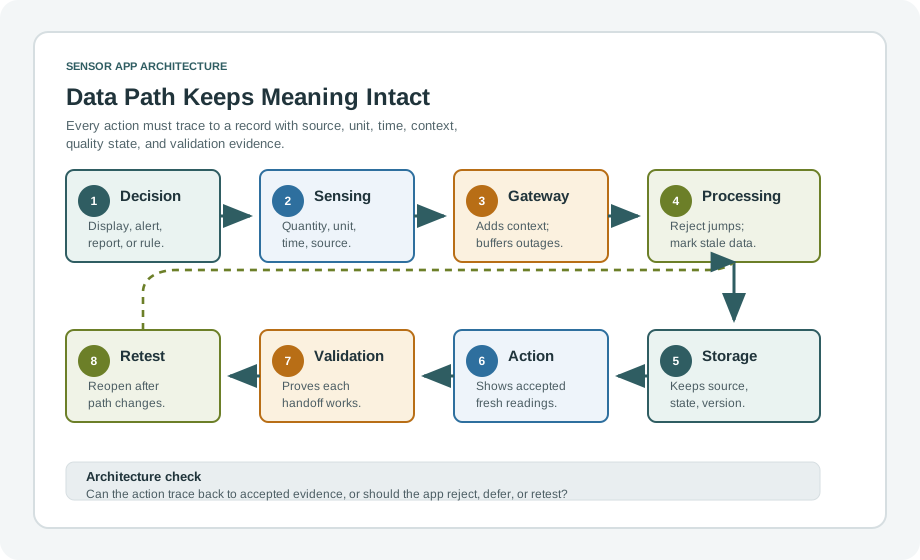
Read Figure 4.1 from the decision need to the sensing node, then follow the record through gateway, processing, and storage. At every boundary, source, unit, timestamp, context, and quality state must remain traceable. The action is allowed only after those handoffs and their validation evidence hold. The final retest trigger connects architecture change back to the measurement claim, which is the chapter’s test for a reviewable design.
Architecture Roles
Sensing Node
Creates the first record: measured quantity, unit, timestamp, source identity, placement context, and validity state.
Gateway
Translates, buffers, filters, routes, attaches site context, or supports a local decision when that role is explicit and validated.
Action Path
Processes, stores, displays, alerts, reports, actuates, or queues review only when the evidence allows the action.
Beginner Examples
Follow one reading through the architecture. At the dashboard it remains weak unless source identity, unit, timestamp, and accepted-or-stale state survived. A gateway adds value when it explicitly translates, buffers, filters, or preserves context; otherwise it merely hides an unclear handoff. If an alert cannot wait for a backend round trip, its rule may belong near the node or gateway, but that placement still needs evidence and ownership. Storage completes the example by preserving the meaning needed for later review rather than only the numeric value.
Overview Knowledge Check
Write the Architecture Record
A practical architecture review starts with the decision or action. A comfort display, cold-storage alarm, machine-protection shutdown, field inspection note, and maintenance report can all use sensor data, but they need different evidence strength. The architecture record should say exactly which decision the path supports.
Once the decision is clear, map every handoff. The record should show the sensing node, gateway behavior, processing rule, storage fields, action rule, validation evidence, quality states, and retest trigger. If a handoff changes meaning, the record should keep the original meaning or explain the transformation.
How It Works: Review the Handoffs
Review the handoffs from the decision backwards. Name the display, alert, report, control action, manual review, or model input, then trace its record through storage, processing, gateway, and sensing node. At each boundary, confirm that source, unit, timestamp, context, validity state, and rule version survive or are deliberately transformed. Place checks near the node, gateway, or backend according to latency, bandwidth, power, connectivity, and available context—not convenience alone. Before enabling the action, run accepted, rejected, stale, missing, and boundary cases through the complete path.
Architecture Review Ledger
Intermediate Example
A room condition display receives temperature and humidity from a sensing node. The gateway attaches room identity and forwards accepted readings. Storage keeps source, unit, timestamp, room identity, validity state, and the rule version that accepted the reading. The dashboard displays accepted fresh readings, marks stale readings unavailable, and refuses to hide rejected readings as normal. The architecture is reviewable because the action can be traced back to the record that supports it.
Practitioner Knowledge Check
Quality States and Retest Boundaries
The hardest architecture mistakes happen when weak readings are allowed to look normal. Accepted, rejected, stale, missing, unavailable, saturated, contradictory, and needs-review states should stay distinct from the sensing node through the action. If they collapse into one normal value, dashboards, reports, alarms, and controls can become confident while the evidence is incomplete.
Retest triggers keep the architecture honest after change. A new sensor, remounted device, gateway rule, storage schema, processing threshold, dashboard action, firmware version, or validation method can change what the data path proves. The record should name which changes reopen review.
Two records can carry the same number and still require different behavior. A fresh accepted reading may drive the normal action, while a replayed reading from an outage may be useful for review but unsafe for an immediate alarm. The architecture has to preserve that state difference as data is transformed, compressed, summarized, and displayed. Otherwise a technically correct numeric value can reach the wrong action boundary.
Advanced Example
A cold-storage alarm uses a sensor node, a local gateway, backend storage, and an alert service. During a gateway outage, the node buffers readings and the gateway replays them later. The architecture should preserve original timestamps and mark replayed records so the alert rule does not treat old values as fresh. Storage should keep the validity state and replay note, while the alert action should use only accepted current readings for immediate alarms and route replayed evidence to review.
Validation Evidence Checklist
Validate the architecture with contrasting records. First send a known value through node, gateway, storage, and action and prove that source, unit, and timestamp survive. Then show that an impossible or out-of-range value is rejected and cannot drive the normal action. Replay an old reading and keep it visibly stale or unavailable; replay a buffered batch and preserve original time, source identity, order, and replay status. Boundary examples should demonstrate the intended accept, reject, and escalation paths. Finally, record which architecture changes require the full validation run again.
Quality-State Contract
Accepted
The reading passed the reviewed checks and may support the normal display, report, or action.
Rejected
The reading failed a quality rule and should keep its reason rather than disappear as a normal missing value.
Stale or Missing
The architecture should show unavailable or needs-review behavior, not silently reuse old evidence.
Retest Needed
A setup, path, rule, schema, firmware, or action change invalidates the old validation evidence until checked again.
Under-the-Hood Knowledge Check
4.2 Follow a Freezer Alarm Back to Ice
This section: Follow a Freezer Alarm Back to Ice — Ice builds around a freezer probe before a cloud dashboard turns red.
Ice builds around a freezer probe before a cloud dashboard turns red. In Figure 4.1, read the sensor data path from physical temperature through sensing, conversion, local processing, transport, storage, analysis, and action. Each labelled boundary can delay, scale, drop, or rename the reading, so the alarm must retain its time and unit.
4.2.1 Predict the Sensor-Path Fault
- Predict: The dashboard shows −5 °C while the gateway queue is twenty minutes old. Does the sensor architecture prove the freezer is warm now? Check: No. The displayed reading needs its measurement time and queue delay.
- Predict: The probe sends 230 but the decoder expects degrees instead of tenths of a degree. What appears? Check: The sensor data path turns 23.0 °C into a false 230 °C application value.
4.3 Summary
This section: Summary — Sensor application architecture is a data-path discipline.
Sensor application architecture is a data-path discipline. A strong architecture record shows how the sensing node, gateway, processing step, storage record, and action preserve measurement meaning. It keeps quality states distinct, validates each handoff, and names the retest triggers that make old evidence unsafe to reuse.
The review should start with the decision or action, then work backward through the evidence. If the action cannot trace to a reviewed record with source, unit, timestamp, context, quality state, and validation evidence, the architecture needs another pass.
4.4 Key Takeaway
This section: Key Takeaway
Design sensor applications so every action can be explained from the data path. Values, quality states, rule versions, validation evidence, and retest triggers are architecture requirements, not cleanup details.
4.5 See Also
This section: See Also
Sensor Applications
Use this for the broader sensor-to-action evidence path before reviewing the architecture in detail.
Sensor Applications: Domain Overview
Connect architecture decisions to common monitoring, alerting, automation, and review domains.
Applications and Sensors Hardware
Choose hardware that fits the architecture record and the evidence required by the application.
Sensor Lab Workflow
Practice building evidence packets that prove each sensor application handoff is reviewable.
Find help
3 reviewed answers.
Where should I start in a module?
Open the module page from the sidebar to see its chapters in order. Use the module map to return to a topic you need.
Modules and pathsReviewed
What can I try when a project does not work?
Check the symptom, then work through the diagnostic steps. Keep the error message and the smallest example that reproduces it.
When you are stuckReviewed
How do interactive examples work?
Use the interactive guide to check how examples and simulations work before changing your project.
Interactive examples guideReviewed