8 Participatory Sensing
More
Depth: Practitioner
Progress saves as you read. Mark sections complete as you go; your progress appears in the sidebar.
8.1 Start With the Crowd Story
This section: Start With the Crowd Story — Picture residents using their phones to map street noise.
Keep Each Person’s Context Before Combining the Crowd
Picture residents using their phones to map street noise. One reading comes from a pocket, another from an open hand, and a third from beside a bus. A bright average can hide those different conditions and make one area look louder than it was.
Start with the decision the map will support and the people affected by it. For every contribution, retain the phone identity, place, event time, arrival time, measurement unit, user prompt, and a short context note. Explain what people agreed to share and how they can stop or correct a record.
Run a small field check before merging the data. Place two phones together, move one indoors, delay an upload, repeat a record, and submit a value with missing context. Check which records remain comparable, which need a warning, and which should stay out of the combined result. Keep the originals so disagreement remains visible.
This check cannot remove every phone difference or participation bias. People and devices change. The deeper sections show how contribution records, calibration, privacy, coverage, and feedback support an honest crowd result.
Participatory sensing starts with many small records, not one magic average. Each contributor brings a phone, a prompt, an access state, a place, a time, and a context note that must be reviewed before records are combined.

8.2 In 60 Seconds
This section: In 60 Seconds — Participatory sensing uses phones carried by contributors to collect observations for a shared sensing task.
Participatory sensing uses phones carried by contributors to collect observations for a shared sensing task. The value comes from many scoped contribution records, not from assuming that every phone reading is automatically comparable. Each record should show the prompt, phone signal, access state, context note, data quality checks, accepted or rejected state, and the decision the combined data can support.
This chapter keeps the workflow bounded. It does not ask learners to run open-ended campaigns or make claims outside the exercise evidence. It teaches how to review contribution evidence before combining phone-based observations.
8.3 Learning Objectives
This section: Learning Objectives
By the end of this chapter, you will be able to:
- Explain how participatory mobile sensing differs from a single-phone sensing record.
- Design a contribution prompt that produces reviewable sensor evidence.
- Identify context fields needed to compare contributed readings.
- Separate accepted, suspect, missing, denied, and unsupported contributions.
- State what an aggregate contribution set can and cannot support.
- Record retest triggers for changes in prompt, phone signal, context, or acceptance rule.
8.4 Quick Check: Contribution Quality
This section: Quick Check: Contribution Quality
8.5 Minimum Viable Understanding
This section: Minimum Viable Understanding — Participatory sensing is a contribution workflow, not simply a larger sensor list.
Participatory sensing is a contribution workflow, not simply a larger sensor list. Give every contributor record the same evidence fields before comparing records, because placement and other contributor context may explain readings that initially look inconsistent. Aggregation must preserve uncertainty, rejected records, and scope limits instead of hiding them in a single value. A shared result is defensible only inside the prompt, collection window, and acceptance rules that produced it.
8.6 Prerequisites
This section: Prerequisites
- Mobile Phone as a Sensor: phone signal roles, setup evidence, and interpretation limits.
- Mobile Sensors Intro: mobile sensing vocabulary and basic phone signals.
- Mobile Sensor APIs: access state, permission handling, timestamps, and data quality fields.
- Sensor Applications: Domain Overview: decision questions, measurands, validation records, and retest triggers.
8.7 Participatory Sensing Workflow
This section: Participatory Sensing Workflow — A participatory workflow starts with a shared question and a clear prompt.
A participatory workflow starts with a shared question and a clear prompt. The prompt tells contributors what to observe, when to collect, which phone signal or note is needed, and what context must be recorded. Without that shared structure, the combined data set is difficult to review.
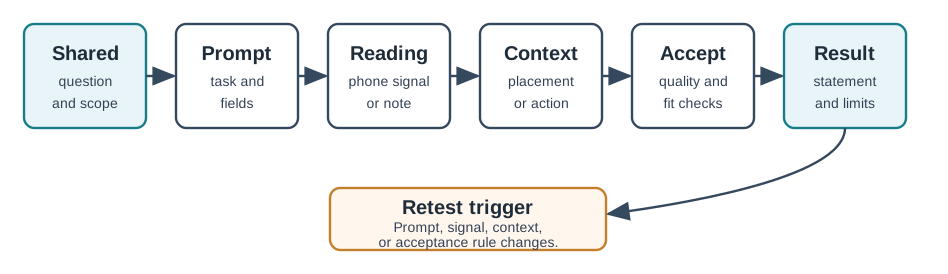
Use Figure 8.1 as the review path:
- State the shared question.
- Write the contribution prompt.
- Collect the phone reading or contributor note.
- Attach access state, timestamp, units, and context.
- Apply acceptance checks before aggregation.
- Write the aggregate statement and scope limits.
- Record retest triggers.
8.8 Contribution Record
This section: Contribution Record — A single contribution should be readable without asking the contributor to explain it later.
A single contribution should be readable without asking the contributor to explain it later. Preserve the prompt version and the contributor’s action, such as starting a sample, adding a note, or confirming context. Identify whether the phone supplied location, motion, an audio or image feature, an external sensor value, or a user observation, and keep that source with its granted, denied, unavailable, unsupported, stale, or interrupted access state. The timestamp and context note capture when and under what placement, surroundings, or collection posture the record was created. Finally, classify it as accepted, suspect, missing, duplicate, or rejected and state what it can support—and what it cannot prove.
The same fields should be used for every contributor in the exercise. Mixed records can still be useful, but the review should identify which fields changed.
8.9 Acceptance Gates
This section: Acceptance Gates — Before contributed readings are combined, inspect Figure 8.2 to see how prompt match, access state, quality, and comparability keep accepted and suspect evidence visibly separate.
Before contributed readings are combined, inspect Figure 8.2 to see how prompt match, access state, quality, and comparability keep accepted and suspect evidence visibly separate.
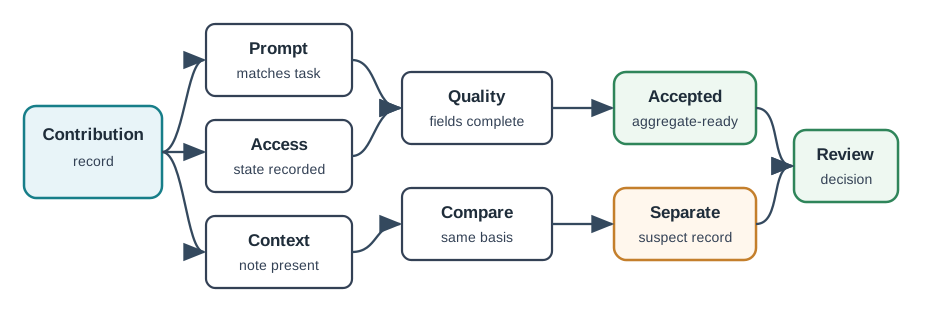
In Figure 8.2, first check that the record answers the current prompt. Also confirm that the phone obtained the reading. A denied, stale, or cut-off reading cannot pass as sound data. Next, look for place and user actions that may change its meaning. Time, units, doubt, and validity state must also be present. Only then ask if two records can share one total. The last gate keeps unlike evidence apart by marking each item accepted, separate, or rejected.
8.10 Contribution Modes
This section: Contribution Modes
8.10.1 Active Contribution
The contributor intentionally starts a reading or writes an observation. This mode is easy to explain and review because the user action is visible. It works well for short exercises where each record needs a context note.
Review questions:
- What action starts the contribution?
- What confirms that the contribution completed?
- What happens if access is denied or the signal is unavailable?
- Which context fields must be entered before submission?
8.10.2 Prompted Sample
The app asks for a contribution when a learning activity reaches a defined point. Keep the prompt short and consistent so records remain comparable, and store its version with every contribution. It should state the expected phone placement or user action and request only the fields needed for the shared question. During review, separate incomplete records from accepted ones rather than filling gaps by assumption.
8.10.3 App-Guided Reading
The app may guide collection using a defined trigger or collection window, but automation still needs a visible review record. State the conditions that start and stop collection and preserve every access or failure state. The app must keep stale data separate from current contributions so an old observation cannot satisfy a new prompt. If the trigger or collection window changes, the review should name that change as a retest condition.
8.11 Aggregation Review
This section: Aggregation Review — Before accepted contributions become a shared statement, inspect Figure 8.3 to see how separate streams and a declared grouping rule prevent the result from hiding doubt.
Before accepted contributions become a shared statement, inspect Figure 8.3 to see how separate streams and a declared grouping rule prevent the result from hiding doubt.
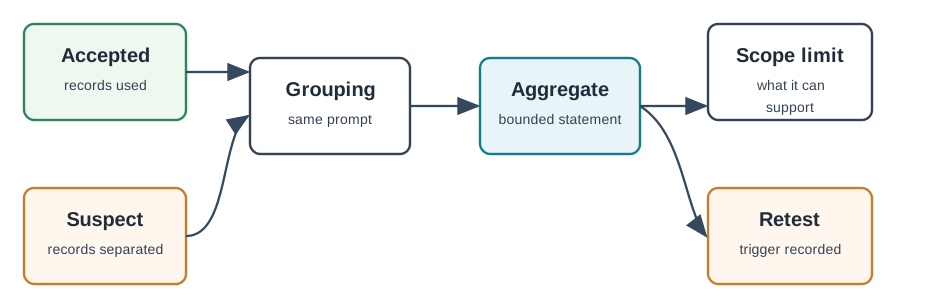
Read Figure 8.3 from the two input groups into the grouping rule. Accepted records supply the aggregate, while suspect or rejected records remain visible beside it rather than disappearing. The grouping rule—such as a shared prompt, location label, sample window, or context category—states why the selected records are comparable. Only then should the review write the aggregate statement, its scope limit and residual concern, and the condition that triggers a retest. That sequence connects the shared result back to the individual contribution evidence.
Avoid broad claims from narrow contribution sets. For example, a set of learner sound observations can support a comparison inside the exercise prompt. It should not be presented as a complete environmental assessment unless additional evidence and review rules are supplied.
8.13 Worked Review: Route Context Note
This section: Worked Review: Route Context Note — Scenario: contributors record a brief motion-and-location note for a route segment during a learning activity.
Scenario: contributors record a brief motion-and-location note for a route segment during a learning activity.
Shared question
Which route notes appear consistent enough to compare within the activity?
Prompt
Start the note at the marked segment, keep the phone placement consistent, and submit only one note for that segment.
Contribution record
Each record stores prompt version, phone placement, location uncertainty when available, motion signal summary, timestamp, access state, and completion state.
Acceptance checks
Separate notes with missing placement, broad location uncertainty, duplicate submissions, or interrupted collection. Do not treat phone motion as a direct statement about the contributor’s movement unless placement supports that interpretation.
Aggregate statement
Accepted notes can support a bounded comparison of submitted route observations for the activity. They do not prove continuous route conditions or conditions outside the submitted segment.
Retest trigger
Repeat the review after changing the route prompt, phone placement instruction, grouping rule, or access path.
8.14 Common Mistakes
This section: Common Mistakes — More phone readings are not automatically more reliable.
More phone readings are not automatically more reliable. Do not combine records made from different prompts or hide denied, stale, interrupted, or unsupported outcomes among normal values. Contributor context such as placement and user action may explain apparent disagreement, so it must survive aggregation. Suspect records should remain marked instead of being averaged silently. Keep public claims within the narrow learning exercise, preserve rejected evidence, and name the change that would require the contribution and aggregation rules to be tested again.
8.15 A Crowd of Phones Is a Crowd of Different Instruments
Participatory sensing turns many people's phones into one distributed instrument — thousands of contributors mapping noise, air quality, or traffic at a scale no fixed sensor network could match. That is the promise: coverage and scale for almost no hardware cost.
The catch is that every phone is a different, uncalibrated instrument. One contributor's microphone is more sensitive than another's; one runs an older sensor with a different offset. Combining their readings into a trustworthy map is therefore a data-quality problem, not merely a data-collection one. The hard engineering is in what you do after the readings arrive.
Before treating coverage as trustworthy evidence, inspect Figure 8.4 to see where participatory sensing can be applied and which constraints grow with scale. The application branches explain the attraction; the cross-cutting challenges explain why collection alone is not the engineering result.
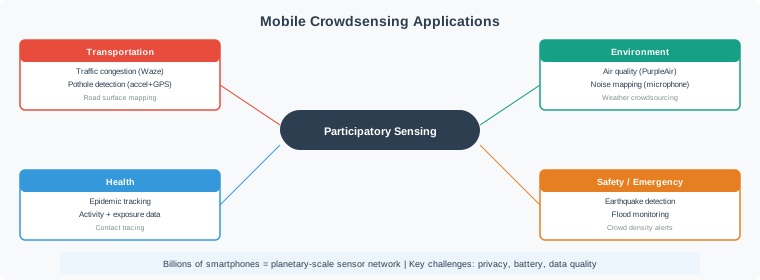
Read Figure 8.4 outward from participatory sensing into transportation, environment, health, and safety use cases. Then return to the privacy, battery, and data-quality constraints that cross every branch. More contributors expand spatial and contextual coverage, but they also multiply instrument variation and governance obligations. This connects the scale promised by crowdsensing to the acceptance and aggregation records developed later in the chapter.
Intuition: crowdsensing is like asking a thousand people to measure temperature with a thousand different thermometers, none of them checked. You get huge coverage, but you cannot just average the numbers and call it truth.
Worked example: the same sound event on two phones
Suppose four learners stand in the same hallway during a 30 s activity. Two Android phones report A-weighted sound features near 66 dB, while two older phones report 70 dB for the same event. The difference is not automatically a real 4 dB sound gradient. It may be microphone gain, case obstruction, operating-system audio preprocessing, or phone placement.
A reviewable contribution record keeps the comparison bounded: prompt version noise-v2, sample window 10:15:00-10:15:30, phone model family, access state, placement note, and whether the phone was held open or kept in a pocket. If the older phones are known to read about +3 dB high from a co-located check, their 70 dB readings become about 67 dB before aggregation. If placement is missing, those records stay suspect instead of being averaged into the accepted set.
The important habit is not memorising one correction value. It is treating each phone reading as evidence with provenance. Participatory sensing becomes defensible when records carry enough context to explain why two measurements can differ before the learner makes a shared claim.
Overview Knowledge Check
8.16 Why Averaging the Crowd Isn’t Enough
Participatory sensing comes in two modes, and both feed an aggregation step whose limits must remain visible. In participatory collection, the user opens the app and deliberately records a sample, which usually provides stronger context and consent but produces sparser, self-selected coverage. Opportunistic collection samples automatically in the background, increasing density while reducing the context available for each reading. Neither mode makes records comparable by itself; the aggregation rule still has to account for prompt, access, placement, device variation, and collection window.
Worked example: averaging cannot remove a shared bias
1000 contributors report a noise level. Averaging their
readings reduces RANDOM error by about sqrt(1000) ~ 32x.

BUT: 600 of them use the same popular phone model, whose
mic reads a systematic +3 dB high. That +3 dB is the SAME
on all 600 devices, so it does NOT average away -- the
aggregate is biased about +2 dB regardless of crowd size.

Averaging fixes random scatter (precision), never a shared
systematic bias (accuracy). More contributors do not help.
This is the accuracy-versus-precision lesson at population scale: a shared, correlated bias survives any amount of averaging. Crowd size buys precision, not accuracy.
Worked example: gate before grouping
A class receives 12 sound contributions for the same prompt. Eight records include prompt version, timestamp, access state, placement, and a 10 s sound feature. Two have no placement note, one has microphone permission denied, and one uses an older prompt with a 5 s sample window. A weak review averages all 12 and reports a single class result. A stronger review creates three buckets first: eight accepted records, three suspect/incomplete records, and one denied record.
The aggregate then uses only comparable records. If the accepted values are 61, 62, 62, 63, 64, 64, 65, and 65 dB, the median is 63.5 dB and the range is 61-65 dB within the exercise prompt. The report can say "accepted classroom samples were clustered around the low-to-mid 60s dB during this window." It should not say "the classroom is always quiet" or "the school has a safe noise level." Those broader claims would need calibration, repeated windows, and a reference measurement plan.
Practically, this means the app or worksheet should force the evidence fields before submission where possible, and the review table should keep suspect records visible. Hiding suspect records makes the number look cleaner while making the evidence weaker.
Practitioner Knowledge Check
8.17 Calibration, Coverage Bias, and Quality Gates
Turning heterogeneous contributions into a defensible result rests on a few disciplines that the raw crowd does not provide by itself.
Cross-device calibration
Learn each device's offset and gain by co-locating some contributors with a reference, or by exploiting overlapping measurements between devices (relative calibration), then normalise readings before aggregating.
Spatial-temporal coverage bias
Contributions cluster where and when people are — busy areas, daytime. The aggregate is a map of the crowd as much as of the phenomenon. Report coverage and weight or flag under-sampled places and times.
Acceptance gates before aggregation
Reject contributions lacking metadata (no location accuracy, no timestamp), out of plausible range, or taken in a bad context (phone in a pocket). Gate on quality first; aggregate second.
Privacy is part of quality
Location-and-time traces re-identify people, so aggregate, anonymise, and collect only the spatial and temporal precision the task truly needs — data minimisation protects contributors and reduces liability.
Worked example: offset correction and coverage limits
Assume a reference meter reads 64 dB during a co-located check. Phone family A reads 65 dB, so its offset is about +1 dB. Phone family B reads 68 dB, so its offset is about +4 dB. A later B reading of 72 dB is therefore stored as a raw observation, but the aggregate uses an adjusted value of about 68 dB. The record should keep both values so reviewers can see the original evidence and the correction applied.
Coverage needs the same discipline. If a neighbourhood map has 180 accepted records but 150 came from two commuter streets between 08:00 and 09:00, the sample count is high but the coverage is narrow. Dividing the area into 12 grid cells may show that only 4 cells have any accepted records and only 2 cells have repeated windows. The aggregate can describe the commuter-street observations, but it cannot support a citywide claim. Under-sampled cells should be marked separately, not coloured as if they were measured.
Privacy constraints also affect the technical design. A learning activity may only need 50 m location bins and 10 minute time bins, not exact GPS traces. Coarser bins can still answer the prompt while reducing re-identification risk. That is why calibration, coverage, acceptance gates, and privacy controls belong in the same review record: each one changes what the final aggregate is allowed to mean.
So a credible participatory-sensing result is never "we averaged everything." It is: gate contributions on quality, normalise across devices to remove per-model bias, weight for uneven coverage, and protect contributor privacy — then aggregate. The crowd supplies scale; these steps supply trust.
Under-the-Hood Knowledge Check
8.18 Knowledge Check
This section: Knowledge Check
8.19 Matching Quiz
This section: Matching Quiz
8.20 Ordering Quiz
This section: Ordering Quiz
8.21 Summary
This section: Summary — Participatory sensing turns phone-based observations into useful shared evidence only when each contribution is reviewable.
Participatory sensing turns phone-based observations into useful shared evidence only when each contribution is reviewable. The core workflow is prompt, contribution record, context note, acceptance check, aggregation rule, scope limit, and retest trigger. Aggregation should make accepted and suspect records visible instead of hiding evidence gaps.
8.22 Key Takeaway
This section: Key Takeaway — Participatory sensing succeeds when data quality, consent, privacy, incentives, bias, and participant safety are designed together.
Participatory sensing succeeds when data quality, consent, privacy, incentives, bias, and participant safety are designed together.
8.23 Concept Relationships
This section: Concept Relationships — The shared question defines the contribution prompt, and that prompt selects the phone signal and context fields each record needs.
The shared question defines the contribution prompt, and that prompt selects the phone signal and context fields each record needs. Access state and data quality then determine whether a contribution is accepted, suspect, or rejected. Aggregation can combine only comparable accepted records under an explicit rule; it does not repair missing context or incompatible prompts. Scope limits keep the resulting statement bounded, while retest triggers reopen the workflow when the question, collection window, access path, or acceptance rule changes.
8.24 What’s Next
This section: What’s Next — Continue through the mobile sensing sequence with Mobile Web Sensor Labs for browser-based practice, then use Mobile PWA & Audio Labs for installable and audio-oriented patterns.
Continue through the mobile sensing sequence with Mobile Web Sensor Labs for browser-based practice, then use Mobile PWA & Audio Labs for installable and audio-oriented patterns. Mobile Sensors Labs brings the lab routes and assessment records together, while Mobile Sensors Assessment checks sensor choice, access state, context, and review decisions.
Find help
3 reviewed answers.
Where should I start in a module?
Open the module page from the sidebar to see its chapters in order. Use the module map to return to a topic you need.
Modules and pathsReviewed
What can I try when a project does not work?
Check the symptom, then work through the diagnostic steps. Keep the error message and the smallest example that reproduces it.
When you are stuckReviewed
How do interactive examples work?
Use the interactive guide to check how examples and simulations work before changing your project.
Interactive examples guideReviewed