2 The Output Side of IoT
More
Depth: Practitioner
Progress saves as you read. Mark sections complete as you go; your progress appears in the sidebar.
-

What must we prove before the vent can open safely?
2.1 Start With the Story
This section: Start With the Story
2.1.1 Prove the Action and the Stop
An actuator is a part that turns an electrical command into a physical change. A microcontroller is a small computer that can request that change, but its control pin is not the load’s power source.
Picture a vent that should open when a room overheats. The screen may show an open command while the vent is stuck, the driver has failed, or the supply is weak. The real result belongs in the evidence.
Trace command, driver, power, load, movement, feedback, and safe stop. Record voltage, current, startup demand, travel time, end state, and the response to a blocked mechanism. Remove communication, reset the controller, and interrupt power. Check where the output settles and how the operator knows.
This trace does not choose every motor, valve, or heater. It establishes the safety boundary. The deeper sections compare output types, drivers, protection, feedback, and control methods for the action you need.
Picture a soil-moisture node that decides a planter needs water. The useful work is not finished when the dashboard says “open valve”; it is finished when a safe driver energizes the valve, the power path survives the load, and the system has evidence that water actually moved.
Read every actuator choice through that loop: command, driver, load, protection, result. A good output design treats the microcontroller pin as a request for action, not as the power source for the action.

Motor Max
“Sensing decides; actuating commits — and a commit to the physical world needs a safe stop.”
On the module’s front door, Max runs one Motion Check on every output: the action committed, the limits that bound it, and the stop that ends it.
2.2 Overview: Actuators Are The Output Side
This section: Overview: Actuators Are The Output Side — Actuators let an IoT system affect the physical world.
Actuators let an IoT system affect the physical world. Sensors report what is happening, software decides what should happen next, and actuators turn that decision into motion, switching, light, sound, heat, or another physical output.
The useful overview question is not “which motor should I buy?” It is “what action must the system perform, how much power does that action need, what driver separates logic from load, what protection is required, and what evidence shows the action is safe and repeatable?”
Inspect Figure 2.1 to see why a 3.3 V controller signal can command a 12 V, 0.5 A irrigation valve but must not supply the valve’s power.
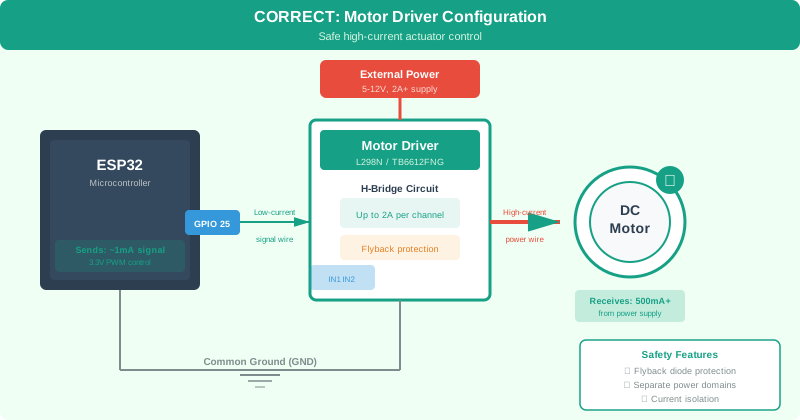
Read Figure 2.1 from the ESP32 GPIO through the driver to the externally powered motor, then follow the common reference and protection path. The controller sends a small signal; the driver and external supply carry load current and absorb switching stress. For the 12 V, 0.5 A valve above, the GPIO drives a transistor or MOSFET gate, the solenoid draws its 6 W from the external supply, and the flyback path keeps stored coil energy from striking the switch at turn-off. That separation is the running design rule for every actuator family that follows.
The same pattern applies to other output roles. A warning LED may need only a resistor and a few milliamps. A fan may need a MOSFET and a supply that tolerates startup current. A bidirectional motor needs an H-bridge. A stepper needs a current-limited stepper driver. A servo needs a control pulse plus a separate power rail sized for stall or holding current. The software command is only the first part of the output path; the power stage, wiring, load, and observed result complete the action.
Actuator selection also depends on consequence. If a status LED fails, the system may simply lose visibility. If a heater, valve, lock, pump, or moving arm fails, the result can damage equipment or create a hazard. That is why the actuator overview always includes safe state and feedback: what happens when power is lost, communication stops, the controller resets, or the mechanism does not move after being commanded?
Never treat a microcontroller pin as the actuator power source; choose the output role first; use a driver circuit; protect inductive loads; and verify the actuator’s result when safety, position, or process quality matters.
2.2.1 Selection Workflow: Common Output Roles
- Motion: DC motors, servo motors, stepper motors, solenoids, pumps, valves, locks, and mechanisms that move or position something.
- Switching: Relays, solid-state switches, transistors, and contactors that let a low-power controller command a higher-power load.
- Feedback output: LEDs, displays, buzzers, speakers, and haptic outputs that communicate status to a person or nearby system.
- Thermal or process action: Heaters, fans, coolers, pumps, valves, and dampers that change an environment or process state.
2.2.2 Worked Example: Beginner Actuator Jobs
- A smart thermostat senses room temperature, decides whether cooling is needed, and commands a fan or relay through a driver stage.
- A soil-moisture controller can open a solenoid valve, but the valve needs a suitable supply, switching device, and flyback protection.
- A robot arm uses position-oriented actuators because the decision is not only “move” but “move to this angle and hold it.”
- A warning buzzer or LED is still an actuator because it turns software state into a physical signal.
2.2.3 Overview Knowledge Check
2.3 Practitioner: Build The Actuator Selection Record
This section: Practitioner: Build The Actuator Selection Record — A practical actuator review should produce a record that another engineer can inspect before wiring, testing, or release.
A practical actuator review should produce a record that another engineer can inspect before wiring, testing, or release. It should state the required physical action, load, supply, driver, protection, control method, feedback need, duty cycle, fail-safe behavior, and retest trigger.
This record prevents two common mistakes: choosing an actuator from a generic parts list before understanding the action, and proving software behavior while leaving the electrical and mechanical load unverified.
2.3.1 Selection Workflow: Selection Sequence
- Name the physical action. State whether the system needs rotation, linear motion, switching, light, sound, heat, airflow, fluid flow, or positioning.
- Describe the load. Record voltage, current, force, torque, speed, travel, duty cycle, inrush behavior, and environment where known.
- Choose the driver boundary. Match the load to a MOSFET, H-bridge, relay, motor driver, servo interface, stepper driver, or isolated switch as appropriate.
- Add protection and failure behavior. Review flyback paths, fuses, current limits, thermal limits, watchdogs, manual override, and safe state on power loss.
- Verify the action. Decide whether open-loop command evidence is enough or whether sensor feedback, position feedback, or process feedback is required.
2.3.2 Selection Ledger
| Actuator Role | Typical Evidence | Driver Or Interface | Failure To Review |
|---|---|---|---|
| DC motor | Required speed, torque, supply, running current, startup current, duty cycle, and load direction. | MOSFET for one direction, H-bridge for reverse, or motor driver with current capability. | Stall current, back-EMF, overheating, mechanical jam, and uncontrolled restart. |
| Servo or stepper | Position range, holding force, speed, backlash, load, mechanical stops, and required repeatability. | Servo control signal, external servo power, or stepper driver with current setting. | Missed steps, overload, brownout, calibration drift, and unsafe motion after reset. |
| Relay or solenoid | Coil supply, load rating, contact type, activation time, duty cycle, isolation, and default state. | Transistor or MOSFET driver, relay module, solid-state relay, or protected low-side switch. | Flyback spike, contact wear, welded contact, heat, and unsafe energized state. |
| Visual or audio output | User role, visibility or audibility, ambient conditions, current draw, timing, and accessibility. | Current-limited GPIO path, LED driver, display bus, buzzer driver, or amplifier. | Ambiguous status, overload, inaudible alert, color-only meaning, and stale indication. |
2.3.3 Worked Review: Greenhouse Actuator Set
A greenhouse controller may need a fan for cooling, a solenoid valve for irrigation, a light driver for grow lighting, and a lock or latch for access control. The actuator review should not stop at naming those parts. It should record supply voltage, expected current, switching device, flyback protection for inductive loads, duty cycle, enclosure heat, and what safe state is required when the controller restarts or loses network access.
If watering can cause damage, command logging alone is not enough. The design may need a normally closed valve, timeout, flow sensor, leak sensor, or manual shutoff. The required evidence depends on the consequence of an incorrect action.
2.3.4 Practitioner Knowledge Check
2.4 Under The Hood: Power, Protection, And Control Evidence
This section: Under The Hood: Power, Protection, And Control Evidence — Under the hood, an actuator path crosses several boundaries: logic signal, driver input, power supply, load current, physical mechanism, and environmental result.
Under the hood, an actuator path crosses several boundaries: logic signal, driver input, power supply, load current, physical mechanism, and environmental result. Each boundary can fail differently, so actuator design needs electrical and mechanical evidence, not only software tests.
Inductive actuators such as motors, relays, and solenoids are especially important to review because changing current through a coil can create voltage spikes. Protection components, driver ratings, wiring, grounding, heat paths, and enclosure choices all affect whether the controller survives repeated switching.
A coil stores energy in its magnetic field. The approximate stored energy is E = 1/2 x L x I^2. If a relay coil has 20 mH inductance and carries 0.5 A, the stored energy is 0.5 x 0.020 x 0.5^2 = 0.0025 J. That sounds small, but when the switch opens the coil tries to keep current flowing. Without a flyback diode, TVS, snubber, or other safe path, the voltage can rise high enough to damage a transistor or reset nearby electronics. Protection is not an optional accessory; it is part of the actuator power path.
This section:
This section: — Inspect Figure 2.2 to see which parts of a field-installed pneumatic valve actuator remain outside the logical control block.
Inspect Figure 2.2 to see which parts of a field-installed pneumatic valve actuator remain outside the logical control block.

In Figure 2.2, begin with the actuator mounted above the valve body, then follow its mechanical connection into the process pipe. The visible tubing and fittings show that a command depends on a pressure source and intact fluid path, not only on software. The enclosure, mounting, and exposed surroundings add environmental and service constraints that a block diagram omits. Use those details to challenge the model: identify what can leak, loosen, corrode, jam, or become hard to reach, and decide which field observation would prove that the valve moved to its intended state.
Motors add another hidden case: startup and stall current. A 12 V DC motor with 2 ohms of winding resistance can draw 12 V / 2 ohms = 6 A at stall before back-EMF builds. Once spinning, if back-EMF rises to 9 V, the winding current falls to (12 V - 9 V) / 2 ohms = 1.5 A. A supply and driver sized only for the running current may brown out during startup or overheat during a jam. This is why actuator reviews record startup current, stall or inrush behavior, duty cycle, and thermal limits instead of only nominal voltage.
Max’s Motion Check
- Commit: spin a 12 V motor through 2-ohm windings.
- Limits: stall draws
12/2 = 6 Auntil back-EMF builds; at 9 V back-EMF, running current falls to 1.5 A. - Safe stop: current sensing catches a jam held at stall current; critical outputs need a defined fallback state.
Control evidence closes the loop. A pump command may be verified by current draw, flow rate, pressure change, or tank-level change. A lock may be verified by a limit switch. A stepper may need homing because missed steps are otherwise invisible. The right evidence depends on the consequence of being wrong. Low-consequence outputs may rely on command logging; safety or process-critical outputs need independent confirmation and a defined fallback state.
2.4.1 Selection Workflow: Internal Responsibilities
- Logic boundary: The microcontroller output should command a driver input, not carry the actuator’s load current.
- Power path: The supply, wiring, driver, connector, fuse, and return path must match expected current, startup behavior, and environment.
- Protection path: Flyback paths, snubbers, current limits, thermal design, isolation, and emergency stops reduce damage from normal and abnormal switching.
- Action proof: Feedback sensors, limit switches, current sensing, flow sensing, timing checks, or process measurements prove whether the action happened.
Max’s Motion Check
- Commit: run the pump — prove water moved by current draw, flow rate, pressure, or tank level.
- Limits: command logging suits only low-consequence outputs; missed stepper steps stay invisible without homing.
- Safe stop: verify the lock with a limit switch; give every critical output a defined fallback state.
2.4.2 Selection Workflow: Failure Modes To Review
- Overcurrent: startup, stall, jam, or short-circuit current can exceed the driver or supply rating.
- Back-EMF: inductive loads can damage switching devices if the energy has no safe path.
- Brownout: actuator startup can pull down the supply and reset the controller.
- Unsafe default state: a relay, valve, motor, heater, or lock may energize or remain active during reset or communication loss.
- Unverified action: software may command motion even when the mechanism is stuck, disconnected, miswired, or overloaded.
2.4.3 Retest Signals
Retest the actuator path when the load changes, the supply changes, the driver changes, wiring length changes, enclosure temperature changes, duty cycle changes, firmware changes startup behavior, a safety requirement changes, or field evidence shows missed motion, overheating, resets, or unexplained state changes.
2.4.4 Under-The-Hood Knowledge Check
2.5 Summary
This section: Summary — Actuators are the physical output side of IoT systems.
Actuators are the physical output side of IoT systems. They complete the sense-decide-act loop by converting controller decisions into motion, switching, light, sound, heat, flow, or other physical effects. A useful actuator design starts with the required action, then records load evidence, driver boundary, supply sizing, protection, control method, feedback need, safe state, and retest triggers.
The safest designs do not treat software commands as proof of physical action. They verify that the actuator can be powered, switched, protected, and observed in the context where it will operate.
2.6 Key Takeaway
This section: Key Takeaway
Choose actuators from the physical action and failure consequence, then prove the driver, power, protection, feedback, and safe-state behavior before trusting the output.
2.7 Related Chapters
This section: Related Chapters
- Introduction to Actuators: Review beginner actuator concepts, feedback loops, and why driver circuits sit between GPIO and load.
- Actuator Types and Comparison: Compare output classes, motion types, precision needs, response behavior, and selection tradeoffs.
- PWM Control for Actuators: Connect actuator commands to duty cycle, frequency, servo pulse width, soft start, and driver behavior.
- Actuator Safety and Protection: Extend the overview into flyback protection, fuses, watchdogs, isolation, emergency stops, and safe states.
Find help
3 reviewed answers.
Where should I start in a module?
Open the module page from the sidebar to see its chapters in order. Use the module map to return to a topic you need.
Modules and pathsReviewed
What can I try when a project does not work?
Check the symptom, then work through the diagnostic steps. Keep the error message and the smallest example that reproduces it.
When you are stuckReviewed
How do interactive examples work?
Use the interactive guide to check how examples and simulations work before changing your project.
Interactive examples guideReviewed