3  Introduction to Actuators

Minimum Viable Understanding (MVU)

If you only have 5 minutes, here’s what you need to know about actuators:

  1. Actuators are the “muscles” of IoT - they convert electrical signals into physical action (motion, light, sound, heat)
  2. Three main motor types: DC motors (continuous spin), Servo motors (precise angles), Stepper motors (precise steps)
  3. NEVER connect actuators directly to GPIO pins - use driver circuits (GPIO provides ~20-40mA; motors need 100mA-2A+)
  4. PWM controls speed/brightness - varying duty cycle (0-100%) controls average power output
  5. Flyback diodes are essential - always protect against voltage spikes from inductive loads (motors, relays, solenoids)

One-sentence summary: Actuators execute physical actions in IoT systems, but require proper driver circuits and protection components to operate safely with microcontrollers.

Learning Objectives

After completing this chapter, you will be able to:

  • Define what actuators are and classify their role in IoT systems
  • Differentiate between sensors and actuators in a control loop
  • Identify common actuator types used in everyday devices
  • Justify why actuators require dedicated driver circuits
  • Illustrate the basic feedback control loop concept with sensor-controller-actuator interactions
In 60 Seconds

Actuators are the output devices of IoT systems — they convert electrical signals into physical actions: motion (motors), switching (relays), light (LEDs), sound (buzzers), and heat. The fundamental rule is never connect an actuator directly to a microcontroller GPIO pin — actuators draw 10-1000x more current than GPIO pins can supply. Always use driver circuits (transistors, MOSFETs, H-bridges, relay modules) as power amplifiers between the 20-40 mA GPIO output and the actuator’s actual current requirement.

3.1 Prerequisites

Before diving into this chapter, you should be familiar with:

  • Electricity Fundamentals: Understanding voltage, current, resistance, and Ohm’s Law is essential for calculating power requirements and designing actuator drive circuits
  • Electronics Fundamentals: Knowledge of transistors, diodes, and semiconductor switching is critical for interfacing microcontrollers with high-power actuators
  • Sensor Fundamentals and Types: Understanding sensor principles helps grasp feedback control systems where sensors provide position/speed data to control actuators

Actuators are like the arms and legs of IoT - they can actually make things MOVE and HAPPEN!

3.1.1 The Sensor Squad Adventure: The School Greenhouse Rescue

The Sensor Squad was super excited about their newest assignment: helping to take care of their school’s greenhouse! Sammy the Temperature Sensor, Lux the Light Sensor, Motio the Motion Detector, and Pressi the Pressure Sensor were all placed around the greenhouse to keep an eye on everything.

One hot summer day, things started going wrong! Sammy called out, “It’s getting way too hot in here - 95 degrees! The tomato plants are wilting!” Lux added, “The sun is blazing through the roof! We need shade!” Motio spotted something too: “A rabbit just hopped through the open door and is heading for the lettuce!”

But the Sensor Squad had a problem. They could SEE everything happening, but they couldn’t DO anything about it! “We need help!” cried Pressi. “We’re just sensors - we can only watch and report!”

That’s when the ACTUATOR CREW arrived to save the day!

Spinny the Fan Motor whooshed into action. “Too hot? I’ll spin my blades and blow cool air across the plants!” Within minutes, Sammy reported: “Temperature dropping to 80 degrees! Much better!”

Servo the Arm was a special motor that could move to exact positions. “I’ll pull the shade cloth over the glass roof to block the harsh sunlight!” Lux cheered as the light dimmed to a perfect level.

Buzzy the Buzzer and Blinky the LED worked together on the rabbit problem. “BEEP BEEP BEEP!” went Buzzy, while Blinky flashed bright red lights. The startled rabbit hopped right back out the door!

Valvie the Solenoid controlled the water pipes. “The plants are thirsty after that heat wave. Let me open the sprinkler system!” A gentle mist covered all the plants.

“We did it together!” cheered Sammy. “Sensors find the problems, and actuators fix them! We’re the perfect team!”

3.1.2 Key Words for Kids

Word What It Means
Actuator Something that moves or makes things happen in the real world (like motors, lights, and buzzers)
Motor An actuator that spins things - like a fan, a wheel, or a propeller
Servo A special motor that can turn to an exact angle (like a robot arm pointing in a specific direction)
Solenoid An actuator that pushes or pulls in a straight line (like opening a water valve or a door lock)
Feedback When sensors check if the actuator did its job correctly (like Sammy checking if the fan actually cooled things down)

3.1.3 Try This at Home!

Build a Human Sensor-Actuator System!

You’ll need: 3 or more friends or family members

Assign roles:

  • One person is SAMMY (temperature sensor) - they feel if things are hot or cold
  • One person is the BRAIN (the controller) - they make decisions
  • One person is SPINNY (the actuator) - they take action by fanning with a book or turning on a real fan

Play the Greenhouse Game:

  1. The sensor (Sammy) reports: “It feels hot in this corner!”
  2. The brain decides: “We need to cool it down! Spinny, start fanning!”
  3. The actuator (Spinny) takes action: fans the area with a book
  4. Sammy checks again: “Much better! Temperature is perfect now!”

Level Up - Add more players:

  • Lux checks light levels: “It’s too dark to read!”
  • Motio watches for movement: “Someone’s at the door!”
  • Blinky the light actuator turns lights on/off
  • Buzzy the sound actuator can ring a doorbell or alarm

The Big Lesson: Sensors and actuators are best friends! Sensors without actuators can only watch helplessly. Actuators without sensors don’t know when to act. Together, they create smart systems that can actually solve problems!

3.2 Getting Started (For Beginners)

New to Actuators? Start Here!

If sensors are the “senses” of IoT, actuators are the “muscles.” This section explains what actuators do and why they matter.

3.2.1 What is an Actuator? (Simple Explanation)

Sensors SENSE the world. Actuators ACT on the world.

Think of it this way:

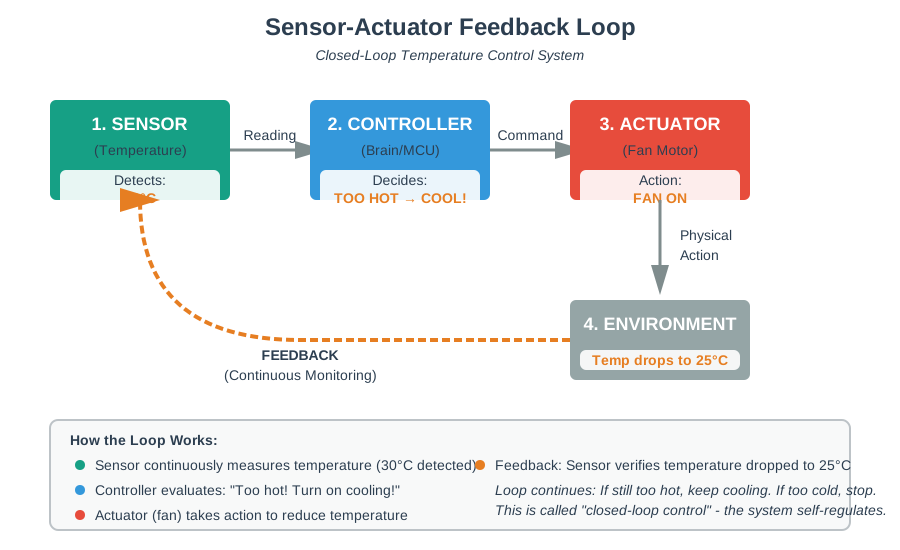
  • Sensor = Eyes (sees temperature is 30C)
  • Controller = Brain (decides “too hot, need to cool”)
  • Actuator = Hands (turns on the fan)

Closed-loop feedback control system diagram showing four stages in a cycle: Sensor detects 30°C temperature, Controller evaluates too hot and decides to cool, Actuator turns on fan motor, Environment temperature drops to 25°C, with feedback arrow completing the continuous monitoring loop

Diagram showing a closed-loop feedback control system with sensor detecting temperature, controller making decisions, and actuator (fan) taking action, with feedback arrow completing the loop
Figure 3.1: Sensor-Actuator Feedback Loop: Closed-Loop Temperature Control System

This decision tree helps you choose the right actuator type based on your IoT application requirements - motion type, precision, power, and cost.

Decision tree for actuator selection starting with motion type: rotational leads to precision options (servo for high precision angles, stepper for very high step control, DC for continuous rotation), linear leads to motion type options (solenoid for simple on/off, linear actuator for controlled positioning), with application examples and decision factors for cost, complexity, precision, and efficiency

Decision tree diagram for selecting the right actuator type based on motion requirements, precision needs, and power constraints
Figure 3.2: Actuator selection guide: Start from your motion requirement.

3.2.2 Actuators You Use Every Day

You interact with actuators constantly:

Device Actuator Inside What It Does
Smartphone Vibration motor Buzzes for notifications
Car door Electric motor Locks/unlocks doors
Smart thermostat Relay Turns HVAC on/off
Robotic vacuum DC motors Drives wheels, spins brushes
3D printer Stepper motors Moves print head precisely
Smart blinds Servo motor Opens/closes window shades

3.2.3 Types of Actuators (Simple Overview)

IoT actuator taxonomy mind map with central node branching to four categories: Motors (DC motor, servo motor, stepper motor, brushless motor), Switches (relay, solenoid, transistor), Visual (LED, LCD/OLED, laser), Audio (piezo buzzer, speaker, ultrasonic transducer), each with brief descriptions of their applications

Mind map showing the taxonomy of IoT actuators organized by type: Motors, Switches, Visual outputs, and Audio outputs
Figure 3.3: IoT Actuator Taxonomy: Motors, Switches, Visual, and Audio Output Devices
Knowledge Check: Actuator Selection

3.2.4 Motors: The Most Common Actuators

Motor Type Precision Speed Control Best For
DC Motor Low Variable (PWM) Fans, wheels, toys
Servo Motor High (angle) Fixed speeds Robot arms, camera gimbals
Stepper Motor Very high Step-by-step 3D printers, CNC machines

Motor type comparison showing three columns: DC motor (PWM control, poor position accuracy, wide speed range, good high-speed torque, low cost, best for fans/wheels/pumps), Servo motor (PWM position control, excellent accuracy, wide speed range, excellent torque profile, high cost, best for robot arms/gimbals/steering), Stepper motor (step pulse control, very high accuracy, limited speed range, excellent low-speed torque, medium cost, best for 3D printers/CNC)

3.2.5 Why Actuators Need “Drivers”

Microcontrollers (like Arduino/ESP32) can’t power actuators directly - they’re too weak!

Direct connection damages your microcontroller!

Warning diagram showing dangerous incorrect motor wiring: ESP32 GPIO pin rated for maximum 40mA current connected directly to DC motor requiring 500-1000mA current. Large red X marks over connection indicate this is wrong and will cause damage. Warning text explains GPIO pin will be overloaded leading to immediate pin damage or complete microcontroller burnout. Consequences shown include burned GPIO pin, overheated chip, and potential board-level failure

Diagram showing incorrect direct connection of motor to microcontroller GPIO pin, highlighting the risk of damage
Figure 3.4: Direct Motor Connection: GPIO Overload and Damage Scenario

Use a motor driver to amplify the signal!

Correct motor wiring diagram showing safe configuration: ESP32 GPIO pin provides low-current 3.3V control signal to motor driver module (L298N or TB6612FNG), motor driver receives high-current power from external 5-12V power supply and controls motor through H-bridge circuit capable of handling up to 2A per motor, motor connected to driver output terminals. Green checkmarks indicate correct connections. Safety features shown include flyback diode protection, separate power domains, and proper current isolation between microcontroller logic and motor power

Diagram showing correct motor connection using a driver circuit between microcontroller and motor
Figure 3.5: Correct Motor Driver Configuration: Safe High-Current Actuator Control

3.2.6 Self-Check: Understanding the Basics

Before continuing, make sure you can answer:

  1. What’s the difference between sensors and actuators? Sensors measure the world; actuators change the world
  2. Why can’t you connect a motor directly to an Arduino pin? Arduino pins provide ~20mA; motors need 100mA-1A+. You need a driver circuit.
  3. What are the three main types of motors? DC (continuous spin), Servo (precise angle), Stepper (precise steps)
  4. What is PWM used for with actuators? Controlling speed (motors) or brightness (LEDs) by varying the duty cycle

3.3 Introduction

While sensors allow IoT systems to perceive the physical world, actuators enable them to affect it. Actuators convert electrical signals into physical action - movement, light, sound, or heat. They are the “hands” of IoT systems, executing commands based on sensor data and control logic.

This chapter introduces actuator fundamentals - what they are, why they matter, and the essential concepts you need before working with specific actuator types. By the end, you will understand how actuators fit into the sensor-controller-actuator ecosystem and why proper driver circuits are essential for safe operation.

Key Concepts

An actuator is a device that converts electrical energy into mechanical motion or other physical output. It’s the opposite of a sensor, which converts physical phenomena into electrical signals.

Essential terminology:

  • PWM Control: Pulse Width Modulation for controlling motor speed and LED brightness by varying duty cycle
  • Duty Cycle: Percentage of time a PWM signal is HIGH; controls average power delivered to actuator
  • H-Bridge: Circuit enabling bidirectional motor control (forward/reverse) using 4 transistors
  • Flyback Diode: Protection diode across inductive loads to prevent voltage spikes when switched off
  • PID Control: Proportional-Integral-Derivative controller for precise actuator positioning with feedback

Key design rule: Match actuator response time to your control loop requirements - a 100ms servo in a 10ms control loop creates instability; a fast motor with a slow sensor wastes energy.

Knowledge Check: Actuator Basics

Common Misconception: “I Can Connect Motors Directly to GPIO Pins”

The Myth: “My microcontroller has plenty of GPIO pins rated at 3.3V or 5V, so I can connect motors, relays, and servos directly to them without additional circuits.”

Why This Is Dangerous:

Most microcontroller GPIO pins can only safely source 10-40mA of current (ESP32: 40mA max, Arduino Uno: 40mA per pin, 200mA total). However, actuators require far more current:

Actuator Typical Current Draw Direct Connection Risk
Small DC motor (TT motor) 200-500mA running, 1-2A stall GPIO damage/burnout
Servo motor (SG90) 100-300mA moving, 500-600mA stall GPIO overload + voltage drop
Relay coil 70-100mA (5V), requires 200mA inrush GPIO pin destruction
Solenoid 300mA-1A activation Immediate GPIO failure
LED (no resistor) 20-30mA+ (can exceed 100mA) LED burnout + GPIO damage

An ESP32 GPIO pin rated at 40mA maximum connected to a 500mA motor attempts to source \(I = 500\) mA. Power dissipated in the pin’s internal resistance (\(R_{on} \approx 50\Omega\) at overload) is \(P = I^2 R = (0.5)^2 \times 50 = 12.5\) W – enough to vaporize the silicon bond wires in milliseconds. Even a “small” 150mA draw exceeds the 40mA limit by 3.75×, causing junction temperature to spike from 25°C to over 150°C (thermal runaway threshold), permanently damaging the pin even if it survives the first power-on.

The Fix:

Always use driver circuits between microcontroller and actuator:

  • DC motors: L298N H-bridge or TB6612 driver (handles 2A+ per motor)
  • Servos: Dedicated servo controller or external 5V supply (shared ground only)
  • Relays: Transistor driver (NPN 2N2222 or MOSFET) with flyback diode
  • High-power LEDs: Constant current driver or MOSFET switch

The Golden Rule: If an actuator draws more than 20mA or operates at different voltage than your microcontroller logic level, it needs a driver circuit!

Energy transformation diagram showing five actuator types and their energy conversion processes: Motor converts electrical energy to mechanical rotation energy (spinning shafts, wheels, fans) with typical efficiency 60-90%, LED converts electrical energy to light energy (visible illumination, indicator signals) with efficiency 20-40%, Buzzer converts electrical energy to sound energy (audible tones, alarms, notifications) with efficiency 10-20%, Heater converts electrical energy to thermal heat energy (temperature increase, warming) with efficiency near 100%, and Solenoid converts electrical energy to linear mechanical motion (push-pull actuation, valve control) with efficiency 5-30%. All conversions start from electrical power input on left flowing rightward through actuator to physical output

Diagram illustrating how actuators convert electrical energy into various forms of physical output
Figure 3.6: Actuator Energy Conversion: From Electrical Signals to Physical Output

3.4 Hands-On Lab: Your First Actuator Control

Interactive Learning

Try this Wokwi simulation to control an LED (the simplest actuator) with PWM. No hardware required!

3.4.1 Lab Objectives

By completing this lab, you will:

  • Control LED brightness using PWM
  • Understand duty cycle effects on perceived brightness
  • Write basic actuator control code
  • Observe the relationship between PWM value and output

3.4.2 Wokwi Simulation: LED PWM Control

Quick Start Instructions
  1. Click the simulation above (or visit wokwi.com)
  2. The built-in LED on GPIO 2 is already available
  3. Copy the code below into the editor
  4. Click “Play” to run the simulation
  5. Watch the LED brightness change!

3.4.3 Code Example

// LED PWM Brightness Control - Your First Actuator!
const int LED_PIN = 2;        // Built-in LED on most ESP32 boards
const int PWM_CHANNEL = 0;    // PWM channel (ESP32 has 16)
const int PWM_FREQ = 5000;    // 5kHz - fast enough for smooth dimming
const int PWM_RESOLUTION = 8; // 8-bit = 256 brightness levels (0-255)

void setup() {
  Serial.begin(115200);
  ledcSetup(PWM_CHANNEL, PWM_FREQ, PWM_RESOLUTION);
  ledcAttachPin(LED_PIN, PWM_CHANNEL);
}

void loop() {
  // Fade UP: OFF → FULL brightness
  for (int brightness = 0; brightness <= 255; brightness += 5) {
    ledcWrite(PWM_CHANNEL, brightness);
    delay(50);
  }
  delay(500);

  // Fade DOWN: FULL → OFF
  for (int brightness = 255; brightness >= 0; brightness -= 5) {
    ledcWrite(PWM_CHANNEL, brightness);
    delay(50);
  }
  delay(500);
}

3.4.4 Experiments to Try

Challenges - Modify the Code!

Easy:

  1. Change the fade speed (modify the delay(50) value)
  2. Make it fade only between 50% and 100% brightness
  3. Add a “breathing” pattern (slow fade up and down)

Medium:

  1. Add a second LED on a different pin with offset timing
  2. Create a “heartbeat” pattern (quick double-pulse, then pause)
  3. Make the fade speed non-linear (faster at start, slower at end)

Think About It:

  • Why does PWM work for dimming when we are only turning the LED fully ON or OFF?
  • What would happen if we used a lower frequency (100Hz vs 5000Hz)?
  • How is LED brightness control similar to motor speed control?
Knowledge Check: PWM Understanding

3.5 Advanced Concepts: Actuator Response Characteristics

Advanced Section

This section covers concepts for experienced practitioners. Beginners can skip this on first reading and return later.

3.5.1 Response Time and Bandwidth

Different actuators have vastly different response characteristics:

Actuator Type Response Time Bandwidth Notes
LED ~nanoseconds >1 MHz Effectively instantaneous
Relay (mechanical) 5-20 ms ~50 Hz Limited by mechanical mass
Solenoid 5-15 ms ~100 Hz Depends on coil inductance
DC Motor 50-200 ms 5-20 Hz Includes mechanical inertia
Servo Motor 100-500 ms 1-10 Hz Position settling time
Stepper Motor ~5 ms/step Varies Depends on step rate
Hydraulic 50-500 ms 1-5 Hz Fluid compression delay

Design Implication: Your control loop frequency must match actuator bandwidth. A 100 Hz control loop with a 10 Hz servo creates instability - you are commanding changes faster than the actuator can respond.

3.5.2 Inductive Load Considerations

Motors, relays, and solenoids are inductive loads. When you switch off an inductor, the collapsing magnetic field generates a voltage spike (back-EMF) that can destroy your transistor or microcontroller.

The solution: Always use a flyback diode across inductive loads:

Circuit diagram showing flyback diode protection for inductive load: microcontroller GPIO pin connects to NPN transistor base through current-limiting resistor, transistor collector connects to one terminal of inductive load (motor or relay coil), other terminal of load connects to positive power supply, flyback diode (1N4007 or similar) connected in reverse bias across the inductive load with cathode to positive supply and anode to collector, transistor emitter connected to ground. When transistor switches off, collapsing magnetic field in inductor generates reverse voltage spike, flyback diode conducts providing safe current path and clamping voltage spike to prevent transistor damage

The diode (shown in teal) provides a path for the inductive current to flow when the transistor turns OFF, preventing the destructive voltage spike.

Knowledge Check: Flyback Protection

3.5.3 Current Limiting and Protection

Production actuator circuits require multiple protection mechanisms:

  1. Over-current protection: Fuses or electronic current limiters prevent motor stall from damaging drivers
  2. Thermal protection: Temperature sensors detect overheating before damage occurs
  3. Soft-start circuits: Gradually ramp voltage to reduce inrush current
  4. Watchdog timers: Automatically shut down if software crashes while actuator is running
Knowledge Check: Control Loop Design

3.5.4 Understanding PWM Visually

PWM (Pulse Width Modulation) controls actuator power by rapidly switching between ON and OFF states. The duty cycle determines the average power delivered:

PWM duty cycle waveform comparison showing three different duty cycles over time: 25% duty cycle shows signal high for 1 time unit and low for 3 time units producing 25% average power and 25% LED brightness or motor speed, 50% duty cycle shows signal high for 2 time units and low for 2 time units producing 50% average power and 50% brightness or speed, 75% duty cycle shows signal high for 3 time units and low for 1 time unit producing 75% average power and 75% brightness or speed. All waveforms show rapid switching at 5kHz frequency, faster than human eye can perceive, creating appearance of smooth dimming or speed control

  • 25% duty cycle: LED at ~25% brightness, motor at ~25% speed
  • 50% duty cycle: LED at ~50% brightness, motor at ~50% speed
  • 75% duty cycle: LED at ~75% brightness, motor at ~75% speed
  • 100% duty cycle: Full brightness/speed (always ON)

Interactive PWM Calculator:

Common Mistake: Ignoring Back-EMF When Reversing DC Motors

The Mistake: Developers command a DC motor spinning forward at full speed to immediately reverse direction by flipping the H-bridge inputs. The motor reverses, but the motor driver overheats and eventually fails after repeated reversals. Some projects experience immediate driver chip damage or blown fuses.

Why It Happens: It seems logical—if H-bridge IN1=HIGH and IN2=LOW makes the motor spin forward, then swapping to IN1=LOW and IN2=HIGH should instantly reverse it. The H-bridge is rated for 2A continuous, and the motor draws 400mA, so there’s plenty of margin… right?

The Reality: Back-EMF Voltage Adds to Supply

When a DC motor spins, it generates voltage proportional to its speed (this is how motors work as generators). This is called back-EMF (electromotive force).

Example Scenario:

  • Motor rated for 12V operation, spinning at full speed forward
  • Back-EMF at full speed: ~10V (opposes the applied voltage)
  • Supply voltage: 12V
  • Net voltage across motor during forward operation: 12V - 10V = 2V (this drives the armature current)

What happens during instant reversal:

  1. Motor is spinning forward at full speed → generating 10V back-EMF in forward direction
  2. You command reverse → H-bridge applies 12V in REVERSE direction
  3. Total effective voltage across motor: 12V (applied reverse) + 10V (back-EMF still in forward direction from inertia) = 22V instantaneous voltage
  4. Current spike: With motor winding resistance of 6Ω, current = 22V ÷ 6Ω = 3.67A (exceeds driver’s 2A rating by 83%)

Consequences:

  • H-bridge MOSFETs overheat (Rds_on × I² heat dissipation)
  • Voltage spike can punch through transistor junctions (avalanche breakdown)
  • Over-current protection (if present) trips, motor stops unexpectedly
  • Repeated abuse degrades driver lifetime from 10+ years to months

Real-World Example: A robotic car project uses L298N H-bridge drivers. During testing, instant forward-to-reverse commands work fine at slow speeds, but after adding high-speed maneuvers, the L298N overheats and the robot becomes unreliable. Thermal camera shows chip temperature reaching 95°C. Replacing the L298N with identical part fixes it temporarily, but failure repeats within 2 weeks.

The Fix: Implement Controlled Reversals

Method 1: Coast-down before reversing

void reverseMotor() {
    // Stop motor (coast)
    digitalWrite(IN1, LOW);
    digitalWrite(IN2, LOW);
    delay(500); // Wait for mechanical stop (adjust for your motor inertia)

    // Now reverse
    digitalWrite(IN1, LOW);
    digitalWrite(IN2, HIGH);
}

Method 2: Brake-then-reverse

void reverseMotor() {
    // Active brake (short motor terminals together)
    digitalWrite(IN1, LOW);
    digitalWrite(IN2, LOW);
    delay(200); // Faster stop via braking

    // Reverse
    digitalWrite(IN1, LOW);
    digitalWrite(IN2, HIGH);
}

Method 3: Gradual reversal with PWM ramping

void reverseMotor(int currentPWM) {
    // Ramp down forward motion
    for (int pwm = currentPWM; pwm >= 0; pwm -= 5) {
        analogWrite(ENA, pwm);
        digitalWrite(IN1, HIGH);
        digitalWrite(IN2, LOW);
        delay(20);
    }

    // Brief coast
    digitalWrite(IN1, LOW);
    digitalWrite(IN2, LOW);
    delay(100);

    // Ramp up reverse motion
    for (int pwm = 0; pwm <= currentPWM; pwm += 5) {
        analogWrite(ENA, pwm);
        digitalWrite(IN1, LOW);
        digitalWrite(IN2, HIGH);
        delay(20);
    }
}

How Long to Wait?

Calculate coast-down time from motor specifications:

Time to stop = (Motor inertia × Speed) / (Friction torque + Load torque)

For typical hobby motors, safe delays: - Small TT motors (3-6V): 200-300ms - Larger hobby motors (12V, 400mA): 500-800ms - High-inertia loads (wheels, fans): 1-2 seconds

Prevention Strategies:

  1. Add back-EMF protection diodes: Flyback diodes across motor terminals clamp voltage spikes (already present in most H-bridge modules, but verify)
  2. Use drivers with current limiting: Drivers like TB6612FNG have built-in over-current shutdown
  3. Monitor driver temperature: Add thermal sensor to driver chip; if temp >70°C, reduce speed or increase coast delays
  4. Soft-start and soft-stop: Always ramp PWM from 0→100% over 100-300ms, never instant ON
  5. Check motor current during reversals: If current exceeds 150% of rated during reversals, coast delays are too short

Key Insight: Back-EMF is not just a nuisance—it’s physics that must be respected. The faster the motor spins before reversal, the more dangerous the voltage spike. High-speed robotics require even longer coast-down delays or active braking resistors to dissipate energy. Never trust “works at low speed” as validation for high-speed operation.

3.6 Summary and Key Takeaways

Chapter Summary

Core Concepts:

  1. Actuators are the output of IoT systems - they convert electrical signals into physical action (motion, light, sound, heat)

  2. The complete loop: Sensors detect → Controller decides → Actuators act → Sensors verify

  3. Driver circuits are essential: Microcontroller GPIO pins cannot directly power most actuators. Always use appropriate drivers (H-bridges, MOSFETs, relay modules)

  4. Three main motor types:

    • DC Motors: Continuous rotation, speed via PWM
    • Servo Motors: Precise angle positioning (0-180 degrees)
    • Stepper Motors: Discrete steps, precise open-loop positioning
  5. PWM (Pulse Width Modulation): Controls average power by rapidly switching ON/OFF. Duty cycle determines speed (motors) or brightness (LEDs)

  6. Safety first: Inductive loads need flyback diodes; high-current loads need proper thermal management; always verify current requirements before connecting

What You Should Be Able To Do:

  • Explain the role of actuators in IoT systems
  • Identify appropriate actuator types for common applications
  • Understand why driver circuits are necessary
  • Calculate PWM duty cycles for desired output levels
  • Recognize safety requirements for inductive loads
Quick Reference Card
Concept Remember This
Actuator role Convert electrical signals → physical action
GPIO limits 20-40mA max; most actuators need more
DC Motor Continuous spin, PWM for speed
Servo Angle control (0-180 degrees typically)
Stepper Discrete steps, precise positioning
Flyback diode ALWAYS use across inductive loads
PWM 50% ON half the time = half average power

3.7 Concept Relationships

Concept Relates To Connection Type
Actuator Drivers Electronics Fundamentals Transistors/MOSFETs amplify GPIO signals to power actuators
PWM Control PWM Control Chapter Modulating duty cycle controls speed and brightness
Feedback Loops Sensor Fundamentals Sensors provide input for closed-loop actuator control
Motor Types Actuator Classifications DC, servo, stepper motors serve different use cases

3.8 See Also

Common Pitfalls

GPIO pins on ESP32 and Arduino are rated for 20-40 mA source/sink current. Even a small LED (20 mA) approaches this limit. DC motors (100-500 mA), relays (50-200 mA coil current), and solenoids (200 mA - 2 A) far exceed it. Direct connection permanently damages the GPIO output driver. Always use a transistor, MOSFET, relay module, or H-bridge driver IC.

When a motor or relay switches, it draws a large current spike that causes the supply voltage to drop momentarily. If the MCU and the actuator share the same power rail without adequate decoupling, this voltage sag causes MCU resets or corrupted sensor readings. Use separate power supplies or at minimum add 100 uF to 1000 uF bulk capacitance near the actuator power connections.

Motors, solenoids, and relays generate electrical noise through switching transients and electromagnetic radiation. This noise couples into nearby sensor signal paths and ADC inputs. Place sensor signal traces away from actuator power traces on PCBs, add RC snubbers across relay contacts, and use shielded cables for sensitive sensor connections near actuators.

Actuator firmware without a watchdog or manual override can leave motors running or solenoids energized if the control loop freezes, network connectivity is lost, or a sensor fails. Always implement a hardware watchdog timer that de-energizes actuators if firmware stops responding, and design a manual emergency stop accessible without power cycling the system.

3.9 What’s Next?

Now that you can define actuators and their role in IoT systems, you are ready to explore specific actuator types and control techniques in more detail.

Chapter Description
Actuator Classifications Compare motor types, selection criteria, and application trade-offs
DC Motors Control continuous rotation motors with H-bridges and PWM
Servo Motors Achieve precise angular positioning for robot arms and gimbals
PWM Control Master duty cycle modulation with interactive calculators
Actuator Safety Design protection circuits, flyback diodes, and fail-safe systems