4 Choosing the Right Actuator
More
Depth: Practitioner
Progress saves as you read. Mark sections complete as you go; your progress appears in the sidebar.
4.1 Start With the Story
This section: Start With the Story — An actuator is a part that turns a control signal into a physical change.
Choose From the Physical Job and Its Safe Failure
An actuator is a part that turns a control signal into a physical change. Picture a greenhouse that must open a vent, spin a fan, and sound a warning. Those actions differ in motion, force, speed, position, power, feedback, and harm if the part sticks.
For each job, record the start and end state, travel, load, speed, repeat rate, supply, driver, feedback, local override, safe state, and proof that the action happened. Reject a family that cannot meet a required gate before comparing cost or convenience.
Block the vent, remove feedback, lower the supply, reverse the load, repeat the action when hot, restart midway, and break the outside link. Measure current, time, position, temperature, noise, and recovery. A sent command is not proof of movement; use an independent sign of the physical result where harm matters.
Class labels narrow the search, but they do not size a motor, valve, heater, relay, or warning device. The final mechanism, mounting, driver, duty, and environment can change the result.
Practitioner builds the selection and fitted test. Under the Hood explains drive circuits, motion and load curves, feedback, heat, wear, stored energy, and the trade-offs hidden by a simple output label.
Use this physical-job check:
- Name the change the part must make.
- Set travel, load, and time.
- Mark the safe failed state.
- Add a local human override.
- Measure peak and steady current.
- Block the motion on purpose.
- Remove position proof once.
- Lower the supply and retest.
- Repeat the job when hot.
- Restart halfway through travel.
- Check the true physical result.
- Reopen after any mounting change.
Suppose the device must unlock a latch, open a vent, spin a fan, and warn a nearby person. Those are all actuator jobs, but they are not the same job. The story starts by naming the physical output before comparing parts.
Once the output is clear, the selection record becomes easier: continuous motion, positioned motion, binary switching, human feedback, or process change. Each family brings a different driver boundary, failure mode, and proof requirement.
4.2 Overview: Classify Actuators By The Job They Must Do
This section: Overview: Classify Actuators By The Job They Must Do — Actuator selection starts with the physical job, not with a favorite part.
Actuator selection starts with the physical job, not with a favorite part. An IoT design may need continuous rotation, a fixed angle, step-by-step positioning, linear push or pull, high-power switching, light, sound, heat, or process movement. Each output type carries different power, driver, protection, and verification needs.
The first classification question is simple: what physical change must the system produce, and how will the system know that the change happened safely?
Motor Max
“Sensing decides; actuating commits — and a commit to the physical world needs a safe stop.”
Through this chapter, Max runs a Motion Check on each candidate: the action committed, the limits that bound it, and the stop that ends it.
Before comparing individual parts, use Figure 4.1 to classify the physical output the system actually needs. Read the families from motion and switching through fluid power, human feedback, and material response; that order prevents a familiar component from replacing a requirements decision.
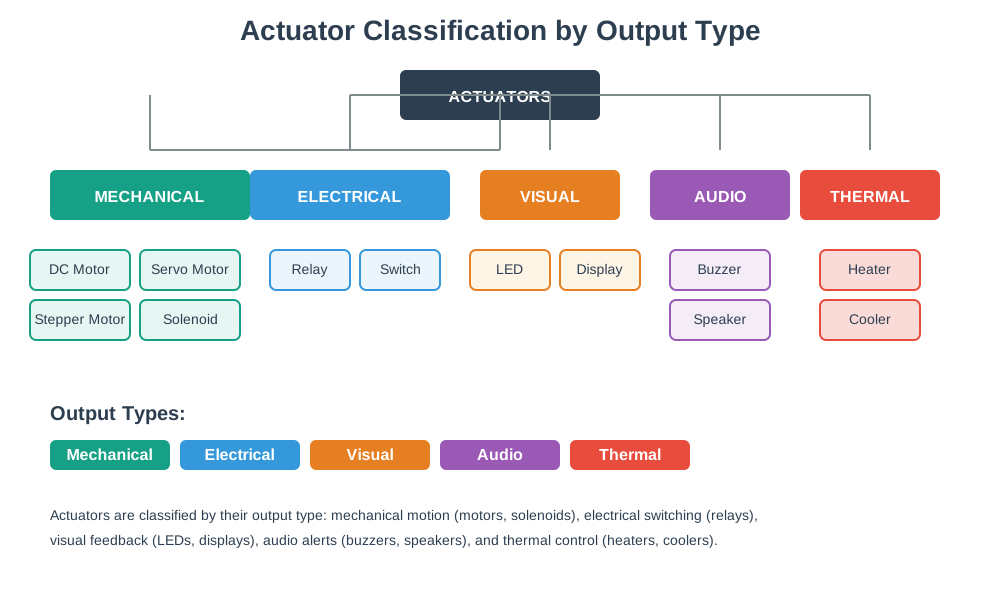
In Figure 4.1, begin with the demanded change, then follow the matching family to its driver and evidence questions. The map connects classification to the chapter’s running Motion Check: name the commitment, bound its limits, and define the stop before selecting hardware.
For example, a greenhouse vent that must rotate about 60 degrees and hold against wind load is a positioned-motion problem, not a generic “small motor” problem. If the linkage needs 1.2 N of push at a 35 mm arm, the load torque is 1.2 x 0.035 = 0.042 N m. With a 2.5x margin, the actuator target is about 0.105 N m, plus enough travel range and a way to confirm the vent is actually open or closed. That points toward a servo, geared motor with limit switches, or stepper with homing, depending on duty and accuracy.
A pump or fan starts from a different classification. The output is continuous rotation and flow, so the key evidence is not final angle; it is speed, current, pressure, flow, or temperature change. A 12 V fan that runs at 0.7 A but starts at 2.1 A needs a driver and supply sized for startup, not just for normal running. A relay may switch the load, but it does not make a fan positional.
Max’s Motion Check
- Commit: run a 12 V fan that draws 0.7 A once spinning.
- Limits: startup pulls 2.1 A — three times the running draw — so the driver and supply must be sized for that, not just normal running.
- Safe stop: a relay can switch the load, but it does not make a fan positional — pick the family for the job.
A lock, latch, alarm buzzer, or warning lamp is different again. A solenoid lock might need a short release pulse and a safe default state; a buzzer needs audibility and user recognition; a lamp needs visibility and current limiting. Classification turns the design from “choose a part” into “choose the output family, driver boundary, evidence path, and safe state that match the physical job.”
Choose by output role, motion shape, positioning need, load behavior, driver boundary, and evidence required after the command.
4.2.1 Selection Workflow: Beginner Actuator Families
- Continuous motion: DC motors and fans are useful when the task is ongoing rotation, airflow, pumping, or wheel movement rather than a precise final position.
- Positioned motion: Servo motors, stepper motors, and geared mechanisms fit tasks where angle, step count, or repeatable position matters.
- Binary action: Relays, solenoids, valves, and locks fit on/off, open/closed, latch/release, and switch-isolated power tasks.
- Fluid-power motion: Hydraulic cylinders or fluid motors use pressurized liquid for high force, while pneumatic cylinders, pumps, and rack-and-pinion actuators use compressed air for fast linear or rotary motion. Their evidence includes pressure source, valve behavior, leaks, reserve capacity, and safe venting or default state.
- Material-response motion: Thermal, magnetic, shape-memory alloy, shape-memory polymer, and soft actuators can bend, contract, or deform when heated, magnetized, illuminated, or exposed to chemical or moisture changes. Their evidence includes stimulus range, response time, fatigue, recovery behavior, and whether the motion stays gentle enough for fragile objects.
- Mechanical conversion: Crankshafts, gears, rails, pulleys, chains, and rack-and-pinion mechanisms convert one motion into another, such as rotary motion into linear motion. Their evidence includes backlash, friction, travel limits, load margin, and jamming behavior.
- Human-visible output: LEDs, displays, buzzers, speakers, and haptic outputs communicate state to a person or nearby system.
4.2.2 Beginner Example
A smart vent, a warning buzzer, and a pump are all actuators, but they should not be selected from the same checklist. The vent needs movement and end-state evidence, the buzzer needs a clear human signal, and the pump needs power switching, protection, and flow or process evidence.
Fluid-power and material-response families round out the beginner tour with two very different tradeoffs. A hydraulic cylinder pushes hard because liquid barely compresses, so almost all of the pump’s pressure turns into force — the same incompressibility is why hydraulic actuators accelerate slowly and are not the right choice when the job needs a fast start or stop. A pneumatic actuator trades some of that force for speed: compressed air responds quickly to a start or stop signal and does not need to be held in reserve, which is why pneumatic rack-and-pinion actuators are a common choice for fast-acting water-pipe valve control. Electric actuators remain the default for most IoT builds because they are usually the cheapest, cleanest, and fastest-responding of the four energy sources; fluid power earns its place only when the job needs more force or duty than a motor and gearbox can deliver. A soft, shape-memory, or light-activated polymer actuator takes a fourth route entirely — bending or contracting when heated, illuminated, or otherwise stimulated, gently enough to handle fragile loads such as fruit-harvesting grippers in agriculture or internal-organ manipulation in biomedical devices.
The real assemblies below make those two families tangible. In the first, the valve and manifold blocks show where control meets the hydraulic cylinder; in the second, compliant fabric fingers show why a soft actuator can handle a fragile load without a rigid pinch point.

In the first photograph, the two long cylinder bodies provide the linear force, while the attached valve and manifold blocks control when fluid enters or leaves each chamber. Their fittings and mounting points make leak checks, hose routing, alignment, and service access part of the actuator decision. Compare that rigid assembly with the next photograph, where the question changes from delivering high force to gripping a fragile object without one hard pinch point.

The second photograph shows compliant fabric fingers wrapping around a strawberry instead of clamping it between rigid jaws. That contact shape spreads force over a larger area and reduces the chance of bruising the fruit. It also changes the evidence needed: a useful test must record grip success, surface damage, release behavior, and repeated wear, not just commanded motion. Read this soft gripper beside the hydraulic assembly to see why both are actuators even though their force, material, failure, and proof requirements are very different.
Inspect Figure 4.2 to see how the active fluid port decides the rod’s direction and how pressure becomes useful linear force.

In Figure 4.2, enter through the cap-end port and follow the pressurized liquid to the broad piston face. That pressure pushes the piston and rod outward along the barrel. Reversing the active path sends fluid through the rod-end port, so the piston retracts instead. The note about low compressibility explains the high-force result: little input pressure is spent compressing the liquid, leaving most of it available at the piston. The drawing therefore links direction to port choice and force to piston area. A correct driver still needs stroke limits, seals, hoses, and a safe way to relieve pressure.
After that pressure path, inspect Figure 4.3 and trace the rotating pinion into the translating rack; then compare it with Figure 4.4, where piston motion passes through a connecting rod and crank pin to become continuous shaft rotation.

After tracing rotation into translation at Figure 4.3, inspect Figure 4.4 to ask how a piston, connecting rod, and offset crank pin reverse that conversion and what mechanical limits shape the useful output.

In Figure 4.4, begin with the piston moving back and forth in the cylinder. The connecting rod carries that changing direction to an offset crank pin, which turns the crankshaft through each cycle. The numbered trace matters because the shaft does not receive a simple straight push: joint angles, side loads, and dead-centre positions change the useful torque. Compare the continuous rotation at the shaft with the reciprocating input at the piston. The mechanism, not merely its energy source, therefore decides direction, travel, wear points, and what a motion test must measure before the design is accepted.
4.2.3 Overview Knowledge Check
4.3 Practitioner: Compare Types With A Selection Record
This section: Practitioner: Compare Types With A Selection Record — A useful actuator comparison record is a small design argument.
A useful actuator comparison record is a small design argument. It states the required output, lists realistic candidate types, rejects poor fits with reasons, and records the driver, protection, feedback, and failure behavior that must be tested.
4.3.1 Selection Workflow: Actuator Selection Record
- Define the output. Name the required motion, switching, light, sound, heat, or process action, including whether the final state must be known.
- List candidate families. Compare only plausible actuator families for that output shape, such as DC motor, servo, stepper, relay, solenoid, or LED driver.
- Check the load boundary. Record voltage, current, startup behavior, inductive behavior, isolation, and whether the controller needs a transistor, MOSFET, H-bridge, motor driver, relay module, or other interface.
- Choose feedback evidence. Decide whether command success can be inferred, sensed directly, confirmed by limit switches, measured through current, or verified by process data.
- Review failure behavior. Describe what should happen on power loss, stuck load, missed position, stale feedback, communication failure, or manual override.
4.3.2 Intermediate Example
A remote irrigation valve could use a solenoid valve, motorized ball valve, or relay-controlled pump. The right answer depends on whether the system needs normally-closed behavior, low standby power, partial positioning, serviceability, and direct evidence of flow. A selection record makes those tradeoffs explicit before hardware is ordered.
For mobile robots, the comparison also has to name the controllable degrees of freedom. A differential-drive robot may have planar state (x, y, heading) but only two direct wheel-speed commands, so it is non-holonomic: it cannot move sideways without changing heading over time. A holonomic platform has enough independently controlled motion axes to command every relevant degree of freedom directly. A quadrotor is another useful boundary case because its six-degree pose is controlled through fewer thrust and moment inputs, so the forward-kinematics record has to say how actuator commands change position and orientation over time.
The inverse question matters too. Forward kinematics predicts the body or world-frame motion that follows from wheel speeds, steering angle, rotor thrust, or joint commands. Inverse kinematics starts from the desired pose, velocity, or path and asks which actuator commands could produce it. Non-holonomic robots often cannot point directly at a goal and translate sideways; they need a feasible path, such as an arc or curve, plus feedback that checks whether the pose is still converging. An open-loop path replay may be acceptable for a bench demo, but a field robot needs closed-loop pose evidence because floor friction, wheel slip, obstacles, and sensor drift can invalidate the planned command.
That classification changes the evidence. A wheel motor command is not proof of a pose update; wheel slip, backlash, floor friction, battery voltage, and sensor delay can all disturb the motion model. A reviewable robot actuator record should name the body frame, controlled axes, actuator count, kinematic model, feedback sources, and the fallback when odometry or pose evidence stops matching the command.
Shape-memory and magnetic actuators deserve their own line in a selection record because “shape-memory” is not one material. Ordinary shape-memory alloys (SMAs) and magnetic shape-memory alloys (MSMAs) are different material families with different manufacturers — Finnish Modti Inc. and American Dynalloy are two named suppliers — so a record should name the specific material rather than the generic category. The same family also spans very different motion profiles: a piezo motor built from an SMA bimorph strip creeps along a ratcheted track by alternately bending two bonded layers, trading speed for a compact, gearless drive, while a coil gun uses the same magnetic-actuation principle for a single hard impulse, pulsing current through a coil to accelerate a metal slug. A selection record that just writes “magnetic actuator” hides which end of that range the design actually needs.
Use Figure 4.5 to inspect that inching action before treating it as a motor substitute. Read the two states in order: one strip bends and anchors a foot farther along the ratchet, then the other releases and is pulled forward.

In the diagram Figure 4.5, progress comes from repeated material response rather than continuous shaft torque. Stimulus level, cooling and recovery time, step size, load, and fatigue therefore join the same selection record used for conventional actuators.
4.3.3 Comparison Ledger
| Candidate | Good Fit | Evidence Needed | Common Risk |
|---|---|---|---|
| DC motor | Continuous rotation, fans, pumps, wheels, and speed-controlled loads. | Driver rating, startup current, speed/load behavior, and protection for the power stage. | Assuming speed control also gives position knowledge. |
| Servo motor | Angle-oriented positioning where a compact integrated mechanism is enough. | Range, torque margin, supply behavior, command limits, and mechanical end-stop review. | Expecting every servo to tolerate the same load, duty cycle, or environment. |
| Stepper motor | Repeatable step movement where the load is predictable and missed steps are managed. | Driver current setting, acceleration profile, holding behavior, and homing or reference evidence. | Treating open-loop step count as proof that the mechanism actually reached position. |
| Relay or solenoid | Binary switching, latching, locking, releasing, and valve-like actions. | Coil/load separation, flyback or snubber protection, contact rating, and safe default state. | Ignoring inrush, inductive kick, contact wear, or power-loss behavior. |
| Hydraulic or pneumatic actuator | High-force or fast linear and rotary motion from pressurized liquid or air. | Pressure source, valve command path, leak behavior, stored-energy release, and end-position evidence. | Treating pressure availability as proof that the mechanism moved safely. |
| Shape-memory, thermal, magnetic, or soft actuator | Compact, lightweight, compliant, or delicate motion where stimulus-driven deformation is useful. | Stimulus level, response and recovery time, fatigue life, material limits, and temperature or field safety. | Ignoring slow response, hysteresis, material aging, or unintended heating. |
Before leaving the comparison ledger, inspect Figure 4.6 as a worked binary-actuator cycle. The diagram turns the relay/solenoid row into a current-path and safe-reset problem rather than a component label.

Follow Figure 4.6 from the closed contact to the energized coil, moving armature, opened contact, and spring reset. The output repeatedly interrupts its own drive, which is why kickback, contact wear, and reset behavior belong beside the visible action. Then use the simulator to compare drive method, response, current, and heat before committing to a selection-record entry.
4.3.4 Practitioner Knowledge Check
4.4 Under The Hood: Classification Also Defines Failure Boundaries
This section: Under The Hood: Classification Also Defines Failure Boundaries — Actuator categories matter because they fail differently.
Actuator categories matter because they fail differently. A motor may stall, overshoot, or draw more current under load. A relay may wear contacts or weld shut. A solenoid may heat if energized too long. An LED or buzzer may be safe electrically but still fail the human-factor job if it is ambiguous or missed.
4.4.1 Why The Same Command Can Mean Different Things
A software command such as “open” or “turn on” is not enough evidence. The physical boundary determines what must be checked: driver state, load current, mechanical movement, final position, thermal behavior, isolation, manual override, and whether the default state is safe when power or communication fails.
Consider a door controller that can choose a relay-driven strike, a solenoid bolt, or a motorized latch. A relay may only prove that the controller energized a coil; it does not prove the contact did not weld, the strike received power, the door moved, or the door is now secure. If the strike draws 1.5 A at 12 V, the relay contact, wiring, fuse, and supply must be rated for that DC load and inrush. If the controller also drives an 80 mA relay coil, the coil still needs a transistor driver and flyback path because the microcontroller pin is not the load supply.
Thermal behavior changes the classification too. A solenoid drawing 0.5 A at 12 V dissipates 12 x 0.5 = 6 W while energized. If it pulses for 10 s every 60 s, the simple duty fraction is 10 / 60 = 0.167, so the average coil heat from the pulse pattern is roughly 1 W before enclosure effects. If the same solenoid is held continuously, the heat case is six times larger and may require a latching mechanism, reduced hold current, or a different actuator family.
Max’s Motion Check
- Commit: pulse a solenoid drawing 0.5 A at 12 V — 6 W while energized.
- Limits: a 10 s pulse every 60 s is a 0.167 duty fraction, so average coil heat is roughly 1 W; held continuously, the heat case is six times larger.
- Safe stop: that jump may need a latching mechanism or reduced hold current, not just a bigger coil.
That is why classification includes failure boundaries. The final answer must say what fails safe, what fails secure, what is sensed directly, and what is only inferred from a command.
4.4.2 Advanced Example
A building access controller might compare a relay-driven strike, a solenoid lock, and a motorized latch. The selection is not only about opening a door. The design must consider default state during power loss, local fire-safety requirements, manual release, driver isolation, status sensing, command audit, and whether the control system can tell the difference between “command sent” and “door actually secured.”
4.4.3 Selection Workflow: Failure-Boundary Checks
- Electrical boundary: Confirm the control signal, driver device, load supply, common reference or isolation, and protection path are appropriate for the actuator family.
- Mechanical boundary: Review travel, stops, load changes, friction, backlash, mounting, and whether movement can jam or injure people or equipment.
- Evidence boundary: Separate command acknowledgement from physical confirmation, and record what feedback proves the useful action happened.
- Safe-state boundary: Define the default state during reset, power loss, stale command, stuck output, and manual intervention.
4.4.4 Try It: Classify Before Choosing
Pick one actuator job, such as opening a vent, moving a camera, switching a pump, or warning a user. Write the output family, motion shape, driver boundary, feedback evidence, and safe default state. If one row is unclear, the actuator choice is not ready.
4.4.5 Under-The-Hood Knowledge Check
4.5 Summary
This section: Summary — Actuator comparison is a design decision about physical output, not a shopping list.
Actuator comparison is a design decision about physical output, not a shopping list. Classify the required action by output family, motion shape, positioning need, load behavior, driver boundary, feedback evidence, and safe-state behavior.
The same command can have very different risks depending on the actuator type. A reviewable IoT design shows how the low-power controller commands the load, how the load is protected, how the useful physical action is confirmed, and what the system does when the actuator or feedback path fails.
4.6 Key Takeaway
This section: Key Takeaway
Choose actuator types by physical job and evidence: output role first, driver and protection second, verification and safe default state before release.
Find help
3 reviewed answers.
Where should I start in a module?
Open the module page from the sidebar to see its chapters in order. Use the module map to return to a topic you need.
Modules and pathsReviewed
What can I try when a project does not work?
Check the symptom, then work through the diagnostic steps. Keep the error message and the smallest example that reproduces it.
When you are stuckReviewed
How do interactive examples work?
Use the interactive guide to check how examples and simulations work before changing your project.
Interactive examples guideReviewed