10 Location Awareness Fundamentals
10.1 Learning Objectives
By the end of this chapter, you will be able to:
- Explain Location Awareness: Describe why location awareness is fundamental to IoT and mobile services and identify its core components
- Compare Positioning Technologies: Evaluate GPS, Wi-Fi, BLE beacons, UWB, and cellular positioning for different scenarios
- Apply Location Determination Methods: Distinguish between trilateration, fingerprinting, and dead reckoning
- Design Geofence-Based Automations: Calculate appropriate geofence radius and dwell time for reliable triggers
- Assess Technology Trade-offs: Analyze accuracy, cost, power, and infrastructure trade-offs for positioning systems
10.2 Prerequisites
Before diving into this chapter, you should be familiar with:
- Wireless Communication Fundamentals: Understanding of RF propagation, signal strength, and time-of-flight principles is essential for grasping positioning technologies
- Sensor Fundamentals: Knowledge of how sensors work provides context for understanding GPS receivers, accelerometers, and other positioning sensors
10.3 Getting Started (For Beginners)
What is Location Awareness? (Simple Explanation)
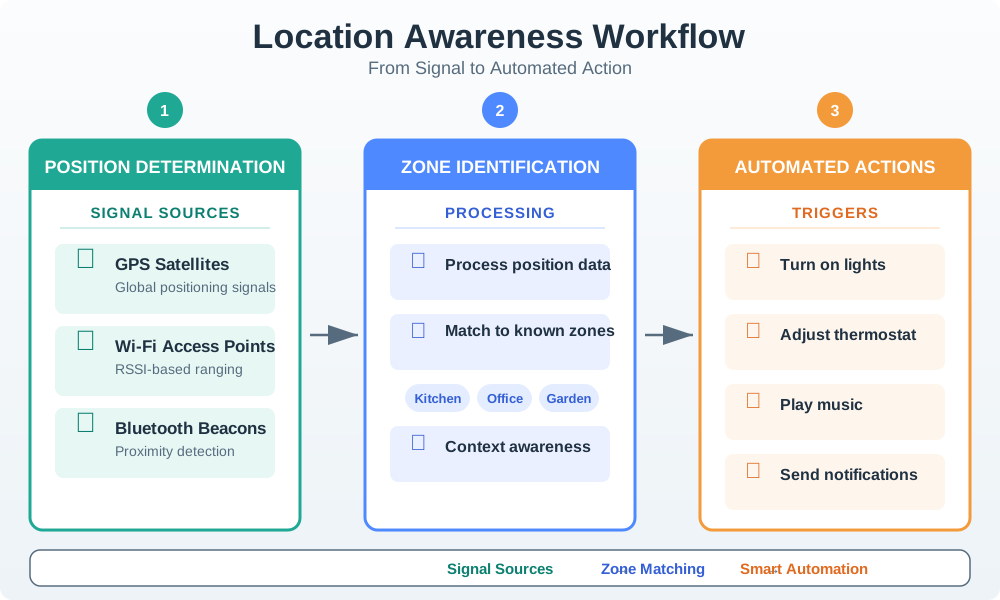
Analogy: Location awareness is like giving your IoT devices a sense of where they are.
Just like you know you’re in the kitchen (not the bedroom), IoT devices can learn their location and act differently based on it!
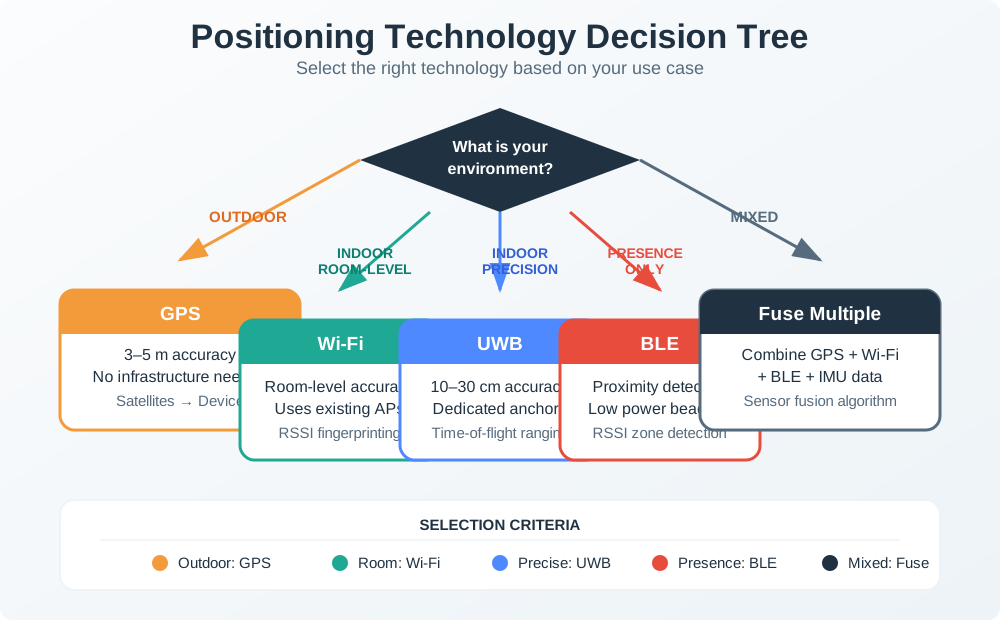
Alternative View: Positioning Technology Selection Decision Tree
This decision tree helps you choose the right positioning technology based on environment, accuracy requirements, and infrastructure constraints.
How Do Devices Know Where They Are?
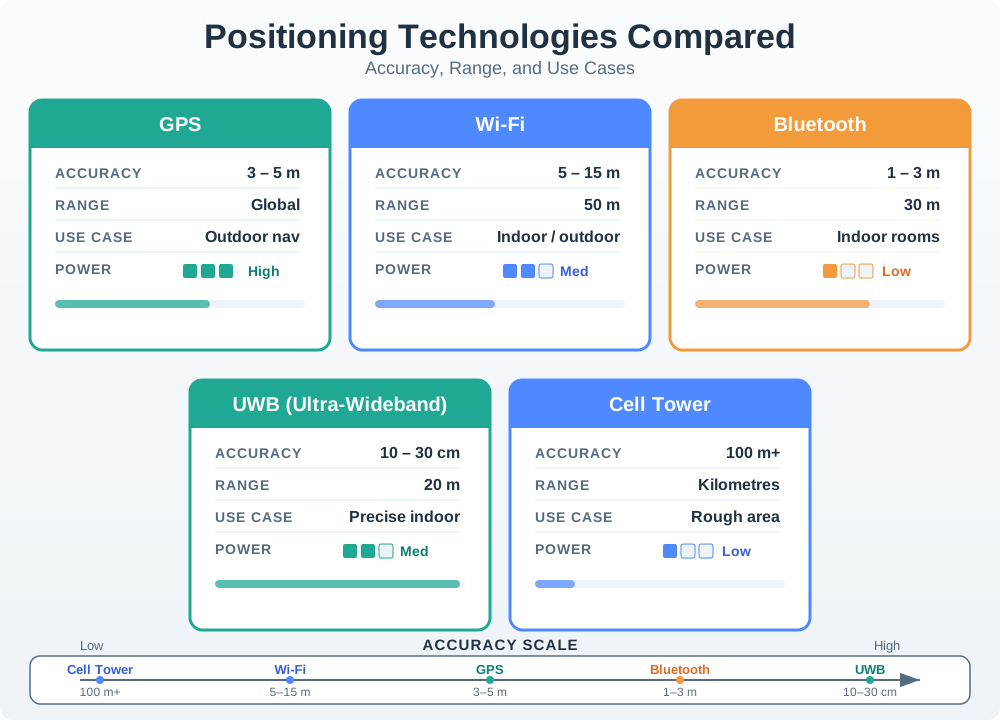
Different technologies serve different positioning needs:
| Technology | How It Works | Typical Accuracy | Best For |
|---|---|---|---|
| GPS | Satellites in space | 5-10 meters | Outdoors |
| Wi-Fi | Known router locations | 5-15 meters | Indoors/outdoors |
| Bluetooth Beacons | Small transmitters | 1-3 meters | Indoor rooms |
| UWB | Ultra-precise timing | 10-30 cm | Exact position |
| Cell Tower | Phone network | 50-300 meters | Rough area |
Key Concept: Geofencing
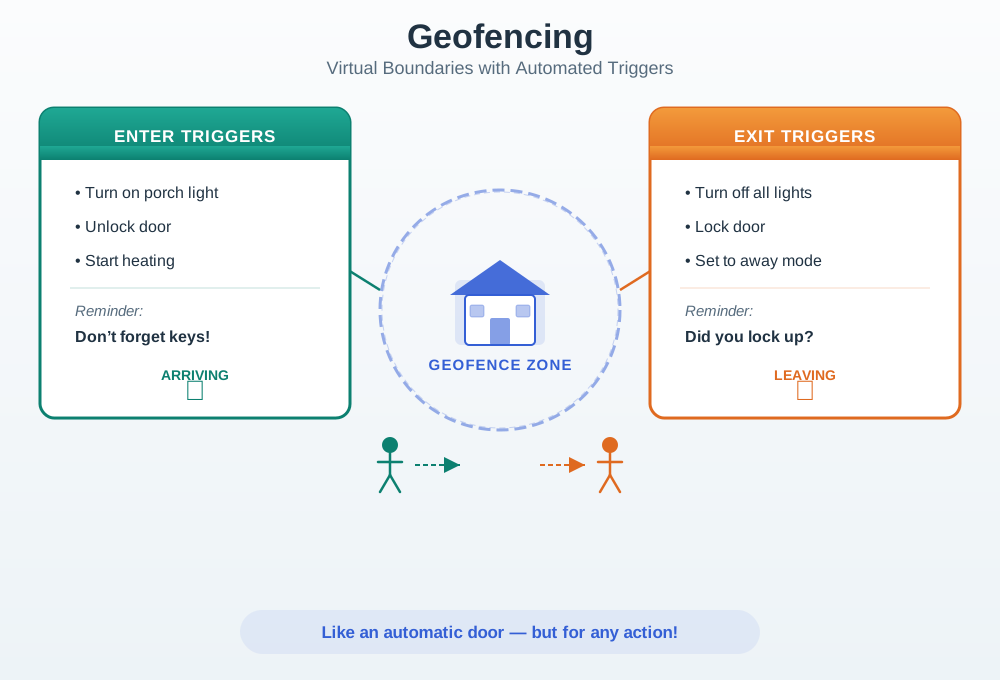
What is it? An invisible “fence” around a location that triggers actions when crossed.
Analogy: Like an automatic door that opens when you approach – but for any action!
| Enter Geofence | Exit Geofence |
|---|---|
| Turn on porch light | Turn off all lights |
| Unlock door | Lock door |
| Start heating | Set to away mode |
| Reminder: “Don’t forget keys!” | Reminder: “Did you lock up?” |
Privacy Matters!
Location data is sensitive. Your position reveals:
- Where you live and work
- What stores you visit
- When you’re not home
Best Practices:
- Only collect location when needed
- Let users control tracking
- Store location data securely
- Delete old location history
See Location Privacy and Regulations for a full treatment of location data protection.
Self-Check Questions
Before diving deeper, test your understanding:
- Why would GPS not work well inside a building?
- Hint: GPS signals cannot penetrate walls and ceilings effectively
- What is the difference between GPS (5-10m accuracy) and UWB (10cm)?
- Hint: One tells you the street, the other tells you the shelf
- What is a geofence?
- Hint: An invisible boundary that triggers actions
Answers explored in the sections below and in the detailed chapters!
For Kids: Meet the Sensor Squad!
Location Awareness is like having a magic treasure map that always knows where you are!
Imagine you have a special map that follows you wherever you go. When you walk into the kitchen, the map lights up and says “Kitchen!” When you go outside to play, it says “Backyard!” Smart devices use this same idea to know where they are and do helpful things automatically.
10.3.1 The Sensor Squad Adventure: The Great Treasure Hunt
It was Grandpa’s birthday, and the Sensor Squad had planned the most amazing treasure hunt ever! But there was a problem – how would Grandpa know where to go next?
“I know!” said Sammy the Sensor. “We can use LOCATION AWARENESS! I’ll put little helper sensors all around the house and yard.”
Lila the LED placed tiny Bluetooth beacons everywhere – one in the kitchen, one in the garage, one by the big oak tree, and one in the garden shed. Max the Microcontroller programmed Grandpa’s special treasure hunt tablet to know about each beacon.
“Now watch this,” whispered Bella the Battery excitedly.
Grandpa picked up the tablet and saw: “Start at the kitchen table!” He walked to the kitchen, and the tablet beeped. “You found Clue 1! Now go where we keep the car.”
“The garage!” laughed Grandpa. As he walked toward the garage, the tablet knew exactly when he arrived and showed the next clue.
But the coolest part happened when Grandpa got to the big oak tree. “It’s too far for the beacons,” worried Lila. “What do we do?”
“GPS to the rescue!” announced Sammy. “When we’re outside, we can use satellites in SPACE to find our location!” The tablet switched from using the indoor beacons to using GPS signals from satellites orbiting Earth.
Grandpa found all the clues and his present – a new garden tool kit! “How did it always know where I was?” he asked in amazement.
The Sensor Squad smiled. They had learned that different location tools work in different places: GPS works outside, beacons work inside, and smart devices can switch between them automatically!
10.3.2 Key Words for Kids
| Word | What It Means |
|---|---|
| GPS | A system using satellites in space to find where you are outdoors (like a treasure hunt clue from space!) |
| Bluetooth Beacon | A tiny device that says “I’m here!” to phones and tablets nearby (like a lighthouse for indoor navigation) |
| Geofence | An invisible fence around a place that triggers actions when you cross it (like a magic doormat) |
| Trilateration | Measuring distances from multiple known points to figure out where you are (like Marco Polo but with math!) |
10.3.3 Try This at Home!
The Human GPS Game
This game shows how GPS uses multiple satellites to find your location!
- Go to a room and stand somewhere (this is the “mystery location”)
- Have 3 friends or family members stand in different corners of the room
- Each person measures how many “giant steps” away you are from them and says it out loud:
- Person A: “5 steps from me!”
- Person B: “3 steps from me!”
- Person C: “4 steps from me!”
- Now have someone who wasn’t watching try to find your mystery location using ONLY those step counts
- They should be able to find the ONE spot that matches all three distances!
This is exactly how GPS works – satellites in space measure how far you are, and by using 3 or more distances, they find the one spot where you must be. Try moving to different spots and see if your “human satellites” can always find you!
10.4 Introduction
Location Awareness: The ability of a system to determine and utilize the physical position of devices, users, or objects in space.
Device mobility is fundamentally about moving through space, so localization is at the core of many mobile services and applications. A context-aware system detects the user’s situation – location, time, activity, social setting – through sensor fusion and adapts behavior automatically, eliminating manual configuration and explicit commands.
10.4.1 Why Location Matters
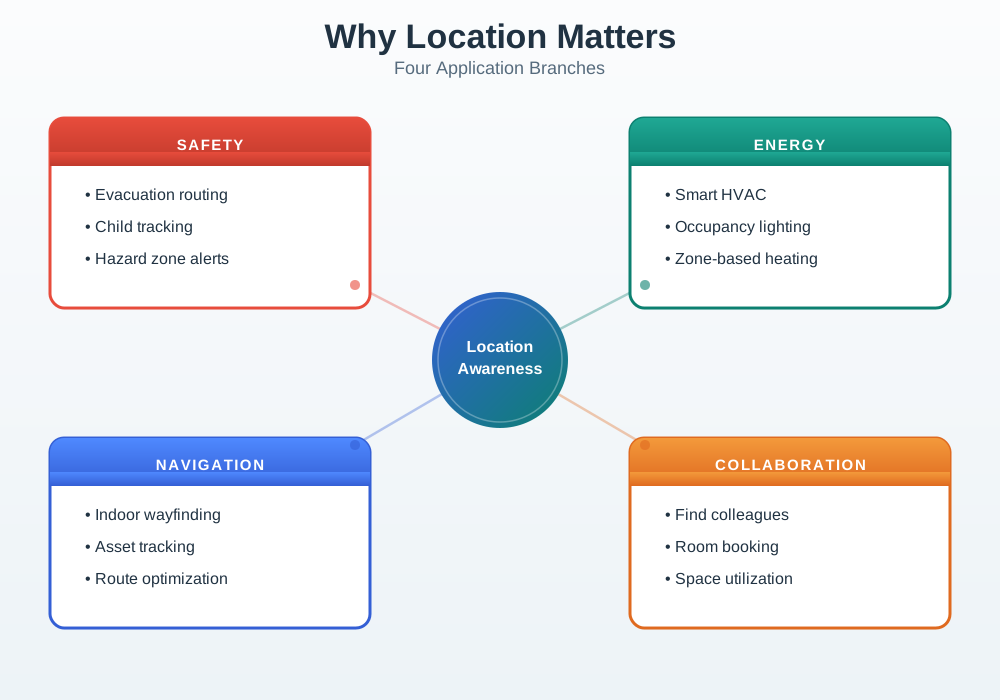
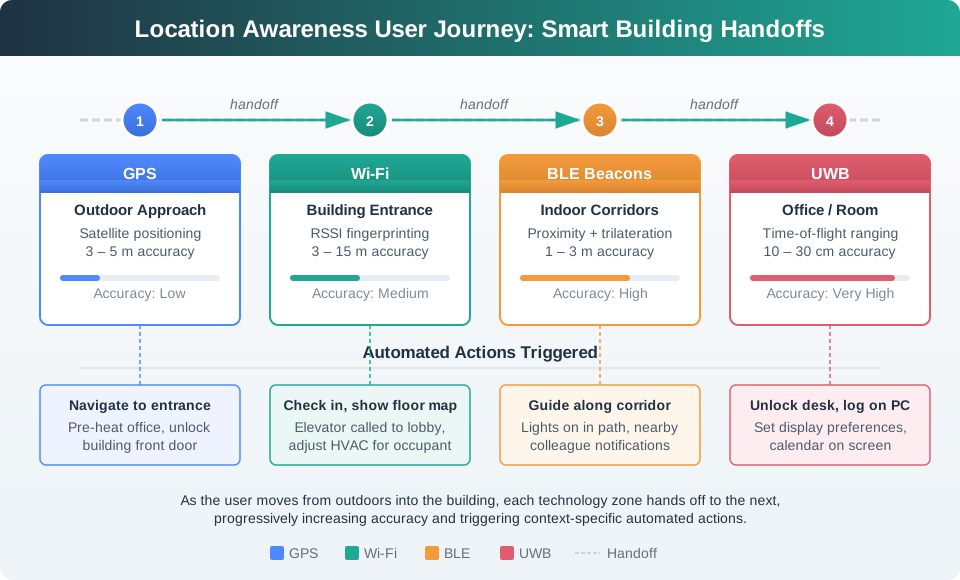
Location-aware IoT systems add value across many domains:
- Safety: Efficient evacuation, tracking children, monitoring high-risk areas (construction sites, mines)
- Energy Reduction: Smart buildings optimize heating, lighting, and HVAC based on occupancy
- Space Usage: Assess office layouts and conference room utilization
- Security: Auto-locking doors, computers, and access control
- Navigation: Wayfinding in unfamiliar buildings, finding nearest resources
- Collaboration: “Where is X?”, “Is Y in the office yet?”
- Retail: Personalized offers, intelligent shopping, item-level navigation
- Health: Activity-level monitoring, elderly care, patient tracking in hospitals
10.4.2 High-Level Location Service Architecture
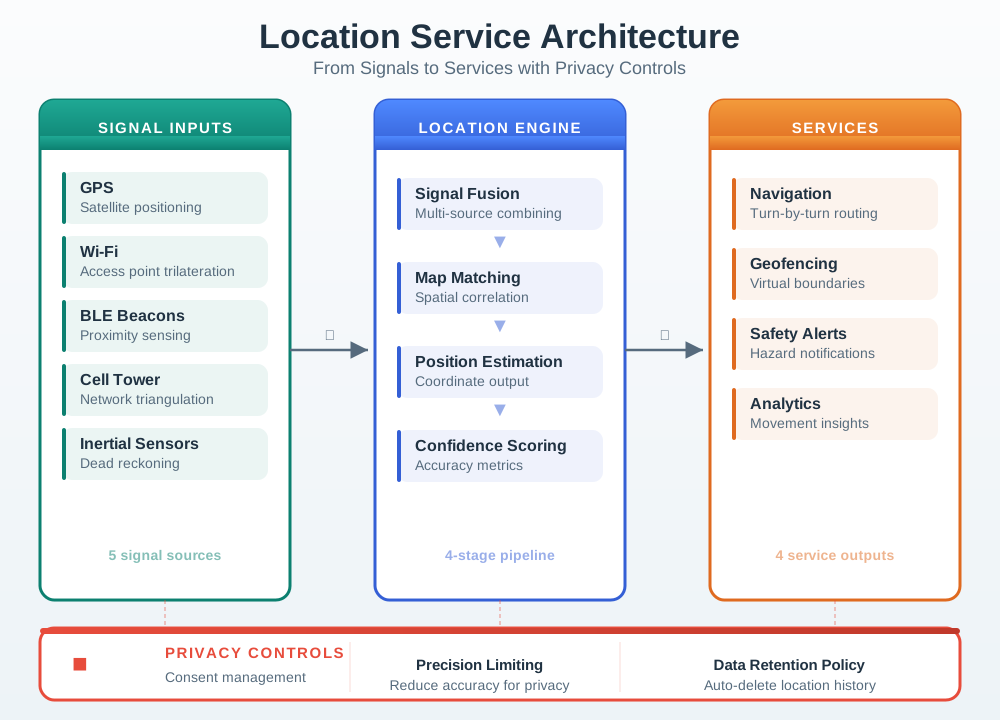
This architecture highlights key design principles:
- Multiple technologies (GPS, Wi-Fi, BLE, cell, inertial sensors) contribute signals; no single method is reliable in all environments.
- A location engine fuses these signals with map and context data to produce a best-estimate position rather than trusting one raw source.
- Applications consume location through stable services (navigation, safety, geofencing, analytics) instead of re-implementing algorithms.
- Privacy controls (consent, precision limiting, retention policies) must surround both the engine and services – location is powerful but highly sensitive data.
10.5 How It Works: Location Determination Methods
Understanding the three fundamental approaches to determining position helps you choose the right technology for each scenario.
10.5.1 Method 1: Trilateration (GPS, BLE Beacons, UWB)
Trilateration measures distances from multiple known reference points and finds their intersection:
- Measure distance to Anchor A: 5 meters
- Measure distance to Anchor B: 3 meters
- Measure distance to Anchor C: 4 meters
- Calculate intersection point – your position
Why 3+ anchors? Each distance measurement creates a circle (in 2D) or sphere (in 3D). At least 3 circles are needed to find a unique intersection point. GPS requires 4 satellites because it must also solve for the receiver’s clock offset.
10.5.2 Method 2: Fingerprinting (Wi-Fi, Magnetic)
Fingerprinting maps signal patterns to physical locations through a two-phase process:
- Survey phase: Walk through the space, recording signal strengths at known locations
- Database: Store patterns like “Location A sees Wi-Fi: [-62 dBm, -45 dBm, -72 dBm]”
- Matching phase: A new device scans signals and finds the closest match in the database
- Estimate: “Your signals match Location A (78% confidence)”
Accuracy depends on: database freshness, environment stability (furniture moves, doors open/close), and the number of access points visible.
10.5.3 Method 3: Dead Reckoning (IMU, Odometry)
Dead reckoning tracks movement from a known starting point without external references:
- Start at a known position (last GPS fix)
- Measure direction (compass/gyroscope) and distance (accelerometer integration or wheel odometry)
- Calculate new position: Previous + (direction x distance)
- Repeat at each measurement interval
Limitation: Errors accumulate over time (typically 1-3% of distance traveled). Systems must periodically reset with an absolute position source (GPS, beacons) to prevent unbounded drift.
10.6 Case Study: Apple AirTag and the Find My Network
Apple’s AirTag (launched April 2021) demonstrates how location awareness can be built on a crowdsourced mesh network rather than requiring dedicated infrastructure. Understanding why Apple chose this approach – and the trade-offs involved – illustrates key positioning technology decisions.
The design problem: Users wanted to locate lost personal items (keys, bags, wallets) anywhere in the world. GPS receivers would drain a coin-cell battery in hours, cellular radios would require monthly subscriptions, and Wi-Fi positioning requires known access-point databases. Apple needed a technology that could last over a year on a CR2032 battery while providing global coverage.
The solution – crowdsourced BLE positioning:
AirTags broadcast Bluetooth Low Energy (BLE) signals at approximately 2-second intervals. Any of the billion-plus active Apple devices (iPhones, iPads, Macs) within BLE range (~30 meters) anonymously relays the AirTag’s encrypted location to Apple’s servers. The AirTag itself has no GPS, no Wi-Fi, and no cellular radio.
| Component | Technology | Power Budget |
|---|---|---|
| BLE beacon | ~2-second broadcast interval | ~5 microwatts average |
| UWB (U1 chip) | Precision finding within 10 m | ~50 milliwatts (on demand only) |
| Speaker | Play sound to locate | ~100 milliwatts (on demand) |
| NFC | Tap to identify found item | Passive (no battery) |
| Total average | BLE broadcasting only | ~5 microwatts |
Positioning accuracy by context:
| Scenario | Accuracy | Method | Latency |
|---|---|---|---|
| Dense urban area | 5-15 meters | Many iPhones relay position | 1-5 minutes |
| Suburban neighborhood | 20-100 meters | Fewer relay devices | 5-30 minutes |
| Indoor (home/office) | 10-30 cm | UWB precision finding | Real-time |
| Rural / remote area | No coverage | No relay devices nearby | Never (until someone passes by) |
Privacy architecture: Every AirTag rotates its BLE identifier every 15 minutes to prevent tracking. Relay devices encrypt the location report with the AirTag owner’s public key before sending it to Apple’s servers. Apple cannot decrypt the reports – only the owner’s iPhone can. This means Apple facilitates the network but cannot track any AirTag or user.
The trade-off Apple accepted: The system does not work in areas without Apple device density. A lost AirTag in a remote hiking area may never be found. Apple chose global-but-probabilistic coverage over guaranteed-but-expensive coverage (which would have required GPS + cellular), because the vast majority of lost items are in areas with high Apple device density (airports, cities, offices).
Result: Within 18 months of launch, AirTags were locating over 50 million items per month with 90%+ success rate in urban areas. The battery lasts approximately 12 months versus the 4-8 hour battery life that a GPS-equipped tracker would achieve in the same form factor.
Lesson for IoT designers: The positioning technology you choose is not just a technical decision – it defines your product’s battery life, coverage map, accuracy, and privacy model. Apple’s decision to use crowdsourced BLE instead of GPS illustrates how constraints (battery size, no subscription fee) can drive innovative architecture.
10.7 Technology Selection Decision Framework
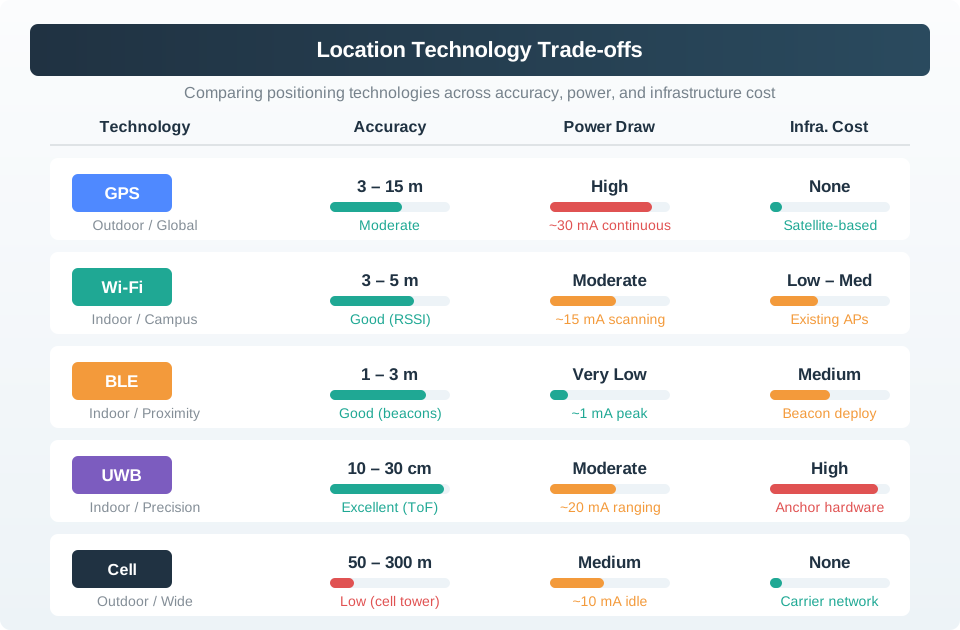
When choosing positioning technology for an IoT application, evaluate these five factors:
| Factor | GPS | Wi-Fi | BLE Beacons | UWB | Cellular |
|---|---|---|---|---|---|
| Accuracy | 5-10 m outdoor | 5-15 m | 1-3 m | 10-30 cm | 50-300 m |
| Works indoors? | No | Yes | Yes | Yes | Partial |
| Infrastructure | None | Existing APs | Deploy beacons ($5-15 each) | Deploy anchors ($50-200 each) | Existing towers |
| Power (continuous) | High (30-50 mA) | Medium (15-20 mA) | Low (0.01-0.1 mA) | Medium (10-30 mA) | High (50-200 mA) |
| Monthly cost | None | None | None | None | $2-10/device |
| Best for | Outdoor tracking | Building-level | Room-level | Centimeter precision | Wide-area rough location |
Decision rules:
- Outdoor only, battery-powered: GPS (or BLE crowdsourced like AirTag if ultra-low power is needed)
- Indoor, room-level accuracy: Wi-Fi fingerprinting if APs exist, BLE beacons if not
- Indoor, sub-meter accuracy: UWB (worth the infrastructure cost for warehouses, hospitals)
- Mixed indoor/outdoor: Sensor fusion combining GPS + Wi-Fi + BLE
- Global tracking, always-on: Cellular + GPS (accept the power and cost penalties)
Mixed Environment Strategy (outdoor-to-indoor transition):
A package delivery tracking system illustrates seamless technology handoff:
- En route (truck): GPS (5 m accuracy, shows “2 blocks away”)
- Arrives at building: Cellular tower (100 m, “arrived in area”)
- Enters building: BLE beacon at entrance detected (“entered lobby”)
- Delivery to apartment 4B: BLE beacon at door (“delivered to 4B”)
Best practice: Use sensor fusion (combine multiple technologies) for seamless indoor/outdoor transitions. Smartphone location APIs already do this automatically: GPS outdoors, Wi-Fi indoors, cellular as fallback.
10.8 Geofencing: Design and Calculation
Geofencing is among the most widely deployed location-awareness features. Getting the parameters right – radius, dwell time, and hysteresis – determines whether users find the system reliable or annoying.
Putting Numbers to It: Geofence Radius Calculation
Let us calculate the geofence radius for a smart home automation system with real GPS accuracy constraints.
Desired Behavior: Trigger “Welcome Home” automation when the user arrives within 20 m of the front door.
GPS Accuracy Model: \[ \text{Position Error}_{95\%} = \text{UERE} \times \text{GDOP} \]
For a typical suburban environment: \[ \begin{aligned} \text{UERE} &= 6.4\text{ m (user equivalent range error)} \\ \text{GDOP} &= 2.3\text{ (geometric dilution of precision)} \\ \text{Position Error} &= 6.4 \times 2.3 = 14.7\text{ m} \end{aligned} \]
Safe Geofence Radius Calculation: \[ R_{\text{safe}} = D_{\text{trigger}} + 2 \times \sigma_{\text{GPS}} + D_{\text{buffer}} \]
Where: \[ \begin{aligned} D_{\text{trigger}} &= 20\text{ m (desired trigger distance)} \\ \sigma_{\text{GPS}} &= 15\text{ m (GPS accuracy, 95\% confidence)} \\ D_{\text{buffer}} &= 10\text{ m (avoid adjacent street false triggers)} \end{aligned} \]
\[ R_{\text{safe}} = 20 + 2(15) + 10 = 70\text{ m minimum radius} \]
Why 2x GPS accuracy? Both the geofence boundary position and the phone’s reported position have accuracy error. The worst case is when both errors push in the same direction, so we account for uncertainty on both sides.
Dwell Time to Prevent False Triggers: \[ T_{\text{dwell}} = \frac{2 \times R_{\text{safe}}}{v_{\text{drive}}} = \frac{2 \times 70}{13.9} \approx 10\text{ seconds} \]
(Using typical residential street speed: \(v_{\text{drive}} = 50\text{ km/h} = 13.9\text{ m/s}\))
Optimized Geofence Configuration:
| Configuration | False Positive Rate | False Negative Rate | User Satisfaction |
|---|---|---|---|
| 50 m, 0 s dwell | 28% (triggers when driving by) | 5% | Poor (annoying) |
| 100 m, 0 s dwell | 12% | 8% | Fair |
| 100 m, 30 s dwell | 2% | 7% | Good |
| 150 m, 60 s dwell | 0.5% | 15% (too slow) | Fair |
Best practice: 100 m radius + 30-second dwell time achieves a 2% false positive rate while catching 93% of actual arrivals within reasonable time.
Additional Optimization – Sensor Fusion:
- Add Wi-Fi detection: If the phone connects to the home Wi-Fi SSID, confirm arrival (independent of GPS)
- Add BLE beacon at the door: Final trigger when less than 5 m from the door (sub-meter precision)
- Combined pipeline: GPS geofence (coarse, 100 m) triggers Wi-Fi check (medium, building-level) triggers BLE confirmation (fine, room-level)
10.9 Positioning Technology Explorer
10.10 Geofence Radius Simulator
Common Mistake: Assuming GPS Provides Real-Time Continuous Positioning
What practitioners do wrong: Designing applications that expect GPS to provide position updates every 1-2 seconds with consistent accuracy, similar to how video games update character position at 60 FPS.
Why it fails:
- Time To First Fix (TTFF): GPS needs 5-30 seconds to acquire satellite lock after cold start (device powered off or moved >100 km)
- Signal Loss: GPS instantly fails when entering buildings, tunnels, parking garages, or urban canyons
- Accuracy Variation: Accuracy degrades from 5 m (open sky, 8+ satellites) to 50 m (poor satellite geometry, 4 satellites)
- Battery Drain: Continuous GPS operation drains a phone battery in 4-8 hours
Real-world example – Pokemon Go (2016): The game required continuous GPS for gameplay. Users reported:
- Character teleporting hundreds of meters (GPS accuracy jumps)
- Character freezing when walking between buildings (signal loss)
- Phone battery dying in 2-3 hours (continuous GPS + screen on)
- Game becoming unplayable indoors (no GPS)
What Niantic learned: Fuse GPS with other sensors:
- Indoors: Wi-Fi/cell tower positioning (50-100 m accuracy, but available)
- Motion: Accelerometer dead reckoning fills GPS gaps (predict movement)
- Power: GPS sampling every 5-10 seconds, not continuous (interpolate between fixes)
- Smoothing: Apply Kalman filter to eliminate position jumps
Correct approach for location-based apps:
| Requirement | Wrong Implementation | Correct Implementation |
|---|---|---|
| Continuous tracking | Poll GPS every 1 s | GPS every 5-10 s + IMU interpolation |
| Indoor/outdoor | GPS only | GPS outdoor + Wi-Fi indoor with seamless handoff |
| Battery life | Always-on GPS | Geofence triggers + significant motion detection |
| Accuracy expectations | Assume 5 m always | Design UX for 5-50 m range, validate with larger radius |
Design principle: Location is probabilistic, not deterministic. Build UX that tolerates 10-20 m error (e.g., “You are near the coffee shop” not “You are at GPS coordinates 37.7749, -122.4194”). Use GPS for general area, BLE beacons for precision when it is critical.
Key Takeaway
In one sentence: Devices should adapt to situation (location, time, activity) automatically – explicit configuration is a UX failure.
Remember these rules:
- The best interface is no interface – if users must manually tell the system where they are, you have failed at context-awareness.
- Geofence triggers should use 100-150 m radius for reliable home/away detection (accounting for GPS accuracy of 5-15 m), with 30-60 second dwell time to prevent false triggers.
- Privacy requires explicit user consent and local-first processing where possible.
Common Pitfalls
1. Using GPS indoors for location-aware IoT applications
GPS signals are attenuated by building materials by 20-40 dB, making indoor GPS unreliable or unavailable in most buildings. IoT applications requiring indoor location must use alternative technologies: Wi-Fi fingerprinting, BLE beacons, ultra-wideband (UWB), or dead reckoning with IMU sensors. Never assume GPS will work indoors – design indoor location as a separate engineering problem from outdoor GPS positioning.
2. Assuming location accuracy is constant across environments
GPS achieves 3-5 meter accuracy in open sky, 20-50 meters in urban canyons, and may be completely unavailable underground. BLE beacons provide 1-3 meter accuracy with dense deployment but 5-10 meters with sparse deployment. Location accuracy must be specified per environment, not as a single number. IoT applications must handle location uncertainty – displaying accuracy circles, filtering impossible movements, and degrading gracefully when accuracy drops.
3. Storing precise location data without privacy controls
Precise GPS trajectories (latitude/longitude at 1-second intervals) reveal home address, workplace, medical appointments, and behavioral patterns. Storing raw location data without purpose limitation, access controls, and retention policies violates privacy regulations (GDPR, CCPA) and creates liability. Quantize location to the minimum precision needed for the application (postal code vs street address vs building vs room), and delete raw location data after aggregate summaries are computed.
10.11 Summary
Location awareness is a foundational capability for IoT systems that enables devices to adapt behavior based on physical position. The key concepts covered in this chapter are:
- No single technology works everywhere: GPS excels outdoors (5-10 m) but fails indoors; BLE beacons and UWB fill the indoor gap; sensor fusion bridges the transition.
- Three determination methods: Trilateration (distance-based), fingerprinting (pattern-matching), and dead reckoning (motion-tracking) each suit different scenarios and constraints.
- Geofencing requires careful engineering: A naive 50 m geofence produces 28% false positives; the optimal configuration of 100 m radius with 30-second dwell time reduces this to 2%.
- Technology choice defines product character: As the AirTag case study shows, picking crowdsourced BLE over GPS determined battery life (1 year versus 8 hours), coverage model, and privacy architecture.
- Location data demands privacy-by-design: Position data reveals sensitive patterns; systems must implement consent, precision limiting, and retention policies from the start.
Cross-Hub Connections
This chapter connects to multiple learning hubs:
- Knowledge Gaps Hub: Explore common misconceptions about GPS accuracy
- Quizzes Hub: Test your understanding of positioning technologies
- Videos Hub: Watch visual explanations of GPS trilateration
- Simulations Hub: Experiment with positioning algorithms
10.12 Knowledge Check
Concept Relationships
Location Awareness Fundamentals connects to:
- GPS and Outdoor Positioning – Trilateration using satellite time-of-flight measurements
- Indoor Positioning – BLE, Wi-Fi, UWB technologies for GPS-denied environments
- GPS Accuracy and Enhancement – DGPS, RTK, and error budget analysis
- Location Privacy and Regulations – Location data sensitivity and protection requirements
- Wireless Communication – RSSI and signal propagation fundamentals
- Sensor Fusion – Combining GPS, Wi-Fi, BLE, and IMU for seamless positioning
- Privacy and Security – General privacy requirements for IoT systems
See Also
Location Technology Standards:
- IEEE 802.15.4z – UWB positioning and ranging
- Bluetooth Core Spec 5.1+ – Direction finding and positioning
- 3GPP Location Services (LCS) – Cellular positioning standards
Positioning Algorithms:
- Kalman Filtering – Optimal sensor fusion for position estimates
- Particle Filters – Non-Gaussian position tracking
- SLAM (Simultaneous Localization and Mapping) – Building maps while localizing
10.14 What’s Next
| If you want to… | Read this |
|---|---|
| Understand GPS accuracy and enhancement technologies | GPS Accuracy and Enhancement |
| Implement indoor positioning for GPS-denied environments | Indoor Positioning Systems |
| Learn GPS satellite system fundamentals and signals | GPS and Outdoor Positioning |
| Design location privacy controls for IoT systems | Location Privacy and Consent |
| Integrate location features into IoT interface design | Interface and Interaction Design |