MQTT Session Management: Reference
More
Depth: Practitioner
Progress saves as you read. Mark sections complete as you go; your progress appears in the sidebar.
The original supporting material is preserved below. The figures remain in MQTT Session Management, and the knowledge-check blocks are collected on the standalone check page.
Start With A Sleeping Device
Imagine a battery sensor that sleeps between events. A broker is the service that routes messages from senders to receivers. When a receiver sleeps, the broker may retain its subscriptions and eligible messages for its return. A session is the state that lets the broker remember that client across a break.
Quality of service (QoS) describes the delivery exchange for a message. Session policy instead sets what state can survive a disconnect. In MQTT 5, Request session resumption means reconnect with the same client ID and Clean Start set to false. The broker must still have stored state for that ID. Confirm session resumption means check that Session Present is 1 in CONNACK, the broker’s connection reply. Clean Start set to false alone does not prove that state was found. See the MQTT 5 specification, sections 3.1.2.4 and 3.2.2.1. Session Expiry Interval sets how long MQTT 5 keeps state after disconnect. Its default is zero, so set a nonzero value to keep the session. Queue limits still apply.
Telemetry means device readings and status. Latency is the delay before a result. Transport layer security (TLS) protects a network stream. Follow the sleeping device through a loss, a reconnect, and an expiry. Compare delivery choices, bound the queue, and check the result.
Follow the sleeping device through four choices. First, separate QoS from session memory. QoS sets the packet exchange. A session sets what the broker keeps after a disconnect. Next, test all three QoS levels under loss. Watch delay and duplicate messages. Then add TLS, client identity, topic access rules, stable client IDs, expiry, and backoff with jitter. Last, size broker queues and local buffers. Give each offline fleet a clear memory and expiry budget.
Checkpoints help you review each choice. Use the deep dives and calculators to work through the sums.
Learning Objectives
By the end of this chapter, you will be able to:
- Choose clean or persistent sessions for a device and its task.
- Use TLS to encrypt traffic. Use certificates to check identity and ACLs to limit topic access.
- Explain what each session type keeps after a disconnect.
- Use backoff with jitter to spread reconnect attempts over time.
- Find causes of lost messages, stale sessions, full queues, and QoS mismatch.
- Use the queue growth formula to estimate broker memory at fleet scale.
- Check QoS on both the publisher and subscriber legs of a route.
These terms describe how messages move and what the broker keeps. Use them to separate delivery choices from saved state.
- MQTT: Message Queuing Telemetry Transport. This pub/sub protocol serves small IoT devices on weak networks.
- Broker: A server that routes messages from senders to matching receivers.
- Topic: A path such as home/bedroom/temperature. It helps route messages to clients that want them.
- QoS Level: Quality of Service 0, 1, or 2. Each level trades a delivery guarantee for more message traffic.
- Retained Message: A message saved for a topic when a sender sets RETAIN. A plain publish does not update it. It may be stale.
- Last Will and Testament: A message set in CONNECT for the broker to send after an unexpected loss. MQTT 5 Will Delay can defer it. A return to the same session before that delay ends can cancel it.
- Persistent Session: Saved subscriptions and pending messages that let a client resume after a break.
For Beginners: MQTT Session Management
When a device disconnects and reconnects to an MQTT broker, what happens to the messages it missed? Session management handles this. A persistent session saves the device’s subscriptions and queues missed messages for later delivery. It is like pausing a movie and picking up right where you left off.
A sleeping client may disconnect for ten minutes. With a clean session, the broker removes its subscriptions and does not queue messages for it. With a persistent session, the broker may retain subscriptions and queue eligible QoS 1 or QoS 2 messages until the client reconnects, subject to session expiry, message expiry and queue limits. Bound the expiry and queue size so an offline client cannot consume broker memory indefinitely.
For persistent sessions (clean_session=false), the broker queues QoS 1/2 messages for offline clients:
Queue memory per offline client:
Where:
- : Number of queued messages
- : Assumed average payload size (100 bytes in this worksheet)
- : Assumed broker metadata per message (40 bytes here; measure the implementation)
Concrete example (sensor offline for 1 hour, 1 msg/min):
Fleet scaling (1000 sensors offline simultaneously):
Worst-case scenario (sensor offline 24 hours):
For 10,000 sensors:
(Units throughout this example use the decimal/SI convention established above: 1 kB = 1,000 bytes, 1 MB = 1,000,000 bytes, 1 GB = 1,000,000,000 bytes.)
Illustrative bound with MQTT 5 Message Expiry Interval: If each QoS 1/2 publication carries Message Expiry Interval 3600 seconds and the broker accepts one message per minute, each offline subscriber’s queue contains at most about 60 unexpired messages under steady input, before broker-specific limits:
Lesson: Persistent sessions scale poorly for long offline periods or high message rates. Use session expiry and message expiry to bound queue growth.
Maths · guided foundations
Offline Time Is the Unbounded Term
Check the quantities and assumptions.
Use these chapters to review QoS, explore production choices, or build a client.
Foundations:
- MQTT QoS Levels - Basic QoS concepts and handshake details
Deep Dives:
- MQTT Production Operations - Advanced patterns
Hands-On:
- MQTT Hands-On Labs - Build MQTT projects
Interactive Lab: MQTT QoS Comparison
Let’s build an experiment that demonstrates the real differences between QoS 0, 1, and 2!
QoS Comparison Simulation
Code Explanation:
#include <WiFi.h>
#include <PubSubClient.h>

const char* ssid = "Wokwi-GUEST";
const char* password = "";
const char* mqtt_server = "test.mosquitto.org";

WiFiClient espClient;
PubSubClient mqttClient(espClient);

// Statistics tracking
int qos0_attempted = 0, qos0_submitted = 0;
unsigned long qos0_time = 0;

// Deliberately skip about 20% of application publish attempts.
bool skipPublish() {
  return random(100) < 20;
}

void callback(char* topic, byte* payload, unsigned int length) {
  // Print any subscribed messages; this publisher sketch makes no subscription.
  Serial.print("Received: ");
  Serial.write(payload, length);  // MQTT payload is not null-terminated
  Serial.println();
}

void testQoS0();

void setup() {
  Serial.begin(115200);
  WiFi.begin(ssid, password);

  while (WiFi.status() != WL_CONNECTED) {
    delay(500);
    Serial.print(".");
  }

  mqttClient.setServer(mqtt_server, 1883);
  mqttClient.setCallback(callback);

  while (!mqttClient.connected()) {
    if (mqttClient.connect("ESP32_QoS_Test")) {
      Serial.println("Connected to MQTT broker!");
    } else {
      delay(5000);
    }
  }

  Serial.println("\n=== QoS 0 publish-attempt example ===\n");
  testQoS0();
}

void testQoS0() {
  unsigned long start = millis();

  for (int i = 0; i < 100; i++) {
    char msg[50];
    snprintf(msg, sizeof(msg), "QoS0_Message_%d", i);

    qos0_attempted++;
    if (!skipPublish()) {
      if (mqttClient.publish("test/qos0", msg)) {  // Local write accepted, not delivery proof
        qos0_submitted++;
      }
    } else {
      Serial.printf("QoS0 publish attempt %d skipped locally\n", i);
    }

    delay(10);
  }

  qos0_time = millis() - start;
  Serial.printf("QoS 0 complete: %d attempted, %d accepted for local write, %lu ms\n",
                qos0_attempted, qos0_submitted, qos0_time);
}

void loop() {
  mqttClient.loop();
  // Test runs once in setup()
}Lab Results Analysis
Illustrative simulator results (20% modeled message loss and assumed retry budget):
- QoS 0: ~80/100 delivered (80%), 0 duplicates, about 1,000 ms, baseline battery use (100%)
- QoS 1: 100/100 delivered (100%), about 4-6 duplicates, about 1,500 ms, about 150% battery use
- QoS 2: 100/100 delivered (100%), 0 duplicates, about 2,500 ms, about 250% battery use
Key Observations:
- QoS 0 has an expected 20 losses per 100 sends in this loss model, not a fixed outcome for every run
- QoS 1 may redeliver when PUBACK is lost; the simulated 100/100 depends on its retry and connection assumptions
- QoS 2 avoids duplicate protocol delivery on a completed MQTT leg; a permanent failure can still prevent delivery
- QoS 2 takes 2.5 times the assumed elapsed time in this simulation; the protocol does not prescribe that factor
- Battery energy in this model is 2.5 times the baseline under its current and timing assumptions, not 2.5 times instantaneous power
Review the QoS Tradeoffs
Compare packet cost, repeats, and delay before choosing QoS. Keep model assumptions separate from observed delivery.
 Checkpoint: QoS Tradeoffs
You now know:
In the chapter’s simulator, 20% independently missed MQTT-level transfers over 100 QoS 0 sends gives an expected 80 deliveries and 20 losses; ordinary TCP packet loss would usually be retransmitted. QoS 1 retries can yield duplicates if PUBACK is lost; delivery still depends on a working connection and retained session state. QoS 2 uses a four-packet exchange on each MQTT leg. The calculator’s delay and battery figures are assumptions, not protocol guarantees.
Carry the QoS Result Into Security
A delivery result does not show who may read or send a message. Check access and link protection next.
Security Considerations
The QoS lab answers “will the message arrive?” The production question is different: “who can read, publish, or replay it while it travels?”
Basic MQTT (port 1883) sends data unencrypted. For production:
- Use MQTT over TLS (port 8883)
- Enable authentication (username/password)
- Implement access control (topic-level permissions)
- Use private broker (don’t rely on public brokers)
Never deploy MQTT on port 1883 without TLS in production environments. Unencrypted MQTT transmits credentials and data in plain text—network sniffers can capture usernames, passwords, and all sensor readings. An attacker on your Wi-Fi network can see every temperature reading, door lock command, and camera feed. Always use MQTTS (port 8883) with TLS 1.2+ and certificate-based authentication for production deployments. Public test brokers like test.mosquitto.org are fine for learning, but never for real applications.
On a public broker, strangers can subscribe to smart-lock topics and publish commands to them.
Using public brokers (test.mosquitto.org, broker.hivemq.com) for real IoT deployments is dangerous:
- Anyone worldwide can subscribe to your topics and see all data
- No authentication means anyone can publish malicious commands
- Zero privacy for sensor readings or control commands
- Unreliable service with no guarantees
Deploy a private broker (Mosquitto, HiveMQ, AWS IoT Core) with TLS, authentication, and topic-level ACLs. The cost is minimal compared to the security risk.
Review Session Security
Protect the link and check client identity. Then enforce topic permissions at the broker.
Checkpoint: Securing MQTT Sessions
You now know:
Port 1883 is plaintext; port 8883 adds TLS so credentials, topics, and payloads are not visible to ordinary network observers. Authentication proves which client connected, but ACLs decide which topics that client can publish or subscribe to. Public test brokers are useful for learning only: no authentication, no private topic namespace, and no production control over who can read or publish traffic.
Apply the Security Checks
Use the checks below to test what protects traffic and what limits topic access.
Knowledge Check: MQTT Security
Test your understanding of these networking concepts.
Common Pitfalls
These examples show where session and delivery choices can fail in practice.
The mistake: MQTT QoS levels (0, 1, 2) are often misunderstood. QoS 0 has no MQTT acknowledgment, QoS 1 transfers a message at least once and can duplicate it, and QoS 2 transfers it exactly once on that MQTT leg. These exchange rules do not guarantee that a disconnected client eventually reconnects or that an application acts exactly once.
Symptoms:
- Critical data may be lost when sent at QoS 0.
- Processing may be duplicated when QoS 1 is used where QoS 2 was expected.
- Unnecessary QoS 2 can drain the battery.
- The QoS 2 handshake can add latency.
Wrong approach:
# Using QoS 0 for critical alerts - messages may be lost!
client.publish("alerts/fire", "Fire detected!", qos=0)

# Using QoS 2 for frequent sensor readings - wastes bandwidth
while True:
    client.publish("sensors/temp", read_temp(), qos=2)
    time.sleep(1)
Correct approach:
# Use QoS 1 or 2 for critical messages
client.publish("alerts/fire", "Fire detected!", qos=2)

# Use QoS 0 for high-frequency, non-critical data
client.publish("sensors/temp", read_temp(), qos=0)

# Use QoS 1 for important but duplicable data
client.publish("metrics/hourly", summary, qos=1)
How to avoid:
Match QoS to message criticality:
- Use QoS 0 for high-frequency telemetry.
- Use QoS 1 for commands and alerts.
- Use QoS 2 only where exactly-once delivery is required.
- Account for battery and bandwidth impact.
The advisor chooses a delivery level. The next mistakes are about where session state lives and whether a reconnect returns to the same broker-side record.
The Mistake: Developers configure clean_session=false on publishing devices (sensors), expecting the broker to buffer their outbound messages when the network is down.
Why It Happens: The term “persistent session” suggests the broker will collect publications that a disconnected device has not yet sent. It does not. The client and broker may retain state for QoS 1/2 exchanges already in progress, but a new reading created while the publisher is offline must be buffered by that publisher if it needs later delivery.
The Fix: Implement local message buffering on the publisher side. When mqttClient.connected() returns false, store messages locally (flash or a bounded RAM buffer) and publish them on reconnection. The sketch below uses PubSubClient, which publishes at QoS 0; for acknowledged QoS 1/2 delivery, choose a client library with those publish modes and retain records until acknowledgment.
// ESP32 local buffering pattern
#define BUFFER_SIZE 100
struct BufferedMessage {
  char topic[64];
  char payload[256];
};
BufferedMessage buffer[BUFFER_SIZE];
int bufferIndex = 0;

void publishWithBuffer(const char* topic, const char* payload) {
  if (bufferIndex == BUFFER_SIZE) return;  // Explicit overflow policy needed in production
  strncpy(buffer[bufferIndex].topic, topic, 63);
  strncpy(buffer[bufferIndex].payload, payload, 255);
  buffer[bufferIndex].topic[63] = '\0';
  buffer[bufferIndex].payload[255] = '\0';
  bufferIndex++;

  if (mqttClient.connected()) {
    int sent = 0;
    while (sent < bufferIndex && mqttClient.publish(buffer[sent].topic, buffer[sent].payload)) sent++;
    for (int i = sent; i < bufferIndex; i++) buffer[i - sent] = buffer[i];
    bufferIndex -= sent;
  }
}
MQTT 3.1.1 Spec Reference: §3.1.2.4 defines CleanSession behavior and §4.1 lists session state on both peers, including in-flight QoS exchanges. Neither makes the broker a buffer for publications the offline client has not sent.
The Mistake: Developers enable persistent sessions (clean_session=false) but use auto-generated or random client IDs like ESP32_ + random() or allow the library to generate one.
Why It Happens: Many MQTT libraries generate unique client IDs automatically to avoid ID collisions. Developers don’t realize this breaks persistent session restoration. Each reconnection creates a new session with different ID, so queued messages and subscriptions from the previous session are orphaned and eventually expire.
The Fix: Use a stable, unique client ID derived from hardware identifiers. For ESP32, use the MAC address or chip ID. In MQTT 5, a broker may assign an ID to an empty-ID client; persist the Assigned Client Identifier and reuse it on reconnect with a nonzero Session Expiry Interval.
// MQTT 3.1.1: Derive stable ID from hardware
char clientId[32];
uint64_t chipId = ESP.getEfuseMac();  // Unique per chip
snprintf(clientId, sizeof(clientId), "ESP32_%04X%08X",
         (uint16_t)(chipId >> 32), (uint32_t)chipId);

// Connect with persistent session
if (mqttClient.connect(clientId, user, pass,
                       willTopic, willQos, willRetain, willMessage,
                       false)) {  // clean_session = false
  // Check Session Present; stored subscriptions and queues exist only if resumed.
}
# MQTT 5: request an assigned ID, if the server permits it.
from pathlib import Path
import paho.mqtt.client as mqtt
from paho.mqtt.properties import Properties
from paho.mqtt.packettypes import PacketTypes
id_file = Path("mqtt-client-id.txt")
stored_id = id_file.read_text().strip() if id_file.exists() else ""
connect_properties = Properties(PacketTypes.CONNECT)
connect_properties.SessionExpiryInterval = 3600 # seconds after disconnect
client = mqtt.Client(mqtt.CallbackAPIVersion.VERSION2,
client_id=stored_id, # Empty ID initially requests assignment
protocol=mqtt.MQTTv5)
def on_connect(client, userdata, flags, reason_code, properties):
if reason_code == 0:
assigned = getattr(properties, "AssignedClientIdentifier", None)
if assigned:
id_file.write_text(assigned)
if not flags.session_present:
client.subscribe("devices/commands", qos=1)
client.on_connect = on_connect
client.connect(broker, port, clean_start=not bool(stored_id),
properties=connect_properties)
client.loop_start()
# On a later process start, the saved ID and clean_start=False request that
# session; Session Present in CONNACK says whether it was actually resumed.This example can resume broker-side subscriptions and eligible queued messages. Paho Python does not persist its own in-flight QoS state across a process restart, so a stable ID alone does not guarantee loss-free recovery of unfinished client-side exchanges.
Broker Configuration (Mosquitto): Set persistent_client_expiration to control how long orphaned sessions are kept. Default is infinite, which can consume broker memory if clients use random IDs.
# mosquitto.conf - expire orphaned sessions after 7 days
persistent_client_expiration 7dYou now know:
Persistent sessions queue messages to offline subscribers; they do not store outbound publications for a sleeping publisher, so publishers still need local buffering. A stable client ID is part of the session contract. Random IDs create orphaned sessions because each reconnect looks like a new client. Expiry is not optional at fleet scale: MQTT 5 Session Expiry Interval or Mosquitto persistent_client_expiration 7d bounds how long unused state can consume memory.
The Mistake: A sender uses QoS 2 and expects each receiver to get a message exactly once. But a receiver uses QoS 0 or 1. Messages can still be lost or repeated on that leg.
Why It Happens: MQTT QoS applies separately to publisher-to-broker and broker-to-subscriber segments. The broker sends at the minimum of the original publication QoS and the maximum QoS it grants for the matching subscription. A QoS 2 publication can therefore reach a subscriber at QoS 0.
The Fix: Request QoS 2 on the subscription and verify the broker grants it when exactly-once transfer on that MQTT leg is required. Both MQTT legs must use QoS 2 to avoid protocol-level duplicate delivery across the route. Application-level execution still needs an idempotency key and outcome check.
# Publisher: QoS 2 for critical command
client.publish("factory/line1/emergency_stop", "STOP", qos=2)

# Subscriber requests QoS 2 so the broker can deliver at QoS 2
def on_connect(client, userdata, flags, reason_code, properties):
    # WRONG: QoS 0 subscription downgrades all deliveries
    # client.subscribe("factory/line1/emergency_stop", qos=0)

    # Request QoS 2 on this MQTT leg; verify granted QoS in SUBACK
    client.subscribe("factory/line1/emergency_stop", qos=2)

# Delivery QoS = min(original publication QoS, broker-granted subscription QoS)
# QoS 2 publish + QoS 0 subscribe = QoS 0 delivery (NO guarantee!)
# QoS 2 publish + granted QoS 2 = QoS 2 delivery on this MQTT leg
Production impact: A factory may publish stop events at QoS 2 while its PLC clients use QoS 0. The sender setting does not give that last leg exactly-once delivery. That QoS 0 leg may lose a message. It has no MQTT retry to create a duplicate; repeats would need another cause, such as a second app publish. Record and test the QoS contract on both sides of each critical topic.
The Mistake: Developers deploy hundreds of IoT devices with persistent sessions (clean_session=false) and long keep-alive intervals (300+ seconds). After a broker restart or failover, synchronized client retries can overload recovery with CONNECT packets and queued message delivery.
Why It Happens: Persistent sessions can survive a client disconnect while the broker remains running; durable storage is needed for those sessions to survive a broker restart. After a restart, 1,000 devices with 50 queued messages each have 50,000 messages to drain as they reconnect. Whether this creates a bottleneck depends on persistence settings, client retry timing and measured broker capacity.
The Fix: Implement staggered reconnection with exponential backoff and jitter. In Mosquitto, configure max_queued_messages to limit each client’s queue. For MQTT 5.0, use Session Expiry Interval to clean up stale sessions.
import random
import time
import paho.mqtt.client as mqtt

class MQTTClientWithBackoff:
    def __init__(self, client_id):
        self.client_id = client_id
        self.client = mqtt.Client(mqtt.CallbackAPIVersion.VERSION2, client_id=client_id, clean_session=False)
        self.base_delay = 1.0  # 1 second base
        self.max_delay = 120.0  # 2 minute cap
        self.attempt = 0

    def connect_with_backoff(self, broker, port):
        while True:
            try:
                self.client.connect(broker, port)
                self.client.loop_start()
                self.attempt = 0  # Reset on success
                return
            except Exception as e:
                self.attempt += 1
                # Exponential backoff: 1s, 2s, 4s, 8s... capped at 120s
                delay = min(self.base_delay * (2 ** (self.attempt - 1)), self.max_delay)
                # Add jitter: random 0-50% of delay to spread reconnections
                jitter = random.uniform(0, delay * 0.5)
                total_delay = delay + jitter
                print(f"Reconnect attempt {self.attempt} in {total_delay:.1f}s")
                time.sleep(total_delay)

# Broker configuration (mosquitto.conf)
# Limit queue buildup per client (Mosquitto 2.x)
# max_queued_messages 1000
# max_inflight_messages 20
#
# Mosquitto-specific expiration for persistent clients that do not reconnect:
# persistent_client_expiration 1h
# For MQTT 5, the client requests a Session Expiry Interval in CONNECT properties.
Sizing Guide: For N devices with Q queued messages and M payload bytes per message, N x Q x M gives a payload subtotal. For 1,000 devices x 100 messages x 500 bytes, that is 50,000,000 bytes (50 MB decimal). Add measured queue metadata, session state and broker overhead. Delivery rate after restart depends on reconnect timing, broker flow control and client Receive Maximum; it need not drain immediately. Set memory headroom from a measured recovery drill.
Checkpoint: Broker Load Boundaries
You now know:
A broker restart is a load event: 1,000 devices with 50 queued messages means 50,000 messages waiting to drain as clients reconnect. Queue limits such as max_queued_messages 1000 and max_inflight_messages 20 convert a hidden memory risk into a configured operating limit. Backoff with jitter spreads reconnect attempts instead of letting every device retry at the same instant; the chapter caps the example at 120 seconds.
Explore how a broker keeps session records and what happens when a client returns.
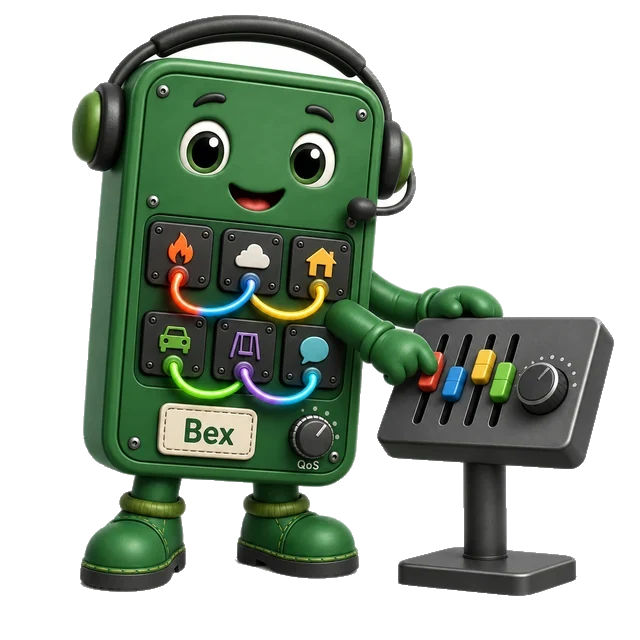
Choose a session based on what the client needs while it is offline. The strip follows that choice from the client role to a test of its return.
In the first panel, Bex separates a sensor that only sends from a device that receives commands. The next panel weighs saved subscriptions and queued messages against memory, a stable client ID, and the load when clients return. In the last panel, the receiver comes back and Bex tests its queue. The clock shows that saved state needs an expiry. Use this sequence to ask what must survive a break, how much space it needs, and how to check the return before choosing a session.
When should you use clean vs persistent sessions? Use this decision table:
| Use Case | Session Type | Rationale |
|---|---|---|
| Sensor publishing telemetry only | Clean | No need to queue messages to publisher; saves broker memory |
| Command receiver (actuator, device) | Persistent | Receives eligible QoS 1/2 commands published while it is offline; set expiry and a safety policy for stale commands |
| Mobile app (online only) | Clean | User expects fresh data on each app launch |
| Fleet tracking dashboard | Persistent | Receives eligible updates after brief disconnections; discard stale data |
| Temporary debug client | Clean | No need to preserve subscriptions |
| Critical infrastructure controller | Persistent | Session restoration helps avoid missing eligible commands; verify expiry, duplicate handling and final command outcome separately |
Session memory cost example:
- 1,000 devices with persistent sessions
- Average 5 subscriptions per device
- Average 10 queued messages per device
- Modeled session-and-queue subtotal: 1,000 × (5 kB + 10 kB) = 15 MB, before broker and index overhead
When persistent sessions create problems:
- Random client IDs (session never restored)
- No session expiry configured (orphaned sessions consume memory forever)
- Thousands of devices reconnecting simultaneously after broker restart
- Devices never cleaning up old sessions (memory leak)
Planning rule: Use persistent sessions when a receiver needs eligible offline messages, and clean sessions when it does not. In MQTT 5, request a suitable Session Expiry Interval; in Mosquitto, review its separate persistent_client_expiration setting. Apply queue and message-expiry limits as well.
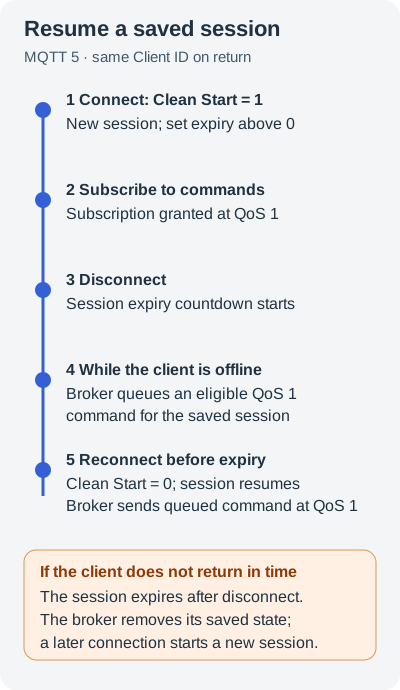
The client starts a new session with Clean Start set to one. It sets a positive session expiry and gets a command subscription at QoS one. After the client goes offline, the broker queues an eligible command. The client comes back with the same client ID and Clean Start set to zero. If it returns before expiry, the broker resumes the session and sends the queued command. If it does not return in time, the broker removes the saved session. A later connection starts a new session.
Knowledge Check: Session Type Selection
Use the decision table before answering: name the client role, decide whether it receives messages while offline, then pair the session choice with a stable client ID and QoS level.
Apply the decision framework above to select the correct session type.
Interactive Calculators
Use these tools to budget queue memory, reconnect load, delivery QoS, and local storage. Change one input at a time and check how the result shifts.
Session Queue Memory Calculator
Estimate broker memory consumed by persistent sessions for offline IoT devices. Adjust device count, offline duration, and message rate to see memory impact.
Reconnection Storm Simulator
Model the burst load when a broker restarts and all devices with persistent sessions reconnect simultaneously. See how exponential backoff with jitter spreads the load.
Effective QoS Calculator
MQTT QoS applies on each leg. Assuming the broker grants the requested subscription QoS, the subscriber leg uses no more than the minimum of publication and granted subscription QoS. The delivery counts below are hypothetical outage outcomes, not predictions from TCP packet loss.
Local Buffer Sizing Tool
When the MQTT broker does not queue messages for publishers, devices need local buffering. Calculate RAM or flash storage needed for offline message storage.
The calculators above turn the chapter’s rules into budgets: broker memory for subscribers, reconnection burst load, effective QoS for each delivery leg, and local storage for publishers. Keep those four budgets together in production design reviews.
Knowledge Check: Matching and Sequencing
Test your understanding of key MQTT session management concepts before moving on.
Knowledge check · self-test
Knowledge check
Test your understanding.
Label the Diagram
Trace the steps a client and broker take to resume a session.
Knowledge check · self-test
Knowledge check
Test your understanding.
Code Challenge
Apply the two expiry settings in this MQTT 5 example.
Knowledge check · self-test
Knowledge check
Test your understanding.
Deep-Dive Note: Session State Boundaries
A persistent session is a broker-side state budget, not a general reliability switch. The saved state has three parts. It holds subscriptions and queued QoS 1 or QoS 2 messages for offline subscribers. It also tracks QoS exchanges that have not finished. A sender using QoS 1 or 2 can use saved state to finish an exchange after a break, while a sleepy actuator that must receive commands during a five-minute wake cycle may depend on it. Review each client by asking what state is useful while this exact client is offline.
In MQTT 3.1.1, clean_session=false resumes stored state if it exists and keeps state after disconnect. With clean_session=true, the client starts fresh and discards state when it disconnects. MQTT 5 separates those choices with Clean Start plus Session Expiry Interval, so a client can resume existing state but still give the broker a retention budget. Record how long the client may be offline and which messages may queue. Set a cap in messages or bytes. Record when state expires. Plan how to subscribe again when Session Present is false.
QoS and session policy should be reviewed together because the broker also tracks packet identifiers for incomplete QoS exchanges. QoS 1 is PUBLISH -> PUBACK, so a lost PUBACK can create a duplicate. QoS 2 is PUBLISH -> PUBREC -> PUBREL -> PUBCOMP, so the broker and client need packet-id state to resume the exchange exactly once after a reconnect. A clean session discards that in-flight state; a persistent session can preserve it if the broker’s expiry and queue limits have not removed the session.
Keep one session test record. List the stable client ID, session type or MQTT 5 expiry, queue cap, and expected time offline. Test reconnects before and after expiry. Record Session Present in both tests. Check that the broker dashboard shows queue growth before the store fills up.
Summary
This chapter covered how to save session state and protect MQTT traffic.
- Clean Sessions forget state on disconnect. They suit simple senders that do not need offline queues.
- Persistent Sessions keep subscriptions and queue QoS 1/2 messages for offline clients. Devices that receive commands during sleep may need this state.
- Security: Use TLS with identity checks and topic access rules on a controlled broker. Port 8883 is the usual TLS port; the listener must be set up to use TLS.
- Common Pitfalls include expecting a broker to queue for a sender, random client IDs, QoS mismatch, and reconnect storms.
- Backoff with jitter spreads reconnect attempts when many devices return at once.
- Broker Configuration must set queue limits and session expiry. Budget memory for the full fleet.
Legacy illustrations moved from the chapter
These illustrations contain lettering and were moved here whole from the chapter page.
Session choice strip (CP-0085)
-
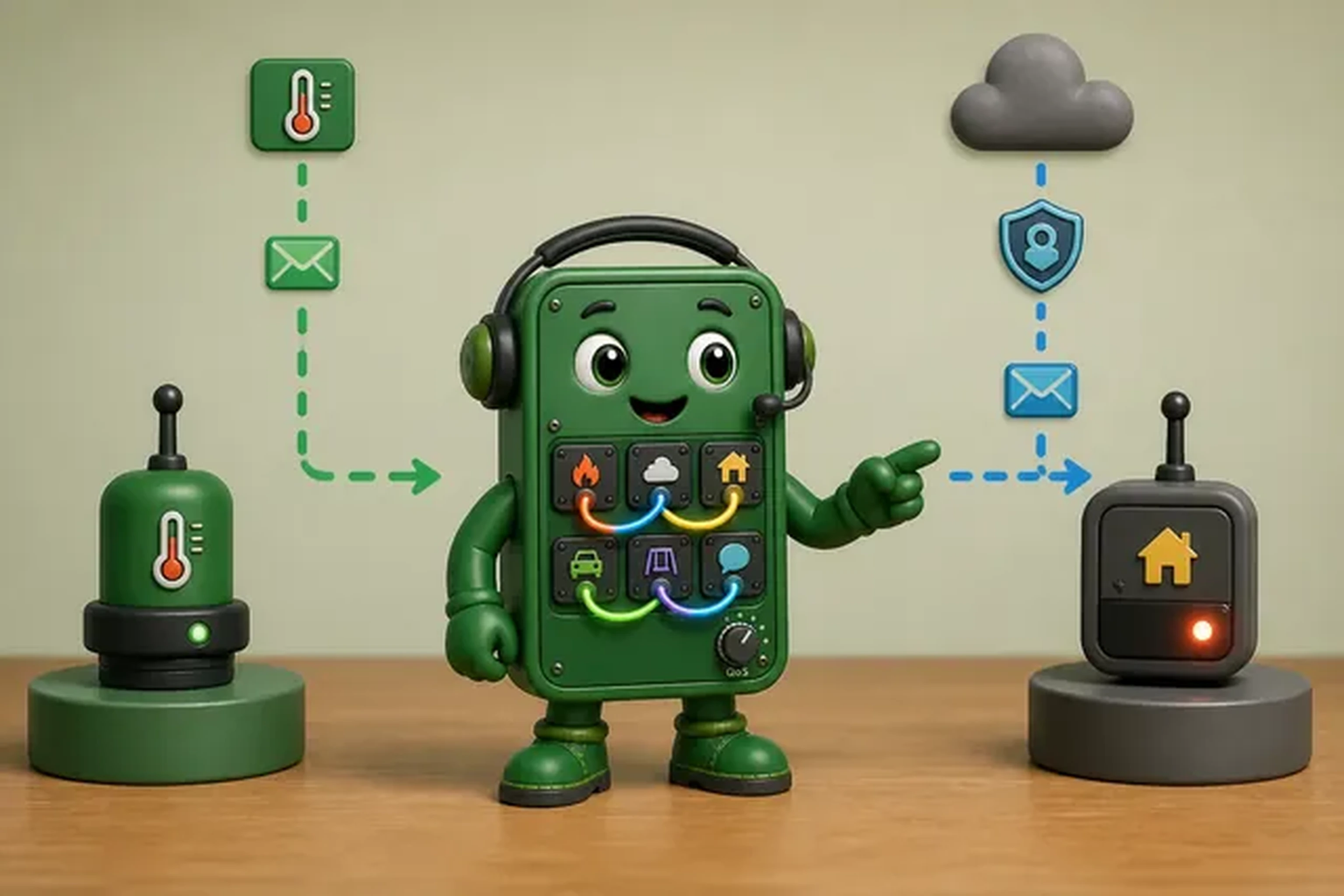
Start with the client role and whether it needs messages after a break.
-

Compare saved messages with memory, identity, and return-load costs.
-
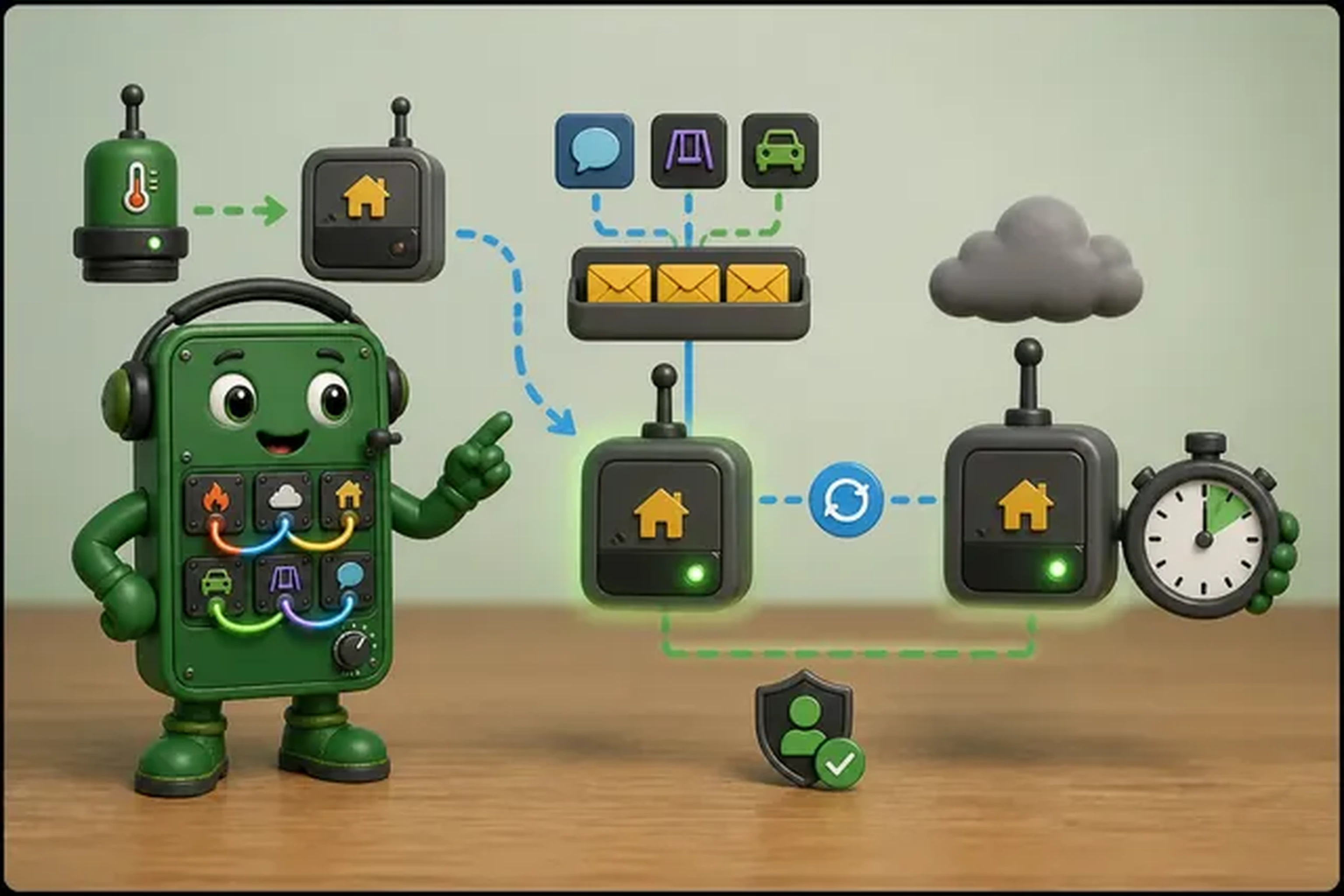
Test a return from offline, then set an end time for saved state.
Detail notes moved from the chapter
Historical protected source blocks retained for the chapter preservation check.