11 MQTT Production Operations
More
Depth: Practitioner
Progress saves as you read. Mark sections complete as you go; your progress appears in the sidebar.
11.1 Start With Release Evidence
Why now: Gather proof of link capacity and failover before the broker goes live. About 3–5 min (estimate)
This section: Start With Release Evidence — Production MQTT is not finished when a broker accepts a test publish.
Production MQTT is not finished when a broker accepts a test publish. A release review needs evidence for connection capacity, failover, queued sessions, retained messages, TLS, ACLs, monitoring, and rollback behavior. Read this chapter as the checklist that proves one MQTT path survives real load and real failure.
This is a long production chapter, so use it in stages:
- First size the broker cluster and prove that connection count, throughput, memory, and latency fit the fleet.
- Then harden the path with TLS, authentication, ACLs, and topic-level authorization.
- Next diagnose performance and reliability traps: QoS overuse, client ID collisions, and protocol bridging.
- Finally use the calculators, visual references, smart-building example, quizzes, and acceptance record as release evidence.
Checkpoints recap the operational decisions. Deep-dive notes and calculators are supporting evidence when you need to audit the numbers.
11.2 Learning Objectives
This section: Learning Objectives
By the end of this chapter, you will be able to:
- Design Scalable Architectures: Design MQTT broker clustering strategies for high availability and horizontal scaling
- Configure Security Layers: Configure TLS encryption, certificate-based authentication, and topic-level ACLs for production deployments
- Diagnose Performance Bottlenecks: Analyze broker metrics to identify and resolve CPU saturation, message throughput limits, and QoS overhead
- Evaluate QoS Trade-offs: Assess the cost and reliability implications of each QoS level and select the appropriate level for a given data type
- Construct Capacity Plans: Calculate memory, node count, and throughput requirements for a given IoT device fleet
- Distinguish Common Pitfalls: Justify design decisions that prevent client ID collisions, QoS misuse, and session misconfigurations in production
Key Concepts
This section: Key Concepts
- MQTT: Message Queuing Telemetry Transport — pub/sub protocol optimized for constrained IoT devices over unreliable networks.
- Broker: Central server routing messages from publishers to all matching subscribers by topic pattern.
- Topic: Hierarchical string (e.g., home/bedroom/temperature) used to route messages to interested subscribers.
- QoS Level: Quality of Service 0/1/2 trading delivery guarantee for message overhead.
- Retained Message: Last message on a topic stored by broker for immediate delivery to new subscribers.
- Last Will and Testament: Pre-configured message published by broker when a client disconnects ungracefully.
- Persistent Session: Broker stores subscriptions and pending messages allowing clients to resume after disconnection.
11.3 Prerequisites
This section: Prerequisites
Required Chapters:
- MQTT Architecture Patterns - Pub/sub concepts and topics
- MQTT QoS and Reliability - Delivery guarantees
Technical Background:
- TLS/SSL concepts
- Load balancing basics
- Database fundamentals (Redis, PostgreSQL)
Estimated Time: 15 minutes
11.4 MQTT Broker Clustering Architecture
Why now: Map broker nodes and client links before calculating cluster load. About 3–5 min (estimate)
This section: MQTT Broker Clustering Architecture — Before sizing individual nodes, inspect Figure 11.1 to identify which state must survive a broker failure and which paths add load beyond the incoming publication rate.
Clustering is one way to meet scalability and availability targets when a single broker is insufficient:
Before sizing individual nodes, inspect Figure 11.1 to identify which state must survive a broker failure and which paths add load beyond the incoming publication rate.
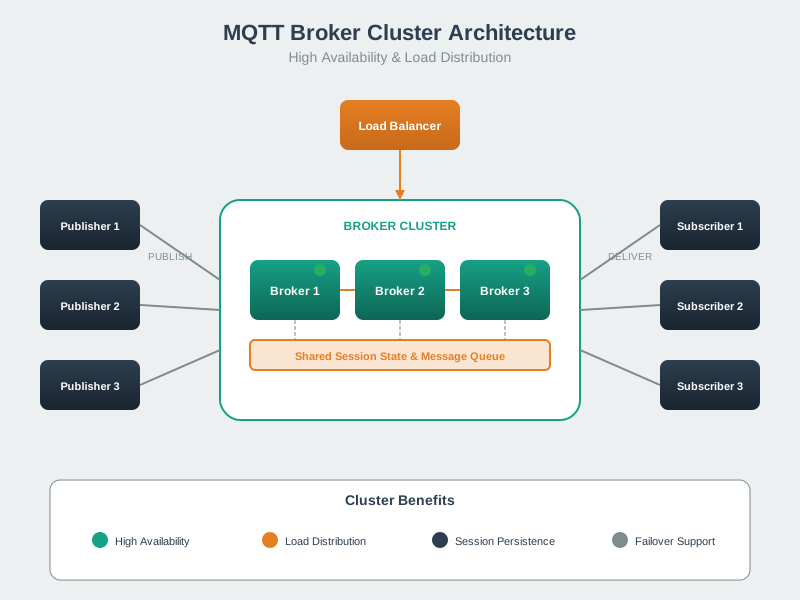
Read Figure 11.1 from the device connections through the load balancer into the three broker nodes. Then follow a publication across the inter-node path to a subscriber attached elsewhere, and finish at the shared session and message stores. The load balancer distributes connections, but correct failover also depends on replicated subscriptions, queued QoS traffic, and retained state; adding nodes alone does not supply those guarantees. That distinction sets up the layer tables and capacity calculation below: size connection handling, fan-out, replication, and durable state as separate parts of the production narrative.
11.4.1 Clustering Architecture Layers
Layer 1: IoT Devices (10,000+)
| Device Type | Role | Connection Pattern |
|---|---|---|
| Sensors | Publishers | Periodic data upload |
| Actuators | Subscribers | Command reception |
| Gateways | Pub/Sub | Bidirectional |
Layer 2: Load Balancer
| Function | Method |
|---|---|
| Distribution | Round Robin / Sticky Sessions |
| Monitoring | Health Checks |
| Ports | 1883 (TCP), 8883 (TLS) |
Layer 3: MQTT Broker Cluster
| Node | Connections | Inter-Node Communication |
|---|---|---|
| Broker Node 1 | ~3K–4K in the 10K+ device architecture shown | Broker-specific routing and state replication, if supported |
| Broker Node 2 | ~3K–4K in the 10K+ device architecture shown | Broker-specific routing and state replication, if supported |
| Broker Node 3 | ~3K–4K in the 10K+ device architecture shown | Broker-specific routing and state replication, if supported |
The separate 50,000-device sizing example below assigns about 16,667 connections to each of three nodes.
Layer 4: Shared Storage
| Store | Technology | Purpose |
|---|---|---|
| Session Store | Broker-specific durable or replicated store | Persistent sessions and subscriptions, if supported and configured |
| Message Persistence | Broker-specific persistence | Retained and queued messages, if supported and configured |
11.4.2 Put the Cluster Numbers on One Node
Scenario: 3-node cluster serving 50,000 IoT devices, each publishing every 30 seconds.
Load distribution:
With 5 subscribers per topic:
Memory requirements (4 kB decimal per connection + queues):
Latency budget:
Capacity headroom:
11.4.3 Capacity Planning Metrics
The following figures are vendor-published or illustrative orders of magnitude, not release limits. Check current vendor documentation and benchmark the selected broker with its actual TLS, QoS, fan-out and persistence settings.
| Metric | Illustrative value | High-performance reference | Measure before release |
|---|---|---|---|
| Connections/Node | 50K–100K | Mosquitto ~100K; EMQX 1M+ in vendor benchmarks | Simultaneous connections and reconnect bursts |
| Message Throughput | 100K msgs/s | 500K+ msgs/s in vendor-scale tests | Inbound publishes, fan-out and acknowledgments separately |
| Latency Target | <50 ms | <10 ms in favorable conditions | Required percentile at peak load |
| Memory per Connection | ~4 kB model assumption | Plus queue and retained storage | Live memory under the target workload |
This section:
 Checkpoint: Cluster Sizing
You now know:
The three-node example distributes 50,000 devices as about 16,667 connections per node. At one publication every 30 seconds and five deliveries per publication, the worksheet gives about 556 inbound and 2,780 outbound packets per second per node, plus an 83.335 MB connection-and-queue subtotal. Its 53 ms latency and 100,000-packet/s node limit are assumptions to benchmark, not broker guarantees.
This section:
11.5 Security Configuration
Why now: Protect production links and topics after the cluster path is known. About 3–5 min (estimate)
This section: Security Configuration — Default MQTT port 1883: Unencrypted - username, password, payload visible to network sniffers.
Default MQTT port 1883: Unencrypted - username, password, payload visible to network sniffers.
Secure MQTT port 8883: TLS-encrypted TCP tunnel.
11.5.1 TLS Configuration
client.tls_set(
    ca_certs="ca.crt",
    certfile="client.crt",
    keyfile="client.key"
)
This enables TLS with mutual authentication.
11.5.2 Security Layers
| Layer | Protection | Implementation |
|---|---|---|
| Transport encryption (TLS) | Prevents eavesdropping | Port 8883 |
| Authentication | Proves client identity | Username/password |
| Client certificates | Mutual TLS (mTLS) | Broker verifies client cert |
| Authorization (ACLs) | Topic access control | Per-client permissions |
11.5.3 Access Control Lists (ACLs)
Production example:
# Mosquitto acl_file entries (the broker config points acl_file to this file)
user sensor_device
topic write sensors/device_123/#
topic read commands/device_123
The sensor_device login can publish only under sensors/device_123/# and read commands/device_123; the example grants no access to other devices’ branches.
11.5.4 Why Alternatives Are Insufficient
- Application-layer encryption only: Misses metadata (topic names visible), doesn’t protect credentials
- VPN alone: Does not replace broker authentication or per-topic authorization
Cloud providers: AWS IoT Core supports X.509 or custom authentication; Azure IoT Hub supports X.509 or SAS tokens; HiveMQ Cloud defaults to username/password and offers other methods by plan. Use TLS and configure topic permissions for the chosen service. Never deploy production IoT with unencrypted MQTT.
11.6 Performance Troubleshooting
Why now: Compare broker CPU and message delay with the tested fleet load. About 3–5 min (estimate)
This section: Performance Troubleshooting
11.6.1 Symptom: Broker CPU at 100%, Message Delays
10,000 sensors: Test the chosen broker with the target connection count, publish rate, fan-out, TLS settings, and queued state. CPU saturation can come from connection churn, TLS handshakes, routing, acknowledgments, or other work.
Bottleneck analysis - CPU 100% suggests:
- QoS overhead: QoS 1 requires an acknowledgment. For 10,000 sensors each publishing once per second, the device-to-broker links carry about 20,000 MQTT control packets/s (10,000 PUBLISH + 10,000 PUBACK), before subscriber fan-out.
- Large messages: 10KB payloads x 10K/sec = 100MB/sec processing
- Complex ACLs: Authorization checks on every publish/subscribe
11.6.2 Solutions
| Solution | Impact | Implementation |
|---|---|---|
| Broker clustering | Distribute load | EMQX, VerneMQ native clustering |
| Optimize QoS | Measure packet and CPU reduction | Use QoS 0 where loss is acceptable |
| Reduce message size | 10x reduction | Send deltas, not full payloads |
| Batch messages | Fewer operations | Combine readings in single message |
| Edge brokers | Local aggregation | Per-floor/building brokers |
Benchmark reference:
| Broker | Throughput |
|---|---|
| HiveMQ Enterprise | ~1M msgs/sec |
| Mosquitto (single) | ~200K msgs/sec |
Production recommendations:
- Use managed MQTT services; AWS IoT Core auto-scales to millions of devices.
- Monitor broker metrics with Prometheus and Grafana.
- Implement backpressure or rate limiting on publishers.
11.7 Common Pitfalls
This section: Common Pitfalls
11.7.1 Pitfall 1: Using QoS 2 for All Messages
-

Wrong: The highest delivery level is best for every message. Match the level to loss, repeat, delay, and power needs.
The Mistake: Developers set QoS 2 (exactly-once delivery) for all messages, assuming higher QoS always means better reliability without considering the costs.
Why It Happens: QoS 2 sounds like the safest option, and developers don’t realize the significant overhead. The 4-way handshake (PUBLISH, PUBREC, PUBREL, PUBCOMP) seems like “extra safety” rather than a trade-off.
The Fix: Match QoS to actual requirements:
- QoS 0 for high-frequency sensor data (temperature every 5 seconds) - missing one reading is acceptable
- QoS 1 for important alerts and commands (door open, motion detected) - duplicates are acceptable, loss is not
- QoS 2 when exactly-once delivery on an MQTT leg is required; use application IDs, acknowledgments and state checks for single-execution actions
Packet-count impact: A completed QoS 2 exchange uses four MQTT control packets versus one for QoS 0 and two for QoS 1. For 10,000 sensors publishing once per second, that is 40,000 versus 10,000 control packets per second on the publisher-to-broker legs, before subscriber fan-out. Actual latency and battery impact need measurement on the target hardware and network.
Use Figure 11.2 to test that fix against message semantics before changing a fleet-wide default. The decision starts with what happens if one publication is lost or repeated, not with the assumption that a larger QoS number is always safer.
Read Figure 11.2 from the loss question to the duplicate question. If a later periodic sample replaces a missed one, QoS 0 avoids acknowledgement traffic. If delivery matters but the consumer can make duplicate processing safe, QoS 1 supplies retransmission with a simpler exchange. Reach QoS 2 only when both loss and duplicate delivery are unacceptable and the extra handshake is justified. This ordered choice connects the pitfall’s broker and battery cost to a per-message requirement rather than a universal setting.
11.7.2 Pitfall 2: Client ID Collisions
The Mistake: Using the same client ID across multiple devices, or using predictable client IDs like “sensor_1” without proper uniqueness guarantees. When two clients connect with the same ID, the broker disconnects the first client.
Why It Happens: In development, a single device works fine. In production with auto-scaling, containerized deployments, or device replacements, multiple instances may attempt to use the same client ID simultaneously.
The Fix: Generate globally unique client IDs using:
# Good: UUID-based client ID
import uuid
client_id = f"sensor_{uuid.uuid4().hex[:12]}"  # Use once at provisioning, then persist for reconnects

# Good: Device-specific identifier
client_id = f"sensor_{device_mac_address}_{deployment_id}"

# Bad: Sequential or predictable IDs
client_id = "sensor_1"  # Will collide with other "sensor_1" devices
Real Impact: Client ID collision causes constant reconnection loops where two devices fight for the same session. This creates:
- Intermittent message loss as each device is disconnected every few seconds
- Broker log flooding with connect/disconnect events
- Session takeover or loss of the expected persistent-session continuity
In a real fleet, a firmware update that hardcodes one client ID can turn thousands of healthy devices into a reconnection storm.
Checkpoint: Secure and Efficient Operations
You now know:
Use TLS, authentication and topic ACLs on the production connection. At 10,000 publishes per second, QoS 2 produces 40,000 control packets per second on the publisher legs versus 10,000 at QoS 0. Give each simultaneously connected device a unique, stable client ID so a duplicate connection does not take over its session.
11.8 Protocol Bridging
Why now: Map CoAP messages into MQTT only after the broker route is understood. About 3–5 min (estimate)
This section: Protocol Bridging
11.8.1 CoAP-MQTT Gateway
Protocol gateway bridges CoAP and MQTT by translating between request-response and publish-subscribe paradigms.
Architecture:
- CoAP sensors communicate with the gateway over CoAP/UDP
- The gateway forwards normalized events to the cloud broker over MQTT/TCP
- Applications publish commands and subscribe to device updates through the same MQTT broker
Gateway functions:
- CoAP->MQTT: Sensor POST to
coap://gateway/sensor/temp-> Gateway publishes tosensors/tempMQTT topic - MQTT->CoAP: Application publishes command to
commands/sensor1-> Gateway converts to CoAP PUTcoap://sensor1/config - Observe->Subscribe: CoAP Observe on sensor -> Gateway maintains subscription, forwards updates to MQTT
Benefits:
- Sensors use power-efficient CoAP/UDP locally
- Cloud services use reliable MQTT/TCP
- Gateway caches sensor data (reduce sensor wake time)
- Protocol translation invisible to both sides
Production examples: AWS IoT Greengrass (edge gateway with protocol translation), Eclipse IoT Gateway (open-source CoAP-MQTT bridge), Azure IoT Edge (custom modules)
Topology mapping:
| CoAP Operation | MQTT Equivalent |
|---|---|
RESTful resource /sensor/temp | Topic devices/{device_id}/sensor/temp |
| CoAP GET | MQTT subscribe |
| CoAP POST | MQTT publish |
| CoAP PUT | MQTT publish with retained flag |
11.9 Production MQTT in Plain Language
This section: Production MQTT in Plain Language
Think of production MQTT like running a postal distribution center:
| Home Setup | Production Setup |
|---|---|
| One post office | Multiple post offices (clustering) |
| No security | Locked mailboxes + ID verification (TLS + auth) |
| Manual sorting | Automated routing (load balancer) |
| Paper records | Database backup (Redis + PostgreSQL) |
The three things that break in production:
- Too many letters (messages) -> Add more post offices (broker nodes)
- Wrong addresses (client IDs) -> Make every mailbox unique (UUID)
- Thieves reading mail -> Encrypt everything (TLS on port 8883)
11.10 Interactive Calculators
This section: Interactive Calculators
11.10.1 MQTT Broker Cluster Sizing Calculator
Estimate the number of broker nodes, memory, and throughput required for your IoT deployment. Adjust device count, message frequency, and payload size to see how cluster requirements scale.
11.10.2 Cluster Availability Calculator
Calculate the expected uptime and annual downtime for your MQTT broker cluster based on node count and individual node reliability. See how adding redundant nodes dramatically improves availability.
11.10.3 QoS Overhead Comparator
Compare the message overhead, bandwidth cost, and processing impact of MQTT QoS levels 0, 1, and 2 for a given device fleet. See why matching QoS to data criticality is essential for production performance.
11.10.4 MQTT Infrastructure Cost Estimator
Estimate the monthly infrastructure cost for your production MQTT deployment including broker nodes, load balancer, session storage, and per-device cost breakdown.
11.11 Visual Reference Gallery
This section: Visual Reference Gallery — Use this reference diagram to connect the production calculations back to MQTT topic routing.
Use this reference diagram to connect the production calculations back to MQTT topic routing.
11.11.1 Visual: MQTT Topic Hierarchy
Before approving a production namespace, inspect Figure 11.3 to predict fan-out and ACL scope by comparing each concrete topic with exact and wildcard filters.
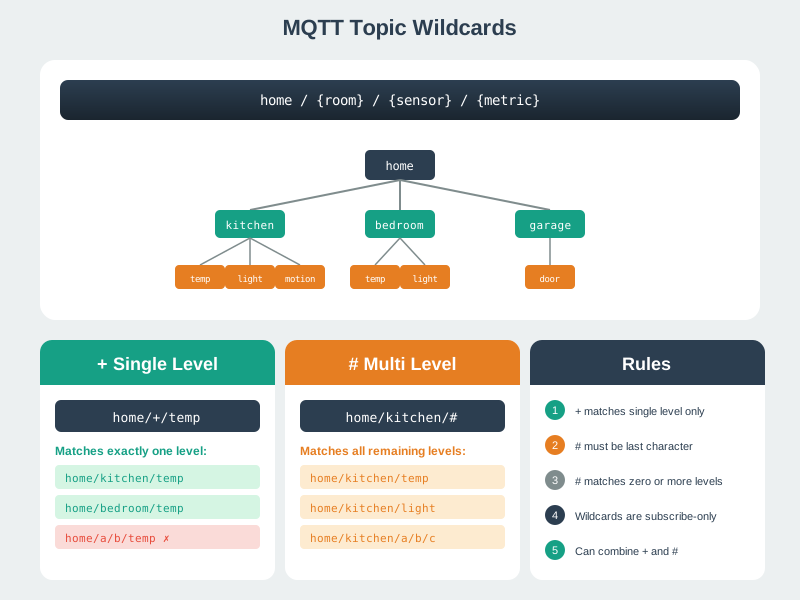
Test one topic against each filter. Note every mismatch. Read Figure 11.3 from a published topic across the candidate filters. An exact filter must match every level; + replaces one level; and a terminal # covers the remaining descendants. Then inspect the non-matches and invalid placements, including the separate treatment required for system topics. This comparison connects hierarchical naming to observable subscriber fan-out, giving production reviews a concrete way to detect over-broad subscriptions and permissions.
11.11.2 Interactive: MQTT Broker Clustering Workbench
11.12 Worked Example: Sizing an MQTT Broker Cluster for a Smart Building
Why now: Test the building sensor count against broker connections, fan-out and spare capacity. About 3–5 min (estimate)
This section: Worked Example: Sizing an MQTT Broker Cluster for a Smart Building — Scenario: A commercial real estate company is deploying IoT across a 40-floor office tower.
Scenario: A commercial real estate company is deploying IoT across a 40-floor office tower. Each floor has 80 sensors (temperature, humidity, CO2, occupancy, light) reporting every 30 seconds, plus 20 actuators (HVAC dampers, blinds, lighting zones) receiving commands. The system must achieve 99.9% uptime with sub-200 ms message delivery. Size the MQTT broker cluster.
Step 1: Calculate Connection and Message Load
| Metric | Calculation | Result |
|---|---|---|
| Total devices | 40 floors x (80 sensors + 20 actuators) | 4,000 devices |
| Sensor messages/sec | 3,200 sensors x (1 msg / 30 sec) | 107 msgs/sec |
| Command messages/sec | 800 actuators x (1 cmd / 60 sec avg) | 13 msgs/sec |
| Dashboard subscribers | 40 floor dashboards + 1 building-wide + 5 analytics | 46 subscribers |
| Fan-out messages/sec | 107 sensor msgs x 3 avg subscribers each | 321 msgs/sec |
| Total broker throughput | 107 + 13 + 321 | 441 msgs/sec |
Step 2: Determine Node Count
| Broker | Max Connections | Max Throughput | Nodes Needed (connections) | Nodes Needed (throughput) |
|---|---|---|---|---|
| Mosquitto (single node) | ~100K vendor-scale example; test 4,000 here | Illustrative 200K msgs/s; test 441 here | 1 if tested | 1 if tested |
| EMQX (cluster candidate) | 1M+ per-node vendor-scale benchmark; verify edition | Illustrative 500K msgs/s; include inter-node traffic | Size from measured limits | Size from measured limits |
These are vendor-published or illustrative comparison values, not a production guarantee. Check current documentation and test both connection capacity and failover under the chosen workload.
A single broker may handle this assumed load, subject to a load test. The 99.9% availability target also requires a recovery design and measured failover time.
Step 3: Design for 99.9% Uptime
99.9% uptime allows at most 8.76 hours of downtime in a 365-day year. If two nodes each had 99.5% availability, their failures were independent, and failover were instantaneous, the idealized parallel-availability calculation would be:
- Cluster availability:
1 - (1 - 0.995)^2 = 1 - 0.000025 = 99.9975% - Downtime:
0.000025 x 365 x 24 x 60 = 13.14 minutes/yearunder those idealized assumptions; shared dependencies and failover time lower real availability
Architecture candidate: A redundant broker deployment with a load balancer; verify the chosen broker’s session, queue and retained-state recovery under a node-failure drill.
Step 4: Memory Sizing per Node
- Connections per node:
4,000 / 2 = 2,000 - Memory per connection:
~4 KB (session state + subscription table) - Connection memory:
2,000 x 4 KB = 8 MB - Message queue:
2,000 x 100 x 200 bytes = 40 MBfor QoS 1 with a 100-message buffer - Routing table:
4,000 topics x 64 bytes = 256 KB - Broker overhead:
~200 MB illustrative placeholder; measure the selected broker runtime - Total per node:
~250 MB RAM
Sizing starting point: Test two 1 GB nodes under TLS, queue and failover load; the 250 MB worksheet omits several broker-specific costs and cannot prove a 4x operational headroom margin.
Step 5: QoS Selection by Data Type
| Data Type | QoS | Rationale |
|---|---|---|
| Temperature/humidity (periodic) | QoS 0 | Next reading in 30s supersedes any loss |
| CO2 level (safety threshold) | QoS 1 | Must trigger ventilation alert reliably |
| Occupancy count | QoS 0 | Frequent updates, loss tolerable |
| HVAC commands | QoS 1 | Must arrive; duplicates are idempotent (set temp to 22C) |
| Fire alarm integration | QoS 1 + retained | Life safety; retained ensures late-joining dashboards see alert |
Cost Summary:
| Component | Specification | Estimated Cost |
|---|---|---|
| Two broker VMs | 2 vCPU, 1 GB RAM each | $120/month (illustrative assumption) |
| Load balancer | 1 vCPU, 512 MB RAM | $30/month (illustrative assumption) |
| Durable state or replication | Broker-specific design | $25/month (illustrative placeholder) |
| Illustrative subtotal | Excludes support, traffic, storage, backup and labor | $175/month |
| Illustrative per-device subtotal | $175 / 4,000 devices | $0.04375/device/month |
Key Insight: The assumed $175/month subtotal divided by 4,000 devices is $0.04375 per device per month before omitted costs. The 99.9975% figure is an idealized two-node calculation, not a service guarantee. QoS 0 removes the QoS 1 acknowledgment packet on each publish leg; actual CPU savings require measurement.
This section:
Checkpoint: Release Evidence
You now know:
The worked example calls for a 4,000-connection and 441-msg/sec load test. A two-node calculation yields 99.9975% only if each node has 99.5% availability, failures are independent and failover adds no downtime. The illustrative $175/month subtotal is $0.04375 per device before omitted costs; obtain quotes and perform failover tests before release.
This section:
11.13 Knowledge Check
This section: Knowledge Check
11.13.1 Test Your Understanding
-
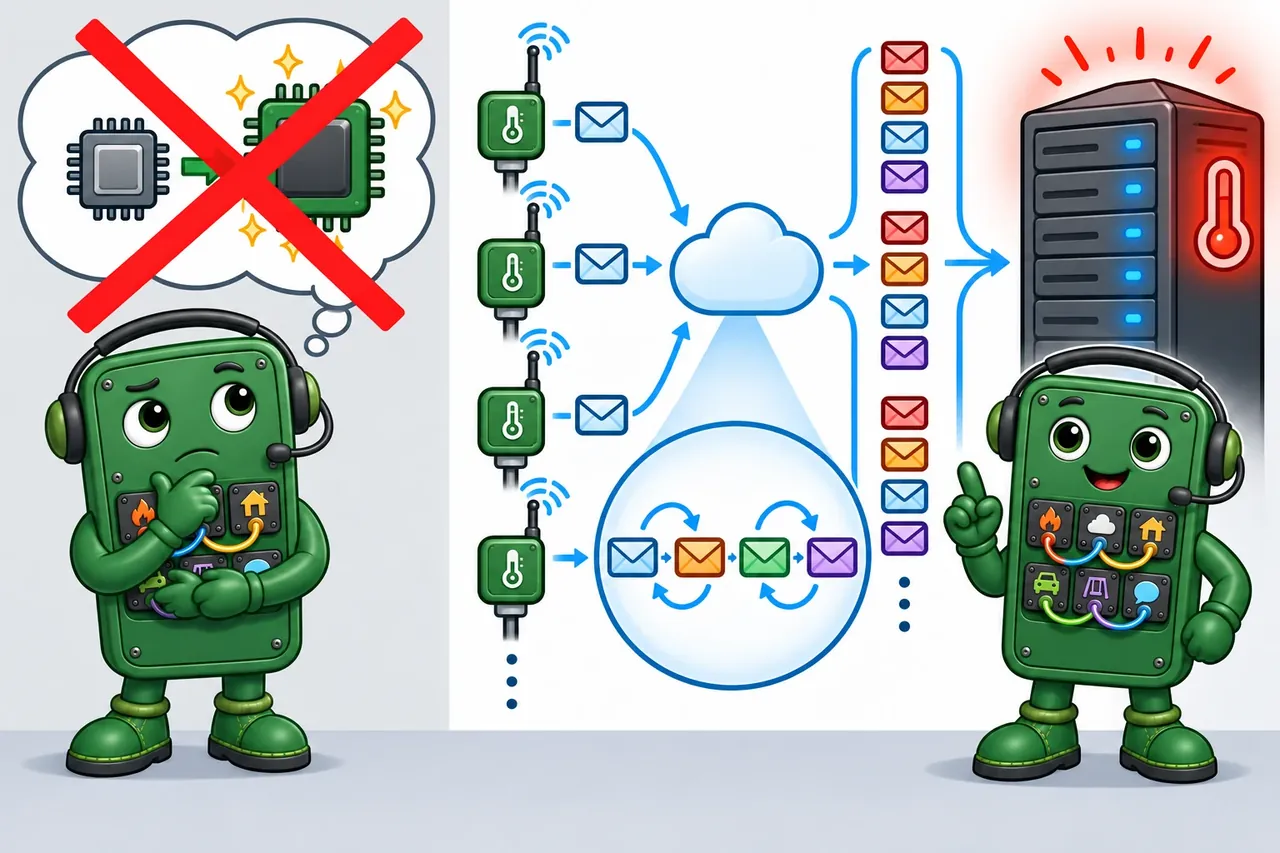
Wrong idea: upgrade the broker while keeping four-step delivery for every reading. It fails because that setting creates four network messages when an occasional reading may be missed.
Match each MQTT production concept to its correct definition or use case:
Arrange the following steps in the correct order for onboarding a new secure MQTT device to a production cluster:
11.14 See Also
This section: See Also
MQTT Series:
- MQTT Architecture - Foundation concepts and pub/sub patterns
- MQTT QoS and Reliability - Delivery guarantees
- MQTT Hands-On Labs - Load tests, client traces, and broker validation practice
Production Infrastructure:
- Cloud IoT Platforms - Managed MQTT services (AWS IoT Core, Azure IoT Hub)
- Monitoring and Observability - Broker metrics and alerting
- Distributed Databases - Horizontal scaling for session storage
Security:
- IoT Security Fundamentals - Threat models
- Encryption Principles - TLS transport encryption
- Certificate Management - PKI for device certificates
11.15 Label the Production Deployment
This section: Label the Production Deployment
11.16 Scale-Out Migration Evidence
Why now: Keep measured rollout results after sizing so a larger cluster can be judged. About 3–5 min (estimate)
This section: Scale-Out Migration Evidence — When moving from one MQTT broker to a production cluster, treat the migration as a measured rollout.
When moving from one MQTT broker to a production cluster, treat the migration as a measured rollout. Keep these artifacts with the deployment decision:
| Migration question | Evidence |
|---|---|
| Why does one broker no longer fit? | Connection count, publish rate, retained-message size, queue depth, CPU, memory, and reconnect storm traces |
| How are subscribers balanced? | Shared-subscription groups, consumer lag, and per-service processing limits |
| How is session state recovered? | Persistent-session policy, Redis or broker-native session replication, retained-message storage, and failover test result |
| How are regions or sites bridged? | Bridge/federation topic allowlist, loop-prevention rule, latency budget, and outage behavior |
| What proves the rollout is safe? | Canary broker, rollback route, dashboard alarms, and an agreed saturation threshold |
The key lesson from large smart-home and smart-building deployments is that clustering is not just adding nodes. It changes ownership of routing, session recovery, retained state, observability, and customer-impact rollback.
11.17 Deep-Dive Note: Production Observability Boundaries
This section: Deep-Dive Note: Production Observability Boundaries — A production MQTT review should prove that failures are visible before users report them.
A production MQTT review should prove that failures are visible before users report them. MQTT 5 reason codes separate authorization failures, quota exceeded, server busy, and other rejected operations instead of turning them into generic disconnects. Shared subscriptions such as \$share/workers/site/+/telemetry let a worker pool split live traffic so each message goes to one group member, while message expiry prevents stale commands from being delivered after their useful window. Flow control with Receive Maximum caps unacknowledged QoS 1/2 messages so a slow consumer cannot create unbounded broker memory pressure.
Monitor MQTT-specific signals, not just CPU and memory. Track client churn, connected clients, message rates, dropped messages, retained topic count, queued-session growth, queue age, authorization failures, TLS certificate expiry, bridge reconnects, queued bridge messages, and dropped forwards. Tie each metric to an owner, an alert threshold, and a controlled-fault test. Without those signals, a broker can look healthy while accepting connections and silently accumulating stale retained data or expired command queues.
Bridging is a security and namespace decision as much as a scaling tool. Give the bridge its own client id, TLS credentials, ACL, keep-alive, and topic prefix so forwarded traffic is distinguishable from local device traffic. Avoid broad # bridge filters unless the downstream broker is supposed to receive everything; otherwise one site can leak commands, retained state, or internal metrics into another environment.
The $SYS tree is the broker’s read-only metrics namespace, but it has a wildcard trap: ordinary # and + subscriptions do not match topic names beginning with $. Subscribe to \$SYS/# explicitly when collecting broker metrics.
Keep one production acceptance record: MQTT 5 reason-code dashboard, shared-subscription worker lag, message-expiry stale-command test, Receive Maximum backpressure test, \$SYS/# metrics subscription, bridge ACL and prefix review, and a controlled alert proving the operations team sees the fault before users do.
11.18 Reference: MQTT Quick Reference Card
This section: Reference: MQTT Quick Reference Card
11.18.1 MQTT Cheat Sheet
Check One Alarm Before Using the Card
Picture a freezer sensor sending a warm alarm to a phone. Telemetry means readings and status sent by a remote device. Message Queuing Telemetry Transport (MQTT) means a lightweight way for devices to exchange messages. A protocol means shared rules for that exchange. A broker means the service that passes messages from senders to receivers. A payload means the useful data inside one message.
Transmission Control Protocol (TCP) means a stream that checks order and delivery. Transport layer security means protection for that stream; it is called TLS. A WebSocket means a lasting two-way link between a browser and a service. Quality of service means the delivery promise chosen for a message; it is called QoS.
Send one alarm, repeat it, cut the link, reconnect, and reject a bad identity. Check what the phone receives and whether old data looks current.
This card recalls names and settings. It does not prove safety, security, or end-to-end delivery. Use the deeper chapters to choose a promise and test the complete path.
MQTT treats topics beginning with $ as system topics. A broad subscription such as # or +/status does not receive $SYS/... messages; subscribe with a filter that also starts with $, such as $SYS/#, when broker telemetry is the intended target.
11.19 Summary
This section: Summary
This chapter covered MQTT production deployment considerations:
- Broker clustering: Size from measured connections, publish rate, fan-out, TLS cost and stored state; verify failover and session recovery.
- Security configuration: Protect MQTT connections with TLS on port 8883, authenticate clients with passwords or mTLS certificates, and enforce per-topic ACLs.
- Performance optimization: Choose QoS per message family, reduce message size, batch messages where appropriate, and use edge brokers for local aggregation.
- Common pitfalls: Avoid unnecessary QoS 2 exchanges, keep client IDs unique and stable, and set session expiry to match command freshness.
- Protocol bridging: Test gateways between CoAP and MQTT, including topic mapping and authorization across broker namespaces.
11.20 Key Takeaway
This section: Key Takeaway — Production MQTT readiness means the fleet can be operated under failure.
Production MQTT readiness means the fleet can be operated under failure. Monitor broker health, connection churn, dropped messages, authorization failures, retained topics, and queue growth before those signals become outages.
Suggested MQTT route
Open printable teacher run sheet
Find help
3 reviewed answers.
Where should I start in a module?
Open the module page from the sidebar to see its chapters in order. Use the module map to return to a topic you need.
Modules and pathsReviewed
What can I try when a project does not work?
Check the symptom, then work through the diagnostic steps. Keep the error message and the smallest example that reproduces it.
When you are stuckReviewed
How do interactive examples work?
Use the interactive guide to check how examples and simulations work before changing your project.
Interactive examples guideReviewed