9 MQTT Python: Reliable Client Patterns
More
Depth: Practitioner
Progress saves as you read. Mark sections complete as you go; your progress appears in the sidebar.
9.1 Start With the Decision
This section: Start With the Decision — A Python MQTT program does not run only as a straight script after it connects.
A Python MQTT program does not run only as a straight script after it connects. MQTT sends device messages through a broker, a service that routes them by topic. A callback is a function the broker client runs when an event occurs. The useful work happens when that client calls back for connection, receipt, or disconnection. A retry is another attempt after a failed step.
9.2 Route Overview
This section: Route Overview — This is part 1 of 2.
This is part 1 of 2. Continue with MQTT Python: Reconnect and Backoff Timing.
9.3 Part Objectives
This section: Part Objectives
- Test python implementation patterns with a concrete scenario and pass criteria.
- Validate worked example: debugging “messages not received” issue with a concrete scenario and pass criteria.
9.4 Start With One Callback
Why now: Observe a broker event first so the Python callback has a clear job. About 7–11 min (estimate)
This section: Start With One Callback — A Python MQTT program is not a straight script after it connects.
A Python MQTT program is not a straight script after it connects. The useful work happens when the broker calls back: connected, message received, disconnected, retry needed. Treat each callback as a piece of evidence about the client’s state, then add reconnection, TLS, topic handling, and tests around that event loop.
- In 60 Seconds
- Start With One Callback
- Key Concepts
- For Beginners: MQTT Python Patterns
- Coding with Python
- Prerequisites
- Python Implementation Patterns
- Try It: MQTT Topic Wildcard Matcher
- Putting Numbers to It: loop_forever() vs loop_start() CPU Overhead
- Checkpoint: Callback and Loop Basics
- Security Pitfall: Public Brokers in Production
- Common Misconception: “Public Brokers Are Fine for Production”
- Quick Check: Public Brokers in Production
- Connection Limit Pitfall
- Pitfall: Broker Connection Limits Causing Silent Failures
- Try It: MQTT Connection Reason Code Explorer
- Checkpoint: Broker Exposure and Capacity
- TLS Timeout Pitfall
- Pitfall: TLS Handshake Timeout on Constrained Devices
- Worked Example: Debugging “Messages Not Received” Issue
This is a long chapter, so here is the shape of the journey:
- First you build the basic paho-mqtt callback pattern: connect, subscribe, receive, and keep the network loop alive.
- Then you harden that pattern against the two production failures that hurt most often: public brokers and broker connection limits.
- Next you add TLS timing margin, reconnection backoff, and a debugging flow that separates broker, topic, QoS, loop, and callback problems.
- Finally you use calculators and quizzes to choose capacity, battery, reliability, and callback designs deliberately instead of copying defaults.
Checkpoints recap the main implementation decisions. Anything titled “Deep dive” is supporting detail you can return to after the core pattern is working.
9.5 Learning Objectives
This section: Learning Objectives
By the end of this chapter, you will be able to:
- Implement Callback Architecture: Construct callback-based MQTT clients with
on_connect,on_message, andon_disconnecthandlers using proper error handling patterns - Configure Connection Reliability: Select between
loop_forever(),loop_start(), and manualloop()strategies and justify the choice for a given deployment scenario - Diagnose Security Vulnerabilities: Analyze why public brokers expose production data and evaluate the financial and operational risks of misconfigured MQTT deployments
- Design Secure MQTT Infrastructure: Configure private brokers with TLS encryption on port 8883, username/password authentication, and ACL topic permissions
- Apply TLS Timeout Strategies: Calculate appropriate connection timeouts for ESP32 and ESP8266 devices based on measured TLS handshake benchmarks and network conditions
- MQTT: Message Queuing Telemetry Transport — pub/sub protocol optimized for constrained IoT devices over unreliable networks.
- Broker: Central server routing messages from publishers to all matching subscribers by topic pattern.
- Topic: Hierarchical string (e.g., home/bedroom/temperature) used to route messages to interested subscribers.
- QoS Level: Quality of Service 0/1/2 trading delivery guarantee for message overhead.
- Retained Message: Last message on a topic stored by broker for immediate delivery to new subscribers.
- Last Will and Testament: Pre-configured message published by broker when a client disconnects ungracefully.
- Persistent Session: Broker stores subscriptions and pending messages allowing clients to resume after disconnection.
9.6 For Beginners: MQTT Python Patterns
This chapter shows you how to implement MQTT in Python, one of the most beginner-friendly programming languages. You will learn common patterns for connecting to brokers, publishing sensor data, and handling incoming messages. If you can write basic Python, you can build IoT applications with MQTT.
Register on_message, connect to the broker, subscribe to the intended topics (for example in on_connect so reconnections restore them), and keep the network loop running before expecting message callbacks. Handle disconnects with bounded exponential backoff so a restart or Wi-Fi outage does not leave the client silent or overload the broker. Use loop_start() when the application must keep reading sensors while networking continues in a background thread.
9.7 Prerequisites
This section: Prerequisites
Before diving into this chapter, you should be familiar with:
- MQTT Publisher-Subscriber Setup: Basic publisher/subscriber creation and simulator usage
- MQTT Publish-Subscribe Basics: Core MQTT concepts including topics, brokers, and message flow
- Python programming: Experience with callbacks, exception handling, and library installation
9.8 Python Implementation Patterns
Why now: Turn the working callback into a client that can handle connections and messages. About 7–11 min (estimate)
This section: Python Implementation Patterns — This section provides practical MQTT patterns for IoT applications using the paho-mqtt library.
This section provides practical MQTT patterns for IoT applications using the paho-mqtt library.
First build the smallest working client. Once callbacks and the network loop are in the right order, every later production concern has a clear place to attach.
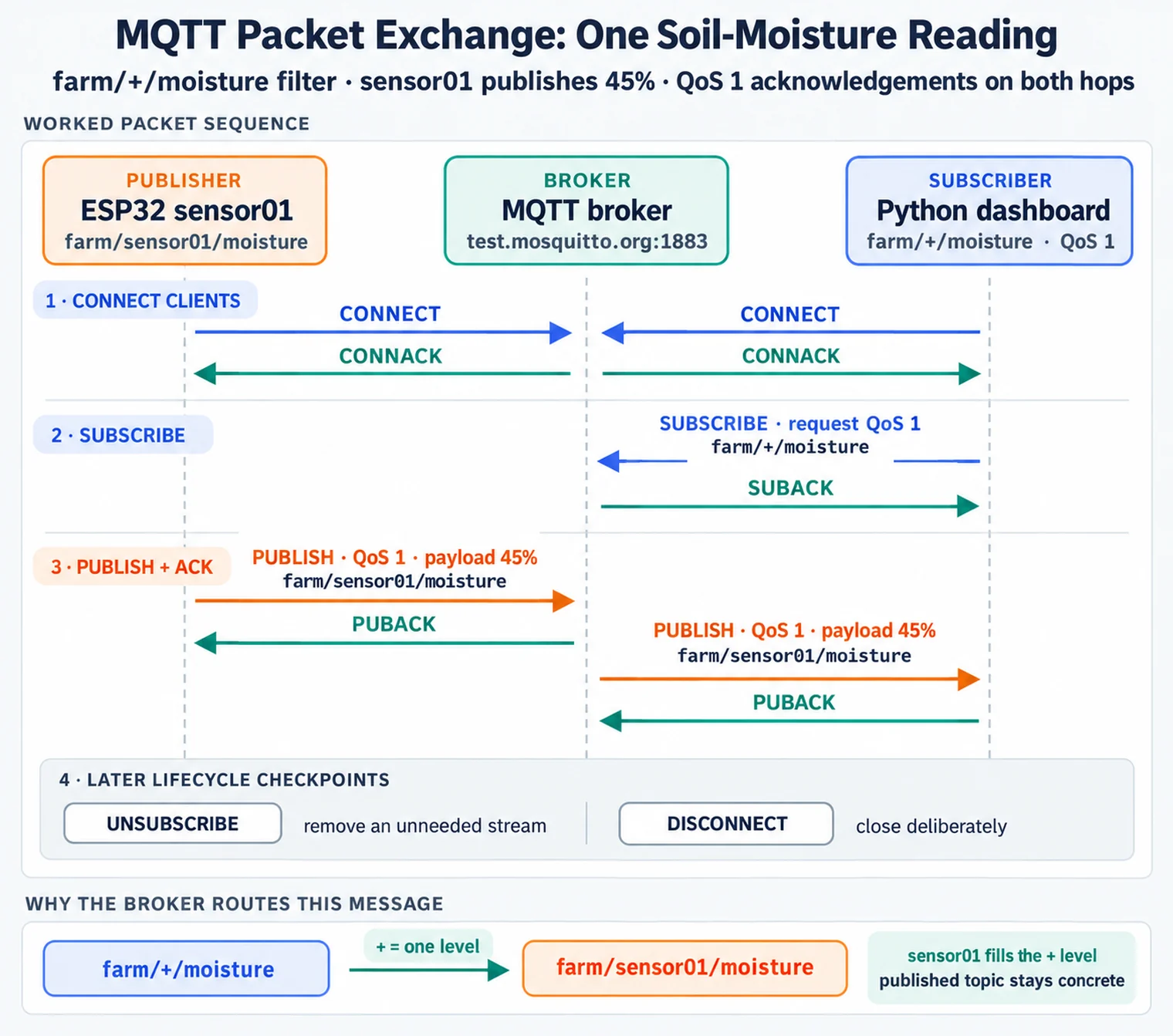
Read Figure 9.1 in connection-lifecycle order. Connect first establishes the session and its identity; subscribe registers the filters that feed callbacks; publish sends application data independently of those subscriptions; unsubscribe removes an unneeded stream; and disconnect closes the session deliberately. The basic client below implements the first three checkpoints, giving the later reconnection, shutdown, and security patterns a known place in the same lifecycle.
9.8.1 Basic MQTT Client Pattern
# Requires paho-mqtt 2.0+
import paho.mqtt.client as mqtt

def on_connect(client, userdata, flags, reason_code, properties):
    if reason_code == 0:
        print("Connected successfully")
        client.subscribe("sensors/#")
    else:
        print(f"Connection failed with reason code {reason_code}")

def on_message(client, userdata, msg):
    print(f"Topic: {msg.topic}, Payload: {msg.payload.decode()}")

client = mqtt.Client(mqtt.CallbackAPIVersion.VERSION2)
client.on_connect = on_connect
client.on_message = on_message
client.connect("test.mosquitto.org", 1883, 60)
client.loop_forever()
Key patterns demonstrated:
- Automatic reconnection with
loop_forever() - Topic wildcards for subscribing (
sensors/#) - Callback-based message handling
Python paho-mqtt provides two loop modes. loop_forever() runs the network loop in the calling thread, while loop_start() runs it in a background thread. Both wait for socket activity; neither is inherently a busy poll.
Elapsed time per loop cycle (illustrative):
Where: Interpret the terms in execution order. Start with , elapsed time waiting on socket activity or a timeout; this is generally not CPU processing time. Next add to parse MQTT packets and acknowledgements, then for application work. Measure CPU use separately from elapsed wait time.
Busy or near-zero timeout loop:
A busy or near-zero timeout loop wakes frequently even when there is no useful MQTT work. Follow the consequence from wake-up rate to compute load and then energy: an accidental busy poll can consume a full core, and a battery-powered device loses the long sleep intervals that normally control average current.
Background loop with an ordinary socket wait:
A background loop with an ordinary socket wait sleeps until socket activity or a timeout while the calling thread remains available for other work. That is a concurrency choice; it does not by itself lower the network loop’s idle wake-up rate relative to loop_forever().
Battery impact:
For battery impact, compare the two paths directly. Constant wake-ups keep the CPU and possibly the radio path active more often than necessary; sleeping between packets creates more opportunities for lower-power states. The exact saving still depends on the board, radio state, TLS configuration, and sensor duty cycle, so the final step is measurement on the target hardware rather than treating the loop API as a power guarantee.
Recommendation:
Use loop_forever() when the calling thread can be devoted to MQTT. For applications that do other work in that thread, use loop_start() or integrate loop() with a disciplined main loop. Measure idle CPU and energy in the final design.
 Checkpoint: Callback and Loop Basics
You now know:
A paho-mqtt 2.0+ client should assign callbacks before it connects, then keep loop_forever(), loop_start(), or a disciplined manual loop() running. Topic filters are routing rules: sensors/# captures a branch, + matches one level, and # matches zero or more levels. Port 1883 is plain MQTT for learning and local testing; production security starts later with TLS on port 8883.
The next question is not “can the Python client connect?” but “who else can see or inject the traffic when it does connect?”
9.9 Security Pitfall: Public Brokers in Production
This section: Security Pitfall: Public Brokers in Production
9.10 Quick Check: Public Brokers in Production
This section: Quick Check: Public Brokers in Production
9.11 Connection Limit Pitfall
This section: Connection Limit Pitfall — After access control and capacity are sized, the remaining connection risk is timing: constrained devices can be correct but still time out during TLS setup.
The Mistake: Developers deploy IoT systems without considering broker connection limits. They test with 10-20 devices successfully, then deploy 500+ devices to production. New devices fail to connect with cryptic errors like “connection refused” or timeout, while existing connections work fine.
Why It Happens: MQTT brokers and host operating systems impose connection and resource limits that vary by deployment. Each TCP connection consumes a socket and broker memory; TLS and queued session state add more. At a configured limit, new connections may be refused or time out, depending on the broker and failure point.
The Fix: Calculate connection requirements before deployment. Configure broker limits explicitly. Implement connection health monitoring and alerting when approaching 80% capacity. Use connection pooling or MQTT bridge patterns for high-scale deployments.
# Inspect the deployed Mosquitto configuration and host file-descriptor limit
grep -R '^[[:space:]]*max_connections' /etc/mosquitto/
ulimit -n

# mosquitto.conf - Production configuration for 5,000 devices
max_connections 6000        # 20% headroom over expected devices
max_queued_messages 1000    # Per-client queue limit
max_inflight_messages 20    # In-flight QoS 1/2 messages
memory_limit 1073741824     # 1GB memory cap

# OS-level: Increase file descriptor limits
# /etc/security/limits.conf
# mosquitto soft nofile 65535
# mosquitto hard nofile 65535

# /etc/sysctl.conf
# net.core.somaxconn = 4096
# net.ipv4.tcp_max_syn_backlog = 4096
# Client-side connection monitoring
import paho.mqtt.client as mqtt
def on_connect(client, userdata, flags, reason_code, properties):
if reason_code == 0:
print("Connected successfully")
elif reason_code == 134: # MQTT 5 reason 0x86
print("ERROR: Connection refused - bad username or password")
elif reason_code == 136: # MQTT 5 reason 0x88
print("ERROR: Server unavailable - inspect broker logs")
elif reason_code == 0x9F: # MQTT 5 connection rate exceeded
print("ERROR: Connection rate exceeded - implement backoff")
else:
print(f"Connection refused: {reason_code}")
# Monitor broker capacity via $SYS topics
def monitor_broker_capacity(client):
client.subscribe("$SYS/broker/clients/connected")
client.subscribe("$SYS/broker/clients/maximum")
def on_sys_message(client, userdata, msg):
if "connected" in msg.topic:
connected = int(msg.payload.decode())
max_clients = userdata.get("max_clients", 1024)
usage_pct = (connected / max_clients) * 100
if usage_pct > 80:
print(f"WARNING: Broker at {usage_pct:.1f}% capacity ({connected}/{max_clients})")Illustrative capacity worksheet: Assume 20% device headroom, two connections per backend service, and three per monitoring tool. For 1,000 devices, 5 backend services and 2 monitoring tools, that is (1000 x 1.2) + (5 x 2) + (2 x 3) = 1,216 planned connection slots. Validate the actual connection pattern and reconnect burst before setting a broker limit.
Checkpoint: Broker Exposure and Capacity
You now know:
Use a controlled broker with TLS, authentication, ACLs and monitoring for production traffic. The worksheet assumes 20% device headroom and extra backend and monitoring connections, giving 1,216 planned slots for its stated fleet. Treat the 80% alert threshold as a chosen warning policy, then test it against the broker’s real capacity and reconnect load.
After access control and capacity are sized, the remaining connection risk is timing: constrained devices can be correct but still time out during TLS setup.
9.12 TLS Timeout Pitfall
This section: TLS Timeout Pitfall — By this point the client can fail gracefully: it knows how to connect securely, interpret reason codes, and test the message path.
The Mistake: Developers enable TLS (port 8883) for production security, test on a fast development machine, and then reuse the same timeout settings on constrained Wi-Fi devices. In the field, slower crypto, Wi-Fi reconnects, network latency, and broker load can push the handshake beyond a default timeout and cause intermittent connection failures.
Why It Happens: TLS handshakes perform key exchange and certificate validation using algorithms chosen by the endpoints. Their CPU and elapsed-time cost varies with hardware, network path and broker load. A timeout copied from a laptop test can be too short after Wi-Fi reconnect and TLS negotiation on the target device.
The Fix: Measure connection and TLS handshake times on the device and network, then configure supported timeout and retry settings with margin. TLS session resumption can reduce a repeated handshake when both endpoints support and negotiate it. Provision device certificates before deployment when that is part of the authentication design.
// ESP32: Configure generous TLS timeouts
#include <WiFiClientSecure.h>
#include <PubSubClient.h>

WiFiClientSecure espClient;
PubSubClient mqttClient(espClient);

void setup() {
    // Load CA certificate (or use setInsecure() for testing only)
    espClient.setCACert(root_ca);

    // Increase TCP timeout for TLS handshake (default is often 10s)
    espClient.setTimeout(60000);  // 60 seconds for slow TLS

    // Configure MQTT client with longer keepalive
    mqttClient.setServer(mqtt_server, 8883);
    mqttClient.setKeepAlive(120);  // 2 minutes (allows for slow reconnects)
    mqttClient.setSocketTimeout(60);  // 60 second socket timeout
}

bool connectWithRetry() {
    int attempts = 0;
    while (!mqttClient.connected() && attempts < 5) {
        Serial.printf("TLS connect attempt %d...\n", attempts + 1);
        unsigned long start = millis();

        if (mqttClient.connect(client_id, mqtt_user, mqtt_pass)) {
            unsigned long elapsed = millis() - start;
            Serial.printf("Connected in %lu ms\n", elapsed);
            return true;
        }

        attempts++;
        // Exponential backoff: 10s, 20s, 40s, 80s, 160s
        int delay_ms = 5000 * (1 << attempts);
        Serial.printf("Failed, retrying in %d ms\n", delay_ms);
        delay(delay_ms);
    }
    return false;
}
# Python paho-mqtt: TLS with extended timeout
import ssl
import paho.mqtt.client as mqtt
client = mqtt.Client(mqtt.CallbackAPIVersion.VERSION2)
# Configure certificate validation for TLS
context = ssl.create_default_context()
context.check_hostname = True
context.verify_mode = ssl.CERT_REQUIRED
context.load_verify_locations("/path/to/ca.crt")
# In paho-mqtt 2.1, connect_timeout (default 5 s) bounds the TCP connect.
client.connect_timeout = 5
client.tls_set_context(context)
# paho-mqtt 2.1 sets the socket timeout to keepalive during the TLS handshake.
# Here the TLS handshake can wait up to 120 s; measure and tune both timeouts.
client.connect(broker, 8883, keepalive=120)
client.loop_start()Timing guidance: Measure handshake time on the real board, network, certificate chain, and broker path. Then configure a timeout with enough margin for Wi-Fi reconnects, broker load, retries, and clock drift instead of copying a laptop default into firmware.
Scenario: A developer deploys 20 ESP32 soil moisture sensors. The Python dashboard connects successfully but doesn’t receive any sensor messages. The Serial Monitor shows “Published: 45%” but the dashboard stays empty.
Step 1: Verify Broker Connectivity
# Terminal 1: Subscribe to the intended sensor branch; -d prints CONNACK/SUBACK evidence
mosquitto_sub -d -h test.mosquitto.org -t 'farm/+/moisture' -v

# A successful SUBACK proves the subscription was accepted; wait for sensor traffic.Result: The client receives SUBACK but no sensor messages. A bare # filter is restricted on this public test service and would not include \$SYS topics in any case.
Step 2: Check Topic Naming
# Sensors publish to:
"farm/sensor01/moisture"  # ESP32 code

# Dashboard subscribes to:
"farm/+/moisture"  # Python code - this SHOULD match

# But wait - check for typos!
print(f"Subscribing to: {TOPIC}") # Add debug printResult: Dashboard output shows Subscribing to: farm//moisture — Double slash! Python string formatting error.
Step 3: Verify QoS Match
# A QoS-capable publisher sends at QoS 1
publisher.publish(topic, payload, qos=1)

# Python dashboard subscribes with QoS 0
dashboard.subscribe("farm/+/moisture", qos=0)
What this means: The broker can acknowledge QoS 1 reception from the publisher yet deliver to this subscriber at QoS 0. QoS 0 has no MQTT acknowledgment on the subscriber leg. Neither setting explains a complete absence of messages when the topic filter is wrong; packet loss percentages cannot be inferred from a link-loss percentage because TCP retransmits packets.
Step 4: Check client.loop()
# BAD: Developer forgot to call loop
def main():
    client.connect(BROKER, 1883)
    client.subscribe("farm/+/moisture")
    while True:
        time.sleep(1)  # WRONG: No network processing!

# GOOD: Call loop to process incoming packets
def main():
    client.connect(BROKER, 1883)
    client.subscribe("farm/+/moisture")
    client.loop_forever()  # Blocks and processes messages
Step 5: Final Fix
# Corrected dashboard code
BROKER = "test.mosquitto.org"
TOPIC = "farm/+/moisture"  # Fixed double-slash typo

def on_connect(client, userdata, flags, reason_code, properties):
    print(f"Connected. Subscribing to: {TOPIC}")
    client.subscribe(TOPIC, qos=1)  # Match publisher QoS

def on_message(client, userdata, msg):
    print(f"Received: {msg.topic} = {msg.payload.decode()}")

client = mqtt.Client(mqtt.CallbackAPIVersion.VERSION2)
client.on_connect = on_connect
client.on_message = on_message
client.connect(BROKER, 1883)
client.loop_forever()  # Ensures callbacks are invoked
Debugging Checklist:
- ✓ Verify broker reachability (
mosquitto_sub -h BROKER -t '#') - ✓ Check topic spelling (add debug prints for actual subscriptions)
- ✓ Match QoS levels between publisher and subscriber
- ✓ Ensure
client.loop(),loop_start(), orloop_forever()is called - ✓ Verify callbacks are assigned BEFORE
connect()
Lesson: Most “MQTT not working” issues are client-side configuration errors, not protocol problems. Systematic debugging with mosquitto_sub can quickly expose topic, subscription, and message-loop problems.
By this point the client can fail gracefully: it knows how to connect securely, interpret reason codes, and test the message path. The next step is to make retry behavior predictable instead of noisy.
9.13 Continue to the Next Part
This section: Continue to the Next Part — Carry this evidence into MQTT Python: Reconnect and Backoff Timing, which begins with Try It: Exponential Backoff Timing Visualizer.
Carry this evidence into MQTT Python: Reconnect and Backoff Timing, which begins with Try It: Exponential Backoff Timing Visualizer.
Suggested MQTT route
Open printable teacher run sheet
Find help
3 reviewed answers.
Where should I start in a module?
Open the module page from the sidebar to see its chapters in order. Use the module map to return to a topic you need.
Modules and pathsReviewed
What can I try when a project does not work?
Check the symptom, then work through the diagnostic steps. Keep the error message and the smallest example that reproduces it.
When you are stuckReviewed
How do interactive examples work?
Use the interactive guide to check how examples and simulations work before changing your project.
Interactive examples guideReviewed