7 MQTT Security Fundamentals

More
Depth: Practitioner
Progress saves as you read. Mark sections complete as you go; your progress appears in the sidebar.
7.1 Start With The Command Nobody Else Should See
Why now: Trace a private command before deciding where MQTT needs protection. About 14–20 min (estimate)
This section: Start With The Command Nobody Else Should See — MQTT security is easiest to understand with one dangerous message: factory/line1/valve/open.
MQTT security is easiest to understand with one dangerous message: factory/line1/valve/open. The broker must know who sent it, whether the connection is encrypted, which clients are allowed to publish or subscribe, and what audit trail proves the decision. TLS, authentication, ACLs, and hardening all serve that one review question.
7.2 Learning Objectives
This section: Learning Objectives
By the end of this chapter, you will be able to:
- Implement Transport Security: Configure TLS/SSL on port 8883 for encrypted MQTT communication and explain why plaintext port 1883 is unacceptable in production
- Compare Authentication Methods: Distinguish between username/password, client certificates, and JWT-based authentication, and justify when each is most appropriate
- Design Access Control Policies: Construct topic-level ACL rules that enforce least-privilege access for sensors, actuators, and dashboards
- Analyze Attack Surfaces: Evaluate which attack vectors (eavesdropping, injection, impersonation, DoS) remain open under different security configurations
- Diagnose Security Pitfalls: Identify and correct common mistakes including hardcoded credentials, overly permissive ACLs, and disabled certificate validation
- Calculate Security Trade-offs: Assess TLS handshake overhead, JWT token lifetime, and ACL rule complexity to select appropriate configurations for constrained IoT deployments
- MQTT: Message Queuing Telemetry Transport — pub/sub protocol optimized for constrained IoT devices over unreliable networks.
- Broker: Central server routing messages from publishers to all matching subscribers by topic pattern.
- Topic: Hierarchical string (e.g., home/bedroom/temperature) used to route messages to interested subscribers.
- QoS Level: Quality of Service 0/1/2 trading delivery guarantee for message overhead.
- Retained Message: Last message on a topic stored by broker for immediate delivery to new subscribers.
- Last Will and Testament: Pre-configured message published by broker when a client disconnects ungracefully.
- Persistent Session: Broker stores subscriptions and pending messages allowing clients to resume after disconnection.
7.3 For Beginners: MQTT Security
Securing MQTT means protecting the data your IoT devices send and receive. This includes encrypting communications (so nobody can eavesdrop), authenticating devices (so only trusted devices connect), and authorizing access (so devices can only see the data they should). Without security, anyone could read or inject fake sensor data.
Protect the link to the broker with TLS so an observer cannot read the temperature readings in transit. Authenticate each device with a credential or certificate. Then authorise its topic operations: a temperature publisher may write to garden/temperature but must not publish to security/door-lock. Test each layer independently.
7.4 Prerequisites
This section: Prerequisites
Before diving into this chapter, you should be familiar with:
- MQTT Publish-Subscribe Basics: Understanding topics, wildcards, and broker architecture
- MQTT Quality of Service: Understanding QoS levels and session management
7.5 Why MQTT Security Matters
Why now: Connect exposed topics and payloads to the device actions they could affect. About 14–20 min (estimate)
This section: Why MQTT Security Matters
Without proper security, attackers can:
- Eavesdrop on sensor data (privacy breach)
- Publish fake commands (actuator manipulation)
- Deny service (flood broker with messages)
- Impersonate devices (inject malicious data)
Every production MQTT deployment MUST implement:
- Encryption (TLS/SSL)
- Authentication (verify identity)
- Authorization (access control)
7.6 Transport Layer Security (TLS/SSL)
Why now: Encrypt the link after you see what plain MQTT reveals. About 14–20 min (estimate)
This section: Transport Layer Security (TLS/SSL)
Always use MQTTS (MQTT over TLS) in production:
| Port | Protocol | Security |
|---|---|---|
| 1883 | MQTT | Unencrypted (testing only) |
| 8883 | MQTTS | TLS encrypted (production) |
7.6.1 Python Example with TLS
# Requires paho-mqtt 2.0+
import paho.mqtt.client as mqtt
import ssl

client = mqtt.Client(mqtt.CallbackAPIVersion.VERSION2)

# Configure TLS
client.tls_set(
    ca_certs="/path/to/ca.crt",      # Certificate Authority
    certfile="/path/to/client.crt",  # Client certificate
    keyfile="/path/to/client.key",   # Client private key
    tls_version=ssl.PROTOCOL_TLS_CLIENT
)

# Connect to secure port
client.connect("broker.example.com", 8883)
7.6.2 ESP32 Example with TLS
#include <WiFiClientSecure.h>
#include <PubSubClient.h>

// Root CA certificate (from broker)
const char* ca_cert = R"(
-----BEGIN CERTIFICATE-----
MIIDxTCCAq2gAwIBAgIJAJC1...
-----END CERTIFICATE-----
)";

WiFiClientSecure espClient;
PubSubClient client(espClient);

void setup() {
    espClient.setCACert(ca_cert);
    client.setServer("broker.example.com", 8883);
}
7.7 Authentication Methods
Why now: Check client identity once the connection is protected. About 14–20 min (estimate)
This section: Authentication Methods
7.7.1 Username/Password Authentication
The simplest authentication method:
client.username_pw_set("device_001", "SecurePassword123!")
client.connect("broker.example.com", 8883)
Best practices:
- Use unique credentials per device
- Store passwords securely (not in source code)
- Rotate credentials periodically
- Use strong passwords (16+ characters)
7.7.2 Client Certificate Authentication
Client certificates can give stronger client authentication than passwords when each device has a unique certificate and its private key remains protected; the TLS handshake proves possession of that key.
client.tls_set(
    certfile="/path/to/device.crt",
    keyfile="/path/to/device.key"
)
# No username/password needed - certificate proves identity
Advantages:
- No password to leak or brute-force
- Device identity cryptographically verified
- Easier to revoke (add to Certificate Revocation List)
Enabling TLS on MQTT adds a handshake cost per new TLS connection. The following simplified, full-handshake model assumes a 100 ms RTT and excludes TCP setup, certificate validation, processing, and retransmissions:
TLS 1.2 handshake (2 RTTs):
TLS 1.3 handshake (1 RTT, improved):
Energy cost (8 mA TX current, 6 handshake packets, 15 ms TX time per packet):
Amortized per message (connect once, send messages):
For (1 msg/min, 1 day session):
Illustrative bandwidth inputs, to measure for the deployed certificate chain: TLS 1.3 handshake: assume 3—5 kB TLS 1.2 handshake: assume 5—10 kB MQTT sensor message: assume 50 bytes
Takeaway: Keep MQTT connections persistent for multiple messages to amortize TLS setup. The simplified RTT component adds 100 ms for a full TLS 1.3 handshake or 200 ms for TLS 1.2 at the assumed RTT; total setup takes longer. With the example’s 0.72 mAs setup and 1440 messages at 0.4 mAs each, the setup fraction is of this modeled energy, before other device loads.
7.7.3 TLS Handshake Overhead Calculator
Estimate the latency, energy, and bandwidth overhead of TLS handshakes for your MQTT deployment. Adjust RTT, TLS version, session length, and message rate to see how persistent connections amortize the cost.
7.7.4 Token-Based Authentication (JWT)
Modern brokers support JWT tokens for scalable device authentication.
JSON Web Tokens provide a stateless authentication mechanism ideal for large-scale IoT deployments.
JWT Structure for MQTT:
Header.Payload.Signature

Header: {"alg": "RS256", "typ": "JWT"}
Payload: {
  "sub": "device_001",        # Device ID (subject)
  "iat": 1702834567,          # Issued at timestamp
  "exp": 1702838167,          # Expiration (1 hour later)
  "aud": "mqtt.example.com",  # Target broker
  "scope": ["publish:sensors/#", "subscribe:commands/#"]
}
Python implementation:
import jwt
import time
from cryptography.hazmat.primitives import serialization

# Load device private key
with open("device_private.pem", "rb") as key_file:
    private_key = serialization.load_pem_private_key(
        key_file.read(), password=None
    )

def generate_mqtt_token():
    payload = {
        "sub": "sensor_001",
        "iat": int(time.time()),
        "exp": int(time.time()) + 3600,  # 1 hour validity
        "aud": "mqtt.example.com",
        "scope": ["publish:sensors/temperature", "subscribe:commands/#"]
    }
    return jwt.encode(payload, private_key, algorithm="RS256")

# Connect with JWT
token = generate_mqtt_token()
client.username_pw_set("", token)  # Empty username, token as password
Security best practices:
| Practice | Recommendation |
|---|---|
| Algorithm | Use RS256/ES256 (asymmetric), not HS256 |
| Expiration | 1-24 hours max |
| Scope claims | Implement fine-grained topic permissions |
| Key rotation | Rotate signing keys quarterly |
7.7.5 JWT Token Lifetime Calculator
Balance security (short tokens) against reconnection overhead (frequent renewals). Adjust token lifetime, device count, and connection parameters to find the optimal trade-off.
7.8 Access Control Lists (ACLs)
Why now: Limit which topics each known client may publish or subscribe to. About 14–20 min (estimate)
This section: Access Control Lists (ACLs) — Security principle: Least privilege - devices only access topics they need.
Restrict which topics each client can access:
# Compact Mosquitto ACL example
user sensor_01
topic write bldg/sensor_01/temp

user act_01
topic read bldg/cmd/act_01
topic write bldg/status/act_01

user dashboard
topic read bldg/#
Security principle: Least privilege - devices only access topics they need.
Each active MQTT client needs a unique client ID: when a second device connects with the same ID, the broker replaces the earlier connection, which can cause repeated disconnects.
7.8.1 ACL Patterns
Read ACL scope from narrowest to broadest. An exact rule such as topic read sensors/temp grants only that topic. A single-level wildcard in topic write sensors/+/data accepts one device level, while topic read sensors/# includes every descendant and therefore carries a much larger blast radius. Pattern substitution narrows a reusable rule differently: pattern write sensors/%u/data replaces %u with the authenticated username, binding each client to its own branch. Mosquitto substitutes %u and %c only on pattern lines; a topic line containing %u is literal. This progression connects topic syntax to least privilege instead of treating wildcard convenience as harmless.
7.8.2 ACL Rule Complexity Estimator
Estimate the number of ACL rules and configuration effort for your deployment. Wildcards and pattern substitution reduce rule count significantly compared to per-device exact rules.
7.9 Knowledge Check: Concept Matching and Protocol Sequencing
This section: Knowledge Check: Concept Matching and Protocol Sequencing — Test your understanding of MQTT security concepts by matching terms to definitions and ordering the steps of the TLS handshake process.
Test your understanding of MQTT security concepts by matching terms to definitions and ordering the steps of the TLS handshake process.
7.10 Label the Diagram
This section: Label the Diagram
7.11 Deep-Dive Note: Broker-Enforced Security Boundaries
This section: Deep-Dive Note: Broker-Enforced Security Boundaries — MQTT security has to be reviewed as three independent broker-enforced layers: transport encryption, authentication, and authorization.
MQTT security has to be reviewed as three independent broker-enforced layers: transport encryption, authentication, and authorization. TLS on port 8883 protects credentials and payloads in transit, while plaintext MQTT on 1883 exposes the CONNECT credentials and PUBLISH payloads to anyone on path. Authentication proves which client identity is connecting, using username/password, JWT, or preferably per-device certificates for high-value fleets. Authorization is separate: broker ACLs decide which topics that authenticated identity may publish to or subscribe from.
Before accepting a generic “secure MQTT” claim, inspect Figure 7.1 to place transport, identity, and topic policy on the same broker-mediated path.
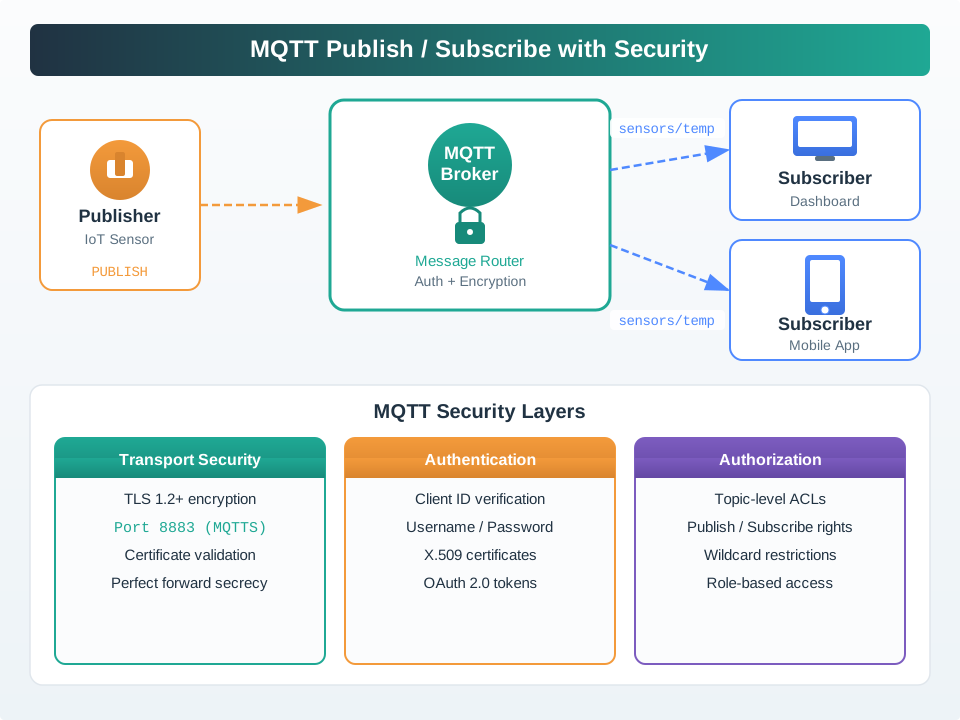
Start at the connection edge. Then inspect broker controls. Read Figure 7.1 from the publisher’s TLS path to the broker identity check and then to the publish and subscribe decisions. A deployment is not secure because one layer exists; the broker must demonstrate all three for the same connection. For transport, verify clients reach the TLS listener, validate the broker certificate chain, and fail closed on invalid or expired trust. For authentication, confirm every device has a distinct revocable identity. For authorization, prove that a telemetry device cannot publish to site/line1/cmd/# and that a dashboard cannot read maintenance-only topics without explicit permission. This ordered review connects the architecture to the negative evidence required below.
MQTT 5 helps narrow fault diagnosis instead of loosening every control at once. Enhanced authentication uses the AUTH packet for challenge-response exchanges such as SCRAM, and reason codes such as Not Authorized (0x87) make denied connects, publishes, or subscribes explicit. A TLS alert before MQTT CONNECT points at certificate trust, hostname validation, protocol version, or cipher-suite policy. A refused CONNECT after TLS succeeds points at identity. A denied PUBLISH or SUBSCRIBE after a successful session points at ACL scope or tenant separation. TLS still does not protect payloads at rest inside broker queues, so end-to-end payload confidentiality remains an application-level design choice.
Some papers and legacy course notes use Secure MQTT (SMQTT) to mean more than MQTT over TLS. In that literature, SMQTT adds payload-level broadcast encryption with key-policy or ciphertext-policy attribute-based encryption, often shortened as KP-ABE or CP-ABE, so one encrypted publication can be delivered through the broker to multiple authorized subscribers. Treat that as a specialized end-to-end encryption design, not as a replacement for production MQTTS. A real acceptance record still needs TLS for the client-to-broker channel, device authentication, broker ACLs, key lifecycle evidence, and proof that the attribute policy matches the subscriber groups that may decrypt each message family.
Keep one security acceptance record: TLS-only listener on 8883, plaintext listener disabled or fenced, certificate validation failure test, per-device identity inventory, ACL negative publish and subscribe tests, MQTT 5 reason-code evidence, and logs tied to client IDs, certificate subjects, or token claims.
7.12 Implementation-Level Attack Surface: String Validation and Message Stages
Why now: Check topic strings and message stages after transport and topic permissions are set. About 14–20 min (estimate)
This section: Implementation-Level Attack Surface: String Validation and Message Stages — TLS, authentication, and ACLs protect transport and broker access, while wire-format validation remains essential.
TLS, authentication, and ACLs protect transport and broker access, while wire-format validation remains essential. MQTT 3.1.1 §1.5.3 requires receivers to close the connection for ill-formed UTF-8 or a null character in an MQTT UTF-8 encoded string, including a topic name. It permits, but does not require, closing the connection for certain other control characters and Unicode non-characters. A PUBLISH payload is different: MQTT 3.1.1 §3.3.3 makes its content application-specific, so arbitrary payload bytes are valid at the protocol layer. An application that expects UTF-8 or JSON must validate the payload against its own schema and reject malformed application data before storing, acting on, or displaying it. A retained or queued message can expose later subscribers to the same malformed application data; test that boundary without assuming an invalid UTF-8 payload is an MQTT protocol violation.
A non-compliant broker that accepts malformed UTF-8 in an MQTT protocol string and repeatedly redelivers a retained QoS 2 message can trap clients in a redelivery loop, creating a denial-of-service risk. Test broker rejection and subscriber recovery with such malformed traffic.
A related implementation risk is Regular Expression Denial of Service (ReDoS). MQTT topic strings and filters are slash-delimited text much like URL paths, and a broker or middleware layer that matches them with a poorly written regular expression can be forced into catastrophic backtracking by a crafted topic string — the same failure mode that ReDoS exploits in web applications. Review any custom topic-matching code, not just the broker’s built-in matcher, for this risk before trusting it with attacker-reachable topic names.
Beyond the wire protocol, M2M applications built on MQTT expose four distinct stages where the message itself is the attack surface, and each needs a different mitigation: data collection, where hijacked publish traffic exposes sensor and process data unless the channel is authenticated and encrypted; device configuration, where a newly broadcasting node can be steered onto a rogue broker if its configuration request carries connection details in the clear; command delivery, where an actuator that accepts any published command without encryption and authentication lets an attacker take control of a physical output; and over-the-air firmware update, where a man-in-the-middle on an unauthenticated OTA channel can deliver altered firmware carrying malicious code. Treat each stage as its own row in the security acceptance record above, not as a single “MQTT is encrypted” checkbox.
7.13 Summary
This section: Summary
Security essentials:
| Layer | Implementation |
|---|---|
| Transport | TLS on port 8883 |
| Authentication | Unique credentials per device |
| Authorization | Topic-level ACLs |
| Monitoring | Log analysis and anomaly detection |
Remember:
- Never use port 1883 in production
- Never disable certificate validation
- Always implement least-privilege ACLs
- Rotate credentials regularly
7.14 See Also
This section: See Also
- MQTT QoS Levels - Security considerations for different QoS levels
- Encryption Architecture - TLS/SSL implementation details
- Access Control Models - RBAC and ABAC for MQTT ACLs
- Security Threat Categories - MQTT-specific attack vectors
7.15 What’s Next
This section: What’s Next — Continue according to the control you need to strengthen.
Now that you can configure TLS, design ACLs, and evaluate MQTT attack surfaces, these chapters extend your knowledge further:
Continue according to the control you need to strengthen. Use MQTT Advanced Topics to make packet and topic structure easier for ACLs to target, then MQTT Labs and Implementation to practise TLS, credentials, and broker rules. Read Encryption Architecture and Levels for handshake and certificate-chain boundaries, and Authentication and Access Control Concepts for scalable RBAC, ABAC, and IAM design. Finish with Threat Modelling and Mitigation and Security Threat Categories and Attack Scenarios to connect broker controls to segmentation, monitoring, and attack evidence.
Suggested MQTT route
Open printable teacher run sheet
Find help
3 reviewed answers.
Where should I start in a module?
Open the module page from the sidebar to see its chapters in order. Use the module map to return to a topic you need.
Modules and pathsReviewed
What can I try when a project does not work?
Check the symptom, then work through the diagnostic steps. Keep the error message and the smallest example that reproduces it.
When you are stuckReviewed
How do interactive examples work?
Use the interactive guide to check how examples and simulations work before changing your project.
Interactive examples guideReviewed