2 Wi-Fi Channel-State Information for Presence and Motion Sensing
More
Depth: Practitioner
Progress saves as you read. Mark sections complete as you go; your progress appears in the sidebar.
2.1 Start With the Story
This section: Start With the Story — Radio Remi is helping a library keep lights on while people are studying.
Radio Remi is helping a library keep lights on while people are studying. A camera would collect more detail than the team needs. A motion sensor misses someone who sits still. Remi asks whether changes in the room’s Wi-Fi path can support a simple occupied or empty decision. The team must test that claim without pretending a notebook has measured the real room.
2.2 Overview
This section: Overview — Wi-Fi channel-state information, or CSI, describes how a received signal changed on many narrow subcarriers.
Wi-Fi channel-state information, or CSI, describes how a received signal changed on many narrow subcarriers. A person can block, reflect, or scatter some paths, so CSI may change even when no message content is read. Useful sensing needs a stable baseline, time windows, features, labels, held-out tests, and a no-decision state. It also needs consent because a radio link can become a sensor for nearby people.
2.3 Learning Objectives
This section: Learning Objectives
By the end of this chapter, you will be able to:
- Explain how channel-state information describes amplitude and phase across Wi-Fi subcarriers.
- Build calibrated window features and evaluate them on held-out synthetic room data.
- Separate a detection result from evidence about people, rooms, radios, and privacy.
2.4 From packets to channel evidence
This section: From packets to channel evidence — A Wi-Fi receiver estimates a complex channel value for each available subcarrier and antenna pair.
A Wi-Fi receiver estimates a complex channel value for each available subcarrier and antenna pair. Its magnitude describes gain or loss, while phase describes relative timing and path change. Hardware, firmware, packet rate, bandwidth, automatic gain control, and clock errors shape the values. CSI is therefore conditional measurement evidence, not a direct body outline. Raw payload content is not required for this exercise, but that fact does not remove the privacy duty.
2.5 Calibrate, window, and describe change
This section: Calibrate, window, and describe change — Start with a baseline recorded under named conditions.
Start with a baseline recorded under named conditions. Split later samples into equal time windows, then calculate features such as mean magnitude change, variance, and motion energy. Calibration removes part of the static room and radio offset; it does not remove furniture changes, people outside the target zone, or radio drift. A threshold should include an uncertain band so borderline windows can be reviewed instead of forced into occupied or empty.
Window duration controls how quickly the detector responds and how much short-term variation it averages. Overlapping windows provide more frequent decisions but also create correlated examples that must not leak across the training and test split. The calibration record should retain device, channel, placement, room state, and collection time. A deployment can then detect when its current context no longer matches the conditions that set the thresholds.
2.6 Read the sensing pipeline
This section: Read the sensing pipeline — The diagram begins with packets and subcarrier estimates on the left.
The diagram begins with packets and subcarrier estimates on the left. The middle card turns calibrated time windows into named features. The final card compares held-out predictions with labels and keeps uncertainty visible. Follow the arrows from measurement to decision: every stage narrows the claim, and no stage proves who caused a change.
Figure Figure 2.1 keeps the stages in reading order. The diagram begins with packets and subcarrier estimates on the left.
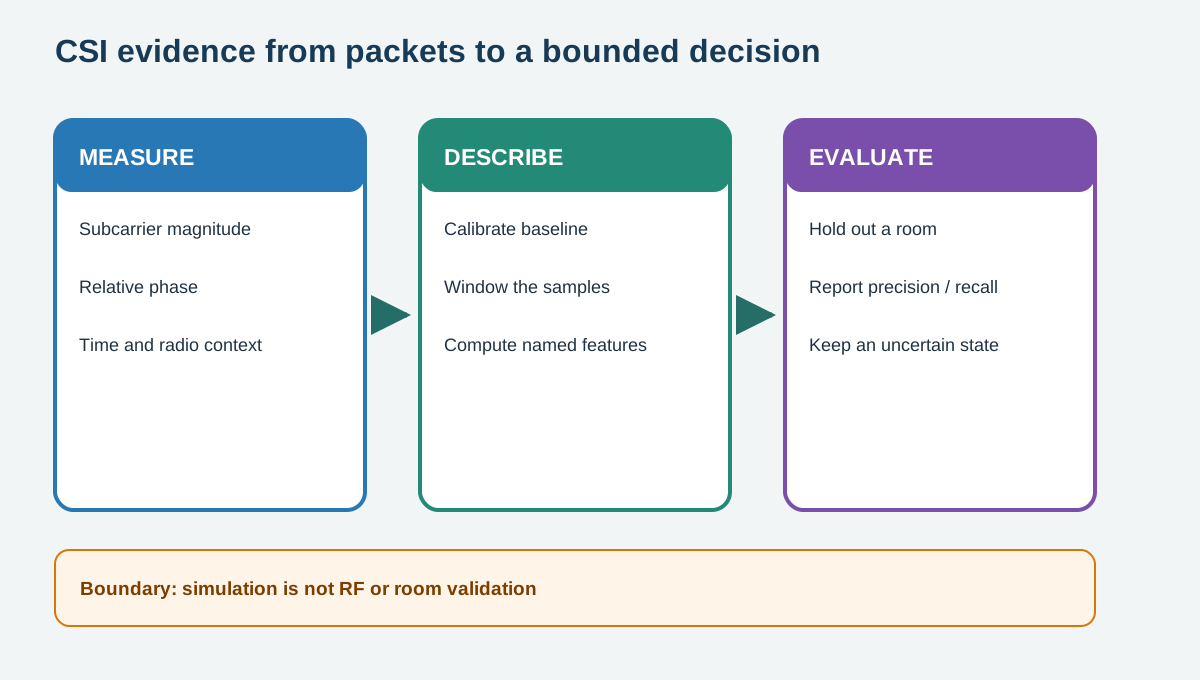
In Figure 2.1, read left to right, then use the final boundary note to limit the conclusion. The arrows show processing order, not proof that the final output is correct in every setting.
2.7 Evaluate beyond one room
This section: Evaluate beyond one room — Precision asks what share of occupied predictions were correct.
Precision asks what share of occupied predictions were correct. Recall asks what share of occupied windows were found. A confusion matrix keeps false alarms and missed presence visible. Report results by room, radio placement, activity, and time period because a random split can leak nearly identical windows into both training and test data. A synthetic held-out room checks the calculation, not real radio performance or generalisation.
2.8 Separate channel change from occupancy evidence
This section: Separate channel change from occupancy evidence — A CSI sample is a complex estimate for a subcarrier and antenna pair.
A CSI sample is a complex estimate for a subcarrier and antenna pair. Magnitude can change when a person moves, but also when gain control, placement, furniture, or the radio channel changes; phase carries timing and hardware offsets as well as propagation. Keep calibration conditions and a signal-quality flag with each time window. If those conditions drift, route the window to recalibration or abstention instead of forcing it through the old occupied threshold.
For the library decision, reserve complete collection sessions or rooms for testing before tuning features. Overlapping windows from one session share many samples, so splitting them at random leaks near-duplicates into both sides and inflates the apparent score. Report false occupied and missed occupied windows separately by room and radio placement, then inspect the uncertain band. The chapter’s pipeline figure shows where baseline subtraction, feature extraction, and classification enter; the synthetic held-out result verifies this workflow, while a library installation still needs consent, a local field trial, and a less intrusive alternative check.
2.9 Decision and Trade-offs
This section: Decision and Trade-offs — Choose CSI when existing Wi-Fi links, coarse presence or motion, and local processing fit the job.
Choose CSI when existing Wi-Fi links, coarse presence or motion, and local processing fit the job. Prefer a simpler contact, passive infrared, pressure, or door sensor when it answers the question with less inference. Reject a deployment that cannot explain consent, retention, uncertainty, and what happens when the radio environment changes.
Use the Sensing Privacy and Consent checklist to record the purpose, people affected, notice, retention, and no-sensing alternative.
2.10 Practice the Method
This section: Practice the Method — The linked lab uses a prepared online tool and retains its result evidence.
The linked lab uses a prepared online tool and retains its result evidence. Complete the steps, compare the result with the chapter boundary, and name one condition that the exercise did not test.

2.11 Check Your Reasoning
This section: Check Your Reasoning
2.12 Summary
This section: Summary — The useful result is a consented, calibrated decision that can abstain when the room no longer matches its evidence.
The useful result is a consented, calibrated decision that can abstain when the room no longer matches its evidence. Keep the raw channel measurements, calibration context, decision threshold, and abstentions together. That record lets a reviewer distinguish a repeatable motion cue from a lucky result or an unreported change in the room.
- CSI records per-subcarrier channel change, not a direct image of a person.
- Calibration, windowing, held-out rooms, and abstention keep the claim bounded.
- A simulated classifier teaches the pipeline but cannot validate an installed Wi-Fi sensing system.
Find help
3 reviewed answers.
Where should I start in a module?
Open the module page from the sidebar to see its chapters in order. Use the module map to return to a topic you need.
Modules and pathsReviewed
What can I try when a project does not work?
Check the symptom, then work through the diagnostic steps. Keep the error message and the smallest example that reproduces it.
When you are stuckReviewed
How do interactive examples work?
Use the interactive guide to check how examples and simulations work before changing your project.
Interactive examples guideReviewed