Detect motion in synthetic Wi-Fi CSI
Generate calibrated synthetic CSI windows, choose an uncertain band, and score a held-out room without making a field claim.

Radio Remi: I want you to predict the result, inspect each intermediate value, and keep the final claim inside the evidence.
Predict the reading, then compare it with the measurement.
Python 3 in your browser (JupyterLite)
Python · no installOpen the notebook in your browser and run each Python cell; no install or account is needed.
Three ways to run: use JupyterLite here with no install; run main.py locally from the downloadable lab folder; or open the same notebook in Google Colab.
Steps
Step 1
- Do
- In the JupyterLite notebook, run the Step 1 cell to freeze the CSI simulation contract.
- You will see
- Input: execute notebook step 1 with its stated deterministic fixture. Observed: subcarriers=24; samples/window=18; rooms=A,B Observed: activities=empty,still,walk,turn; seed=437 Observed: No packets or RF hardware are measured.
- Why it matters
- Expected: the reproducible CSI fixture contains 24 subcarriers and two rooms. The run reports 18 samples per window and four activity labels. This freezes the comparison before deriving activity features. Limit: there is no packet capture or RF hardware measurement.
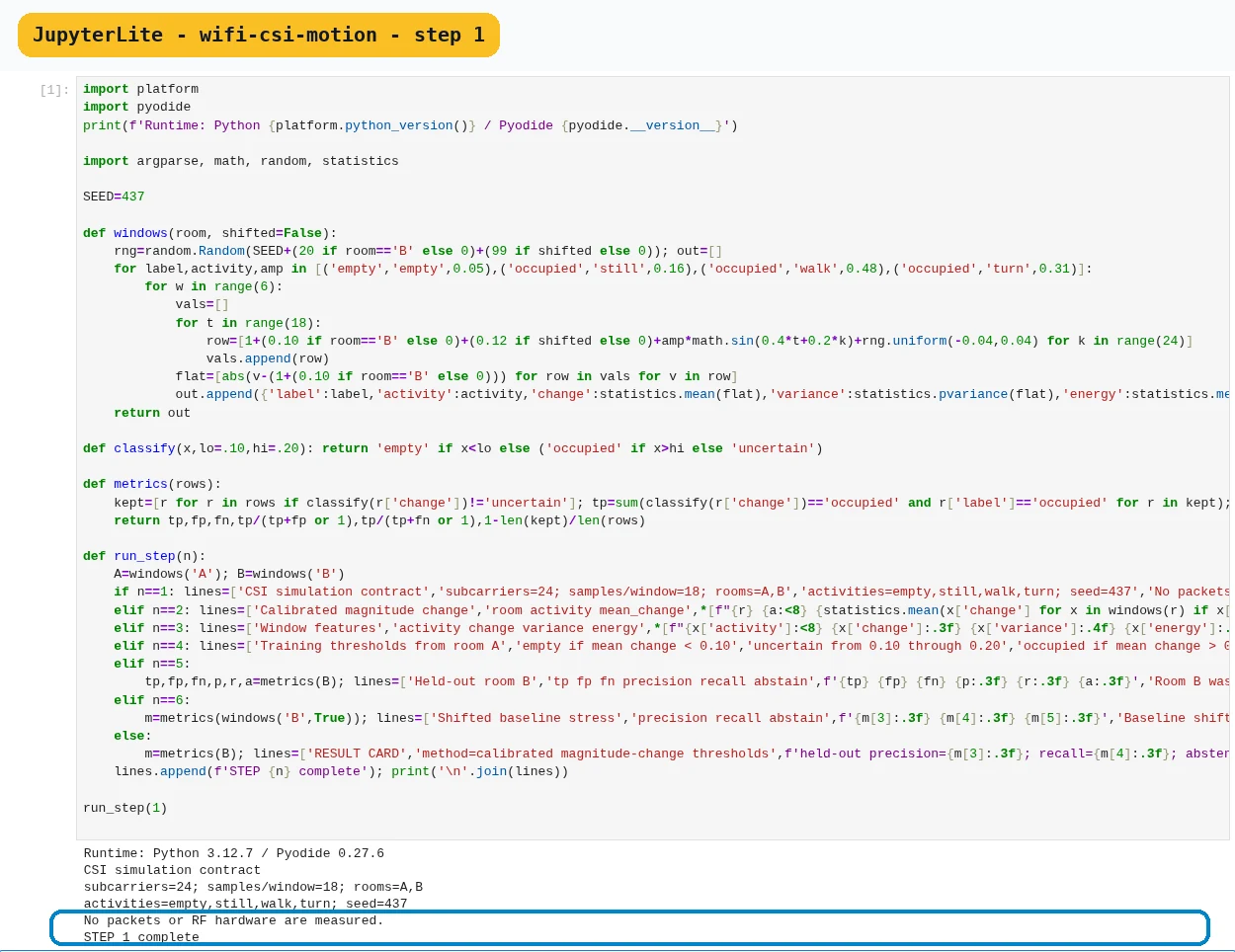
Step 1 · Python 3 in your browser (JupyterLite); numbered callout added to a real capture. Enlarge screenshot (new tab) Step 2
- Do
- In the JupyterLite notebook, run the Step 2 cell (
run_step(2)) to generate calibrated CSI windows. - You will see
- Input: execute notebook step 2 with its stated deterministic fixture. Observed: A empty 0.036 Observed: A walk 0.308 Observed: B walk 0.308
- Why it matters
- Expected: empty-room magnitude change is below the walk fixture in both rooms. The executed means are 0.036 for A-empty and 0.308 for A-walk and B-walk. The fixture produces a clear synthetic activity contrast across rooms. Limit: these values are not calibrated CSI measurements.
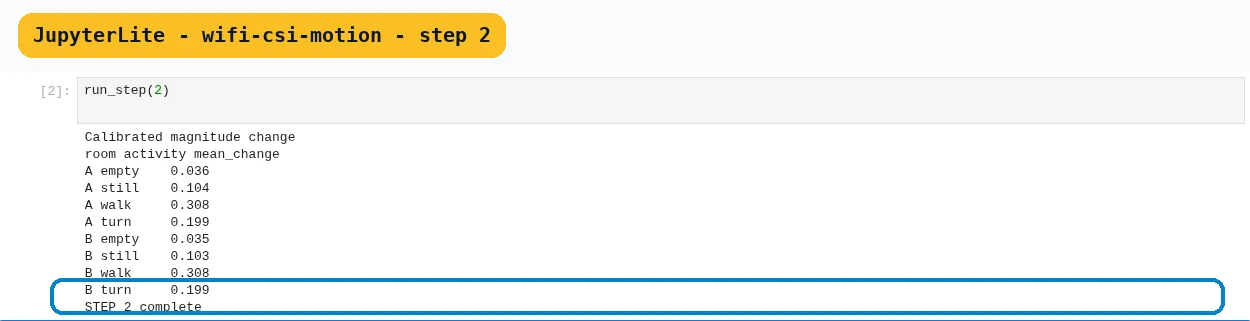
Step 2 · Python 3 in your browser (JupyterLite); numbered callout added to a real capture. Enlarge screenshot (new tab) Step 3
- Do
- In the JupyterLite notebook, run the Step 3 cell (
run_step(3)) to calculate window features. - You will see
- Input: execute notebook step 3 with its stated deterministic fixture. Observed: empty 0.037 0.0005 0.0019 Observed: still 0.104 0.0029 0.0136 Observed: STEP 3 complete
- Why it matters
- Expected: window summaries report change, variance, and energy per activity window. The run reports the displayed empty and still feature rows. The multiple features preserve more than a single threshold signal. Limit: rows describe synthetic windows, not people or rooms.
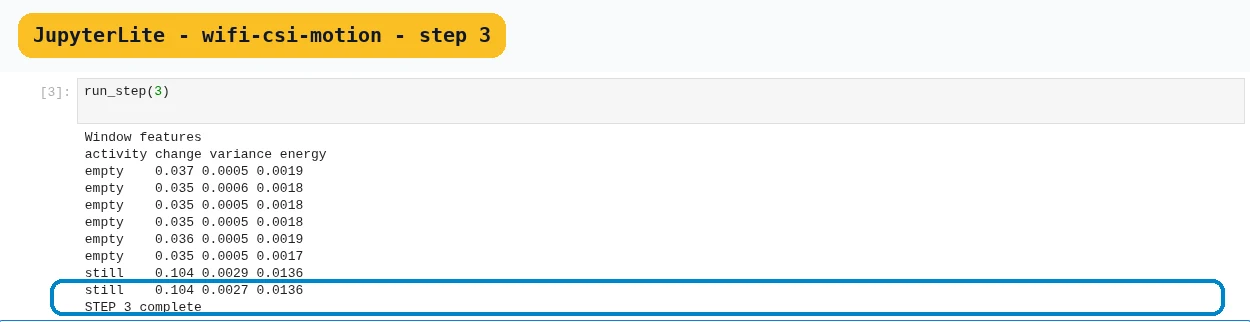
Step 3 · Python 3 in your browser (JupyterLite); numbered callout added to a real capture. Enlarge screenshot (new tab) Step 4
- Do
- In the JupyterLite notebook, run the Step 4 cell (
run_step(4)) to fit two thresholds on room A. - You will see
- Input: execute notebook step 4 with its stated deterministic fixture. Observed: empty if mean change < 0.10 Observed: uncertain from 0.10 through 0.20 Observed: occupied if mean change > 0.20
- Why it matters
- Expected: thresholds split low, uncertain, and high magnitude-change regions. The notebook trains these thresholds using room A. An explicit uncertain band avoids forcing every window into two classes. Limit: thresholds are fixture choices, not deployment constants.

Step 4 · Python 3 in your browser (JupyterLite); numbered callout added to a real capture. Enlarge screenshot (new tab) Step 5
- Do
- In the JupyterLite notebook, run the Step 5 cell (
run_step(5)) to score the held-out room B. - You will see
- Input: execute notebook step 5 with its stated deterministic fixture. Observed: 7 0 0 1.000 1.000 0.458 Observed: Room B was not used to choose thresholds. Observed: STEP 5 complete
- Why it matters
- Expected: held-out room B reports TP, FP, FN, precision, recall, and abstention. The run reports 7 TP, no FP/FN, precision/recall 1.000, and 0.458 abstention. Room B is held out from threshold selection in this exercise. Limit: held-out synthetic performance is not room validation.

Step 5 · Python 3 in your browser (JupyterLite); numbered callout added to a real capture. Enlarge screenshot (new tab) Step 6
- Do
- In the JupyterLite notebook, run the Step 6 cell (
run_step(6)) to stress a shifted baseline. - You will see
- Input: execute notebook step 6 with its stated deterministic fixture. Observed: 1.000 1.000 0.500 Observed: Baseline shift changes the decision distribution. Observed: Action: recalibrate or abstain.
- Why it matters
- Expected: a shifted baseline can change the confidence distribution. The shifted fixture reports precision/recall 1.000 and abstention 0.500. The notebook recommends recalibration or abstention after the shift. Limit: a generated shift does not cover measured environmental variation.

Step 6 · Python 3 in your browser (JupyterLite); numbered callout added to a real capture. Enlarge screenshot (new tab) Step 7
- Do
- In the JupyterLite notebook, run the Step 7 cell (
run_step(7)) to write a bounded result card. - You will see
- Input: execute notebook step 7 with its stated deterministic fixture. Observed: held-out precision=1.000; recall=1.000; abstention=0.458 Observed: boundary=synthetic CSI only; no RF, room, or person validation Observed: decision=repeat with consented measured rooms before use
- Why it matters
- Expected: the card states fixture performance, validation boundary, and next evidence. The result card reports 0.458 abstention on held-out room B. The next step is a consented measurement in real rooms. Limit: no RF, room, or person validation has occurred.

Step 7 · Python 3 in your browser (JupyterLite); numbered callout added to a real capture. Enlarge screenshot (new tab)
Chapter checks
These questions refer to the chapter’s examples. Use the return links to review their answers.
Why should CSI data be split by room or time before evaluation?
Return to the chapter’s knowledge checkWhat is the safest action for a CSI window inside the uncertain threshold band?
Return to the chapter’s knowledge check
Return to Wi-Fi Channel-State Information for Presence and Motion Sensing · Browse Labs