
15 Lab 4: Secure MQTT Broker and Reliability
This is the fourth and final bounded MQTT lab. It starts where the public-broker exercises stop: use a broker you control, establish its trust boundary, and retain evidence for every security and reliability claim.
15.1 Lab 4: Secure MQTT with TLS and Authentication
Objective: Implement MQTT security using TLS encryption and username/password authentication.
Materials:
- ESP32 or Python client
- Private MQTT broker (Mosquitto installed locally or on Raspberry Pi)
- SSL/TLS certificates
Step 1: Install and Configure Mosquitto Broker
Install Mosquitto on Linux/Raspberry Pi:
sudo apt update
sudo apt install mosquitto mosquitto-clients
Step 2: Generate SSL/TLS Certificates
# Create certificate directory
sudo mkdir -p /etc/mosquitto/certs
cd /etc/mosquitto/certs

# Generate CA certificate
sudo openssl req -new -x509 -days 365 -extensions v3_ca \
  -keyout ca.key -out ca.crt \
  -subj "/C=US/ST=State/L=City/O=IoTClass/CN=CA"

# Generate server key and certificate
sudo openssl genrsa -out server.key 2048
sudo openssl req -new -out server.csr -key server.key \
  -subj "/C=US/ST=State/L=City/O=IoTClass/CN=mqtt.local"
sudo openssl x509 -req -in server.csr -CA ca.crt -CAkey ca.key \
  -CAcreateserial -out server.crt -days 365

# Set permissions
sudo chmod 644 /etc/mosquitto/certs/*.crt
sudo chmod 600 /etc/mosquitto/certs/*.key
Step 3: Configure Mosquitto with Security
Edit /etc/mosquitto/mosquitto.conf:
# Default listener (disabled)
listener 1883
allow_anonymous false

# TLS listener
listener 8883
cafile /etc/mosquitto/certs/ca.crt
certfile /etc/mosquitto/certs/server.crt
keyfile /etc/mosquitto/certs/server.key
require_certificate false

# Password file
password_file /etc/mosquitto/passwd

# Logging
log_dest file /var/log/mosquitto/mosquitto.log
log_type all
Step 4: Create User Accounts
# Create password file with first user
sudo mosquitto_passwd -c /etc/mosquitto/passwd iotuser

# Add more users (without -c flag)
sudo mosquitto_passwd /etc/mosquitto/passwd admin
Step 5: Restart Mosquitto
sudo systemctl restart mosquitto
sudo systemctl status mosquitto
Before testing credentials, inspect Figure 15.1 to place each control at the boundary where the broker can enforce it. The connection is acceptable only when transport, identity, and topic permissions all hold for the same client.
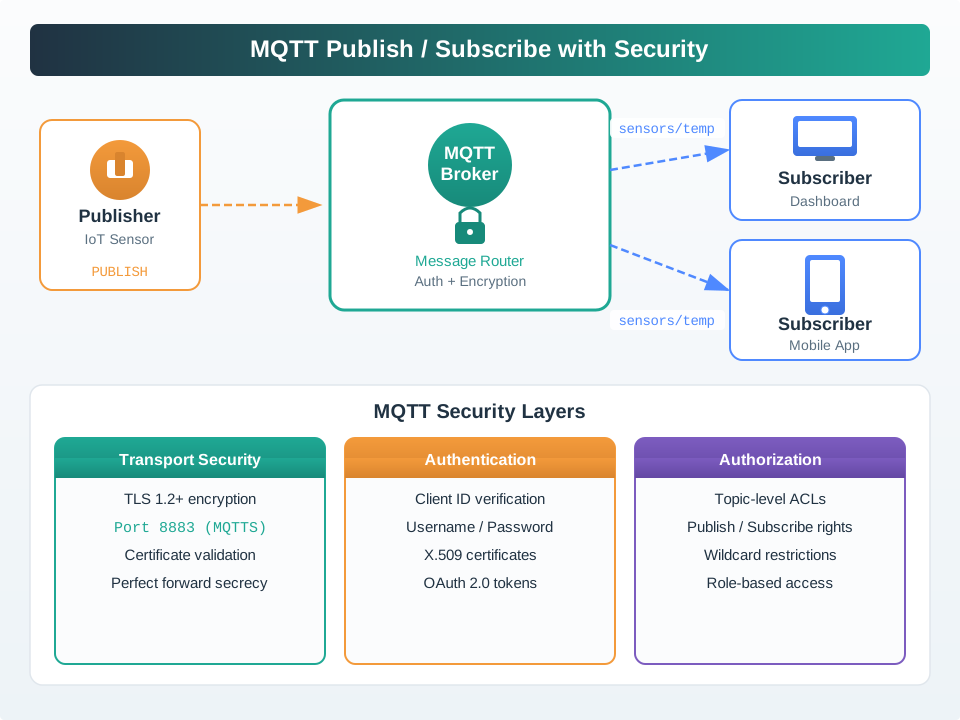
Read Figure 15.1 from the publisher’s protected connection to the broker and then outward to subscribers. TLS protects each client-to-broker path and validates the server endpoint; authentication binds that connection to iotuser or another distinct identity; authorization then limits which topics that identity may publish or subscribe to. The broker remains a trusted plaintext and routing boundary, so the positive and negative commands below must prove all three layers rather than treating a successful TLS handshake as the whole security result.
Testing Connection Security:
# Test with mosquitto_pub (with authentication)
mosquitto_pub -h mqtt.local -p 8883 \
  -u iotuser -P your_password \
  --cafile /etc/mosquitto/certs/ca.crt \
  -t "secure/test" -m "Hello from terminal" -q 1

# Test without authentication (should fail)
mosquitto_pub -h mqtt.local -p 8883 \
  --cafile /etc/mosquitto/certs/ca.crt \
  -t "secure/test" -m "This will fail"
Learning Outcomes:
- Generate SSL/TLS certificates for MQTT
- Configure Mosquitto broker with security
- Implement username/password authentication
- Use encrypted MQTT connections
- Understand certificate-based security
- Test and troubleshoot secure MQTT
Security Best Practices:
- Always use TLS in production (port 8883)
- Disable anonymous access
- Use strong passwords (12+ characters)
- Implement topic-level ACLs (Access Control Lists)
- Keep certificates updated (renew before expiration)
- Monitor broker logs for suspicious activity
- Use client certificates for enhanced security (mutual TLS)
 Checkpoint: Secure Broker Baseline
You now know:
Read the checkpoint as one evidence chain. Begin with The secure lab moves MQTT traffic to TLS port 8883 with CA, server certificate, and server key files. Then connect The minimum broker baseline disables anonymous access and adds a password file before production testing. Finish with The negative test matters: an unauthenticated mosquitto_pub command should fail before you trust the broker configuration.
15.2 Interactive Simulator: MQTT QoS Levels and Last Will Testament
What This Simulates: ESP32 demonstrating MQTT Quality of Service levels and Last Will and Testament for reliable communication
QoS Levels Explained:
QoS 0 (At Most Once):          QoS 1 (At Least Once):      QoS 2 (Exactly Once):
Publisher -> Message ->         Publisher -> Message ->      Publisher -> Message ->
Broker -> Subscriber            Broker -> Subscriber         Broker -> PUBREC <-
                                Broker <- PUBACK             Publisher -> PUBREL ->
Fast, no guarantee              May duplicate                Broker -> PUBCOMP <-
                                Acknowledged                 Guaranteed once

Use for: sensor readings        Use for: commands            Use for: billing data
Power: Lowest                   Power: Medium                Power: Highest
Latency: ~5ms                   Latency: ~15ms               Latency: ~30ms
Run it: Rather than tracing the handshake diagrams above, operate the QoS Delivery Workbench to see delivery guarantees play out. Set the Publish QoS to 0, 1, and 2 in turn, then change the Network event to drop the first PUBLISH, the acknowledgement, or the QoS 2 PUBREL and press Play to watch which messages are lost, retried, or duplicated. Lower the Subscriber maximum QoS to see a downgrade, adjust Messages per minute and Round-trip time, and toggle the idempotent option, then use those observations to answer the QoS choice in the check below.
15.3 Quick Check: QoS Levels
Last Will and Testament (LWT):
Device connects with LWT set:
{
  topic: "devices/sensor01/status",
  message: "offline",
  qos: 1,
  retain: true
}

Normal flow:                    Unexpected disconnect:
1. Device connects              1. Device crashes
2. Publishes "online"           2. Network timeout (60s)
3. Sends data periodically      3. Broker detects disconnect
4. Publishes "offline"          4. Broker publishes LWT:
5. Disconnects gracefully          "devices/sensor01/status" -> "offline"
                                5. Monitoring system alerted

Result: Device status always known, even after crash
How to Use:
Build the decision in sequence. Begin with Click the Play button to start simulation. Then consider Watch LWT being set during connection. Then consider Observe messages sent with different QoS levels. Then consider See PUBACK responses for QoS 1. Close by considering Monitor retained status messages.
15.3.1 Pitfall: Stale Retained Messages After Device Removal
The Mistake: Developers use retained messages for device status (e.g., devices/sensor42/status with retain=true), but when devices are decommissioned or replaced, the old retained messages remain on the broker indefinitely. New subscribers receive stale “online” status for devices that no longer exist.
Why It Happens: Retained messages persist until explicitly cleared with an empty payload. Most developers focus on the “publish” side and forget that retained messages require lifecycle management. Brokers like Mosquitto will keep retained messages forever unless configured otherwise.
The Fix: Implement device decommissioning that clears retained messages. Publish an empty payload (zero-length) with retain=true to delete the retained message. For MQTT 5.0, use Message Expiry Interval to auto-expire stale status.
import paho.mqtt.client as mqtt

# MQTT 3.1.1: Clear retained message on device removal
def decommission_device(client, device_id):
    # Publish empty payload with retain=true to clear
    for suffix in ("status", "config", "lwt"):
        result = client.publish(
            f"devices/{device_id}/{suffix}", payload="", qos=1, retain=True
        )
        result.wait_for_publish()
        if result.rc != mqtt.MQTT_ERR_SUCCESS:
            raise RuntimeError(
                f"Failed to clear retained {suffix} message: MQTT code {result.rc}"
            )
    print(f"Cleared all retained messages for {device_id}")

# MQTT 5.0: Auto-expire status messages
from paho.mqtt.properties import Properties
from paho.mqtt.packettypes import PacketTypes

props = Properties(PacketTypes.PUBLISH)
props.MessageExpiryInterval = 300  # Expire after 5 minutes of no update

result = client.publish(
    "devices/sensor01/status",
    payload='{"status": "online", "timestamp": 1699123456}',
    qos=1,
    retain=True,
    properties=props
)
result.wait_for_publish()
if result.rc != mqtt.MQTT_ERR_SUCCESS:
    raise RuntimeError(f"Publish failed with MQTT code {result.rc}")
# If device stops publishing, status auto-clears after 5 minutes
Broker Configuration (Mosquitto): Set retain_available false to disable retained messages entirely if your application doesn’t need them, or use \$SYS/broker/retained messages/count to monitor accumulation.
15.3.2 Pitfall: Last Will Triggered on Graceful Disconnect
The Mistake: Developers configure Last Will and Testament (LWT) to publish “offline” status, expecting it only fires on crashes or network failures. But they observe LWT messages being published even during normal shutdown sequences, flooding monitoring systems with false “offline” alerts.
Why It Happens: The MQTT spec states LWT is published when the broker closes the connection “without receiving a DISCONNECT packet.” Many developers call client.disconnect() but don’t wait for completion, or the TCP connection closes before the DISCONNECT packet is sent. Network issues during graceful shutdown can also prevent DISCONNECT delivery.
The Fix: Always explicitly publish “offline” status before disconnecting, then send DISCONNECT. Use blocking disconnect or wait for confirmation. For Python paho-mqtt, use disconnect() followed by loop_stop() in the correct order.
// ESP32: Graceful shutdown with explicit status
void gracefulShutdown() {
    // Step 1: Publish explicit offline status
    mqttClient.publish("devices/sensor01/status", "offline", true);  // retain=true
    delay(100);  // Allow time for publish to complete

    // Step 2: Send DISCONNECT packet (prevents LWT)
    mqttClient.disconnect();
    delay(100);  // Allow TCP to close cleanly

    // Step 3: Now safe to power down
    WiFi.disconnect(true);
    esp_deep_sleep_start();
}

// If LWT fires anyway, it's redundant (already sent "offline")
// Better than missing offline status if crash occurs before explicit publish
# Python paho-mqtt 2.0+: Proper disconnect sequence
import time
def graceful_disconnect(client):
# Publish explicit status first
result = client.publish("devices/sensor01/status", "offline", qos=1, retain=True)
result.wait_for_publish(timeout=5.0) # Block until published
# Now disconnect - this prevents LWT from firing
client.disconnect()
client.loop_stop() # Stop network thread AFTER disconnect
# Common mistake: loop_stop() before disconnect()
# This kills the network thread before DISCONNECT packet is sent
# Result: Broker never receives DISCONNECT, triggers LWTMQTT 5.0 Enhancement: Use Reason Code in DISCONNECT to tell broker why you’re disconnecting. Reason Code 0x00 (Normal disconnection) explicitly signals “don’t publish LWT.”
Battery Life Calculation:
Scenario: Send temperature every 60 seconds

QoS 0:
- Assumptions: ~120 mA radio current, ~50 ms radio-on time per publish
- Per message: 120 mA x 50 ms / 3,600,000 = 0.0017 mAh
- Per day: 1440 x 0.0017 = 2.4 mAh/day
- Battery (2000 mAh): 2000 / 2.4 = ~833 days (~2.3 years)

QoS 1:
- Assumptions: ~120 mA radio current, ~150 ms radio-on time (PUBLISH + PUBACK)
- Per message: 120 mA x 150 ms / 3,600,000 = 0.0050 mAh
- Per day: 1440 x 0.0050 = 7.2 mAh/day
- Battery (2000 mAh): 2000 / 7.2 = ~278 days (~9 months)

QoS 2:
- Assumptions: ~120 mA radio current, ~300 ms radio-on time (4-way handshake)
- Per message: 120 mA x 300 ms / 3,600,000 = 0.0100 mAh
- Per day: 1440 x 0.0100 = 14.4 mAh/day
- Battery (2000 mAh): 2000 / 14.4 = ~139 days (~4.6 months)

Conclusion: QoS 0 uses ~67% less TX energy than QoS 1; QoS 2 has the highest overhead.

Note: These estimates isolate MQTT exchange time. If the device reconnects Wi-Fi/TLS each minute (common with deep sleep), connection overhead will dominate and battery life will be much lower.
15.3.3 Putting Numbers to It
The QoS battery calculations above are a simplified “always-on” radio model. With ESP32 deep sleep, connection setup often dominates:
Deep sleep scenario (ESP32 wakes every 60 s, sends 1 reading, sleeps):
Wi-Fi connection overhead:
- Scan channels: 200 ms @ 80 mA = 4.44 µAh
- Associate + DHCP: 1,500 ms @ 100 mA = 41.67 µAh
- Total connection: 46.11 µAh per wake
MQTT connection (clean session):
- TCP handshake: 150 ms @ 80 mA = 3.33 µAh
- CONNECT + CONNACK: 100 ms @ 80 mA = 2.22 µAh
- Total MQTT setup: 5.55 µAh
Message transmission (QoS 0):
- PUBLISH: 50 ms @ 120 mA = 1.67 µAh
- Total message: 1.67 µAh
Per-wake cycle:
Daily energy (1,440 wakes):
Battery life (2000 mAh):
Key insight: In this example, Wi-Fi setup is much larger than the MQTT publish. Treat persistent sessions, sleep interval, retained status, and TLS setup as scenario variables instead of assuming a fixed battery-life multiplier.
Checkpoint: Reliability and Energy Evidence
You now know:
Read the checkpoint as one evidence chain. Begin with QoS choices change both delivery guarantees and packet exchanges: QoS 0 has no acknowledgement, QoS 1 adds PUBACK, and QoS 2 adds PUBREC, PUBREL, and PUBCOMP. Then connect Last Will evidence depends on the broker not receiving DISCONNECT; keep-alive detection uses 1.5x the configured interval. Finish with In the deep sleep example, Wi-Fi setup, MQTT setup, and one publish add to 53.33 uAh per wake, which is the number to challenge before promising battery life.
15.4 Interactive Design Tools
Use these calculators as scenario estimators for MQTT deployments. Confirm final sizing with measurements from your broker, radio, TLS settings, and cloud pricing.
15.4.1 MQTT QoS Battery Life Calculator
Estimate how MQTT publish exchange time changes battery demand at each QoS level.
15.4.2 MQTT Broker Capacity Planner
Plan your MQTT broker resources based on device count and connection patterns.
15.4.3 MQTT Message Cost Estimator
Estimate monthly MQTT message charges and potential savings from change-based publishing. Update the unit price to match the provider and region you are using.
15.4.4 MQTT Deep Sleep Energy Calculator
Model the full wake cycle energy for ESP32 with deep sleep, including Wi-Fi and MQTT connection overhead.
Checkpoint: Calculator Results to Review Evidence
You now know:
Read the checkpoint as one evidence chain. Begin with The battery calculator isolates MQTT publish exchange time, so it should not be treated as a full product battery-life estimate by itself. Then connect The broker capacity planner uses the same connection formula as the pitfall section: devices x 1.2, backend services x 2, and monitoring x 3. Finish with The cost and deep sleep calculators turn the lab trade-offs into reviewable claims about message volume, heartbeat interval, Wi-Fi setup, and MQTT setup overhead.
15.5 Knowledge Check
Test your understanding of MQTT implementations with these questions:
15.6 Matching Quiz: MQTT Concepts and Definitions
15.7 Ordering Quiz: Secure MQTT Broker Setup
15.8 Auto-Gradable Quick Check
15.9 Label the Diagram
15.10 Code Challenge
15.11 Deep-Dive Note: Presence Evidence Boundaries
Last Will and Testament is strongest when the lab treats presence as evidence, not as a dashboard badge. A useful transcript shows the subscriber already listening, the will-enabled client connecting, the exact ungraceful stop, and the broker publication on the status topic. Record the broker, TLS mode, username or client-certificate method, will topic, retain flag, QoS, keep-alive, and termination method so another engineer can reproduce why the will did or did not fire.
Run this test on a private or local broker when the topic carries device status. Public brokers are useful for syntax checks, but they do not provide stable authorization boundaries, broker log access, or protection from another user publishing to the same topic. In production, scope the status topic by site and device id, protect it with ACLs so only the device or trusted service can write it, and include timestamps so operators can distinguish a fresh offline event from stale retained state.
The under-the-hood failure to rehearse is split-brain presence. A device can publish retained online before its sensors are ready, a long Will Delay Interval can make alarms late, and an aggressive keep-alive can make mobile or cellular devices flap offline during normal roaming. MQTT 5 Will Delay helps short network blips by waiting before publishing the will; retained-message cleanup prevents a decommissioned device or reprovisioned replacement from inheriting another device’s stale marker.
Keep one presence acceptance record: clean DISCONNECT suppresses the will, killed process or network drop fires it after keep-alive detection, late subscribers see the retained state, and decommissioning clears retained status topics.
15.12 Summary
This lab moved the earlier publisher, dashboard, and automation evidence behind a broker boundary you control. You configured TLS, credentials, and ACLs; exercised QoS and Last Will behaviour; and used capacity, cost, and battery calculations to state where the design remains safe and where it needs another test.
15.13 Concept Relationships
MQTT Hands-On Labs connect to:
Carry the chapter forward as one connected chain. First, MQTT Publisher-Subscriber Setup - Foundation skills (pub/sub, topics, brokers) applied in these labs. Then, MQTT Python Patterns - Production patterns (callbacks, reconnection, TLS) demonstrated in labs. Then, MQTT Security - Lab 4 implements TLS, authentication, and ACLs from security chapter. Finally, Sensor Integration - DHT22 sensor interfacing techniques used in Lab 1.
Lab progression: Lab 1 (basic publisher) → Lab 2 (Python dashboard) → Lab 3 (multi-device automation) → Lab 4 (secure deployment). Each builds on previous concepts while adding complexity.
15.14 See Also
Continue through these resources in a deliberate order. Begin with MQTT QoS - Deep dive into QoS selection implemented in these labs. Then use MQTT Sessions - Persistent session and reconnection behavior used by reliable clients. Then use Sensor Lab Implementation - Hardware setup and sensor-readout practices for ESP32 labs. Finish with MQTT Production Review - Advanced patterns and production deployment.
15.15 What’s Next
Move from lab evidence to production decisions in a deliberate order. Start with MQTT QoS and MQTT Sessions when acknowledgement, persistence, or queue behavior is still unclear. Continue to MQTT Security Fundamentals for mutual authentication, certificate lifecycle, and threat boundaries, then MQTT Python Patterns for reconnection, callbacks, error handling, and batching. Use Sensor Lab Implementation when the hardware and measurement path need proof. Finish with MQTT Production Review, where protocol comparison, load testing, failure simulation, clustering, and capacity evidence turn the individual lab results into an operational release decision.
15.16 Key Takeaway
Hands-on MQTT labs should verify observable broker behavior, not only code execution. Check subscription filters, retained state, Last Will messages, QoS acknowledgements, and reconnection behavior in the broker logs or dashboard.