Learning Hubs
  • ← All Modules
  1. Tools & References
  2. 18  IoT Failure Case Studies
Learning Hubs
  • 1  Introduction to Learning Hubs
  • Navigation & Discovery
    • 2  Learning Hubs
    • 3  Knowledge Map
    • 4  Visual Concept Map
    • 5  Interactive Concept Navigator
    • 6  Learning Paths
    • 7  Learning Recommendations
    • 8  Role-Based Learning Paths
  • Quizzes & Simulations
    • 9  Quiz Navigator
    • 10  Simulation Playground
    • 11  Simulation Learning Workflow
    • 12  Simulation Catalog
    • 13  Simulation Resources
    • 14  Hands-On Labs Hub
  • Tools & References
    • 15  Tool Discovery Hub
    • 16  Troubleshooting Hub
    • 17  Troubleshooting Flowchart
    • 18  IoT Failure Case Studies
    • 19  Discussion Prompts Hub
    • 20  Quick Reference Cards
    • 21  IoT Code Snippet Library
  • Knowledge Tracking
    • 22  Knowledge Gaps Tracker
    • 23  Gap Closure Process
    • 24  Knowledge Categories & Refreshers
    • 25  Progress Tracking & Assessment
    • 26  Video Gallery
    • 27  Quick Reference: Key Concepts

On This Page

  • 18.1 Learning Objectives
  • 18.2 IoT Failure Case Studies
  • 18.3 Case Study Categories
  • 18.4 Connectivity Failures
  • 18.5 Power & Battery Failures
  • 18.6 Security Breaches
  • 18.7 Scaling Issues
  • 18.8 Integration Problems
  • 18.9 Failure Prevention Checklist
  • Common Pitfalls
  • 18.10 What’s Next
  • 18.11 Related Resources
  1. Tools & References
  2. 18  IoT Failure Case Studies

18  IoT Failure Case Studies

Learn from Real-World Project Failures

18.1 Learning Objectives

After completing this chapter, you will be able to:

  • Analyze root causes of IoT project failures across connectivity, power, security, scaling, and integration domains
  • Apply prevention checklists to avoid common deployment mistakes before they occur
  • Explain why testing in actual deployment conditions is critical for connectivity and power budget validation
  • Evaluate security design decisions using lessons learned from real-world breaches
For Beginners: IoT Failure Case Studies

Learning from other people’s mistakes is one of the fastest ways to become a better engineer. These case studies document real IoT projects that failed – from batteries that died in months instead of years, to security breaches caused by default passwords. Each story explains what went wrong, why, and how you can avoid the same mistake. You do not need technical expertise to learn from these; the lessons are practical and widely applicable.

In 60 Seconds

Real-world IoT project failures documented with root cause analysis and prevention checklists. Covers connectivity failures (LoRaWAN range, Wi-Fi congestion), power miscalculations (10-year batteries lasting 3 months), security breaches (default passwords, unencrypted health data), scaling meltdowns, and integration nightmares. Learn from others’ $150K-$2M mistakes before making your own.

Key Concepts
  • Root Cause Analysis (RCA): Systematic technique identifying the fundamental cause of an IoT failure rather than just treating symptoms (e.g., root cause = no OTA update mechanism, symptom = 10,000 devices with expired TLS certificates)
  • Failure Mode: Specific way in which an IoT system can fail — connectivity loss, power exhaustion, security breach, data corruption, scaling overload
  • Post-Incident Review (PIR): Blameless structured analysis conducted after an IoT system failure to extract learnings and prevent recurrence
  • Prevention Checklist: Pre-deployment verification list derived from historical failures to catch common issues before they reach production
  • Design for Failure: Architectural philosophy assuming components will fail and engineering systems to detect, contain, and recover from failures gracefully
  • Blast Radius: Scope of impact when an IoT failure occurs — how many devices, users, or processes are affected, used to prioritize failure prevention investment
  • Contributing Factor: Condition that made a failure more likely or severe without being the direct cause (e.g., lack of monitoring that delayed detection)
  • Lessons Learned Database: Organizational knowledge repository capturing IoT project failure patterns to prevent their recurrence in future deployments
Chapter Scope (Avoiding Duplicate Hubs)

This chapter focuses on failure patterns, root causes, and prevention strategy.

  • Use Troubleshooting Hub when debugging an active issue right now.
  • Use Troubleshooting Flowchart for step-by-step command-level diagnosis.
  • Use this chapter when you want to understand why projects fail at system level and how to design safeguards before deployment.

18.2 IoT Failure Case Studies

Learn from Failure

The best engineers learn as much from failures as from successes. This hub documents common IoT project failures, their root causes, and how to avoid them.

No-One-Left-Behind Failure Review Loop
  1. Read the case narrative first (what happened and business impact).
  2. Map one technical root cause to one measurable indicator.
  3. Apply the prevention checklist before writing new code.
  4. Reinforce with one simulator, lab, or game challenge for the same concept.

18.3 Case Study Categories

Show code
categories = [
  {id: "connectivity", name: "Connectivity Failures", icon: "wifi", count: 4},
  {id: "power", name: "Power & Battery", icon: "battery", count: 3},
  {id: "security", name: "Security Breaches", icon: "shield", count: 3},
  {id: "scale", name: "Scaling Issues", icon: "trending-up", count: 3},
  {id: "integration", name: "Integration Problems", icon: "link", count: 3}
]

viewof selectedCategory = Inputs.radio(
  categories.map(c => c.name),
  {label: "Category:", value: "Connectivity Failures"}
)

18.4 Connectivity Failures

18.4.1 Case 1: The Silent Smart Farm

Project: Agricultural Monitoring System

Investment: $150,000 | Duration: 8 months | Outcome: Failed deployment

The Setup: A farming operation deployed 200 soil moisture sensors across 500 acres using LoRaWAN. Initial testing in a small area worked perfectly.

What Went Wrong:

Week 1-2: All sensors reporting ✓
Week 3: 40% of sensors offline
Week 4: 70% of sensors offline
Week 6: System abandoned

Root Cause Analysis:

Terrain

Flat test site hid the real RF path loss

Issue: Testing was done on flat ground while the production farm had hills.

Impact: RF shadows blocked 60% of devices.

Crop Growth

Vegetation changed the link budget

Issue: Corn grew to 8 feet and absorbed RF energy.

Impact: Signal attenuation increased by 20 dB.

Gateway Placement

Single gateway created a fragile topology

Issue: One gateway sat at the farm center.

Impact: There was no redundancy and a single point of failure remained.

Spreading Factor

Static tuning traded resilience for speed

Issue: SF7 was hardcoded for throughput.

Impact: The deployment missed the adaptive spreading factor needed for real range.

Lessons Learned:

Prevention Checklist

Technical Fix:

# WRONG: Hardcoded spreading factor
lora.set_spreading_factor(7)
lora.send(data)

# RIGHT: Adaptive spreading factor with retry
def send_with_retry(data, max_attempts=3):
    for sf in [7, 9, 11, 12]:
        for attempt in range(max_attempts):
            lora.set_spreading_factor(sf)
            if lora.send_and_confirm(data):
                return True
    return False


18.4.2 Case 2: The Wi-Fi Warehouse Disaster

Project: Warehouse Inventory Tracking

Investment: $80,000 | Duration: 3 months | Outcome: Partial failure

The Setup: 500 Wi-Fi-connected inventory tags tracking pallets in a distribution warehouse.

What Went Wrong:

Expected: 99.9% uptime
Actual: 65% average connectivity
Peak hours: 30% packet loss
Result: Inventory accuracy dropped to 70%

Root Cause Analysis:

Channel Congestion

Too many clients shared one RF lane

Issue: All devices ran on the same channel.

Impact: Collision rate exceeded 40%.

AP Capacity

Per-access-point load was far too high

Issue: 500 devices were spread across only 10 APs.

Impact: 50 devices per AP exceeded the practical capacity target.

2.4 GHz Interference

Other warehouse systems occupied the same band

Issue: Forklifts used 2.4 GHz video cameras.

Impact: Constant interference reduced reliability.

Roaming

Mobility exposed handoff weaknesses

Issue: Tags moved between APs frequently.

Impact: Reconnection delays reached 5 seconds.

Lessons Learned:

Wi-Fi IoT Design Rules
  1. Capacity: Plan for max 30 IoT devices per AP (not 50+)
  2. Channels: Use 5GHz where possible, non-overlapping channels
  3. Interference Survey: Conduct RF survey BEFORE deployment
  4. Protocol Choice: Consider BLE mesh or Thread for moving assets
  5. Roaming: Use 802.11r/k/v for fast roaming if available

Better Architecture:

ORIGINAL (Failed):
[500 Tags] --Wi-Fi--> [10 APs] --> [Server]

IMPROVED (Successful):
[500 BLE Tags] --> [50 BLE Gateways] --Ethernet--> [Server]
                        |
                   No interference
                   No roaming issues
                   $40 per gateway

18.4.3 Case 3: The Matter of Protocol Mismatch

Project: Smart Building Retrofit

Investment: $200,000 | Duration: 12 months | Outcome: 18-month delay

The Setup: Retrofit 50 commercial buildings with smart lighting and HVAC using “the latest standard.”

What Went Wrong:

  • Specified Matter protocol before devices were available
  • Interim solution used 4 different protocols (Zigbee, Z-Wave, BLE, proprietary)
  • Integration nightmare with 6 different apps
  • Firmware updates broke compatibility monthly

Root Cause: Choosing emerging standards without fallback plan

Lessons Learned:

Protocol Selection Rules
  1. Never bet on unreleased standards for production deployments
  2. Have a migration path from current to future protocols
  3. Use protocol gateways to isolate devices from cloud changes
  4. Standardize on ONE protocol per building if possible
  5. Budget 20% for integration - it’s always harder than expected

18.5 Power & Battery Failures

18.5.1 Case 4: The 10-Year Battery That Lasted 3 Months

Project: Smart Water Meter Network

Investment: $2M | Duration: 24 months | Outcome: Mass battery replacement

The Setup: 10,000 water meters with “10-year battery life” deployed across a city.

What Went Wrong:

Datasheet claim: 10 years @ 1 msg/day
Reality: 3 months average life

Why?
- Specification: 1 message/day
- Implementation: 1 message/hour (for "better monitoring")
- Plus: 10 retries per failed message
- Plus: GPS fix every message (not needed!)
- Plus: Full power during server maintenance

Power Budget Analysis:

Messages per Day

Telemetry frequency exploded

Specified: 1 message/day

Actual: 24 messages/day

Impact: 24x more energy than planned.

TX Power

Radio configuration drifted upward

Specified: 14 dBm

Actual: 20 dBm

Impact: Roughly 4x the transmission power.

GPS

Location logic consumed the budget

Specified: Never enabled

Actual: GPS fix on every message

Impact: 100 mA for 30 seconds per reading was severe overkill.

Sleep Current

Standby power hid a firmware bug

Specified: 1 µA

Actual: 50 µA because of a bug

Impact: Standby draw was 50x higher than expected.

Putting Numbers to It

The “10-year battery” claim was based on theoretical calculations that ignored real deployment conditions. Let’s see the math that predicted 10 years and the reality that delivered 3 months:

Theoretical Daily Consumption (Datasheet): \[ \begin{align} \text{Sleep: } & 1\,\mu\text{A} \times 23.97\,\text{hr/day} = 0.024\,\text{mAh/day}\\ \text{Sensor: } & 5\,\text{mA} \times 0.1\,\text{sec} \times 1/\text{day} \div 3600 = 0.0001\,\text{mAh/day}\\ \text{LoRa TX: } & 30\,\text{mA} \times 2\,\text{sec} \times 1/\text{day} \div 3600 = 0.017\,\text{mAh/day}\\ \hline \text{Total: } & 0.041\,\text{mAh/day}\\ \text{Battery: } & 2400\,\text{mAh} \div 0.041\,\text{mAh/day} = 58,536\,\text{days} = 160\,\text{years!} \end{align} \]

Actual Daily Consumption (Deployed): \[ \begin{align} \text{Sleep: } & 50\,\mu\text{A} \times 23.0\,\text{hr/day} = 1.15\,\text{mAh/day}\\ \text{Sensor: } & 5\,\text{mA} \times 0.1\,\text{sec} \times 24/\text{day} \div 3600 = 0.033\,\text{mAh/day}\\ \text{LoRa TX: } & 35\,\text{mA} \times 2.5\,\text{sec} \times 24/\text{day} \div 3600 = 0.583\,\text{mAh/day}\\ \text{GPS fix: } & 100\,\text{mA} \times 30\,\text{sec} \times 24/\text{day} \div 3600 = 20\,\text{mAh/day}\\ \text{Retries (10× avg): } & 35\,\text{mA} \times 2.5\,\text{sec} \times 10 \times 2.4/\text{day} \div 3600 = 0.583\,\text{mAh/day}\\ \hline \text{Total: } & 22.35\,\text{mAh/day}\\ \text{Battery: } & 2400\,\text{mAh} \div 22.35\,\text{mAh/day} = 107\,\text{days} \approx 3.5\,\text{months} \end{align} \]

The GPS fix alone consumed 90% of daily energy. Had they measured instead of estimated, this would have been caught before deploying 10,000 units.
Lessons Learned:

Battery Life Realities
  1. Measure actual consumption - don’t trust calculations
  2. Test with production firmware - development builds differ
  3. Include retries in budget - real networks have failures
  4. Verify sleep current - often 10-100x higher than spec
  5. Budget for worst case - not typical case

Interactive Power Budget Calculator:

Show code
viewof sleep_current = Inputs.range([0.001, 1000], {value: 50, step: 0.1, label: "Sleep Current (µA)", width: 300})
viewof sleep_hours = Inputs.range([0, 24], {value: 23.0, step: 0.1, label: "Sleep Hours per Day", width: 300})
viewof sensor_current = Inputs.range([0, 100], {value: 5, step: 0.1, label: "Sensor Current (mA)", width: 300})
viewof sensor_time = Inputs.range([0.01, 10], {value: 0.1, step: 0.01, label: "Sensor Time per Sample (sec)", width: 300})
viewof messages_per_day = Inputs.range([1, 100], {value: 24, step: 1, label: "Messages per Day", width: 300})
viewof tx_current = Inputs.range([10, 200], {value: 35, step: 1, label: "TX Current (mA)", width: 300})
viewof tx_time = Inputs.range([0.1, 10], {value: 2.5, step: 0.1, label: "TX Time per Message (sec)", width: 300})
viewof gps_enabled = Inputs.toggle({label: "GPS Enabled", value: true})
viewof gps_current = Inputs.range([50, 200], {value: 100, step: 5, label: "GPS Current (mA)", width: 300})
viewof gps_time = Inputs.range([5, 60], {value: 30, step: 1, label: "GPS Fix Time (sec)", width: 300})
viewof battery_capacity = Inputs.range([500, 10000], {value: 2400, step: 100, label: "Battery Capacity (mAh)", width: 300})
Show code
power_budget = {
  const sleep_power = (sleep_current / 1000) * sleep_hours;
  const sensor_power = sensor_current * (sensor_time / 3600) * messages_per_day;
  const tx_power = tx_current * (tx_time / 3600) * messages_per_day;
  const gps_power = gps_enabled ? gps_current * (gps_time / 3600) * messages_per_day : 0;
  const total_daily = sleep_power + sensor_power + tx_power + gps_power;
  const battery_days = battery_capacity / total_daily;
  const battery_years = battery_days / 365;

  return {
    sleep_power: sleep_power,
    sensor_power: sensor_power,
    tx_power: tx_power,
    gps_power: gps_power,
    total_daily: total_daily,
    battery_days: battery_days,
    battery_years: battery_years
  };
}
Show code
html`<div class="failure-case-studies-calc-shell failure-case-studies-calc-shell--power">
<h4 class="failure-case-studies-calc-title">Power Budget Results</h4>
<div class="failure-case-studies-calc-grid">
  <div class="failure-case-studies-calc-card">
    <span class="failure-case-studies-calc-label">Sleep Power</span>
    <span class="failure-case-studies-calc-value">${power_budget.sleep_power.toFixed(3)} mAh/day</span>
  </div>
  <div class="failure-case-studies-calc-card">
    <span class="failure-case-studies-calc-label">Sensor Power</span>
    <span class="failure-case-studies-calc-value">${power_budget.sensor_power.toFixed(3)} mAh/day</span>
  </div>
  <div class="failure-case-studies-calc-card">
    <span class="failure-case-studies-calc-label">TX Power</span>
    <span class="failure-case-studies-calc-value">${power_budget.tx_power.toFixed(3)} mAh/day</span>
  </div>
  ${gps_enabled ? `<div class="failure-case-studies-calc-card">
    <span class="failure-case-studies-calc-label">GPS Power</span>
    <span class="failure-case-studies-calc-value" style="color: #f6c667;">${power_budget.gps_power.toFixed(3)} mAh/day</span>
  </div>` : ''}
  <div class="failure-case-studies-calc-card">
    <span class="failure-case-studies-calc-label">Total Daily</span>
    <span class="failure-case-studies-calc-value" style="color: #7fffd4;">${power_budget.total_daily.toFixed(2)} mAh/day</span>
  </div>
  <div class="failure-case-studies-calc-card">
    <span class="failure-case-studies-calc-label">Battery Life</span>
    <span class="failure-case-studies-calc-value" style="color: ${power_budget.battery_years >= 1 ? '#7fffd4' : '#ffb3b3'};">
      ${power_budget.battery_days.toFixed(0)} days
    </span>
    <span class="failure-case-studies-calc-sub">${power_budget.battery_years.toFixed(1)} years</span>
  </div>
</div>
${gps_enabled && power_budget.gps_power > power_budget.total_daily * 0.7 ?
  `<div class="failure-case-studies-calc-callout failure-case-studies-calc-callout--danger">
    <strong>Warning:</strong> GPS consumes ${((power_budget.gps_power / power_budget.total_daily) * 100).toFixed(0)}% of total power. Reduce GPS usage or budget for a much larger battery.
  </div>` : ''}
</div>`

Use the Power Budget Calculator for more advanced modeling.


18.5.2 Case 5: The Solar-Powered Failure

Project: Remote Environmental Monitoring

Investment: $50,000 | Duration: 6 months | Outcome: Winter data gap

The Setup: Solar-powered air quality sensors in a northern city (52°N latitude).

What Went Wrong:

Summer: Perfect operation ✓
Fall: Intermittent outages
Winter: 3 months of no data
Spring: Sensors damaged by deep discharge

Root Cause:

Summer

Comfortable positive energy balance

Solar hours: 16 h

Panel output: 5 W average

Consumption: 1 W

Balance: +64 Wh/day

Winter

Daily deficit drained the battery

Solar hours: 6 h

Panel output: 0.5 W average

Consumption: 1 W

Balance: -21 Wh/day

Battery capacity: 50Wh. Winter deficit accumulated until batteries died.

Lessons Learned:

Solar IoT Design
  1. Design for worst month - not average
  2. Include cloudy day buffer - 5+ days without sun
  3. Add low-power mode - reduce consumption when low
  4. Consider hybrid power - solar + grid backup
  5. Protect batteries - low-voltage cutoff prevents damage

Interactive Solar Energy Calculator:

Show code
viewof season = Inputs.select(["Summer", "Winter", "Spring/Fall"], {label: "Season", value: "Winter"})
viewof solar_hours = Inputs.range([2, 18], {value: 6, step: 0.5, label: "Sunlight Hours per Day", width: 300})
viewof panel_power = Inputs.range([1, 50], {value: 5, step: 1, label: "Solar Panel Power (W)", width: 300})
viewof efficiency = Inputs.range([0.5, 1.0], {value: 0.7, step: 0.05, label: "Panel Efficiency", width: 300})
viewof device_consumption = Inputs.range([0.1, 10], {value: 1, step: 0.1, label: "Device Consumption (W)", width: 300})
viewof battery_wh = Inputs.range([10, 500], {value: 50, step: 10, label: "Battery Capacity (Wh)", width: 300})
viewof cloudy_days = Inputs.range([0, 10], {value: 5, step: 1, label: "Cloudy Day Buffer (days)", width: 300})
Show code
solar_calc = {
  const daily_generation = panel_power * efficiency * solar_hours;
  const daily_consumption = device_consumption * 24;
  const daily_balance = daily_generation - daily_consumption;
  const battery_days = battery_wh / daily_consumption;
  const sustainable = daily_balance >= 0 && battery_days >= cloudy_days;
  const annual_generation = daily_generation * 365;
  const annual_consumption = daily_consumption * 365;

  return {
    daily_generation: daily_generation,
    daily_consumption: daily_consumption,
    daily_balance: daily_balance,
    battery_days: battery_days,
    sustainable: sustainable,
    annual_generation: annual_generation,
    annual_consumption: annual_consumption
  };
}
Show code
html`<div class="failure-case-studies-calc-shell failure-case-studies-calc-shell--solar">
<h4 class="failure-case-studies-calc-title">Solar Energy Analysis (${season})</h4>
<div class="failure-case-studies-calc-grid">
  <div class="failure-case-studies-calc-card">
    <span class="failure-case-studies-calc-label">Daily Generation</span>
    <span class="failure-case-studies-calc-value">${solar_calc.daily_generation.toFixed(1)} Wh/day</span>
  </div>
  <div class="failure-case-studies-calc-card">
    <span class="failure-case-studies-calc-label">Daily Consumption</span>
    <span class="failure-case-studies-calc-value">${solar_calc.daily_consumption.toFixed(1)} Wh/day</span>
  </div>
  <div class="failure-case-studies-calc-card">
    <span class="failure-case-studies-calc-label">Daily Balance</span>
    <span class="failure-case-studies-calc-value" style="color: ${solar_calc.daily_balance >= 0 ? '#d5ffe8' : '#ffd6d6'};">
      ${solar_calc.daily_balance >= 0 ? '+' : ''}${solar_calc.daily_balance.toFixed(1)} Wh/day
    </span>
  </div>
  <div class="failure-case-studies-calc-card">
    <span class="failure-case-studies-calc-label">Battery Autonomy</span>
    <span class="failure-case-studies-calc-value" style="color: ${solar_calc.battery_days >= cloudy_days ? '#d5ffe8' : '#ffe7b3'};">${solar_calc.battery_days.toFixed(1)} days</span>
    <span class="failure-case-studies-calc-sub">Target buffer: ${cloudy_days} cloudy days</span>
  </div>
  <div class="failure-case-studies-calc-card">
    <span class="failure-case-studies-calc-label">System Status</span>
    <span class="failure-case-studies-calc-value" style="color: ${solar_calc.sustainable ? '#d5ffe8' : '#ffd6d6'};">
      ${solar_calc.sustainable ? 'Sustainable' : 'Insufficient'}
    </span>
  </div>
</div>
${!solar_calc.sustainable ?
  `<div class="failure-case-studies-calc-callout failure-case-studies-calc-callout--danger">
    <strong>Warning:</strong> ${solar_calc.daily_balance < 0 ?
      `Daily deficit of ${Math.abs(solar_calc.daily_balance).toFixed(1)} Wh means the battery will drain over time.` :
      `Battery autonomy (${solar_calc.battery_days.toFixed(1)} days) is below the ${cloudy_days}-day weather buffer.`}
  </div>` : ''}
${solar_calc.sustainable ?
  `<div class="failure-case-studies-calc-callout failure-case-studies-calc-callout--success">
    <strong>Success:</strong> The system can operate indefinitely with a ${cloudy_days}-day cloudy-weather buffer.
  </div>` : ''}
</div>`

18.6 Security Breaches

18.6.1 Case 6: The Default Password Botnet

Project: Smart Camera Network (Consumer)

Outcome: 100,000 devices compromised

The Setup: Consumer security cameras with “easy setup” shipped with default password admin:admin.

What Went Wrong:

Day 1: Cameras connected to internet
Day 3: Shodan indexed open ports
Day 7: Botnet scanning began
Day 14: 100,000 cameras compromised
Day 30: Used in DDoS attack (Mirai variant)

Root Cause Analysis:

Default Credentials

Authentication was effectively absent

Impact: trivial authentication bypass.

No Forced Change

Operators never rotated the factory secret

Impact: default passwords stayed in production.

UPnP Enabled

Home routers exposed the fleet automatically

Impact: automatic port forwarding widened the attack surface.

Unsigned Firmware

Malware could survive reboots

Impact: persistence after compromise.

Telnet Enabled

Attackers gained a direct remote shell

Impact: easy remote access for botnet operators.

Lessons Learned:

IoT Security Minimums
  1. Unique per-device credentials - printed on device, never defaults
  2. Force password change on first use
  3. Disable UPnP by default - require explicit enable
  4. Signed firmware only - prevent malicious updates
  5. Disable unnecessary services - no telnet, minimal ports
  6. Security by design - not afterthought

Use the Zero Trust Simulator to design secure policies.


18.6.2 Case 7: The Unencrypted Health Data

Project: Remote Patient Monitoring

Investment: $500,000 | Outcome: HIPAA violation, $1.5M fine

The Setup: Wearable health monitors transmitting patient vitals to cloud.

What Went Wrong:

  • Data transmitted over HTTP (not HTTPS)
  • BLE pairing used “Just Works” (no authentication)
  • Patient IDs in plaintext in MQTT topic names
  • No audit logging of data access
  • Data stored without encryption at rest

Discovery: Security researcher demonstrated interception in conference presentation.

Lessons Learned:

Healthcare IoT Security
  1. TLS everywhere - no exceptions, even “internal” networks
  2. BLE: Use Secure Connections - never Just Works for sensitive data
  3. Anonymize identifiers - hash or encrypt patient IDs
  4. Encryption at rest - database and backup encryption
  5. Audit everything - who accessed what, when
  6. Penetration test - before launch, not after breach

18.7 Scaling Issues

18.7.1 Case 8: The Million-Device Meltdown

Project: Smart Home Platform

Scale: 50,000 → 1,000,000 devices | Outcome: 4-hour outage

The Setup: Cloud platform designed for 50,000 devices, grew to 1M.

What Went Wrong:

Devices: 50K    → Platform stable
Devices: 200K   → Occasional slowdowns
Devices: 500K   → Daily degradation
Devices: 1M     → Complete outage

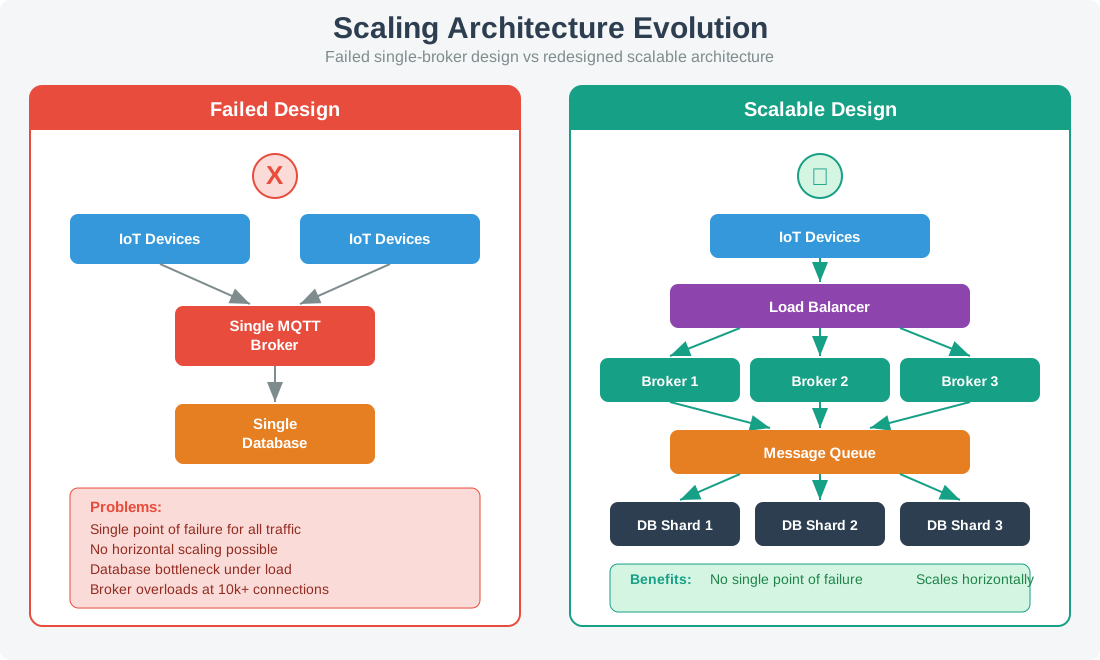
Root cause: Single MQTT broker, single database

Architecture Evolution:

Comparison of failed single-broker architecture versus redesigned scalable architecture showing load balancer distributing to multiple brokers, message queue for decoupling, and database shards for horizontal scaling
Figure 18.1: Architecture evolution from single-point-of-failure design to horizontally scalable architecture with load balancing, multiple brokers, message queue, and database sharding.

Lessons Learned:

Scalability Design Principles
  1. Design for 10x current scale - growth surprises everyone
  2. Horizontal scaling - add nodes, not bigger nodes
  3. Stateless services - no server affinity
  4. Shard data - no single database bottleneck
  5. Queue everything - decouple producers from consumers
  6. Load test regularly - with production-like data

Interactive Scaling Calculator:

Show code
viewof current_devices = Inputs.range([1000, 1000000], {value: 50000, step: 1000, label: "Current Devices", width: 300})
viewof growth_rate = Inputs.range([0.1, 5], {value: 1.5, step: 0.1, label: "Annual Growth Factor (x)", width: 300})
viewof msgs_per_device = Inputs.range([1, 100], {value: 10, step: 1, label: "Messages per Device per Hour", width: 300})
viewof broker_capacity = Inputs.range([1000, 100000], {value: 10000, step: 1000, label: "Messages per Broker per Hour", width: 300})
viewof db_capacity = Inputs.range([100, 10000], {value: 1000, step: 100, label: "DB Writes per Second per Shard", width: 300})
viewof architecture = Inputs.select(["Single Broker", "Multiple Brokers + Queue", "Fully Distributed"], {label: "Architecture", value: "Single Broker"})
Show code
scaling_calc = {
  const total_msgs_per_hour = current_devices * msgs_per_device;
  const total_msgs_per_second = total_msgs_per_hour / 3600;
  const brokers_needed = Math.ceil(total_msgs_per_hour / broker_capacity);
  const db_shards_needed = Math.ceil(total_msgs_per_second / db_capacity);

  const year1_devices = current_devices * growth_rate;
  const year2_devices = year1_devices * growth_rate;
  const year3_devices = year2_devices * growth_rate;

  const year1_msgs = year1_devices * msgs_per_device;
  const year2_msgs = year2_devices * msgs_per_device;
  const year3_msgs = year3_devices * msgs_per_device;

  const year1_brokers = Math.ceil(year1_msgs / broker_capacity);
  const year2_brokers = Math.ceil(year2_msgs / broker_capacity);
  const year3_brokers = Math.ceil(year3_msgs / broker_capacity);

  let scalable = true;
  if (architecture === "Single Broker" && brokers_needed > 1) scalable = false;
  if (architecture === "Multiple Brokers + Queue" && db_shards_needed > 1) scalable = false;

  return {
    total_msgs_per_hour: total_msgs_per_hour,
    total_msgs_per_second: total_msgs_per_second,
    brokers_needed: brokers_needed,
    db_shards_needed: db_shards_needed,
    year1_devices: year1_devices,
    year2_devices: year2_devices,
    year3_devices: year3_devices,
    year1_brokers: year1_brokers,
    year2_brokers: year2_brokers,
    year3_brokers: year3_brokers,
    scalable: scalable
  };
}
Show code
html`<div class="failure-case-studies-calc-shell failure-case-studies-calc-shell--scale">
<h4 class="failure-case-studies-calc-title">Scaling Analysis (${architecture})</h4>
<div class="failure-case-studies-calc-grid">
  <div class="failure-case-studies-calc-card">
    <span class="failure-case-studies-calc-label">Current Throughput</span>
    <span class="failure-case-studies-calc-value">${Math.round(scaling_calc.total_msgs_per_hour).toLocaleString()} msg/hr</span>
    <span class="failure-case-studies-calc-sub">${scaling_calc.total_msgs_per_second.toFixed(1)} msg/sec</span>
  </div>
  <div class="failure-case-studies-calc-card">
    <span class="failure-case-studies-calc-label">Brokers Needed Now</span>
    <span class="failure-case-studies-calc-value" style="color: ${scaling_calc.brokers_needed === 1 ? '#d5ffe8' : '#ffe7b3'};">${scaling_calc.brokers_needed}</span>
  </div>
  <div class="failure-case-studies-calc-card">
    <span class="failure-case-studies-calc-label">DB Shards Needed Now</span>
    <span class="failure-case-studies-calc-value" style="color: ${scaling_calc.db_shards_needed === 1 ? '#d5ffe8' : '#ffe7b3'};">${scaling_calc.db_shards_needed}</span>
  </div>
  <div class="failure-case-studies-calc-card">
    <span class="failure-case-studies-calc-label">Architecture Status</span>
    <span class="failure-case-studies-calc-value" style="color: ${scaling_calc.scalable ? '#d5ffe8' : '#ffd6d6'};">
      ${scaling_calc.scalable ? 'Can Scale' : 'Will Fail Under Load'}
    </span>
  </div>
</div>
<div class="failure-case-studies-scaling-grid">
  <div class="failure-case-studies-calc-card">
    <span class="failure-case-studies-calc-label">Now</span>
    <span class="failure-case-studies-calc-value">${current_devices.toLocaleString()} devices</span>
    <span class="failure-case-studies-calc-sub">${scaling_calc.brokers_needed} brokers • ${scaling_calc.db_shards_needed} DB shards</span>
  </div>
  <div class="failure-case-studies-calc-card">
    <span class="failure-case-studies-calc-label">Year 1</span>
    <span class="failure-case-studies-calc-value">${Math.round(scaling_calc.year1_devices).toLocaleString()} devices</span>
    <span class="failure-case-studies-calc-sub">${scaling_calc.year1_brokers} brokers • ~${Math.ceil(scaling_calc.db_shards_needed * growth_rate)} DB shards</span>
  </div>
  <div class="failure-case-studies-calc-card">
    <span class="failure-case-studies-calc-label">Year 2</span>
    <span class="failure-case-studies-calc-value">${Math.round(scaling_calc.year2_devices).toLocaleString()} devices</span>
    <span class="failure-case-studies-calc-sub">${scaling_calc.year2_brokers} brokers • ~${Math.ceil(scaling_calc.db_shards_needed * growth_rate * growth_rate)} DB shards</span>
  </div>
  <div class="failure-case-studies-calc-card">
    <span class="failure-case-studies-calc-label">Year 3</span>
    <span class="failure-case-studies-calc-value">${Math.round(scaling_calc.year3_devices).toLocaleString()} devices</span>
    <span class="failure-case-studies-calc-sub">${scaling_calc.year3_brokers} brokers • ~${Math.ceil(scaling_calc.db_shards_needed * growth_rate * growth_rate * growth_rate)} DB shards</span>
  </div>
</div>
${!scaling_calc.scalable && architecture === "Single Broker" ?
  `<div class="failure-case-studies-calc-callout failure-case-studies-calc-callout--danger">
    <strong>Critical Risk:</strong> A single broker cannot absorb ${scaling_calc.brokers_needed} brokers worth of traffic. Move to multiple brokers with queueing or a fully distributed architecture.
  </div>` : ''}
${!scaling_calc.scalable && architecture === "Multiple Brokers + Queue" ?
  `<div class="failure-case-studies-calc-callout failure-case-studies-calc-callout--warn">
    <strong>Warning:</strong> The database already needs ${scaling_calc.db_shards_needed} shards. Plan horizontal data scaling before growth compounds.
  </div>` : ''}
${scaling_calc.scalable && architecture === "Fully Distributed" ?
  `<div class="failure-case-studies-calc-callout failure-case-studies-calc-callout--success">
    <strong>Excellent:</strong> This architecture can scale horizontally toward ${Math.round(scaling_calc.year3_devices).toLocaleString()} devices by Year 3.
  </div>` : ''}
</div>`

18.8 Integration Problems

18.8.1 Case 9: The API Version Nightmare

Project: Multi-Vendor Smart Building

Duration: 18 months | Outcome: 6-month delay, 50% cost overrun

The Setup: Integrate 5 vendor systems (HVAC, lighting, access, security, energy).

What Went Wrong:

Vendor A: REST API v2.1
Vendor B: REST API v3.0 (breaking changes monthly)
Vendor C: SOAP (yes, really)
Vendor D: Proprietary binary protocol
Vendor E: "API available Q4" (arrived Q2 next year)

Integration Complexity:

HVAC ↔︎ Lighting

Simple estimate hid API churn

Estimated: 2 weeks

Actual: 8 weeks

Issue: Rate limiting and authentication changes.

Access ↔︎ Security

Protocol mismatch multiplied adapter work

Estimated: 3 weeks

Actual: 12 weeks

Issue: Incompatible protocols between vendors.

Energy ↔︎ All

Late vendor delivery broke the plan

Estimated: 4 weeks

Actual: 16 weeks

Issue: Vendor E missed the promised API timeline.

Lessons Learned:

Integration Best Practices
  1. Verify API stability - check changelog frequency
  2. Build abstraction layer - isolate vendor changes
  3. Contract-first design - define interfaces before coding
  4. Mock everything - don’t depend on vendor availability
  5. Version everything - never break existing integrations
  6. Plan for 3x integration time - it’s always underestimated

18.9 Failure Prevention Checklist

Before deploying any IoT project, verify:

18.9.1 Connectivity

18.9.2 Power

18.9.3 Security

18.9.4 Scale

18.9.5 Integration


Worked Example: Preventing Battery Failure Through Power Budget Validation

Scenario: Preventing the “10-year battery lasting 3 months” failure BEFORE deployment.

Step 1: Calculate Theoretical Power Budget

Device Specs (datasheet claims): - Microcontroller sleep: 1 µA - Sensor active: 5 mA for 100 ms - LoRa TX (14 dBm): 30 mA for 2 sec - Messages: 1 per hour

Math (theoretical):

Sleep power: 1 µA × 23.97 hours/day = 0.024 mAh/day
Sensor power: 5 mA × 0.1 sec × 24/day ÷ 3600 = 0.033 mAh/day
TX power: 30 mA × 2 sec × 24/day ÷ 3600 = 0.4 mAh/day
TOTAL: 0.457 mAh/day

Battery: 2400 mAh (2× AA)
Life: 2400 ÷ 0.457 = 5,250 days = 14.4 years ✓

Step 2: Measure ACTUAL Power Consumption

Equipment: Power Profiler Kit (Nordic nRF or Joulescope)

Findings:

Sleep current: 50 µA (NOT 1 µA!) - GPIO leakage, regulator quiescent current
Sensor warmup: 5 mA for 300 ms (NOT 100 ms) - datasheet showed "typical" not max
LoRa TX: 35 mA for 2.5 sec including ACK wait
Firmware bug: ADC left on, consuming 100 µA constantly
ACTUAL TOTAL: 3.8 mAh/day (8.3× higher than theory!)

Real battery life: 2400 ÷ 3.8 = 631 days = 1.7 years

Step 3: Fix Issues

GPIO Leakage

Disable all unused GPIOs

Savings: -30 µA

Regulator Loss

Switch to an ultra-low quiescent regulator (TPS62840)

Savings: -15 µA

Sensor Warmup

Pre-warm once every 10 samples

Savings: -0.5 mAh/day

ADC Bug

Disable the ADC after each read

Savings: -100 µA

LoRa Retries

Implement exponential backoff

Savings: -0.3 mAh/day

New total: 1.2 mAh/day Validated life: 2400 ÷ 1.2 = 2,000 days = 5.5 years

Step 4: Add Safety Margin

Design target: 10 years Safety factor: 2× Required: 1.2 mAh/day ÷ 2 = 0.6 mAh/day budget

Final optimizations:

  • Message every 2 hours (not 1) → -0.4 mAh/day
  • SF7 → SF8 on LoRa (better link margin, fewer retries) → -0.1 mAh/day
  • Result: 0.7 mAh/day (exceeds 10-year target with margin)

Cost: 2 days of engineering time with power profiler = $1,600 Saved: Avoiding field replacement of 10,000 devices in year 2 = ~$200,000

Key Lesson: ALWAYS measure actual power. Datasheets show “typical” or “minimum” values. Real-world deployments see 5-10× higher consumption due to: 1. Sleep current dominated by leakage, not MCU datasheet 2. Peripheral warmup times longer than advertised 3. Firmware bugs (most common cause!) 4. Environmental factors (cold weather increases battery ESR)

Tool Cost: Joulescope: $500, Nordic PPK2: $90. ROI on first project.

Match Failure Types to Root Causes

Order: Analyzing an IoT Failure Case Study

Place these analysis steps in the correct order.

Key Takeaway

Most IoT project failures stem from testing in ideal conditions rather than real-world environments. Always test with actual deployment conditions (terrain, weather, interference), measure real power consumption (not datasheet estimates), enforce unique device credentials, design for 10x current scale, and budget 3x the estimated integration time.


For Kids: Meet the Sensor Squad!

The Case of the Silent Sensors

Sammy the Sensor was so excited! He and 199 of his friends were placed across a huge farm to watch over the crops. “We will send messages about the soil every day!” cheered Sammy.

But then the corn grew tall – really, REALLY tall. “Hey, I cannot hear the gateway anymore!” called Sammy from behind the towering stalks. Max the Microcontroller tried turning up the signal power, but Bella the Battery groaned, “If you do that, I will run out of energy in a week!”

Lila the LED blinked a warning pattern. “We should have tested when the corn was fully grown, not just when the field was empty!”

The lesson Sammy learned: Always test your IoT project in the REAL conditions it will face – not just the easy ones. Plants grow, weather changes, and what works in a lab might not work in a field. Plan ahead and always have a backup plan!

Can you think of something in your home that works differently in summer versus winter?


Knowledge Check: IoT Failure Analysis

Concept Relationships: IoT Failure Case Studies
Connectivity Failures

Relates to: Protocol Selection + Field Testing

LoRaWAN range failures happen when lab testing ignores terrain, vegetation, and interference in the real site.

Power Budget Miscalculations

Relates to: Sleep Modes + Transmission Frequency

Batteries lasting months instead of years usually trace to missing deep sleep or far more transmissions than budgeted.

Security Breaches

Relates to: Default Credentials + Encryption

Mirai-style compromise disappears when fleets use unique per-device credentials and modern encryption hygiene.

Scaling Issues

Relates to: Cloud Architecture + Load Testing

Systems that look stable at 100 devices collapse at 10,000 without queueing, sharding, and horizontal scale.

Integration Problems

Relates to: API Versioning + Legacy Systems

Retrofit programs fail when teams assume modern REST interfaces can cleanly meet old Modbus or proprietary systems.

Cross-module connection: Prevention checklists map to design best practices. See Protocol Selection Framework for connectivity, Energy-Aware Harvesting for power, and Zero Trust Security for security.

Common Pitfalls

1. Studying Failure Case Studies Without Extracting Generalizable Principles

Reading case studies as interesting stories without extracting reusable principles provides entertainment but not protection. For each case study, explicitly ask: “What general design rule would have prevented this?” Convert each case into a checklist item applicable to your own IoT projects.

2. Assuming Failures Only Happen to Inexperienced Teams

Famous IoT failures have occurred at well-funded companies with experienced engineers. The common factor is not inexperience — it is specific architectural blind spots (no OTA update mechanism, inadequate security threat modeling, untested failure scenarios). Study failures with the assumption that your project could make the same mistakes.

3. Focusing Only on Technical Failures

Many IoT project failures are organizational or process failures: inadequate requirements gathering, insufficient field testing, poor user research, or missing operational procedures. Technical solutions to organizational problems rarely succeed. Analyze the full sociotechnical system, not just the hardware and software.

18.10 What’s Next

Discuss Discussion Prompts Hub Use it to compare failure scenarios with peers and debate prevention strategies. Apply Troubleshooting Hub Use it to translate case-study lessons into active issue triage and root-cause categories. Test Quiz Navigator Use it to verify that the failure patterns and warning signs are now instinctive. Build Hands-On Labs Hub Use it to practice resilience patterns in guided labs before you deploy them for real.

18.11 Related Resources

  • Troubleshooting Hub - Diagnose issues before they become failures
  • Troubleshooting Flowchart - Run command-level diagnostic paths
  • Power Budget Calculator - Prevent battery failures
  • Protocol Selection Framework - Choose the right protocol architecture
  • Zero Trust Security - Design secure systems
  • IoT Games Hub - Reinforce risk patterns through short challenge loops

Previous Troubleshooting Flowchart
Current Failure Case Studies
Next Discussion Prompts Hub
Label the Diagram

17  Troubleshooting Flowchart
19  Discussion Prompts Hub