25  Progress Tracking & Assessment

In 60 Seconds

An interactive progress tracking system for monitoring your IoT knowledge across 9 domains. Rate yourself 1-5 on each domain, set targets, and get personalized gap analysis with content recommendations. Includes a 5-step self-assessment checklist (Identify, Prioritize, Study, Validate, Maintain) and a copy-paste progress tracking template.

Chapter Scope (Avoiding Duplicate Hubs)

This chapter focuses on measurement and progress evidence.

25.1 Learning Objectives

By the end of this chapter, you will be able to:

  • Use the Knowledge Assessment Matrix to visualize your progress across domains
  • Apply the 5-step self-assessment process to systematically identify and close gaps
  • Track your progress using the provided template
  • Acquire personalized recommendations through the interactive assessment tool

This interactive tool helps you see how your IoT knowledge is growing over time. You rate yourself across nine areas, set goals, and the tool highlights where you are strong and where you need more work. Think of it like a report card that you create for yourself – it keeps you honest about your progress and helps you focus your study time on the areas that matter most.

Simple tracking loop:

  1. Measure current state with one honest baseline score per domain.
  2. Select one priority gap using objective gap size and project relevance.
  3. Run one focused remediation cycle (study, practice, retest).
  4. Log evidence and reinforce with a short challenge to protect retention.

25.2 How to Track Your Progress

Time: ~10 min | Level: Intermediate | Unit: P01.C04.U06

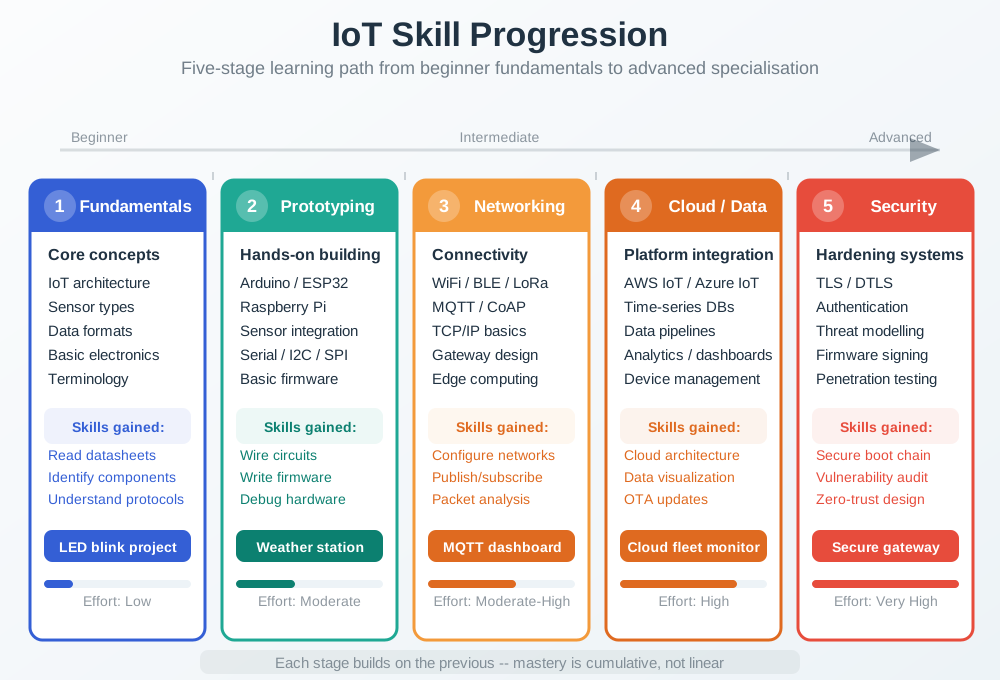
Geometric diagram showing skill progression through learning stages from awareness through understanding to application and mastery, with indicators for typical time investments and assessment checkpoints at each stage.

Skill Progression Framework
Figure 25.1: Skill progression follows predictable patterns. Understanding these stages helps you set realistic expectations and recognize when you are ready to advance to more challenging material or apply knowledge in projects.
Visual Progress Tracker

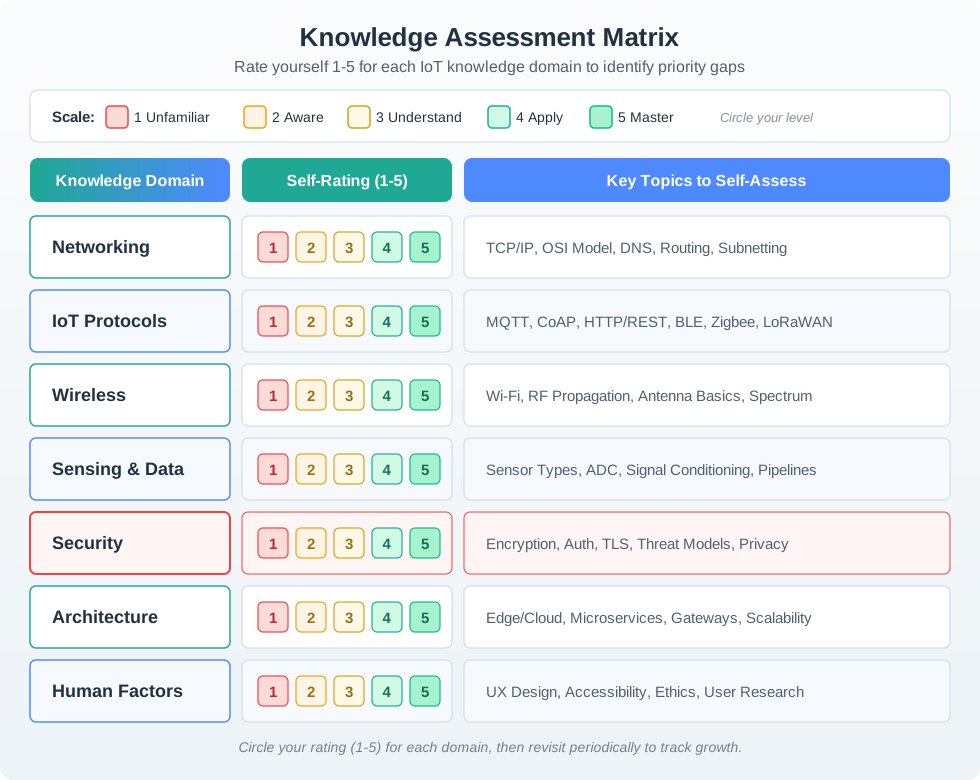
Use the Knowledge Assessment Matrix below to visualize your progress across all domains. Rate yourself 1-5 for each category, then track improvement over time.

Knowledge assessment matrix diagram with two sections: left panel shows seven IoT domains (Networking, IoT Protocols, Wireless, Sensing and Data, Security highlighted in red, Architecture, Human Factors) each with five empty checkboxes for self-rating. Right panel displays a proficiency scale legend with five levels (1-Unfamiliar in red, 2-Aware in orange, 3-Understand in yellow, 4-Apply in teal, 5-Master in green). Arrow connects the panels instructing users to rate themselves 1-5 for each domain.
Figure 25.2: Knowledge Assessment Matrix: self-rate your proficiency (1-5) in each domain to identify priority gaps
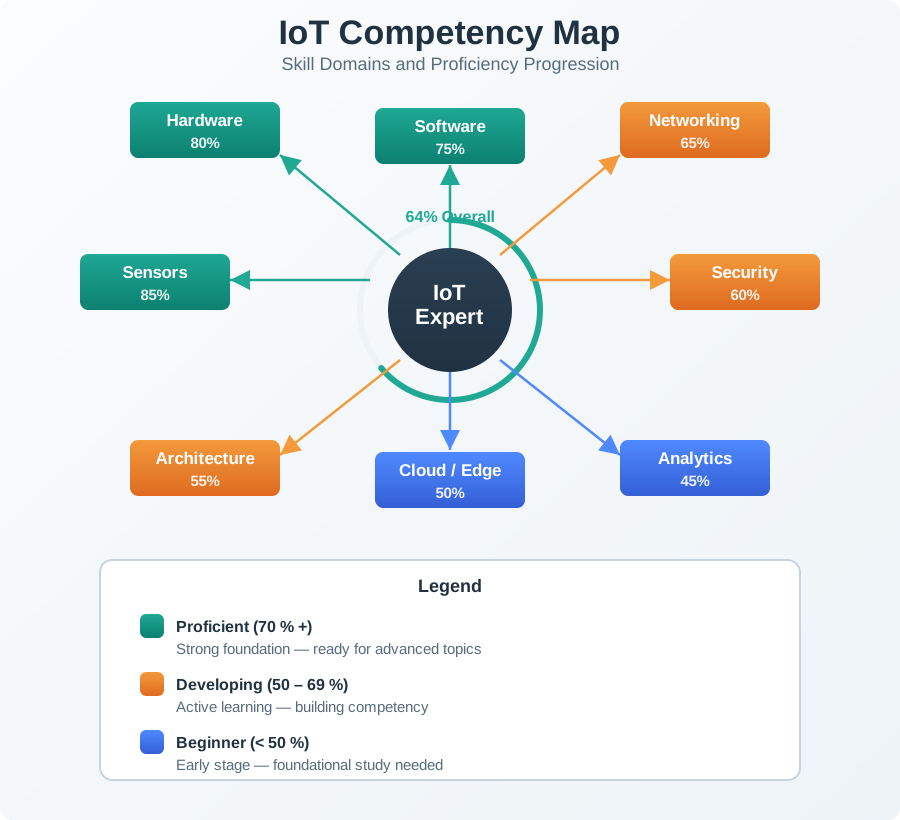
Radar chart template showing seven IoT competency dimensions arranged in a heptagon. Dimensions are Networking, IoT Protocols, Wireless, Sensing and Data, Security, Architecture, and Human Factors. Each axis scales from 0 at center to 5 at perimeter. Example profile shows a student with scores: Networking 4, Protocols 3, Wireless 4, Sensing 2, Security 1, Architecture 3, Human Factors 2. The shaded area reveals strengths in networking/wireless (outer edges) and gaps in security/sensing (inner edges near center).
Figure 25.3: Alternative View: Competency Radar Profile - This radar chart representation shows a sample student’s knowledge profile. Larger outer areas indicate stronger competencies (Networking, Wireless at 4/5), while areas close to the center reveal gaps (Security at 1/5, Sensing at 2/5). Use this visual approach to quickly identify your priority study areas. A balanced learner would have a roughly circular profile. This student should prioritize Security and Sensing/Data before advancing to complex integration projects.

25.2.1 Self-Assessment Checklist

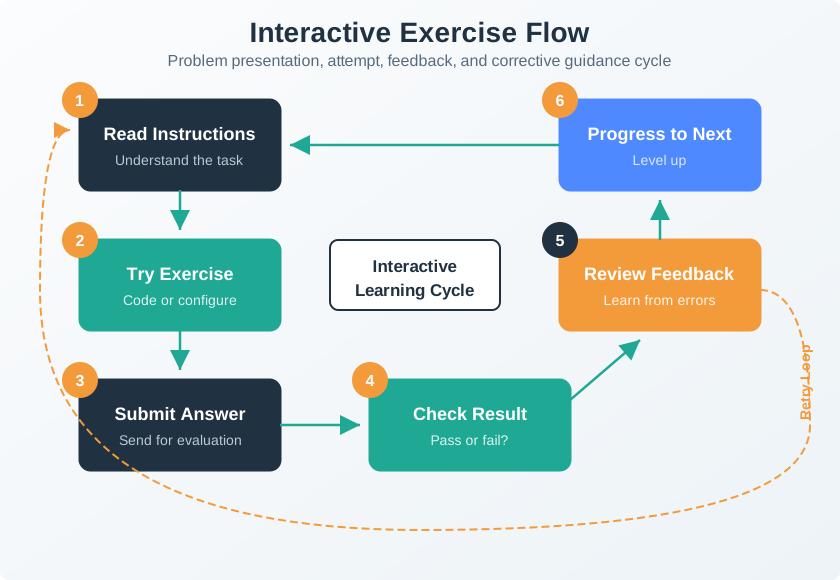
Geometric diagram of an interactive exercise framework showing the cycle of problem presentation, student attempt, immediate feedback, and corrective guidance that characterizes effective self-assessment activities.

Interactive Exercise Framework
Figure 25.4: Interactive exercises provide immediate feedback that accelerates learning. Unlike passive reading, active problem-solving engages deeper cognitive processes and reveals gaps that self-assessment alone might miss.

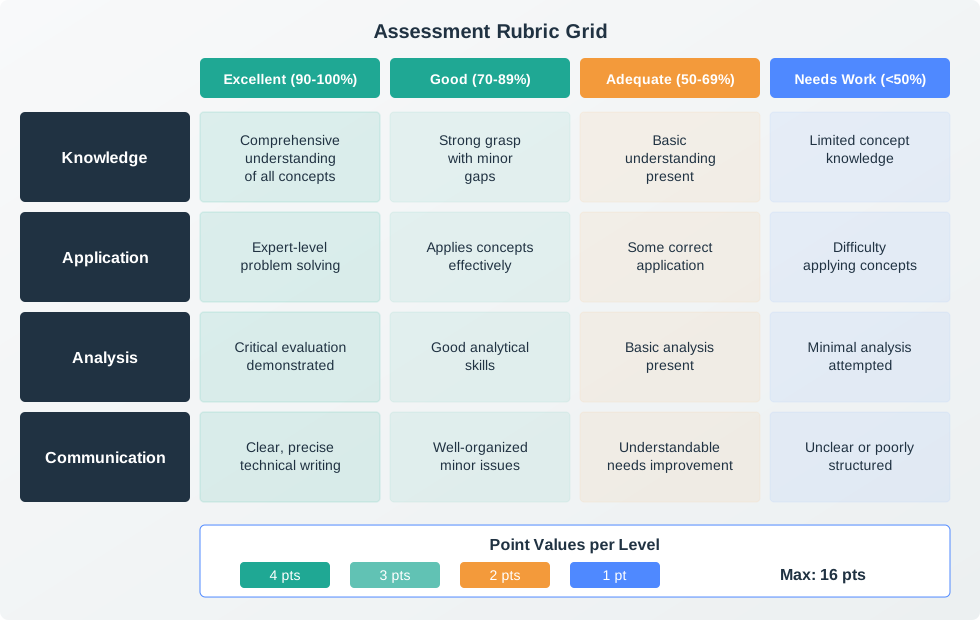
Geometric illustration of an assessment rubric with criteria rows and proficiency columns, showing how different performance levels map to specific skill demonstrations and knowledge indicators.

Assessment Rubric
Figure 25.5: Assessment rubrics provide clear criteria for evaluating your understanding. Each criterion describes what mastery looks like, helping you identify specific areas needing improvement rather than receiving vague feedback.

Use this systematic approach to identify and close knowledge gaps:

Step 1: Identify Gaps

Step 2: Prioritize

Step 3: Study & Practice

Step 4: Validate Understanding

Step 5: Maintain Mastery

25.2.2 Progress Tracking Template

Copy this template to your notes to track progress:

KNOWLEDGE GAPS TRACKER
======================

Date Started: __________

Priority Topics:
1. _________________ | Status: [ ] Not Started [ ] In Progress [ ] Mastered
2. _________________ | Status: [ ] Not Started [ ] In Progress [ ] Mastered
3. _________________ | Status: [ ] Not Started [ ] In Progress [ ] Mastered

Current Focus: _________________
Last Quiz Score: _____%
Target Date: __________

Notes:
-
-

We will continue to expand this tracker as more assessments roll out. Contributions welcome!

25.3 Interactive Self-Assessment

Time: ~15 min | Level: Intermediate | Unit: P01.C04.U07

Sign In Required for Progress Tracking

The interactive self-assessment below requires authentication to save your progress. Sign in with GitHub to track your knowledge gaps over time and receive personalized recommendations.

Use this interactive tool to assess your knowledge across all IoT domains. Rate yourself honestly on a 1-5 scale, set your target level, and the system will identify your priority gaps and recommend content to address them.

25.3.1 Your Knowledge Profile

25.3.2 Domain Assessment Form

Rate your current knowledge level and set your target for each domain.

25.3.3 Priority Gaps

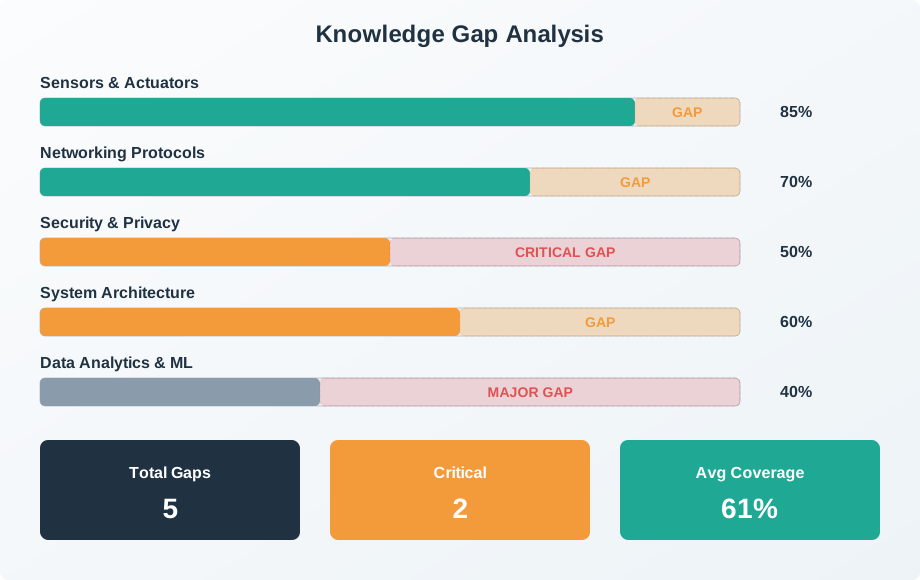
Your knowledge gaps sorted by priority (largest gaps first). Focus on closing these gaps to reach your target levels.

25.3.5 All Domain Status

View your assessment status across all 9 IoT knowledge domains.

25.5 Knowledge Check

Place these self-assessment steps in the correct order.

25.6 Summary

Progress tracking converts subjective “I should study more” into objective gap prioritization.

\(\text{Gap Size} = \text{Target Rating} - \text{Self Rating}\)

Worked example: You rate Security: self=2, target=5, giving a gap of 3 points. Networking: self=3, target=4, giving a gap of 1 point.

  • Security gap: \(5-2 = 3\) points
  • Networking gap: \(4-3 = 1\) point

Focus on Security first — 3× larger gap. The interactive assessment tool below automatically prioritizes domains with the largest gaps, helping you focus your study time where it matters most.

Progress tracking is essential for systematic learning improvement:

  • Knowledge Assessment Matrix - Visual tool to rate yourself 1-5 across all domains
  • 5-Step Self-Assessment - Identify → Prioritize → Study → Validate → Maintain
  • Progress Template - Copy-paste tracker for your own notes
  • Interactive Assessment - OJS-powered tool with personalized gap analysis
  • Domain Status Dashboard - View all 9 IoT knowledge domains at a glance
Concept Relationships: Knowledge Gaps Tracking
  • Self-Assessment Matrix -> 9 IoT Domains: Rows map to domains such as fundamentals, hardware, and connectivity, while columns represent proficiency levels 1-5.
  • Gap Prioritization -> Prerequisite Dependencies: High-priority gaps are the ones that block access to multiple advanced topics.
  • Progress Template -> Spaced Repetition: Weekly re-assessment intervals detect retention decay before it becomes a larger problem.
  • Interactive Dashboard -> Visual Feedback: The dashboard turns assessment data into a quick visual profile of your strengths and weak spots.

Cross-module connection: Tracking integrates with all modules. See Visual Concept Map for prerequisite chains and Quiz Navigator for domain-specific assessments.

Common Pitfalls

Marking a topic as “done” after first reading creates an inaccurate picture of readiness. Knowledge degrades without practice — a topic studied 3 months ago may be effectively re-opened. Track both completion status AND confidence level (1-5), and schedule review for topics with declining confidence.

Self-reporting that a topic is “mastered” after reading it once creates false confidence. Only update mastery status after completing an associated quiz, successfully completing a lab, or being able to explain the concept clearly without notes. The tracker’s value depends on honest assessment.

Marking 50 topics as “started” shows breadth but not readiness. A tracker showing 15 topics marked as “mastered with practice” is more valuable than one showing 50 topics “read once.” Structure your tracking to distinguish surface exposure from working knowledge.

25.7 What’s Next


Previous Current Next
Knowledge Categories Progress Tracking Troubleshooting Hub