15 IoT Interaction Principles: Context and Recovery
More
Depth: Practitioner
Progress saves as you read. Mark sections complete as you go; your progress appears in the sidebar.
15.1 Start With the Decision
This section: Start With the Decision — A screen that works at a desk may fail with gloves, noise, sun, or no link.
A screen that works at a desk may fail with gloves, noise, sun, or no link. Context evidence must shape the interface.
15.2 Route Overview
This section: Route Overview — This is part 2 of 2.
This is part 2 of 2. Review IoT Interaction Principles: State and Evidence for the preceding evidence.
15.3 Learning Objectives
This section: Learning Objectives
- Choose input and feedback from physical and social context.
- Review access, shared use, error recovery, and iteration.
15.4 Chapter Roadmap
This section: Chapter Roadmap
- Context Evidence Before Interface Choice
- Visible System State
- Useful Feedback
- User Control and Consent
- Error Prevention and Recovery
- Accessibility, Shared Use, and Trust
- Iteration Discipline
- Incremental Examples
- Worked Review: Door Access Setup
- Maintenance Alert Review
- Interaction Review Record
- Common Design Defects
- Review Checklist
- Try It Now
- Micro-Exercise: State Truth
- Concept Check: Visible State
- Match Principles to Evidence
- Order Interaction Review
- Summary
- Key Takeaway
- See Also
- What’s Next
15.5 Context Evidence Before Interface Choice
This section: Context Evidence Before Interface Choice — IoT interactions happen in rooms, vehicles, factories, hospitals, farms, buildings, and outdoor sites.
IoT interactions happen in rooms, vehicles, factories, hospitals, farms, buildings, and outdoor sites. A screen that works at a desk may fail when the user has wet hands, gloves, bright sunlight, poor connectivity, noise, fatigue, or a shared device.
Strong context evidence includes:
- representative users and support roles
- physical location, lighting, noise, reach, mounting, and movement constraints
- connectivity, power, battery, sensor, and actuator failure modes
- shared use, guest use, maintenance access, and handoff scenarios
- privacy and consent boundaries
- accessibility needs that affect vision, hearing, cognition, language, and motor control
- evidence from prototype sessions, field observation, support tickets, or deployment reviews
Weak context evidence sounds like “users will understand it” or “the app can explain it later.” A review should ask what was observed, what was tested, and what uncertainty remains.
15.6 Visible System State
This section: Visible System State — Connected systems often hide uncertainty.
Connected systems often hide uncertainty. A dashboard may show a room as occupied even when the last sensor reading is old. A lock screen may show “locked” even when the command is still queued. A thermostat may show a target temperature without explaining that the device is offline.
Good interaction design shows state with enough precision for the decision being made:
- current when the state is fresh and confirmed
- pending when a request has been accepted but not completed
- stale when the last known value is too old for confident action
- uncertain when evidence conflicts or confidence is low
- offline when the device or service cannot be reached
- rejected when a command cannot be accepted
- safe fallback when local behavior continues with limits
Do not make stale or inferred state look like confirmed state. If the system is uncertain, the interaction should say so in plain language and provide the next useful action.
15.7 Useful Feedback
This section: Useful Feedback — close enough in time to the action that the user can connect cause and effect.
Feedback answers the user’s immediate question: “Did the system notice what I did, and what happens next?”
Feedback should be:
close enough in time to the action that the user can connect cause and effect. specific about acceptance, progress, completion, rejection, or delay. available in the channel that fits the context, such as physical indicator, app message, sound, haptic cue, or support record. understandable to the person who must act, not only to engineers. consistent across device, app, cloud, automation, and support surfaces. calm enough not to create unnecessary attention load.
For example, a gateway reset control should not only blink an LED. It should show whether the reset was requested, whether it is running, whether local rules remain active, and when remote service reconnects. The support view should show the same sequence without forcing the user to retell it.
15.8 User Control and Consent
This section: User Control and Consent — IoT products affect physical spaces and personal routines.
IoT products affect physical spaces and personal routines. User control is therefore a product requirement, not a preference.
Review user control by asking:
Can the user perform the core physical task if the app, account, or cloud path is unavailable? Are important actions confirmable before they affect people, property, privacy, or safety? Can users undo, cancel, retry, silence, postpone, or escalate appropriate actions? Are notification levels, automation rules, data sharing, and access permissions visible and changeable? Are shared-space roles clear, such as owner, occupant, guest, maintainer, caregiver, installer, or support agent? Does the system explain why it asks for a permission or credential at the moment it is needed?
Avoid workflows where setup, account creation, firmware updates, or remote permissions block basic local value unless the product’s risk model truly requires it. If a restriction is required, the design should explain the reason and provide a recovery path.
15.9 Error Prevention and Recovery
This section: Error Prevention and Recovery — Error prevention means designing the interaction so common mistakes are less likely.
Error prevention means designing the interaction so common mistakes are less likely. Error recovery means helping people recover when mistakes or failures still happen.
Strong IoT recovery design covers:
invalid setup choices, wrong device selection, and duplicate pairing attempts. weak signal, low battery, missing permissions, and expired credentials. actuator commands that are unsafe, rejected, late, duplicated, or conflicting. notification overload, muted alerts, and missed alerts. handoff between user, installer, maintainer, and support staff. local fallback when remote services are unavailable. logs or event records that explain what happened without exposing unnecessary private data.
Do not treat the happy path as the whole interaction. A user usually judges the system when something goes wrong.
15.10 Accessibility, Shared Use, and Trust
This section: Accessibility, Shared Use, and Trust — Accessibility is not a late polish task.
Accessibility is not a late polish task. It changes the interaction architecture.
Review the design for:
readable text, sufficient contrast, clear focus order, and screen reader labels. alternatives to sound-only, color-only, gesture-only, and app-only feedback. physical reach, tactile affordance, force, grip, glove, wet-hand, and mobility constraints. voice, haptic, visual, and physical-control fit for the use context. language, literacy, cognitive load, and memory demands. household, workplace, public-space, and maintenance role boundaries. data visibility, consent, retention, and explanation for sensitive behavior.
The cost paths in Figure 15.1 explain why early prototype learning matters to later decisions.
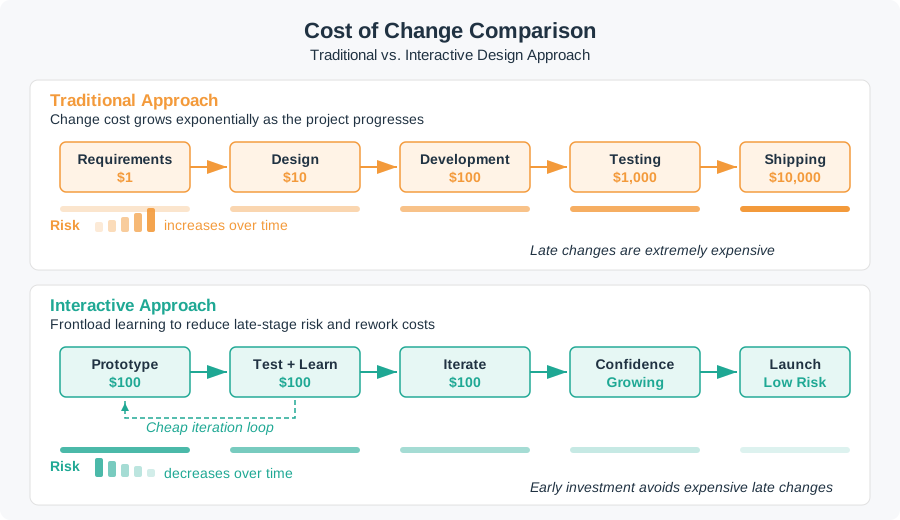
The traditional path places full specification and design before a late test, with the illustrated cost of change rising across stages. The interactive path spends effort on prototype, test, and iteration before launch, so uncertainty can be found while the design is still easier to change. The dollar marks are illustrative, not a forecast for this product. Use the contrast to ask what must be learned now about accessibility, shared use, or trust, and which small test can expose a costly mistake before release.
15.11 Iteration Discipline
This section: Iteration Discipline — Iteration is not random redesign.
Iteration is not random redesign. Each iteration should answer a specific question.
Inspect Figure 15.2 to ask how a test question, the right users, observed task work, and a clear finding lead to the next design choice.
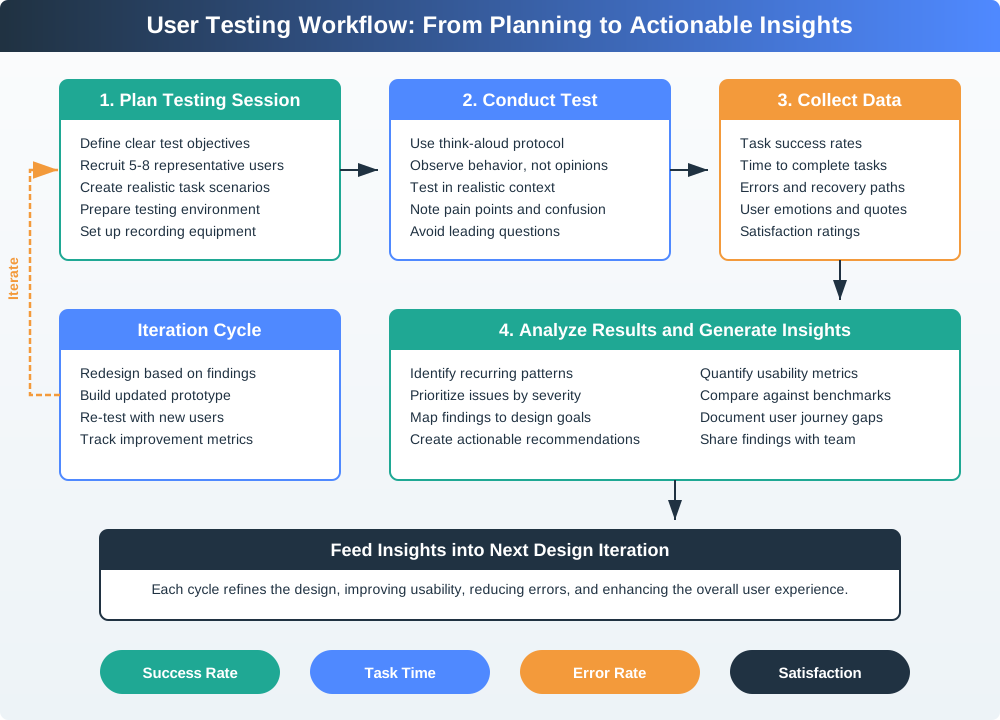
Figure 15.2 keeps the people, seen acts, and review in one chain. What a person says may explain a fault. What they do shows whether the design helps them finish the task. Watch success, pauses, errors, and attempts to get back on track. The review groups those facts into one clear finding; it does not turn each comment into a need. That finding must name the next design choice and the proof needed for a new test. If it does not, the arrow back to the plan means repeat work, not useful change.
Use Figure 15.3 from left to right, comparing what becomes testable as sketches become digital, functional, and production-like. Cost and change effort rise along that path. Use low fidelity for concept, sequence, wording, role, or layout; move to functional work only when timing, physical feel, device feedback, sensor behavior, connectivity, or recovery must be real.
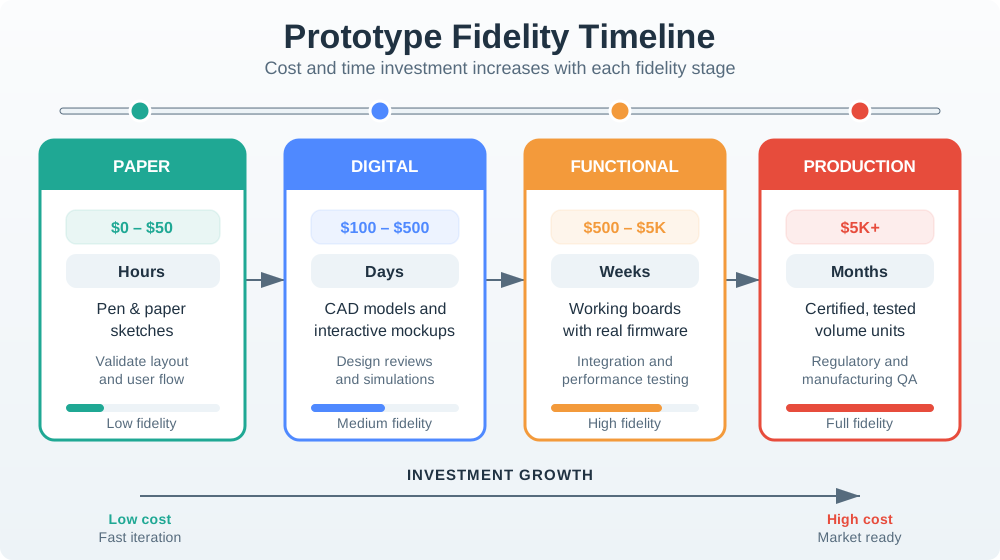
In Figure 15.3, later does not mean automatically better; it means more expensive evidence about a narrower class of implementation-dependent risk. Choose the cheapest prototype that can answer the current interaction question. Together, the two diagrams define iteration discipline: state the question, select fitting fidelity, observe representative behavior, record a decision, and loop only on the risk that remains.
An iteration record should capture:
- design question
- prototype fidelity
- user or context evidence
- observed behavior
- decision made
- remaining risk
- owner
- change condition
If the team only asks whether people like a mockup, it has not tested the interaction. Ask people to complete a task, observe what they do, and revise the design around the behavior that matters.
15.12 Incremental Examples
This section: Incremental Examples
15.12.1 Honest Sensor Readings
A beginner interaction review can start with a desk prototype for a soil-moisture sensor. The mobile card should distinguish “moisture 28% measured 2 minutes ago,” “last reading 4 hours old,” “sensor offline,” and “irrigation command pending.” The physical node can use a status LED, but the app must not rely on color alone. A useful first test is to ask a learner which action is safe when the device is online, stale, or offline.
15.12.2 Recover from Setup Failure
A shared smart-lock product needs a setup flow that spans the wall reader, mobile credential, installer app, and cloud policy service. The interaction should show whether BLE discovery found the correct reader, whether the QR setup payload or NFC tag matched the expected unit, whether Wi-Fi or Ethernet provisioning succeeded, whether the account role was approved, and whether the credential is active. Recovery paths should cover duplicate credentials, expired invites, lost phones, low reader battery, and support handoff without exposing private access history to the wrong role.
15.12.3 Coordinate Alert Ownership
An industrial pump monitor needs interaction rules across the device indicator, operator dashboard, maintenance app, MQTT broker, notification service, and support console. The design should name who owns acknowledged, assigned, snoozed, escalated, cleared, recurring, stale, and offline alert states. Evidence can come from sensor confidence, last-seen timestamps, vibration and temperature trends, gateway health, MQTT session logs, OpenTelemetry traces, maintenance work orders, and role-based notification policy. The interface is ready only when the operator and maintenance lead can explain the same state from their own surface.
15.13 Worked Review: Door Access Setup
This section: Worked Review: Door Access Setup — Scenario: a shared building door access product has a wall reader, mobile credential, cloud policy service, and installer app.
Scenario: a shared building door access product has a wall reader, mobile credential, cloud policy service, and installer app. New occupants must gain access quickly, but facility staff need a secure setup and support trail.
A strong interaction review would accept:
local entry behavior that is understandable when the phone, network, or cloud service is unavailable. setup feedback that distinguishes scanning, credential exchange, policy approval, activation, and failure. a clear recovery path for wrong unit, expired invite, duplicate credential, lost phone, and low reader battery. visible role boundaries for occupant, guest, installer, facility manager, and support agent. notification language that explains what happened without exposing unnecessary private data. support evidence that shows accepted, rejected, pending, and completed setup events. a change condition when credential flow, device firmware, access policy, or shared-space role changes.
The review should reject a design that says “the app handles setup” but does not show device feedback, offline behavior, role boundaries, error recovery, or support evidence.
15.14 Maintenance Alert Review
This section: Maintenance Alert Review — Scenario: a connected pump monitor sends alerts to operators and maintenance staff.
Scenario: a connected pump monitor sends alerts to operators and maintenance staff. The product team wants to avoid alert fatigue while still making actionable failures visible.
A strong interaction review would accept:
alert levels tied to user action, not only sensor severity. visible confidence and freshness for the reading that triggered the alert. distinct feedback for acknowledged, assigned, snoozed, escalated, cleared, and recurring alerts. a local device indicator for field staff who are near the equipment. a support record that links the alert to device state, recent maintenance, and communication health. an escalation rule for repeated alerts, missing acknowledgements, and device offline state. a review point for privacy, safety, and operational language before deployment.
The review should reject a design where every threshold crossing becomes the same urgent notification or where users can only silence alerts without recording why.
15.15 Interaction Review Record
This section: Interaction Review Record — Use Figure 15.4 to check whether an interaction supports the whole user task.
Use Figure 15.4 to check whether an interaction supports the whole user task.
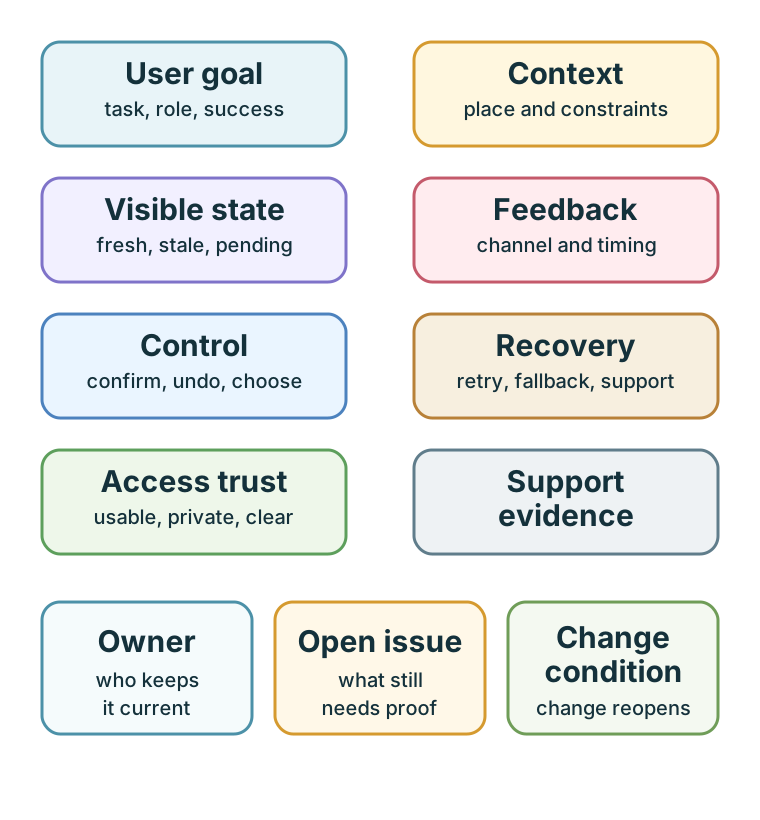
User goal and context define whose action is being reviewed and under what constraints. Visible state and feedback tell the person what the system knows and when it changed. Control and recovery cover confirmation, undo, retry, fallback, and support when the action cannot finish. Access trust checks whether that route remains usable and private. The owner, open issue, and change condition keep the record alive after a first test. A polished screen cannot settle the decision if its failure route is still unproven.
user goal. context evidence. visible state rule. feedback channel and timing. control or consent decision. recovery path. accessibility and trust check. owner. open issue. change condition.
The record should be small enough to maintain and specific enough to revisit when conditions change.
15.16 Common Design Defects
This section: Common Design Defects — hiding stale, pending, rejected, or uncertain state behind a simple success message.
Watch for these defects during review:
hiding stale, pending, rejected, or uncertain state behind a simple success message. making cloud or app access mandatory for a core local action without a clear risk reason. using sound, color, gesture, or touchscreen input as the only control path in difficult contexts. asking users whether they like a mockup instead of observing task behavior. adding notification settings without explaining alert meaning, ownership, and escalation. treating accessibility, privacy, consent, and shared roles as later documentation tasks. allowing support staff to see less interaction evidence than the user saw. increasing prototype fidelity before the design question has been answered. recording a design decision without owner, open issue, or change condition.
15.17 Review Checklist
This section: Review Checklist — Is the user goal and context evidence explicit?
Before accepting an IoT interaction design, check:
Is the user goal and context evidence explicit? Does the design show current, pending, stale, offline, uncertain, rejected, and fallback states where relevant? Does every important action receive useful feedback in the right channel? Can users control, confirm, undo, cancel, retry, silence, postpone, or escalate appropriate actions? Is there a recovery path for device, network, cloud, account, sensor, actuator, battery, and permission failures? Are accessibility needs addressed in the interaction architecture? Are shared-space roles, consent, privacy, and trust boundaries visible? Does support evidence match what users experienced? Does the prototype fidelity match the design question? Is there an owner, open issue, accepted tradeoff, and change condition?
15.18 Try It Now
This section: Try It Now
Choose one IoT interaction and write a one-row review:
| Field | Your answer |
|---|---|
| User task | What the person is trying to do, not the feature name. |
| System state | Current, pending, stale, uncertain, rejected, offline, or fallback state that changes the task. |
| Feedback channel | Device indicator, app message, haptic cue, sound, notification, dashboard, or support surface. |
| Recovery path | Undo, retry, cancel, override, escalate, local fallback, or support handoff. |
| Trust boundary | Permission, consent, privacy, shared role, accessibility, or support visibility issue. |
15.19 Micro-Exercise: State Truth
This section: Micro-Exercise: State Truth — “Door unlocked” when the command has only been queued.
For each interface phrase, rewrite it so the user can see what the system really knows:
“Door unlocked” when the command has only been queued. “Room available” when the gateway is offline and the last motion event is stale. “Pump fault urgent” when sensor confidence is low and no maintenance role is currently assigned.
15.20 Concept Check: Visible State
This section: Concept Check: Visible State
15.21 Match Principles to Evidence
This section: Match Principles to Evidence
15.22 Order Interaction Review
This section: Order Interaction Review
15.23 Rehearse Recovery at the Pump
This section: Rehearse Recovery at the Pump — Put an operator beside the noisy pump with gloves on and ask them to acknowledge a maintenance alert.
Put an operator beside the noisy pump with gloves on and ask them to acknowledge a maintenance alert. Record what they see on the local indicator, what the dashboard reports, and whether the acknowledgement reaches the device. Then disconnect the gateway during the task. The interface should identify the pending command, mark the last confirmed state, and offer a repeatable route to check the pump before another command is sent. Treat an apparent success message as a defect until the device confirms it.
15.24 Separate Requested State From Confirmed State
This section: Separate Requested State From Confirmed State — A tap changes the requested state before the network confirms a physical change.
A tap changes the requested state before the network confirms a physical change. A delayed acknowledgement can make a dashboard display a newer request beside an older sensor sample. Label the timestamp and origin of each state so the operator can distinguish an unconfirmed command, stale telemetry, and a device fault. The chapter’s visibility-of-state principle requires feedback from the real command path, not merely the local click; its recovery record then tests what people do when the path breaks.
15.25 Practice the Decision
This section: Practice the Decision
15.26 Summary
This section: Summary — Interactive design principles help IoT teams make connected products understandable, controllable, recoverable, accessible, and trustworthy.
Interactive design principles help IoT teams make connected products understandable, controllable, recoverable, accessible, and trustworthy. The most important review question is not whether the interface looks polished. It is whether the product shows the right state, provides useful feedback, preserves user control, supports recovery, respects shared context, and records enough evidence to revisit the decision when conditions change.
Strong interaction design is evidence-bound. It connects user goals, physical context, system uncertainty, feedback channels, permission boundaries, support evidence, owners, and change conditions.
15.27 Key Takeaway
This section: Key Takeaway — Interactive IoT design should make system state, action, feedback, autonomy, and recovery understandable across physical and digital touchpoints.
Interactive IoT design should make system state, action, feedback, autonomy, and recovery understandable across physical and digital touchpoints.
15.28 See Also
This section: See Also — Design Prototyping and Learning explains why prototypes should answer specific learning questions.
Design Prototyping and Learning explains why prototypes should answer specific learning questions. Interactive Design Process turns these principles into a step-by-step workflow. Prototyping Techniques for IoT helps choose the right prototype fidelity for the current design question. User Testing and Iteration shows how to observe behavior and revise the design. Interface Design Fundamentals connects these principles to screen, control, and feedback patterns. Design Facets and Calm Technology reviews attention, trust, and cross-device behavior.
15.29 What’s Next
This section: What’s Next — Continue to Interactive Design Process to apply these principles as a structured workflow for discovery, prototyping, testing, iteration, and release decisions.
Continue to Interactive Design Process to apply these principles as a structured workflow for discovery, prototyping, testing, iteration, and release decisions.
15.30 Continue Your Route
This section: Continue Your Route — This is the last part of this chapter.
This is the last part of this chapter. Return to IoT Interaction Principles: State and Evidence. See Choose a UX Design Module.
15.31 Additional Knowledge Checks
This section: Additional Knowledge Checks
Find help
3 reviewed answers.
Where should I start in a module?
Open the module page from the sidebar to see its chapters in order. Use the module map to return to a topic you need.
Modules and pathsReviewed
What can I try when a project does not work?
Check the symptom, then work through the diagnostic steps. Keep the error message and the smallest example that reproduces it.
When you are stuckReviewed
How do interactive examples work?
Use the interactive guide to check how examples and simulations work before changing your project.
Interactive examples guideReviewed