17 IoT Interaction Design: Discovery Through Release
More
Depth: Practitioner
Progress saves as you read. Mark sections complete as you go; your progress appears in the sidebar.
17.1 Start With the Decision
This section: Start With the Decision — An IoT interface starts with the user’s setting and constraint.
An IoT interface starts with the user’s setting and constraint. Map discovery, design, trials, and tests before polishing screens.
17.2 Route Overview
This section: Route Overview — This is part 2 of 2.
This is part 2 of 2. Review IoT Interaction Design: Testing the Design Loop for the preceding evidence.
17.3 Learning Objectives
This section: Learning Objectives
- Test process map with a concrete scenario and pass criteria.
- Validate interaction design loop order with a concrete scenario and pass criteria.
17.4 Chapter Roadmap
This section: Chapter Roadmap
- Process Map
- Discover Context
- Define the Design Question
- Ideate Alternatives
- Prototype the Current Uncertainty
- Test Behavior
- Iterate, Loop Back, or Release
- Divergent and Convergent Work
- IoT Release Gates
- Incremental Examples
- Process Record
- One-Decision Process Record
- Micro-Exercise: Choose the Loop Point
- Common Process Defects
- Review Checklist
- Lightweight Review Template
- Concept Check: Identify the Process Gap
- Match Process to Evidence
- Interaction Design Loop Order
- Summary
- Key Takeaway
- See Also
- What’s Next
17.5 Process Map
This section: Process Map — start from context evidence, not a preferred interface.
Use the process map above as a working sequence:
start from context evidence, not a preferred interface. frame a decision question that can be tested. explore more than one interaction path. prototype only the evidence needed for the current question. test behavior in a realistic task. decide whether to loop back, move forward, or release with known limits. preserve the record so later teams know why the decision was made.
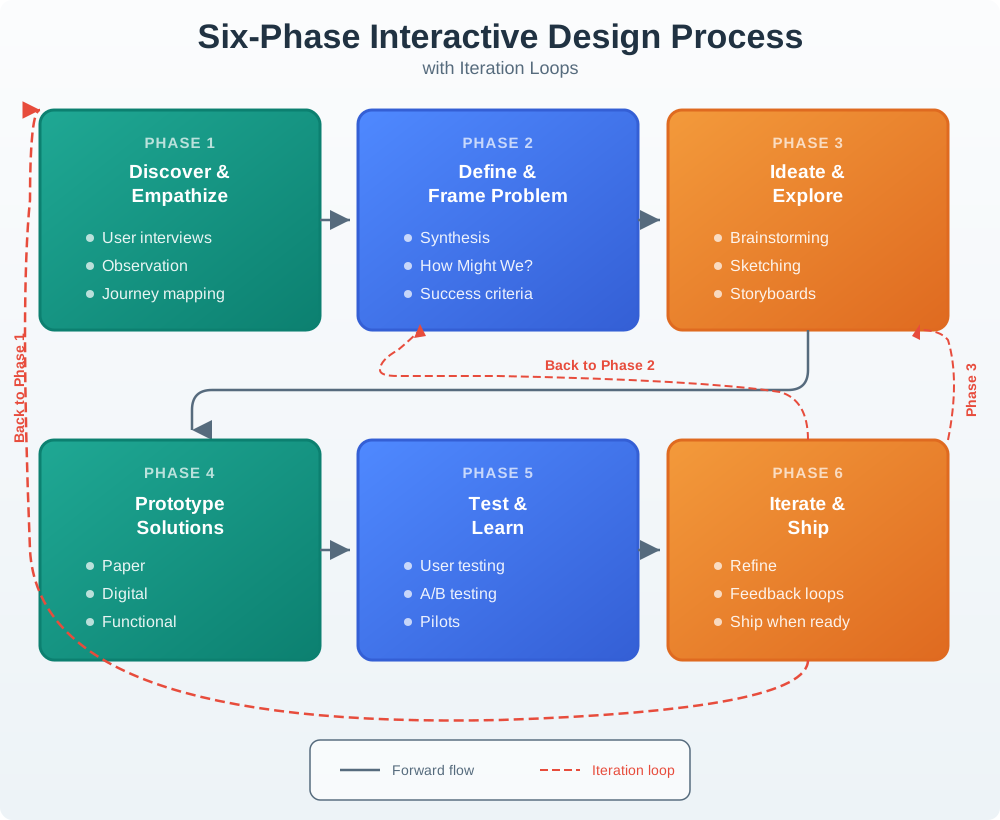
The estate figure in Figure 17.1 shows why the process should be treated as a loop with named exit points. A team can move forward only when the current stage has produced evidence strong enough for the next decision.
Use Figure 17.2 to choose the next test for a pump monitoring alert.
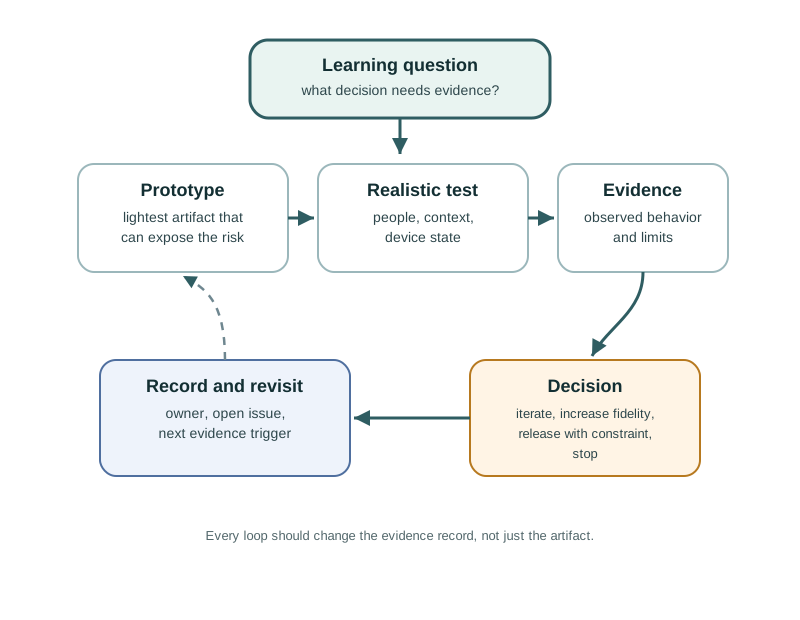
Operator evidence says alerts arrive too often and that urgent, assigned, snoozed, repeated, and resolved states are hard to distinguish. That becomes a learning question about making an alert actionable without adding fatigue. The team then chooses a prototype and tests it against a realistic task, rather than polishing a screen before the question is clear. The decision may keep, change, or reject the route. Each pass should preserve the observed behavior and name the next uncertainty the team needs to test.
17.6 Discover Context
This section: Discover Context — Discovery gathers evidence about people, spaces, devices, constraints, and existing workarounds.
Discovery gathers evidence about people, spaces, devices, constraints, and existing workarounds. IoT discovery should include the physical and service context, not only interviews about a future app.
Strong discovery evidence may include:
observation of the task in the place where the product will be used. device placement, reach, lighting, noise, weather, mounting, gloves, movement, and shared access constraints. setup, maintenance, support, and handoff roles. network, battery, sensor, actuator, permission, account, and cloud failure paths. existing tools, manual workarounds, labels, checklists, logs, and support tickets. privacy, consent, accessibility, and safety boundaries.
Discovery is weak when the team jumps from a stakeholder request directly to a feature list.
17.7 Define the Design Question
This section: Define the Design Question — Definition turns raw evidence into a narrow question the team can act on.
Definition turns raw evidence into a narrow question the team can act on. The question should be specific enough to guide ideation and broad enough to allow alternatives.
Useful definition statements include:
- user or role
- context and constraint
- desired outcome
- current obstacle
- evidence that would show improvement
- known boundary that the design must respect
For example: “How might a facility technician confirm which gateway is offline and start a safe local recovery action without needing cloud access?” This is stronger than “improve the dashboard” because it names the user, context, action, constraint, and evidence path.
17.8 Ideate Alternatives
This section: Ideate Alternatives — Ideation deliberately separates idea generation from selection.
Ideation deliberately separates idea generation from selection. Connected products often have more than one possible interaction path: physical control, app flow, spoken prompt, local indicator, printed setup code, support workflow, automation rule, or maintenance tool.
A useful ideation pass:
generates several distinct interaction paths. includes people who understand users, hardware, firmware, cloud services, support, security, accessibility, and operations. names the tradeoff each path creates. keeps simple options visible. avoids choosing the first technically convenient answer. records why rejected alternatives were not chosen.
The point is not to generate novelty for its own sake. The point is to avoid false certainty.
Use Figure 17.3 to see where teams should expand alternatives and where evidence should narrow them.
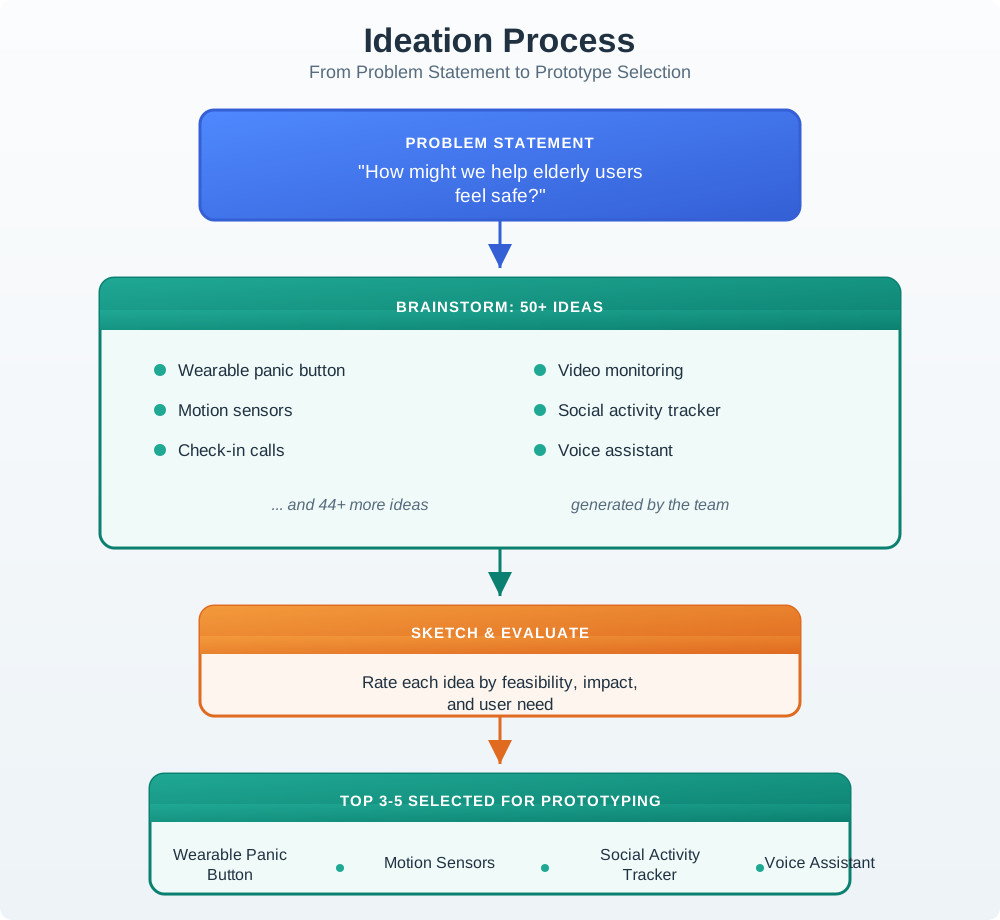
Begin with the problem and user need. They keep new ideas tied to a real result. The wide middle holds more than one path, such as an alert, a sensor, or video. The first tool that seems to fit is not yet the answer. The next step tests each idea against risk, cost to build, privacy, and facts already found. The best paths become mock-ups, not firm plans. A test may rule an idea out or make the need more clear, so the route can open again rather than push a weak idea toward launch.
17.9 Prototype the Current Uncertainty
This section: Prototype the Current Uncertainty — A prototype should match the question being tested.
A prototype should match the question being tested.
Use low-fidelity artifacts when testing wording, sequence, roles, permission moments, notification meaning, or setup logic. Use a functional prototype when timing, device feedback, physical affordance, sensor state, actuator behavior, connectivity, or recovery depends on real behavior.
Right-sized prototype questions include:
- Can users identify the correct device before pairing?
- Does the user understand pending, rejected, stale, and offline states?
- Can the physical control be found and used under the expected conditions?
- Does the alert message explain the action needed?
- Can support staff reconstruct what happened from the available evidence?
- Does local fallback still meet the product promise when remote services fail?
Prototype polish is not evidence. A rough prototype that answers the question is better than a polished prototype that hides the risk.
17.10 Test Behavior
This section: Test Behavior — Testing should observe representative users attempting realistic tasks.
Testing should observe representative users attempting realistic tasks. It should not rely only on preference questions such as “Do you like this?”
A strong test plan includes:
- task scenario and success criteria
- representative participant or role
- environment or simulated context
- prototype fidelity and known limitations
- observations to capture
- failure, recovery, support, and handoff prompts
- accessibility and privacy checks where relevant
- decision rule for what happens after the test
Testing is useful when it reveals what people did, where they paused, which cue they missed, how they recovered, and what evidence the team needs next.
17.11 Iterate, Loop Back, or Release
This section: Iterate, Loop Back, or Release — Iteration should be tied to evidence.
Iteration should be tied to evidence. A team may loop back to discovery if the task or user role was misunderstood, to definition if the design question is wrong, to ideation if alternatives are too narrow, to prototyping if the artifact cannot test the question, or to testing if the evidence is weak.
A release decision should not mean “no issues remain.” It should mean:
- the core task works for the intended users and context
- important states and recovery paths are visible
- remaining risks are named
- support and operations evidence is available
- owners are assigned
- accepted tradeoffs are recorded
- change conditions are clear
If a change condition fires after release, the process resumes with evidence rather than guesswork.
17.12 Divergent and Convergent Work
This section: Divergent and Convergent Work — The process alternates between expanding and narrowing.
The process alternates between expanding and narrowing.
Read Figure 17.4 to distinguish expanding the evidence space from narrowing toward a decision.
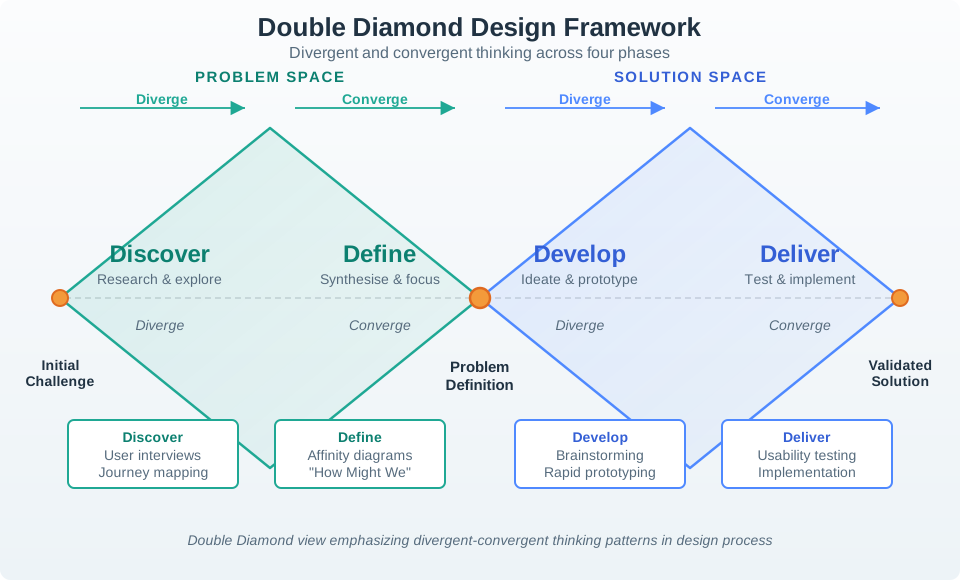
The first diamond opens with discover, where the team seeks different people, contexts, and explanations rather than confirming its initial view. Define narrows that evidence into a bounded problem. The second diamond widens again during develop, allowing several interaction and service approaches to compete. Deliver then narrows through testing and release evidence. The centre is not a one-way gate: a prototype may expose a mistaken problem definition and send the team back. The model helps only when each convergence states what evidence justified discarding the alternatives.
Divergent work expands the evidence or option space:
observing different users and contexts. generating alternative interaction paths. exploring physical, mobile, voice, support, and automation surfaces. trying low-cost prototypes that answer different questions.
Convergent work narrows the decision:
selecting the problem frame. choosing the simplest useful prototype. deciding which evidence matters. accepting, rejecting, or revising a design path. recording owners and change conditions.
Teams drift when they converge too early or never converge at all. Both are process defects.
17.13 IoT Release Gates
This section: IoT Release Gates — Does the product still provide understandable local value when remote services are unavailable?
Before a connected interaction leaves the design process, check the IoT-specific gates:
Does the product still provide understandable local value when remote services are unavailable? Are setup, pairing, permission, and credential failures recoverable? Are stale, pending, rejected, offline, uncertain, and fallback states visible where relevant? Are physical controls, mobile screens, notifications, support views, and logs consistent? Are accessibility and shared-use requirements built into the interaction path? Are privacy and consent moments explained before data is collected or shared? Can support staff see enough evidence to help without exposing unnecessary private data? Is there a rollback, disable, or safe-mode path for risky automation? Is the owner for each unresolved issue named?
These gates keep interaction design connected to the full IoT system.
17.14 Incremental Examples
This section: Incremental Examples
17.14.2 Maintenance Alert Flow
Scenario: a pump monitor sends maintenance alerts. Operators complain that alerts arrive too often and do not explain whether action is urgent, assigned, snoozed, repeated, or resolved.
A strong process review would accept:
discovery evidence from operators, field technicians, supervisors, and support records. a defined question about making alert state actionable without creating alert fatigue. ideation across local indicators, mobile alerts, dashboard queues, escalation rules, and maintenance records. a prototype of alert levels, acknowledgement, assignment, snooze, escalation, and cleared states. testing with realistic alert sequences, missing acknowledgement, repeated alerts, and offline device state. iteration based on observed confusion, missed cues, over-silencing, and support handoff gaps. a release gate that checks notification policy, local indication, support logs, and change conditions.
The review should reject a process that only changes colors or notification wording without checking alert ownership, state, repetition, recovery, and escalation.
17.14.3 OTA Rollback and Gateway Recovery
Scenario: an industrial gateway receives an over-the-air firmware update. The team wants to release a new setup and recovery flow, but the risk crosses device firmware, local network state, cloud command status, and field support.
A strong process review would accept:
discovery evidence from installers, site operators, support engineers, security reviewers, and firmware owners. a defined question about how a site operator understands update progress, rollback, and local recovery when the cloud path is delayed. ideation across gateway LEDs, local web UI, mobile push, MQTT command topics, device-shadow status, maintenance console, and support scripts. a bench prototype that exposes bootloader slot, firmware version, signature failure, rollback state, and gateway offline interval. a field-like prototype that includes weak Wi-Fi, Ethernet failover, battery-backed clock drift, duplicate command id, and idempotency key behavior. testing that asks operators to distinguish updating, pending restart, rolled back, failed signature, offline gateway, and support-required states. a release gate that checks OpenTelemetry trace ids, support correlation ids, firmware version, account role, local fallback instructions, and the owner for each unresolved recovery path.
The review should reject a process that treats the update as a single success message. The design path is not ready until users and support staff can see the same update state and recovery boundary.
17.15 Process Record
This section: Process Record — The fields in Figure 17.5 preserve what a design iteration learned.
The fields in Figure 17.5 preserve what a design iteration learned.
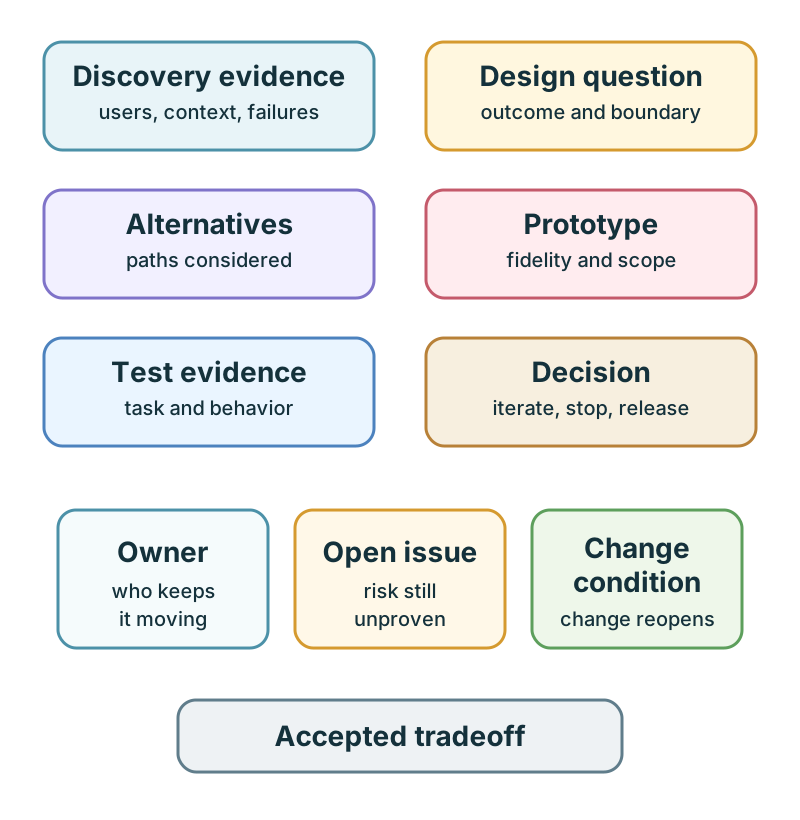
Discovery evidence describes users, setting, and failures. The design question names the outcome and boundary, while alternatives show which routes were considered. Prototype scope and test evidence then connect the artifact to a task and observed behavior. The decision can be to iterate, stop, or release; it should not stand alone without that trace. Owner, open issue, accepted tradeoff, and change condition keep the decision reviewable as the product or context changes. This prevents a past test from silently becoming permanent proof.
discovery evidence. design question. alternatives considered. prototype fidelity and scope. test task and observed behavior. decision made. accepted tradeoff. owner. open issue. change condition.
The record should be short enough to maintain and specific enough to guide the next iteration.
Use one current interaction decision from a prototype, lab, or project. Fill in a record before you change the design again:
| Record field | What to write |
|---|---|
| Design question | The narrow user task, device state, or recovery path being tested |
| Alternatives considered | At least two interaction paths, including the rejected option |
| Evidence used | The observation, test task, support record, log, or constraint that changed the decision |
| Decision | Keep, revise, loop back, increase fidelity, or release |
| Owner | The person or role responsible for the next action |
| Open issue | The risk, missing evidence, or known tradeoff that remains |
| Change condition | The condition that will force the team to revisit the decision |
Accept the record only if another team member could understand what changed, why it changed, and what would make the decision unsafe later.
17.16 Micro-Exercise: Choose the Loop Point
This section: Micro-Exercise: Choose the Loop Point — For each situation, write which stage should happen next: discover, define, ideate, prototype, test, iterate, or release.
For each situation, write which stage should happen next: discover, define, ideate, prototype, test, iterate, or release.
A smart-lock team knows setup fails when the reader is offline, but no one has observed whether residents understand the offline message. A pump-monitoring team has three alert concepts, but has not compared local indicator, mobile notification, dashboard queue, and maintenance-ticket paths. A gateway-update flow works in the happy path, but support cannot see firmware version, rollback state, or command correlation id.
17.17 Common Process Defects
This section: Common Process Defects — starting from a preferred feature rather than observed context.
Watch for these defects during review:
starting from a preferred feature rather than observed context. defining the problem so broadly that any solution could fit. choosing the first feasible idea before exploring alternatives. building a polished prototype that does not test the real uncertainty. testing opinions instead of behavior. ignoring failure, recovery, support, accessibility, privacy, or shared-role scenarios. treating the process as linear even after evidence contradicts the current direction. releasing without owner, open issue, accepted tradeoff, support evidence, or change condition.
17.18 Review Checklist
This section: Review Checklist — Does discovery include real context, roles, constraints, and failure modes?
Before accepting an interactive design process, check:
Does discovery include real context, roles, constraints, and failure modes? Is the design question testable? Were distinct alternatives considered before selection? Does the prototype fidelity match the current uncertainty? Did testing observe behavior in a realistic task? Were failure and recovery paths tested? Did the evidence change a decision? Are accessibility, privacy, shared use, support, and operations included? Is the release gate explicit? Are owner, open issue, accepted tradeoff, and change condition recorded?
Use this when the process needs a concrete checklist record:
design_question=
user_context=
system_state_to_show=
feedback_or_recovery_path=
constraints=
prototype_fidelity=
test_participants_or_scenario=
evidence_collected=
decision=keep | revise | loop back | increase fidelity | release
next_owner=
The template is intentionally short. If the team cannot fill it in, the design process is not ready for implementation review.
17.19 Concept Check: Identify the Process Gap
This section: Concept Check: Identify the Process Gap
17.20 Match Process to Evidence
This section: Match Process to Evidence
17.21 Interaction Design Loop Order
This section: Interaction Design Loop Order
17.22 Choose the Next Loop From the Failed Handoff
This section: Choose the Next Loop From the Failed Handoff — Suppose the shared-door reader works in a walkthrough but residents cannot finish visitor setup.
Suppose the shared-door reader works in a walkthrough but residents cannot finish visitor setup. Preserve the failed observation, including the invite screen, reader response, role, and connectivity state. Define a narrower question: can a resident tell whether an invite has reached the visitor? Change the smallest part of the flow, test it with a new resident, and decide whether the evidence supports another iteration or implementation. The process record should name the decision owner and the condition that sends the team back to research.
17.23 Why Process Gates Need Evidence
This section: Why Process Gates Need Evidence — An attractive prototype demonstrates presentation, not that a visitor can enter under realistic constraints.
An attractive prototype demonstrates presentation, not that a visitor can enter under realistic constraints. The design loop links context evidence to a requirement, then to a prototype behaviour and an observed outcome. If the team cannot trace the failed invite to the changed screen and a new test, it has skipped the evaluation part of the loop. The chapter’s iterative process and one-decision record make that evidence trace explicit.
17.24 Practice the Decision
This section: Practice the Decision
17.25 Summary
This section: Summary — The interactive design process turns uncertainty into evidence.
The interactive design process turns uncertainty into evidence. Strong teams discover real context, define a testable question, ideate alternatives, prototype the current risk, test behavior, and iterate or release based on evidence. The process is not linear, but loops should be intentional and recorded.
For IoT products, the process must include devices, services, physical spaces, roles, failures, accessibility, privacy, support, and operations. A design is not ready because it looks complete. It is ready when the team can explain what was tested, what changed, what remains open, who owns it, and what condition requires another review.
17.26 Key Takeaway
This section: Key Takeaway — The interaction design process should move from user evidence to prototypes, tests, decisions, implementation, and post-release learning.
The interaction design process should move from user evidence to prototypes, tests, decisions, implementation, and post-release learning.
17.27 See Also
This section: See Also — Interactive Design Principles defines the principles this process applies.
Interactive Design Principles defines the principles this process applies. Prototyping Techniques for IoT explains how to choose prototype fidelity for each process question. User Testing and Iteration expands the testing and iteration stage. Design Thinking for IoT connects discovery, framing, ideation, prototyping, and testing to the broader design model. Interface Design Fundamentals applies process decisions to controls, feedback, navigation, and state.
17.28 What’s Next
This section: What’s Next — Continue to Prototyping Techniques for IoT to choose the right prototype fidelity for the design question, device behavior, physical context, and test evidence needed next.
Continue to Prototyping Techniques for IoT to choose the right prototype fidelity for the design question, device behavior, physical context, and test evidence needed next.
17.29 Continue Your Route
This section: Continue Your Route — This is the last part of this chapter.
This is the last part of this chapter. Return to IoT Interaction Design: Testing the Design Loop. See Choose a UX Design Module.
Find help
3 reviewed answers.
Where should I start in a module?
Open the module page from the sidebar to see its chapters in order. Use the module map to return to a topic you need.
Modules and pathsReviewed
What can I try when a project does not work?
Check the symptom, then work through the diagnostic steps. Keep the error message and the smallest example that reproduces it.
When you are stuckReviewed
How do interactive examples work?
Use the interactive guide to check how examples and simulations work before changing your project.
Interactive examples guideReviewed