19 IoT Prototyping: Fidelity and Validation Methods
More
Depth: Practitioner
Progress saves as you read. Mark sections complete as you go; your progress appears in the sidebar.
19.1 Start With the Decision
This section: Start With the Decision — A paper control can test a task flow, while a live radio mock-up can test delay.
A paper control can test a task flow, while a live radio mock-up can test delay. Fidelity should match the claim under review.
19.2 Route Overview
This section: Route Overview — This is part 2 of 2.
This is part 2 of 2. Review IoT Prototyping: Questions and Learning Loops for the preceding evidence.
19.3 Learning Objectives
This section: Learning Objectives
- Select low, medium, or high fidelity from the target claim.
- Match prototype methods to interaction and system risks.
19.4 Chapter Roadmap
This section: Chapter Roadmap
- Fidelity Decision Map
- Low-Fidelity Prototypes
- Simulated Smart Behavior
- Medium-Fidelity Prototypes
- High-Fidelity Prototypes
- Prototype Review Record
- Laundry Sensor Review
- Worked Review: Maintenance Alert Button
- Common Prototyping Defects
- Review Checklist
- Knowledge Check
- Matching Quiz
- Ordering Quiz
- Summary
- Key Takeaway
- Concept Relationships
- What’s Next
19.5 Fidelity Decision Map
This section: Fidelity Decision Map — Prototype fidelity is useful only when it buys evidence about the current uncertainty.
Prototype fidelity is useful only when it buys evidence about the current uncertainty. Figure 19.1 helps choose the least expensive artifact that can expose the risk without pretending that simulated behavior has been proven in the field.
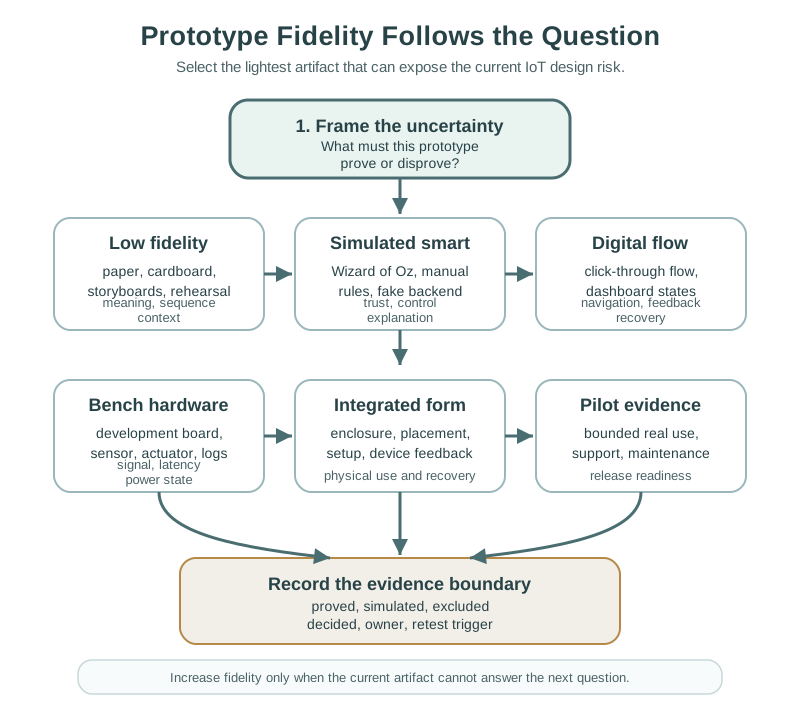
At the top of Figure 19.1, frame the uncertainty asks what the team must prove or rule out. A rough story can test meaning and order. A screen flow can test how people move through it, but cannot prove delay or a live link. A person can stand in for smart code when the question is about the user’s response. Bench gear suits tests of sensing, action, power, or radio use. A full form finds case and site risks. Only a pilot tests real work. The record says what each form proved, what is open, and why the next form is worth its cost.
Start with the question the prototype must answer. Select the lightest prototype that can expose that risk. Include enough context to avoid false confidence. Record what the prototype proves and what it does not prove. Increase fidelity only when the previous evidence justifies it.
19.6 Low-Fidelity Prototypes
This section: Low-Fidelity Prototypes — Low-fidelity prototypes are valuable because they make weak ideas cheap to find.
Low-fidelity prototypes are valuable because they make weak ideas cheap to find. They are appropriate when the team is testing meaning, sequence, role boundaries, or physical concept before committing to implementation.
19.6.1 Paper and Screen Sketches
Paper sketches are useful for:
- testing terminology and labels
- comparing navigation paths
- checking whether people understand device states
- exploring permission and setup flows
- exposing missing confirmation, undo, or recovery steps
For IoT, sketches should include device state, not only app screens. If the app says “connected,” the sketch should also show what the device does, what the user sees on the physical object, and what happens when the device is offline. Figure 19.2 follows that evidence through the paper-prototype loop.
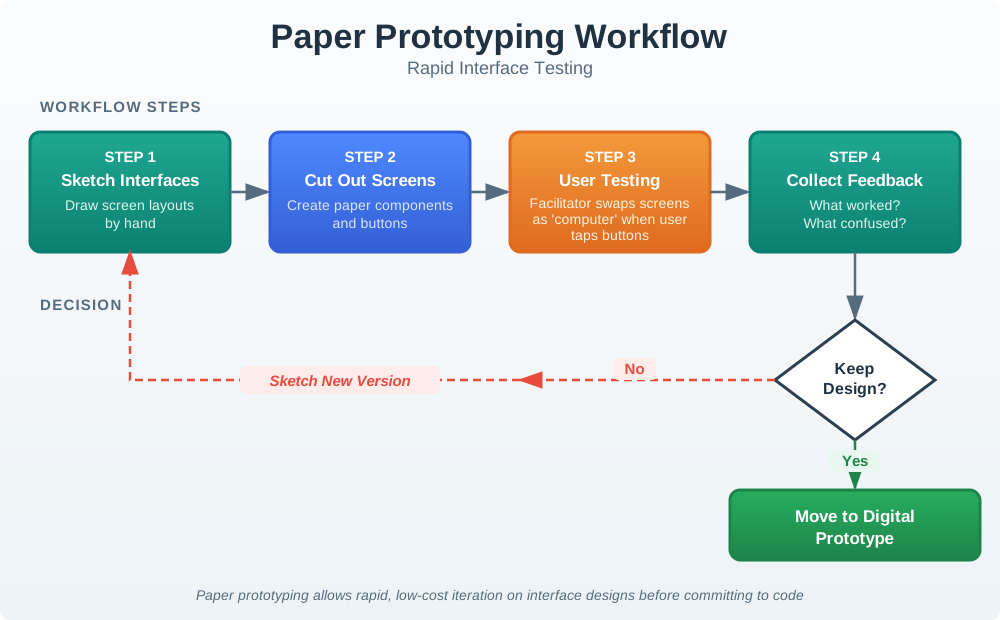
Use Figure 19.2 when the question is still about meaning, order, or recovery wording. Paper is useful because the facilitator can change the flow immediately when a device state or support step is missing.
19.6.2 Cardboard and Physical Mockups
Physical mockups test reach, placement, size, affordance, visibility, mounting, and shared use. They are not about electronics. They are about whether the object makes sense in the space where it will live.
Useful questions include:
Can the user see the indicator from the expected distance? Can the device be reached while carrying tools, groceries, or equipment? Does the label remain understandable when mounted at the expected height? Does the control invite the correct action? Does the placement create privacy, safety, accessibility, or maintenance problems?
19.6.3 Storyboards and Service Rehearsals
Storyboards show what happens around the device over time. Service rehearsals let the team act out installation, failure, escalation, replacement, and support handoff.
These methods are helpful when the design depends on multiple roles:
- resident and installer
- patient and caregiver
- facility manager and technician
- operator and supervisor
- customer and support agent
An IoT design can pass a single-user app test and still fail because handoff, ownership, or support evidence was never prototyped.
19.7 Simulated Smart Behavior
This section: Simulated Smart Behavior — Wizard of Oz prototypes test a smart behavior before the smart system is built.
Wizard of Oz prototypes test a smart behavior before the smart system is built. A human operator quietly simulates automation so the team can observe whether users understand, trust, override, or reject the behavior.
Use Figure 19.3 to separate the experience being tested from the automation that is still simulated.
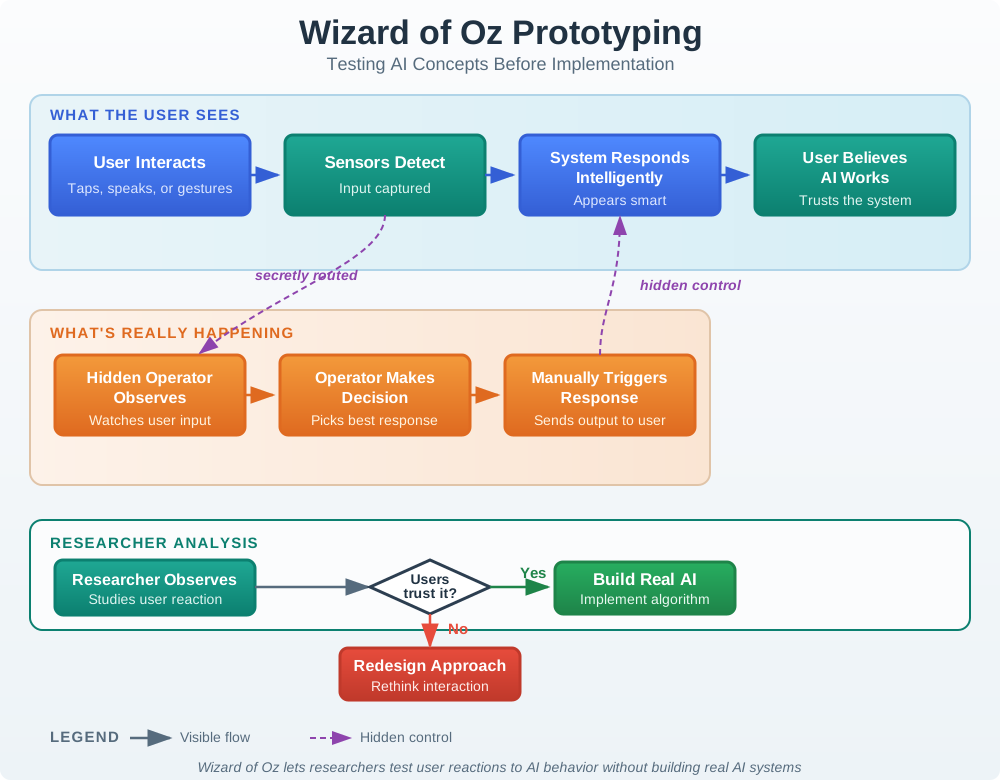
Read the path that the user can see. The user gives an input and gets what looks like a smart reply. A hidden person sees that input, makes the choice the system cannot yet make, and starts the reply by hand. This can test timing, words, trust, and the need for an override before a model exists. It cannot prove how well a model can detect an input, how fast it will run, how it will scale, or whether it is safe alone. The study record must name the trick, keep each choice fair, and list the tests that still need working code.
Use this method when the question is about interaction with intelligence, not the technical model itself:
Should the system suggest an action or take action automatically? Do users understand why an automation occurred? What override do users expect? What level of explanation is enough? Does shared use create conflicting preferences?
Do not use Wizard of Oz testing to hide privacy-sensitive observation or to simulate safety-critical control without proper disclosure, boundaries, and review. Participants should be debriefed when the session is complete, and the prototype record should clearly state what was simulated.
19.8 Medium-Fidelity Prototypes
This section: Medium-Fidelity Prototypes — Medium-fidelity prototypes combine more realistic interaction with selective implementation.
Medium-fidelity prototypes combine more realistic interaction with selective implementation. They should still be question-driven.
19.8.1 Digital Click-Through Prototypes
Digital click-through prototypes are useful for mobile apps, dashboards, setup flows, consent screens, notification controls, and support journeys.
They can test:
- navigation and task sequence
- visual hierarchy
- copy and device-state language
- notification timing and wording
- accessibility of controls and status
- recovery from setup, permission, or identity errors
They cannot prove that real sensing, connectivity, power, latency, or actuator behavior will work. A digital prototype that uses perfect data can hide the real design problem: what the user should see when data is delayed, stale, missing, contradictory, or unsafe to act on.
19.8.2 Breadboard and Bench Prototypes
Bench prototypes use development boards, sensors, actuators, debug wiring, test fixtures, and simple firmware to prove a technical behavior before form factor or production design.
They are appropriate for:
- sensor range, noise, drift, and calibration checks
- actuator response and safe default behavior
- radio behavior in expected spaces
- latency that changes user perception
- local feedback when cloud services are unavailable
- power-state measurement under representative duty cycles
Inspect Figure 19.4 to ask which sensor, code, link, cloud, and feedback claims a bench build can prove before case, battery, setup, and upkeep tests.
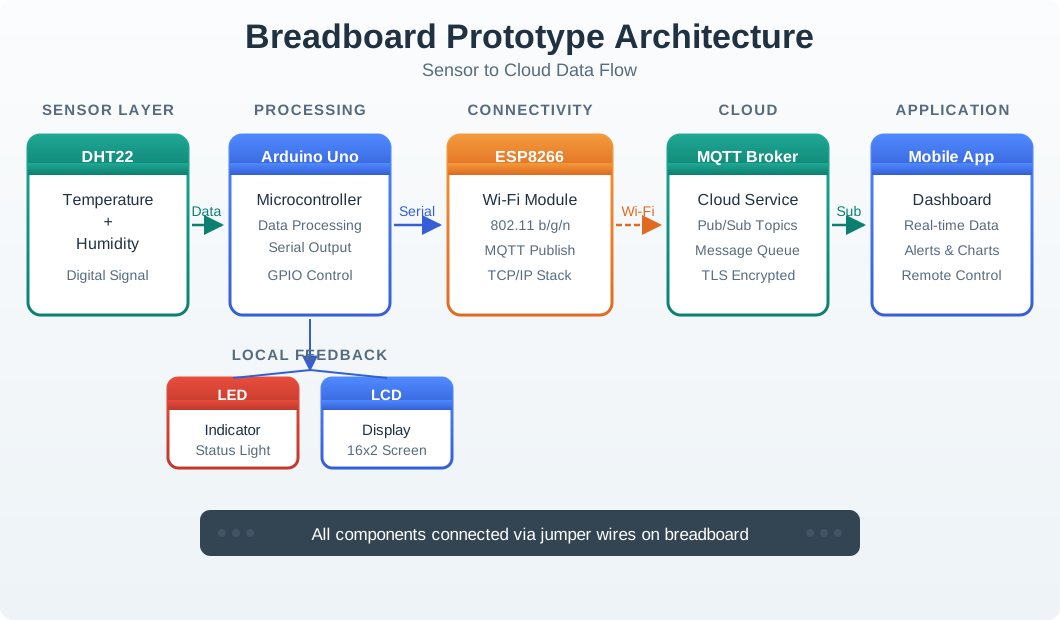
Use Figure 19.4 to separate bench evidence from product evidence. Start at the DHT22 sensor and Arduino, where the prototype can test whether a reading is sampled and processed correctly. The ESP8266 and MQTT broker then expose connectivity and message-flow behaviour, while the LED or display and mobile app provide local and remote feedback. That chain can validate interfaces and basic timing. It does not yet prove enclosure effects, battery life, installation, radio range, weather resistance, fleet security, or long-term support, so those limits belong in the prototype record.
19.8.3 Hybrid Prototypes
Hybrid prototypes combine real and simulated pieces. For example, a real sensor may publish readings while the analytics, app state, support workflow, or recommendation logic is simulated.
Hybrid prototypes are useful when the team needs realistic user behavior before every backend or hardware component is finished. They must be labeled carefully in the review record. Otherwise, stakeholders may believe a mocked subsystem has already been validated.
19.9 High-Fidelity Prototypes
This section: High-Fidelity Prototypes — High-fidelity prototypes are appropriate after lower-fidelity evidence has reduced concept and interaction uncertainty.
High-fidelity prototypes are appropriate after lower-fidelity evidence has reduced concept and interaction uncertainty. They are expensive in attention, coordination, and review effort, so they should be used for questions that lower fidelity cannot answer.
19.9.1 Integrated Form Prototypes
Integrated form prototypes combine enclosure, device feedback, mounting, controls, firmware behavior, app flow, and service assumptions closely enough to test everyday use.
They should be used for:
placement and visibility in realistic spaces. accessibility of physical controls and indicators. setup and recovery with real device state. safe behavior during power, network, or sensor faults. enclosure influence on sensor quality, heat, radio, or maintenance access. user trust when the device acts in the physical world.
19.9.2 Pilot Prototypes
Pilot prototypes test the system in real environments with bounded scope. They are not a substitute for earlier learning. They are a release-readiness gate that checks whether the product survives ordinary conditions.
A useful pilot record includes:
who used the prototype and in what setting. what failures were intentionally included in the test. what support and maintenance evidence was collected. what logs, observations, and user reports were reviewed. what remains outside the pilot scope. what must be checked again before release.
19.10 Prototype Review Record
This section: Prototype Review Record — The fields in Figure 19.5 keep a prototype result tied to its test conditions.
The fields in Figure 19.5 keep a prototype result tied to its test conditions.
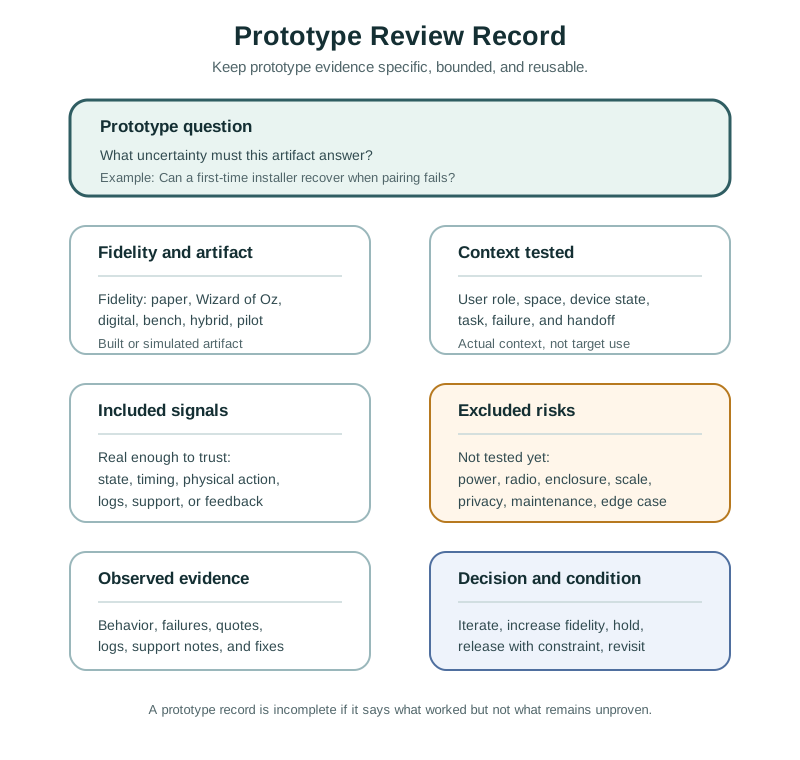
The question may ask whether a first time installer can recover from pairing failure. Fidelity and artifact say whether the test used paper, a scripted simulation, a bench device, or a pilot. Context records the user, space, device state, task, and handoff, while included signals show what was real enough to trust. Excluded risks name what the artifact did not test. That boundary matters when a smooth scripted recovery is later cited as proof of network reliability or field support readiness.
Question: the uncertainty the prototype was built to answer. Fidelity: paper, storyboard, Wizard of Oz, digital, bench, hybrid, integrated form, or pilot. Artifact: what was actually built or simulated. Context: the user role, space, device state, and task observed. Included signals: the parts of the system that were real enough to trust. Excluded risks: what the prototype did not test. Evidence: observed behavior, failures, quotes, logs, or support findings. Decision: iterate, increase fidelity, hold, release with constraint, or stop. Owner and change condition: who owns the open issue and what event requires another review.
The excluded-risk field matters. It protects the team from treating a partial prototype as proof of the whole system.
19.11 Laundry Sensor Review
This section: Laundry Sensor Review — A team wants to prototype a sensor that reports whether shared laundry machines are available.
A team wants to prototype a sensor that reports whether shared laundry machines are available.
The first uncertainty is not the sensor. It is whether residents understand availability, reservation, and stale state.
A useful sequence is:
Paper sketch: Test labels for available, in use, likely finished, offline, and unknown. Storyboard: Show a resident walking to the laundry room after checking the app and finding a stale reading. Wizard of Oz: Simulate notifications manually to learn whether reminders feel helpful or annoying. Bench prototype: Check whether vibration or current sensing can distinguish running, idle, and finished states. Integrated form prototype: Mount the device in a realistic location and test visibility, tampering, power, and maintenance. Pilot: Observe real usage, false readings, support contacts, and maintenance work over a bounded period.
The important decision is not “did the prototype work?” The important decision is which uncertainty was reduced and which risk moves to the next prototype.
19.13 Common Prototyping Defects
This section: Common Prototyping Defects
19.13.1 Demos vs Evidence Tools
A polished demonstration can impress stakeholders while leaving the main uncertainty unanswered. To judge its value as evidence, identify the question it was built to answer and the observed behavior that supports a decision. Appearance and stakeholder preference alone do not establish whether the interaction or technical behavior works.
Match the prototype to the claim. A paper flow can test terminology and task sequence, while a bench build can examine sensing, connectivity, or timing. Record the user role, device state, test context, and simulated parts so that the result remains tied to its conditions. State what remains untested and use those limits to decide whether to revise the prototype, increase fidelity, or hold the design for further investigation.
19.13.2 Testing Only the Happy Path
A prototype that shows only successful operation leaves important interaction questions unanswered. IoT products need understandable feedback for offline state, stale data, failed setup, rejected commands, permission problems, and low power. Include the relevant fault and recovery states in the test so that observed behavior can inform the design beyond the successful path.
Choose the method according to the uncertainty. Paper states can test whether users understand an offline message or recovery wording; bench hardware can examine local feedback when cloud services are unavailable. Observe whether the user understands the state and can find the intended next step, including safe fallback or support. Record which failures were tested, what recovery behavior was observed, and which risks remain outside the prototype’s scope.
19.13.3 Simulated Subsystems Risk
Mocked analytics, artificial sensor readings, manual support handling, and hidden operator control can help test an interaction before its supporting system is complete. Their evidence depends on a clear account of what was real and what was simulated. Without that boundary, stakeholders may interpret a convincing response as validation of an unfinished subsystem.
A hidden operator can support a study of wording, trust, and expected overrides, but the observed response does not establish the model’s detection performance, execution speed, scalability, or independent safety. Similarly, a real sensor in a hybrid prototype does not validate simulated analytics or support handling. Record the included signals, simulated decisions, and excluded risks, then identify the further tests that require working implementation. Keep the resulting decision within those evidence limits.
19.13.4 Increasing Fidelity Too Early
Higher fidelity adds attention, coordination, and review effort, and can make a team reluctant to change direction. Before adding detail, identify the uncertainty that the current prototype cannot answer. If the question still concerns labels, task order, or recovery wording, a paper flow may provide useful evidence while remaining easy to revise.
Move to a bench prototype when the question requires real sensing, connectivity, power, or timing. Use an integrated form when enclosure, mounting, physical controls, or realistic device use affects the claim. The reason for increasing fidelity should follow from the evidence already collected and the risk still open. Record that reason, the limits of the next prototype, and the decision it will inform. An unfinished appearance alone does not justify a more elaborate build.
19.13.5 Ignoring the Physical Context
Screen prototypes can test how people interpret controls and device states, but they cannot establish whether mounting height, light visibility, sound audibility, cable access, cleaning constraints, tamper risk, or maintenance reach are acceptable in the intended space. When these conditions affect use, the prototype needs physical context that makes them observable. A cardboard mock-up can explore placement and reach, while an integrated form can test mounting, feedback, and maintenance access together. Choose the form according to the uncertainty under review. Record the setting and observed behavior, and identify physical risks that remain untested rather than extending screen findings to the installed device.
19.13.6 Missing Operations Evidence
Connected products need operation and support after the initial interaction has been designed. A prototype review should therefore include ownership, support routing, alert triage, maintenance, and the update path when these affect the service promise. Receiving a request is only part of the evidence: the review also needs to examine who owns it and whether staff can distinguish duplicate, accidental, and urgent reports. Service rehearsals can explore handoffs, while a bounded pilot can collect support and maintenance observations in real use. Label simulated support handling clearly. Record unresolved operational issues with an owner and a change condition that states when another review is needed.
19.14 Review Checklist
This section: Review Checklist — Is the prototype question explicit?
Before accepting an IoT prototype, check:
Is the prototype question explicit? Is the fidelity the lightest one that can answer the question? Does the prototype include the device state, physical context, and user role needed for the test? Are simulated parts clearly labeled? Does the review include failure, recovery, or stale-state behavior when relevant? Does the evidence come from observed behavior, not preference alone? Are accessibility, privacy, safety, support, and maintenance considered at the right level? Does the record say what the prototype proves and what remains untested? Is the next decision clear? Is there an owner and change condition for unresolved risk?
19.15 Knowledge Check
This section: Knowledge Check
19.16 Matching Quiz
This section: Matching Quiz
19.17 Ordering Quiz
This section: Ordering Quiz
19.18 Pick Fidelity for the Maintenance Alert
This section: Pick Fidelity for the Maintenance Alert — For a maintenance alert button, first decide what uncertainty the next prototype must answer.
For a maintenance alert button, first decide what uncertainty the next prototype must answer. A paper card can expose whether the label and handoff are understood. A clickable screen can test whether staff find the acknowledgement path. A device-and-gateway prototype is needed to measure whether the physical indicator and remote acknowledgement agree during a dropped link. Record the task, the prototype’s deliberate omissions, the observed action, and the next build decision; avoid treating the polished app as proof of the radio path.
19.19 Match the Prototype to the Failure Mechanism
This section: Match the Prototype to the Failure Mechanism — A screen simulation has no device timing, packet loss, or physical placement.
A screen simulation has no device timing, packet loss, or physical placement. If the risk is a missed alert, validation must include the event source, transmission, acknowledgement, and local feedback, with timestamps that distinguish delay from user hesitation. If the risk is comprehension, observation of the task can be decisive before hardware is ready. Fidelity is useful only relative to the claim being tested: a high-fidelity visual can still leave the system behaviour unrepresented. The chapter’s review record should state that boundary.
19.20 Practice the Decision
This section: Practice the Decision
19.21 Summary
This section: Summary — IoT prototyping is evidence work.
IoT prototyping is evidence work. The best prototype is the lightest artifact that can answer the current uncertainty without hiding the risks that matter. Paper, cardboard, storyboards, Wizard of Oz tests, digital click-throughs, bench rigs, integrated form prototypes, and pilots all have a place. Quality depends on matching the artifact to the question, labeling simulated parts, testing failure and recovery when relevant, and recording what remains unproven.
19.22 Key Takeaway
This section: Key Takeaway — IoT prototypes should answer specific learning questions about behavior, feedback, hardware constraints, connectivity, and service recovery.
IoT prototypes should answer specific learning questions about behavior, feedback, hardware constraints, connectivity, and service recovery.
19.23 Concept Relationships
This section: Concept Relationships — Interactive Design Process frames the loop that decides which question needs a prototype.
Prototype decisions connect to the rest of the UX design process:
Interactive Design Process frames the loop that decides which question needs a prototype. Interactive Design Principles defines the qualities that prototypes should make observable. User Testing and Iteration explains how to observe prototype use and convert evidence into revisions. Interface Design Fundamentals expands screen, control, status, and feedback decisions that digital prototypes often test.
Prototype fidelity also connects to engineering review. Hardware, firmware, cloud, support, accessibility, privacy, security, and maintenance risks should be pulled into the prototype when they affect the user promise.
19.24 What’s Next
This section: What’s Next — Continue to User Testing and Iteration to learn how to observe prototype use, interpret evidence, avoid preference-only findings, and decide whether the design should iterate, increase fidelity, or move toward release.
Continue to User Testing and Iteration to learn how to observe prototype use, interpret evidence, avoid preference-only findings, and decide whether the design should iterate, increase fidelity, or move toward release.
19.25 Continue Your Route
This section: Continue Your Route — This is the last part of this chapter.
This is the last part of this chapter. Return to IoT Prototyping: Questions and Learning Loops. See Choose a UX Design Module.
Find help
3 reviewed answers.
Where should I start in a module?
Open the module page from the sidebar to see its chapters in order. Use the module map to return to a topic you need.
Modules and pathsReviewed
What can I try when a project does not work?
Check the symptom, then work through the diagnostic steps. Keep the error message and the smallest example that reproduces it.
When you are stuckReviewed
How do interactive examples work?
Use the interactive guide to check how examples and simulations work before changing your project.
Interactive examples guideReviewed