4 UX Evaluation: Evidence for Decisions
More
Depth: Practitioner
Progress saves as you read. Mark sections complete as you go; your progress appears in the sidebar.
4.1 Start With the Decision
This section: Start With the Decision — Is this setup flow ready for a field pilot?
Is this setup flow ready for a field pilot? Can users distinguish stale data from current data?
4.2 Route Overview
This section: Route Overview — This is part 2 of 2.
This is part 2 of 2. Review UX Evaluation: Methods and Measures for the preceding evidence.
4.3 Learning Objectives
This section: Learning Objectives
- Choose a defensible design using tie evaluation to decisions.
- Validate concept check: order the evaluation with a concrete scenario and pass criteria.
4.4 Chapter Roadmap
This section: Chapter Roadmap
- Tie Evaluation to Decisions
- Evaluation Method Map
- Heuristic Review
- Task-Based Usability Testing
- Accessibility Review
- State and Recovery Review
- Issue Record Workflow
- Prioritizing Findings
- Incremental Examples
- Try It Now
- Pick Evaluation Methods
- Worked Review: Offline Sensor State
- Worked Review: Automation Override
- Review Checklist
- Common Defects
- Concept Check: Evaluation Evidence
- Concept Check: Match Methods to Evidence
- Concept Check: Order the Evaluation
- Summary
- Key Takeaway
- See Also
- What’s Next
4.5 Tie Evaluation to Decisions
This section: Tie Evaluation to Decisions — Is this setup flow ready for a field pilot?
Do not begin by asking, “What evaluation method should we use?” Begin by asking, “What decision needs evidence?”
Example decisions:
Is this setup flow ready for a field pilot? Can users distinguish stale data from current data? Can a guest complete access without installing an app? Can operators find the next action when many devices report warnings? Can users recover from offline, low battery, denied permission, or update states? Does automation provide enough explanation and override? Does the experience work with realistic accessibility and context constraints?
The method follows the decision. A heuristic review can find obvious design problems. Task testing shows whether representative users can complete the flow. Accessibility review checks whether the experience works across abilities and assistive technology. Support-path review checks whether failures can be diagnosed and explained.
4.6 Evaluation Method Map
This section: Evaluation Method Map — Use the evaluation method map in the depth panel above to match the evaluation method to the evidence you need.
Use the evaluation method map in the depth panel above to match the evaluation method to the evidence you need.
4.7 Heuristic Review
This section: Heuristic Review — A heuristic review compares a design against established usability principles.
A heuristic review compares a design against established usability principles. It is useful early because it can quickly find problems such as unclear status, inconsistent wording, hidden actions, weak error prevention, poor recovery, and overloaded screens.
For IoT, adapt the review to connected-system behavior:
Is current, stale, pending, offline, low-power, updating, muted, and failed state visible where needed? Does the interface use language that matches the user’s task instead of internal system terms? Can users pause, override, undo, or recover from automation? Are device, app, dashboard, and support terms consistent? Does the design prevent high-consequence mistakes before they happen? Does the user need to remember hidden state, codes, or configuration details? Are common actions easy while advanced actions remain discoverable? Are alerts, dashboards, and device indicators minimal but sufficient? Do error messages explain consequence and next action? Is help contextual rather than a disconnected manual?
Heuristic review is not proof that real users will succeed. It is a fast way to remove avoidable problems before task testing.
Use Figure 4.1 to locate the earliest point at which a realistic task breaks down.
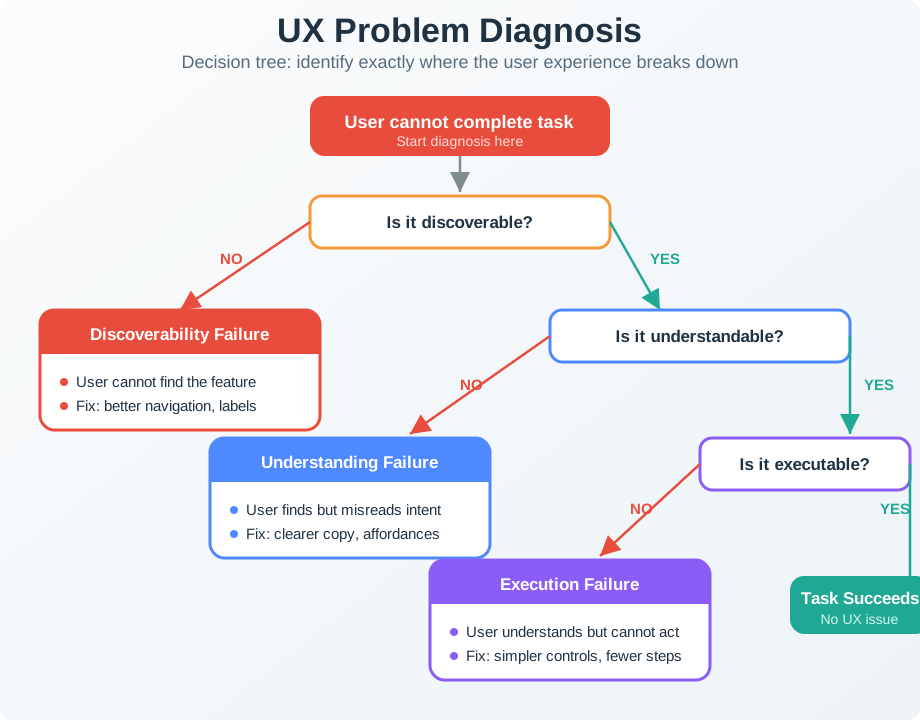
Begin with discoverability: can the person find the control or route without being told where it is? If so, ask whether its wording, state, and consequence are understandable. The next branch tests execution, including permissions, connectivity, timing, and physical ability. A completed action still needs a success check because the system may accept input without producing the intended result. Stopping at the first failed branch gives the team a sharper diagnosis and a testable correction, while later branches remain open until the earlier barrier is removed.
4.8 Task-Based Usability Testing
This section: Task-Based Usability Testing — Task testing asks representative users to complete realistic tasks while the team observes what happens.
Task testing asks representative users to complete realistic tasks while the team observes what happens.
Before making a task-based usability decision, inspect Figure 4.2 as a complete evidence chain: Report problem → No confirmation → Duplicate tickets → Decision → Next Check. The figure links user behavior to staff consequence, then to a concrete design change and focused recheck.
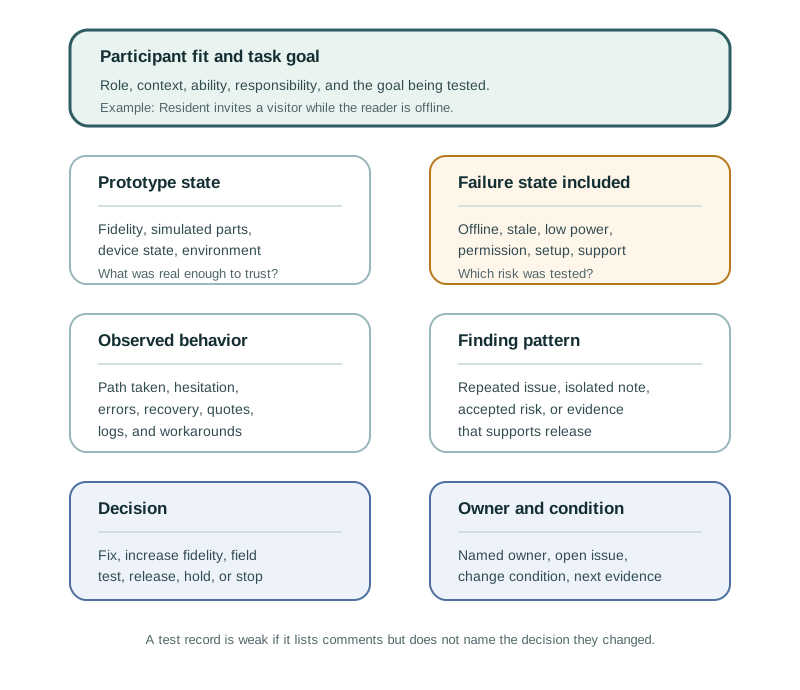
Use the figure to separate what happened from what should change. The observed evidence is that users can report a problem, then press repeatedly when no confirmation appears; staff see duplicate tickets. The design change adds request received, already reported, and staff assigned states, and the next check keeps network delay in the test.
Good IoT tasks include context and success criteria:
“You are leaving for a week. Set the system so the home stays safe and energy use is reduced.”. “A guest needs access today from 2 PM to 4 PM without creating an account.”. “The app says a room sensor is offline. Find what happened and what action is needed.”. “A device is updating. Decide whether it is safe to leave the site.”. “A low-battery warning appears for a device mounted behind equipment. Plan the next maintenance action.”.
Avoid tasks that tell users where to click, such as “open Settings and tap Schedule.” That tests instruction following, not interface understanding.
Observe:
first action. hesitation. wrong turns. backtracking. repeated reading. requests for help. workaround behavior. confidence at the end. task completion, not just user opinion.
Ask follow-up questions after the task, not during the task unless safety or ethics require intervention.
4.9 Accessibility Review
This section: Accessibility Review — Accessibility evaluation should happen during UX review, not after the design is otherwise accepted.
Accessibility evaluation should happen during UX review, not after the design is otherwise accepted.
Check whether the experience works when users:
- cannot rely on color alone
- need larger text or higher contrast
- use keyboard, switch, screen reader, captions, or reduced motion settings
- have limited dexterity, vision, hearing, attention, memory, or language fluency
- are wearing gloves, carrying items, moving, fatigued, stressed, or under time pressure
- cannot use the app at the moment of need
For IoT, accessibility also includes physical controls, local indicators, printed labels, placement, setup, maintenance, and support. A device can pass a screen checklist and still fail because the reset button is hidden, labels are tiny, alerts are sound-only, or the fallback requires a smartphone.
4.10 State and Recovery Review
This section: State and Recovery Review — State and recovery review checks whether people can understand what the system is doing and what they can do next.
State and recovery review checks whether people can understand what the system is doing and what they can do next.
For each important flow, review:
what the device knows. what the app or dashboard shows. what the user believes. what the support team can diagnose. what happens when the command is delayed, rejected, queued, or partially applied. what happens when the system is offline, stale, updating, low on power, muted, or denied permission. whether the next action is clear.
If a system has one generic error state for many different causes, users and support teams will guess. Evaluation should force those states apart where the consequence differs.
4.11 Issue Record Workflow
This section: Issue Record Workflow — The sequence in Figure 4.3 turns an observed UX fault into a checkable fix.
The sequence in Figure 4.3 turns an observed UX fault into a checkable fix.
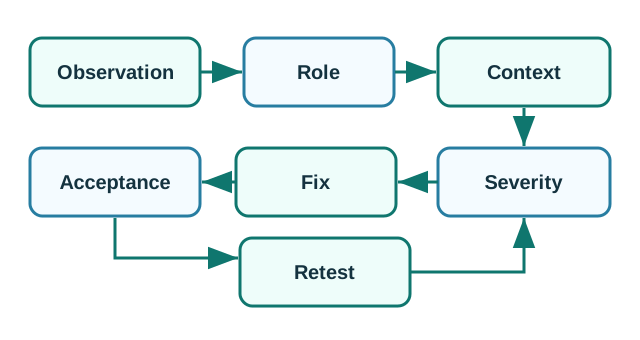
Observation says what happened, and role and context say who faced it and under which device or network state. Severity explains the consequence rather than merely counting how often a screen looked wrong. The proposed fix then needs an acceptance condition that a reviewer can observe. Retest repeats the relevant route after the change. Keeping these fields together matters for IoT failures because the same visible symptom may come from permission, stale data, a delayed command, or a device fault.
4.12 Prioritizing Findings
This section: Prioritizing Findings — What did the evaluator or participant observe?
A useful issue record should answer:
What did the evaluator or participant observe? Which role was affected? In what context did the issue appear? How often did it happen in the evidence set? What is the consequence if it remains? Is it a blocker, high-priority issue, medium-priority issue, or low-priority issue? What change should be tried? What evidence will prove the fix worked? Who owns the fix? What future change should trigger review again?
Prioritize by consequence and task importance, not by how easy the issue is to describe. A small wording problem can be high priority if it causes unsafe action or prevents recovery.
4.13 Incremental Examples
This section: Incremental Examples
4.13.1 Beginner Example: Review a Status Card
A beginner evaluation can inspect a thermostat or room-sensor card before user testing. The evaluator checks whether current, stale, offline, updating, and low-battery states have different labels, whether color is not the only signal, whether the latest timestamp is visible, and whether the next action is clear. This catches obvious state-visibility defects before participants spend time on the prototype.
4.13.2 Setup Recovery Task Test
An intermediate evaluation asks representative users to recover from a smart-plug setup failure. The test should include the physical device, mobile app, QR or setup code, Bluetooth discovery, Wi-Fi provisioning, Matter commissioning or vendor-cloud account binding, permission prompts, and a support path. The issue record should separate user hesitation from technical state: BLE timeout, wrong network, Thread border-router absence, expired invite, account-role mismatch, or cloud service delay.
4.13.3 Evaluate Operations Workflows
An advanced evaluation combines heuristic review, task observation, accessibility review, telemetry, and support evidence for a factory pump monitor. Operators and maintenance staff should diagnose current, stale, muted, assigned, escalated, cleared, and recurring alerts using the dashboard, device indicator, notification path, MQTT broker logs, OpenTelemetry traces, maintenance work orders, and support console. The release decision should depend on whether the right role can take the next action without guessing which state is authoritative.
Before a design review, write one decision rule that connects the evidence to the release call:
Design question: what decision needs evidence before the team proceeds? User, task, and context: who is trying to do what, and under which device, network, permission, or recovery condition? Metric threshold: what observation, completion rate, error count, accessibility result, or support-path outcome is strong enough to accept the design? Observed result: what actually happened in the evaluation? Release decision: ship, iterate, or rerun based on the threshold. Follow-up condition: what product, context, role, or risk change requires the team to evaluate again?
If the observed result misses the threshold, the release decision is “iterate or rerun,” not “ship with a note.” This keeps evaluation tied to a decision instead of a loose list of comments.
4.14 Pick Evaluation Methods
This section: Pick Evaluation Methods — Users cannot tell whether a shared room sensor is offline or reporting a normal value.
For each risk, choose the first evaluation method you would run and the evidence you would need:
Users cannot tell whether a shared room sensor is offline or reporting a normal value. A setup flow fails after QR scan when the phone has Bluetooth disabled. Operators silence repeated pump alerts because every warning looks equally urgent.
4.15 Worked Review: Offline Sensor State
This section: Worked Review: Offline Sensor State — A building dashboard shows room comfort sensors.
Scenario:
A building dashboard shows room comfort sensors. Operators complain that the dashboard sometimes shows normal values when devices are disconnected.
Evaluation approach:
Run a state and recovery review for current, stale, offline, and gateway-down states. Ask operators to diagnose a realistic stale-data scenario. Check whether support staff can separate sensor failure, gateway outage, low power, and delayed sync. Review alert wording for actionability.
Findings:
The dashboard shows the last value without making data age obvious. Operators assume the room is normal because the value still appears green. Support staff need logs to distinguish sensor and gateway failures, but the operator view does not explain the next action.
Fix direction:
Show data freshness near the value. Separate current, stale, offline, and estimated readings. Link each state to a next action: wait, inspect gateway, replace battery, check placement, or contact support. Repeat the task with operators using realistic alert volume.
4.16 Worked Review: Automation Override
This section: Worked Review: Automation Override — A smart lighting system automatically adjusts shared-space lights.
Scenario:
A smart lighting system automatically adjusts shared-space lights. Users report that they do not know why lights change or how to pause the behavior.
Evaluation approach:
Run a heuristic review focused on visibility, user control, consistency, and error recovery. Test a realistic task: “Pause the automatic behavior during a meeting and restore it afterward.”. Check affected roles: room user, facilities staff, and support. Review accessibility: visual, physical, and voice paths.
Findings:
The app names the rule differently from the wall control. The pause state is not visible on the wall control. Users can disable the automation permanently by mistake when they only want a temporary pause. Support cannot tell whether a user paused the rule or a sensor failed.
Fix direction:
Use the same automation name across app, wall control, dashboard, and support view. Add a visible temporary-pause state with duration. Separate “pause now” from “disable rule.”. Add recovery wording and support diagnostics. Repeat the meeting scenario with users who did not see the original design.
4.17 Review Checklist
This section: Review Checklist — the evaluation question is tied to a real design decision.
Before accepting a UX evaluation result, confirm:
the evaluation question is tied to a real design decision. users, roles, and contexts are representative of the product risk. tasks include realistic device, network, data, permission, and recovery states. heuristic review findings are separated from user-observation findings. accessibility is reviewed across screen, device, physical, and support touchpoints. state and recovery paths are tested, not assumed. issues include evidence, consequence, severity, owner, and acceptance criteria. fixes are checked with users or contexts that can reveal whether the issue is solved. follow-up conditions are recorded.
4.18 Common Defects
This section: Common Defects — Opinion testing: asking “what do you think?” instead of observing task completion.
Watch for:
Opinion testing: asking “what do you think?” instead of observing task completion. Non-representative users: testing only with engineers, staff, or expert users when the product serves different people. Happy-path testing: testing only connected, charged, well-lit, low-pressure scenarios. Score-only reporting: reporting a survey score without explaining observed failures and fixes. Heuristic overconfidence: treating expert review as proof that real users will succeed. Accessibility late review: checking accessibility after layout, controls, and device placement are already accepted. No support-path test: ignoring whether support can diagnose and explain failures. No follow-up observation: fixing an issue in design files without observing whether the fix works.
4.19 Concept Check: Evaluation Evidence
This section: Concept Check: Evaluation Evidence
4.20 Concept Check: Match Methods to Evidence
This section: Concept Check: Match Methods to Evidence
4.21 Concept Check: Order the Evaluation
This section: Concept Check: Order the Evaluation
4.22 Triangulate the Offline-Sensor Finding
This section: Triangulate the Offline-Sensor Finding — Start with a heuristic review of the sensor status label, then ask a representative operator to decide whether an old reading is safe to act on.
Start with a heuristic review of the sensor status label, then ask a representative operator to decide whether an old reading is safe to act on. Observe the chosen action and the timestamp they used. Compare that with gateway and dashboard events and ask support how the same fault would be diagnosed. Write a finding that distinguishes unclear wording from delayed telemetry, assign a change owner, and rerun the task after the fix. The release claim should be limited to the states and roles actually tested.
4.23 How Different Methods Constrain a Claim
This section: How Different Methods Constrain a Claim — A visibility-of-status heuristic can flag an ambiguous label, but it cannot show how often people make the wrong decision.
A visibility-of-status heuristic can flag an ambiguous label, but it cannot show how often people make the wrong decision. Task observation reveals behaviour in the tested scenario; logs can show when the device last reported; an accessibility review checks whether the state is perceivable through other modes. Joining these sources at the same event and timestamp prevents a design-only explanation for a network fault. The chapter’s evidence decision record should keep each method’s limits beside the proposed fix.
4.24 Practice the Decision
This section: Practice the Decision
4.25 Summary
This section: Summary — UX evaluation is an evidence process.
UX evaluation is an evidence process. It combines heuristic review, realistic task testing, accessibility review, state and recovery review, and issue records so a team can decide what to fix and how to prove the fix works.
For IoT, evaluation must include connected-system realities: physical devices, apps, dashboards, alerts, shared roles, accessibility, offline behavior, stale data, permissions, automation, maintenance, and support.
4.26 Key Takeaway
This section: Key Takeaway — UX evaluation should combine heuristics, analytics, user observation, accessibility checks, and field evidence before changes are accepted.
UX evaluation should combine heuristics, analytics, user observation, accessibility checks, and field evidence before changes are accepted.
4.27 See Also
This section: See Also — User Experience Design explains the whole connected experience that evaluation must cover.
This chapter connects to the rest of UX Design:
User Experience Design explains the whole connected experience that evaluation must cover. UX Design Core Concepts introduces the UX process and vocabulary. UX Design Fundamentals explains the principles used during heuristic review. UX Design Examples shows scenario-based UX decisions that evaluation can test. UX Design Pitfalls and Patterns describes common issues evaluation should catch. Understanding People and Context explains how representative users, roles, and context are chosen. Prototyping Techniques for IoT explains how to create testable prototypes.
4.28 What’s Next
This section: What’s Next — UX Design Examples, if you want scenario examples of evaluation findings.
Continue with:
UX Design Examples, if you want scenario examples of evaluation findings. UX Design Pitfalls and Patterns, if you want common failure patterns and safer alternatives. Interface Design Fundamentals, if evaluation findings point to controls, feedback, or recovery problems. Prototyping Techniques for IoT, if you need a prototype that can be tested before implementation.
4.29 Continue Your Route
This section: Continue Your Route — This is the last part of this chapter.
This is the last part of this chapter. Return to UX Evaluation: Methods and Measures. See Choose a UX Design Module.
Find help
3 reviewed answers.
Where should I start in a module?
Open the module page from the sidebar to see its chapters in order. Use the module map to return to a topic you need.
Modules and pathsReviewed
What can I try when a project does not work?
Check the symptom, then work through the diagnostic steps. Keep the error message and the smallest example that reproduces it.
When you are stuckReviewed
How do interactive examples work?
Use the interactive guide to check how examples and simulations work before changing your project.
Interactive examples guideReviewed