21 Prototype Testing: Neutral Tasks
More
Depth: Practitioner
Progress saves as you read. Mark sections complete as you go; your progress appears in the sidebar.
21.1 Start With the Decision
This section: Start With the Decision — The stronger task lets the user choose a path.
The stronger task lets the user choose a path. That choice is evidence.
21.2 Route Overview
This section: Route Overview — This is part 2 of 2.
This is part 2 of 2. Review Prototype Testing: Test Planning for the preceding evidence.
21.3 Learning Objectives
This section: Learning Objectives
- Test write neutral tasks with a concrete scenario and pass criteria.
- Validate concept check: order the user test with a concrete scenario and pass criteria.
21.4 Chapter Roadmap
This section: Chapter Roadmap
- Write Neutral Tasks
- Conduct the Session
- Observe Behavior Before Opinion
- Test IoT-Specific States
- Lab, Remote, and Field Testing
- Iteration Decisions
- User Test Evidence Record
- Incremental Examples
- Worked Review: Shared Entry Setup
- Worked Review: Maintenance Alert
- Common Testing Defects
- Review Checklist
- Try It Now
- Micro-Exercise: Remove the Leading Clue
- Concept Check: Neutral Task Design
- Match Test Terms to Evidence
- Concept Check: Order the User Test
- Summary
- Key Takeaway
- See Also
- What’s Next
21.5 Write Neutral Tasks
This section: Write Neutral Tasks — A good task gives a realistic goal without naming the solution.
A good task gives a realistic goal without naming the solution.
Weak task:
“Open the security tab and check the event log.”.
Stronger task:
“You heard a noise near the front door last night. Find out whether the device recorded anything useful.”.
The stronger task lets the user choose a path. That choice is evidence. If the user cannot find the path, misunderstands a state, or creates a workaround, the design has learned something.
For IoT tests, task prompts should also include realistic constraints:
hands full during entry. weak network during setup. device shared by several people. app permission denied. sensor reading delayed or stale. physical indicator hard to see. support handoff required. automation acts at an unexpected time.
21.6 Conduct the Session
This section: Conduct the Session — The facilitator’s job is to observe, not rescue the design.
The facilitator’s job is to observe, not rescue the design.
Before the task:
explain that the prototype is being tested, not the participant. ask the participant to think aloud when comfortable. confirm consent for recording, logging, or note-taking. explain any simulated behavior in a way that preserves safety and ethics.
During the task:
let hesitation happen before intervening. ask neutral prompts such as “What are you looking for now?”. avoid teaching, defending, or explaining the intended path. record what the participant did, not only what they said. capture device state, environment, timing, and support handoff issues.
After the task:
ask what the participant expected to happen. ask what felt uncertain, risky, or surprising. distinguish preference from observed behavior. note whether the issue requires another prototype, a content fix, a hardware change, a support change, or a release constraint.
21.7 Observe Behavior Before Opinion
This section: Observe Behavior Before Opinion — People often try to be polite.
People often try to be polite. They may say the design is clear after struggling with it. They may say they would use a feature every day, then ignore it in field use. Testing should respect participant opinions while grounding design decisions in behavior.
Compare the two evidence columns in Figure 21.1 before accepting a participant’s positive summary of the task.
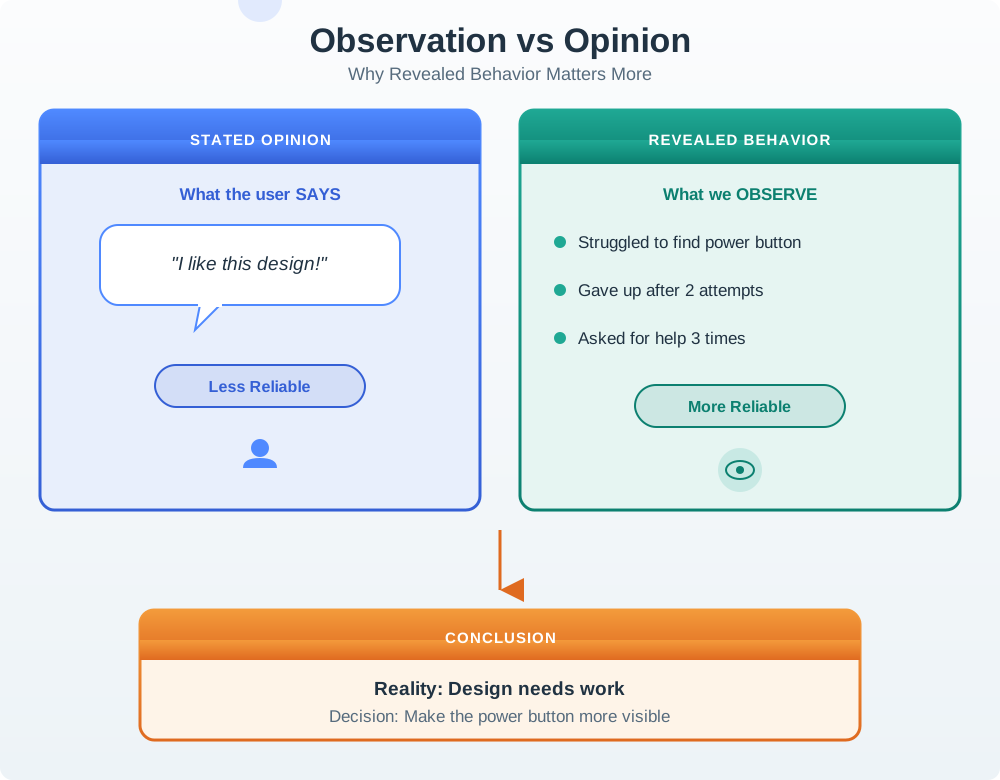
The stated-opinion side sounds reassuring: the participant says the product is easy and that they like it. The observed side shows a different task history—hesitation, repeated attempts, and asking for help three times before finding the control. Neither source should be discarded. The opinion explains attitude and expectation, while observed behaviour reveals where the interface failed during action. The design response follows the behaviour by making the control easier to find, then retesting; it does not turn one comment or one struggle into a claim about every user.
Useful evidence includes:
task completion or abandonment. where the user hesitated. incorrect assumptions about device state. support or help-seeking behavior. recovery success after a failure. repeated wording misunderstandings. workarounds created by the participant. visible trust, anxiety, frustration, or overconfidence. logs showing stale data, rejected commands, or delayed feedback.
Opinions matter when they explain behavior. They are weak evidence when they predict future use without observation.
21.8 Test IoT-Specific States
This section: Test IoT-Specific States — Connected products fail in ways that screen-only products do not.
Connected products fail in ways that screen-only products do not. Tests should include the states most likely to affect trust and safety.
Consider testing:
first setup and pairing. device offline and recovery. stale sensor reading. low battery or low power mode. rejected command or actuator lockout. permission mismatch between roles. shared household or team conflict. privacy consent and recording state. network interruption. support handoff after failure. update or maintenance interruption.
Not every test needs every state. The test plan should include the states tied to the current risk.
21.9 Lab, Remote, and Field Testing
This section: Lab, Remote, and Field Testing — Lab testing is useful when the team needs controlled observation of a specific flow.
Lab testing is useful when the team needs controlled observation of a specific flow. It can reveal labeling, navigation, feedback, and task-sequence problems quickly.
Remote testing can work for screen-heavy flows, dashboards, onboarding, consent, and support copy. It is weaker when the physical device, environment, installation, or sensor behavior is the main risk.
Field testing is needed when the question depends on ordinary life:
placement and visibility over time. shared use by multiple people. maintenance and charging behavior. false alerts and alert fatigue. privacy comfort in a real space. connectivity and environmental variation. adoption after the first impression fades.
Good review practice is to label the test type and its limits. A lab test can validate a task flow. It cannot prove long-term field adoption.
Use Figure 21.2 to increase test realism only when the equipment alert question needs it.
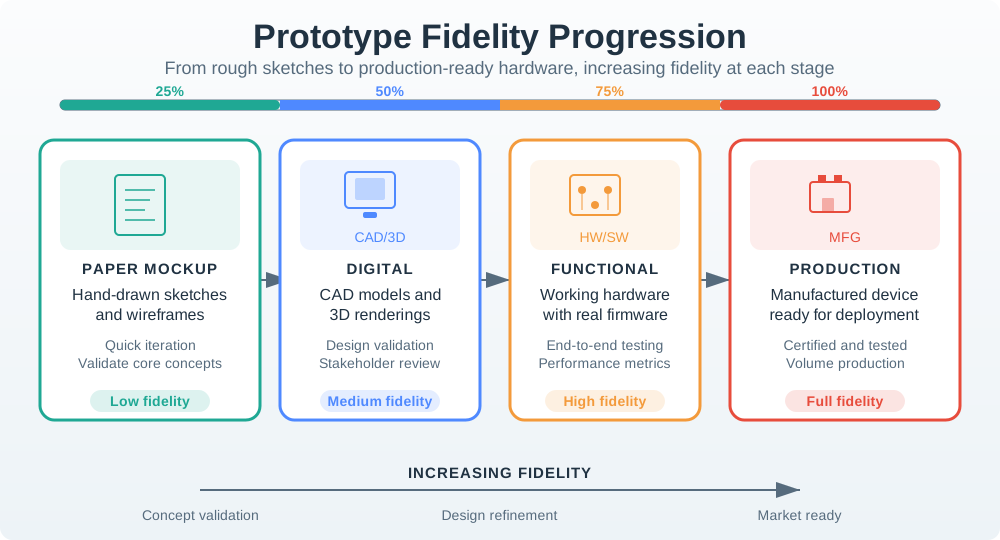
A storyboard with realistic alert cases can show whether users classify a situation and understand its language, but it cannot prove sensing or timing. A clickable or scripted interaction can test watching, acting, and escalating through the proposed flow. Later hardware or field work adds the behavior the earlier artifacts could only imitate. The ladder is a sequence of evidence limits, not a maturity badge. At each step, name the question answered, the observed task, and the risk that still needs another setting.
21.10 Iteration Decisions
This section: Iteration Decisions — Testing should end with a decision, not only a list of observations.
Testing should end with a decision, not only a list of observations.
Common decisions include:
Fix wording: the concept is sound but users misread a label, state, or instruction. Change flow: users understand the goal but take the wrong route or miss a required step. Change feedback: users cannot tell whether the device heard, acted, failed, or needs help. Change physical design: placement, controls, indicators, or ergonomics prevent success. Change support model: users need a handoff, escalation, or owner that the design does not provide. Increase fidelity: the next question requires real sensing, actuation, installation, or field context. Repeat focused check: the change touches a critical task or risk. Release with constraint: remaining issues are known, bounded, owned, and acceptable for the release scope.
Read Figure 21.3 to see which evidence justifies moving forward and which findings should reopen the design.
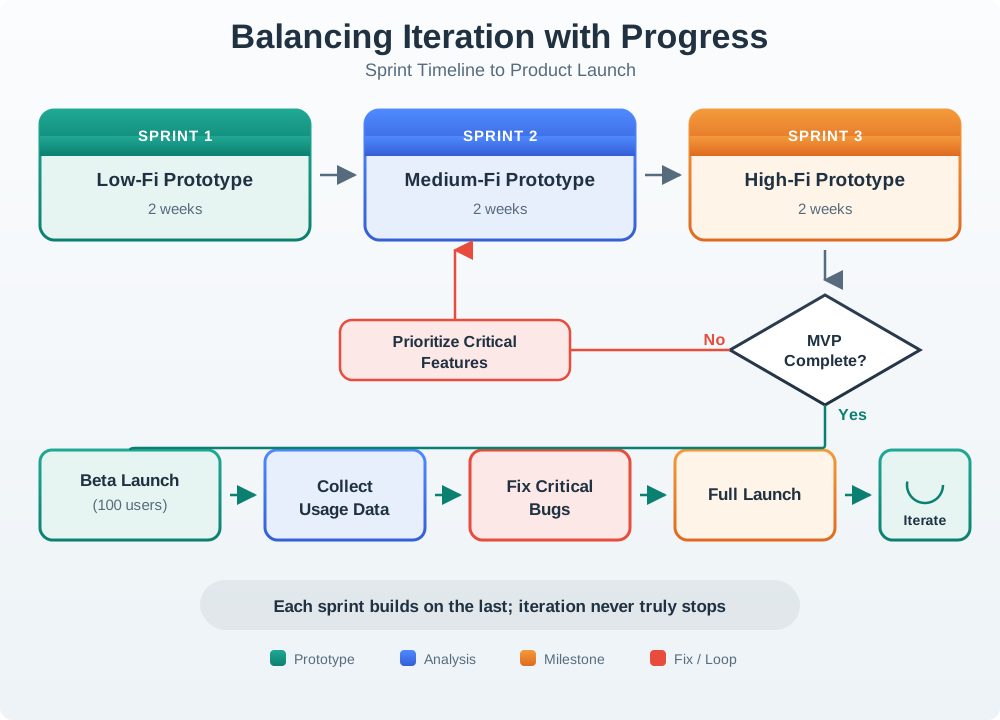
Follow the mock-ups from low to middle and high detail. Move up only when the cheap form cannot answer the next test question. A beta adds facts from real use, but keeps the group small while major faults are found. The fix loop sends only the claims touched by a bug back to test. It need not restart all work. Full launch is one more proof gate, not the end of study. Give each stage a clear way out and a cause to reopen it, or repeat work may never end or may hide a known risk.
Avoid endless iteration. A design does not need to be perfect. It needs enough evidence for the current decision, plus a record of accepted risks and change conditions.
21.11 User Test Evidence Record
This section: User Test Evidence Record — Use Figure 21.4 as a worked user-test evidence record.
Use Figure 21.4 as a worked user-test evidence record. Follow the observed event order from Fault seen and Report problem to No confirmation and Duplicate tickets, then compare the resulting Finding, Decision, and Next Check.
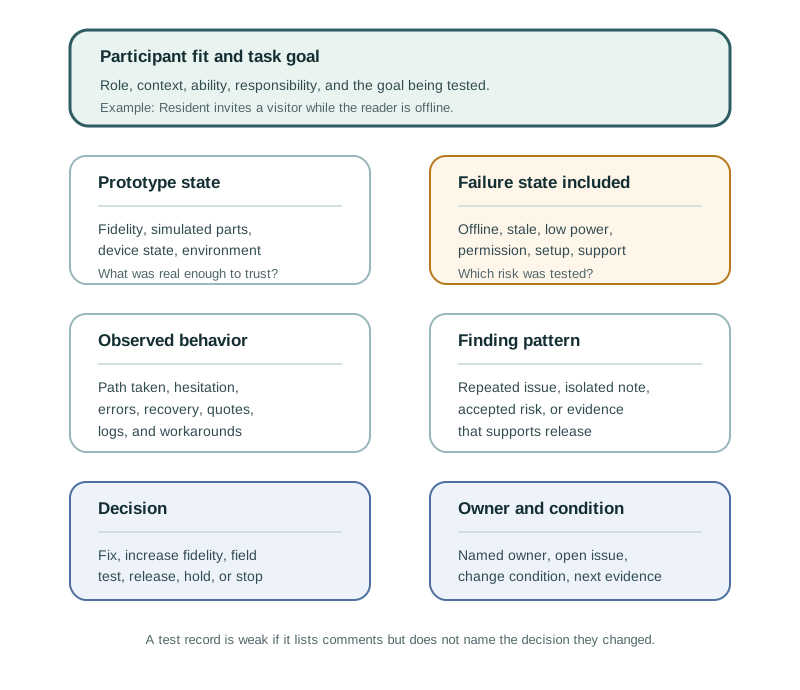
The figure makes the record auditable because observation and response stay distinct. Users understand how to report a problem, but when no confirmation appears they press repeatedly; staff then see duplicate tickets and waste time merging reports. The design response addresses feedback and service state with request received, already reported, and staff assigned states, followed by a focused check with network delay included.
Participant fit: the role, context, and abilities represented. Task goal: the user goal being tested. Prototype state: fidelity, device state, and simulated parts. Observed behavior: what the participant did before explanation. Failure state: offline, stale, low power, permission, setup, support, or other risk included in the test. Finding: the issue or evidence pattern. Decision: fix, repeat a focused check, increase fidelity, field test, release with constraint, or stop. Owner: the person or team responsible for the next action. Change condition: the condition that requires the finding to be checked again.
The record should be short enough to use but specific enough to prevent the same issue from being rediscovered later.
21.12 Incremental Examples
This section: Incremental Examples
21.12.1 Beginner Example: Rewrite a Leading Task
A beginner test can start with a screen prototype for a visitor invite flow. Replace “open Settings, tap Visitors, and send an invite” with “your friend needs access tonight from 7 PM to 9 PM; set that up.” Watch whether the participant finds the invite path, understands active versus pending credentials, and notices when the reader state is offline. The useful finding is the observed route and misunderstanding, not whether the participant liked the screen.
21.12.2 Add Device State to Tests
An intermediate test adds a real or simulated reader state. The facilitator sets up an expired invite, a wrong-unit selection, BLE discovery failure, or gateway offline state before the task. Evidence should include participant behavior, app screen recording, reader indicator state, MQTT retained state or device-shadow version, support-ticket timestamp, and whether the participant can recover without being taught the path.
21.12.3 Move Risk Into the Field
An advanced field test checks whether an access or maintenance prototype survives ordinary context. Residents, visitors, property managers, and support staff may use the same system under poor lighting, weak Wi-Fi, low phone battery, quiet hours, delayed push notifications, and shared-device conflict. The test should connect observed behavior to logs such as APNs/FCM delivery state, gateway offline interval, command id, idempotency key, firmware version, support correlation id, and role permission state.
21.14 Worked Review: Maintenance Alert
This section: Worked Review: Maintenance Alert — A facility team prototypes a maintenance alert button for shared equipment.
A facility team prototypes a maintenance alert button for shared equipment.
The test plan includes:
- a visible button on the equipment
- a user who sees a fault
- a delayed network state
- a duplicate report
- a staff member receiving the alert
- a closed-loop confirmation back to the user
The team learns that users understand how to report a problem, but they press the button repeatedly when no confirmation appears. Staff then see duplicate tickets and waste time merging reports.
The iteration is not a bigger button. The issue is feedback and service state. The prototype needs clear “request received,” “already reported,” and “staff assigned” states, then a focused check with network delay included.
21.15 Common Testing Defects
This section: Common Testing Defects
21.15.1 Testing the Wrong Participants
Convenient colleagues may not represent the accessibility needs, language, age, context, roles, or trust concerns relevant to a prototype test. Participant selection should follow the risk that the test is intended to examine. A setup task involving limited mobile confidence needs participants who represent that condition; a support handoff needs the responsibilities of the relevant roles represented. Successful completion by a convenient group leaves questions about other users and contexts open. Record participant fit alongside the task, device state, and observed behavior. This keeps findings tied to the people and conditions tested and helps identify where further evidence is needed.
21.15.2 Leading the User Through the Flow
Telling a participant where to tap supplies the route that the interface is meant to communicate. Completion after that guidance gives weaker evidence about whether the participant could find the path independently. Write the task as a realistic goal without naming tabs, controls, or steps, then observe the route chosen. Hesitation, incorrect assumptions, requests for help, and workarounds are useful findings. During the task, use neutral prompts such as asking what the participant is looking for, and allow hesitation before intervening. Record behavior before explaining the intended path. Afterwards, ask what the participant expected and connect the finding to a wording, flow, or feedback decision.
21.15.3 Testing Only the Happy Path
Successful use under favorable conditions leaves important IoT questions unanswered. Review should include the failure states tied to the product promise, such as setup problems, offline devices, stale readings, permission mismatches, rejected commands, and support handoffs. Select states according to the current risk rather than adding them without a clear evidence target. Observe whether participants understand the device state, recognize what remains incomplete, and recover without being taught the route. Delayed confirmation in the maintenance-alert test led to repeated presses and duplicate tickets, showing why feedback needs testing under network delay. Record the state, observed behavior, decision, and focused check needed after a change.
21.15.4 Treating Compliments as Proof
Positive comments can explain a participant’s attitude or expectations, but they do not override observed confusion, failed recovery, or workaround behavior. A participant may describe a design as clear after hesitating, making repeated attempts, or asking for help. Keep both forms of evidence in the test record, distinguishing what the participant said from what they did before explanation.
Base the iteration decision on the task evidence. Difficulty finding a control supports reviewing its visibility; misunderstanding a device state supports reviewing state language or feedback. Ask what the participant expected to happen to help interpret the difficulty, then retest the relevant change. A favorable summary does not establish successful recovery or future use, and an observed struggle should remain bounded to the tested task and conditions.
21.15.5 Ignoring Physical Context
Screen recordings alone cannot prove visibility, reach, noise, placement, installation, shared use, or maintenance access.
21.15.6 Iterating Without a Review Record
Without a review record, the same issue can return under a different prototype because the earlier finding, response, and responsibility are unclear. Record the finding as the observed issue or evidence pattern, then state the decision it supports. Name the person or team responsible for the next action and the change condition that requires another check.
Keep observation separate from the proposed response. In the maintenance-alert test, repeated presses and duplicate tickets support a feedback and service-state change, followed by a focused check with network delay. Recording that connection makes the next test reviewable. Include the relevant prototype and device state so later reviewers can understand the evidence limits. The record should support a bounded decision, including accepted risks and conditions for reopening the issue.
21.16 Review Checklist
This section: Review Checklist — Are participants representative of the tested risk?
Before accepting a user testing and iteration plan, check:
Are participants representative of the tested risk? Are tasks written as goals rather than instructions? Does the test include relevant device state, environment, and role context? Are simulated parts labeled in the evidence record? Does the session observe behavior before asking for opinion? Are failure, recovery, support, and stale-state paths included when relevant? Are accessibility, privacy, safety, and shared use considered? Are findings tied to design decisions? Is each open issue assigned to an owner? Is there a clear change condition?
21.17 Try It Now
This section: Try It Now
Choose one IoT prototype and write a one-row user-test plan:
| Field | Your answer |
|---|---|
| Decision | What release, iteration, or fidelity decision needs evidence? |
| Participant | Which role, context, ability, or responsibility must the participant represent? |
| Neutral task | What goal will you ask them to complete without naming the interface path? |
| Device state | Online, offline, stale, low-power, permission-denied, pending, rejected, or support-handoff state. |
| Evidence | Observed behavior, prototype log, device state, support record, or follow-up condition. |
21.18 Micro-Exercise: Remove the Leading Clue
This section: Micro-Exercise: Remove the Leading Clue — “Tap the bell icon and mute alerts for one hour.”.
Rewrite each task so it describes the user goal instead of the interface path:
“Tap the bell icon and mute alerts for one hour.”. “Open the device settings and check the last-seen timestamp.”. “Press Retry after the Wi-Fi setup error.”.
21.19 Concept Check: Neutral Task Design
This section: Concept Check: Neutral Task Design
21.20 Match Test Terms to Evidence
This section: Match Test Terms to Evidence
21.21 Concept Check: Order the User Test
This section: Concept Check: Order the User Test
21.23 How Leading Language Hides a Defect
This section: How Leading Language Hides a Defect — A prompt that names the target menu supplies the very navigation cue the interface must provide.
A prompt that names the target menu supplies the very navigation cue the interface must provide. It changes the evidence from discoverability to ability to follow instructions. The observer should record task completion, route taken, errors, assistance, and relevant system state separately, because a successful tap may still leave an invite pending. Repeating the same neutral goal after a design change makes the comparison meaningful; a changed prompt can manufacture an apparent improvement.
21.24 Practice the Decision
This section: Practice the Decision
21.25 Summary
This section: Summary — User testing turns prototypes into evidence.
User testing turns prototypes into evidence. Strong IoT tests use representative participants, neutral tasks, realistic device states, observation before opinion, and records that connect findings to decisions. Lab tests can refine flows, but field tests are needed when environment, shared use, maintenance, privacy, support, or long-term adoption matters. Iteration should be evidence-bound: fix what the test exposes, record what remains unproven, and check the risks that still matter.
21.26 Key Takeaway
This section: Key Takeaway — User testing should observe real tasks, environments, devices, failures, and support paths rather than only screen-level usability.
User testing should observe real tasks, environments, devices, failures, and support paths rather than only screen-level usability.
21.27 See Also
This section: See Also — Prototyping Techniques for IoT explains what artifact and fidelity to test.
User testing connects the UX design chapters:
Prototyping Techniques for IoT explains what artifact and fidelity to test. Interactive Design Process places testing inside a loop of evidence, iteration, and release gates. Interactive Design Principles defines the qualities testing should make visible. Understanding People and Context expands the research work needed before and around testing.
Testing also connects to engineering and operations. Firmware, connectivity, device state, support routing, privacy, accessibility, maintenance, and release constraints should enter the test when they affect user trust.
21.28 What’s Next
This section: What’s Next — Continue to Design Prototyping and Learning to connect prototyping, testing, iteration, and learning into a broader design practice for connected products.
Continue to Design Prototyping and Learning to connect prototyping, testing, iteration, and learning into a broader design practice for connected products.
21.29 Continue Your Route
This section: Continue Your Route — This is the last part of this chapter.
This is the last part of this chapter. Return to Prototype Testing: Test Planning. See Choose a UX Design Module.
Find help
3 reviewed answers.
Where should I start in a module?
Open the module page from the sidebar to see its chapters in order. Use the module map to return to a topic you need.
Modules and pathsReviewed
What can I try when a project does not work?
Check the symptom, then work through the diagnostic steps. Keep the error message and the smallest example that reproduces it.
When you are stuckReviewed
How do interactive examples work?
Use the interactive guide to check how examples and simulations work before changing your project.
Interactive examples guideReviewed