24 Binary Number Systems
More
Depth: Practitioner
Progress saves as you read. Mark sections complete as you go; your progress appears in the sidebar.
24.1 Start Simple
This section: Start Simple — Picture a pressure alarm stored as eight bits.
Decode One Byte Before Trusting the Number
Picture a pressure alarm stored as eight bits. The same row can mean a value, several flags, or part of a signed number. The hardware contract must say which meaning is correct.
An analog-to-digital converter is a circuit that turns a changing voltage into a number. ADC is its short name. Binary means writing numbers with only zero and one, where each place has a power-of-two value.
Name every bit in one byte. Set one flag, reverse byte order, cross the signed limit, change ADC scale, and restart the device. Record raw bits, version, scale, unit, decoded value, and rejected cases.
This runway does not prove measurement accuracy or every number format. The deeper sections explain place value, conversion, signed values, bit operations, converter steps, rounding, and hardware meaning.
Imagine a sensor reading saved as a row of ones and zeroes. Binary is just place value with powers of two, but it becomes practical when those bits represent a pin state, register field, ADC code, or warning flag. Start with one byte, name each bit’s meaning, and convert only after the hardware contract is clear.

- Binary Number System: A base-2 number system using only digits 0 and 1; each position represents a power of 2 (1, 2, 4, 8, 16…); binary 1011 = 1x8 + 0x4 + 1x2 + 1x1 = 11 in decimal
- Hexadecimal: Base-16 number system using digits 0-9 and letters A-F; one hex digit represents exactly 4 bits (a nibble); commonly used to represent binary data compactly: 0xFF = 11111111 in binary = 255 in decimal
- Bit and Byte: A bit is a single binary digit (0 or 1); a byte is 8 bits (256 possible values, 0-255); microcontroller registers, ADC outputs, and sensor data are all expressed in bits and bytes
- Two’s Complement: The standard representation of signed integers in binary; the most significant bit (MSB) represents a negative power of 2; for an 8-bit signed integer: range is -128 to +127; used by accelerometers and ADCs to represent negative values
- Bitwise Operations: AND (&), OR (|), XOR (^), NOT (~), shift left (<<), and shift right (>>) operate on individual bits; essential for extracting sensor data from multi-byte register values: value = (high_byte << 8) | low_byte
- LSB and MSB: Least Significant Bit (LSB): the bit with the smallest value (position 0); Most Significant Bit (MSB): the bit with the largest value (position N-1); sensor data is often transmitted MSB-first or LSB-first — check the datasheet to combine bytes correctly
- Fixed-Point Arithmetic: Representing fractional numbers by treating a fixed number of bits as the fractional part; used in embedded systems where floating-point hardware is absent; a Q8.8 format uses 8 bits for integer and 8 bits for fraction, giving 1/256 resolution
- Bit Masking: Using bitwise AND with a mask to isolate specific bits from a register value; e.g., status & 0x04 isolates bit 2 (the third bit); used to check specific flag bits in sensor status registers
24.2 Learning Objectives
This section: Learning Objectives
- Convert Binary Numbers: Translate between decimal and binary number systems using place-value decomposition
- Apply Powers of 2: Calculate ADC resolution ranges from bit depth
- Interpret Place Values: Use positional notation in base-2 arithmetic
- Analyse Floating Point: Explain IEEE 754 representation and identify its precision limitations
- Implement Safe Comparisons: Write code that correctly compares floating-point sensor values using threshold-based techniques
Binary is the language of all computers and microcontrollers — instead of using 0 through 9 like we do, they only use 0 and 1. Every sensor reading, every image, every sound in a digital device is stored as a pattern of zeros and ones. Understanding binary helps you grasp why a “12-bit sensor” is more precise than an “8-bit sensor” and what that means for your measurements.
24.3 Prerequisites
This section: Prerequisites
Before diving into this chapter, you should be familiar with:
- Basic Mathematics: Understanding of exponents and place value systems (decimal notation)
- Electricity Fundamentals: Basic understanding of voltage as a measurable quantity
24.4 Learning Objectives and Motivation
This section: Learning Objectives and Motivation
- Binary can feel detached from hardware, but it directly determines what a sensor reading, a register value, or an ADC result actually means inside a microcontroller.
- In real IoT work, this chapter matters whenever you combine bytes from a sensor, interpret configuration bits from a datasheet, or try to understand why one ADC has more precision than another.
- A student who understands this chapter stops seeing digital values as arbitrary numbers and starts seeing them as encoded physical measurements.
24.5 How To Use This Chapter
This section: How To Use This Chapter
- On a first pass, focus on place value, powers of two, and the meaning of bit depth.
- Leave floating-point subtleties and more advanced binary details for the second pass if they feel heavy.
- As you read, keep tying the math back to real tasks: ADC resolution, sensor register decoding, and communication packets.
Analog and digital are like the difference between a slide (smooth) and stairs (steps)!
24.5.1 Translator Story
Temperature Terry had a problem. “Max, I can feel temperatures that go smoothly from cold to hot - like 20.1, 20.2, 20.3 degrees. But you only understand numbers like 20, 21, 22!”
the microcontroller nodded. “You’re right, Sammy! I’m a digital thinker. I can only work with exact step numbers, like climbing stairs. But your feelings are analog - smooth like sliding down a slide.” This was a big problem! How could they work together?
the LED had an idea. “What about our friend ADC Andy? He’s a translator!” ADC Andy arrived with a big smile. “I can help! When Sammy feels 20.7 degrees, I’ll translate it to the nearest step - 21 - so Max can understand!” the battery was curious. “But don’t you lose some information?” Andy explained, “A little bit, yes. But I can make my stairs have MORE steps - instead of big steps like 20, 21, 22, I can use tiny steps like 20.0, 20.1, 20.2. The more steps I use, the closer I get to Sammy’s smooth feelings!” Now Sammy could measure temperatures, Andy would translate them into step-numbers, and Max could process them. The Sensor Squad’s translation team was complete!
24.5.2 Key Words for Kids
| Word | What It Means |
|---|---|
| Analog | Smooth signals that can be any value (like a slide) |
| Digital | Step signals that jump between exact values (like stairs) |
| ADC | A translator that changes smooth signals into step numbers |
| Resolution | How many steps you have - more steps means more precise |
| Sampling | Taking snapshots of a smooth signal to turn it into steps |
| Binary | A number system using only 0 and 1 (how computers count) |
24.5.3 Worked Example: Try This at Home
The Temperature Translator Game!
-
Get a cup of water and feel how warm it is
-
Try to describe the temperature in two ways:
- Analog way: “It feels kind of warm, a bit cooler than my hand, slightly warmer than the air…”
- Digital way: “I’ll call it a 6 out of 10” (pick a number from 1-10)
-
Now try with MORE steps (1-100):
- Is “62 out of 100” more precise than “6 out of 10”?
What you learned: When you pick a number, you’re doing what an ADC does - translating a smooth feeling into a step-number! More steps (higher resolution) means a more accurate translation, but you can never perfectly capture the smooth original feeling - you’re always rounding to the nearest step!
24.6 Getting Started: Analog vs Digital
This section: Getting Started: Analog vs Digital
Analogy: Think of a ramp vs stairs.
- Analog = A smooth ramp (infinite positions)
- Digital = Stairs (fixed steps, you’re on step 1, 2, or 3—never 1.5)
Inspect Figure 24.1 at the same point on each time axis. The analog trace can occupy any intermediate voltage, while the digital trace can occupy only one of the four pictured step levels.
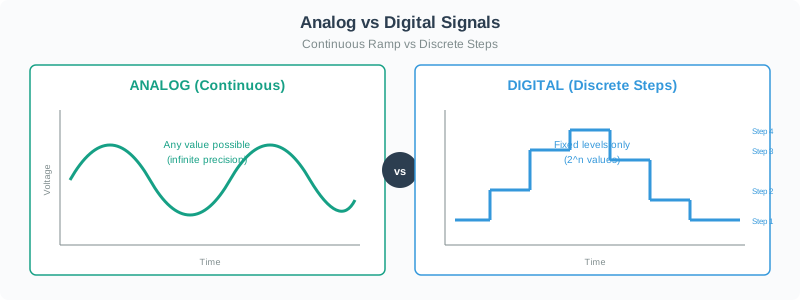
Read Figure 24.1 from the smooth voltage ramp to Steps 1–4. The left-hand trace has effectively infinite possible values; the right-hand trace assigns each sample to one of fixed levels. That loss of intermediate values is quantisation, and increasing reduces the voltage interval represented by each step.
Everything we want to measure is analog, but computers only understand digital!
| Real World (Analog) | Computer Needs (Digital) |
|---|---|
| Temperature: 23.7°C | ADC raw value: 00010111 (23 after rounding) |
| Light level: 847 lux | Number: 847 |
| Sound wave: smooth curve | Samples: [128, 130, 145, ...] |
Solution: Use an ADC (Analog-to-Digital Converter) to translate!
Inspect Figure 24.2 from physical temperature through the sensor, continuous voltage, ADC sample-and-hold, quantised -bit code, and MCU interpretation. Each arrow changes the quantity or its representation.
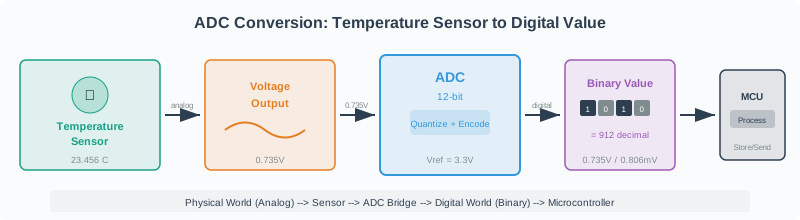
Read Figure 24.2 with its evidence row: input range and reference bound the voltage, resolution determines the code spacing, sample timing selects the instant, and calibration plus units turn the code into a temperature estimate. The -bit code is therefore not the physical temperature by itself; its meaning depends on every preceding boundary record.
24.7 Binary: The Language of Computers
This section: Binary: The Language of Computers
24.7.1 What is a Bit?
Bit = Binary Digit = Smallest unit of information = 0 or 1
One transistor = One bit
Real-world binary examples:
- Light switch: ON/OFF
- Door: OPEN/CLOSED
- Answer: YES/NO
- Coin: HEADS/TAILS
24.7.2 Worked Example: Why Binary Uses Powers of 2
Binary groupings are always powers of 2:
| Bits | Calculation | Possible Values | Range |
|---|---|---|---|
| 1 | 2^1^ | 2 | 0-1 |
| 2 | 2^2^ | 4 | 0-3 |
| 4 | 2^4^ | 16 | 0-15 |
| 8 | 2^8^ | 256 | 0-255 |
| 10 | 2^10^ | 1,024 | 0-1023 |
| 12 | 2^12^ | 4,096 | 0-4095 |
| 16 | 2^16^ | 65,536 | 0-65535 |
| 32 | 2^32^ | 4,294,967,296 | 0-4.3 billion |
Why This Matters for IoT:
- 8-bit ADC: 256 different sensor values
- 10-bit ADC: 1,024 values (typical Arduino)
- 12-bit ADC: 4,096 values (typical ESP32)
- 16-bit ADC: 65,536 values (high-precision sensors)
Each additional bit doubles the resolution: . An 11-bit ADC has steps, exactly twice the 10-bit ADC’s 1024 steps. For a 0-5V range, the 10-bit step size is mV, while 12-bit is mV (4× finer). Adding 2 bits () multiplies resolution by . To measure a 50mV sensor signal with 1% precision (0.5mV), you need bits minimum ( steps).
24.8 Binary Number System
This section: Binary Number System
Inspect Figure 24.3 down the two columns: each increment from to doubles the available binary combinations, with the 4-bit and 8-bit rows marking 16 and 256 combinations.
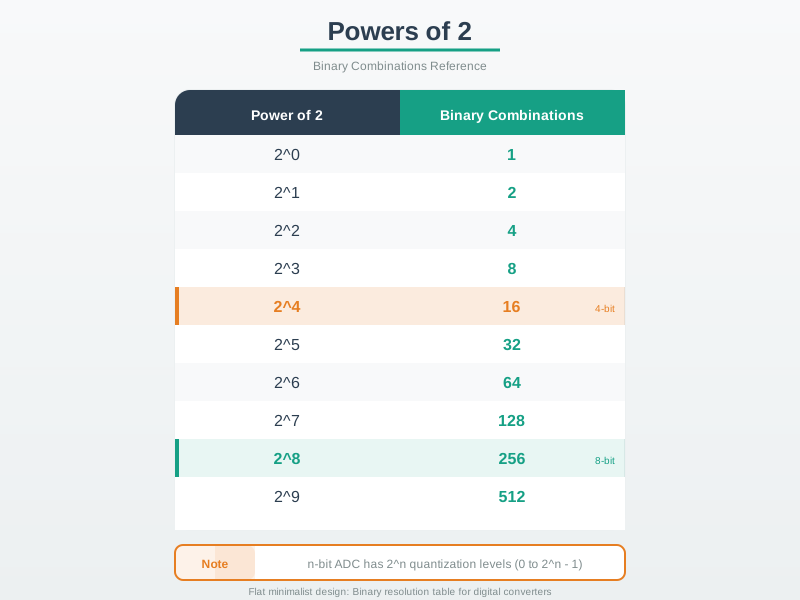
Read Figure 24.3 down the doubling ladder, then compare its four-bit and eight-bit landmarks. Each added bit has two states and doubles the combinations, so four bits produce possible values. Because an unsigned code begins at zero, those values are numbered 0 through 15 rather than 1 through 16. Eight bits similarly provide 256 values numbered 0 through 255. This distinction matters for ADC work: counts the available quantization levels, while is the largest code. The figure links binary place value to the later resolution calculation without treating code count and maximum code as interchangeable.
24.8.1 Place Value in Binary
Just like decimal uses powers of 10, binary uses powers of 2:
Decimal (base 10):
Binary (base 2):
24.8.2 Example: Convert Decimal 37 to Binary
Step 1: Find largest power of 2 ≤ 37
| Position | 2^5^ | 2^4^ | 2^3^ | 2^2^ | 2^1^ | 2^0^ |
|---|---|---|---|---|---|---|
| Value | 32 | 16 | 8 | 4 | 2 | 1 |
| Bit | 1 | 0 | 0 | 1 | 0 | 1 |
Step 2: Calculate:
- 37 ÷ 32 = 1 remainder 5 → Bit 5 = 1
- 5 ÷ 16 = 0 → Bit 4 = 0
- 5 ÷ 8 = 0 → Bit 3 = 0
- 5 ÷ 4 = 1 remainder 1 → Bit 2 = 1
- 1 ÷ 2 = 0 → Bit 1 = 0
- 1 ÷ 1 = 1 → Bit 0 = 1
Inspect Figure 24.4 across bit positions 5 to 0. The active columns are bit 5, bit 2, and bit 0, carrying place values 32, 4, and 1.
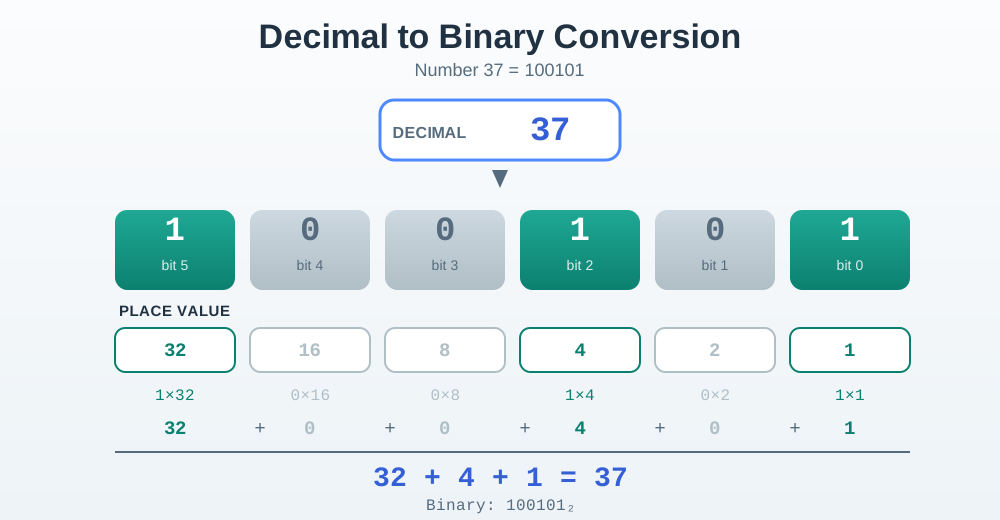
Read Figure 24.4 by multiplying each bit by its displayed place value: . The resulting bit row is 100101, and the sum at the bottom independently checks the conversion.
Inspect Figure 24.5 column by column. Its 37 in Binary row places 1 beneath , , and , and 0 beneath the excluded powers.
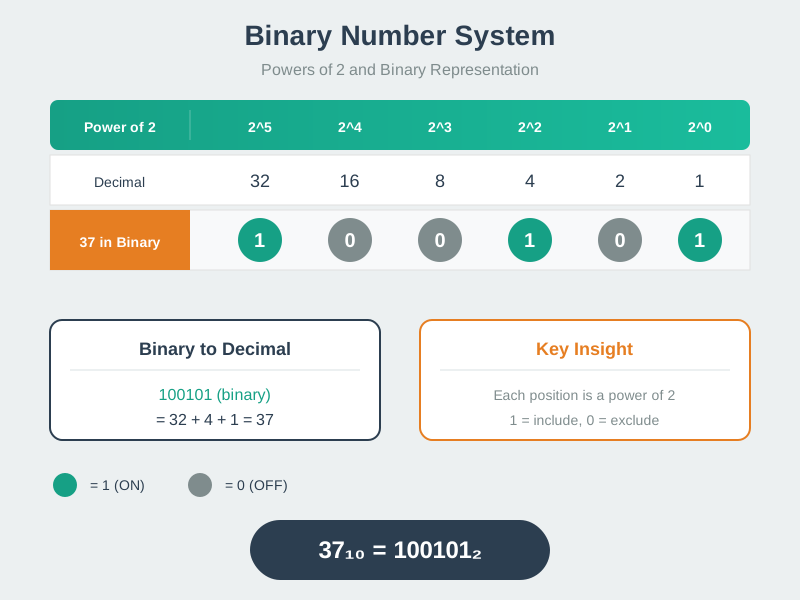
Read Figure 24.5 as an include/exclude record: a 1 includes the column’s power of two and a 0 excludes it. The code 100101 therefore selects 32, 4, and 1, reproducing and providing a second check on the worked division.
Result: 37decimal = 100101binary
Verification: (1×32) + (0×16) + (0×8) + (1×4) + (0×2) + (1×1) = 32 + 4 + 1 = 37 ✓
Recommended: Intro to Binary Numbers (10 minutes). This is a visual explanation of binary counting, conversion, and why computers use base-2.
24.8.3 Try It: Binary / Decimal Converter
Use the slider to pick a decimal number and see its binary representation, place values, and hexadecimal equivalent.
24.9 Floating Point Numbers
This section: Floating Point Numbers — Problem: How to represent very large or very small numbers efficiently?
Problem: How to represent very large or very small numbers efficiently?
Solution: Floating point notation (scientific notation for computers)
24.9.1 Decimal Scientific Notation
Instead of:
- 300,000,000,000 → Write: 3 × 10^11^
- 0.000000000015 → Write: 1.5 × 10^-11^
24.9.2 Worked Example: Binary Floating Point (IEEE 754)
32-bit float representation:
| Sign | Exponent | Significand (Mantissa) |
|---|---|---|
| 1 bit | 8 bits | 23 bits |
Example: 3.14159… stored as:
- Sign: 0 (positive)
- Exponent: biased by +127 (stored as 128 for 2^1^)
- Significand: fractional part after the leading 1 (implicit)
IoT Relevance:
- Arduino (AVR): 32-bit floats only (
floatanddoubleare both 32-bit) - ESP32: Hardware single-precision FPU; 64-bit doubles supported in software
- Sensors: Temperature as 23.456°C stored efficiently
This section:
Never compare floats with == in code!
Due to rounding errors, 0.1 + 0.2 may not exactly equal 0.3.
Correct:
if (abs(value1 - value2) < 0.0001) {
    // Close enough!
}
This section:
Recommended: Floating Point Numbers Explained (12 minutes). This explains how computers represent decimal numbers and why precision matters.
This section:
24.10 Quiz: Binary Fundamentals
This section: Quiz: Binary Fundamentals
The Mistake: Assuming that a “12-bit ADC” can measure 12 volts, or that increasing bit depth extends the measurable voltage range.
Why It Happens: The term “12-bit” sounds like it describes voltage capability, and datasheets often list resolution before reference voltage, creating confusion about what the bits actually control.
Real-World Example: A student tried to measure a 12V battery voltage with an ESP32’s 12-bit ADC. They expected accurate readings because “12-bit should handle 12 volts.” The ESP32 immediately damaged because its maximum input is 3.3V, not 12V. The 12-bit specification describes resolution (how many steps), not range (maximum voltage).
The Fix: Understand These Three Independent Specifications
| Specification | What It Controls | ESP32 Example |
|---|---|---|
| Bit Depth (Resolution) | Number of discrete steps | 12-bit = 4,096 steps |
| Reference Voltage (Vref) | Maximum measurable voltage | 3.3V maximum input |
| Voltage Per Step | Precision | 3.3V / 4,096 = 0.806 mV/step |
Key Insight: Resolution (bits) and range (Vref) are independent:
- A 12-bit ADC with 5V reference: 5V / 4,096 = 1.22 mV/step
- A 12-bit ADC with 3.3V reference: 3.3V / 4,096 = 0.806 mV/step
- A 16-bit ADC with 3.3V reference: 3.3V / 65,536 = 0.0504 mV/step
Same bit depth, different ranges. Same range, different precision.
To measure up to 15 V on the classic ESP32 ADC:
Use R1 = 56 kΩ (upper), R2 = 10 kΩ (lower): at 15 V the ADC pin is 15×10/66 = 2.27 V, within the documented 11 dB range. Configure 11 dB attenuation and calibrate the ADC. Actual input voltage = calibrated ADC pin voltage × 6.6. For a 12 V input, the pin is 12/6.6 = 1.818 V; a calibrated 1.818 V reading gives 12.0 V. Raw code alone is not a 3.3 V/4095 voltmeter.
Rule of Thumb: Bit depth = precision (how finely you measure). Reference voltage = range (how high you measure). Always apply voltage dividers for inputs exceeding Vref.
| Concept | Relates To | Relationship |
|---|---|---|
| Binary Place Values | ADC Resolution | 2^n formula determines how many discrete voltage levels the ADC can distinguish |
| Floating-Point (IEEE 754) | Sensor Data Processing | Temperature readings like 23.456°C stored efficiently but comparisons need threshold |
| Powers of 2 | Memory and Data Storage | IoT buffers sized in powers of 2 (256-byte, 512-byte, 1024-byte) for efficiency |
Cross-module connection: ADC Fundamentals - Applies binary powers of 2 to calculate ADC voltage steps and quantization error
24.11 Design Contract: Signed Sensor Decoding
This section: Design Contract: Signed Sensor Decoding — Binary place value is only the first part of a sensor-data contract.
Binary place value is only the first part of a sensor-data contract. A firmware review also has to name the byte order, bit width, signedness, scale factor, and boundary tests that turn raw bits into physical units. The detailed layered treatment now lives in Signed Sensor Decoding Contracts, which covers unsigned versus two’s-complement interpretation, signed register decoding, and sign extension.
24.12 Checkpoint: Summary
This section: Checkpoint: Summary — Understanding binary is essential for interpreting ADC values, calculating memory requirements, and debugging sensor data in IoT systems.
This chapter covered the binary number system - the foundation for all digital electronics:
- Analog vs. Digital: Real-world signals are continuous (analog); computers work with discrete values (digital)
- Binary (Base-2): Uses only 0 and 1; each position represents a power of 2
- Powers of 2: Determine ADC/DAC resolution (8-bit = 256 values, 12-bit = 4,096 values)
- Place Value: Convert binary to decimal by summing bit × 2^position^
- Floating Point: IEEE 754 representation allows efficient storage of very large/small numbers
- Precision Pitfalls: Never use
==for float comparison; use threshold-based comparison
Understanding binary is essential for interpreting ADC values, calculating memory requirements, and debugging sensor data in IoT systems.
Binary is the universal language of digital systems. Every sensor reading in IoT passes through a binary representation, and the number of bits (resolution) directly determines how precisely a real-world measurement can be captured. Understanding binary, powers of 2, and floating-point limitations is essential for correctly interpreting sensor data and avoiding subtle bugs in IoT applications.
Common Pitfalls
This section: Common Pitfalls
Most sensors transmit 16-bit values as two separate bytes. Some sensors are big-endian (high byte first) while others are little-endian (low byte first). Combining bytes in the wrong order produces a completely wrong value — for example, reading a temperature of 25.3 C as 19987.4 C because high and low bytes were swapped. Always check the datasheet for byte order and combine accordingly: value = (high << 8) | low for big-endian.
Accelerometer Z-axis at 0 g returns 0x0000; at +2 g returns approximately 0x4000; at -2 g returns 0xC000 (in two’s complement, this is -16384). Casting 0xC000 to an unsigned integer gives 49152 instead of -16384. Always cast signed sensor data to the appropriate signed integer type before arithmetic operations.
Summing 100 ADC readings (0-4095 each) into a 16-bit unsigned integer (max 65535) risks overflow if values are near maximum: 100 x 4095 = 409500, which overflows a 16-bit integer. Use 32-bit integers (uint32_t) for accumulation before dividing to compute the average.
Left shift (<<) multiplies by powers of 2 and fills with zeros on the right; right shift (>>) divides by powers of 2 but fills with the sign bit for signed values (arithmetic shift) or zeros (logical shift) depending on the data type. Shifting a signed value right in C can produce unexpected results if the variable type is not explicitly specified as unsigned.
24.13 What’s Next?
This section: What’s Next? — Now that you can convert between binary and decimal and recognise floating-point precision pitfalls, explore how ADCs apply these concepts to real sensor voltages.
Now that you can convert between binary and decimal and recognise floating-point precision pitfalls, explore how ADCs apply these concepts to real sensor voltages.
| Chapter | Focus |
|---|---|
| ADC Fundamentals | How ADCs convert analog voltages to digital values using the binary principles covered here |
| Nyquist Sampling Theory | Minimum sampling rates required to faithfully capture analog signals |
| ADC/DAC Worked Examples | Hands-on calculations combining binary, resolution, and voltage scaling |
| DAC and PWM Output | Converting digital values back to analog signals for actuator control |
| Data Representation | How binary sensor values are encoded and transmitted as network packets |
| Electricity Fundamentals | Voltage, current, and resistance — the signals that ADCs digitise |
Find help
3 reviewed answers.
Where should I start in a module?
Open the module page from the sidebar to see its chapters in order. Use the module map to return to a topic you need.
Modules and pathsReviewed
What can I try when a project does not work?
Check the symptom, then work through the diagnostic steps. Keep the error message and the smallest example that reproduces it.
When you are stuckReviewed
How do interactive examples work?
Use the interactive guide to check how examples and simulations work before changing your project.
Interactive examples guideReviewed