11 Where Multi-Hop Networks Fit
More
Depth: Practitioner
Progress saves as you read. Mark sections complete as you go; your progress appears in the sidebar.
-

What happens if either relay cannot pass the field alarm?
11.1 Start With the Place a Gateway Cannot Cover
This section: Start With the Place a Gateway Cannot Cover — Picture a field sensor that reaches the operator only when two battery nodes relay its alarm.
Prove the Relay Chain Helps the Service
Picture a field sensor that reaches the operator only when two battery nodes relay its alarm. Extra reach is useful only if delay, loss, and energy stay inside the service promise.
A gateway means the boundary system that joins local devices to another network or service. Mark every relay, power source, expected route, alternate route, and application deadline before testing.
Run near, far, missing-relay, busy, weak-link, and restored cases. Keep the source, hops, route changes, retries, delay, delivery, energy, and operator receipt so another person can repeat the trial.
This check covers one layout and traffic pattern, not every radio condition. The deeper sections compare use cases, routing, capacity, power, mobility, and support.
Multi-hop applications appear when one gateway cannot reach every useful sensor. A corridor turns, a field spreads out, a basement blocks radio, or a temporary site has no wired backhaul.
The everyday decision is whether relay nodes make the system better than adding infrastructure. Start with the unreachable measurement, then ask which nodes can forward it, how often the route changes, and what the application can tolerate when the chain is weak.
11.2 Learning Objectives
This section: Learning Objectives — The overview depth layer below carries the route map that connects fit, roles, proof, gateway contract, and review record.
By the end of this chapter, you should be able to:
- Decide whether an application is a good candidate for multi-hop ad hoc networking.
- Map application needs to end-node, relay, and gateway responsibilities.
- Define path-health proof that shows a multi-hop route is working for the application.
- Explain how gateway boundaries shape reliability, buffering, and ownership.
- Build a compact decision record for a multi-hop application deployment.
The overview depth layer below carries the route map that connects fit, roles, proof, gateway contract, and review record.
11.3 Where This Chapter Fits
This section: Where This Chapter Fits — The earlier multi-hop chapters explain concepts such as hops, relays, route changes, and ad hoc formation.
The earlier multi-hop chapters explain concepts such as hops, relays, route changes, and ad hoc formation. This chapter turns those concepts into application decision habits.
Inputs
Application data, placement limits, node duty cycle, maintenance access, gateway ownership, and acceptable delay.Outputs
Fit decision, role map, path proof, gateway contract, decision record, and change triggers.Route-Fit Habit
Ask, "Can the application still meet its purpose when routes change, relays carry uneven load, or the gateway is offline for a while?"11.4 Application Fit for Multi-Hop
This section: Application Fit for Multi-Hop — Multi-hop should be selected because it fits the application behavior, not because it sounds flexible.
Multi-hop should be selected because it fits the application behavior, not because it sounds flexible. The route has value only when the application can tolerate the shape of that route.
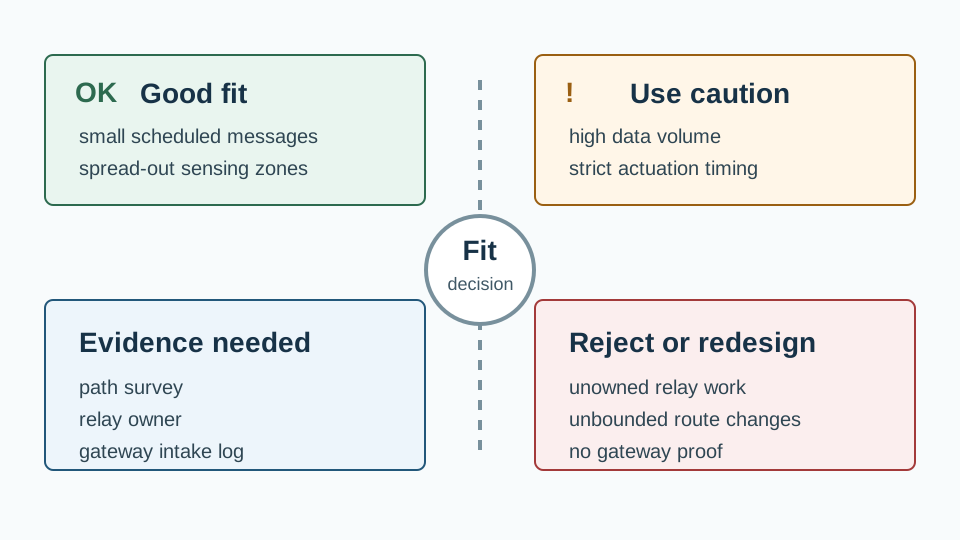
| Fit Signal | Why It Helps | Proof to Request |
|---|---|---|
| Small, scheduled messages | Short payloads reduce relay burden and make retries easier to manage. | Payload examples, send interval, retry policy, and queue behavior under missed gateway contact. |
| Spread-out sensing zones | Relays can bridge gaps where one direct path would be weak or blocked. | Placement map, path survey, hop-depth limit, and fallback route notes. |
| Staged or changing work area | The network can form around the work instead of waiting for fixed wiring. | Join behavior, route recovery observation, and a rule for removing stale nodes. |
| Limited maintenance access | A planned relay layer can make service visits predictable instead of reactive. | Relay owner, health record, spare placement plan, and battery service schedule. |
The same design is a poor fit when the application requires continuous high-volume streams, strict actuation timing, unbounded route changes, or unowned relay nodes. Multi-hop can extend reach, but it also creates extra responsibilities.
11.5 Common Application Patterns
This section: Common Application Patterns — The strongest multi-hop applications usually have a clear reason for not making every node talk directly to a fixed access point.
The strongest multi-hop applications usually have a clear reason for not making every node talk directly to a fixed access point.
Distributed Environment Monitor
Small readings come from sensors spread across rooms, yards, enclosures, or outdoor zones. The review focuses on hop depth, relay load, and gateway buffering.Staged Work Area
Nodes are added, moved, or retired as a project area changes. The review focuses on join behavior, route recovery, and stale-node cleanup.Mobile Asset Yard
Assets may not remain near one access point. The review focuses on neighbor stability, delivery windows, and whether asset movement changes relay burden.Protected Site
Installation limits may prevent trenching, cabling, or large fixed equipment. The review focuses on placement proof, maintenance access, and local record keeping.11.6 Relay Roles and Gateway Boundary
This section: Relay Roles and Gateway Boundary — In an application design, a relay is not just “another node.” It has an operating role.
In an application design, a relay is not just “another node.” It has an operating role. A gateway is not just the last hop. It is the boundary where the ad hoc route meets application services, records, alerts, or operators.
Use Figure 11.2 to test how maintained relays extend a roughly 100 m end-node reach and where the gateway assumes validation, buffering, and handoff responsibilities.

Trace one message across the relays. Check each role. Read Figure 11.2 from the end node through Relay A and Relay B to the gateway boundary. Each relay extends the path beyond the approximate 100 m direct reach but also adds link, queue, power, and maintenance risk. The gateway validates schema and identity, deduplicates or buffers the reading, and hands it to the cloud application; it does not repair unobserved relay failures. Hop depth, retry trend, queue age, neighbour stability, gateway intake, application receipt, and owner response must share one trace so a successful cloud display can be tied back to maintained forwarding.
End Node
Measures or detects the event, sends the payload, sleeps when possible, and reports enough health data to show whether its own work is happening.Relay Node
Forwards traffic, observes neighbor quality, manages short queue delays, and exposes whether its own burden is increasing.Gateway
Receives routed messages, validates format and freshness, buffers during service interruptions, and makes route failures visible.The gateway contract should answer four questions:
- What messages does the gateway accept from the multi-hop network?
- What does it reject, delay, de-duplicate, or hold for later delivery?
- What proof shows the gateway saw a message, not just that a relay sent it?
- Who responds when gateway intake, queue age, or route health moves outside the agreed limits?
11.7 Path Health and Operational Proof
This section: Path Health and Operational Proof — Multi-hop applications fail quietly when teams review only a drawing.
Multi-hop applications fail quietly when teams review only a drawing. The drawing shows intended paths. The evidence shows whether those paths are behaving well enough for the application.
Path Health and Operational Proof introduces a boundary that must remain visible in the design. Figure 11.3 clarifies it by depicting how “Path health check linking hop depth, retry trend, queue age, neighbor stability, and gateway intake” is explicit in the diagram.
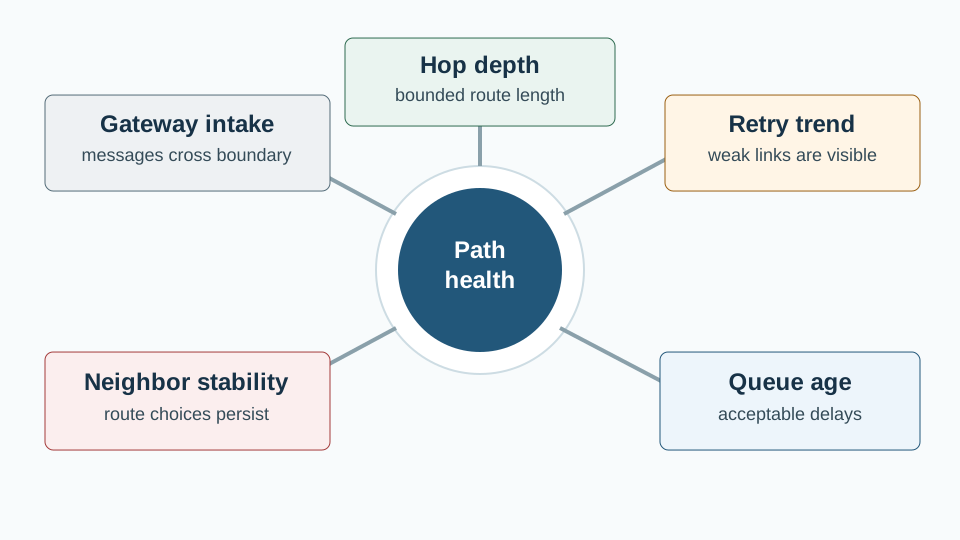
Read Hop depth as the first explicit role in Figure 11.3; acceptable delays supplies the next constraint, while messages cross boundary records the consequence. This label-specific chain shows “Path health check linking hop depth, retry trend, queue age, neighbor stability, and gateway intake” is explicit in the diagram. That is why Path Health and Operational Proof matters to the chapter’s later acceptance decision.
| Path Proof | What It Proves | Failure It Exposes |
|---|---|---|
| Hop depth record | Messages are not taking unexpectedly long routes. | A relay gap, blocked path, or accidental dependence on one fragile bridge. |
| Retry trend | The route has enough margin for normal variation. | Weak links that still succeed sometimes but are eroding reliability. |
| Queue age | Delays remain compatible with the application purpose. | Gateway interruption, relay overload, or route instability. |
| Neighbor stability | Nodes keep useful route choices over time. | Movement, interference, installation drift, or an unstable relay role. |
| Gateway intake log | The application boundary actually received usable messages. | A route that works inside the mesh but fails at translation, validation, or buffering. |
11.8 Field Environment Monitor
This section: Field Environment Monitor — A team needs environment readings from several separated zones.
A team needs environment readings from several separated zones. The readings are small and periodic, the site layout makes direct gateway reach uneven, and some nodes can be placed where they can serve as maintained relays.
The team should not approve multi-hop just because a path can be drawn. It should approve the design only after the application contract is clear.
Clarify the Application Need
- What readings are required, and how late can they arrive before they lose value? - Which nodes only sense, which nodes may relay, and which nodes must never carry relay work? - Where can the gateway safely buffer messages when upstream service is unavailable? - What local evidence will show that the application purpose is still being met?Good Approval Signal
The design names relay candidates, limits hop depth, records path evidence, and assigns a person or team to gateway and relay health.Weak Approval Signal
The design shows many nodes on a map but does not prove delivery at the gateway, route recovery, or relay burden over time.11.9 Application Decision Record
This section: Application Decision Record — Follow the three panels to see what belongs in a multi-hop application decision record.
Follow the three panels to see what belongs in a multi-hop application decision record.
-

Start with the purpose and each node's job.
-

Prove the route and the gateway result.
-

Name the owner and what forces a new review.
The first panel assigns source, relay, and gateway jobs. The second checks the relay route and, separately, whether the application accepted the result beyond the gateway. The third adds an owner and a reason to review the route again, such as a failed link. The record template below keeps those checks together.
A short review record keeps the multi-hop decision from becoming tribal knowledge. It also helps future teams know when the decision must be revisited.
To judge Application Decision Record rather than merely name it, first establish how “Decision record tying application purpose, node roles, path proof, gateway proof, owner, and change trigger” is explicit in the diagram. Figure 11.4 is the evidence map for that judgment.
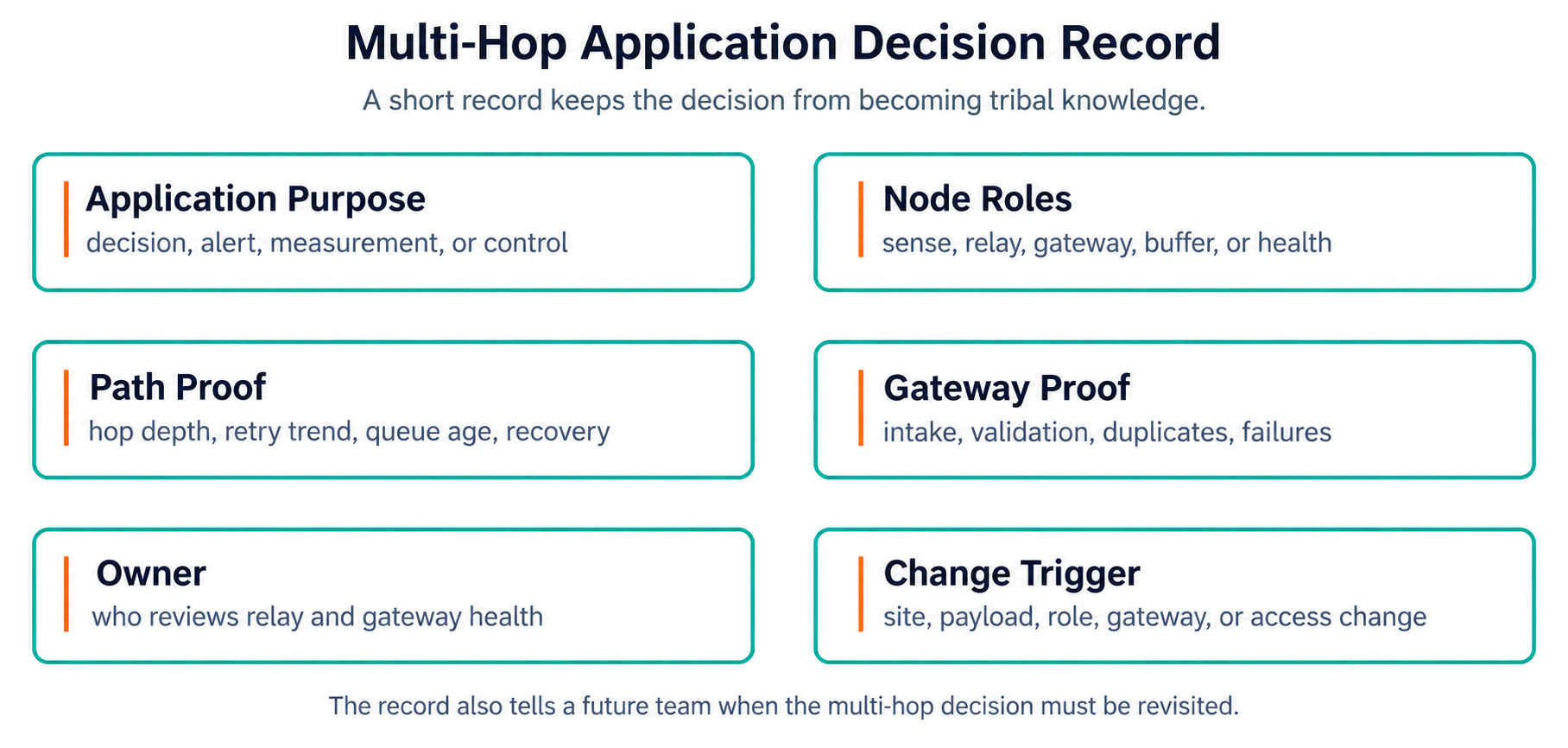
Start Figure 11.4 at Application Purpose, but do not stop there: Gateway Proof changes the interpretation, and Change Trigger closes the account. This progression is the diagram’s proof that “Decision record tying application purpose, node roles, path proof, gateway proof, owner, and change trigger” is explicit in the diagram. It is also the narrative bridge from Application Decision Record to implementation.
Record Template
- Application purpose: What decision, alert, measurement, or control depends on the multi-hop route?
- Node roles: Which nodes sense, relay, gateway, buffer, or observe health?
- Path proof: Hop depth, retry trend, queue age, neighbor stability, and route recovery observation.
- Gateway proof: Intake log, validation result, buffering behavior, duplicate handling, and failure visibility.
- Owner: Who reviews relay health, gateway health, and placement changes?
- Change trigger: Site layout change, payload change, node role change, gateway policy change, or maintenance access change.
11.10 Knowledge Check
This section: Knowledge Check
11.11 Match Application Signals to Proof
This section: Match Application Signals to Proof
11.12 Order a Multi-Hop Application Decision
This section: Order a Multi-Hop Application Decision
11.13 Common Pitfalls
This section: Common Pitfalls
Counting Relays, Not Paths
Adding relay nodes without proving hop depth, alternate paths, retry behavior, or gateway intake.Unowned Relay Work
Letting a node forward other traffic without assigning power, placement, health review, and maintenance ownership.Gateway Blind Spot
Stopping proof at the final relay instead of checking validation, buffering, duplicate handling, and visible failures at the gateway.Static Drawing Bias
Approving a clean diagram without observing route recovery, stale nodes, neighbor changes, or queue age under normal site activity.11.14 Overview: Fit Is An Operating Claim
This section: Overview: Fit Is An Operating Claim — A multi-hop application is not approved by showing that nodes can form a route.
A multi-hop application is not approved by showing that nodes can form a route. It is approved by showing that the application can still use the data after the route changes, a relay carries extra work, or the gateway delays intake. Inspect Figure 11.5 to connect that application requirement to the path evidence.
The fit claim therefore has two sides. In Figure 11.5, follow the application need through role assignment, path and gateway proof, and the recorded decision. The application must define what counts as useful data, and the network must show which route, relay, and gateway conditions keep that data useful.
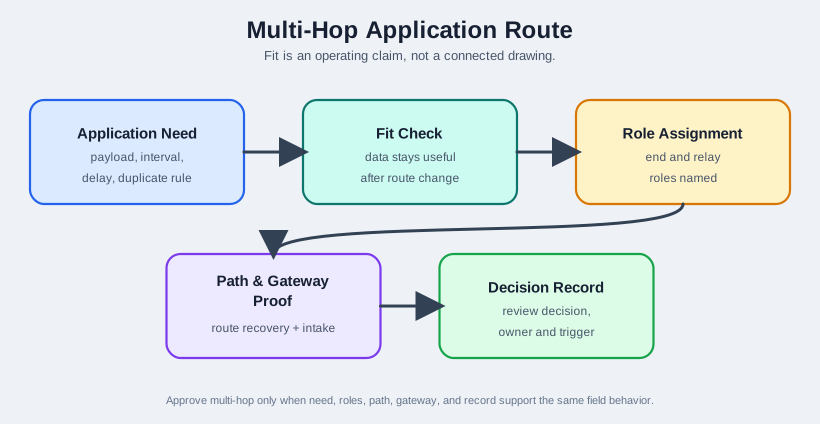
Mobile summary: Figure 11.5 supports approval only when the application need, relay roles, path evidence, gateway contract, and review record all support the same field behavior.
11.15 Separate Traffic from Relay Work
This section: Separate Traffic from Relay Work — For each application pattern, split the review into traffic need and relay work.
For each application pattern, split the review into traffic need and relay work. This prevents a team from approving a mesh because it looks connected while missing the devices that now carry the cost of that connection.
Traffic Need
Name the payload, send interval, delay tolerance, duplicate rule, and gateway result that makes the application decision valid.
Relay Work
Name the relays that may forward, their queue and power limits, health evidence, maintenance owner, and removal rule.
Acceptance Line
Name the gateway intake proof, rejection behavior, buffering limit, and visible alert that tells operators the route no longer supports the application.
This split is especially important for mobile asset yards and staged work areas. Movement can turn yesterday's end node into today's overloaded relay, so the application record must track role changes as well as delivery success.
11.16 Gateways Change Failure Shape
This section: Gateways Change Failure Shape — The gateway turns route behavior into application behavior.
The gateway turns route behavior into application behavior. A relay may successfully forward a frame, but the application can still fail if the gateway rejects stale data, drops duplicates without audit, buffers beyond the decision window, or hides intake errors from operators.
That is why the proof record should include both path evidence and gateway evidence: hop depth, retries, queue age, neighbor stability, intake result, validation result, duplicate handling, and the operator-visible status after failure.
11.17 Summary
This section: Summary — Multi-hop ad hoc applications succeed when the route design is tied to the application purpose.
Multi-hop ad hoc applications succeed when the route design is tied to the application purpose.
Check the route and what the gateway took in. A sent frame alone is not proof.
11.18 Key Takeaway
This section: Key Takeaway — Multi-hop applications need proof that routing, power, latency, maintenance, and failure recovery fit the actual field topology.
Multi-hop applications need proof that routing, power, latency, maintenance, and failure recovery fit the actual field topology.
11.19 See Also
This section: See Also
11.20 What’s Next
This section: What’s Next
| If you want to… | Read this |
|---|---|
| Test your multi-hop knowledge | Multi-Hop Assessment |
| Revisit route and relay concepts | Multi-Hop Core Concepts |
| Start from the foundation | Multi-Hop Fundamentals |
Find help
3 reviewed answers.
Where should I start in a module?
Open the module page from the sidebar to see its chapters in order. Use the module map to return to a topic you need.
Modules and pathsReviewed
What can I try when a project does not work?
Check the symptom, then work through the diagnostic steps. Keep the error message and the smallest example that reproduces it.
When you are stuckReviewed
How do interactive examples work?
Use the interactive guide to check how examples and simulations work before changing your project.
Interactive examples guideReviewed