7 IoT Glossary: Q-Z
Essential IoT Terms from QoS to 6LoWPAN
capstone
glossary
q
z
7.1 In 60 Seconds
This glossary section covers IoT terminology from Q through Z, with emphasis on quality of service, security, sensor data, time-series storage, wireless protocols, and additional reference terms. The most frequently reused terms in this range include QoS, TLS, Time Series, TSDB, Thread, Zigbee, Z-Wave, and 6LoWPAN.
7.2 Start With The Runtime Promise
Q-Z terms often sound like guarantees, so start by naming the promise they really make. QoS describes broker delivery behavior, not whether an actuator command is safe to repeat. TLS protects a transport session only when certificates, hostnames, clocks, keys, and trust anchors are handled correctly. A TSDB stores timestamped measurements, but it does not prove that units, retention, downsampling, or dashboard queries are fit for the incident you need to review.
Wireless terms need the same discipline. Thread, Zigbee, Z-Wave, Wi-Fi, Sigfox, and 6LoWPAN each carry assumptions about power, topology, range, gateway roles, channel planning, and recovery. The term is a starting point, not a field result.
Use this section to turn vocabulary into runbook checks. Ask what state the term owns, what evidence proves it, and what failure remains outside the promise.
7.3 Learning Objectives
After reviewing this section, you will be able to:
- Define key IoT terms from Q to Z with technical precision.
- Evaluate quality of service levels and their trade-offs for different IoT scenarios.
- Differentiate wireless protocols such as Zigbee, Z-Wave, Thread, Wi-Fi, Sigfox, and 6LoWPAN by topology, power, range, and data rate.
- Select appropriate database technologies for time-series IoT data based on write rate, retention, aggregation, and query patterns.
7.4 Q-Z Terms Name Run-Time Promises
The Q-Z range is where vocabulary becomes operations. QoS, retry, routing, schema, telemetry, TLS, token, topic, TSDB, Thread, Wi-Fi, Zigbee, Z-Wave, and 6LoWPAN name promises that are tested after deployment, not just during design. They decide whether a message can be duplicated, whether a certificate is trusted, whether a timestamp is meaningful, whether a query can reconstruct an incident, and whether a low-power network still works after interference or route changes.
Read each term by asking what run-time state it owns. MQTT QoS owns broker delivery behavior, not database writes or actuator safety. TLS owns transport authentication, confidentiality, and integrity only when certificate validation, hostnames, clocks, key storage, and trust anchors are correct. A topic owns broker routing, but it does not define tenant authorization, schema compatibility, or dashboard freshness. A TSDB owns timestamped storage and time-window queries, but retention, downsampling, backup, and cardinality control are still design choices.
Wireless terms carry similar operational boundaries. Thread and 6LoWPAN make IPv6 practical on constrained IEEE 802.15.4 networks, but border-router behavior, fragmentation, routing, and sleepy-device assumptions still matter. Zigbee and Z-Wave can reduce endpoint power, but coordinator, certification, regional band, channel, and mesh-health evidence decide whether the deployment is credible. Wi-Fi provides high throughput and IP familiarity, but power draw and congestion can dominate battery or reliability claims.
| Run-Time Promise | Terms To Bind | Evidence To Inspect | Risk If Vague |
|---|---|---|---|
| Delivery | QoS, retry, subscriber, subscription, topic, wildcard | PUBLISH/PUBACK trace, retry policy, topic ACL, duplicate test | A duplicate or misrouted command changes physical state |
| Trust | TLS, token, certificate, HTTPS, OAuth | Certificate chain, hostname check, token scope, expiry test | Encrypted traffic is mistaken for authorized traffic |
| History | Telemetry, timestamp, time series, TSDB, TimescaleDB | Schema version, unit, retention policy, downsampling query | Incident review cannot reconstruct the original signal |
| Connectivity | Thread, Zigbee, Z-Wave, Wi-Fi, Sigfox, 6LoWPAN | Channel, role, gateway/border router, link quality, route table | Range or power claims ignore topology and recovery behavior |
7.5 Turn Terms Into Runbook Checks
For a project or capstone review, translate each Q-Z term into a runbook check. A QoS claim should say which MQTT QoS level is used, why that level fits the data or command, what duplicate behavior was tested, and where idempotency is enforced. QoS 0 may be acceptable for high-rate telemetry where the next sample replaces a missed one. QoS 1 may be appropriate for important telemetry when consumers deduplicate by timestamp, sequence number, or message id. QoS 2 may be useful in broker delivery paths, but it still does not prove that an actuator command is safe to repeat physically.
Security terms need observable negative tests. TLS evidence should include certificate-chain validation, hostname behavior, supported protocol version, clock tolerance, and how keys or trust stores rotate. Token evidence should include scope, expiry, refresh behavior, and the API or broker rule that enforces authorization. A practical review should deliberately test an expired token, wrong hostname, revoked credential, or unauthorized topic so the term is not only asserted on the happy path.
Time-series and telemetry terms need data-life-cycle evidence. Record sensor id, unit, timestamp source, schema version, quality flag, and retention class in at least one sample row. For InfluxDB, TimescaleDB, Prometheus, QuestDB, or another TSDB-like store, write down the expected write rate, cardinality drivers, compression or downsampling policy, query windows, backup and restore expectation, and the person or team that can operate it. A dashboard screenshot is not enough if the underlying query hides missing data or stale aggregation.
Wireless terms need deployment evidence rather than generic protocol descriptions. For Thread, record the border router, mesh role, channel, route health, and whether sleepy end devices meet latency needs. For Zigbee, record coordinator state, channel selection, joining policy, and interference assumptions. For Z-Wave, record the regional band and inclusion/exclusion workflow. For 6LoWPAN, record IPv6 header compression, fragmentation risk, MTU, routing interaction, and what happens when one fragment is lost. The review should end with a specific next check, not a broad claim that the network is low power.
The compact format is term, owner, evidence, and recovery. “TLS” becomes “gateway process owns TLS validation; proof is a successful valid-chain connection and failed wrong-hostname test; recovery is certificate rotation through the documented trust-store update path.” That format turns vocabulary into something an operator could use during an outage.
7.6 Guarantees Stop At Layer Boundaries
Under the hood, Q-Z terms often fail when a guarantee is stretched beyond its layer. MQTT QoS 1 confirms a broker delivery handshake, but a subscriber may still process the same payload twice. MQTT QoS 2 narrows a duplicate path inside MQTT, but it does not prove that storage, alerts, or physical actuators are exactly once. A retained message can be useful for last-known state and dangerous when old state appears current after a reboot. Wildcard subscriptions can simplify monitoring and accidentally cross tenant, device, or command namespaces.
TLS and token terms stop at their own boundaries too. TLS can authenticate the endpoint and protect bytes in transit, but it cannot decide whether a device is allowed to publish to a topic unless an authorization layer checks that policy. A token may authorize an API call, but it does not prove sensor calibration, payload truth, or device possession unless it is combined with device identity. Bad clocks can break certificate validity and token expiry checks, so time synchronization becomes part of security evidence.
Data terms hide another boundary. A timestamp may be generated by the sensor, gateway, broker, ingestion service, database, or dashboard. Each choice changes ordering and incident reconstruction. Schema validation can reject malformed data, but it cannot prove units, calibration, or semantic truth. Downsampling can make long-term dashboards efficient while deleting spikes that matter for safety, warranty, or maintenance. TSDB compression and retention policies therefore belong in the engineering argument, not in a footnote.
Wireless and adaptation terms hide state that is easy to miss. Thread and Zigbee meshes depend on router roles, neighbor tables, link quality, and channel planning. Z-Wave behavior depends on regional frequencies, inclusion security, and network healing. 6LoWPAN compresses IPv6 headers and fragments packets across small IEEE 802.15.4 frames; losing one fragment can lose the whole IPv6 packet. Wi-Fi has familiar IP behavior but higher idle listening costs and shared-channel contention. Sigfox and other narrowband options constrain payload size, downlink, and regional service availability.
A rigorous Q-Z explanation names both the useful guarantee and the stop sign. QoS helps broker delivery but stops before application idempotency. TLS protects transport but stops before authorization and operations. TSDB stores time-indexed rows but stops before proof that the signal was sampled correctly. Thread or Zigbee helps low-power mesh behavior but stops before evidence that the actual deployment has healthy routes. That stop-sign discipline is what turns vocabulary into dependable design review.
7.7 Deep Dive: Q-Z Terms Define Operational Boundaries
Terms from Q through Z describe what happens after a device starts operating: delivery semantics, retry behavior, routing, sampling, schema evolution, serialization, telemetry, security, time-series storage, wireless behavior, and low-power IP networking.
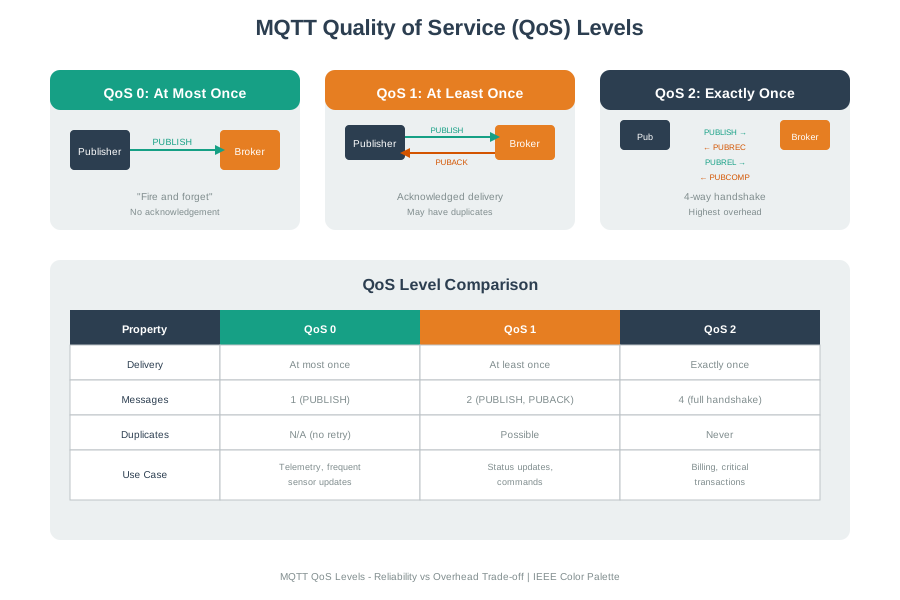
Use each term to name a boundary that can be tested. QoS is not a universal reliability switch; it is a protocol-level delivery contract with latency, duplication, state, and power consequences. A timestamp is not just a display value; it decides ordering, correlation, retention, and aggregation. A wireless protocol is not just range; it carries topology, channel planning, power budget, certification, gateway, and regional constraints.
The figure shows the reading pattern for the whole range. QoS 0, QoS 1, and QoS 2 describe broker delivery behavior, not the full business outcome. A duplicate QoS 1 message can still be correct telemetry if the consumer deduplicates by timestamp and sequence number, but it can be dangerous for a non-idempotent actuator command. The same boundary logic applies to Retry, Token, Topic, TLS, TSDB, UART, WebSocket, Wi-Fi, Zigbee, Z-Wave, and 6LoWPAN: each term says which component owns a promise and which component still needs a separate check.
For a capstone explanation, avoid saying that a system is “real time,” “secure,” “reliable,” or “low power” without the Q-Z term that makes the claim inspectable. Real-time may mean an alert deadline, a control-loop budget, or dashboard freshness. Secure may mean TLS certificate validation, token scope, key storage, or message authorization. Low power may mean radio duty cycle, sleepy end-device behavior, sampling interval, routing role, or retransmission cost.
| Boundary | Terms That Make It Inspectable |
|---|---|
| Reliability | QoS, retry, routing, subscriber, subscription, topic, wildcard, and real-time terms explain what can be lost, duplicated, delayed, filtered, or misrouted. |
| Data | Sampling, schema, serialization, telemetry, time series, timestamp, TSDB, and TimescaleDB terms explain what is measured, encoded, stored, compacted, and queried. |
| Connectivity | Thread, Wi-Fi, Zigbee, Z-Wave, Sigfox, cellular IoT, frequency, and 6LoWPAN terms explain how packets move through constrained or managed networks. |
7.7.1 Connect the Term to a Measurable Check
Before using a Q-Z term in a project review, connect it to evidence from the system. QoS should point to MQTT packet flow, duplicate handling, and command idempotency. Retry should point to backoff settings and maximum attempts. Schema should point to JSON Schema, Protobuf, Avro, or database migrations. TLS should point to certificate validation, cipher policy, and token handling.
For wireless and storage terms, record the constraint that changes the design. Zigbee, Thread, and Wi-Fi share the 2.4 GHz band in many deployments but use different channel plans and mesh/star behavior. Z-Wave uses sub-GHz regional bands and certification constraints. TSDB selection depends on write rate, retention, downsampling, compression, query shape, and operational familiarity.
For a QoS or retry claim, capture both the protocol trace and the application rule. Record the MQTT client id, clean-start/session setting, topic, QoS level, retained flag, packet identifiers, PUBACK/PUBREC/PUBREL/PUBCOMP evidence where relevant, retry interval, and the consumer rule that prevents duplicate side effects. For a command path, add the command id, expected state transition, acknowledgement source, timeout, and rollback or manual-review path.
For data terms, keep the evidence tied to the field contract. A telemetry row should show sensor id, units, timestamp source, schema version, quality flag, and retention class. A TSDB or TimescaleDB decision should include write rate, cardinality, compression/downsampling plan, query windows, backup/restore expectations, and the team that can operate the database. For TLS and Token, record certificate chain validation, hostname behavior, clock tolerance, key rotation, scope, expiry, and where authorization is enforced.
For wireless terms, record the deployment constraint rather than only the protocol name. A Thread or Zigbee statement should include channel, PAN or fabric identity as appropriate, router/end-device role, gateway or border-router dependency, link-quality evidence, and interference assumptions. A 6LoWPAN statement should include the adaptation boundary: IPv6 header compression, fragmentation risk, MTU, routing interaction, and what happens when a fragment is lost.
- Choose the observable. Example: MQTT PUBLISH/PUBACK logs, a TLS certificate chain, a Zigbee channel scan, a Thread border-router route, or a TSDB retention policy.
- Name the term and layer. Example: QoS at the MQTT layer, timestamp at the data model layer, or 6LoWPAN at the adaptation layer.
- Write the failure mode. Example: duplicate command, rejected token, stale aggregation, channel interference, malformed payload, or dropped fragmented packet.
7.7.2 Late-Alphabet Terms Decide Operations
Many Q-Z terms are operational contracts. MQTT QoS 1 can redeliver a message, so consumers still need deduplication or idempotent state changes. QoS 2 narrows one MQTT duplicate-delivery path, but it does not make a physical actuator command safe by itself. TLS protects transport only when certificates, hostnames, time, keys, and trust stores are correct.
Time-series terms carry similar boundaries. Sampling rate changes what a sensor can represent. Schema changes what a downstream service can trust. Retention policy changes what an incident review can reconstruct. Downsampling changes which anomalies survive long-term storage.
The hidden technical detail is usually state ownership. A broker owns session state, inflight packet identifiers, retained messages, subscriptions, and wildcard matching. Firmware owns local sampling, UART or SPI timing, retry queues, and command execution. A gateway or border router owns protocol adaptation, Thread-to-IP forwarding, Zigbee coordinator state, Z-Wave regional behavior, or 6LoWPAN compression and fragmentation. A data platform owns timestamp normalization, schema compatibility, retention, rollups, and alert queries.
Because those owners differ, one Q-Z fix can create another Q-Z failure. Raising MQTT QoS can increase radio wake time and duplicate-handling requirements. Extending TSDB retention can increase storage cost while still losing high-frequency anomalies if downsampling is too aggressive. Tightening TLS or token lifetime can break devices with bad clocks or unreachable renewal paths. Moving from Wi-Fi to Thread or Zigbee can reduce power, but it introduces mesh-health, border-router, coordinator, channel, and certification constraints.
A rigorous capstone treats late-alphabet vocabulary as a runbook checklist: what state exists, where it is stored, how it expires, who can rotate it, how duplicates are detected, how failures are retried, and which evidence would prove the system behaved correctly after an outage or upgrade.
For capstone work, use Q-Z terms to assign operational responsibility: which firmware task, broker, route, gateway, database, dashboard, alert rule, certificate store, or support process owns the next check?
7.8 How It Works: Use Q-Z Terms in a Review
- Start with one operational claim: “the command is reliable,” “the network is low power,” “the dashboard shows history,” or “the API is secure.”
- Replace the claim with exact terms: MQTT QoS 1 plus idempotency, Thread mesh plus border router, TSDB retention plus downsampling, or HTTPS with TLS certificate validation and scoped tokens.
- Add the check that would prove or disprove it: packet capture, duplicate-command test, channel survey, route table, schema validation, retention policy, or expired-token test.
Beginner Example: A room sensor publishes temperature to floor/3/room/12/temperature with QoS 0, includes an ISO 8601 timestamp, and stores readings in a TSDB. The important terms are topic, QoS, timestamp, time series, and TSDB.
Intermediate Example: A smart-building gateway receives Zigbee sensor reports, forwards MQTT telemetry over TLS, and stores hourly aggregates in TimescaleDB. The important terms are Zigbee, routing, telemetry, TLS, schema, sampling, aggregation, and retention.
Advanced Example: A low-power asset tracker uses 6LoWPAN over IEEE 802.15.4, forwards data through a Thread border router, retries only idempotent updates, and rejects expired OAuth tokens at the API. The important question is which layer owns delivery, identity, replay protection, fragmentation, and historical evidence.
7.9 Key Concepts
- QoS (Quality of Service): MQTT delivery semantics that trade reliability, duplicate handling, latency, network overhead, and power use.
- TLS (Transport Layer Security): The cryptographic protocol that provides authentication, confidentiality, and integrity for IoT communications.
- Time Series: Sensor or event data indexed by timestamp so trends, anomalies, and historical aggregates can be queried.
- TSDB (Time Series Database): A database optimized for high-rate timestamped writes, time-window queries, compression, and retention policies.
- Thread: An IPv6-based low-power mesh protocol for home and building IoT devices.
- UART: A simple point-to-point serial interface used to connect microcontrollers to sensors, GPS modules, and modems.
- Zigbee and Z-Wave: Low-power mesh protocols commonly used in home automation and building control.
7.10 For Beginners: Using This Glossary
This section is a quick reference for important IoT words from Q to Z. Use it when a chapter, project brief, or diagram mentions a term such as “QoS,” “TSDB,” “TLS,” “Thread,” or “Zigbee” and you need the definition, plain-language explanation, common mistakes, and related terms in one place.
Navigation
This is part 3 of the IoT Glossary, covering terms Q-Z. See also:
- Glossary A-F - start of the glossary sequence and quick navigation
- Glossary A-F - ACL through Frame
- Glossary G-P - Gateway through Publisher
Reference Use Metric
Reference usability can be estimated by lookup coverage:
\[ U = \frac{R}{T} \]
where \(R\) is resolved lookups and \(T\) is total lookups.
Worked example: If learners perform 220 glossary lookups and 198 are resolved without leaving the section, usability is \(198/220=90\%\). Improving cross-references and examples should push this ratio higher.
7.11 Q
7.11.1 QoS (Quality of Service)
Definition: A set of mechanisms that control network resources and delivery characteristics, particularly message delivery semantics such as at-most-once, at-least-once, and exactly-once within a defined protocol boundary.
In simple terms: Delivery choices - like choosing between regular mail, tracked delivery, or registered mail depending on how important your package is and what extra handling you can afford.
Common confusions:
- MQTT QoS (0, 1, 2) refers to message delivery, not network performance
- Higher QoS means more overhead and latency
Related terms: At-most-once, At-least-once, Exactly-once, Acknowledgment
Synonyms: delivery quality, service level
7.12 R
7.12.1 REST (Representational State Transfer)
Definition: An architectural style for web services using HTTP methods (GET, POST, PUT, DELETE) to perform CRUD operations on resources, emphasizing stateless communication and uniform interfaces.
In simple terms: Web API design principles - a common way to build APIs where URLs represent things (resources) and HTTP methods represent actions (get, create, update, delete).
Common confusions:
- REST vs. RESTful - REST is the style, RESTful describes APIs following REST principles
- Not all HTTP APIs are RESTful (many only use POST)
Related terms: API, HTTP, Microservices
Synonyms: REST API, RESTful API
7.12.2 Retry
Definition: The practice of automatically re-attempting a failed operation, typically with backoff strategies and maximum attempt limits to handle transient failures gracefully.
In simple terms: “Try again” - when something fails, automatically attempt it again (perhaps after waiting) because many failures are temporary and succeed on retry.
Common confusions:
- Retries without backoff can overwhelm systems (thundering herd)
- Not all operations should be retried (only transient failures)
Related terms: Backoff, Idempotency, Circuit Breaker
Synonyms: retry mechanism, automatic retry
7.12.3 Routing
Definition: The process of selecting paths in a network for traffic to flow, using algorithms and routing tables to determine the best path for data to reach its destination.
In simple terms: Finding the best route - like a GPS navigating traffic, routers determine the best path for data to travel from source to destination through the network.
Common confusions:
- Routing vs. switching - routing works between networks (Layer 3), switching works within networks (Layer 2)
- Static vs. dynamic routing have different use cases
Related terms: Mesh, Gateway, Packet
Synonyms: packet routing, path selection
7.13 S
7.13.1 Sampling
Definition: The process of converting continuous signals into discrete values at regular intervals, with sampling rate determining how often measurements are taken.
In simple terms: Taking periodic snapshots - instead of continuous recording, take measurements at regular intervals, like checking temperature every minute instead of watching a thermometer constantly.
Common confusions:
- To reconstruct a band-limited signal, sampling rate needs to exceed twice the highest frequency of interest; many IoT sensing tasks use lower rates when they only need trends or thresholds
- Higher sampling rates produce more data but may not add value
Related terms: ADC, Time Series, Aggregation
Synonyms: data sampling, signal sampling
7.13.2 Schema
Definition: A formal description of data structure defining field names, types, constraints, and relationships, used to validate data and ensure consistency across systems.
In simple terms: A data template - specifies what fields data should have and what types they should be, like a form that defines required fields and their formats.
Common confusions:
- Schema-on-write vs. schema-on-read have different flexibility/reliability tradeoffs
- Schema evolution needs versioning and compatibility rules so older devices and newer services can coexist
Related terms: JSON, Protobuf, Serialization
Synonyms: data schema, data model
7.13.3 Sensor
Definition: A device that detects and measures physical properties (temperature, light, motion, pressure) and converts them into electrical signals that can be processed by electronic systems.
In simple terms: The eyes and ears of IoT - devices that measure the real world and report what they sense, like a thermometer that tells a computer what the temperature is.
Common confusions:
- Sensor vs. transducer - sensors measure, transducers convert energy forms (sensors are a type of transducer)
- Sensor accuracy vs. precision are different characteristics
Related terms: Actuator, ADC, Telemetry
Synonyms: detector, transducer
7.13.4 Serialization
Definition: The process of converting data structures or objects into a format suitable for storage or transmission, enabling reconstruction of the original structure later (deserialization).
In simple terms: Packing for shipment - converting complex data into a flat format that can be sent over a network or saved to disk, then unpacking it at the destination.
Common confusions:
- Serialization format affects size, speed, and compatibility (JSON vs. CBOR vs. Protobuf)
- Deserialization needs validation for malformed, oversized, or malicious data
Related terms: JSON, CBOR, Protobuf, Payload
Synonyms: marshalling, encoding
7.13.5 Serverless
Definition: A cloud computing execution model where the cloud provider dynamically manages server allocation, charging only for actual execution time, abstracting infrastructure management.
In simple terms: Computing without managing servers - write code that runs when needed without worrying about servers, scaling, or paying for idle time, like renting a taxi versus owning a car.
Common confusions:
- Serverless still uses servers, you just don’t manage them
- Cold start latency can affect time-sensitive applications
Related terms: Cloud, Microservices, Platform
Synonyms: Function as a Service (FaaS), Lambda
7.13.6 Sigfox
Definition: A proprietary LPWAN technology using ultra-narrowband modulation for very low-power, low-throughput IoT communication, associated with operated network services where coverage is available.
In simple terms: A managed low-data IoT network - like a phone-network model for simple sensors, intended for devices that send very small payloads infrequently.
Common confusions:
- Sigfox is network-as-a-service (you don’t deploy your own infrastructure)
- Very limited uplink payload size and daily message count in common Sigfox service profiles
Related terms: LPWAN, LoRaWAN, NB-IoT
Synonyms: none common
7.13.7 SoC (System on Chip)
Definition: An integrated circuit that combines a processor, memory, I/O interfaces, and often wireless connectivity into a single chip, providing complete computing functionality for embedded systems.
In simple terms: An entire computer on one chip - everything from the processor to Wi-Fi radio combined into a single piece of silicon, making it easy to build small, integrated devices.
Common confusions:
- SoC vs. microcontroller - SoCs typically include more features like wireless, microcontrollers are simpler
- Examples: ESP32, Nordic nRF52, Raspberry Pi RP2040
Related terms: Microcontroller, GPIO
Synonyms: System on a Chip, integrated SoC
7.13.8 SPI (Serial Peripheral Interface)
Definition: A synchronous serial communication interface using four wires (clock, data in, data out, select) for high-speed communication between a microcontroller and peripheral devices.
In simple terms: Fast wired communication - uses more wires than I2C but is faster, good for sensors and displays that need to transfer lots of data quickly.
Common confusions:
- SPI vs. I2C - SPI is faster but needs more wires and individual select lines per device
- SPI has multiple modes (CPOL/CPHA) that need to match between devices
Related terms: I2C, UART, GPIO
Synonyms: four-wire serial bus
7.13.9 Star Topology
Definition: A network topology where all devices connect to a central hub or coordinator, with all communication flowing through this central point rather than directly between devices.
In simple terms: Hub-and-spoke design - every device connects to one central point, like streets radiating from a town center. Simple, but the center becomes a critical dependency.
Common confusions:
- Star vs. mesh - star is simpler but less resilient, mesh has redundant paths
- Wi-Fi networks typically use star topology with the access point as center
Related terms: Mesh, Routing, Gateway
Synonyms: hub topology, centralized topology
7.13.10 Subscriber
Definition: A client in publish-subscribe messaging that registers interest in specific topics and receives messages published to those topics, without direct connection to publishers.
In simple terms: A listener - signs up to receive certain types of messages from the system, like subscribing to a newsletter to receive updates on topics you care about.
Common confusions:
- Subscriber vs. consumer - essentially the same concept
- Subscribers are decoupled from publishers (don’t know who’s sending)
Related terms: Publisher, Topic, Subscription, Broker
Synonyms: consumer, receiver, listener
7.13.11 Subscription
Definition: A registration with a message broker expressing interest in receiving messages matching certain criteria (typically topic patterns), maintained until explicitly cancelled.
In simple terms: A standing order for messages - tell the broker “send me anything about topic X” and you’ll receive matching messages until you unsubscribe.
Common confusions:
- Subscription vs. topic - subscription is the registration, topic is what you subscribe to
- Durable vs. non-durable subscriptions persist (or not) across disconnections
Related terms: Topic, Subscriber, Filter, Wildcard
Synonyms: topic subscription
7.14 T
7.14.1 Telemetry
Definition: The automated collection and transmission of measurements from remote devices to receiving equipment for monitoring, including sensor readings, status information, and performance metrics.
In simple terms: Remote sensing data - the continuous stream of measurements sent from devices in the field back to a central system, like vital signs monitors sending patient data to nurses’ stations.
Common confusions:
- Telemetry vs. commands - telemetry flows from devices, commands flow to devices
- Telemetry vs. logs - telemetry is structured measurements, logs are event records
Related terms: Sensor, Time Series, MQTT
Synonyms: device telemetry, sensor data, metrics
7.14.2 Thread
Definition: An IPv6-based mesh networking protocol designed for smart home devices, providing secure, low-power communication with mesh routing and border-router connectivity.
In simple terms: Modern smart home mesh - a low-power way for home devices to communicate using IPv6, often used as a network transport for Matter devices.
Common confusions:
- Thread vs. Zigbee - Thread uses IP, Zigbee has its own network layer
- Thread is a transport for Matter (they work together)
Related terms: Matter, Mesh, 6LoWPAN, Zigbee
Synonyms: Thread Group protocol
7.14.3 Throughput
Definition: The actual rate at which data is successfully transferred over a network connection, typically lower than bandwidth due to protocol overhead, errors, and congestion.
In simple terms: Real-world speed - while bandwidth is the maximum theoretical capacity, throughput is how fast data actually moves in practice, accounting for all the overhead and delays.
Common confusions:
- Throughput vs. bandwidth - throughput is achieved rate, bandwidth is capacity
- Throughput varies based on conditions, bandwidth is a fixed characteristic
Related terms: Bandwidth, Latency
Synonyms: actual speed, effective bandwidth
7.14.4 Time Series
Definition: A sequence of data points indexed by time, commonly used in IoT for recording sensor measurements, metrics, and events with timestamps for temporal analysis.
In simple terms: Data ordered by time - measurements collected over time, like temperature readings every minute, stored in time order so you can see trends and patterns.
Common confusions:
- Time series databases are optimized differently than relational databases
- Time series data often requires special handling for gaps and irregular intervals
Related terms: TSDB, Telemetry, Timestamp, Aggregation
Synonyms: temporal data, time-stamped data
7.14.5 TimescaleDB
Definition: An open-source time series database built on PostgreSQL, combining full SQL support with time series optimizations for IoT, monitoring, and analytics workloads.
In simple terms: SQL-friendly time series database - handles sensor data efficiently while letting you use familiar SQL queries and benefiting from PostgreSQL’s ecosystem.
Common confusions:
- TimescaleDB vs. InfluxDB - TimescaleDB uses SQL, InfluxDB has its own query languages
- TimescaleDB is an extension to PostgreSQL, not a standalone database
Related terms: TSDB, InfluxDB, Time Series
Synonyms: none common
7.14.6 Timestamp
Definition: A recorded point in time associated with data, typically expressed in a standardized format like Unix epoch time or ISO 8601, essential for ordering and correlating events.
In simple terms: A date-time stamp - marks when something happened, like the postmark on a letter, essential for knowing when sensor readings were taken.
Common confusions:
- Timestamp precision matters (seconds vs. milliseconds vs. microseconds)
- Timezone handling is crucial for distributed systems
Related terms: Time Series, Metadata, Telemetry
Synonyms: datetime, epoch time
7.14.7 TLS (Transport Layer Security)
Definition: A cryptographic protocol providing secure communication over networks through encryption, authentication, and integrity verification, the successor to SSL.
In simple terms: The “S” in HTTPS - encrypts data in transit so eavesdroppers can’t read it, verifies server identity, and ensures data hasn’t been tampered with.
Common confusions:
- TLS vs. SSL - TLS is the modern successor, SSL is deprecated
- TLS works with TCP, use DTLS for UDP
Related terms: DTLS, HTTPS, Certificate, Encryption
Synonyms: SSL/TLS, secure sockets
7.14.8 Token
Definition: A digital credential used for authentication or authorization, typically a string containing encoded information about identity and permissions with expiration time.
In simple terms: A digital key card - proves who you are and what you’re allowed to do, like a badge that gets you through certain doors for a limited time.
Common confusions:
- Access tokens vs. refresh tokens serve different purposes
- JWT (JSON Web Token) is one common token format
Related terms: Authentication, OAuth, Authorization
Synonyms: access token, bearer token, JWT
7.14.9 Topic
Definition: A named channel or subject in publish-subscribe messaging systems that publishers send messages to and subscribers receive messages from, enabling message routing.
In simple terms: A message address or category - like a TV channel number, publishers broadcast to a topic and anyone tuned to that topic receives the messages.
Common confusions:
- Topic hierarchy (sensors/temperature/room1) enables organized message routing
- Topics are usually strings, not queues (messages aren’t stored by default)
Related terms: Publisher, Subscriber, Subscription, MQTT
Synonyms: channel, subject, message topic
7.14.10 TSDB (Time Series Database)
Definition: A database optimized for storing, querying, and analyzing time-stamped data, featuring efficient compression, time-based indexing, and specialized query functions.
In simple terms: A database built for sensor data - designed to handle high-volume time-stamped measurements efficiently, with features such as retention policies, compression, downsampling, and time-window queries.
Common confusions:
- TSDB vs. relational database - TSDBs optimize for time-based writes and queries
- Examples: InfluxDB, TimescaleDB, Prometheus, QuestDB
Related terms: Time Series, InfluxDB, TimescaleDB
Synonyms: time series database
7.15 U
7.15.1 UART (Universal Asynchronous Receiver/Transmitter)
Definition: A hardware communication protocol for asynchronous serial communication between devices, using two wires (TX and RX) without requiring a shared clock signal.
In simple terms: Basic serial communication - the simplest way for two devices to talk to each other over wires, like an old-fashioned telegraph system for digital data.
Common confusions:
- UART vs. I2C/SPI - UART is point-to-point and asynchronous, I2C/SPI support multiple devices
- Baud rate needs to match between sender and receiver
Synonyms: serial port, RS-232 (related standard)
7.16 W
7.16.1 WebSocket
Definition: A protocol providing full-duplex communication channels over a single TCP connection, enabling real-time bidirectional data exchange between web clients and servers.
In simple terms: A two-way communication line - unlike HTTP polling, WebSocket keeps a connection open so servers can push updates as events happen.
Common confusions:
- WebSocket vs. HTTP - WebSocket is persistent and bidirectional, HTTP is request-response
- WebSocket starts with HTTP upgrade, then switches protocol
Related terms: HTTP, MQTT, Real-time
Synonyms: WS, WSS (secure WebSocket)
7.16.2 Wi-Fi
Definition: A family of wireless networking protocols based on IEEE 802.11 standards, providing local area network connectivity using radio frequencies in 2.4 GHz and 5 GHz bands.
In simple terms: Wireless internet - the most common way to connect devices to a network without cables, using radio waves to link devices to a router or access point.
Common confusions:
- Wi-Fi vs. internet - Wi-Fi is the local connection, internet is what you access through it
- Wi-Fi generations (4/5/6/6E/7) have different speeds and capabilities
Related terms: BLE, Zigbee, Bandwidth
Synonyms: Wi-Fi, 802.11, WLAN
7.16.3 Wildcard
Definition: A special character in topic patterns that matches multiple topic levels, enabling subscribers to receive messages from multiple topics with a single subscription.
In simple terms: A pattern matcher - like using “*” to find all files in a folder, wildcards let you subscribe to groups of related topics at once.
Common confusions:
- MQTT uses + (single level) and # (multi-level) wildcards
- Different protocols have different wildcard syntax
Related terms: Topic, Subscription, Filter
Synonyms: topic wildcard, pattern matching
7.17 Z
7.17.1 Zigbee
Definition: A wireless mesh networking protocol based on IEEE 802.15.4 for low-power, low-data-rate applications, widely used in home automation and industrial control.
In simple terms: A mesh network for smart homes - devices form a web of connections where messages hop from device to device, creating reliable coverage throughout your home.
Common confusions:
- Zigbee vs. Z-Wave - different protocols, incompatible, both used for home automation
- Zigbee vs. Thread - Zigbee has its own network layer, Thread uses IPv6
Related terms: Z-Wave, Mesh, Thread, Matter
Synonyms: Zigbee, IEEE 802.15.4
7.17.2 Z-Wave
Definition: A proprietary wireless mesh networking protocol operating in sub-GHz frequencies, designed for smart home automation with low interference and excellent building penetration.
In simple terms: Another smart home mesh - similar purpose to Zigbee but uses different radio frequencies that pass through walls better, with strictly controlled certification.
Common confusions:
- Z-Wave vs. Zigbee - incompatible protocols, Z-Wave uses sub-GHz, Zigbee uses 2.4 GHz
- Z-Wave is proprietary with mandatory certification, Zigbee is more open
Related terms: Zigbee, Mesh, Matter
Synonyms: none common
7.17.3 6LoWPAN
Definition: IPv6 over Low-Power Wireless Personal Area Networks, an adaptation layer enabling IPv6 packets to be transmitted over IEEE 802.15.4 networks through header compression and fragmentation.
In simple terms: Shrinking IPv6 for tiny devices - makes full internet protocol (IPv6) work on constrained networks by compressing headers and splitting large packets.
Common confusions:
- 6LoWPAN is an adaptation layer, not a complete protocol stack
- Used by Thread and often paired with CoAP
Related terms: CoAP, Thread, MTU
Synonyms: IPv6 over LoWPAN
7.18 Additional Reference Terms
7.18.1 Cellular IoT
Definition: IoT connectivity using cellular networks (LTE-M, NB-IoT, 5G), leveraging existing mobile infrastructure for wide-area coverage and managed connectivity services.
In simple terms: Using cell phone networks for IoT - connecting devices through the same towers your phone uses, providing coverage almost anywhere without deploying your own network.
Common confusions:
- Cellular IoT includes multiple technologies (NB-IoT, LTE-M, 5G mMTC)
- Requires carrier subscription and SIM/eSIM
Related terms: NB-IoT, LTE-M, LPWAN
Synonyms: mobile IoT, cellular M2M
7.18.2 IIoT (Industrial IoT)
Definition: Application of IoT technologies in industrial settings for manufacturing, energy, transportation, and other industrial processes, emphasizing reliability, safety, and interoperability.
In simple terms: IoT for factories and industry - connecting machines, sensors, and systems in industrial environments to improve efficiency, safety, and maintenance.
Common confusions:
- IIoT vs. Industry 4.0 - IIoT is the connectivity, Industry 4.0 is the broader transformation
- IIoT has stricter requirements for reliability and safety than consumer IoT
Related terms: OPC-UA, Modbus, Digital Twin
Synonyms: Industrial Internet of Things, Industry 4.0 IoT
7.18.3 Real-time
Definition: System responses occurring within defined time constraints, where data is processed and delivered within the deadline needed for action or feedback.
In simple terms: Instant response - systems that react immediately, like brake lights that come on the moment you press the pedal, not seconds later.
Common confusions:
- Real-time doesn’t mean “fast” - it means “predictably within time constraints”
- Hard real-time vs. soft real-time have different tolerance for delays
Related terms: Latency, DDS, WebSocket
Synonyms: real-time systems, low-latency
7.18.4 Frequency
Definition: The rate at which a periodic signal oscillates, measured in Hertz (Hz), determining radio band allocation for wireless communication and signal characteristics.
In simple terms: How fast waves wiggle - measured in cycles per second, different frequencies are used for different purposes (2.4 GHz Wi-Fi, 915 MHz LoRa, etc.).
Common confusions:
- Higher frequency generally means more bandwidth but less range/penetration
- Different regions use different frequency bands (regulatory)
Related terms: Channel, Bandwidth, Wi-Fi
Synonyms: radio frequency, Hz
Common Pitfalls
1. Confusing QoS 1 ‘at least once’ with ‘exactly once’
MQTT QoS 1 asks the broker and client to complete at-least-once delivery, so duplicate messages are still possible. If a sensor reading is published with QoS 1 and the broker acknowledgment is lost, the device can retransmit, causing a subscriber to receive the same reading twice. For actuator commands where duplicates could cause repeated actions, use command ids, idempotent state transitions, acknowledgement state, and application-level safety checks; MQTT QoS 2 only narrows duplicate delivery within the MQTT exchange.
2. Using Zigbee and Wi-Fi simultaneously without interference management
Zigbee commonly uses 2.4 GHz IEEE 802.15.4 channels 11-26, while Wi-Fi channels in the same band occupy wider 20/22 MHz slices. Poor channel planning can reduce packet delivery, especially when a Zigbee channel sits inside a busy Wi-Fi channel. Survey the site, separate busy Wi-Fi and Zigbee channels where possible, check device support for upper Zigbee channels such as 25 or 26, and consider sub-GHz options such as Z-Wave only after checking regional frequency and certification constraints.
3. Choosing Wi-Fi for every sensor node
Wi-Fi offers high throughput, but it is often a poor fit for small battery-powered sensors that send short messages. For low-rate sensing, compare Wi-Fi with Zigbee, Thread, Z-Wave, Sigfox, LoRaWAN, and Cellular IoT before choosing. Match the wireless technology to range, power budget, topology, and infrastructure constraints instead of defaulting to the most familiar network.
Worked Example: Selecting QoS Levels for a Multi-Sensor IoT System
You’re designing an industrial monitoring system with 50 sensors transmitting via MQTT. The numbers below are worksheet assumptions for comparing choices; replace them with measured radio current, broker logs, and failure costs in a real design.
System Overview:
- 30 temperature sensors (1-minute intervals)
- 15 vibration sensors (10-second intervals, equipment health)
- 5 emergency stop buttons (immediate alerts)
Step 1: Temperature Telemetry
- Data characteristics: 1,440 readings/day per sensor (43,200 total across 30 sensors), redundant data
- Glossary lookup: QoS level 0 = At-most-once delivery (fire-and-forget)
- Analysis: Losing one isolated reading from a high-frequency trend may be acceptable if aggregation, alerting, and data-quality rules tolerate gaps
- Decision: QoS 0 (lowest overhead)
- Power impact: 1 MQTT message per transmission (vs QoS 1: 2 messages, QoS 2: 4 messages)
- Battery impact: QoS 0 reduces radio airtime and acknowledgement traffic compared with QoS 1 or QoS 2 in this simplified model
Step 2: Vibration Monitoring
- Data characteristics: Critical for predictive maintenance, detects bearing failures
- Glossary lookup: QoS level 1 = At-least-once delivery (acknowledged)
- Analysis: Missing a high-vibration event could delay maintenance; quantify the downtime cost from the actual asset and maintenance workflow
- Concern from glossary “Common confusions”: QoS 1 can deliver duplicates
- Implementation: Tag each reading with Timestamp + sequence number
- Backend deduplication: Use Idempotency checks (discard duplicate timestamps)
- Decision: QoS 1 (at-least-once delivery with deduplication)
- Network overhead: 2x messages vs QoS 0, but critical for equipment health
Step 3: Emergency Stop Buttons
- Data characteristics: Life-safety commands need controlled execution, explicit acknowledgement, and a safe final state
- Glossary lookup: QoS level 2 = Exactly-once delivery (four-way handshake)
- Analysis: Duplicate emergency stop handling and missed-stop handling belong in the safety design, not only in the MQTT QoS setting
- Protocol flow from glossary:
- PUBLISH from client to broker
- PUBREC from broker to client, meaning “received”
- PUBREL from client to broker, meaning “release”
- PUBCOMP from broker to client, meaning “complete”
- Decision: QoS 2 plus command idempotency and safety interlocks (only where the extra MQTT handshake is justified)
- Latency impact: additional handshake traffic can be acceptable for rare critical traffic, but only if the end-to-end safety path meets its timing requirement
Step 4: Gateway Heartbeats
- Data characteristics: Gateway online/offline status, every 60 seconds
- Glossary lookup: Telemetry health monitoring
- Analysis: If heartbeat is lost, next heartbeat arrives in 60s (acceptable detection delay)
- Decision: QoS 0 (redundant pings, fire-and-forget)
Resulting MQTT Configuration Table
| Message Type | QoS | Rationale | Overhead | Energy Note |
|---|---|---|---|---|
| Temperature telemetry | 0 | Redundant trend data | 1x | Lowest acknowledgement traffic |
| Vibration data | 1 | Critical alerts, deduplication via timestamp and sequence | 2x | Higher radio airtime, justified by maintenance risk |
| E-stop commands | 2 + app safety | Critical command path | 4x MQTT handshake | Rare traffic; verify full safety timing |
| Gateway heartbeats | 0 | Status pings, 60s redundancy | 1x | Missing one heartbeat can be handled by stale-state rules |
Relative Airtime Impact
If we incorrectly used QoS 2 for temperature telemetry:
- Current (QoS 0): 43,200 messages/day x 1 transmission = 43,200 transmissions
- Incorrect (QoS 2): 43,200 messages/day x 4 transmissions = 172,800 transmissions (4x power)
- Practical consequence: more airtime, more broker work, more battery drain, and more opportunities for congestion; convert this into battery-life and maintenance cost with measured device current
Key Lesson: Match QoS level to message criticality. The glossary’s “Common confusions” section for QoS emphasizes: “Higher QoS means more overhead and latency” - reserve QoS 2 only for irreplaceable commands.
7.18.5 Interactive QoS Impact Calculator
Experiment with different QoS levels to see their impact on battery life and network overhead:
Decision Framework: Wireless Protocol Selection Using Glossary Terms
Use this framework to compare Wi-Fi, Zigbee, Thread, BLE, LoRaWAN, and Cellular IoT. Treat the ranges and lifetimes as starting estimates to verify with the exact radio, antenna, enclosure, firmware duty cycle, region, and site survey.
7.18.6 Decision Criteria Table
| Requirement | If This Applies | Consider | Glossary Terms to Review |
|---|---|---|---|
| Short-range personal area | Wearables, room sensors | BLE | BLE, Frequency |
| Room/building automation | Home/office automation | Zigbee, Thread, Wi-Fi | Mesh, Star Topology |
| Campus/farm/site coverage | Sparse telemetry with gateway planning | LoRaWAN, Sigfox where service exists | LPWAN |
| Carrier-managed wide-area coverage | City-wide, regional, mobile assets | NB-IoT, LTE-M | Cellular IoT |
| Multi-year battery target | Infrequent reporting | LoRaWAN, Sigfox, NB-IoT after current-budget validation | LPWAN, Duty Cycle |
| Throughput > 1 Mbps | Video, audio streaming | Wi-Fi | Bandwidth, Throughput |
| Latency < 100 ms | Real-time control | Wi-Fi, Thread | Latency, Real-time |
| Mesh networking required | Redundant paths and self-healing routes | Zigbee, Thread | Mesh, Routing |
| IP connectivity required | Directly addressable devices | Wi-Fi, Thread, 6LoWPAN | 6LoWPAN, Gateway |
| No infrastructure | Deploy in remote areas | LoRaWAN (own gateway), avoid NB-IoT (needs carrier) | LPWAN |
7.18.7 Comparative Analysis Example
Scenario: Smart building with 200 occupancy sensors, 50-meter coverage, 10-year deployment
| Protocol | Range | Battery Life | Data Rate | Mesh? | Verdict |
|---|---|---|---|---|---|
| Wi-Fi | 50m | 6 months | 54 Mbps | No | Battery too short |
| BLE | 10m | 2 years | 1 Mbps | No | Range insufficient |
| Zigbee | 100m | 5 years | 250 kbps | Yes | Best fit |
| Thread | 100m | 5 years | 250 kbps | Yes | Alternative with IPv6 benefit |
| LoRaWAN | 5 km | 10 years | 50 kbps | No | Overkill for 50m, higher cost |
Decision: Zigbee or Thread
7.18.8 Common Confusion Resolution
Question: “Should I use Zigbee or Z-Wave?”
From glossary “Common confusions” sections:
- Zigbee: 2.4 GHz profiles are common, with mesh routing and larger theoretical address space than most residential deployments need
- Z-Wave: sub-GHz regional frequencies, managed interoperability certification, and controller/device limits that depend on the product generation
Decision factors:
- Building penetration: Z-Wave (868/915 MHz) penetrates walls better than Zigbee (2.4 GHz)
- Wi-Fi interference: Z-Wave avoids 2.4 GHz congestion
- Scale: Zigbee for >100 devices, Z-Wave for <100
- Global deployment: Zigbee (single frequency), Z-Wave requires region-specific modules
Rule of thumb: For residential deployments with sub-GHz region support, Wi-Fi interference, and strong wall-penetration needs, evaluate Z-Wave. For larger commercial deployments or global product planning, evaluate Zigbee or Thread with explicit channel planning, controller support, and certification checks.
Common Mistake: Misunderstanding Time Series Database Requirements
The Problem: Students often say “I’ll use InfluxDB” or “I’ll use TimescaleDB” without understanding when a TSDB is actually needed.
Teaching Scenario:
A team stored 3 temperature sensors (1-minute sampling) in a MySQL database using:
CREATE TABLE readings (
  sensor_id INT,
  value FLOAT,
  timestamp DATETIME,
  PRIMARY KEY (sensor_id, timestamp)
);
After 6 months, queries like “average temperature per hour for the last week” took 45 seconds. With 12 million rows, the database consumed 2.1 GB.
Why This Can Fail:
- Wrong query shape for the index: A simple timestamp table can work, but long time-range aggregation may need partitioning, rollups, or a purpose-built store.
- No downsampling policy: Raw data kept forever can make old queries expensive when older data only needs hourly or daily summaries.
- No compression or retention plan: TSDBs often provide compression and retention controls that general tables need to be configured to match.
How to Decide: Do You Need a TSDB?
Use this decision guide:
| Condition | Recommended storage choice |
|---|---|
| Data is not time-stamped | Use PostgreSQL, MongoDB, or another general-purpose database. |
| Time-stamped data below 10,000 readings/day | Use PostgreSQL with a timestamp index if query needs are simple. |
| Time-stamped data from 10,000 to 1M readings/day | Consider a TSDB, such as TimescaleDB for SQL familiarity or InfluxDB for IoT-native workflows. |
| Time-stamped data above 1M readings/day | Use a TSDB such as InfluxDB, Prometheus, QuestDB, or TimescaleDB. |
Corrected Design Using TSDB:
Option 1: TimescaleDB (if team knows SQL)
- Glossary: TimescaleDB = PostgreSQL extension for Time Series
- Advantages: Familiar SQL syntax, use existing PostgreSQL knowledge
- Automatic chunking: Partitions data by time (1-week chunks)
- Continuous aggregates: Pre-compute hourly/daily averages in background
- Compression: 10x reduction using columnar storage plus delta encoding
Option 2: InfluxDB (purpose-built for IoT)
- Glossary: InfluxDB = Native TSDB with custom query language (Flux)
- Advantages: Designed for high-throughput Telemetry ingestion workflows and built-in downsampling
- Tagging system: Store sensor metadata (location, type) as tags, not separate tables
- Retention policies: Auto-delete old data (keep 7 days raw, 90 days hourly, 2 years daily)
Illustrative Performance Comparison:
| Database | 6-month Dataset Size | “Last week hourly average” Query Time |
|---|---|---|
| MySQL (original) | 2.1 GB | 45 seconds |
| TimescaleDB (compressed) | 184 MB | 1.2 seconds |
| InfluxDB (with downsampling) | 94 MB | 0.3 seconds |
Treat these values as a teaching comparison for one workload shape, not vendor benchmarks. Real results depend on schema, indexes, hardware, retention policy, compression settings, and query design.
When NOT to Use a TSDB:
- Event logs: Use Elasticsearch (full-text search), not InfluxDB
- Transactional data: Use PostgreSQL for ACID transaction semantics, not TimescaleDB
- Small datasets: Below 100,000 points total, PostgreSQL with a timestamp index is simpler.
- Complex joins: If queries need to join with user tables or product catalogs, PostgreSQL may be the better primary store.
Key Lesson from Glossary: Review TSDB “Common confusions”: “TSDB vs. relational database - TSDBs optimize for time-based writes and queries.” Match database to query pattern, not just data type.
7.19 Concept Relationships
How These Terms Interconnect
Quality of Service Ecosystem:
- QoS connects to at-least-once, at-most-once, exactly-once, idempotency, and retry logic.
- This chain shows how delivery semantics require specific design patterns
Wireless Protocol Hierarchy:
- Physical layer: Wi-Fi, BLE, LoRa (radio modulation)
- Network layer: Zigbee, Thread, 6LoWPAN (routing, addressing)
- Application layer: MQTT, CoAP, HTTP (data exchange patterns)
Database Decision Tree:
- High-rate time series data often requires a TSDB.
- TSDB options: InfluxDB (purpose-built) vs TimescaleDB (SQL-based)
- Schema determines query patterns and storage efficiency
Security Stack:
- TLS (transport encryption) + Token (authentication) + ACL (authorization) = Secure IoT
7.20 Summary
This section covered 36 essential IoT terms from Q through Z, including four additional reference terms:
| Category | Terms | Examples |
|---|---|---|
| Reliability and messaging | 6 | QoS, Retry, Subscriber, Subscription, Topic, Wildcard |
| Data and databases | 7 | Sampling, Schema, Serialization, Time Series, TimescaleDB, Timestamp, TSDB |
| Security and access | 2 | TLS, Token |
| Hardware and interfaces | 4 | Sensor, SoC, SPI, UART |
| Networking and performance | 6 | REST, Routing, Star Topology, Throughput, WebSocket, Real-time |
| Wireless connectivity | 7 | Sigfox, Thread, Wi-Fi, Zigbee, Z-Wave, 6LoWPAN, Cellular IoT |
| Architecture and reference | 4 | Serverless, Telemetry, IIoT, Frequency |
7.21 See Also
Related Resources
Within This Module:
- Glossary A-F - Navigate to the start of the glossary sequence for related terms
- Glossary A-F - Foundation terms (Authentication, CoAP, Edge Computing)
- Glossary G-P - Networking and hardware terms (MQTT, Gateway, LoRaWAN)
Deep Dives (Cross-Module):
- MQTT QoS Levels - Practical implementation of QoS 0, 1, 2
- Zigbee vs Thread Comparison - When to use each mesh protocol
- Time Series Database Selection - InfluxDB vs TimescaleDB vs QuestDB benchmarks
Hands-On Practice:
- TSDB Query Lab - Practice InfluxDB and TimescaleDB queries
- Wi-Fi vs Zigbee Range Calculator - Compare wireless protocol coverage
7.22 What’s Next
| If you want to… | Read this |
|---|---|
| Look up IoT terms from A through F | Glossary A-F |
| Look up IoT terms from G through P | Glossary G-P |
| Review the glossary from the first range | Glossary A-F |
| Apply security concepts (TLS, QoS) in capstone projects | Capstone Projects |
| Deep dive into time-series database concepts | Time-Series Fundamentals |
7.24 Key Takeaway
Later glossary terms often capture operational concerns such as reliability, telemetry, updates, and wireless behavior. These concepts should appear in test plans and deployment reviews, not only in definitions.