6 Mobile Sensor APIs: Measurements and Evidence
More
Depth: Practitioner
Progress saves as you read. Mark sections complete as you go; your progress appears in the sidebar.
6.1 Overview
This section: Overview — This first route maps mobile API families to real sensors and derived values, then checks permission, context, timing, units, frames, and batching.
This first route maps mobile API families to real sensors and derived values, then checks permission, context, timing, units, frames, and batching.
This is part 1 of 2. Continue with Mobile Sensor APIs: Positioning and Filtering for the second focused route.
6.2 Begin With One Phone Reading
This section: Begin With One Phone Reading — An API means a set of rules that lets one piece of software ask another for data or an action.
An API means a set of rules that lets one piece of software ask another for data or an action. Picture a phone on a delivery cart. You want its motion reading to mark a rough stop or turn. First ask what the reading must prove. Then choose the smallest phone feature that can answer that question. Note who must grant access. Note the time, unit, and quality field that come back with each value.
Try a simple check before you trust the result. Place the phone still on a table. Change its pose. Deny access once. Lock the screen once. A sound plan records each state instead of filling a gap with made-up data. It also says when a web page is enough and when a native app is needed. More access may give more data, but it also raises privacy, battery, and support costs.
This short story does not prove that the phone is a calibrated field tool. It does not explain every sensor inside the device. Use the Practitioner sections to compare access paths, review data quality, and make a field record. Use the Under the Hood sections to trace gravity, frames, sensor hubs, location fixes, and filters. Those deeper routes test the limits of the first choice; they do not erase the need for a clear measurement question.
Make the first trial easy to audit. Put the phone on a known surface. Record its model and system version. Record the app or page version. Ask for access in front of the tester. Save the answer. Take ten still readings. Turn the phone once. Walk a short path. Stop. Save time and units with every value.
Now try the bad paths. Deny access. Turn the feature off. Move to the back. Lock the screen. Wait for an old value. Start with no network. A clear app should show each state. It should not reuse an old value as if it were new. It should not ask for more access than the task needs.
Read the saved record without the phone in hand. Can another person tell what moved? Can they tell which frame was used? Can they spot a gap? Can they tell how exact the location was? Can they see why a value was rejected? If not, add the missing field before adding more sensors. Good evidence starts with a small path that tells the truth.
6.3 Start With the Permission Story
This section: Start With the Permission Story
The first mobile sensor result may be “denied,” “unsupported,” or “not fresh enough.” Treat that as evidence, not failure: the API path, permission state, sampling behavior, and accuracy fields are part of the measurement story.
6.4 In 60 Seconds
This section: In 60 Seconds — Mobile phones can act as sensing nodes because browsers and native apps expose controlled access to location, motion, orientation, camera, microphone, and nearby-device signals.
Mobile phones can act as sensing nodes because browsers and native apps expose controlled access to location, motion, orientation, camera, microphone, and nearby-device signals. The access path matters: each API has a permission model, availability limits, sampling behavior, data format, and evidence requirement.
For IoT work, the goal is not to call every phone sensor. The goal is to choose the smallest API surface that supports the measurement question, explain what the reading means, handle permission denial, record data quality limits, and document when a native app is needed instead of a browser-based approach.

6.5 Learning Objectives
This section: Learning Objectives
By the end of this chapter, you will be able to:
- Identify common mobile sensor API families and the measurements they expose.
- Explain the permission and secure-context checks that gate mobile sensor access.
- Compare browser-based sensing with native mobile access for an IoT use case.
- Review mobile sensor data for timestamp, units, accuracy, context, and failure states.
- Choose an API path and record the evidence behind that choice.
6.6 Quick Check: API Access Path
This section: Quick Check: API Access Path
6.7 Minimum Viable Understanding
This section: Minimum Viable Understanding — Mobile APIs mediate sensor access; an app never owns the physical sensor directly.
Mobile APIs mediate sensor access; an app never owns the physical sensor directly. Permission, browser support, secure context, and foreground state can all determine whether a reading is available. Even a successful API value needs units, timestamps, accuracy fields, calibration context, and validation before it becomes trustworthy evidence. Browser APIs fit scoped collection, demonstrations, and lightweight field forms. Native APIs become relevant when the project requires deeper platform integration, richer lifecycle control, or access the browser does not expose.
6.8 Prerequisites
This section: Prerequisites
Review these chapters first:
- Mobile Sensors Intro: the main phone sensors and how their measurements are interpreted.
- Mobile Phone as a Sensor: the broader role of phones in IoT sensing systems.
- Sensor Applications: Domain Overview: how application context shapes sensor requirements.
6.9 API Access Model
This section: API Access Model — Mobile sensor access usually follows a reviewable sequence.
Mobile sensor access usually follows a reviewable sequence. Before requesting a permission, inspect Figure 6.1 to see why the measurement question and support check lead the process: they prevent an available API from being mistaken for a suitable measurement path.
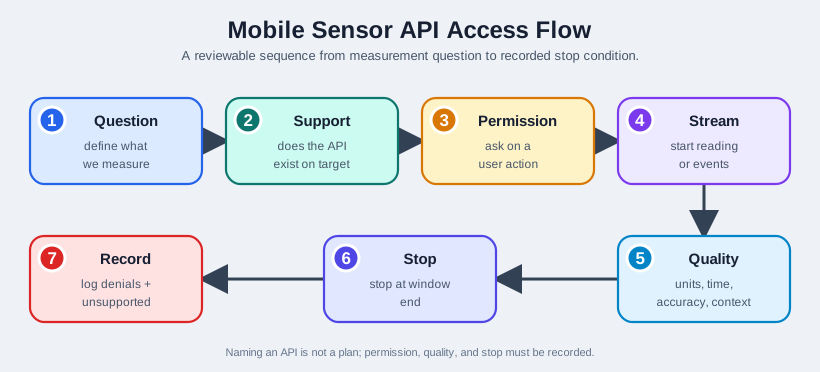
Read Figure 6.1 from the question into the platform-support check and permission request. Only a supported, authorised path reaches the reading stream. Units, timestamp, accuracy, and context then give that stream meaning before a stop condition closes the collection window. The failure branch is equally important: denial and unsupported states remain part of the record. This ordered path connects API selection to the quality evidence and lifecycle boundaries needed by the sensing claim.
6.10 Common Mobile API Families
This section: Common Mobile API Families
6.10.1 Location
Location APIs can provide position estimates and related metadata such as accuracy and timestamp. They are useful when the application decision depends on place, movement path, or proximity to a defined area.
Review questions:
- Does the task need a position fix, a movement trace, or only a coarse location category?
- Is the accuracy field recorded with the coordinate?
- Is the reading recent enough for the decision?
- What happens when the user denies permission or the position is unavailable?
- Is the claim limited to the available position evidence?
The API surface above is deliberately thin: it names the call, not the physics behind the fix. Where a Location Fix Actually Comes From walks through what technique is actually running behind that coordinate, indoors and out, and why a raw fix still needs filtering before it becomes a track.
6.10.2 Motion And Orientation
Motion and orientation APIs may expose acceleration, rotation rate, and device orientation events depending on platform support. They are useful for activity cues, tilt, gesture review, and movement context, but only when the record says which axes and units were used. Distinguish gravity, linear acceleration, and orientation, and record or estimate the sampling interval. Phone placement—hand-held, pocketed, mounted, or on a table—sets what the signal can represent. A reference movement or validation reading should then show that the recorded direction and scale are plausible.
6.10.3 Camera And Microphone
Camera and microphone APIs can support visual or audio sensing, but they carry stronger privacy and context concerns. The review should stay narrow: what signal is being collected, why it is needed, how the user grants access, and what is excluded from the claim.
A microphone and speaker pair can also act as an active sensor rather than a passive recorder. SoundWave (Gupta et al., 2012) plays an 18-22kHz tone from the phone’s own speaker — just above what most people can hear — and listens on the microphone for the reflection; a hand moving past the phone Doppler-shifts the returning tone, and the sign and size of that shift is enough to recognize a swipe or a push-away gesture without touching the screen or the camera. The review lesson is the same one that applies to any derived signal: the raw microphone stream is not “gesture” any more than a raw accelerometer reading is “motion.” An application still has to isolate the reflected tone from room noise and decide a shift threshold before a reading counts as evidence of a gesture.
Review questions:
- Is the application collecting a raw stream, a derived feature, or a one-time sample?
- Is the user-facing permission prompt aligned with the actual collection?
- Are background or passive collection assumptions avoided unless the platform path supports them?
- Is the stored data minimized to what the measurement question requires?
6.10.4 Nearby Devices And External Sensors
Some mobile platforms allow apps or browsers to communicate with nearby devices such as BLE peripherals. This path is useful when the phone is a gateway for an external sensor rather than the sensor itself.
Review questions:
- Which external device is in scope?
- Which service or data characteristic is required?
- How is pairing, permission, and disconnect handling documented?
- How does the app distinguish phone sensor data from external sensor data?
6.11 Browser Or Native Path
This section: Browser Or Native Path — Figure 6.2 places browser sensor access beside native access, including the permissions and lifecycle limits that affect a measurement.
Figure 6.2 places browser sensor access beside native access, including the permissions and lifecycle limits that affect a measurement.
In Figure 6.2, browser sensing fits a narrow, short-lived activity that needs quick access without installation, runs while the page is visible, and uses an API supported by the target devices. The design must still handle permission denial and unsupported states. Native access becomes relevant when the required sensor is not exposed to the browser, when collection must survive app-state changes, or when local storage, notifications, and device services need tighter platform integration. That benefit carries platform-specific maintenance and testing obligations.
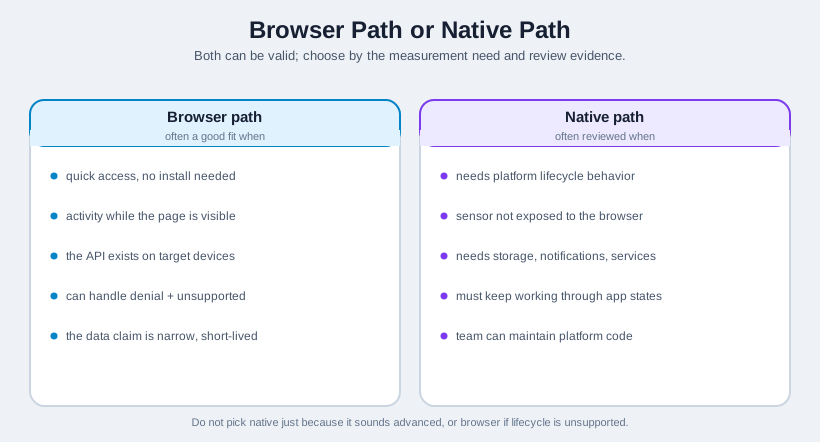
Read Figure 6.2 by testing the browser branch first against support, visible-session lifetime, and the narrowness of the claim. Then test the native branch against missing sensor access, background lifecycle, and integration requirements. The deciding path is the first one that satisfies the evidence and operational boundary, not the one that sounds more advanced. This makes the implementation choice part of the measurement record and exposes when a browser page cannot meet the required lifecycle behaviour.
6.11.1 Legacy Mobile Web Protocols
Older mobile-web stacks such as Wireless Application Protocol (WAP) and Wireless Markup Language (WML) are useful mainly as historical architecture context. WAP 1.x commonly relied on a gateway that translated mobile-friendly markup and acted as a proxy between a small phone browser and web servers. WAP 2.0 moved closer to normal Internet protocols with IP, TCP, HTTP, XHTML Mobile Profile, and CSS support, so newer devices could communicate more directly with web services.
For an IoT review, treat a WAP or WAP2 path as a legacy integration boundary, not as evidence that a modern phone sensor API exists. Record whether a gateway or proxy can inject or observe phone number, location, billing, or handset information; where end-to-end TLS actually terminates; what markup and browser capabilities are available; and why the design cannot use current browser APIs or a native app instead. The lesson is the same as for sensor APIs: the access path decides the permission, security, and evidence record.
6.12 Data Quality Review
This section: Data Quality Review — Mobile sensor readings should be reviewed before they are used as evidence.
Mobile sensor readings should be reviewed before they are used as evidence. Start with the source—the phone API, external device, or derived signal—and keep its units and observation timestamp attached. Preserve accuracy or uncertainty when the API exposes it, especially for location, and describe how the phone was held, worn, mounted, or positioned. Permission state must distinguish granted, denied, unavailable, and unsupported outcomes. Close the record with the collection window and its stop reason, then add a known movement, known location, comparison reading, or plausibility check as validation evidence.
Common failure states include unsupported APIs, denied permission, stale cached readings, missing accuracy fields, sensor saturation, inconsistent sampling intervals, and readings that change because the phone position changed rather than because the measured condition changed.
6.13 Worked Example: Location-Aware Field Note
This section: Worked Example: Location-Aware Field Note — Suppose a learner wants a phone-based field note that records a rough location when they inspect a sensor installation.
Suppose a learner wants a phone-based field note that records a rough location when they inspect a sensor installation.
Measurement question: where was the inspection note created?
API path: browser location API is acceptable if the page is visible, the user grants permission, and the record stores coordinate, accuracy, timestamp, and note text.
Review evidence:
- The user action that requests location is documented.
- Permission denial leaves the note usable with a manual location field.
- The record includes the accuracy field and timestamp.
- The note does not claim exact equipment position if the accuracy field is broad.
- A retest is required if the workflow changes from one-time notes to continuous tracking.
Decision:
The browser path supports a scoped inspection note. It does not support broad movement analysis, unattended tracking, or precise asset mapping unless additional evidence is added.
6.14 Common Mistakes
This section: Common Mistakes — Do not start with a framework before stating the measurement question, and do not treat permission approval as proof of accuracy.
Do not start with a framework before stating the measurement question, and do not treat permission approval as proof of accuracy. Coordinates without accuracy and time are incomplete; motion values without phone placement are ambiguous. Browser support varies, so denied, unsupported, stale, and interrupted states must remain visible. Narrow phone data cannot justify broad activity, safety, or health claims. Every collection plan also needs an explicit stop condition and a retest trigger so changed access or setup cannot silently inherit an old conclusion.
6.15 A Phone Reports More Sensors Than It Has
A modern phone's sensor API lists a dozen or more sensors, but only some of them are physical chips. Beneath the API sit the real hardware sensors — accelerometer, gyroscope, magnetometer, barometer, light, proximity. Above them sit fused or virtual sensors that no chip produces directly; they are computed in software from the raw ones.
This distinction is not academic. When you read "linear acceleration" or "rotation vector," you are reading the output of an algorithm, not a transducer. Knowing which sensors are raw and which are fused tells you what a value actually means, which inputs it depends on, and therefore how it can fail.
Intuition: the accelerometer is a musician; the "linear acceleration" and "gravity" sensors are a sound engineer splitting that one recording into two tracks. Useful, but only as good as the original recording and the algorithm doing the splitting.
To distinguish a transducer reading from a platform estimate, inspect Figure 6.3 before naming the API output. The diagram exposes the processing stages that sit between physical chips and values such as gravity, linear acceleration, or a rotation vector.
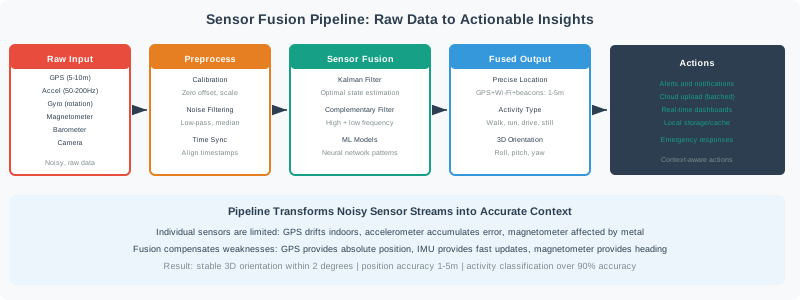
Read Figure 6.3 from the raw accelerometer, gyroscope, magnetometer, and other inputs into preprocessing, then follow their combination through the fusion algorithm. The fused output is an inference whose failure modes include the inputs and the algorithm, not a separate physical chip. Only after that distinction should an application act on the value. This connects API selection to the chapter’s requirement to record signal type and provenance.
That is why an API review should name the signal type instead of only naming the JavaScript, Android, or iOS call. A raw acceleration event tells you what the accelerometer reported in the phone's device frame. A gravity estimate, linear acceleration estimate, or rotation vector tells you what the platform's fusion pipeline inferred after filtering and combining inputs. Those derived values can be the right evidence, but they are not neutral facts from a single chip.
For example, a browser orientation exercise might receive roll, pitch, and yaw-style values. The record should still say whether the page checked permission, whether the phone was mounted or hand-held, whether the platform exposed absolute heading, and whether nearby metal could disturb the magnetometer. Without those notes, two learners can see similar numbers while one is reading a stable mounted phone and the other is reading a phone that has been rotated in the hand.
Overview Knowledge Check
6.16 Splitting Gravity, and Minding the Frame
A raw accelerometer measures gravity plus motion together. The fused sensors separate them:
raw accelerometer = gravity + linear acceleration
  gravity sensor            -> the ~9.81 m/s^2 gravity component
  linear-acceleration sensor -> the motion component (gravity removed)
Axes are device-fixed: x = right, y = toward top, z = out of screen (right-handed)
Worked example: is the phone actually moving?
Phone lying flat, raw accelerometer reads:
   (ax, ay, az) = (0.2, 0.1, 9.9) m/s^2

Gravity here is about (0, 0, 9.81). Subtract it:
  linear accel = (0.2, 0.1, 9.9 - 9.81) = (0.2, 0.1, 0.09)

The magnitude is ~0.24 m/s^2 -> essentially at rest.
The big 9.9 was gravity, NOT motion. Reading raw
acceleration as "movement" would be a beginner error;
the fused linear-acceleration sensor makes it obvious.
One more trap hides in the axes: readings are in the device frame. To know motion in the world (north, up), you must rotate device-frame vectors using the orientation, or the same physical push reads differently just because the phone is held at an angle.
Apply that frame rule to the API choice. If the lab only asks, "did the phone tilt after the user tapped start?", device-frame orientation may be enough. If the lab asks, "did the user move north along a route?", device-frame acceleration alone is not enough; the app needs orientation, timestamps, drift controls, and usually location or another reference. The measurement question decides how much platform machinery must be trusted.
A useful review record therefore has three rows: the API requested, the physical or fused quantity returned, and the quality field used to accept or reject the reading. For location this may be accuracy and age. For motion it may be placement, sampling interval, and a known movement check. For media it may be permission state, collection window, and whether only derived features were stored. If one of those rows is missing, the result may still be a demo, but it is not yet reliable evidence.
Why Fusion Beats Any Single Sensor
The reason a phone bothers to fuse sensors instead of trusting the "best" one is that no single MEMS part is good at everything, and multisensor fusion is exactly this: combining data from several sensors to get a more accurate or more specific estimate than any one of them could give alone. An accelerometer can estimate tilt from gravity when other acceleration is small; its reading is noisy and subject to motion and calibration errors, but it does not accumulate integration drift like a gyroscope angle estimate. A gyroscope's angle estimate is smooth moment-to-moment, but integrating a noisy angular-rate signal accumulates bias error the longer the phone runs. Neither sensor alone gives a trustworthy rotation angle; combined, each one covers the other's blind spot -- fusing more sensors this way also buys robustness against a single sensor failing, and finer resolution than either input has by itself, at the cost of reconciling their different formats, units, sample rates, and arrival delays before anything can be combined.
A typical phone-orientation pipeline makes that combination explicit: raw gyroscope and accelerometer samples both feed a Kalman filter to produce a drift-corrected roll and pitch, and only the magnetometer -- which has no gravity axis to lean on -- can resolve yaw, so a separate tilt-compensation step combines the filtered roll and pitch with the raw magnetometer reading to get yaw. For rotation about one axis, a minimal Kalman state is just the rotation angle and gyro bias:
A one-axis rotation Kalman filter
state:        x = [ phi  b ]^T        (rotation angle, gyro bias)
input:        w_g                   (measured gyro rate)
transition:   x_next = A x + B w_g
              A = [ 1  -dt ]        (angle += (w_g - b) * dt)
                  [ 0    1 ]
              B = [ dt  0 ]^T
observation:  H = [ 1   0 ]         (accelerometer tilt measures angle)
Swap "rotation angle" for "position" and this is the same recursive-filter idea used later in this chapter to track a phone's location from GPS or indoor fixes -- one algorithm, applied to two different noisy-sensor problems.
Fusion is not free: a rotation-vector API absorbs the bookkeeping of different data formats, sample rates, and arrival delays so the caller sees one clean value, but a review that only asks "what does the API return" and never asks "what did it just throw away" will miss why a heading occasionally jumps near a car door or a laptop hinge.
Practitioner Knowledge Check
6.17 Batching, Sensor Hubs, and Inherited Weaknesses
How events reach your code — and what the fused values depend on — decides both battery life and correctness.
Mobile platforms do not usually wake the main processor for every tiny sensor change. A low-power sensor hub can sample physical sensors, buffer events, run simple fusion, and deliver a batch later. That saves battery, but it changes how software should interpret time. The event timestamp is the measurement time; the callback time is only when the operating system delivered the batch. Treating callback arrival as the sampling interval creates drift in integration, speed estimates, and windowed activity features.
Batching via a sensor hub
A low-power sensor hub buffers events in a hardware FIFO and delivers them in batches, letting the main processor sleep between deliveries. For continuous sensing this is a large battery win, traded against added latency.
Trust timestamps, not assumed rates
You request a rate, but delivery is best-effort and batched, so intervals jitter. Integrate and window using each event's own timestamp, never a hard-coded dt, or accumulated timing error corrupts results.
Fused sensors inherit input flaws
The rotation vector needs a calibrated magnetometer for absolute heading; near metal or magnets its heading drifts. The game rotation vector drops the magnetometer for immunity, but then gives only relative heading.
Availability is not guaranteed
Budget phones may lack a gyroscope or barometer, and magnetometers need figure-eight (hard-iron/soft-iron) calibration. Query what exists and its calibration state; never assume every sensor is present and trimmed.
Fused sensors also inherit the weakest input in the pipeline. A rotation vector can be excellent when accelerometer, gyroscope, and magnetometer data are stable. It can be misleading near a laptop hinge, speaker magnet, vehicle frame, or steel bench. A game rotation vector may avoid magnetic heading error by dropping the magnetometer, but then it gives relative heading and can drift over time. The API name alone does not tell the whole truth; the dependency list and operating context do.
The through-line: a phone sensor value arrives through a power-saving pipeline and, if fused, through an algorithm with its own dependencies. Reading it well means using event timestamps, rotating into the frame you care about, and knowing which raw sensors a fused value leans on so you can predict where it will drift. The review record should therefore include the requested rate, observed timestamp pattern, device placement, API availability, calibration state when exposed, and the fallback behavior when one dependency is missing.
Under-the-Hood Knowledge Check
6.18 Continue to Part 2
Continue with Mobile Sensor APIs: Positioning and Filtering.
Find help
3 reviewed answers.
Where should I start in a module?
Open the module page from the sidebar to see its chapters in order. Use the module map to return to a topic you need.
Modules and pathsReviewed
What can I try when a project does not work?
Check the symptom, then work through the diagnostic steps. Keep the error message and the smallest example that reproduces it.
When you are stuckReviewed
How do interactive examples work?
Use the interactive guide to check how examples and simulations work before changing your project.
Interactive examples guideReviewed