4 Building IoT Streaming Pipelines
More
Depth: Practitioner
Progress saves as you read. Mark sections complete as you go; your progress appears in the sidebar.
4.1 Start With the Handoff Between Two Stages
This section: Start With the Handoff Between Two Stages — Picture a river sensor that sends a high reading into a chain of filters and rules.
Make Every Stage Explain What It Changed
Picture a river sensor that sends a high reading into a chain of filters and rules. The final screen shows a safe average, but the team cannot tell which stage removed the spike. A useful result without its handoff history is hard to trust.
Name each stage in order. For every handoff, write the input shape, event time, unit, change made, output shape, and result kept for review. State whether the stage filters, joins, groups, delays, or stores the record. Preserve the original identity so a later decision can be traced back to its source.
Test the chain with one normal reading, one late reading, one repeat, one missing field, and one burst that is faster than the next stage. Check where each record goes, what the user sees, and how the system shows delay or dropped work. Assign an owner to every rejected or held record.
This small trace does not prove the chain at every scale. Loads and sources change. The deeper sections show how time rules, state, recovery, and stage review records turn these handoffs into a bounded streaming design.
Think about a reading leaving the intake stage and entering a rule that enriches, filters, or aggregates it. If that handoff is vague, every later dashboard, alert, and export has to guess what the event meant.
A streaming pipeline is reliable when each stage states what it accepts, changes, stores, emits, and records for review. The story of the pipeline is therefore a chain of small contracts, not a mystery box between sensors and decisions.
4.2 A Pipeline Is A Chain Of Decisions
This section: A Pipeline Is A Chain Of Decisions — An IoT streaming pipeline turns device events into bounded outputs while new events are still arriving.
An IoT streaming pipeline turns device events into bounded outputs while new events are still arriving. The pipeline may update a dashboard, emit an alert, write a durable record, route evidence to review, or produce a downstream event. Each stage changes what later stages can trust.
A good pipeline starts with the event contract, not with a tool name. The design should state what enters the stream, which intake checks protect the main path, what processing rule is applied, which state or window is needed, where outputs go, and what evidence lets another reviewer retest the result.
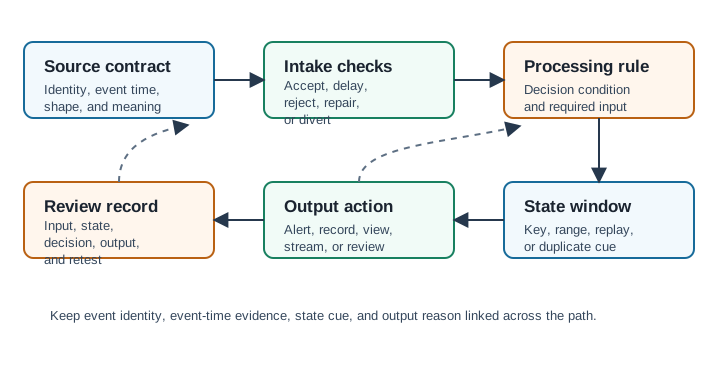
Before choosing an implementation, inspect the diagram in Figure 4.1 to expose the contract at each handoff so a later alert can be traced back to the accepted source event.
For the compact view, inspect Figure 4.1 and use this rule: preserve event identity, event time, schema version, state evidence, output boundary, and retest input from source to review record.
-

Dora gives the event one identity at intake.
-

The rule check sends bad shape to quarantine.
-

Good events enter the right state window.
-

The window makes one reviewable output.
-

The output moves to its named destination.
-

A record supports later replay or rejection.
At the entrance to Figure 4.1, Source contract fixes identity, event time, shape, and meaning. Intake checks may accept, delay, reject, repair, or divert the event, so their reason code must travel onward rather than disappearing at the filter. The Processing rule states the decision condition and required input, while State window adds the key, range, replay, or duplicate cue needed for a stateful result. Output action then distinguishes an alert, record, view, stream, or review instead of treating all sinks alike. The closing Review record reconnects input, state, decision, output, and retest evidence. That chain is the ledger structure used in the next section and the basis for diagnosing which boundary lost context.
Worked example: a vibration sensor on pump P-14 sends one event every second with event id, source id, event time, acceleration RMS, unit, and quality status. At 10:00:05 the gateway receives an event with a known source id but a new schema version. The intake stage should not let that record enter the normal alert path as if it were identical to the older schema. It should divert the event with a reason code, retain the raw payload, and keep enough context to test the parser update.
After the schema decision, the processing stage can use a named rule such as "three high-RMS events in 10 seconds for the same equipment key." The state record then needs the key, window start, window end, event count, duplicate policy, and whether a delayed event may revise the alert. The output is not just "alert sent"; it should say which input events supported the alert, whether it is final or provisional, and which source, schema, rule, or threshold change makes the path stale. That concrete trail lets a reviewer replay the path without guessing what each stage meant.
Pipeline Stages
Source Contract
The claimed event shape, source identity, event identifier, timestamp basis, schema version, units, and required fields.
Intake Checks
The accept, reject, delay, repair, quarantine, or divert decision made before the event changes stream state.
Processing Boundary
The rule, key, state, window, late-event policy, and duplicate policy used to make the decision.
Output Boundary
The alert, dashboard update, durable record, downstream event, replay packet, or review queue entry emitted by the pipeline.
Beginner Checklist
Apply this checklist to one event as it crosses the pipeline. At every boundary, ask which identifier, timestamp, status, or reason would let an operator explain the next stage's decision; if that field disappears, the stage is still opaque.
Separate source conversion, validation, enrichment, alerting, and storage so each change has an owner and an observable outcome. Keep event identity and event time visible after intake, and attach reason codes to rejected, delayed, repaired, and diverted records. Otherwise a later gap looks identical whether the source was silent or the pipeline made a deliberate decision.
At the output end, route alerts, durable records, dashboard views, and review evidence by purpose instead of sending every result everywhere. Preserve the input, state, and output context needed to replay or retest the decision. A beginner can apply this test without knowing the platform internals: if one event cannot be followed from source meaning to output reason, the pipeline still contains an opaque boundary.
Overview Knowledge Check
4.3 Design The Pipeline Review Ledger
This section: Design The Pipeline Review Ledger — A practical pipeline review records stage responsibilities before implementation details dominate the discussion.
A practical pipeline review records stage responsibilities before implementation details dominate the discussion. The ledger should be short enough to keep current, but explicit enough to explain why an event was accepted, delayed, corrected, rejected, or turned into an output.
The safest workflow is to separate the source contract, intake checks, processing rule, state ownership, output routing, and retest evidence. This keeps one failure from spreading silently across the pipeline and gives operators a place to inspect degraded behavior.
Review Workflow
Move from meaning to mechanics: freeze the event contract first, then document intake outcomes, stateful processing, output semantics, and finally recovery evidence. This order prevents a convenient broker or sink configuration from silently redefining the source event.
Define the event contract first: required fields, source identity, event id, event time, schema version, units, and quality status. Then enumerate intake outcomes—accept, reject, quarantine, delay, repair, and duplicate handling—with a reason code for every non-normal path. This fixes the meaning of the evidence before transformation begins.
At processing, state the decision condition, key, retained state, window, late-event policy, and correction behavior. Separate output purposes so an alert, dashboard, durable record, downstream stream, review queue, and replay packet do not inherit accidental shared semantics. Close the workflow by preserving representative input, expected intake outcome, expected state, and expected output. Those artifacts allow a reviewer to replay the affected boundary without reverse-engineering the entire implementation.
Pipeline Ledger
Worked Review: Equipment Alert Pipeline
Suppose a gateway sends vibration events from industrial equipment. The pipeline should alert only when the source identity is known, the schema version is accepted, the event belongs to the reviewed window, and the processing rule sees enough repeated abnormal evidence for that same equipment key.
The intake stage should divert unknown schema versions with a reason code instead of letting consumers guess. The processing stage should record the equipment key, window rule, previous state cue, and alert condition. The output stage should emit a bounded alert and a durable review record. A replay packet should include a representative input event, expected intake decision, relevant state, and expected output boundary.
Practitioner Knowledge Check
4.4 State, Replay, And Output Meaning
This section: State, Replay, And Output Meaning — Under the hood, a pipeline is a set of state transitions.
Under the hood, a pipeline is a set of state transitions. Accepted events are parsed, keyed, checked against event-time and received-time rules, applied to maintained state, and then routed as bounded outputs. The hard part is not moving events quickly. The hard part is preserving the meaning of each decision after delay, retry, duplicate delivery, restart, and replay.
A pipeline should be able to explain what happened after a failure. If a processor restarts from a checkpoint, if a source resends a message, or if a late event arrives after an output was emitted, the review record should show whether the output is unchanged, corrected, provisional, or routed for review.
Worked example: a motor alert pipeline keeps a 30-second rolling window keyed by equipment id. Events E-101 through E-105 arrive before a processor restart. The checkpoint records a source replay position, the current window boundaries and abnormal-event count for each equipment key, the event identities needed by the stated duplicate policy, and the alert identity; the output sink must also be idempotent or transactional. When the processor restarts, replaying E-103 and E-104 should rebuild the same state without creating two additional alerts for the same physical event.
The replay contract should also describe consumer-visible output. If a restarted processor proves that the old alert is still supported, it should keep the same alert id and mark the record as recovered. If a late abnormal event increases the window count, the pipeline should emit a bounded update tied to the original alert, not erase history or send an unrelated "all clear." The retest should replay the same event ids, restart point, and late-event arrival order. This is why idempotency, checkpoint scope, late-event policy, and output side-effect boundaries belong in the same review record.
Internal Responsibilities
Idempotency
Stable event identifiers and duplicate policies prevent retries from producing repeated alerts, records, or state changes.
Backpressure
Queue depth, lag, throttling, and shed-load policies decide whether the pipeline preserves meaning when sources outpace processing.
State Scope
State keys, window boundaries, retention, and cleanup rules determine which events can influence later decisions.
Replay Contract
Replay should recreate or explain decisions without duplicating side effects or hiding corrections.
Failure Modes To Surface
Test failures at the handoff where their meaning changes. A schema rejection belongs at intake, a duplicate aggregate belongs at state and replay, and a stale dashboard result belongs at the output boundary; locating the break keeps the correction bounded.
Begin at intake with a repair that changes units or values; the record must preserve what changed and why. Next, send events from two devices or tenants through the same apparent key to expose state bleed. Replay one accepted event and inspect the side-effect boundary: a second alert, command, or durable record shows that identity was lost between state and output.
Introduce lag and verify that dashboards reveal source and processing age rather than looking current. Hold a session, join, or long window open until its retention owner and cleanup rule become visible. Finally, deliver a correction after an initial result and confirm that the consumer can distinguish provisional, corrected, and final states. These failures locate meaning, isolation, idempotency, freshness, retention, and finality at their respective pipeline boundaries.
Under-the-Hood Knowledge Check

4.5 Common Pitfalls and Worked Examples
This section: Common Pitfalls and Worked Examples
4.5.1 Start With the Alert That Looks Right But Is Not
Challenge the Convincing Alert
Picture a flood alert created from a five-minute average. The screen turns red, but the high reading arrived late and was counted in the wrong window. The alert looks reasonable while answering a different question from the one the operator asked.
Write the claim behind the alert in plain words. Name the source, event time, arrival time, grouping rule, stored state, output time, and action. Decide how the system treats late, repeated, missing, and corrected records. Keep a link from the output back to every input that changed it.
Test one trap at a time. Delay a reading, send it twice, change the clock, fill a stage, restart with saved state, and correct an earlier value. Check whether the alert changes, whether the operator can see why, and whether recovery repeats or loses an action. Record the owner and retest trigger.
These cases do not cover every stream or business rule. The deeper sections show how time choice, window shape, duplicate identity, pressure, state recovery, and replay evidence expose common failures before a believable output drives action.
A stream-processing mistake often appears as a believable alert. The value crossed a threshold, a window produced a summary, or a dashboard changed color, but the evidence may hide a late event, duplicate input, overloaded stage, or stale state.
The safest review begins by treating a correct-looking output as a claim to prove. This chapter shows how to trace that claim back through time basis, window rule, recovery behavior, and retest evidence before the system acts.
4.5.2 Pitfalls Are Evidence Gaps
Stream-processing pitfalls usually begin as small review gaps. The time basis is unclear, a window answers the wrong consumer question, late events are hidden, duplicate identity is missing, state has no owner, pressure signals are invisible, or an output is published without saying whether it is provisional, revised, or final.
The safe review path starts with evidence instead of a broad rewrite. Name the affected source, processor, key, window, output, and consumer decision. Then identify the smallest symptom, collect the time and state evidence, choose a bounded correction, and define the retest trigger that should confirm or reopen the decision.
Worked example: a dashboard shows a tank-fill average as final at 10:05, then two delayed readings with earlier event times arrive at 10:08 and change the average. The pitfall is not simply "late data is bad." The review needs to know the event-time window, when the output was marked final, whether the consumer acted on it, and whether the architecture supports a correction event.
That same evidence-first habit prevents overcorrection. A single delayed alert may require a late-event policy for one path, not a new broker, a new database, or a rewrite of every stream window.
If you only need the intuition, use this rule: classify a stream pitfall only after event time, receive time, identity, state, pressure, output, and consumer impact are visible.
Time Basis
Processing time can disagree with event time. The review must know which timestamp assigns an event to a window.
Window And Late Data
A technically valid window can still answer the wrong decision or hide late arrivals that change the output meaning.
State And Duplicates
State keys, replay behavior, duplicate identity, and output idempotency decide whether recovery creates explainable results.
Pressure And Output
Lag, queue growth, retries, and throttling can make outputs stale unless pressure evidence is exposed to consumers.
4.5.3 Build The Pitfall Review Record
-

Wrong: One symptom justifies a broad fix. Record the path, decision, evidence, impact, and retest trigger.
A pitfall review record should be short enough to use during an incident or design review, but specific enough to explain the decision later. It separates the observed symptom from the evidence, category, correction, output impact, and retest trigger.
The correction should stay bounded to the affected stream path until evidence supports a wider change. A delayed alert does not automatically prove the whole pipeline is wrong. It may come from event-time semantics, late-event policy, queue pressure, duplicate handling, state recovery, schema drift, or output routing.
Review Record Template
Affected path:
Visible symptom:
Consumer decision:
Time and window evidence:
Identity and state evidence:
Pressure or schema evidence:
Pitfall category:
Bounded correction:
Output impact:
Retest trigger:
4.5.4 Recovery Changes Output Semantics
Failures, restarts, replays, retries, and delayed input do not merely affect throughput. They affect what an output means. A replay can duplicate an alert. A restart can restore stale state. A late event can revise a closed window. A schema change can parse successfully while changing units or identity. A queue can stay healthy enough to accept events while a high-priority output is stale.
The implementation therefore needs explicit semantics for recovery and correction. Stable event identifiers support duplicate detection. State keys and checkpoints define what can be replayed. Watermarks or lateness rules define whether a window can change. Output contracts define whether consumers may see provisional, revised, stale, or final results.
Worked example: a restart replays event E77 and emits command C14 a second time. The raw event path may look healthy, but the downstream actuator saw two commands. The fix starts by checking event identity, replay offset, restored state, output idempotency key, and whether the sink records C14 as already applied. Without those contracts, replay turns recovery into a new side effect.
The under-the-hood test should include expected consumer-visible labels. If a value is revised, the sink should say revised. If an alert is delayed by lag, the sink should say stale or late. If a duplicate is suppressed, the review record should show which identifier proved it.
Failure Chains To Test
Replay To Duplicate Output
Producer retries or processor restarts can repeat an event unless identity and output idempotency are preserved.
Late Event To Revised Window
A valid older event can require a provisional output, bounded revision, or explicit rejection policy.
Restart To Uncertain State
Checkpoint recovery should show which state was restored, which input was replayed, and which output may be uncertain.
Pressure To Stale Decision
Queue growth, lag, and throttling should be visible when outputs no longer reflect current stream conditions.
Retest Evidence
Build a compact retest pack before changing the implementation. Pair each degraded trace with expected state and an output label, then confirm that restart, replay, and pressure preserve the consumer-facing explanation as well as the processor's internal result.
Build the trace set in a deliberate progression: on-time, late inside policy, late outside policy, duplicate, replayed, and schema-changed events. For restart tests, write the expected state before failure, after checkpoint restore, and after replay. Comparing those states reveals whether recovery preserved the same decision or merely restarted the process.
Assign an expected output label—provisional, revised, stale, diverted, held, or final—to each trace before running it. Add lag and pressure scenarios that expose alert priority, source throttling, and stale-output behavior. The final evidence belongs at the consumer boundary: it must explain why a result changed, why it was withheld, or why it can no longer be treated as current. That record turns a retest into proof of maintained meaning rather than a simple “processor running” check.
4.5.5 Summary
Treat a pitfall as a broken evidence contract at a named boundary. First reproduce the affected source, key, state, output, and consumer consequence; then repair only that boundary and replay the degraded trace before claiming a broader architecture problem. Event-time and lateness tests show whether ordering remains meaningful. Duplicate and restart tests expose identity, checkpoint, and idempotency gaps. Pressure and schema-change tests reveal stale output or interpretation failures. The result presented to consumers should say whether it is provisional, revised, diverted, held, stale, or final, because operational recovery is incomplete if the processor recovers but its output meaning does not.
- Stream-processing pitfalls are evidence gaps around time basis, windows, late data, duplicates, state, pressure, schema drift, and output meaning.
- Start from the affected source, processor, key, output, and consumer decision before classifying the problem.
- Keep corrections bounded until multiple review records prove a wider contract or architecture issue.
- Outputs should state whether they are provisional, revised, stale, diverted, held, or final when stream evidence is incomplete.
- Recovery and replay need tests for duplicate handling, state restoration, late-event behavior, pressure, and consumer-facing explanation.
Most stream-processing pitfalls are hidden assumptions about ordering, clocks, duplicates, late data, pressure, replay, and whether outputs still mean what consumers think they mean.
4.5.6 See Also
Stream Processing Fundamentals
Review event time, windows, watermarks, state, checkpoints, and retest evidence.
Stream Processing Architectures
Place state, queues, processors, and output boundaries in the wider architecture.
Building IoT Streaming Pipelines
Preserve event contracts, intake evidence, processing records, and output boundaries.
Basic Stream Processing Lab
Practice pitfall review with bounded event traces, buffers, windows, and alert outputs.
4.6 Summary
This section: Summary — A defensible pipeline preserves a continuous evidence thread even though responsibility changes at every stage.
A defensible pipeline preserves a continuous evidence thread even though responsibility changes at every stage. Source and intake establish what the event means, processing and state explain how it influenced a decision, and the output and retest record tell consumers whether that decision can still be trusted. Intake reason codes explain gaps instead of silently dropping data. Stable keys and explicit window boundaries make replay predictable. Output identity, freshness, and correction semantics keep a recovered or delayed result from masquerading as a new decision. Review the chain as one contract, but repair failures at the boundary that lost the evidence.
- A streaming pipeline is a chain of reviewable decisions from source contract to intake, processing, state, output, and retest evidence.
- Event identity, event time, schema version, source context, state evidence, and output boundary should survive the path.
- Intake checks should preserve reason codes for accepted, rejected, delayed, repaired, quarantined, and duplicate events.
- Processing boundaries should name the rule, key, state, window, late-event behavior, and output correction policy.
- Replay, recovery, and backpressure are part of the design because they affect whether outputs remain explainable after failure.
Design IoT streaming pipelines as evidence paths: every stage should preserve enough context to explain, correct, replay, and retest the decision it produces.
4.7 See Also
This section: See Also
Stream Processing Fundamentals
Review event time, windows, late-event policy, state, checkpoints, and stream retest evidence.
Stream Processing Architectures
Choose the smallest architecture that preserves the pipeline evidence the consumer needs.
Common Pitfalls and Worked Examples
Review late data, duplicates, pressure, schema drift, recovery, and output-contract failures.
Basic Stream Processing Lab
Practice turning event traces, buffer rules, windows, and alert outputs into review records.
Find help
3 reviewed answers.
Where should I start in a module?
Open the module page from the sidebar to see its chapters in order. Use the module map to return to a topic you need.
Modules and pathsReviewed
What can I try when a project does not work?
Check the symptom, then work through the diagnostic steps. Keep the error message and the smallest example that reproduces it.
When you are stuckReviewed
How do interactive examples work?
Use the interactive guide to check how examples and simulations work before changing your project.
Interactive examples guideReviewed