5 IoT Access Control: OAuth and Identity Lifecycle
More
Depth: Practitioner
Progress saves as you read. Mark sections complete as you go; your progress appears in the sidebar.
5.1 Start With the Decision
This section: Start With the Decision — A screen-free device cannot type a normal web password.
A screen-free device cannot type a normal web password. The OAuth device flow moves user approval to a trusted screen.
5.2 Route Overview
This section: Route Overview — This is part 2 of 2.
This is part 2 of 2. Review IoT Access Control: Models and Policy for the preceding evidence.
5.3 Learning Objectives
This section: Learning Objectives
- Trace codes, polling, tokens, and expiry in the device flow.
- Bind token scope and identity lifecycle to a device.
5.4 Chapter Roadmap
This section: Chapter Roadmap
- OAuth 2.0 Device Authorization Flow
- Identity and Access Control Roadmap
- Summary
- Key Takeaway
- See Also
5.6 Identity and Access Control Roadmap
This section: Identity and Access Control Roadmap
Learning Objectives
After completing this module, you will be able to:
- Explain the difference between authentication, authorization, and accounting.
- Choose practical authentication methods for IoT users, devices, gateways, and cloud APIs.
- Design access-control policies using RBAC, ABAC, least privilege, and default deny.
- Compare passwords, certificates, JWTs, MFA, API keys, and hardware-backed identities.
- Build and test simple access-control workflows before deploying them to real devices.
5.6.2 Why This Module Matters
An IoT system is not secure just because it uses encryption. The system must also know who is connecting, what that identity is allowed to do, and how to revoke access when something goes wrong.
This module focuses on the identity layer of IoT security. A smart lock, PLC, sensor gateway, medical monitor, or cloud dashboard all need the same basic chain:
- Identify the user, device, service, or gateway.
- Authenticate that the identity is genuine.
- Authorize only the actions that identity needs.
- Log and audit important access decisions.
- Rotate or revoke credentials when risk changes.
For beginners, the key idea is simple: authentication answers “Who are you?” and access control answers “What are you allowed to do?” Both are required. If either one is weak, attackers can move from a single stolen password or device key into the rest of the IoT system.
5.6.3 Suggested Study Paths
| Path | Best For | Start With | Then Study | Time |
|---|---|---|---|---|
| Beginner path | New students who need the mental model first | Authentication Fundamentals | Authentication Methods for IoT, then Access Control for IoT | 3-4 hours |
| Builder path | Students implementing a prototype | Authentication and Access Control Overview | Access Control Fundamentals, then the basic lab chapters | 5-7 hours |
| Security path | Students reviewing a real deployment | Secure Data Authentication | Secure Data and Software, then advanced access-control challenges | 6-8 hours |
| Advanced path | Students designing production systems | Advanced Capabilities | Advanced Implementation, advanced access control, and advanced labs | 8-12 hours |
5.6.4 Worked Identity-to-Permission Route
Use Figure 5.1 to trace one concrete request from identity proof and OAuth device authorization to a separate access-control decision. The worked route makes the chapter’s key sequencing rule visible: signing in or receiving a token does not by itself authorize every operation.
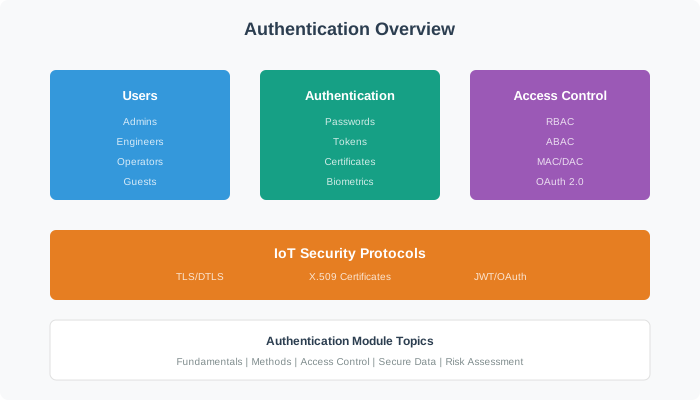
Read Figure 5.1 left to right across the top, then continue across the lower row. The top route separates user identity proof from OAuth authorization and ends with a scoped access token. The lower route presents that token with a concrete maintenance request, evaluates the subject, action, resource, context, policy, and scope, then records the allow/deny outcome for audit and lifecycle handling.
5.6.5 Chapter Guide
| Area | Chapters | What You Should Be Able To Do |
|---|---|---|
| Core foundations | Authentication Fundamentals, Authentication Methods for IoT | Explain identity, credentials, password hashing, mTLS, JWT, MFA, and when each method fits. |
| Authentication plus authorization | Authentication and Access Control Overview, Access Control Index | Connect identity verification to permission decisions and audit trails. |
| Access-control models | Access Control Fundamentals, Access Control Concepts, Access Control for IoT, IoT Security Access Control | Compare RBAC, ABAC, least privilege, default deny, resource-level permissions, and policy evaluation. |
| Advanced identity patterns | Advanced Access Control, Access Control Challenges, Advanced Capabilities, Advanced Implementation | Handle token lifetimes, OAuth-style flows, capability tokens, key distribution, revocation, and scale. |
| Secure-data connections | Secure Data Authentication, Secure Data and Software | Protect credentials, firmware, data paths, and software update trust. |
| Hands-on labs | Basic Lab Setup, Basic Lab Implementation, Advanced Lab Concepts, Advanced Lab Implementation | Build and reason through RFID-style identity checks, policy decisions, and secure access workflows. |
5.6.6 No-Hardware Learning Route
You can learn the main ideas without buying hardware:
- Use the diagrams to trace each request from identity proof to permission decision.
- Complete the knowledge checks and ordering exercises before reading the lab solution.
- Treat each code block as pseudocode first: identify the credential, the policy, and the final allow/deny decision.
- In lab chapters, focus on the workflow and security reasoning even if you cannot flash an ESP32.
When you later use hardware, the same process applies. The only difference is that credentials come from real devices, cards, keys, or certificates instead of examples on the page.
5.6.7 Common Beginner Mistakes
| Mistake | Why It Causes Trouble | Better Habit |
|---|---|---|
| Using one shared password for every device | One compromised device exposes the whole fleet | Give every device a unique credential or certificate. |
| Treating login as the whole security system | Authenticated users may still need strict limits | Check authorization for every sensitive action. |
| Giving admin access “temporarily” | Temporary privileges often become permanent risk | Start with no access and add only what is needed. |
| Storing credentials in code or plaintext files | Firmware, backups, and logs can leak secrets | Use secure storage, hashing, signing, and rotation. |
| Ignoring audit logs | Breaches become invisible until damage is done | Log important access decisions and review anomalies. |
5.6.8 Decision Checklist
Use this checklist when designing an IoT identity system:
Apply the decision in a deliberate order. First, what identities exist: users, devices, gateways, services, installers, guests? Next, what proof does each identity use: password, certificate, token, API key, badge, or biometric? Then, what can each identity do: read, write, control, configure, update, or administer? Then, what context changes the decision: time, location, network, risk level, maintenance window? Then, what happens when a credential is stolen or a device is retired? Finally, how are access attempts logged, reviewed, and investigated?
5.6.9 What’s Next
Start with Authentication Fundamentals if you are new to the topic. If you already understand authentication and want practical implementation details, go directly to Authentication Methods for IoT and then Access Control for IoT.
Navigation: Networking Fundamentals | Cryptography for IoT
5.6.10 Overview: Two Questions People Constantly Confuse
Access control rests on two different questions that beginners routinely merge into one. Authentication asks “who are you?” - it proves identity. Authorization asks “what are you allowed to do?” - it grants permissions. A system can authenticate you flawlessly and still must separately decide what you may touch.
Keeping them distinct is the foundation of the whole module. Logging in as yourself (authentication) does not entitle you to read someone else’s records (authorization). Mixing the two is the root of a large class of real security bugs, where a correctly logged-in user reaches data that was never theirs.
Intuition: authentication is showing your ID at the door; authorization is the guest list deciding which rooms your badge opens. Getting through the door is not the same as being allowed everywhere inside.
5.6.10.1 Overview Knowledge Check
5.6.11 Practitioner: Factors, MFA, and Access-Control Models
Authentication draws on three factors, and strong systems combine factor types:
| Factor | Meaning | Examples |
|---|---|---|
| Something you know | A secret in your head | Password, PIN |
| Something you have | A physical possession | Phone, security key, smart card |
| Something you are | A biometric trait | Fingerprint, face |
5.6.11.1 Worked example: what counts as multi-factor
Multi-factor authentication (MFA) = two or more DIFFERENT
factor types.

  password + SMS code         -> know + have  = real MFA
  password + security question -> know + know  = NOT real MFA
  fingerprint + hardware key   -> are + have   = real MFA

Mixing types matters: a phisher who steals your password
(know) still lacks your phone (have), so one theft is not
enough to get in.
Authorization then uses a model. The workhorse is role-based access control (RBAC): assign users to roles, and roles to permissions, so access is managed by role rather than per user. Attribute-based access control (ABAC) extends this with context (time, location, device state).
5.6.11.2 Practitioner Knowledge Check
5.6.12 Under the Hood: Different Failures, and the Identity Lifecycle
Because authentication and authorization are separate, they fail in separate ways - and both must be tested.
5.6.12.0.1 Two kinds of bug
An authentication flaw lets the wrong person in. An authorization flaw lets the right person do the wrong thing - privilege escalation, or accessing another user’s object by changing an ID (insecure direct object reference). Test both paths.
5.6.12.0.2 Least privilege
Grant the minimum permissions a role needs. Least privilege shrinks the blast radius: a compromised low-privilege account or token can do little, whereas over-broad grants turn any breach into a full compromise.
5.6.12.0.3 Revocation is the weak spot
Identities have a lifecycle: provision, rotate credentials, and - critically - revoke on role change or offboarding. Stale, un-revoked access is a leading cause of breaches; deprovisioning is as important as onboarding.
5.6.12.0.4 Log for accountability
Record who did what and when, so actions can be attributed (non-repudiation). Logs turn “someone changed this” into “this identity changed this at this time,” which is essential for both response and deterrence.
So the identity layer is five verbs, not one: identify, authenticate, authorize, log, and revoke. Authentication and authorization sit at its heart as distinct decisions, MFA hardens the first by mixing factor types, RBAC organises the second by role, and least privilege plus timely revocation keep the damage of any single failure small.
5.6.12.1 Under-the-Hood Knowledge Check
5.6.13 Summary
Authentication and access control provide the identity and permission layer for IoT security. The module covers device identity, user identity, authorization models, advanced credential patterns, and labs that test whether policies work under realistic conditions.
5.6.14 Key Takeaway
Secure IoT systems need identity for every actor and least-privilege access for every action. Design enrollment, authorization, audit, and revocation as first-class parts of the system.
5.7 Summary
This section: Summary — Start with the access decision, then choose the model and token lifecycle that can enforce it.
Start with the access decision, then choose the model and token lifecycle that can enforce it. First, access control is authorization: deciding what a proven identity may do, governed by a model that enforces least privilege. Next, DAC lets owners grant access, MAC enforces a central policy, RBAC groups permissions into roles, ABAC decides from attributes and context, and capability-based access grants rights by holding an unforgeable token. Then, use RBAC for stable job categories and ABAC for dynamic, context-dependent, or multi-tenant decisions that would otherwise cause role explosion; real systems often layer both. Then, OAuth 2.0 is an authorization framework (device code, client credentials, authorization code with PKCE, refresh); OpenID Connect is the identity layer if you must authenticate the user. Avoid the Implicit and ROPC grants. Then, provision per-device identity: unique key generated in a secure element, separate bootstrap and operational credentials, scoped policies, and a revocation plan from day one. Then, ABAC and cloud policy engines both evaluate with deny-overrides-allow and default-deny, and bind the device’s identity into the policy so each device reaches only its own resources. Then, the certificate lifecycle runs from manufacturing through enrolment, activation, operation, renewal (well before expiry), and revocation; automate it with EST, and prefer ECDSA on constrained devices for smaller keys and faster signing. Finally, a device’s blast radius equals its permission scope, so scope to the minimum and use long random identifiers.
5.8 Key Takeaway
This section: Key Takeaway — Choose the access-control model by scale and how dynamic the decision is, then enforce least privilege everywhere: deny by default, scope each device to its own resources, and bind policy to the device’s identity.
Choose the access-control model by scale and how dynamic the decision is, then enforce least privilege everywhere: deny by default, scope each device to its own resources, and bind policy to the device’s identity. Back it with per-device certificates provisioned in hardware and a working renewal and revocation path. OAuth authorizes; OIDC authenticates; an explicit deny always wins.
5.9 See Also
This section: See Also
Auth & Authorization Basics
Revisit identity, authentication, and how authorization fits the AAA framework.
Capability-Based Access Control
Explore the fine-grained alternative to roles: unforgeable tokens of authority.
Authentication Methods for IoT
See how the certificates behind device identity actually authenticate via mutual TLS.
Advanced Access Control
Put models into operation with sessions, tokens, elevation, and defense in depth.
5.10 Continue Your Route
This section: Continue Your Route — This is the last part of this chapter.
This is the last part of this chapter. Return to IoT Access Control: Models and Policy or continue from the authentication module index.
Find help
3 reviewed answers.
Where should I start in a module?
Open the module page from the sidebar to see its chapters in order. Use the module map to return to a topic you need.
Modules and pathsReviewed
What can I try when a project does not work?
Check the symptom, then work through the diagnostic steps. Keep the error message and the smallest example that reproduces it.
When you are stuckReviewed
How do interactive examples work?
Use the interactive guide to check how examples and simulations work before changing your project.
Interactive examples guideReviewed