13 IoT Quick Reference: Conversions and Standards
More
Depth: Practitioner
Progress saves as you read. Mark sections complete as you go; your progress appears in the sidebar.
13.1 Start With the Situation
This section: Start With the Situation — A design note now has the right component and protocol names, but its numbers still need consistent units and formulas.
A design note now has the right component and protocol names, but its numbers still need consistent units and formulas. This route keeps the conversion, calculation, and standards checks together.
13.2 Overview
This section: Overview — This reference route connects unit conversion and useful formulas to calculators and standards sources.
This reference route connects unit conversion and useful formulas to calculators and standards sources.
This is part 2 of 2. Review IoT Quick Reference: Terms and Hardware when you need the first route.
13.3 Learning Objectives
This section: Learning Objectives
By the end of this chapter, you will be able to:
- convert common IoT units
- apply networking and electronics formulas
- locate relevant standards and references
13.4 E. Unit Conversions
This section: E. Unit Conversions
13.4.1 Data Rate
| Unit | Equivalent |
|---|---|
| 1 bps | 1 bit/second |
| 1 kbps | 1,000 bps |
| 1 Mbps | 1,000,000 bps |
| 1 Gbps | 1,000,000,000 bps |
| 1 Byte/s | 8 bps |
13.4.2 Signal Strength (dBm)
Transmit-power examples
| dBm | mW | Typical Use |
|---|---|---|
| 30 | 1000 | Max Wi-Fi (US) |
| 20 | 100 | Typical router |
Power conversion reference
| dBm | mW |
|---|---|
| 10 | 10 |
| 0 | 1 |
Received-signal examples
Higher dBm means a stronger received signal: −10 dBm is stronger than −50 dBm.
| dBm | mW | Reception Example |
|---|---|---|
| -10 | 0.1 | Stronger than the −50 dBm example below |
| -50 | 0.00001 | Excellent Wi-Fi |
| -70 | 0.0000001 | Good Wi-Fi |
| -90 | 0.000000001 | Weak Wi-Fi |
| -120 | - | LoRa sensitivity |
13.4.3 Power Consumption
| Current | @ 3.3V | Battery Life (2000mAh) |
|---|---|---|
| 1 mA | 3.3 mW | 2000 hours (83.3 days) |
| 100 µA | 330 µW | 20,000 hours (833 days / 2.3 years) |
| 10 µA | 33 µW | 200,000 hours (22.8 years) |
| 1 µA | 3.3 µW | 2,000,000 hours (228 years) |
13.5 F. Useful Formulas
This section: F. Useful Formulas
13.5.1 Networking
Free Space Path Loss (dB):
Link Budget:
Shannon Capacity:
This section:
13.5.2 Electronics
Ohm’s Law:
Power:
Voltage Divider:
RC Time Constant:
Cutoff Frequency (RC Filter):
This section:
13.5.3 Battery Life
Battery Life (hours):
Duty Cycle Average Current:
Where D = duty cycle (0-1)
This section:
13.6 G. References and Further Reading
This section: G. References and Further Reading
Core Concept: IoT standards come from different organizations - IEEE for physical/MAC layers (802.11, 802.15.4), IETF for internet protocols (CoAP, 6LoWPAN, RPL), and industry alliances for application-specific specs (LoRaWAN, Zigbee, Matter).
Why It Matters: Knowing which organization owns a standard tells you where to find official documentation, certification requirements, and future roadmaps for the technology you are using.
Key Takeaway: When researching a protocol, start with the standards body that owns it - IEEE for wireless PHY/MAC, IETF for IP-based protocols, and alliance websites for ecosystem-specific features.
13.6.1 Standards Organizations
IEEE: IEEE - 802.11, 802.15.4 standards IETF: IETF - CoAP, 6LoWPAN, RPL RFCs LoRa Alliance: LoRa Alliance - LoRaWAN specification Connectivity Standards Alliance (CSA): Connectivity Standards Alliance - Zigbee and Matter standards Bluetooth SIG: Bluetooth SIG - Bluetooth specifications
13.6.2 Key RFCs and Standards
| Document | Title |
|---|---|
| RFC 7252 | CoAP - Constrained Application Protocol |
| RFC 6550 | RPL - Routing Protocol for LLNs |
| RFC 4944 | IPv6 over 802.15.4 (6LoWPAN) |
| RFC 6282 | 6LoWPAN Header Compression |
| IEEE 802.15.4 | Low-Rate Wireless PANs |
| IEEE 802.11 | Wireless LAN (Wi-Fi) |
13.7 Visual Reference Gallery
This section: Visual Reference Gallery
Read Figure 13.1 from the radio link upward to see one complete CoAP path.
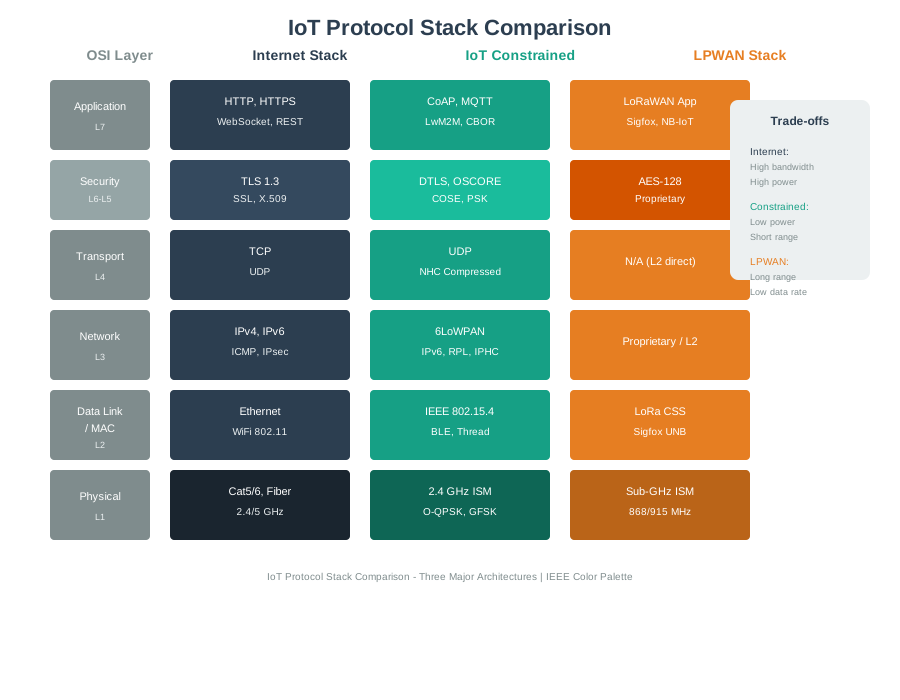
IEEE 802.15.4 supplies the physical and link layer. 6LoWPAN adapts IPv6 to that link, IPv6 routes packets, and UDP carries the CoAP messages. At the top, CoAP provides request and response exchanges and can add optional reliability. Follow the arrows down again when testing a request: the application name alone does not prove that a packet fits the link, reaches the address, or arrives in time. The side note keeps packet size, routing, reliability, and the radio link in the decision. This worked stack makes each lower-layer check part of the capstone protocol record.
Inspect Figure 13.2 to ask how the processor, memory, radios, pins, and ports must share the board’s time and electrical limits.
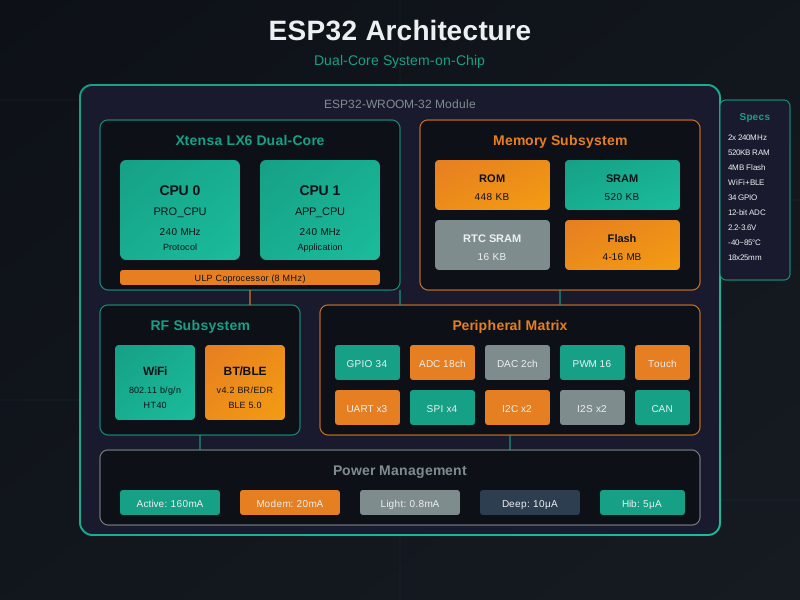
In Figure 13.2, start with the processor and memory buses. Next follow their links to Wi-Fi, Bluetooth, GPIO, ADC/DAC, and the serial ports. Placing these blocks on one chip makes a design easier to build, but it does not make their limits vanish. The code still has to share processor time, memory, pins, and each port. It must also control radio use and stay within the board’s electrical limits. Those checks turn a well-known board into a sound design choice.
Scenario: Your capstone project has a BME280 temperature, humidity, and pressure sensor plus a BH1750 light sensor, both using I2C. After wiring, only one sensor responds. You consult the appendix before rewriting code.
Appendix lookup (Section C: Common Sensor Specifications):
- BME280: I2C address 0x76 or 0x77 (configurable via SDO pin)
- BH1750: I2C address 0x23 or 0x5C (configurable via ADDR pin)
Before changing code, inspect the actual sensor package in Figure 13.3 and connect the appendix address options to the SDO wiring on the breakout. The photograph is useful here because the debugging question is about a physical board configuration, not an abstract I2C rule.

In Figure 13.3, locate the metal-capped BME280 package first and then the header pins that carry power and the I2C bus. The board view reminds you that the selected address depends on how the breakout exposes and wires SDO; it cannot be inferred from the sensor name alone. That observation sends the investigation back to wiring, power, bus scan, and board documentation before firmware is rewritten.
Photo: SparkFun Electronics, CC BY 2.0.

Problem identified: The possible addresses are different, so an address conflict is unlikely. The next check is wiring and bus assignment.
I2C debug:
$ i2cdetect -y 1
     0  1  2  3  4  5  6  7  8  9  a  b  c  d  e  f
00:          -- -- -- -- -- -- -- -- -- -- -- -- --
70: -- -- -- -- -- -- 76 --
Only one device (0x76) appears. BH1750 missing.
Solution: Check Section D (ESP32 Pin Reference):
- Default I2C: SDA=GPIO 21, SCL=GPIO 22
- Verify wiring: BH1750 SDA connected to GPIO 19, which is SPI MISO rather than the default I2C SDA pin.
Fix: Move BH1750 SDA to GPIO 21. Both sensors now work.
Key insight: The appendix helped separate an addressing theory from a wiring fault. Quick lookups save time during prototyping when they are used with a clear diagnostic sequence.
| Situation | Best First Stop | Why |
|---|---|---|
| “What is the I2C address of BME280?” | Appendix | Quick lookup for a specific hardware fact |
| “How do I implement MQTT reconnection?” | Detailed chapter | Requires an algorithm, state handling, and error strategy |
| “What is the formula for link budget?” | Appendix | Quick formula reference |
| “Should I use CoAP or MQTT?” | Detailed chapter | Requires decision guidance and project context |
| “What is the MTU for 6LoWPAN?” | Appendix | Quick protocol specification lookup |
Appendix strengths:
Pin assignments during wiring Unit conversions during calculations Protocol quick comparison Formula lookups
Appendix limitations:
No design guidance (go to chapters) No tutorials (go to chapters) No troubleshooting (go to chapters)
Key insight: Use the appendix as a quick reference during hands-on work. Return to chapters for understanding why and how things work.
-

Wrong: The short appendix can replace the full lesson. Use it for recall after learning the reasons and tradeoffs.
The mistake: A learner tries to learn IoT exclusively from the appendix, using the glossary, pin references, and formulas without reading the detailed chapters. The result is memorized definitions without enough context for design decisions.
Why It Happens: Appendix is concise and feels efficient. “I can learn IoT in 20 pages!”
Example of insufficient understanding:
- Appendix: “MQTT is publish/subscribe, CoAP is request/response”
- Missing context: When to use each? QoS implications? Power consumption differences?
- Result: Chooses MQTT for battery device because “it’s popular” (wrong - CoAP would be better)
The Fix: Use the appendix for recall, not learning:
- Read the detailed chapter (e.g., MQTT fundamentals)
- Practice with examples
- Use appendix as quick reference during design/coding
- Return to chapter when deeper understanding is needed
Key insight: The appendix is a map, not a guidebook. It helps you navigate once you know the terrain; it does not teach the underlying engineering by itself.
Common Pitfalls
This section: Common Pitfalls
The appendix is reference material, not a structured learning path. Reading it linearly without the conceptual grounding from main chapters produces memorization without understanding. Use appendix sections as deep-dives after the relevant main chapter concepts are understood, not as standalone introductions.
Appendix content is only valuable when connected to the problems it solves. When using a formula from the appendix, trace it back to the chapter where it was applied in context. The mathematical derivation alone without the application context rarely produces actionable understanding.
Code examples in reference appendices are illustrative, not deployment-ready. They typically use placeholder device IDs, hardcoded credentials, and simplified error handling. Always adapt examples to your specific hardware, add proper error handling, and validate against your target environment before relying on them in production.
13.8 Summary
This section: Summary
This appendix serves as a quick reference companion to the main textbook:
Glossary: 45+ IoT terms with concise definitions Protocol Comparisons: Side-by-side tables for wireless, LPWAN, and application protocols Sensor Specifications: Common temperature, motion, and distance sensors with specs ESP32 Pin Reference: GPIO capabilities and common pin assignments Engineering Formulas: Essential calculations for link budgets, battery life, and electronics
13.9 Knowledge Check
This section: Knowledge Check
Appendix serves as the connective tissue between modules: Each table, formula, or pin reference draws from concepts explained in detail elsewhere: 6LoWPAN in networking, MQTT in application protocols, BME280 specifications in sensors, and ESP32 GPIO in prototyping. The appendix does not introduce new concepts; it consolidates them for quick reference.
Standards organizations map to technology layers: IEEE owns physical/MAC layers such as 802.11 and 802.15.4, IETF owns IP-based protocols such as CoAP, 6LoWPAN, and RPL, and industry alliances such as the LoRa Alliance and CSA own ecosystem specifications. Understanding this mapping helps you find authoritative documentation.
Protocol comparison tables reveal design trade-offs: The short-range table shows the relationship between data rate and power, such as Wi-Fi being higher rate and higher power while Zigbee is lower rate and lower power. The LPWAN table shows licensed vs. unlicensed spectrum trade-offs, such as NB-IoT using licensed spectrum and LoRaWAN using unlicensed spectrum. These tables do not make design decisions for you; they help you ask the right questions before consulting detailed chapters.
Formulas connect hardware to behavior: Link budget calculations tie transmit power to receiver sensitivity through path loss. Battery-life calculations connect current consumption to duty cycle. The appendix does not teach when to apply these formulas; it assumes you have already learned the underlying principles.
Pin reference prevents hardware mistakes: ESP32 GPIO tables show which pins have ADC, DAC, and touch capabilities, default I2C/SPI assignments, and boot-mode restrictions. This reference does not teach you how I2C works; it helps you avoid wiring mistakes after you have learned the protocol.
Within This Module (Engineering & Capstone):
Capstone Projects - Apply appendix references in real projects Glossary A-F - Extended glossary (A-F terms) Glossary G-P - Extended glossary (G-P terms)
Related Concepts in Other Modules:
IoT Protocol Stack - Detailed explanation of protocol layers Sensor Interfacing - I2C/SPI/UART protocols in depth ESP32 Development - ESP32 GPIO usage and examples MQTT Fundamentals - MQTT protocol details CoAP Fundamentals - CoAP protocol details LoRaWAN Architecture - LoRaWAN specification details Link Budget Calculations - RF link budget explained Battery Life Optimization - Battery life formulas and strategies
External Resources:
IEEE Standards - Official IEEE 802.11, 802.15.4 specifications IETF RFCs - CoAP, 6LoWPAN, RPL specifications LoRa Alliance - LoRaWAN specification downloads ESP32 Technical Reference Manual - Complete ESP32 GPIO and peripheral documentation
13.11 What’s Next
This section: What’s Next
| If you want to… | Read this |
|---|---|
| Build a complete IoT system with capstone projects | Capstone Projects |
| Look up technical term definitions from across the course | IoT Glossary A-F |
| Continue to the next appendix topic | Mathematical Foundations |
| Apply consistent visual standards from the style guide | Reference Appendix |
| Return to any module for deeper topic exploration | Data Storage |
Find help
3 reviewed answers.
Where should I start in a module?
Open the module page from the sidebar to see its chapters in order. Use the module map to return to a topic you need.
Modules and pathsReviewed
What can I try when a project does not work?
Check the symptom, then work through the diagnostic steps. Keep the error message and the smallest example that reproduces it.
When you are stuckReviewed
How do interactive examples work?
Use the interactive guide to check how examples and simulations work before changing your project.
Interactive examples guideReviewed