9 Edge Container Orchestration: Workload Contracts
More
Depth: Practitioner
Progress saves as you read. Mark sections complete as you go; your progress appears in the sidebar.
9.1 Start With the Decision
This section: Start With the Decision — An orchestrator can restart a service only when its workload contract is clear.
An orchestrator can restart a service only when its workload contract is clear. Define health, state, ports, and limits first.
9.2 Route Overview
This section: Route Overview — This is part 1 of 2.
This is part 1 of 2. Continue with Edge Container Orchestration: Images and Kubernetes.
9.3 Part Objectives
This section: Part Objectives
- Define orchestration starts with a workload contract with explicit inputs, errors, and change rules.
- Define container contract with explicit inputs, errors, and change rules.
-

How will door records keep flowing when one service stops?
9.4 Start With the Workload That Must Keep Running
This section: Start With the Workload That Must Keep Running — Picture a warehouse service that records door events.
Prove the Service Can Fail Without Losing the Promise
Picture a warehouse service that records door events. A new release starts well, then one copy runs out of memory while the site link is down. Restarting it may help, but only if queued events, secret values, and the last safe version survive.
Telemetry is the incoming device reading and status record that this service promises to handle. Choose one service that receives such records and write its promise in plain words. Name the input, output, resource limit, health sign, local safe action, and result that calls for a return to the old version. The package alone does not define those duties.
Test the promise before choosing a large control platform. Stop one copy, deny it a secret, fill its memory, cut the remote link, and release a bad version. Check which work continues, which work waits, what the operator sees, and how recovery avoids duplicate or lost records.
This trial does not settle every scale or platform choice. Sites and failure costs differ. The deeper sections show how health checks, placement, limits, rollout, rollback, and edge independence turn the workload promise into an operating record.
Container orchestration matters when a workload has to keep a product promise during reconnect storms, bad releases, partial outages, and edge disconnection. The image is only the package; the workload contract decides how it survives.
Begin with one service such as telemetry ingest or command dispatch. Name its health checks, resource limits, rollout rule, rollback signal, and edge autonomy before choosing how much orchestration the system needs.
- Start With the Workload That Must Keep Running
- In 60 Seconds
- Minimum Viable Understanding
- Orchestration Starts With A Workload Contract
- Review One Telemetry Ingest Deployment
- The Control Plane Acts On Signals
- Check Your Workload Contract
- Most Valuable Understanding
- Prerequisites
- Orchestration Decision Map
- Container Contract
- Checkpoint: Workload Contract
First, define the workload contract so the platform knows the image, health, resource, secret, and rollout intent. Then, read the Kubernetes Deployment, Service, probes, and autoscaling pattern as one operating agreement. Next, compare cloud, edge, K3s, KubeEdge, service mesh, and event-driven choices against the actual IoT failure modes. Finally, use the deployment checklist and quizzes to review a release before it reaches production. Checkpoint callouts pause the main path; collapsed deep-dive and quiz sections let you verify details without breaking the flow.
9.5 Orchestration Starts With A Workload Contract
This section: Orchestration Starts With A Workload Contract — A container image says what to run.
A container image says what to run. The workload contract says how the platform should run it safely: where replicas may be placed, when traffic may reach them, how much CPU and memory they need, which secrets they may read, and how a bad release is stopped.
For IoT services, those choices affect physical systems. A telemetry ingest outage can hide a freezer alarm. A command service rollout can duplicate actuator requests. A gateway update can break local rules while the WAN link is down. The orchestrator is therefore part of the product’s safety and support model, not just a server scheduler.
Consider a refrigerated-store fleet. The cloud side may run an MQTT bridge, telemetry ingest API, command service, alert worker, and dashboard backend on Kubernetes. The store side may run a gateway container, local rules engine, short-term queue, and device adapter under K3s, Azure IoT Edge, AWS IoT Greengrass, Balena, Docker Compose, or a vendor supervisor. The same container image can behave well or badly depending on the declared probes, resource requests, storage mounts, restart policy, and update rules around it.
- Cloud services often need Deployments, Services, Ingress, HPA, ConfigMaps, Secrets, and observability pipelines.
- Edge gateways may need K3s, KubeEdge, AWS IoT Greengrass, Azure IoT Edge, Balena, Docker Compose, or a simpler supervisor depending on autonomy and support needs.
- Stateful workloads such as brokers, databases, and local queues need storage, backup, update, and recovery rules beyond a generic Deployment.
The practical design question is: what should the platform do when real conditions change? If a storm of devices reconnects after a power outage, the platform may need to scale workers from broker lag rather than CPU. If a new image starts but cannot reach the broker, readiness should keep it out of the Service endpoint set. If a gateway loses WAN access, its local rule engine should continue using cached desired state and buffered telemetry. Good orchestration makes those outcomes explicit before the failure happens.
9.6 Review One Telemetry Ingest Deployment
This section: Review One Telemetry Ingest Deployment — Before launching a telemetry ingest service, review the Kubernetes objects as a contract instead of a YAML checklist.
Before launching a telemetry ingest service, review the Kubernetes objects as a contract instead of a YAML checklist. The important question is whether the platform can keep useful service running during reconnect storms, bad images, slow dependencies, and partial rollouts.
- Image: pin
ghcr.io/acme/telemetry-ingest@sha256:...or a signed immutable tag, notlatest. - Traffic: use a Service and readinessProbe so pods receive requests only after the MQTT broker, cache, and database path are usable.
- Capacity: set requests and limits from measured message rate, p95 latency, broker lag, queue depth, and memory during burst replay.
- Rollback: keep old ReplicaSets available, watch error rate and dropped-message counters, and know which metric pauses the Deployment.
Work the review against a concrete release. A telemetry-ingest service reads MQTT messages from EMQX or Mosquitto, writes normalized readings to PostgreSQL or TimescaleDB, and publishes alerts to Kafka or NATS JetStream. The Deployment should pin an immutable image digest, use a ServiceAccount with only the required permissions, load broker and database credentials from Secrets, and expose separate startup, readiness, and liveness probes. A startup probe can give schema checks and warmup time. A readiness probe should stay false until the broker connection, write path, and local cache are ready. A liveness probe should detect a stuck process without killing a slow but recovering pod.
The capacity review should use measured load, not guesses. Start from expected device count, message size, reconnect burst size, and allowed alert latency. Convert those into CPU and memory requests, queue-depth thresholds, max replicas, and PodDisruptionBudget rules. If a store outage can replay two hours of buffered telemetry, test that replay in staging and watch broker lag, dropped messages, pod restarts, and database write latency. The launch review is complete only when the team knows which metric triggers scaling, which metric pauses rollout, and which runbook step rolls back the image.
9.7 The Control Plane Acts On Signals
This section: The Control Plane Acts On Signals — Kubernetes and edge orchestrators do not understand product intent.
Kubernetes and edge orchestrators do not understand product intent. They act on declared signals: probe results, resource pressure, desired replica counts, node health, taints, labels, Secrets, ConfigMaps, and controller status.
- Placement: node labels, affinity, tolerations, and PodDisruptionBudgets decide where workloads run and how much voluntary disruption is acceptable.
- Scaling: HPA uses CPU, memory, or custom metrics; KEDA can scale workers from Kafka lag, MQTT-adjacent queues, cloud queues, or Prometheus metrics.
- Rollout: Deployment strategies, Argo Rollouts, Flagger, Helm, Kustomize, Argo CD, or Flux can automate progressive delivery only when health metrics are reliable.
- Security: RBAC, ServiceAccounts, NetworkPolicies, mTLS, image signing, admission policy, and secret rotation protect the cluster without replacing application authorization.
Use Figure 9.2 to connect those declarations to the actions a control plane can actually take. The important distinction is between a failed readiness gate, which withholds traffic, and a workload signal, which may justify scaling or pausing a release.
flowchart TD
  A[Device burst or new release] --> B[Telemetry ingest Deployment]
  B --> C{Startup and readiness pass?}
  C -->|No| D[Keep pod out of Service endpoints]
  C -->|Yes| E[Route traffic through Service or Ingress]
  E --> F{Lag, errors, or latency rising?}
  F -->|Scale signal| G[HPA or KEDA adds replicas]
  F -->|Release signal| H[Argo Rollouts or Deployment pauses]
  G --> I[New pods repeat readiness gate]
  H --> J[Rollback or hold canary traffic]
  I --> E
J --> K[Operators review metrics and runbook]
At the top of Figure 9.2, Device burst or new release reaches Telemetry ingest Deployment, but Startup and readiness pass? decides whether a pod may join Service endpoints. Once traffic flows, Lag, errors, or latency rising? splits capacity response from release safety: HPA or KEDA adds replicas on a scale signal, while Argo Rollouts or Deployment pauses on a release signal. Both routes return to a readiness check or an operator review, connecting the chapter’s signal inventory to a closed operational loop rather than treating autoscaling as a one-way reaction.
The control loop only works when the signals match the workload. CPU-based HPA may lag behind a reconnect storm if pods block on database writes, so KEDA scaling from Kafka lag, RabbitMQ depth, Azure Service Bus messages, or Prometheus queue metrics may be more useful. A readiness endpoint that only returns “process is running” can make a bad rollout look healthy. A PodDisruptionBudget that allows too many pods down can break alert ingestion during node maintenance. A NetworkPolicy that blocks the broker can look like an application outage unless the probe and logs identify the missing path.
Edge systems add another layer. KubeEdge and cloud-managed edge platforms reconcile desired state across unreliable links; K3s or Docker Compose on a gateway may rely on local supervisors and update scripts. In both cases, the platform needs explicit rules for cached configuration, local queue retention, credential rotation, disk pressure, and update windows. The deeper orchestration skill is making the platform’s automatic actions line up with the IoT workload’s real safety and support boundaries.
9.8 Learning Objectives
This section: Learning Objectives
By the end of this chapter, you will be able to:
- Explain what an orchestrator adds beyond Dockerfiles and container registries.
- Design a Kubernetes workload contract with images, probes, resources, configuration, secrets, and rollout behavior.
- Choose between cloud Kubernetes, lightweight edge Kubernetes, KubeEdge, and simpler gateway supervisors.
- Decide when service mesh is useful for IoT service-to-service traffic.
- Use event-driven workloads without turning every consumer into a tightly coupled service call.
- Review an IoT deployment for health, scaling, security, and rollback readiness.
Container orchestration is a reliability boundary. The orchestrator can restart, reschedule, scale, and roll out a service only if the service exposes the right health signals, declares realistic resources, stores state safely, and treats configuration and credentials as external deployment inputs.
9.9 Prerequisites
This section: Prerequisites
- SOA and Microservices Fundamentals: Know how services map to business capabilities.
- SOA API Design and Discovery: Understand stable service contracts and discovery paths.
- SOA Resilience Patterns: Understand retries, circuit breakers, timeouts, and bulkheads.
- Cloud Computing for IoT: Know where cloud workloads, gateways, and managed services run.
- Edge-Fog-Cloud Introduction: Understand edge deployment constraints.
9.10 Orchestration Decision Map
This section: Orchestration Decision Map — Start from the workload and operations model, not from a product name.
Start from the workload and operations model, not from a product name.
Inspect Figure 9.1 to identify the responsibilities an orchestration choice must cover before comparing products. The visual connects desired state to running workloads, which is the evidence needed to decide whether a full control plane, a lightweight edge distribution, or a simpler supervisor fits the deployment.
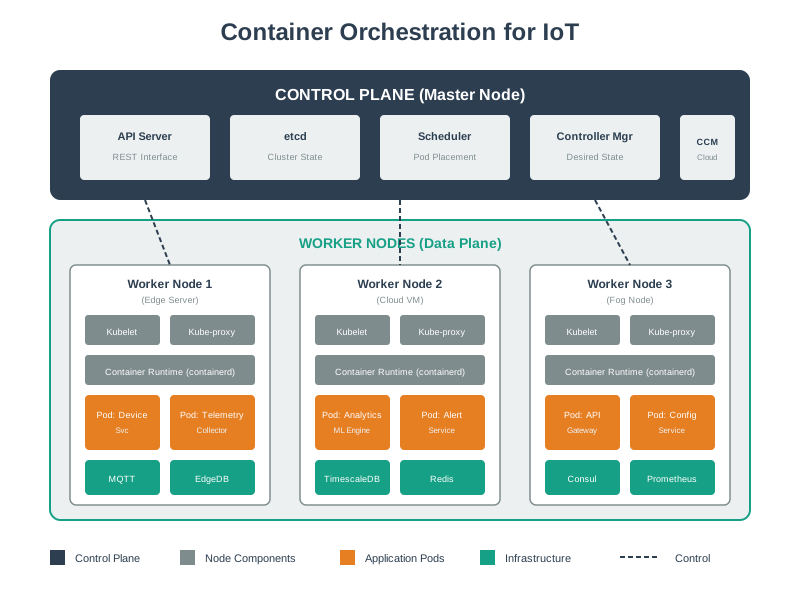
Follow one desired state. Check how the cluster restores it. Read Figure 9.1 from the control-plane API through scheduling and reconciliation, then down to the workers that actually run IoT services. The store preserves desired state, the scheduler chooses placement, and controllers correct drift between declared and observed conditions. Worker agents make that intent real by starting and monitoring the assigned containers. This sequence anchors the choice map: adopt a full control plane only when the workload needs these separate responsibilities and the operating team can observe, repair, and recover them.
9.10.1 Cloud Kubernetes
Use when services need shared scheduling, rolling updates, autoscaling, internal service discovery, managed ingress, and strong observability in a connected cloud or data-center environment.
9.10.2 Lightweight Edge Kubernetes
Use when a gateway or small site needs the Kubernetes API and local workload management, but the deployment must stay simpler than a large multi-node platform.
9.10.3 KubeEdge-Style Edge Management
Use when many edge nodes must keep workloads running during intermittent connectivity and synchronize desired state when the cloud link returns.
9.10.4 Compose or Local Supervisor
Use when the gateway runs a small fixed set of containers and does not need Kubernetes APIs, cluster scheduling, or centralized rollout policy.
The practical question is: who will restart the service, update it safely, stop bad versions, isolate secrets, observe failures, and explain capacity when telemetry volume changes? The answer may be Kubernetes, KubeEdge, a managed edge platform, or a simpler local process manager.
9.11 Container Contract
This section: Container Contract — A production container contract tells the platform how to run the service safely.
A production container contract tells the platform how to run the service safely.
9.11.1 Image
Pin an immutable image tag or digest, build from a minimal base, run as a non-root user, and keep the image free of environment-specific secrets.
9.11.2 Configuration
Move broker hosts, feature flags, batch sizes, and region-specific settings into ConfigMaps or equivalent platform configuration.
9.11.3 Secrets
Load credentials from a secret store or mounted secret volume. Do not bake device certificates, API keys, or database passwords into the image.
9.11.4 Health
Expose startup, readiness, and liveness signals that represent real dependency state, not only “the process is running.”
9.11.5 Resources
Declare CPU and memory requests for scheduling, then set limits that protect the node without causing normal bursts to fail.
9.11.6 Rollout
Define how the service moves from old to new versions, how it rolls back, and how operators know whether the new version is healthy. Read the rollout as an evidence sequence: admit a small amount of traffic, compare errors, latency, broker lag, reconnects, and restarts with the old version, then expand only while those signals stay within the service objective. Keep the previous image and compatible data path available until the rollback window closes. This makes rollout behavior part of the workload contract rather than an optimistic deployment command.
This section:
 Checkpoint: Workload Contract
- You now know that an image is only the package; the contract also declares configuration, secrets, health, resources, and rollout behavior.
- You now know why readiness must wait for dependencies such as broker connections, cache warmup, and database paths.
- You now know that edge autonomy changes the contract because local rules, queues, credentials, and update windows must survive weak links.
This section:
9.12 Continue to the Next Part
This section: Continue to the Next Part — Carry this evidence into Edge Container Orchestration: Images and Kubernetes, which begins with Dockerfile Baseline.
Carry this evidence into Edge Container Orchestration: Images and Kubernetes, which begins with Dockerfile Baseline.
Find help
3 reviewed answers.
Where should I start in a module?
Open the module page from the sidebar to see its chapters in order. Use the module map to return to a topic you need.
Modules and pathsReviewed
What can I try when a project does not work?
Check the symptom, then work through the diagnostic steps. Keep the error message and the smallest example that reproduces it.
When you are stuckReviewed
How do interactive examples work?
Use the interactive guide to check how examples and simulations work before changing your project.
Interactive examples guideReviewed