10 Edge Container Orchestration: Images and Kubernetes
More
Depth: Practitioner
Progress saves as you read. Mark sections complete as you go; your progress appears in the sidebar.
10.1 Start With the Decision
This section: Start With the Decision — A Dockerfile should build the same service each time.
A Dockerfile should build the same service each time. Pin the base, copy only what runs, and state the startup command.
10.2 Route Overview
This section: Route Overview — This is part 2 of 2.
This is part 2 of 2. Review Edge Container Orchestration: Workload Contracts for the preceding evidence.
10.3 Learning Objectives
This section: Learning Objectives
- Test dockerfile baseline with a concrete scenario and pass criteria.
- Validate references with a concrete scenario and pass criteria.
10.4 Chapter Roadmap
This section: Chapter Roadmap
- Dockerfile Baseline
- Kubernetes Workload Pattern
- Scaling Rule of Thumb
- Knowledge Check: HPA and Readiness
- Rollout and Rollback Behavior
- Edge Orchestration Choices
- K3s and KubeEdge in Context
- Knowledge Check: Edge Autonomy
- Service Mesh for IoT
- Knowledge Check: Mesh Tradeoff
- Checkpoint: Runtime Choice
- Event-Driven Workloads
- Deployment Review Checklist
- Try It: Build a Rollout Review Note
- Common Pitfalls
- 1. Treating Kubernetes as a substitute for service design
- 2. Making every health check return success
- 3. Using CPU as the only scaling signal
- 4. Running stateful services as if they were stateless
- 5. Adding service mesh before the team can operate it
- Label the Diagram
- Code Challenge
- Summary
- Key Takeaway
- Knowledge Check
- Quiz: Container Orchestration Review
- Interactive Quiz: Match Orchestration Concepts
- Interactive Quiz: Sequence the Deployment Review
- Try It Yourself
- Exercise: Review an IoT Deployment Manifest
- References
- What’s Next
- Navigation
10.5 Dockerfile Baseline
This section: Dockerfile Baseline — The container image should be boring, repeatable, and environment-neutral.
The container image should be boring, repeatable, and environment-neutral.
FROM python:3.12-slim

WORKDIR /app
COPY requirements.txt .
RUN pip install --no-cache-dir -r requirements.txt

COPY src/ ./src/

RUN useradd --create-home appuser
USER appuser

EXPOSE 8080
CMD ["python", "-m", "src.telemetry_ingest"]
10.5.1 Good Image Signals
- Dependencies are pinned and rebuilt by CI.
- The process does not run as root.
- The image has no deployment secrets.
- Runtime configuration is supplied by the platform.
- Logs go to standard output for collection.
10.5.2 Image Smells
latestis used for production. Review whether the deployed version can be identified and an immutable image retained for rollback.- Credentials appear in build arguments or source files. Deployment secrets should be mounted or injected from a secret manager.
- The image changes behavior based on hidden local files. Supply runtime configuration through the platform so the same image can run across environments.
- Health checks are missing or only check the process ID. Startup, readiness, and liveness checks should reflect real service state.
- One image contains unrelated services. Review the service boundaries and what each workload needs to declare for startup, health, scaling, and rollout.
10.6 Kubernetes Workload Pattern
This section: Kubernetes Workload Pattern — Kubernetes commonly represents a stateless IoT service as a Deployment, a Service, and optional autoscaling policy.
Kubernetes commonly represents a stateless IoT service as a Deployment, a Service, and optional autoscaling policy.
Inspect Figure 10.1 before reading the manifest to distinguish the stable request path from the replaceable pods and feedback loop that implement it.
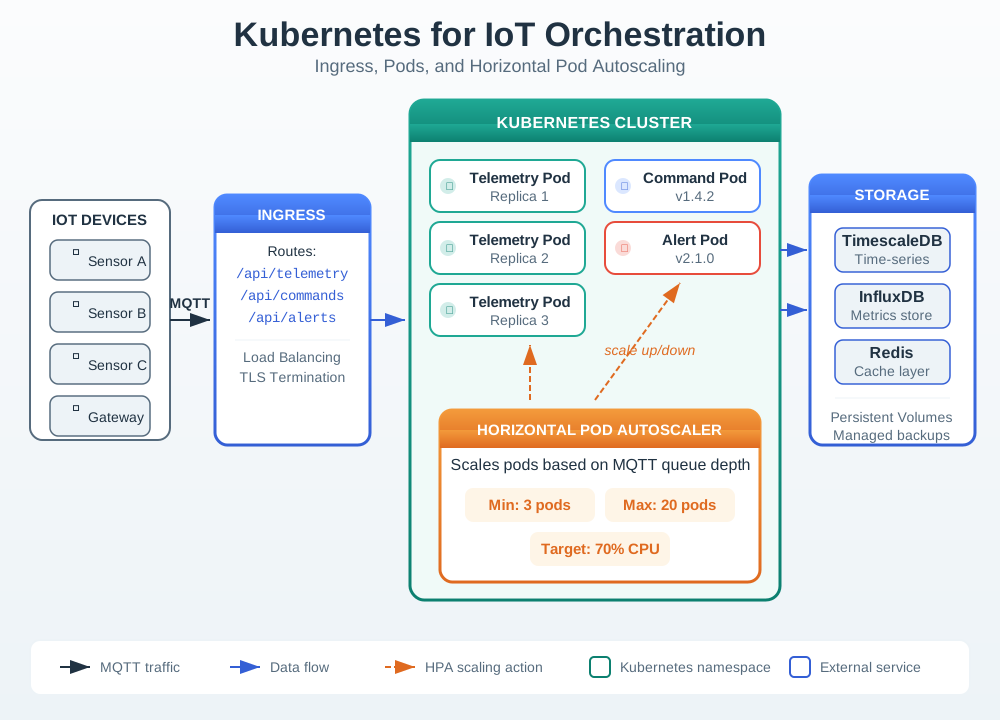
Follow one workload into the cluster. Check its service path. Follow Figure 10.1 from Ingress to the stable Service and then to the pod replicas that perform the work. The client-facing route remains stable while individual pods can be replaced. Next trace the observed load back through the horizontal autoscaler, which changes replica count without changing that access contract. This makes each manifest object answer an operational question: Ingress and Service own routing, Deployments own desired replicas and health, resource declarations constrain placement, and the autoscaler turns measured pressure into a bounded scaling action.
10.6.1 Deployment and Service
This example keeps the manifest compact so the important contract is visible.
apiVersion: apps/v1
kind: Deployment
metadata:
  name: telemetry-ingest
  labels:
    app.kubernetes.io/name: telemetry-ingest
spec:
  replicas: 3
  selector:
    matchLabels:
      app.kubernetes.io/name: telemetry-ingest
  template:
    metadata:
      labels:
        app.kubernetes.io/name: telemetry-ingest
    spec:
      containers:
        - name: service
          image: ghcr.io/acme/telemetry-ingest:1.4.0
          ports:
            - containerPort: 8080
          envFrom:
            - configMapRef:
                name: telemetry-ingest-config
          volumeMounts:
            - name: device-ca
              mountPath: /var/run/iot-ca
              readOnly: true
          resources:
            requests:
              cpu: 250m
              memory: 256Mi
            limits:
              memory: 512Mi
          startupProbe:
            httpGet:
              path: /startup
              port: 8080
            failureThreshold: 12
            periodSeconds: 5
          readinessProbe:
            httpGet:
              path: /ready
              port: 8080
            periodSeconds: 5
          livenessProbe:
            httpGet:
              path: /live
              port: 8080
            periodSeconds: 20
      volumes:
        - name: device-ca
          secret:
            secretName: telemetry-device-ca
---
apiVersion: v1
kind: Service
metadata:
  name: telemetry-ingest
spec:
  selector:
    app.kubernetes.io/name: telemetry-ingest
  ports:
    - port: 80
      targetPort: 8080
10.6.2 Deployment
Keeps the desired number of replicas available and performs controlled updates through ReplicaSets.
10.6.3 Service
Gives clients a stable virtual address while pods are created, replaced, and rescheduled.
10.6.4 Probes
Separate startup, readiness, and liveness so Kubernetes does not send traffic too early or restart a slow-starting service unnecessarily.
10.6.5 Autoscaling
The Horizontal Pod Autoscaler can scale a Deployment based on resource metrics or custom metrics. In IoT systems, CPU is often a late signal; queue depth, broker lag, request latency, or dropped-message rate may be better leading indicators.
apiVersion: autoscaling/v2
kind: HorizontalPodAutoscaler
metadata:
  name: telemetry-ingest
spec:
  scaleTargetRef:
    apiVersion: apps/v1
    kind: Deployment
    name: telemetry-ingest
  minReplicas: 3
  maxReplicas: 12
  metrics:
    - type: Resource
      resource:
        name: cpu
        target:
          type: Utilization
averageUtilization: 65Use resource metrics when they actually track demand. Use queue or broker metrics when the service can be overwhelmed before CPU rises. In either case, test the full path: metric collection, autoscaler reaction, image pull, startup, readiness, and load balancer update.
10.7 Rollout and Rollback Behavior
This section: Rollout and Rollback Behavior — Rolling updates are useful only when the new version is observable and reversible.
Rolling updates are useful only when the new version is observable and reversible.
Build CI creates an immutable image and attaches provenance, security scan results, and a changelog.
Deploy The Deployment updates pods gradually while readiness gates protect the Service endpoint set.
Observe Operators watch errors, latency, restarts, broker lag, and device command success rate.
Decide The release continues, pauses, rolls back, or shifts only a small percentage of traffic.
10.7.1 Rollout Signals
- Error rate stays within the service objective. Read this alongside latency and device command success rate when deciding whether the release should continue.
- Device reconnects do not spike. Watch for session disruption as pods are replaced during the update.
- Broker lag clears after a burst. This helps show whether consumers can recover from the observed pressure.
- New pods do not restart repeatedly. Review startup and liveness behavior if restarts suggest a slow service is being restarted unnecessarily.
- The old version remains available during the transition. Keeping the update reversible supports a decision to pause or roll back when service signals deteriorate.
10.7.2 Rollout Smells
- A database migration must finish before old pods can work.
- Readiness is always true.
- The only rollback plan is rebuilding an older image.
- Operators cannot tell which version handled a failing request.
- Long-running device sessions are dropped during each update.
10.8 Edge Orchestration Choices
This section: Edge Orchestration Choices — Edge deployments add constraints that cloud clusters usually hide: power cycles, weak links, local storage, limited maintenance windows, and hardware that may be shared with gateways, brokers, or local analytics.
Edge deployments add constraints that cloud clusters usually hide: power cycles, weak links, local storage, limited maintenance windows, and hardware that may be shared with gateways, brokers, or local analytics.
Inspect Figure 10.2 to see where central release control ends and site autonomy begins. That boundary matters before selecting an edge orchestrator because images, desired state, cached artifacts, and local recovery do not share the same connectivity assumptions.
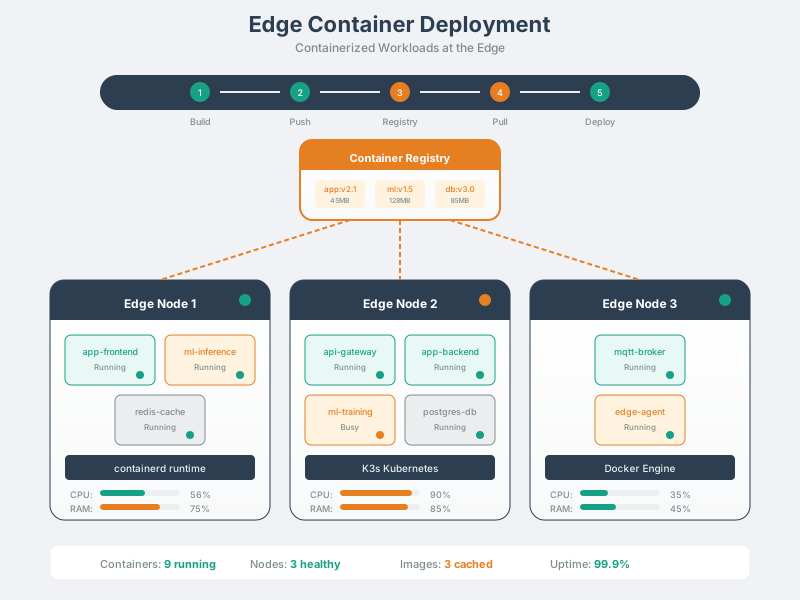
Read Figure 10.2 from the central registry outward to each site, then inspect the gateway, analytics, and local-service workloads within a node. Distribution is centrally coordinated, but execution and recovery must continue locally when the link fails. This brings the chapter back to its governing choice: the platform must match real power, storage, connectivity, and field-support constraints.
10.8.1 Single Gateway
Prefer a simple supervisor or lightweight Kubernetes when the site has a small fixed workload. Keep the operational model simple enough that field teams can recover the gateway.
10.8.2 Store, Factory, or Campus
Use an edge cluster when several services must coordinate locally and the site needs controlled updates, observability, and local failover.
10.8.3 Large Edge Fleet
Use a cloud-managed edge platform when many nodes need policy, workload updates, inventory, and status reporting from one control plane.
10.8.4 Disconnected Operation
Choose an edge approach that caches desired state and keeps local workloads running when the cloud control plane cannot be reached.
K3s is a lightweight Kubernetes distribution for environments where a smaller Kubernetes footprint is useful. KubeEdge extends cloud-native orchestration toward edge scenarios where edge nodes, devices, and cloud control need to coordinate across less reliable networks. Validate both against your hardware, network, update cadence, observability requirements, and support model.
10.9 Service Mesh for IoT
This section: Service Mesh for IoT — A service mesh moves service-to-service concerns into infrastructure: identity, mutual TLS, traffic policy, retries, telemetry, and sometimes authorization.
A service mesh moves service-to-service concerns into infrastructure: identity, mutual TLS, traffic policy, retries, telemetry, and sometimes authorization.
Inspect Figure 10.3 before treating that infrastructure as a universal improvement. It makes the extra control plane and per-workload proxy path visible, allowing the security and resource costs to be weighed against consistent identity, policy, and telemetry.
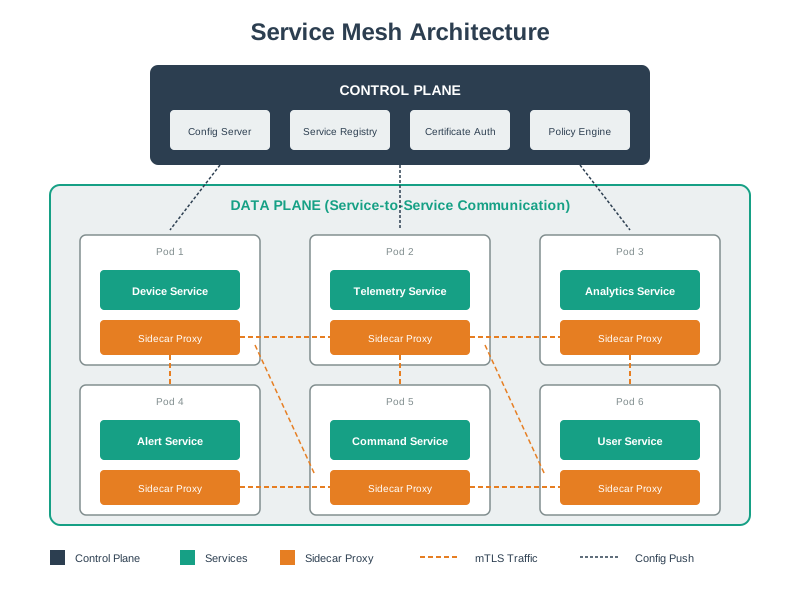
Read Figure 10.3 from the control plane to the sidecars, then follow a service call through both proxies before it reaches the peer workload. The mesh can authenticate and observe that hop, but the applications still own domain authorization and payload meaning. This ordered reading connects mesh adoption to the chapter’s recurring requirement for explicit operational boundaries.
10.9.1 Good Fit
Use mesh when many services communicate inside a cluster and teams need consistent mTLS, traffic policy, observability, and service identity without reimplementing those concerns in every codebase.
10.9.2 Weak Fit
Avoid mesh when the gateway is highly constrained, the service count is small, the team cannot operate the control plane, or application-level TLS and simple metrics solve the real requirement.
10.9.3 Edge Caution
Sidecars and mesh control planes consume resources and add operational complexity. Test them on the actual edge hardware and workload, not only in a cloud staging cluster.
10.9.4 Security Boundary
Mesh mTLS helps service-to-service identity and encryption. It does not replace device identity, authorization design, API schema validation, secret rotation, or secure firmware practice. Review the boundary from the workload outward: the sidecar can authenticate the peer service and protect transport, while the application must still authorize the requested action and validate its data. Operators must also rotate mesh credentials and observe policy failures. This distinction connects the mesh decision to the running narrative by keeping infrastructure guarantees separate from domain and device security claims.
This section:
 Checkpoint: Runtime Choice
- You now know how to compare cloud Kubernetes, lightweight edge Kubernetes, KubeEdge-style management, and simpler supervisors against the workload.
- You now know that service mesh earns its place only when identity, mTLS, traffic policy, telemetry, and team ownership justify the overhead.
- You now know that event-driven workloads still need orchestration around producers, brokers, consumers, health, scale, and rollout signals.
This section:
10.10 Event-Driven Workloads
This section: Event-Driven Workloads — IoT systems often combine request-response APIs with event streams.
IoT systems often combine request-response APIs with event streams. Orchestration should respect that difference.
Inspect Figure 10.4 to locate the durable event backbone before assigning scaling responsibilities. The point is to see why producers and consumers can change independently while the broker carries routing, buffering, and lag evidence between them.
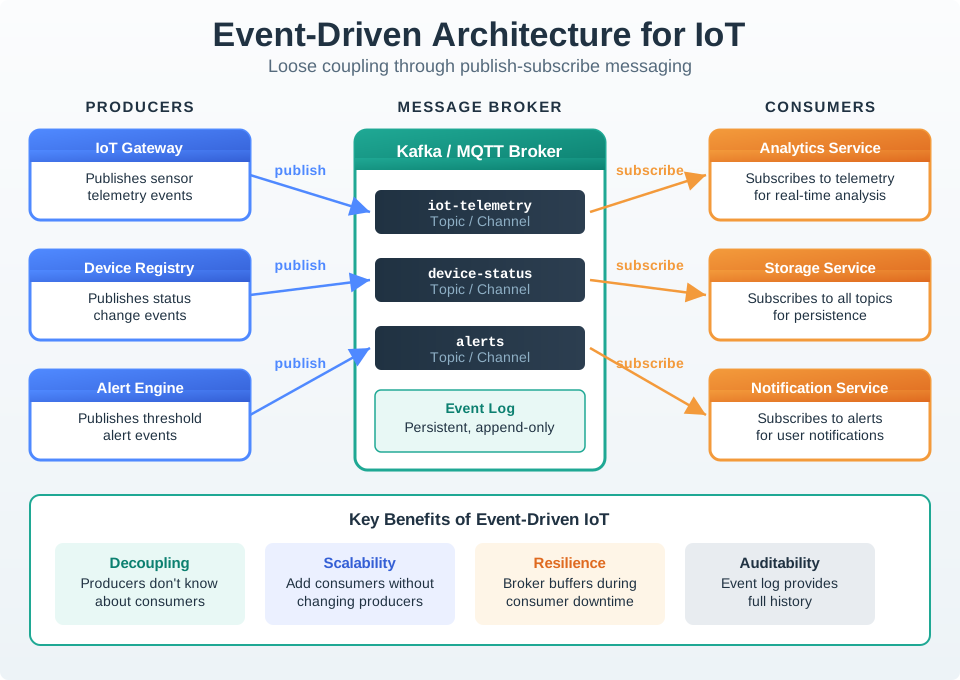
Start with one event. Then follow each independent consumer. Follow Figure 10.4 from producers into the publish-subscribe backbone and then outward to the consumer classes. Producers do not wait for every analytics, storage, or notification service; consumers progress at their own rate, while broker depth and lag expose pressure between them. Those signals tell the orchestrator which surrounding workload may need more replicas or recovery. The boundary is important: orchestration can place, restart, and scale the services, but the broker still owns routing, buffering, ordering, and delivery semantics that protect their loose coupling.
10.10.1 Producers
Gateways, ingestion services, and device managers publish telemetry, command status, lifecycle changes, and alerts without knowing every consumer.
10.10.2 Brokers
MQTT brokers, Kafka, or other message platforms buffer, route, retain, and expose consumer lag or queue depth as scaling signals.
10.10.3 Consumers
Analytics, rules, storage, dashboards, and notification services scale independently according to their own lag, throughput, and latency targets.
10.10.4 Orchestrator Role
Kubernetes does not replace the broker. It keeps producers and consumers healthy, configured, discoverable, and scalable around the event backbone.
10.11 Deployment Review Checklist
This section: Deployment Review Checklist — Use this before sending an IoT service into production.
Use this before sending an IoT service into production.
Image: Is the image immutable, scanned, reproducible, and free of secrets?
Configuration: Can the same image run in development, staging, cloud, and edge with external configuration?
Secrets: Are credentials mounted or injected from a secret manager, and is rotation tested?
Health: Do startup, readiness, and liveness probes reflect real service state?
Resources: Are requests and limits based on measured load rather than guesses?
Scaling: Does the scaling metric lead demand early enough to prevent dropped messages?
State: Can pods be replaced without losing device state, command state, or buffered telemetry?
Rollout: Is rollback fast, documented, and observable through service-level metrics?
Edge: What happens during power loss, WAN loss, clock drift, and a partial update?
Before approving a container rollout, write a short review note for one IoT workload. Keep it specific enough that another reviewer could replay the decision.
| Review field | What to record |
|---|---|
| Workload | Service name, container image tag, environment, and owner |
| Readiness | The dependency checks that must pass before traffic reaches the pod |
| Capacity | CPU, memory, broker lag, queue depth, or latency measurements behind the initial requests and scaling metric |
| Rollout guard | The metric, alert, or user-visible symptom that would pause or roll back the release |
| Edge behavior | What the workload should do during WAN loss, power recovery, or a partial update |
Deliverable: a five-row review note plus one sentence explaining whether the rollout is ready, needs more proof, or should stay in staging.
Common Pitfalls
This section: Common Pitfalls
Kubernetes can restart a failing pod, but it cannot make a service idempotent, prevent duplicate device commands, design database migrations, or decide which messages are safe to retry. Keep application-level reliability patterns in the service design.
If readiness always returns success, clients may hit pods that have not loaded certificates, connected to a broker, or warmed a cache. If liveness fails during normal slow startup, Kubernetes can restart the pod repeatedly. Give each probe a clear meaning.
An ingestion service can fall behind because broker lag grows, database writes slow down, or downstream calls time out. CPU may remain moderate until the backlog is already serious. Add workload-specific metrics where needed.
Telemetry caches, brokers, databases, and local edge queues need storage, backup, retention, and upgrade plans. A Deployment is not automatically the right workload primitive for state.
Mesh can be valuable, but it introduces certificates, policy, sidecars or node proxies, upgrades, dashboards, and failure modes. Validate the benefit before placing it on constrained edge systems or small service sets.
10.12 Label the Diagram
This section: Label the Diagram
10.13 Code Challenge
This section: Code Challenge
10.14 Summary
This section: Summary
- Containers make IoT services portable, but orchestration makes them operable.
- A good workload contract includes image, configuration, secrets, probes, resources, scaling, and rollout rules.
- Kubernetes is a strong fit for connected cloud and data-center services; edge deployments need an autonomy and supportability check.
- Service mesh can centralize mTLS and traffic policy, but it is not free infrastructure.
- Event-driven services scale best when orchestration uses broker lag, queue depth, and service-level health signals rather than only generic CPU.
Use orchestration to make service behavior explicit. The platform can only automate what the workload declares: how to start, when it is ready, how much capacity it needs, how it is discovered, and what safe rollout looks like.
10.15 Knowledge Check
This section: Knowledge Check
10.16 Try It Yourself
This section: Try It Yourself
Pick one IoT service from a project or lab and write a one-page deployment review.
- Identify the container image, exposed port, configuration inputs, and secret inputs.
- Define startup, readiness, and liveness checks in plain language before writing YAML.
- Choose initial CPU and memory requests based on a small local load test.
- Decide whether autoscaling should use CPU, queue depth, broker lag, or request latency.
- Write the rollback trigger: what metric or symptom means the rollout must stop?
- For an edge deployment, describe what should happen during WAN loss and power recovery.
10.17 References
This section: References
- Kubernetes Deployments
- Kubernetes Horizontal Pod Autoscaling
- Kubernetes Resource Management for Pods and Containers
- Kubernetes Liveness, Readiness, and Startup Probes
- Kubernetes Services
- Kubernetes Secrets
- Docker Build Best Practices
- K3s Documentation
- KubeEdge Documentation
- Istio Security Concepts
- Linkerd Automatic mTLS
10.18 What’s Next
This section: What’s Next
10.18.1 Review the SOA Foundation
SOA and Microservices Fundamentals explains why service boundaries should map to durable capabilities before they become containers.
10.18.2 Strengthen API Contracts
SOA API Design and Discovery shows how clients find services and survive version changes.
10.18.3 Add Runtime Resilience
SOA Resilience Patterns covers timeouts, retries, circuit breakers, and bulkheads that orchestration cannot replace.
10.18.4 Model Device Lifecycles
State Machine Patterns shows how to keep device and command state explicit during deployment changes.
10.20 Continue Your Route
This section: Continue Your Route — This is the last part of this chapter.
This is the last part of this chapter. Return to Edge Container Orchestration: Workload Contracts or continue from the design-patterns module index.
Find help
3 reviewed answers.
Where should I start in a module?
Open the module page from the sidebar to see its chapters in order. Use the module map to return to a topic you need.
Modules and pathsReviewed
What can I try when a project does not work?
Check the symptom, then work through the diagnostic steps. Keep the error message and the smallest example that reproduces it.
When you are stuckReviewed
How do interactive examples work?
Use the interactive guide to check how examples and simulations work before changing your project.
Interactive examples guideReviewed