sequenceDiagram participant A as Peer A (door station) participant Sig as Signaling (WebSocket/SIP) participant B as Peer B (browser) A->>Sig: SDP offer Sig->>B: SDP offer B->>Sig: SDP answer Sig->>A: SDP answer Note over A,B: Signaling done, media goes peer-to-peer A->>B: ICE checks (STUN/TURN) A->>B: DTLS handshake (derive SRTP keys) A-->>B: SRTP encrypted media + RTCP
8 Real-Time Protocol Workflows
Media Sessions, Browser Streams, and Low-Latency IoT Control Paths
protocols
realtime
rtp
sip
webrtc
websocket
iot
Keywords
realtime IoT protocols, RTP, RTCP, SIP, SRTP, WebRTC, WebSocket, RTSP, IoT media streaming
Start with the story: Realtime protocols matter when “check again later” is not good enough. A camera view, door-station call, live dashboard, or remote control path needs the right split between media transport, signaling, browser streams, and evidence that the live path is healthy.
8.1 Learning Objectives
By the end of this chapter, you will be able to:
- Explain what realtime means for application protocols in IoT media and control paths.
- Distinguish media transport, session signaling, stream control, browser transport, and event updates.
- Compare RTP, RTCP, SIP, SRTP, RTSP, WebRTC, and WebSocket by role.
- Decide when messaging protocols should remain separate from media-session protocols.
- Review latency, jitter, packet loss, security, and observability evidence for realtime paths.
- Build a protocol evidence record for an IoT camera, intercom, dashboard, or live operations view.
8.2 Realtime Protocol Route
The duplicate realtime chapter is consolidated here. Use this route when an application needs live media, session setup, browser state, operator feedback, or event streams with timing expectations.
Keep these roles separate:
- Session signaling decides who may talk and how the session starts.
- Media transport carries timed frames and quality feedback.
- Browser channels carry dashboard state and commands.
- Messaging protocols still handle telemetry, notifications, history, and durable workflows.
8.3 Key Concepts
Timing
Deadline Over Arrival
A late media frame can be less useful than the next fresh frame. Realtime paths review delay, jitter, and loss together.
Session
Control Is Separate
Signaling protocols set up who talks, which media is used, and when a session starts or ends.
Media
Transport Is Continuous
Media transport carries timed audio, video, or sensor streams with sequence and timestamp context.
Evidence
Prove the Path
Measure latency, jitter, packet loss, encryption, identity, fallback, and recovery behavior under expected load.
8.4 What Realtime Means Here
Realtime does not mean every message is instant or guaranteed. In application-protocol design, realtime means the system has a timing target and must keep media, interaction, or live state useful while the network changes.
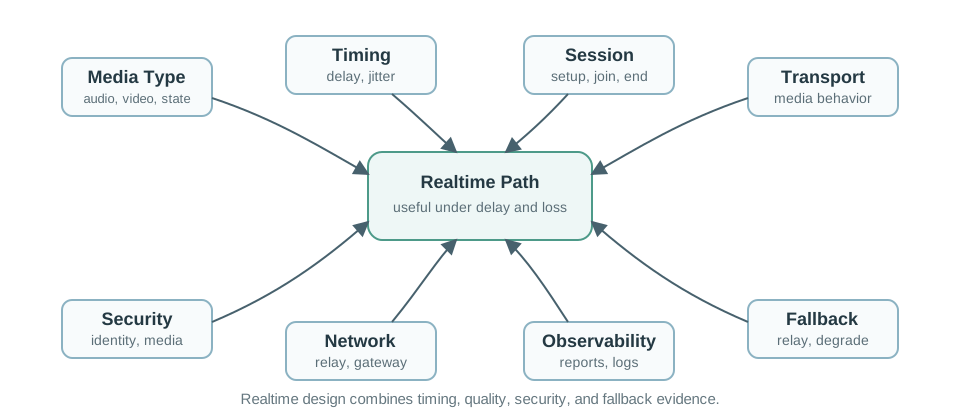
Use a realtime protocol review when the flow includes:
- Live audio, video, or screen sharing.
- Interactive control where stale commands should not be replayed blindly.
- A dashboard that should receive live updates without repeated polling.
- A local operations view that must show current state and connection quality.
- A gateway that bridges notifications, session setup, media, and recorded data.
8.5 Realtime Protocol Roles
The protocol names are easier to use when their roles are separated. One IoT product may use several of them in the same workflow.
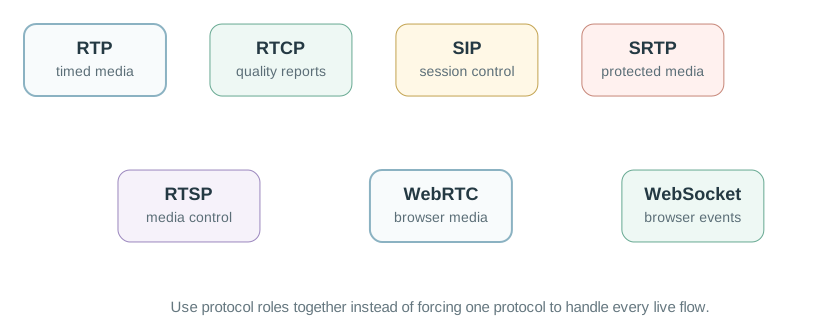
RTP
Timed Media Transport
Carries audio, video, or other realtime payloads with sequence numbers and timestamps.
RTCP
Quality Feedback
Reports reception quality, participant information, sender reports, receiver reports, and stream health.
SIP
Session Signaling
Establishes, modifies, and ends communication sessions. It does not carry the media frames.
SRTP
Protected Media
Adds confidentiality, message authentication, and replay protection to RTP media streams.
WebRTC
Browser Media Path
Combines browser APIs, secure media, negotiation, and network traversal behavior for peer connections.
WebSocket
Live Event Channel
Keeps a bidirectional browser connection for status updates, commands, and dashboards, not raw video transport.
8.6 Media Session Architecture
Realtime media systems often separate the signaling path from the media path. This avoids forcing the same protocol to do both coordination and timed delivery.
The split matters because:
- Session signaling handles identity, invitation, negotiation, authorization, and teardown.
- Media transport handles timed packets and receiver playback.
- Quality reporting helps detect jitter, loss, and receiver health.
- Security may protect signaling and media through different mechanisms.
- A gateway may terminate signaling but relay, mix, transcode, or record media separately.
8.7 Messaging and Realtime Together
MQTT, CoAP, HTTP, AMQP, RTP, SIP, and WebRTC should not be forced into one role. A door station, operations panel, or camera can use message protocols for events and realtime protocols for live interaction.
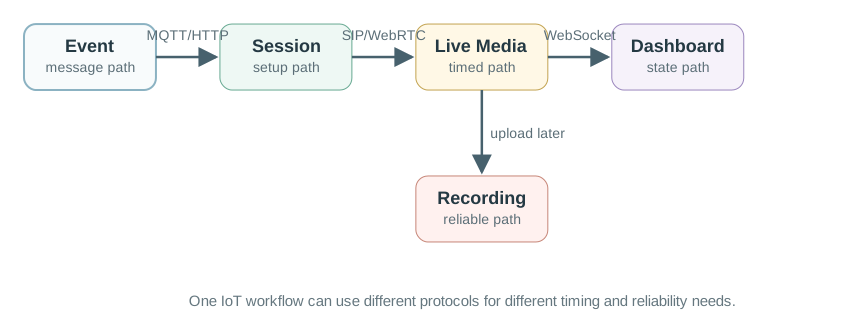
Keep these boundaries clear:
- Notification: message protocol such as MQTT, HTTP callback, or AMQP event.
- Session setup: SIP, WebRTC signaling, RTSP control, or application-specific negotiation.
- Live media: RTP/SRTP, WebRTC media, or another timed media transport.
- Recorded media: reliable upload or retrieval path such as HTTPS or managed storage workflow.
- Control and state: WebSocket, MQTT, HTTP, or CoAP depending on the endpoint and dashboard.
Telephony gateways add a few older names to the same boundary. The PSTN is the traditional circuit-switched phone network. VoIP carries voice over IP networks instead, usually with SIP or another signaling path to set up the session and RTP or SRTP to carry media. An analog telephone adapter, or ATA, is the bridge box that lets an analog handset or fax device join that IP workflow. At the media edge, ADC and DAC stages convert between microphone/speaker analog signals and digital samples; SDP describes session parameters such as codecs and addresses; SCTP can carry ordered data channels in WebRTC; and MSML is a media-server control language used to manipulate audio or video streams. Keep these terms attached to their layer: access device, signaling description, media transport, data channel, or media-server control.
Implementation examples make the same split easier to inspect. An open-source softphone such as Linphone is useful because the repository exposes the objects that own account setup, signaling, media negotiation, calls, video, and messaging instead of hiding them behind a finished app. Treat that code as a map of responsibilities, not as proof that the stack is safe for a device. A deployment still has to decide whether the endpoint is an ATA converting an analog handset, an IP phone attached directly to Ethernet or Wi-Fi, or a computer or mobile softphone, and then prove power behavior, emergency-service assumptions, directory or provisioning support, codec compatibility, and fallback. Peer-to-peer calling systems can also route media or discovery through other clients, so the design record should say when traffic is direct, relayed, or service-mediated. The same openness that made early ARPANET-era VoIP experiments and later user-run services possible also means policy reviews must account for unmanaged softphones, gaming voice channels, or disguised traffic that may bypass ordinary telephone controls.
A hands-on softphone exercise should make those responsibilities visible in settings, not only in source code. Installing a mobile app or a Linux package is just the entry point; the useful review asks which SIP identity and domain are registered, which server and port settings are used, whether media encryption is configured with options such as ZRTP, TLS, or SRTP, which audio and video codecs are enabled, and what debug or advanced options expose call setup failures. Features such as multiple calls, call transfer, conferencing, messaging, file sharing, address-book integration, call history, echo cancellation, low-bandwidth mode, ICE support, push notifications, Bluetooth headset support, and quality-of-service statistics are design choices that must be kept or removed according to the device role.
Mobile SDK examples should still be read through that same split. An Android SIP app might create account credentials with a SipProfile.Builder, hand the profile to SipManager, and then open calls with objects such as SipAudioCall or SipSession. Those names do not change the architecture: the profile is identity and registration evidence, the manager owns signaling behavior, and the audio call or session object should be tied to negotiated codecs, RTP or SRTP media, call-state callbacks, network permissions, and failure logs. A code walkthrough is complete only when it records both ends of the call, the server or peer used for registration, and the fallback behavior when Wi-Fi, NAT traversal, or credentials fail.
For SIP itself, read packets as session-control messages rather than as the call audio. A SIP request is shaped like an HTTP-style message: it has a method, a request URI that names the target SIP resource, a SIP version, headers, and sometimes a body with session details such as SDP. A typical SIP URI looks like sip:user:password@host:port, though production records should avoid storing cleartext secrets. SIP can run over UDP, TCP, or SCTP; common deployments use port 5060 for unencrypted signaling and port 5061 for signaling protected with TLS. The voice or video stream still belongs on RTP or SRTP after the session has been negotiated.
The network elements explain many call failures. A user agent is the endpoint that sends requests and returns responses; in practice it may be an IP phone, a softphone, or a device gateway. A proxy server forwards requests on behalf of clients and can enforce routing, policy, and permissions while moving the request closer to the target user. A registrar accepts REGISTER requests and updates the location service that maps a user’s SIP identity to the current reachable address. A redirect server tells the requester or proxy where to try next instead of forwarding the call itself. A session border controller sits at the boundary to control VoIP signaling during setup, teardown, and inter-domain traversal. A gateway connects the SIP/RTP world to other networks such as the PSTN.
The method names are a useful checklist during troubleshooting. REGISTER binds a user agent to a registrar. INVITE starts a media session. ACK confirms reliable message exchanges. BYE terminates an existing session. CANCEL stops a pending request. OPTIONS asks about capabilities without opening a session. REFER tells a recipient to contact a third party, and PRACK acknowledges provisional responses. Responses should be read by class: provisional responses mean the request is still being processed, success means the action was understood and accepted, redirection points to another completion path, client errors usually mean the request cannot be fulfilled at this server, server errors mean this server failed an apparently valid request, and global failures mean no server can fulfill the request.
8.8 WebRTC and WebSocket Are Different
Both names often appear in browser-based IoT systems, but they solve different problems.
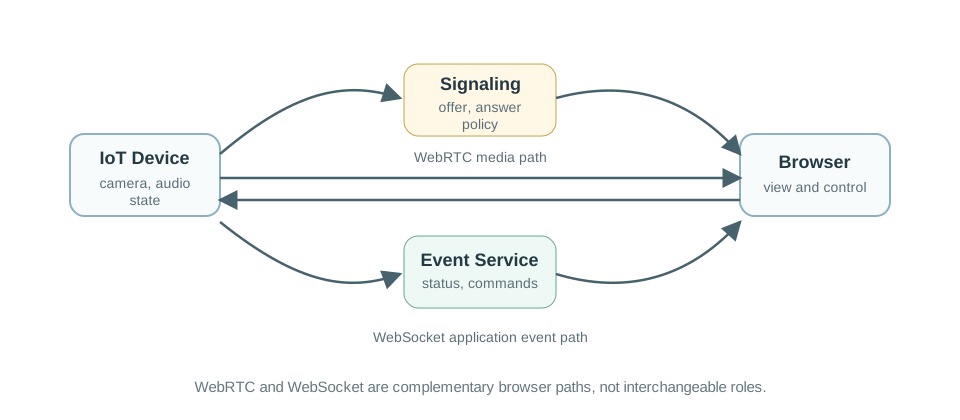
Use WebRTC when the browser needs a secure media session or peer connection behavior. Use WebSocket when the browser needs a persistent bidirectional application channel for events, commands, and state updates. A browser dashboard may use both: WebRTC for live camera/audio and WebSocket for device status, alarms, and operator commands.
8.9 Latency, Jitter, and Loss Review
RTP does not guarantee timely delivery or network quality by itself. The protocol gives receivers information such as sequence numbers and timestamps; the system still needs network design, buffers, codec choices, and monitoring.
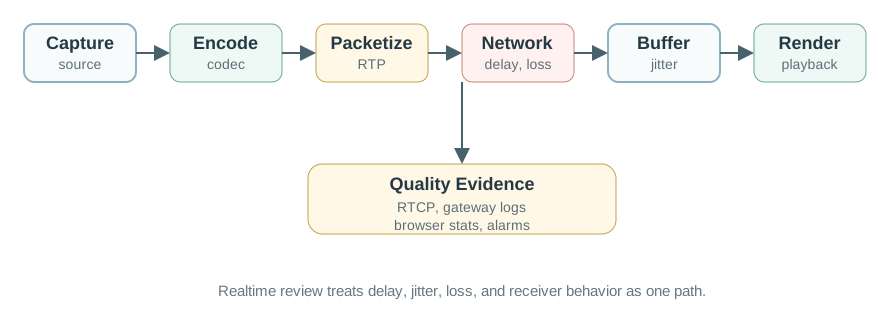
Review the path in terms of:
- Capture and encode: time before packets are available.
- Packetization: frame size, audio interval, and payload format.
- Network delay: one-way delay, routing changes, wireless contention, and gateway queues.
- Jitter: variation in packet arrival that the receiver must smooth.
- Loss and reordering: missing or late packets that affect media continuity.
- Receiver buffer: delay added to make playback stable.
- Reports: RTCP, gateway logs, browser stats, or application telemetry that shows path quality.
For voice or video media, the packet stack is part of the timing budget. Codec frames may be wrapped in RTP, UDP, IP, and link-layer headers before they reach the radio or wire, so small payloads can lose useful goodput to overhead and fragmentation. Robust Header Compression, or ROHC, can reduce repeated IP/UDP/RTP header fields to a few bytes on suitable links, but the evidence record should prove the compressor context, loss behavior, round-trip assumptions, and recovery after silence or reordering rather than quoting a best-case header size. The receiver should also name the synchronization window, not only the average delay: a video stream that trails audio by a small amount can still feel natural, while video that leads audio is noticed much sooner. A review note might therefore set asymmetric bounds, such as keeping video no more than about 80 ms behind audio and no more than about 140 ms ahead of audio. Treat those limits as product evidence beside the RTP sequence numbers, timestamps, jitter buffer, and RTCP quality reports.
8.10 Security Review
Realtime IoT traffic can carry private audio, video, and operational state. Security review must cover signaling, media, identity, authorization, and storage boundaries.
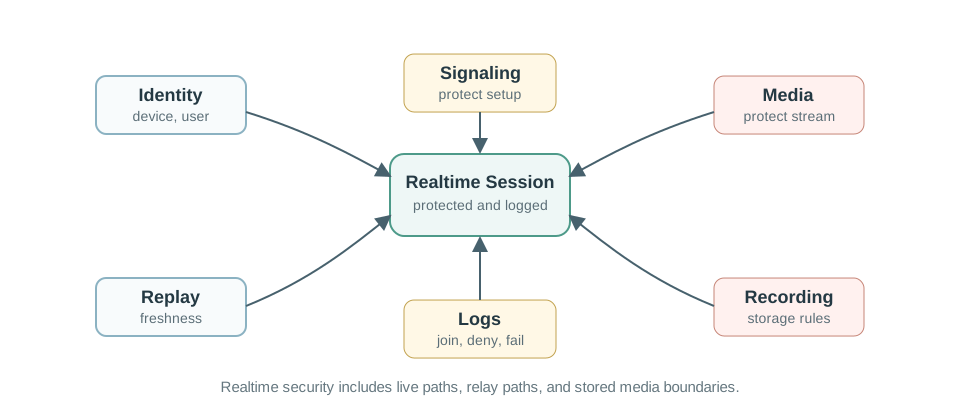
Check:
- Identity: device, gateway, service, browser user, and operator identities.
- Signaling protection: session setup should be protected against interception and tampering.
- Media protection: use protected media transport for sensitive audio or video.
- Authorization: restrict who can start, join, view, record, or control a session.
- Replay control: stale media or commands should not be accepted as current action.
- Fallback: relay paths and degraded modes should preserve policy and logging.
- Recording boundary: live stream rules may differ from stored clip rules.
8.11 Worked Review: Door Station With Live View
A building door station needs a visitor button, live video, two-way audio, status updates, and recorded clips for review. The team wants realtime media without losing reliable notifications.
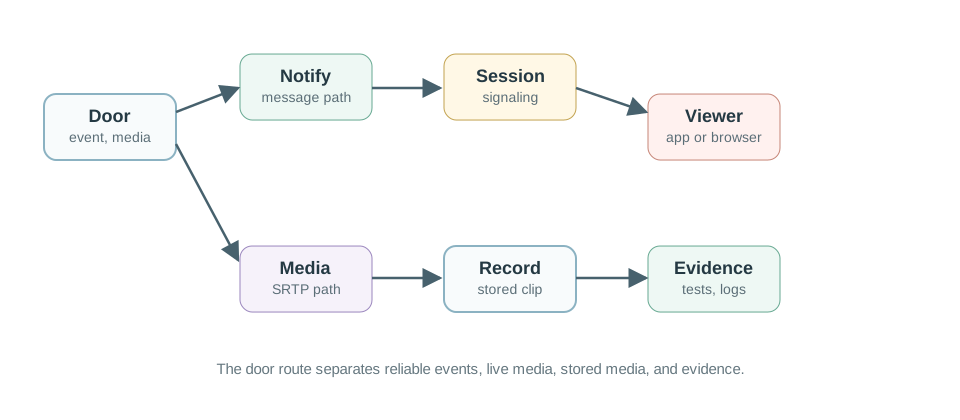
8.11.1 Step 1: Name the Flows
Notification
Visitor Event
A button press or motion event needs reliable delivery to an app, dashboard, or service.
Session
Live Call Setup
The system negotiates participants, media, codecs, permissions, and route.
Media
Audio and Video
Timed packets carry live media while the receiver handles jitter, loss, and synchronization.
Record
Clip Storage
Recorded media uses a reliable storage path with its own retention and access rules.
8.11.2 Step 2: Select Protocol Roles
One defensible route is:
- Notification and device state: MQTT, HTTP, or AMQP event path.
- Browser or app session setup: WebRTC signaling, SIP, or an application signaling service.
- Live media: SRTP or WebRTC media path with quality monitoring.
- Dashboard status: WebSocket or message subscription for current state and control feedback.
- Recorded clip: reliable upload and access-control path.
8.11.3 Step 3: Keep the Evidence Record
Realtime Protocol Evidence Record
Flows: notification, session setup, media, dashboard state, command, and recording.
Timing: target delay, jitter budget, receiver buffer, loss behavior, and degraded mode.
Security: identity, authorization, signaling protection, media protection, relay policy, and storage boundary.
Tests: allowed join, denied join, packet loss, network delay, relay fallback, recording access, and recovery after disconnect.
8.12 Realtime Selection Workflow
Use this workflow before choosing a realtime protocol.
1. Name the live flow Audio, video, control, dashboard state, notification, or recording.
2. Decide the role Signaling, media transport, stream control, browser events, or storage.
3. Set timing needs Delay, jitter, loss tolerance, receiver buffer, and degraded mode.
4. Protect the path Identity, authorization, encrypted signaling, protected media, logs, and relay policy.
5. Prove behavior Test loss, delay, disconnect, reconnection, denied access, and recording access.
8.13 Learning Route
Use this chapter after the application-protocol overview and before worked examples that combine several protocol roles.
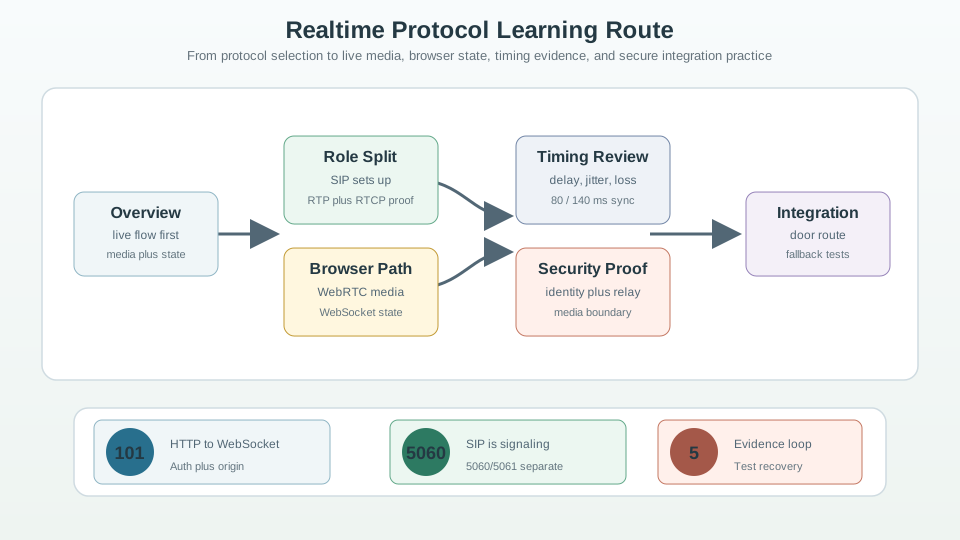
Before
Application Protocols Overview
Review protocol-selection basics before specializing in realtime paths.
Parallel
Application Realtime Chapter
Compare this route with the related realtime chapter in the same module.
Next
Worked Examples
Apply protocol role separation to realistic gateway and media designs.
Later
Security and Transport
Deepen the network and security foundations behind realtime behavior.
8.14 Knowledge Check: Real-Time Protocol Workflows
8.15 Common Pitfalls
Pitfall 1: Calling Every Fast Update Realtime
A live dashboard update, a media session, and deterministic machine control have different timing models. Name the actual deadline and failure behavior.
Pitfall 2: Sending Media Through the Notification Channel
The path that reliably delivers an event is not automatically suitable for live media. Separate notification, session setup, media, and recording flows.
Pitfall 3: Ignoring Jitter
Average delay can look acceptable while arrival variation makes playback unstable. Review jitter, buffers, and loss together.
Pitfall 4: Treating Relay Fallback as Policy-Free
TURN relays, gateways, media servers, and recorders are security boundaries. Include them in authorization, logging, and recovery tests.
8.16 Deep Dive: How “Live” Rides On (and Escapes) HTTP
The roles above describe what each real-time protocol is for. This layered walkthrough shows the mechanism: how a browser or gateway turns an ordinary HTTP request into a live channel with a single 101 Switching Protocols response, and where WebRTC leaves HTTP behind entirely to carry encrypted media.
Plain HTTP is one-shot: a client asks, a server answers, and the exchange ends. Live IoT views need a channel that stays open so state or media can arrive when it changes. Pick the mechanism by direction and payload, not by whether the feature feels “live.”
| Mechanism | Wire model | IoT fit |
|---|---|---|
| Server-Sent Events (SSE) | Ordinary HTTP response kept open as text/event-stream; server-to-client only; reconnects with Last-Event-ID |
Browser alert feeds and status strips that never send commands on the same channel |
| WebSocket | Starts as HTTP GET, upgrades with 101 Switching Protocols, then carries framed full-duplex traffic over one TCP connection |
Interactive control and live state where the browser both watches and sends commands |
| WebRTC | Uses signaling to set up peer media, then carries encrypted SRTP media over UDP with RTCP feedback |
Live camera/audio between capable endpoints; too heavy for a simple sensor reading |
For an IoT review, record the direction, payload type, and failure behavior before naming the protocol. A dashboard status feed can stay on SSE and reuse ordinary HTTP infrastructure. A door-lock console that sends commands while receiving state needs WebSocket and explicit authorization for each command frame. A camera call needs WebRTC because codecs, media timing, NAT traversal, and congestion control are the real requirements.
A WebSocket connection is born as a normal HTTP/1.1 request. The client asks the server to switch protocols on the existing TCP connection:
GET /telemetry HTTP/1.1
Host: gw.example
Upgrade: websocket
Connection: Upgrade
Sec-WebSocket-Key: dGhlIHNhbXBsZSBub25jZQ==
Sec-WebSocket-Version: 13
If the server agrees, it does not return 200 OK. It returns 101 Switching Protocols, meaning “I am changing the protocol on this connection as requested”:
HTTP/1.1 101 Switching Protocols
Upgrade: websocket
Connection: Upgrade
Sec-WebSocket-Accept: s3pPLMBiTxaQ9kYGzzhZRbK+xOo=
Sec-WebSocket-Accept is not random. The server computes base64(SHA-1(Sec-WebSocket-Key + "258EAFA5-E914-47DA-95CA-C5AB0DC85B11")), using the fixed GUID defined by RFC 6455. The client checks this value so a cache or proxy cannot fake the upgrade by echoing headers. After that point, the TCP connection no longer carries HTTP; both ends exchange WebSocket frames, with a small header plus payload, in either direction at any time.
The security review still treats the upgraded channel as application traffic. Use wss:// so TLS protects both the handshake and frames. Validate Origin for browser clients. Authenticate before accepting control messages. Close idle or unauthenticated sockets before they become a fleet-wide resource drain, and rate-limit reconnects because persistent channels often fail together after server restarts.
WebRTC is where real-time media stops looking like HTTP. It splits into a signaling plane that sets the call up and a media plane that carries the encrypted stream. WebRTC deliberately does not standardize signaling; you can carry SDP offer/answer over WebSocket, SIP, or another application channel. Media then flows directly or through a relay.
| Step | Mechanism | What to verify |
|---|---|---|
| Signal | SDP offer/answer over WebSocket, SIP, or another signaling path | Codecs, keys, and candidate addresses are exchanged with authentication |
| Connect | ICE with STUN and TURN | Direct and relayed NAT paths are tested, logged, and authorized |
| Secure | DTLS key exchange for DTLS-SRTP | Media encryption is mandatory and keys are fresh for the session |
| Stream | SRTP plus RTCP, optional SCTP data channel | Media quality, loss, jitter, and fallback behavior are observable |
This is the right stack for a door station live view, but it is a large one: ICE, STUN/TURN, DTLS, SRTP, and congestion control all run on the endpoint. A coin-cell sensor sending one JSON reading gains nothing from it and cannot afford it. Reserve WebRTC for genuine media between capable endpoints, and keep the signaling channel separate from the media path in both the design and the security review.
For every realtime path, keep three records together: the signaling protocol, the media or event transport, and the fallback path. That prevents a “live” feature from hiding unauthenticated commands, overloaded reconnect storms, or unreviewed TURN relay boundaries.
8.17 Summary
Realtime application protocols are useful when IoT systems need live media, current state, or interactive operation. RTP carries timed media and RTCP reports quality. SIP sets up sessions. SRTP protects media. RTSP controls media delivery. WebRTC supports secure browser media paths. WebSocket supports persistent browser application channels. A good design separates protocol roles, sets timing and quality expectations, protects signaling and media, and keeps evidence that the path works under delay, loss, fallback, and disconnect conditions.
8.18 Key Takeaway
Realtime protocol decisions should start from latency, directionality, fan-out, ordering, and recovery needs, then prove that the chosen WebSocket, MQTT, CoAP observe, or streaming pattern can be operated securely.
8.19 External References
- RFC 3550: RTP: Real-time Transport Protocol and RTP Control Protocol.
- RFC 3261: SIP: Session Initiation Protocol for establishing, modifying, and terminating sessions.
- RFC 3711: SRTP: Secure Real-time Transport Protocol.
- RFC 7826: RTSP 2.0: Real-Time Streaming Protocol for setup and control of media delivery.
- RFC 6455: WebSocket: WebSocket protocol for full-duplex application communication.
- W3C WebRTC: Browser API for realtime communication.
- RFC 8445: ICE: Interactive Connectivity Establishment for NAT traversal.
8.20 What’s Next
- Application Protocols Worked Examples: Apply protocol role separation to gateway and media workflows.
- Application Protocols Introduction: Review the broader application-protocol route.
- Application Protocols Overview: Revisit the protocol-selection lens.
- Transport Fundamentals: Review TCP, UDP, latency, jitter, and loss foundations.
- IoT Security Fundamentals: Review security thinking for connected device sessions.
| Previous: Real-Time Protocol Workflows | Next: Application Protocols Worked Examples |