Fundamentals
  • ← All Modules
  1. 2  Core Building Blocks of IoT
Fundamentals
  • 1  Introduction to Fundamentals
  • 2  Core Building Blocks of IoT
  • Ecosystem Overview
    • 3  IoT Ecosystem Fundamentals
  • Data & Number Systems
    • 4  Data Representation Fundamentals
    • 5  Number Systems and Data Units
    • 6  Text Encoding for IoT
    • 7  Bitwise Operations and Endianness
  • Data & Packet Formats
    • 8  IoT Data Formats Overview
    • 9  Binary Data Formats for IoT
    • 10  Data Format Selection Guide
    • 11  Data Formats Practice and Assessment
    • 12  Data Formats for IoT
    • 13  Packet Structure and Framing
    • 14  Packet Anatomy
    • 15  Frame Delimiters and Boundaries
    • 16  Error Detection: Checksums and CRC
    • 17  Protocol Overhead and Encapsulation
  • Signal Processing
    • 18  Sensor to Network Pipeline
    • 19  Pipeline & Signal Acquisition
    • 20  Pipeline Processing and Formatting
    • 21  Pipeline Transmission
    • 22  Signal Processing Essentials
    • 23  Signal Processing Overview
    • 24  Signal Processing Essentials
    • 25  ADC Sampling & Aliasing
    • 26  Aliasing and ADC Resolution
    • 27  Quantization and Digital Filtering
    • 28  Signal Processing Practice and Lab
    • 29  Sensor Dynamics and Linearization
    • 30  Voice and Audio Compression for IoT
    • 31  Signal Processing Labs
  • Wireless Propagation
    • 32  Wireless Propagation Basics
    • 33  Radio Wave Basics for IoT
    • 34  Path Loss and Link Budgets
    • 35  Fading & RF Interference
    • 36  Wireless Propagation Lab
  • Protocol Selection
    • 37  Protocol Selection Framework
    • 38  Protocol Selection Framework
    • 39  Protocol Selection Scenarios
    • 40  Protocol Anti-Patterns
    • 41  Protocol Selection: The Challenge
    • 42  Protocol Selector Wizard
    • 43  Protocol Decision Frameworks
    • 44  Protocol Selection Wizard
    • 45  Protocol Matching Game
    • 46  IoT Architecture Planner
    • 47  Learning Path Generator
  • Academic Resources
    • 48  Paper Reading Guides
    • 49  WSN Papers Guide
    • 50  Paper Guides: Protocols
    • 51  Architecture Papers Guide
    • 52  Paper Reading Guides: IoT Security

On This Page

  • 2.1 Learning Objectives
  • 2.2 Part Overview
  • 2.3 Visual Topic Map
  • 2.4 Learning Paths
  • 2.5 Quick Links to Key Chapters
  • 2.6 Estimated Time to Complete
  • 2.7 Chapter Dependencies
  • 2.8 Common Use Cases
  • 2.9 Key Concepts Summary
  • 2.10 Integration with Other Parts
  • 2.11 What’s Next?
  • 2.12 Statistics & Content Coverage

2  Core Building Blocks of IoT

2.1 Learning Objectives

After completing this part, you will be able to:

  • Convert between binary, hexadecimal, and decimal number systems and construct bitwise operations for IoT data handling
  • Deconstruct packet structures including headers, framing techniques, and error detection mechanisms (CRC, checksums)
  • Apply the Nyquist sampling theorem and justify appropriate ADC resolution for sensor applications
  • Calculate wireless link budgets using free-space path loss models to predict range for IoT deployments
  • Evaluate systematic protocol selection frameworks to recommend between BLE, Zigbee, LoRa, Wi-Fi, and Cellular for specific requirements
In 60 Seconds

The Fundamentals part teaches the core technical skills that underpin all IoT: data representation (binary, hex, encoding), packet structure (headers, framing, CRC), signal processing (ADC, Nyquist, filtering), wireless propagation (path loss, link budgets), and protocol selection (decision trees for BLE vs. Zigbee vs. LoRa vs. Wi-Fi). These 55 chapters give you the vocabulary to work across any IoT domain.

Part Scope (Avoiding Duplicate Hubs)

This part focuses on core technical primitives and engineering reasoning.

  • Use Learning Hubs for cross-topic navigation, study loops, and remediation workflows.
  • Use this part when you need deep foundations that transfer across protocols, domains, and architectures.
  • Use hubs to reinforce these chapters with quizzes, simulations, labs, videos, and games.

2.2 Part Overview

The Fundamentals part teaches the core technical skills that underpin ALL IoT systems, regardless of application domain or architecture. You’ll learn how sensors convert physical phenomena to digital bits, how those bits become packets traveling over wireless links, and how to choose the right protocol for your constraints. These 55 chapters cover 6 major topic clusters: data representation, packet structure, sensor pipelines, signal processing, wireless propagation, and protocol selection.

Why Fundamentals Matter: You can’t debug a LoRaWAN message if you don’t understand hexadecimal. You can’t choose between Wi-Fi and Zigbee without knowing link budgets. You can’t read sensor datasheets without signal processing basics. This part provides the vocabulary and mental models that make advanced topics comprehensible - skipping fundamentals leads to months of frustration when real systems fail.

Key Takeaway

In one sentence: IoT fundamentals teach the 3-step data journey from physical world to cloud - sensing converts phenomena to analog voltages, ADCs digitize to binary at sampling rates obeying Nyquist theorem, and packets frame those bits with headers/error-checking for wireless transmission where path loss follows inverse-square law.

Remember this rule: Every IoT system performs the same core operations (sense → digitize → packetize → transmit) - mastering these fundamentals lets you work across ALL protocols and architectures, while protocol-specific knowledge becomes obsolete within 5-7 years.

No-One-Left-Behind Fundamentals Loop
  1. Learn one concept deeply (not five concept names shallowly).
  2. Validate with one calculation, one packet example, or one protocol decision.
  3. Reinforce with one quiz/simulation/lab activity.
  4. Capture one design rule before moving to the next chapter.

2.3 Visual Topic Map

The Fundamentals part consists of 6 major topic clusters:

2.3.1 📊 Data Representation (8 chapters)

Master how IoT systems encode information as binary: - Number Systems: Binary, decimal, hexadecimal conversion - Text Encoding: ASCII, Unicode, UTF-8 for messages - Bitwise Operations: AND, OR, XOR, shifts, masks - Data Formats: JSON vs CBOR vs binary protocols - Selection Guide: When to use text vs binary encoding

⏱️ ~12 hours total | 🎯 Read datasheets, debug packets Start: Data Representation

2.3.2 📦 Packet Structure & Framing (6 chapters)

Understand how data becomes network packets: - Packet Anatomy: Headers, payload, footers, addressing - Framing Techniques: Byte stuffing, length prefixes, delimiters - Error Detection: CRC, checksums, parity bits - Protocol Overhead: How much bandwidth do headers consume? - Interactive Tools: Payload Builder, Binary-Hex Converter

⏱️ ~8 hours total | 🎯 Design efficient protocols Start: Packet Structure

2.3.3 🔄 Sensor-to-Network Pipeline (4 chapters)

Trace data from physical sensor to network packet: - Pipeline Overview: 5 stages from sensing to transmission - Signal Conditioning: Amplification, filtering, linearization - Data Processing: Calibration, averaging, threshold detection - Transmission Preparation: Packetization, compression, encryption

⏱️ ~6 hours total | 🎯 End-to-end system design Start: Sensor Pipeline

2.3.4 🌊 Signal Processing (11 chapters)

Master ADC fundamentals and sampling theory: - ADC Basics: Resolution, sampling rate, quantization noise - Nyquist Theorem: Why sample at 2× maximum signal frequency - Aliasing: What happens when sampling too slow - Filtering: Anti-aliasing, moving average, exponential smoothing - Linearization: Convert raw ADC counts to engineering units - Interactive Tools: ADC Visualizer, Sampling Simulator, Formula Calculator

⏱️ ~18 hours total | 🎯 Read sensor specs, choose ADCs Start: Signal Processing Index

2.3.5 📡 Wireless Propagation (5 chapters)

Understand RF fundamentals for range estimation: - Radio Basics: Frequency, wavelength, antennas, polarization - Path Loss Models: Free-space path loss (FSPL), log-distance - Fading & Interference: Multipath, shadowing, co-channel - Link Budget: Calculate max range from TX power + RX sensitivity - Practical Labs: Fresnel zones, materials impact, range calculator

⏱️ ~10 hours total | 🎯 Plan deployments, debug coverage Start: Wireless Propagation

2.3.6 🎯 Protocol Selection Framework (10 chapters)

Choose the right protocol for your requirements: - Decision Trees: Match protocols to range/power/rate constraints - Trade-off Analysis: BLE vs Zigbee vs LoRa vs Wi-Fi vs Cellular - Anti-patterns: 12 common protocol selection mistakes - Scenario Practice: 20 real-world selection challenges - Interactive Tools: Protocol Selector Wizard, Comparison Matrix

⏱️ ~14 hours total | 🎯 Architecture decisions Start: Protocol Selection Framework

2.3.7 🛠️ Interactive Decision Tools (6 chapters)

Hands-on practice with selection frameworks: - Protocol Selector Wizard: Multi-criteria decision tool - Architecture Planner: System design assistant - Learning Path Generator: Personalized curriculum builder

⏱️ ~4 hours total | 🎯 Quick decisions Start: Protocol Selector

2.3.8 📚 Paper Reading Guides (5 chapters)

Study seminal IoT research papers with guided questions: - WSN Foundations: Akyildiz (2002), Yick (2008) - IoT Surveys: Atzori (2010), Gubbi (2013) - Protocol Standards: Al-Fuqaha (2015), Bormann (2012) CoAP - Security: Roman (2013), Sicari (2015)

⏱️ ~8 hours total | 🎯 Academic depth Start: Paper Reading Guides

Knowledge Check: IoT Fundamentals Concepts


2.4 Learning Paths

2.4.1 Beginner → Intermediate → Advanced Progression

2.4.2 🟢 Beginner Path (2-3 weeks, ~18 hours)

Goal: Understand core concepts without deep math

Week 1: Data & Packets (6 hours) - Data Representation - Binary, hex, ASCII basics - Try: Binary-Hex Converter (15 min) - Packet Anatomy - Headers, payloads, CRC - Try: Payload Builder (20 min) - Quiz: Data Representation fundamentals (10 questions)

Week 2: Sensing & Signals (6 hours) - Sensor Pipeline Overview - 5-stage pipeline - ADC Fundamentals - Resolution & sampling - Try: ADC Resolution Visualizer (15 min) - Watch: “Understanding ADC Specs” video (12 min) - Quiz: Signal processing basics (8 questions)

Week 3: Protocols & Range (6 hours) - Wireless Radio Basics - Frequency, antennas - Try: Wireless Range Calculator (15 min) - Protocol Framework Challenge - Decision practice - Try: Protocol Wizard Interactive (20 min) - Quiz: Protocol selection (12 questions)

Outcome: Can read sensor datasheets, understand packet captures, explain why BLE has shorter range than LoRa

2.4.3 🟡 Intermediate Path (4-5 weeks, ~35 hours)

Goal: Apply fundamentals to design decisions

Phase 1: Deep Data Skills (2 weeks, 14 hours) - Data Formats Overview + Selection Guide - Bitwise Operations - Masks, shifts, flags - Packet Framing + Error Detection - Protocol Overhead - Efficiency analysis - Lab: Build custom packet parser in Python (2 hours) - Quiz: Advanced data formats (15 questions)

Phase 2: Signal Processing Mastery (1.5 weeks, 11 hours) - Signal Processing Essentials - Quantization & Filtering - Linearization Practice - Aliasing & ADC - Try: Sampling Visualizer (30 min) - Lab: Calibrate temperature sensor with 3-point curve (1.5 hours)

Phase 3: Protocol Selection (1.5 weeks, 10 hours) - Systematic Framework - Anti-patterns - 12 mistakes - 20 Scenarios - Practice decisions - Wireless Propagation Labs - Complete: Protocol Selector Wizard (45 min) - Case study: Design network for 50-acre farm (2 hours)

Outcome: Can design IoT systems from requirements, justify protocol choices with calculations, debug signal quality issues

2.4.4 🔴 Advanced Path (3-4 weeks, ~28 hours)

Goal: Master production-grade design and research

Phase 1: Research Foundations (1 week, 8 hours) - Read: Paper Guides - WSN - Akyildiz, Yick papers - Read: Paper Guides - Protocols - Al-Fuqaha, Bormann - Analyze: 3 seminal papers with guided questions (6 hours) - Write: Summary comparing WSN vs modern IoT evolution (2 hours)

Phase 2: Advanced Signal Processing (1 week, 10 hours) - Signal Processing Overview - Complete theory - Voice Compression - Codec tradeoffs - Sensor Dynamics - Response time, settling - Complete: Signal Processing Labs (3 labs, 4 hours) - Project: Design ADC selection for 6-channel data logger (2 hours)

Phase 3: Production Design (2 weeks, 10 hours) - Wireless Fading & Interference - Path Loss & Link Budget - Calculate: Link budgets for 3 different scenarios (2 hours) - Protocol Wizard Game - Expert mode - Capstone: Design 200-device industrial network with full justification (4 hours)

Outcome: Ready for IoT architect roles, can review technical designs, lead protocol standardization discussions


2.5 Quick Links to Key Chapters

2.5.1 Most Important Topics

🔥 Must-Read Chapters

  1. Data Representation - Binary, hex, ASCII fundamentals
  2. Packet Anatomy - Headers, payloads, addressing
  3. ADC Fundamentals - Resolution, sampling, quantization
  4. Wireless Radio Basics - Frequency, antennas, path loss
  5. Protocol Framework Systematic - Selection methodology

🎮 Best Interactive Tools

  • Binary-Hex Converter - Practice number conversion
  • Payload Builder - Design custom packets
  • ADC Resolution Visualizer - See quantization effects
  • Sampling Visualizer - Understand Nyquist theorem
  • Wireless Range Calculator - Link budget tool
  • Protocol Selector Wizard - Multi-criteria decision support

📊 Common Calculations

Interactive Calculators

Show code
viewof adcBits = Inputs.range([8, 24], {value: 12, step: 1, label: "ADC Bits:"})
viewof vref = Inputs.range([1, 5], {value: 3.3, step: 0.1, label: "Vref (V):"})

adcLevels = Math.pow(2, adcBits)
voltsPerCount = vref / adcLevels

html`<div style="background: #E8F4F8; padding: 15px; border-left: 4px solid #16A085; margin: 10px 0;">
  <strong style="color: #2C3E50;">ADC Resolution</strong><br/>
  <span style="color: #E67E22; font-size: 1.1em;">${adcBits}-bit ADC → ${adcLevels.toLocaleString()} levels → ${voltsPerCount.toFixed(6)} V/count</span><br/>
  <span style="color: #7F8C8D; font-size: 0.9em;">Precision: ±${(100/adcLevels).toFixed(4)}%</span>
</div>`
Show code
viewof signalFreq = Inputs.range([1, 1000], {value: 50, step: 1, label: "Signal Frequency (Hz):"})

nyquistRate = signalFreq * 2
recommendedRate = signalFreq * 2.5

html`<div style="background: #E8F4F8; padding: 15px; border-left: 4px solid #E67E22; margin: 10px 0;">
  <strong style="color: #2C3E50;">Nyquist Sampling</strong><br/>
  <span style="color: #16A085; font-size: 1.1em;">Signal: ${signalFreq} Hz → Sample at ≥ ${nyquistRate} Hz</span><br/>
  <span style="color: #7F8C8D; font-size: 0.9em;">Recommended: ${recommendedRate} Hz (2.5× for anti-aliasing margin)</span>
</div>`
Show code
viewof distance = Inputs.range([0.01, 100], {value: 1, step: 0.1, label: "Distance (km):"})
viewof frequency = Inputs.range([100, 6000], {value: 2400, step: 100, label: "Frequency (MHz):"})

fspl = 20 * Math.log10(distance) + 20 * Math.log10(frequency) + 32.45

html`<div style="background: #E8F4F8; padding: 15px; border-left: 4px solid #9B59B6; margin: 10px 0;">
  <strong style="color: #2C3E50;">Free-Space Path Loss</strong><br/>
  <span style="color: #E67E22; font-size: 1.1em;">FSPL = ${fspl.toFixed(2)} dB</span><br/>
  <span style="color: #7F8C8D; font-size: 0.9em;">Distance: ${distance} km, Frequency: ${frequency} MHz</span><br/>
  <span style="color: #7F8C8D; font-size: 0.8em;">Formula: 20×log₁₀(d) + 20×log₁₀(f) + 32.45</span>
</div>`
Show code
viewof txPower = Inputs.range([-10, 30], {value: 20, step: 1, label: "TX Power (dBm):"})
viewof txGain = Inputs.range([0, 20], {value: 2, step: 1, label: "TX Antenna Gain (dBi):"})
viewof rxGain = Inputs.range([0, 20], {value: 2, step: 1, label: "RX Antenna Gain (dBi):"})
viewof pathLoss = Inputs.range([40, 150], {value: 100, step: 1, label: "Path Loss (dB):"})
viewof margin = Inputs.range([0, 20], {value: 10, step: 1, label: "Fade Margin (dB):"})

rxPower = txPower + txGain - pathLoss + rxGain - margin

html`<div style="background: #E8F4F8; padding: 15px; border-left: 4px solid #E74C3C; margin: 10px 0;">
  <strong style="color: #2C3E50;">Link Budget</strong><br/>
  <span style="color: #16A085; font-size: 1.1em;">RX Power = ${rxPower.toFixed(1)} dBm</span><br/>
  <span style="color: #7F8C8D; font-size: 0.9em;">${txPower} + ${txGain} - ${pathLoss} + ${rxGain} - ${margin} = ${rxPower.toFixed(1)} dBm</span><br/>
  <span style="color: ${rxPower >= -90 ? '#16A085' : '#E74C3C'}; font-size: 0.9em; font-weight: bold;">
    ${rxPower >= -90 ? '✓ Link viable (RX > -90 dBm)' : '✗ Link may fail (RX < -90 dBm)'}
  </span>
</div>`

Formula Reference

  • Hex to Decimal: 0xA3 = (10 × 16¹) + (3 × 16⁰) = 163
  • ADC Resolution: 12-bit ADC → 4096 levels → (Vref / 4096) volts per count
  • Nyquist Rate: Sample at ≥ 2× max signal frequency to avoid aliasing
  • Free-Space Path Loss: FSPL(dB) = 20×log₁₀(d) + 20×log₁₀(f) + 32.45 (d in km, f in MHz)
  • Link Budget: RX power = TX power + TX gain - path loss + RX gain - margin

🎓 Study Resources

  • Data Formats Practice - Conversion exercises
  • Protocol Anti-patterns - 12 mistakes to avoid
  • Signal Processing Labs - Hands-on ADC exercises
  • Wireless Practical Lab - Range measurements
  • Formula Calculator - All equations in one tool

2.6 Estimated Time to Complete

2.6.1 By Learning Path

Path Chapters Time Range Outcome
Beginner 15 core chapters 18-25 hours Read datasheets, explain concepts
Intermediate 30+ chapters 35-45 hours Design systems, justify decisions
Advanced All 55 chapters 55-70 hours Production-grade design, research

2.6.2 By Topic Cluster

Cluster Chapters Time Estimate Key Skill
Data Representation 8 10-14 hours Hex/binary fluency
Packet Structure 6 6-9 hours Protocol analysis
Sensor Pipeline 4 5-7 hours System thinking
Signal Processing 11 16-22 hours ADC selection
Wireless Propagation 5 8-12 hours Range planning
Protocol Selection 10 12-16 hours Architecture decisions
Decision Tools 6 3-5 hours Quick choices
Paper Reading 5 6-10 hours Research depth

2.6.3 Time Breakdown by Activity

Activity Quantity Time per Unit Total Range
Reading chapters 55 chapters 30-60 min 27-55 hours
Interactive tools 8 tools 15-30 min 2-4 hours
Quizzes ~50 questions 2-3 min 2-3 hours
Labs & practice 15 exercises 20-45 min 5-11 hours
Paper reading 5 papers 1-2 hours 5-10 hours
Capstone projects 2-3 projects 2-4 hours each 6-12 hours

2.6.4 Recommended Pacing

Sustainable Study Schedule

Option 1: Intensive (Full-Time Study)

  • Week 1: Data Representation + Packet Structure (20 hours)
  • Week 2: Signal Processing deep dive (22 hours)
  • Week 3: Wireless + Protocol Selection (20 hours)
  • Week 4: Labs, papers, integration (18 hours)
  • Total: 4 weeks @ 20 hours/week = 80 hours

Option 2: Part-Time (Evenings/Weekends)

  • 6 weeks @ 10 hours/week: Beginner + Intermediate paths
  • 12 weeks @ 5 hours/week: All chapters + deep practice
  • 20 weeks @ 3 hours/week: Comprehensive mastery with research

Option 3: Modular (Pick Topics)

  • Data + Packets only: 2 weeks @ 8 hours/week = 16 hours
  • Signal Processing only: 2.5 weeks @ 8 hours/week = 20 hours
  • Protocol Selection only: 2 weeks @ 8 hours/week = 16 hours

2.7 Chapter Dependencies

2.7.1 Prerequisite Map

Fundamentals prerequisite map
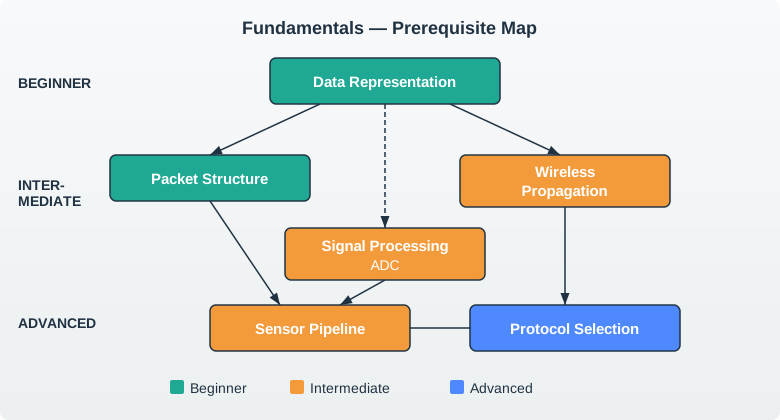
Figure 2.1: Prerequisite map showing the dependency chain from Data Representation through to Protocol Selection

Reading Order:

  1. Start Here (Beginner): Data Representation → Packet Structure
  2. Then (Intermediate): Signal Processing → Sensor Pipeline → Wireless Propagation
  3. Finally (Advanced): Protocol Selection Framework → Paper Reading Guides

Flexible Topics (can read anytime after Data Representation): - Interactive Decision Tools (use as needed) - Formula Calculator (reference tool) - Paper Reading Guides (academic track)


2.8 Common Use Cases

2.8.1 “I need to…”

📖 Read a Sensor Datasheet → Start: Data Representation (hex notation) → Then: ADC Fundamentals (resolution specs) → Finally: Sensor Dynamics (response time) ⏱️ 3-4 hours

🔍 Debug a Protocol with Wireshark → Start: Packet Anatomy (header structure) → Then: Data Formats Binary (encoding types) → Finally: Error Detection (validate CRC) ⏱️ 2-3 hours

📡 Estimate Wireless Range → Start: Wireless Radio Basics (frequency & antennas) → Then: Path Loss & Link Budget (FSPL formula) → Try: Wireless Range Calculator ⏱️ 2-3 hours

🎯 Choose Between BLE and Zigbee → Start: Protocol Framework Systematic (decision tree) → Then: Protocol Scenarios (practice cases) → Try: Protocol Selector Wizard ⏱️ 2-3 hours

⚙️ Select an ADC for My Design → Start: ADC Fundamentals (resolution vs speed) → Then: Quantization & Filtering (noise analysis) → Finally: Signal Processing Labs (hands-on sizing) ⏱️ 3-5 hours

📦 Design a Custom Protocol → Start: Packet Anatomy + Packet Framing → Then: Protocol Overhead (efficiency) → Try: Payload Builder (design interactively) ⏱️ 4-6 hours


2.9 Key Concepts Summary

2.9.1 The Big Ideas

🔢 Number Systems Rule Every value in IoT is ultimately binary (0/1). Hex notation (0x) is compact: each hex digit = 4 binary bits. Example: 0xA3 = 10100011 binary = 163 decimal.

Why it matters: Sensor datasheets use hex register addresses. Protocol specs show hex opcodes. Wireshark displays hex packet dumps.

📊 Nyquist Sampling Theorem Sample at ≥ 2× the highest signal frequency to avoid aliasing. For 50 Hz signal → sample at ≥100 Hz (100 samples/second).

Why it matters: Under-sampling causes high frequencies to “fold back” as false low frequencies, corrupting your data permanently.

📡 Path Loss = Range Killer RF signal strength drops with distance squared (inverse-square law). Double the distance → ¼ the power received. FSPL(dB) = 20×log₁₀(d) + 20×log₁₀(f) + 32.45.

Why it matters: This equation determines max range. If link budget doesn’t close (RX power < sensitivity), your IoT device won’t work.

📦 Headers Steal Bandwidth MQTT over TCP/IP/Ethernet: 54-byte headers + your payload. For 10-byte sensor reading → 84% overhead! CoAP over UDP: only 20-byte headers → 67% overhead. Binary protocols beat JSON by 3-5×.

Why it matters: Battery-powered sensors can’t afford to transmit 80% overhead on every packet. Protocol choice impacts battery life directly.

🎯 No Universal Best Protocol BLE: 10-100m, 1 Mbps, complex stack. Zigbee: 100m mesh, 250 kbps, moderate complexity. LoRa: 15 km, 300 bps, simple. Wi-Fi: 50m, 54+ Mbps, power-hungry. Cellular: global, Kbps-Mbps, expensive.

Why it matters: Every protocol makes trade-offs. Your requirements (range, battery, cost, data rate) determine which trade-off is acceptable.

⚙️ ADC Resolution = Precision 8-bit ADC: 256 levels (±0.4% precision). 12-bit: 4096 levels (±0.024%). 16-bit: 65,536 levels (±0.0015%). More bits = finer measurements but slower conversion and higher cost.

Why it matters: Reading body temperature (±0.1°C) needs 12+ bits. Reading room temperature (±1°C) can use 8-10 bits. Over-spec wastes money and power.


2.10 Integration with Other Parts

2.10.1 How Fundamentals Connect

Fundamentals integration map
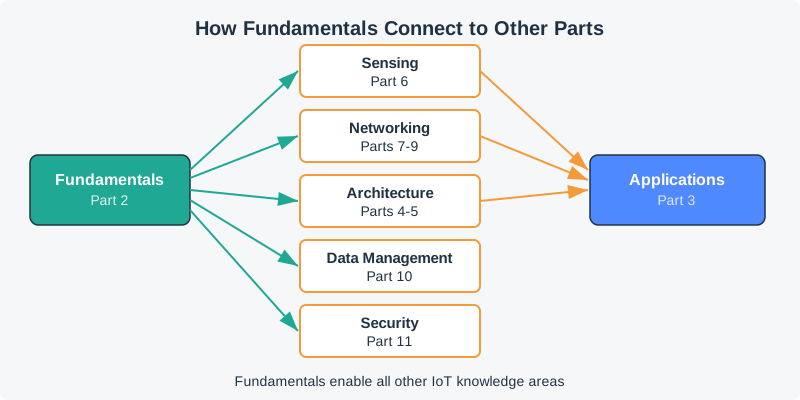
Figure 2.2: How Fundamentals connect to Sensing, Networking, Architecture, Data Management, Security, and Applications

Fundamentals enable:

  • Sensing (Part 6): ADC skills → read sensor specs, understand calibration curves
  • Networking (Parts 7-9): Packet structure → parse protocol headers (MQTT, CoAP, BLE)
  • Architecture (Parts 4-5): Protocol selection → choose tech stack for edge/fog/cloud
  • Data Management (Part 10): Data formats → optimize payload encoding (JSON vs CBOR)
  • Security (Part 11): Bitwise ops → understand encryption flags, access control bits

Applications (Part 3) require: Fundamentals + domain knowledge (Sensing, Networking, Architecture)


2.11 What’s Next?

2.11.1 Recommended Continuation

After Completing Fundamentals

Next Part Options:

Option A - Go Deep on Hardware: → Sensing & Actuation (Part 6) - Apply ADC knowledge to real sensors (temperature, motion, light) - Learn actuator control (motors, servos, relays) - Build complete sensor-to-actuator systems ⏱️ ~30 hours | 🎯 Hardware prototyping

Option B - Master Protocols: → Networking Fundamentals (Part 7) → Short-Range Protocols (Part 8) - Deep dive into BLE, Zigbee, Wi-Fi, Thread - Apply packet structure knowledge to real protocols - Design mesh networks and gateway systems ⏱️ ~60 hours | 🎯 Protocol expertise

Option C - Design Systems: → Architecture Foundations (Part 4) - Apply protocol selection to reference architectures - Learn enablers, standards, communication models - Design production IoT systems ⏱️ ~90 hours | 🎯 System architecture

Option D - Build Applications: → Applications & Use Cases (Part 3) - Apply fundamentals to real-world domains - Understand business models and monetization - Explore industry 4.0 and IIoT ⏱️ ~35 hours | 🎯 Domain expertise

2.11.2 Continue Learning

Within Fundamentals (if not complete): - Use Tool Discovery Hub - Find the right simulator for each fundamentals concept - Complete Paper Reading Guides - Academic foundations - Master Signal Processing Labs - Deep ADC skills - Add reinforcement rounds in IoT Games Hub

Cross-Part Projects:

  • Project 1: Design smart agriculture sensor node
    • Fundamentals (ADC, protocol selection) + Sensing (soil moisture) + Networking (LoRaWAN)
  • Project 2: Build BLE beacon tracker
    • Fundamentals (packet parsing) + Networking (BLE advertising) + Data (RSSI-based location)
  • Project 3: Create energy-aware mesh network
    • Fundamentals (link budget) + Architecture (WSN routing) + Design (duty cycling)

2.12 Statistics & Content Coverage

2.12.1 📚 Chapter Count

  • 55 total chapters
  • 8 on data representation
  • 11 on signal processing
  • 10 on protocol selection
  • 6 interactive decision tools

2.12.2 Interactive Tools

  • 8 OJS animations/tools
  • 50+ inline quiz questions
  • 15 hands-on lab exercises
  • 5 seminal paper guides

2.12.3 Study Time

  • Beginner: 18-25 hours
  • Intermediate: 35-45 hours
  • Advanced: 55-70 hours
  • Mastery: 80+ hours with projects

2.12.4 Skills

Master 6 core skill areas: - Data encoding (binary/hex) - Packet structure analysis - ADC/sampling selection - Range estimation (RF) - Protocol selection decisions - Research paper analysis

Knowledge Check: Protocol Selection

Matching Quiz: Fundamentals Concepts and Their Definitions

Ordering Quiz: IoT Data Journey from Sensor to Cloud


Previous Current Next
Learning Hubs Core Building Blocks of IoT Applications & Use Cases

About This Index Page

This landing page serves as the navigation hub for Part 2: Fundamentals. For detailed content, click individual chapter links. All figures use IEEE color scheme: navy (#2C3E50), teal (#16A085), orange (#E67E22).

Last Updated: January 2026 | Chapters: 55 | Estimated Completion: 18-70 hours depending on depth

For Kids: Meet the Sensor Squad!

Welcome to the IoT Fundamentals adventure! Meet your guides:

Sammy the Sensor can detect temperature, light, motion, and more! “I’m the eyes and ears of IoT – I sense the world around me!”

Max the Microcontroller is the brain. “I take what Sammy senses and turn it into numbers that computers understand. Binary, hexadecimal – I speak all the number languages!”

Lila the LED lights up to show what’s happening. “I help you see and debug. When something goes wrong, I blink to tell you!”

Bella the Battery keeps everyone running. “I’m the energy source! The smarter the team works (shorter messages, less radio time), the longer I last!”

In this part, you’ll learn:

  1. Number Languages – How computers count in binary (0s and 1s) and hex (0-F)
  2. Packing Data – How sensor readings get wrapped up in packets like letters in envelopes
  3. Sending Signals – How radio waves carry data through the air (and why walls block them!)
  4. Choosing Protocols – How to pick the right way to communicate (like choosing between texting, calling, or sending mail)

Ready to start? Follow the Squad through each chapter!
🏷️ Label the Diagram

Code Challenge

1  Introduction to Fundamentals
3  IoT Ecosystem Fundamentals