CoAP’s Observe extension enables server-push notifications that save 99% energy compared to HTTP polling: a client registers interest in a resource, and the server sends notifications only when the value changes. Key implementation details include sequence number ordering with 24-bit wraparound, conditional observe to suppress notifications below a threshold, and NAT timeout handling where clients must re-register before the NAT mapping expires.
57.1 Learning Objectives
By the end of this chapter, you will be able to:
Implement CoAP Observe: Set up server-push notifications for real-time sensor monitoring
Apply Sequence Number Algorithms: Correctly process notification ordering and 24-bit wraparound using modular arithmetic
Configure Observe Subscriptions: Register, maintain, and deregister Observe relationships on constrained devices
Calculate Energy Savings: Quantify and compare the power consumption of Observe versus polling strategies
Diagnose NAT Timeout Failures: Identify and resolve common firewall/NAT timeout problems in production deployments
Distinguish CON from NON Messages: Select the appropriate message type based on reliability and energy trade-offs
Key Concepts
CoAP: Constrained Application Protocol — REST-style request/response protocol using UDP instead of TCP
Confirmable Message (CON): Requires ACK from recipient — provides reliable delivery over UDP at the cost of one roundtrip
Observe Option: CoAP extension enabling publish/subscribe: client registers to receive notifications on resource changes
Block-wise Transfer: Fragmentation mechanism for transferring payloads larger than a single CoAP datagram
Token: Client-generated value matching responses to requests — enables concurrent request/response pairing
DTLS: Datagram TLS — CoAP’s security layer providing encryption and authentication over UDP
57.2 For Beginners: CoAP Observe Patterns
The CoAP Observe extension lets a client subscribe to a resource and get automatic updates when its value changes, like following a social media account that notifies you of new posts. For IoT, this means a dashboard can automatically receive new temperature readings without constantly asking the sensor for updates.
The Observe pattern is CoAP’s killer feature for IoT, enabling server-push notifications without persistent connections. This provides 99% energy savings compared to HTTP polling:
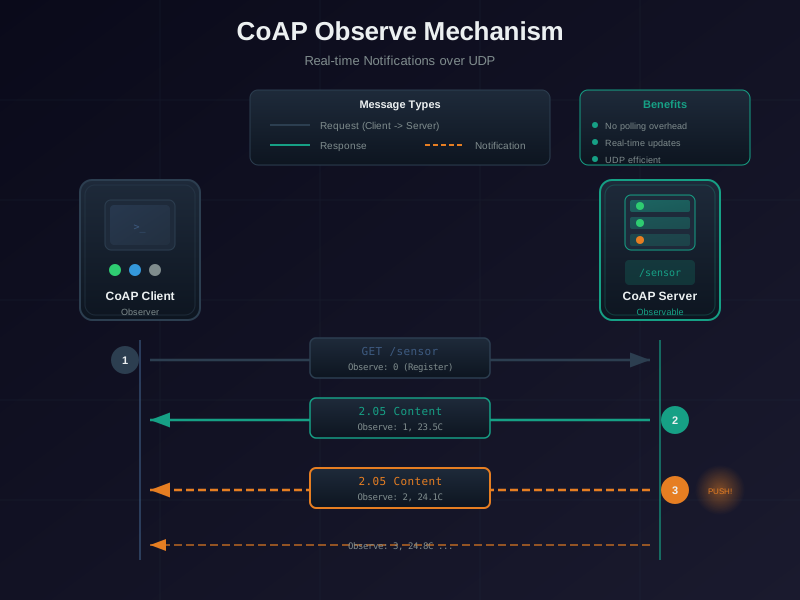
Figure 57.1: CoAP Observe server-push notifications with 99% energy savings
CoAP Observe mechanism demonstrating server-push notifications with 99% energy savings versus client polling. Phase 1 - Registration (one-time 3 mJ cost): Client sends single CON GET request with Observe: 0 option header to register interest in /temp resource. Server responds with ACK 2.05 Content containing initial temperature value (22C) and Observe sequence number 42. Subscription now established - client doesn’t send further requests. Phase 2 - Autonomous Notifications (2.5 mJ each): When sensor detects temperature change to 23C, server autonomously pushes CON notification with Observe: 43 and new value, without waiting for client request. Client sends ACK to confirm receipt. Server continues pushing notifications for each change (24C with Observe: 44), maintaining incrementing sequence numbers. Client compares sequence numbers to detect out-of-order delivery caused by network reordering - if received seq < last_seen_seq, discard as stale. Zero client polling overhead, zero network bandwidth waste, instant 0-latency updates when data changes. Phase 3 - Deregistration (clean termination): Client sends RST message in response to notification to explicitly stop subscription, or alternatively sends GET with Observe: 1 to formally deregister. Server removes observation from active list, stops sending notifications. Server also implements 24-hour timeout to automatically clean up stale observations if client disappears.
57.5 Observe Performance Analysis
Scenario: Temperature monitoring over 24 hours, sensor updates every 5 minutes (288 actual changes)
Conditional Observe only sends notifications when the value changes by more than a specified threshold. This dramatically reduces message overhead for noisy sensors or when small fluctuations don’t matter. Adjust the threshold to find the optimal balance between data fidelity and energy efficiency.
Putting Numbers to It
CoAP Observe’s energy advantage becomes critical for battery-powered sensors. Let’s calculate the impact:
CoAP Observe (temperature changes 288 times/day, CON notifications): - Registration: 1 CON GET with Observe: 0 = 3 mJ (once) - Each CON notification round-trip: server transmit (1.5 mJ) + client ACK (1.5 mJ) ÷ 2 parties ≈ 2.5 mJ system average per notification - Daily energy: \(3 + 288 \times 2.5 = 3 + 720 = 723\) mJ total system energy
Energy ratio (system-wide):\[\frac{86{,}400}{723} \approx 120\times \text{ improvement}\]
Battery life (CR2032, 225 mAh @ 3V = 2,430 J = 2,430,000 mJ):
Adjust the polling interval and notification frequency above to see how CoAP Observe dramatically reduces energy consumption compared to CoAP CON polling. Note: HTTP polling costs even more (~30 mJ per request vs 3 mJ for CoAP CON) due to TCP connection setup and header overhead. Even against the more efficient CoAP CON baseline, Observe still achieves 99%+ energy savings when sensor updates are infrequent.
57.6 Common Pitfalls and Solutions
57.6.1 NAT/Firewall Timeout Issues
Problem: NAT/firewall closes UDP port after 60-120 seconds of inactivity
Solution: Client re-registers every 5 minutes to refresh port mapping
Problem: Notifications arrive out-of-order due to network reordering
Solution: Check Observe sequence numbers; discard if seq# < last_received
Problem: Server doesn’t know client lost power/restarted
Solution: Server implements 24-hour timeout; cleans up stale observations
Problem: Battery drains fast with frequent notifications
Solution: Use conditional observe (only notify on significant changes >0.5C)
Pitfall: Ignoring NAT/Firewall Timeouts with CoAP Observe
The Mistake: Developers implement CoAP Observe for real-time sensor monitoring but don’t account for NAT/firewall UDP session timeouts. After 60-300 seconds of inactivity, the NAT mapping expires and server notifications can no longer reach the client.
Why It Happens: Observe works perfectly in development (local network, no NAT), but fails in production when devices are behind home routers or enterprise firewalls. Developers assume the UDP “connection” stays open indefinitely like TCP.
The Fix: Implement Observe re-registration before NAT timeout:
# Re-register Observe every 5 minutes to refresh NAT mappingOBSERVE_REFRESH_INTERVAL =300# seconds (5 minutes)asyncdef maintain_observe(uri):whileTrue:# Send fresh GET with Observe:0 to re-register request = Message(code=GET, uri=uri) request.opt.observe =0await protocol.request(request).responseawait asyncio.sleep(OBSERVE_REFRESH_INTERVAL)
Alternatively, use CON (Confirmable) notifications instead of NON - the bidirectional ACK traffic keeps NAT mappings alive.
Real Impact: A smart agriculture deployment lost 40% of sensor data because Observe notifications stopped arriving after NAT timeouts. The sensors were sending data, but packets were dropped at the farm’s router. Re-registration every 5 minutes restored 99.7% data delivery with minimal overhead (1 extra message every 5 minutes vs continuous polling).
Calculate the optimal Observe re-registration interval based on your NAT/firewall timeout and notification frequency. If notifications are infrequent, periodic re-registration is needed to keep the NAT mapping alive. Adjust the safety margin to account for network jitter and timing uncertainty.
Pitfall: Using NON Messages for Critical Commands
The Mistake: Developers use Non-Confirmable (NON) messages for actuator commands like door locks, HVAC controls, or emergency stops because “CoAP is reliable enough” or to save energy.
Why It Happens: NON messages are simpler (no ACK handling) and use 50% less energy than CON. In testing with reliable networks, NON appears to work fine. The 5-15% packet loss in real wireless environments isn’t apparent until production.
The Fix: Always use CON (Confirmable) messages for commands that affect physical state:
# Bad: NON for actuator commandrequest = Message(code=PUT, uri='coap://lock/state', mtype=NON)request.payload =b'{"locked": false}'await protocol.request(request).response # May never arrive!# Good: CON for actuator command with retryrequest = Message(code=PUT, uri='coap://lock/state', mtype=CON)request.payload =b'{"locked": false}'response =await protocol.request(request).response # Retries automaticallyif response.code == CHANGED:print("Door unlocked successfully")
Real Impact: A warehouse automation system used NON messages for forklift routing commands. During Wi-Fi congestion, 8% of commands were lost, causing forklifts to collide. After switching to CON messages, command delivery reached 99.99% with automatic retransmission. The 2x energy cost was negligible compared to collision damage costs. Rule of thumb: NON for sensors (temperature, humidity), CON for actuators (locks, motors, valves).
Try It: CON vs NON Message Type Analyzer
Show code
viewof msgType = Inputs.radio(["CON (Confirmable)","NON (Non-Confirmable)"], {value:"CON (Confirmable)",label:"Message type"})viewof messagesPerHour = Inputs.range([1,1000], {value:60,step:1,label:"Messages per hour"})viewof packetLossRate = Inputs.range([0,30], {value:5,step:1,label:"Packet loss rate (%)"})viewof maxRetries = Inputs.range([1,8], {value:4,step:1,label:"CON max retries"})
Show code
{const isCon = msgType.startsWith("CON");const msgsDay = messagesPerHour *24;const lossProb = packetLossRate /100;// CON: energy per message = tx (1.5 mJ) + wait for ACK (1.5 mJ) = 3 mJ// NON: energy per message = tx only (1.5 mJ)const energyPerMsg = isCon ?3.0:1.5;// CON reliability: 1 - (lossProb ^ (retries+1)) for each messageconst conReliability = (1-Math.pow(lossProb, maxRetries +1)) *100;const nonReliability = (1- lossProb) *100;const reliability = isCon ? conReliability : nonReliability;// Average retransmissions per CON messageconst avgRetries = isCon ? (lossProb >0? lossProb / (1-Math.pow(lossProb, maxRetries +1)) :0) :0;const totalEnergy = msgsDay * (energyPerMsg + avgRetries *3.0);// Lost messages per dayconst lostPerDay =Math.round(msgsDay * (1- reliability /100));// Latency: CON has retransmission delay on loss, NON is fire-and-forgetconst avgLatency = isCon ? (50+ avgRetries *1500) :25;returnhtml`<div style="background: #f8f9fa; border-left: 4px solid ${isCon ?'#3498DB':'#E67E22'}; padding: 1rem; margin: 1rem 0; font-family: Arial, sans-serif;"> <h4 style="color: #2C3E50; margin-top: 0;">${isCon ?'CON':'NON'} Message Analysis</h4> <div style="display: grid; grid-template-columns: repeat(auto-fit, minmax(110px, 1fr)); gap: 0.75rem; margin: 1rem 0;"> <div style="background: white; padding: 0.75rem; border-radius: 4px; text-align: center; border: 2px solid ${reliability >99?'#16A085': reliability >90?'#E67E22':'#E74C3C'};"> <div style="color: #7F8C8D; font-size: 0.75rem;">Delivery Reliability</div> <div style="font-size: 1.5rem; font-weight: 700; color: ${reliability >99?'#16A085': reliability >90?'#E67E22':'#E74C3C'};">${reliability.toFixed(2)}%</div> </div> <div style="background: white; padding: 0.75rem; border-radius: 4px; text-align: center; border: 1px solid #e0e0e0;"> <div style="color: #7F8C8D; font-size: 0.75rem;">Energy/Day</div> <div style="font-size: 1.5rem; font-weight: 700; color: #2C3E50;">${totalEnergy.toFixed(0)} mJ</div> </div> <div style="background: white; padding: 0.75rem; border-radius: 4px; text-align: center; border: 1px solid #e0e0e0;"> <div style="color: #7F8C8D; font-size: 0.75rem;">Lost Messages/Day</div> <div style="font-size: 1.5rem; font-weight: 700; color: ${lostPerDay ===0?'#16A085':'#E74C3C'};">${lostPerDay}</div> </div> </div> <div style="background: white; padding: 0.75rem; border-radius: 4px; margin: 0.75rem 0; border: 1px solid #e0e0e0;"> <div style="display: grid; grid-template-columns: repeat(auto-fit, minmax(130px, 1fr)); gap: 0.75rem;"> <div> <div style="color: #7F8C8D; font-size: 0.75rem;">Avg Latency</div> <div style="font-weight: 600; color: #2C3E50;">${avgLatency.toFixed(0)} ms</div> </div> <div> <div style="color: #7F8C8D; font-size: 0.75rem;">Avg Retransmissions</div> <div style="font-weight: 600; color: #2C3E50;">${isCon ? avgRetries.toFixed(2) :'N/A (fire-and-forget)'}</div> </div> </div> </div> <div style="background: ${isCon ?'#ebf5fb':'#fef9e7'}; padding: 0.75rem; border-radius: 4px; border-left: 3px solid ${isCon ?'#3498DB':'#E67E22'};"> <div style="font-weight: 600; color: #2C3E50; font-size: 0.875rem; margin-bottom: 0.25rem;">Recommendation</div> <div style="color: #2C3E50; font-size: 0.875rem;">${isCon?`CON with ${maxRetries} retries achieves ${reliability.toFixed(2)}% reliability. Best for actuator commands, alerts, and critical state changes.`:`NON saves ${((1-1.5/3.0) *100).toFixed(0)}% energy per message but loses ~${lostPerDay} messages/day at ${packetLossRate}% loss. Best for periodic sensor readings where next value supersedes previous.`} </div> </div> <div style="color: #7F8C8D; font-size: 0.75rem; margin-top: 0.75rem; font-style: italic;"> Toggle between CON and NON to compare reliability, energy, and latency tradeoffs at different packet loss rates </div> </div>`;}
57.7 Worked Example: Observe Token and Sequence Number Management
Worked Example: Observe Token and Sequence Number Management
Scenario: A CoAP client monitors a temperature sensor using the Observe extension. You need to implement proper token matching and sequence number validation to handle out-of-order notifications and detect stale data.
Result: The client correctly processes notifications 1000, 1002, 1003, and 1005, while discarding the late-arriving 1001. The sequence number algorithm handles both normal ordering and 24-bit wraparound scenarios.
Key Insight: CoAP Observe uses a 24-bit sequence space that wraps around. Clients must implement modular arithmetic comparison (not simple <> comparison) to correctly detect fresh vs stale notifications. Always validate token first (security), then sequence number (freshness). Discard notifications with mismatched tokens - they may be spoofed or from a different observation.
Interactive Calculator: Sequence Number Wraparound
This calculator demonstrates RFC 7641’s modular arithmetic algorithm for detecting fresh vs stale notifications. The 24-bit sequence space wraps around every 16,777,216 notifications. Simple new > old comparison fails at the wraparound boundary, but the modular distance algorithm correctly handles all cases.
57.8 Understanding Check: Observe Patterns
Scenario: Message Type Strategy
Situation: Your smart building has three types of devices with different reliability requirements:
Device types:
Temperature sensors: Report every 30 seconds
Fire alarms: Critical alerts that MUST be received
Occupancy counters: Periodic counts where occasional loss acceptable
Think about:
What happens if a temperature sensor’s NON message is lost?
What happens if a fire alarm’s NON message is lost?
How does CON message reliability work without TCP?
Key Insight:
NON (Non-Confirmable):
Fire-and-forget: Send once, no acknowledgment
Energy: 1.5 mJ (transmit only, 25ms)
Reliability: ~85-95% (depends on network quality)
Use for: Replaceable data where next update supersedes previous
CON (Confirmable):
Wait for ACK: Server acknowledges receipt
Energy: 3.0 mJ (transmit + wait for ACK, 50ms)
Reliability: 99.99% (retries up to 4 times with exponential backoff)
Use for: Critical data that MUST arrive
Recommended mapping:
Temperature sensors -> NON (missing 1 reading OK, next arrives in 30s)
Fire alarms -> CON (MUST deliver, worth 2x energy cost)
Occupancy -> NON (periodic count, loss has minimal impact)
Energy impact over 24 hours:
Temp sensor (2880 readings/day): NON = 4.3Wh, CON = 8.6Wh (2x difference)
Fire alarm (2 alarms/year): Energy impact negligible, reliability critical
Occupancy (96 counts/day): NON appropriate
Try It: Device Message Type Planner
Show code
viewof deviceType = Inputs.select( ["Temperature Sensor","Fire Alarm","Occupancy Counter","Door Lock","HVAC Controller","Water Leak Detector"], {value:"Temperature Sensor",label:"Device type"})viewof deviceCount = Inputs.range([1,500], {value:50,step:1,label:"Number of devices"})viewof reportsPerDevice = Inputs.range([1,2880], {value:120,step:1,label:"Reports per device per day"})
The Observe pattern is CoAP’s key feature for efficient IoT monitoring, enabling 99% bandwidth reduction compared to polling by only sending updates when sensor values actually change.
Label the Diagram
💻 Code Challenge
Order the Steps
Quiz: CoAP Observe Patterns
Worked Example: Implementing Observe Sequence Number Wraparound Handling
Scenario: Your CoAP client subscribes to a high-frequency sensor that sends Observe notifications every 100ms. The 24-bit sequence number will wrap around in about 19 days. You need to implement correct freshness detection that handles wraparound without discarding valid notifications.
Given:
Observe sequence number: 3 bytes (24 bits), range 0 to 16,777,215
Notification rate: 10 per second
Time to wraparound: 16,777,215 / 10 = 1,677,721.5 seconds ≈ 19.4 days