This hands-on lab builds a complete CoAP environmental monitoring station on ESP32: a CoAP server exposing temperature and humidity resources from a DHT22 sensor, LED control via PUT requests, and the Observe pattern for real-time sensor updates. The lab integrates hardware wiring, CoAP resource endpoint design, and RESTful URI structure for a practical IoT system.
58.1 Learning Objectives
By the end of this chapter, you will be able to:
Construct CoAP Servers: Implement CoAP resources on ESP32 for sensor monitoring and actuator control
Design Resource Endpoints: Configure RESTful URI structures for temperature, humidity, and LED control
Apply the Observe Pattern: Implement CoAP observe mode to deliver real-time sensor updates to registered clients
Diagnose CoAP Communication: Analyze request/response exchanges using tools to identify and resolve protocol errors
Evaluate Content Negotiation Strategies: Compare CBOR and JSON payload formats and justify format selection for constrained versus web clients
Demonstrate Hardware Integration: Construct complete IoT systems by wiring DHT22 sensors and LEDs to ESP32 with correct pin assignments
Key Concepts
CoAP: Constrained Application Protocol — REST-style request/response protocol using UDP instead of TCP
Confirmable Message (CON): Requires ACK from recipient — provides reliable delivery over UDP at the cost of one roundtrip
Observe Option: CoAP extension enabling publish/subscribe: client registers to receive notifications on resource changes
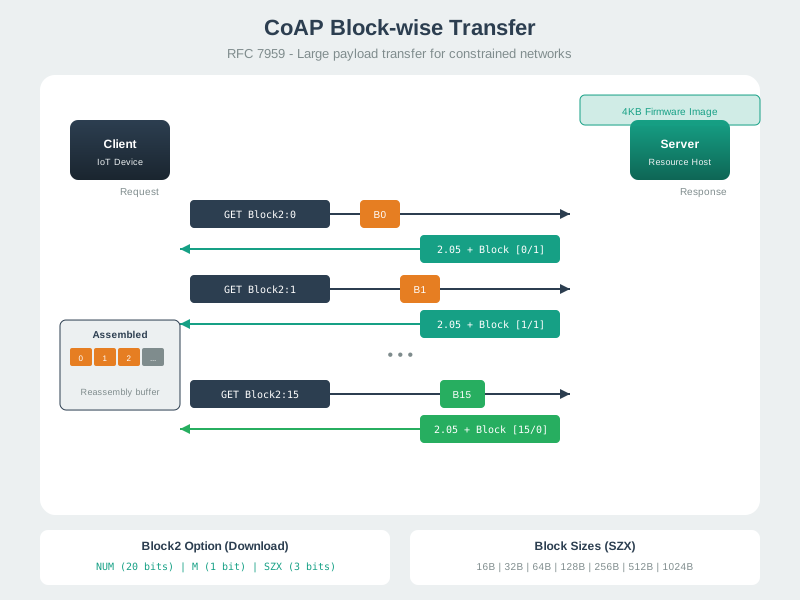
Block-wise Transfer: Fragmentation mechanism for transferring payloads larger than a single CoAP datagram
Token: Client-generated value matching responses to requests — enables concurrent request/response pairing
DTLS: Datagram TLS — CoAP’s security layer providing encryption and authentication over UDP
58.2 For Beginners: CoAP Labs Review
This review brings together all the hands-on CoAP labs and implementation exercises. It is a chance to revisit the key skills you have practiced – setting up CoAP servers, making requests, handling observations – and solidify your practical experience with this important IoT protocol.
Experience CoAP in action! This simulator demonstrates ESP32 with sensors, showing how CoAP requests work with RESTful IoT resources. Watch the Serial Monitor for request/response logs.
Request Methods: GET for reading sensors, PUT for controlling LED
Resource Discovery: /.well-known/core returns available endpoints
Compare to HTTP: Notice the simpler message format (4-byte header vs HTTP’s text headers)
Install Library:
# Arduino IDE: Sketch -> Include Library -> Manage Libraries# Search for: "CoAP simple ESP32" and "DHT sensor library"
Testing with Python Client:
import asynciofrom aiocoap import*asyncdef test_esp32_coap():"""Test ESP32 CoAP server""" ESP32_IP ="192.168.1.100"# Replace with your ESP32 IP protocol =await Context.create_client_context()# 1. Discoveryprint("1. Resource Discovery:") request = Message(code=Code.GET, uri=f'coap://{ESP32_IP}/.well-known/core') response =await protocol.request(request).responseprint(f" {response.payload.decode('utf-8')}\n")# 2. Get Temperatureprint("2. Get Temperature:") request = Message(code=Code.GET, uri=f'coap://{ESP32_IP}/temperature') response =await protocol.request(request).responseprint(f" {response.payload.decode('utf-8')}\n")# 3. Get Humidityprint("3. Get Humidity:") request = Message(code=Code.GET, uri=f'coap://{ESP32_IP}/humidity') response =await protocol.request(request).responseprint(f" {response.payload.decode('utf-8')}\n")# 4. Turn LED ONprint("4. Turn LED ON:") request = Message(code=Code.PUT, uri=f'coap://{ESP32_IP}/led', payload=b'{"state":"on"}') response =await protocol.request(request).responseprint(f" {response.payload.decode('utf-8')}\n")await asyncio.sleep(2)# 5. Turn LED OFFprint("5. Turn LED OFF:") request = Message(code=Code.PUT, uri=f'coap://{ESP32_IP}/led', payload=b'{"state":"off"}') response =await protocol.request(request).responseprint(f" {response.payload.decode('utf-8')}\n")asyncio.run(test_esp32_coap())
Expected Output (Serial Monitor):
=== ESP32 CoAP Environmental Station ===
DHT22 initialized
Connecting to WiFi.....
WiFi connected
IP Address: 192.168.1.100

CoAP server started on port 5683

Available resources:
  GET  coap://192.168.1.100/temperature
  GET  coap://192.168.1.100/humidity
  GET  coap://192.168.1.100/led
  PUT  coap://192.168.1.100/led
  GET  coap://192.168.1.100/.well-known/core

Ready for requests!

-> CoAP Request: GET /temperature
<- Response: 2.05 CONTENT
   Temperature: 23.5 C

-> CoAP Request: PUT /led
   Payload: {"state":"on"}
<- Response: 2.04 CHANGED
   LED turned ON
58.5 Lab 2: Python CoAP Smart Home Automation Server
Build a complete smart home automation server with multiple rooms and devices.
Testing the Server:
# Terminal 1: Start serverpython3 smart_home_server.py# Terminal 2: Test with coap-client# Install: sudo apt-get install libcoap2-bin# 1. Discoverycoap-client-m get coap://localhost/.well-known/core# 2. Dashboardcoap-client-m get coap://localhost/dashboard# 3. Get light statecoap-client-m get coap://localhost/devices/light_living# 4. Turn light oncoap-client-m put coap://localhost/devices/light_living -e'{"power":true,"brightness":80}'# 5. Set thermostatcoap-client-m put coap://localhost/devices/thermostat_main -e'{"target_temp":24.0}'# 6. Turn off all lights in living roomcoap-client-m put coap://localhost/rooms/Living_Room -e'{"all_lights":"off"}'
Expected Output:
=== CoAP Smart Home Automation Server ===

Server started on coap://localhost:5683

Available resources:
  GET  coap://localhost/.well-known/core
  GET  coap://localhost/dashboard

Devices:
  GET/PUT coap://localhost/devices/light_living (Living Room)
  GET/PUT coap://localhost/devices/light_bedroom (Bedroom)
  GET/PUT coap://localhost/devices/light_kitchen (Kitchen)
  GET/PUT coap://localhost/devices/thermostat_main (Living Room)

Rooms:
  GET/PUT coap://localhost/rooms/Living_Room
  GET/PUT coap://localhost/rooms/Bedroom
  GET/PUT coap://localhost/rooms/Kitchen

Example commands:
  coap-client -m get coap://localhost/dashboard
  coap-client -m get coap://localhost/devices/light_living
  coap-client -m put coap://localhost/devices/light_living -e '{"power":true}'
  coap-client -m put coap://localhost/rooms/Living_Room -e '{"all_lights":"off"}'
58.6 Worked Example: REST API Design with CoAP Content Negotiation
Worked Example: REST API Design with CoAP Content Negotiation
Scenario: A smart irrigation system exposes sensor data that must be consumed by both constrained devices (CBOR format, low bandwidth) and web dashboards (JSON format, human-readable). Design the CoAP API with proper content negotiation.
Given:
Resource: /sensors/soil-moisture
Supported formats: CBOR (ct=60), JSON (ct=50), plain text (ct=0)
Request:
GET /sensors/soil-moisture
Accept: 110 (XML - not supported)

Response: 4.06 Not Acceptable
Payload: "Supported formats: 0, 50, 60"
Result: The API serves the same resource in three formats based on client preference. Constrained devices receive 44-byte CBOR (51% smaller than JSON), while web dashboards get human-readable JSON. The server defaults to CBOR for maximum efficiency when no preference is specified.
Key Insight: Content negotiation via Accept option enables single-resource APIs that serve diverse clients efficiently. CBOR reduces payload size by 50-70% compared to JSON with equivalent data. Always define a server default format (prefer efficient formats like CBOR) and return 4.06 Not Acceptable with supported options for unsupported requests.
Putting Numbers to It
Content negotiation becomes critical when bandwidth cost scales with device count. Calculate the yearly transmission cost for 1,000 soil moisture sensors.
$ = N_{} R_{} P_{} C_{} $
Worked example: A LoRaWAN agricultural deployment with 1,000 sensors reporting every hour (24 messages/day). Carrier charges $5 per MB for uplink data.
Savings = $3,717.61 − $1,837.92 = $1,879.69/year (51% reduction). Over 10-year sensor lifetime: $18,797 saved by using content negotiation to serve CBOR to constrained devices.
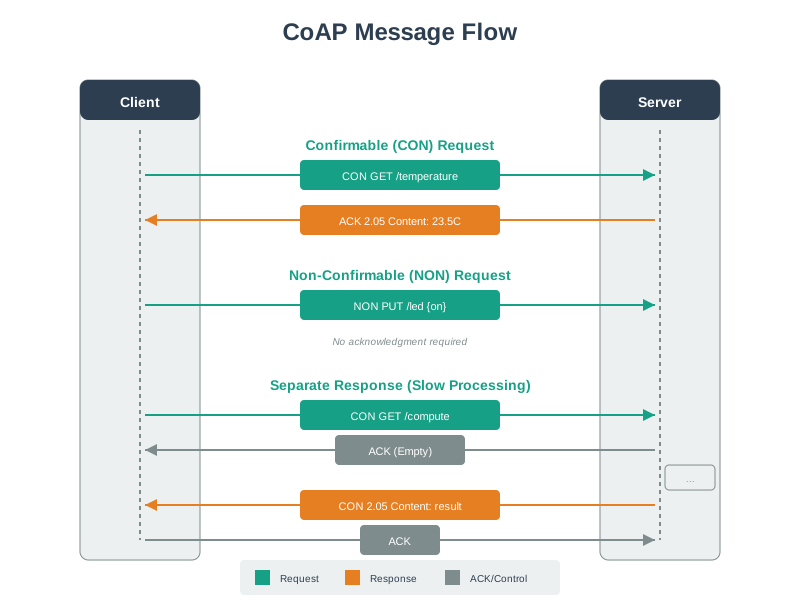
This diagram illustrates CoAP’s request-response pattern over UDP, showing how confirmable messages achieve reliability through application-layer acknowledgments rather than TCP’s transport-layer guarantees.
Visual: CoAP Block Transfer
CoAP Block Transfer for large payloads
Block transfer enables reliable large payload transmission (firmware updates, bulk data) over constrained networks with small MTU limits by splitting data into individually acknowledged blocks.
Visual: CoAP Server Implementation
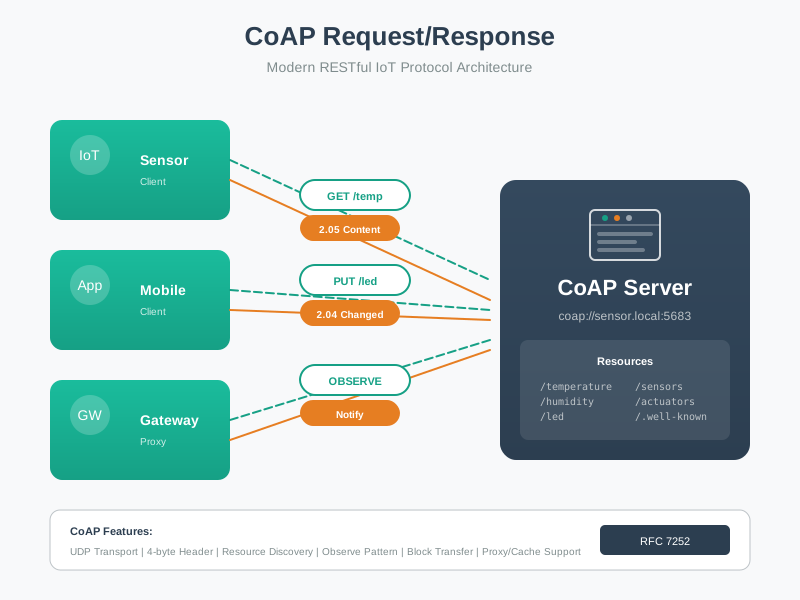
CoAP Server with resource handlers
Understanding CoAP server architecture helps developers design efficient resource hierarchies for IoT devices, organizing sensors and actuators into logical RESTful endpoints.
Common Pitfalls
1. Using Confirmable Messages for Every CoAP Request
CON messages require an ACK roundtrip — on lossy networks with 20% packet loss, a 4-attempt retry with exponential backoff can delay responses by 45 seconds. Use NON for periodic telemetry where data freshness matters more than guaranteed delivery; reserve CON for actuation commands.
2. Ignoring CoAP Proxy Caching Semantics
CoAP proxies cache GET responses based on Max-Age option — a sensor returning temperature with Max-Age=60 will serve cached values for 60 seconds even if the physical reading changes. Set Max-Age to match your data freshness requirement, not the default 60 seconds.
3. Forgetting DTLS Session Management
DTLS handshake (6-8 roundtrips) dominates latency for short-lived CoAP connections — repeatedly creating new DTLS sessions for each request adds 500-2000ms overhead. Use DTLS session resumption (RFC 5077) to reduce reconnection to 1 roundtrip after the initial handshake.
Label the Diagram
💻 Code Challenge
Order the Steps
Match the Concepts
58.8 Summary
This chapter covered CoAP implementation and testing through comprehensive hands-on labs:
ESP32 CoAP Server: Built environmental monitoring station with DHT22 sensor, implementing GET/PUT endpoints for temperature, humidity, and LED control with resource discovery
Python Smart Home Server: Developed complete automation system with multiple device types (lights, thermostats), room-level control, and dashboard aggregation
Content Negotiation: Designed APIs that serve CBOR (51% smaller in this example) for constrained devices and JSON for web dashboards
RESTful Resource Design: Applied HTTP-like semantics (GET for sensors, PUT for actuators) to CoAP endpoints
58.9 Knowledge Check
Quiz: CoAP Implementation
Common Mistake: Forgetting to Handle CoAP Separate Responses
The Error: Developers implement CoAP servers that perform slow operations (database queries, sensor polling, complex calculations) but return responses using the piggybacked pattern. When processing exceeds the client’s retransmission timeout (typically 2-4 seconds), clients retransmit the request, creating duplicate operations and wasted processing.
Why It Happens: Most CoAP tutorials show simple temperature sensor examples where processing is instant (<100ms). Developers copy this pattern without considering slow operations. The CoAP library’s default behavior often sends piggybacked responses, requiring explicit configuration for separate responses.
Example of Failure:
# WRONG: Piggybacked response for slow operationclass SlowSensorResource(resource.Resource):asyncdef render_get(self, request):# This takes 5 seconds (database query + sensor poll) data =await query_historical_average() # 5 seconds# Client times out at 2s, retransmits request# Server processes BOTH requests, wastes 10 seconds totalreturn Message(code=Code.CONTENT, payload=data)
The Fix: Use separate response pattern for operations > 1 second:
# CORRECT: Separate response for slow operationclass SlowSensorResource(resource.Resource):asyncdef render_get(self, request):# Immediately send empty ACK to stop client retransmission request.respond_empty_ack()# Now process slowly without client timeout pressure data =await query_historical_average() # 5 seconds# Send the actual response as a separate CON message# Client receives it reliably with its own ACK response = Message(code=Code.CONTENT, payload=data, token=request.token, mtype=CON)await request.context.request(response).response
Key Implementation Points:
Empty ACK timing: Send within 500ms to prevent first retransmission
Token preservation: Separate response must use the original request’s token for correlation
New Message ID: Separate response gets its own MID, different from ACK
Client handling: Client must not treat empty ACK as final response
Real-World Impact:
A smart meter deployment queried daily energy consumption (3-second database query). Without separate responses: - Client timeout: 2 seconds - Each query triggered 2-3 retransmissions before completion - Server CPU: 400% (processing 4 duplicate requests per query) - Response time: 15 seconds (processing queue backlog)
After implementing separate responses: - Empty ACK sent at 50ms (well before timeout) - Zero retransmissions - Server CPU: 100% (one query per request) - Response time: 3.2 seconds (query + network)
Detection: Monitor CoAP logs for duplicate requests with the same Token arriving <5 seconds apart. If you see this pattern, your server needs separate response handling for that resource.
CoAP Review: Knowledge AssessmentFocus: Scenario-based quiz questions covering all CoAP concepts Why read it: Test your understanding of the protocol with applied exercises before moving to other protocols
CoAP Review: Observe PatternsFocus: Server-push notifications and real-time subscription model Why read it: Deepen your grasp of the Observe extension used in this lab’s real-time sensor streaming
CoAP Review: Protocol FundamentalsFocus: Message types, reliability tiers, and architecture comparisons Why read it: Review the theory behind the request/response exchanges you implemented in these labs
CoAP Implementation LabsFocus: Extended ESP32 exercises with Wokwi simulations Why read it: Apply these implementation patterns to more complex hardware configurations
MQTT Labs and ImplementationFocus: MQTT pub/sub broker setup and client programming Why read it: Compare a broker-based protocol against CoAP’s direct resource model for IoT deployments
DTLS and SecurityFocus: Securing CoAP communications with DTLS and pre-shared keys Why read it: Add transport-layer security to the CoAP servers you built in this chapter