Review a Wi-Fi site survey and roaming decisions
Evaluate roaming, airtime, and operations evidence by comparing a seeded walk-path survey with threshold and hysteresis decisions.

Record the input, rule, output and unresolved evidence before making a release or site decision.
Predict the reading, then compare it with the measurement.
Python 3 in your browser (JupyterLite)
Python · no installEvaluate roaming, airtime, and operations evidence by comparing a seeded walk-path survey with threshold and hysteresis decisions.
Open the notebook in your browser and run each Python cell; no install or account is needed.
Three ways to run: use JupyterLite here with no install; run main.py locally from the downloadable lab folder; or open the same notebook in Google Colab.
Steps
Step 1
- Do
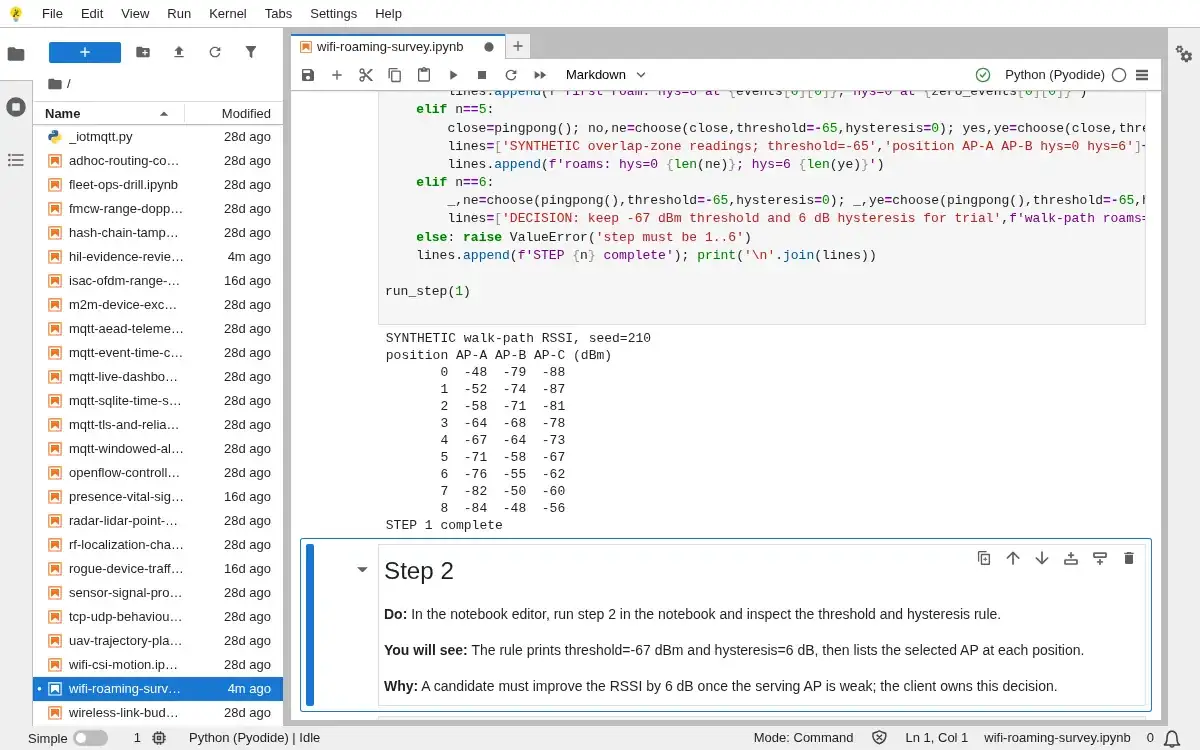
- In the notebook editor, inspect the notebook input cell and run step 1 to see the synthetic walk path.
- You will see
- The walk-path table lists 9 positions and RSSI in dBm for AP-A, AP-B and AP-C.
- Why it matters
- A named position and AP identity make the candidate signal difference inspectable before applying a roaming rule.
Step 1 · Python 3 in your browser (JupyterLite); numbered callout added to a real capture. Enlarge screenshot (new tab) Step 2
- Do
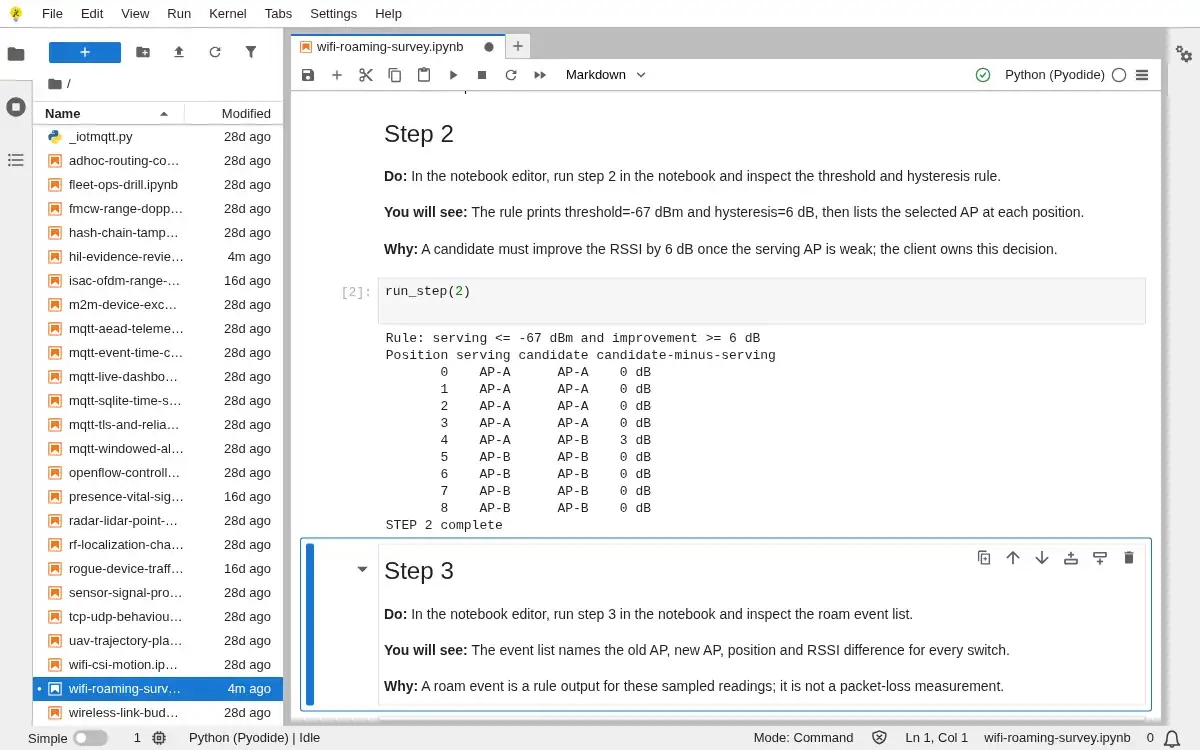
- In the notebook editor, run step 2 in the notebook and inspect the threshold and hysteresis rule.
- You will see
- The rule prints threshold=-67 dBm and hysteresis=6 dB, then lists the selected AP at each position.
- Why it matters
- A candidate must improve the RSSI by 6 dB once the serving AP is weak; the client owns this decision.
Step 2 · Python 3 in your browser (JupyterLite); numbered callout added to a real capture. Enlarge screenshot (new tab) Step 3
- Do
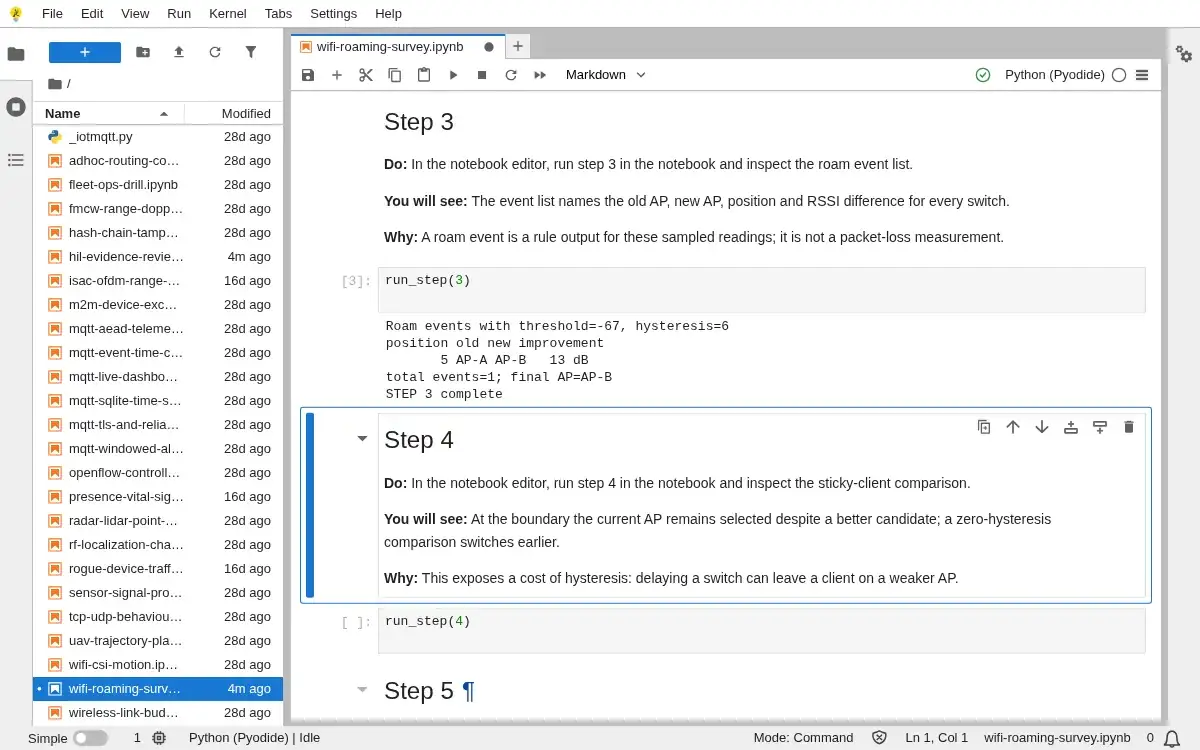
- In the notebook editor, run step 3 in the notebook and inspect the roam event list.
- You will see
- The event list names the old AP, new AP, position and RSSI difference for every switch.
- Why it matters
- A roam event is a rule output for these sampled readings; it is not a packet-loss measurement.
Step 3 · Python 3 in your browser (JupyterLite); numbered callout added to a real capture. Enlarge screenshot (new tab) Step 4
- Do
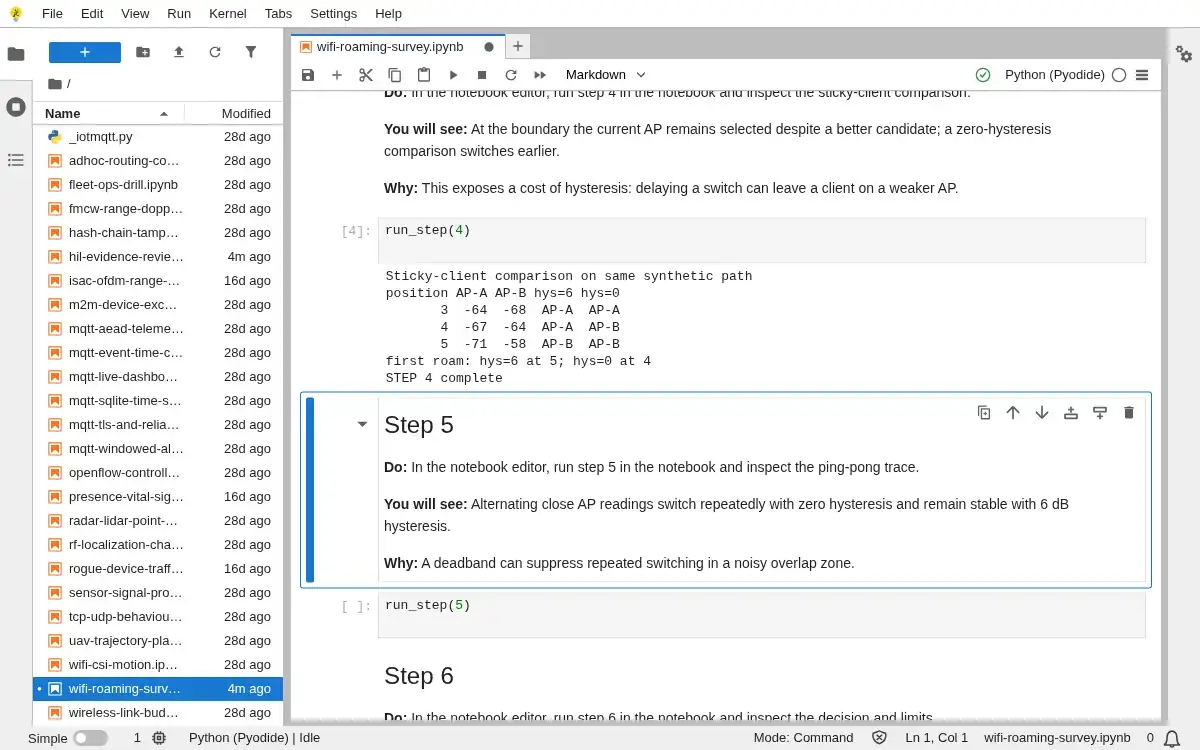
- In the notebook editor, run step 4 in the notebook and inspect the sticky-client comparison.
- You will see
- At the boundary the current AP remains selected despite a better candidate; a zero-hysteresis comparison switches earlier.
- Why it matters
- This exposes a cost of hysteresis: delaying a switch can leave a client on a weaker AP.
Step 4 · Python 3 in your browser (JupyterLite); numbered callout added to a real capture. Enlarge screenshot (new tab) Step 5
- Do
- In the notebook editor, run step 5 in the notebook and inspect the ping-pong trace.
- You will see
- Alternating close AP readings switch repeatedly with zero hysteresis and remain stable with 6 dB hysteresis.
- Why it matters
- A deadband can suppress repeated switching in a noisy overlap zone.
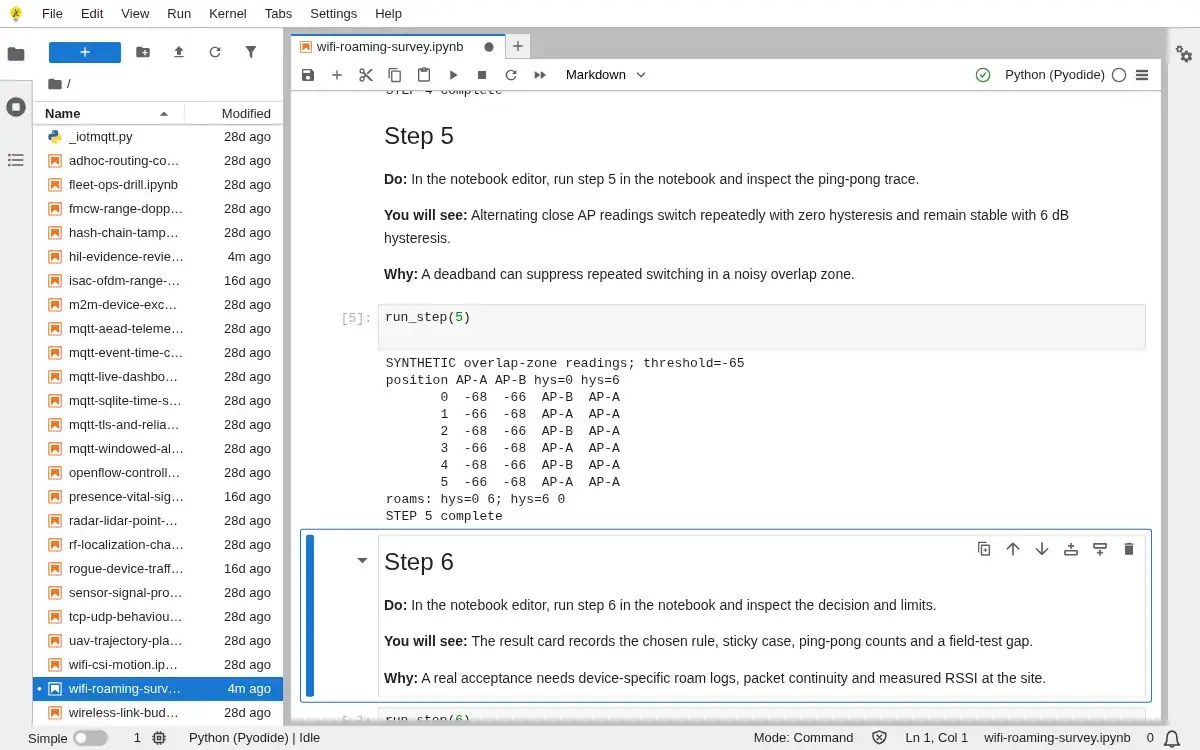
Step 5 · Python 3 in your browser (JupyterLite); numbered callout added to a real capture. Enlarge screenshot (new tab) Step 6
- Do
- In the notebook editor, run step 6 in the notebook and inspect the decision and limits.
- You will see
- The result card records the chosen rule, sticky case, ping-pong counts and a field-test gap.
- Why it matters
- A real acceptance needs device-specific roam logs, packet continuity and measured RSSI at the site.
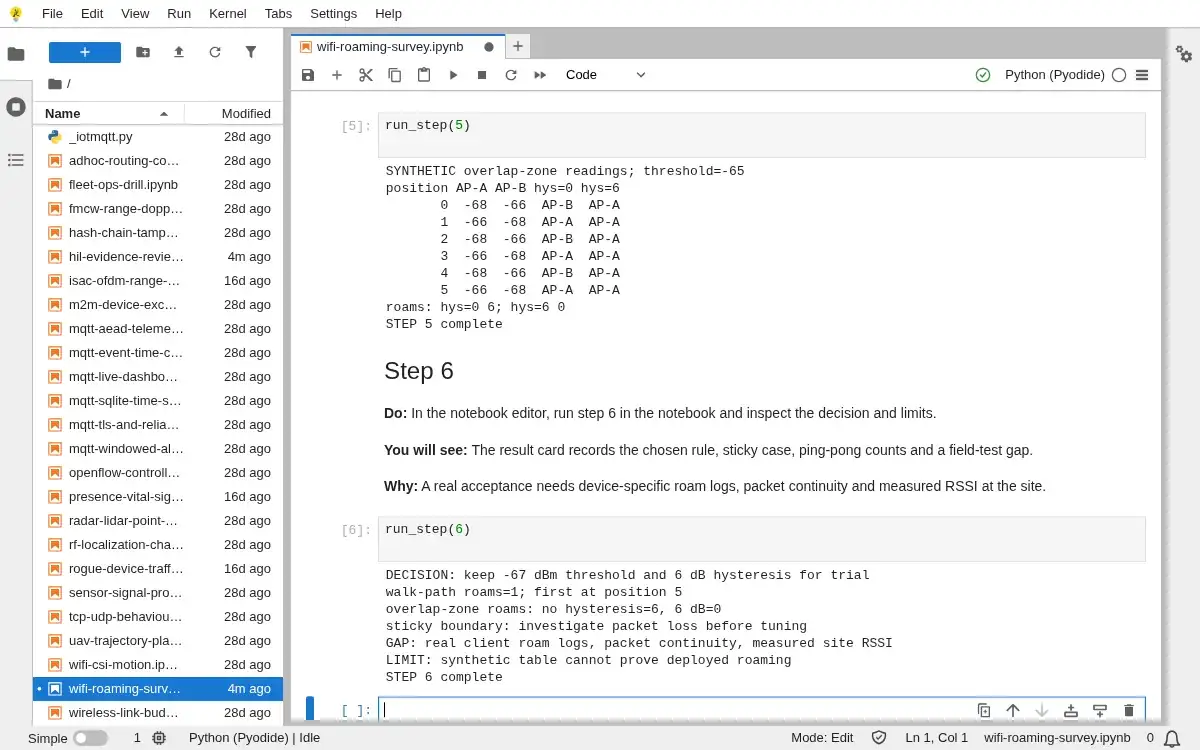
Step 6 · Python 3 in your browser (JupyterLite); numbered callout added to a real capture. Enlarge screenshot (new tab)
Chapter checks
These questions refer to the chapter’s examples. Use the return links to review their answers.
Why should Wi-Fi architecture reviews separate stationary-device reconnect evidence from mobile-device roaming evidence?
Return to the chapter’s knowledge checkA station joins an access point but cannot reach the local service. Which map helps locate the break?
Return to the chapter’s knowledge check