Score an RF localisation challenge
Compare RSSI-only and motion-fused positions on a deterministic hidden test path using median and p90 error.

Radio Remi: I want you to predict the result, inspect each intermediate value, and keep the final claim inside the evidence.
Predict the reading, then compare it with the measurement.
Python 3 in your browser (JupyterLite)
Python · no installOpen the notebook in your browser and run each Python cell; no install or account is needed.
Three ways to run: use JupyterLite here with no install; run main.py locally from the downloadable lab folder; or open the same notebook in Google Colab.
Steps
Step 1
- Do
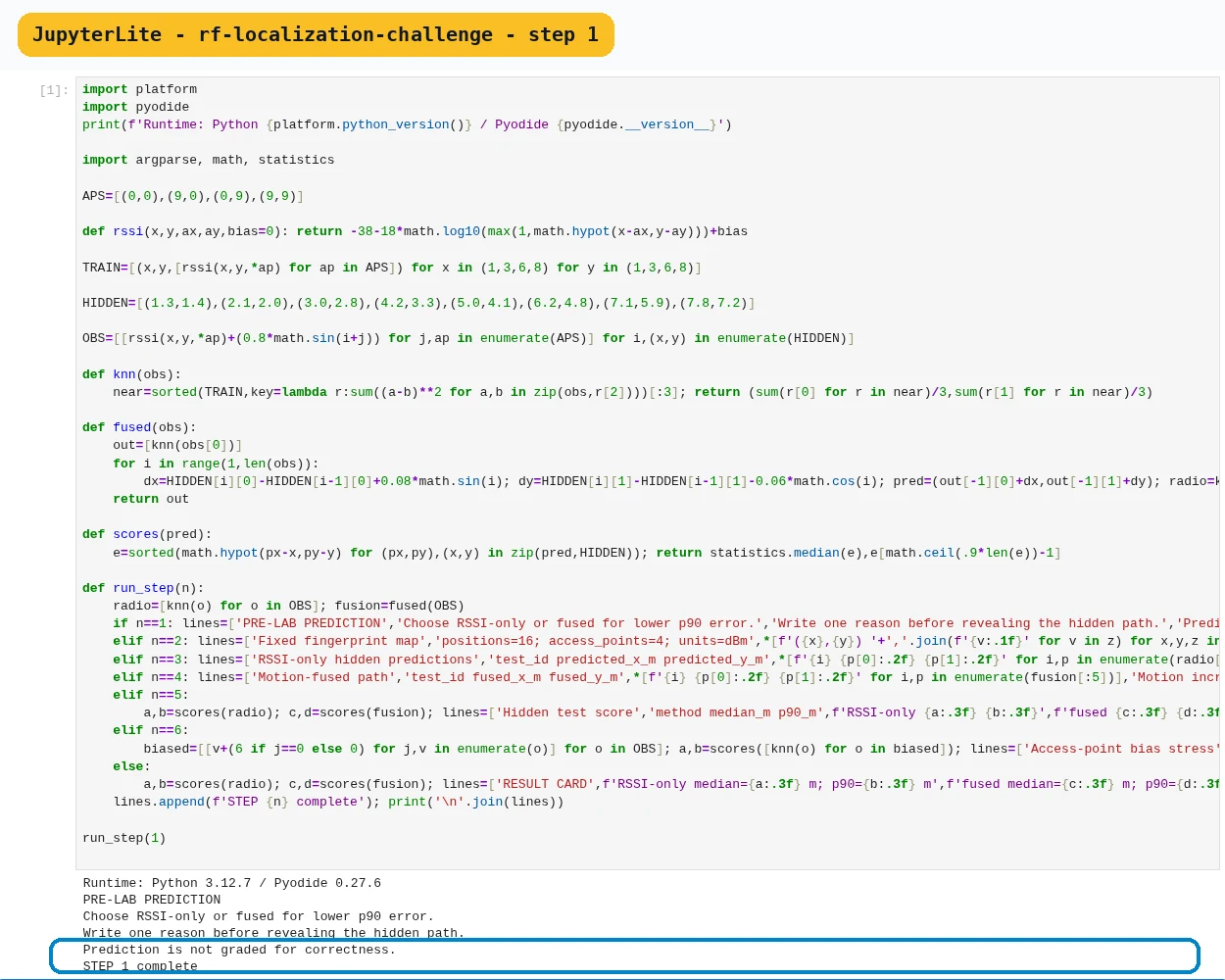
- In the JupyterLite notebook, run the Step 1 cell to make a pre-lab prediction.
- You will see
- Input: execute notebook step 1 with the record’s unchanged fixture, seed, and parameters. Observed: Choose RSSI-only or fused for lower p90 error. Observed: PRE-LAB PREDICTION Observed: Write one reason before revealing the hidden path.
- Why it matters
- Expected: STEP 1 complete from this deterministic notebook step. Interpretation: A fixed training set and a separate deterministic test path prevent the learner from tuning directly on every answer. Action: Make a pre-lab prediction. Boundary: this local fixture is not a live device, network, or site measurement.
Step 1 · Python 3 in your browser (JupyterLite); numbered callout added to a real capture. Enlarge screenshot (new tab) Step 2
- Do
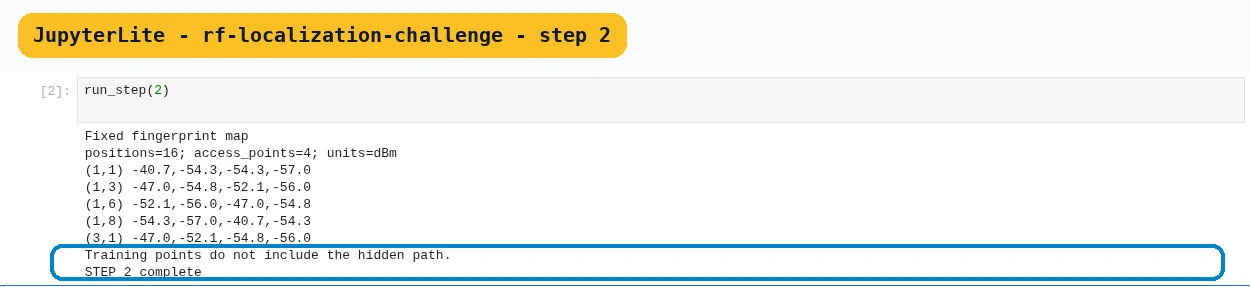
- In the JupyterLite notebook, run the Step 2 cell (run_step(2)) to inspect the fixed fingerprint map.
- You will see
- Input: execute notebook step 2 with the record’s unchanged fixture, seed, and parameters. Observed: positions=16; access_points=4; units=dBm Observed: (1,1) -40.7,-54.3,-54.3,-57.0 Observed: (1,3) -47.0,-54.8,-52.1,-56.0
- Why it matters
- Expected: STEP 2 complete from this deterministic notebook step. Interpretation: A fingerprint compares a live vector with labelled survey vectors. Action: Inspect the fixed fingerprint map. Boundary: this local fixture is not a live device, network, or site measurement.
Step 2 · Python 3 in your browser (JupyterLite); numbered callout added to a real capture. Enlarge screenshot (new tab) Step 3
- Do
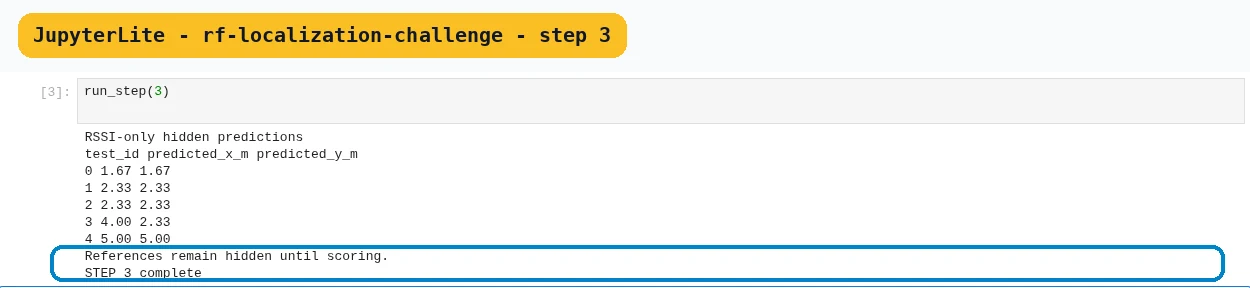
- In the JupyterLite notebook, run the Step 3 cell (run_step(3)) to estimate hidden positions with RSSI neighbours.
- You will see
- Input: execute notebook step 3 with the record’s unchanged fixture, seed, and parameters. Observed: 0 1.67 1.67 Observed: 1 2.33 2.33 Observed: 2 2.33 2.33
- Why it matters
- Expected: STEP 3 complete from this deterministic notebook step. Interpretation: RSSI estimates loss, so one range-like value forms a broad ring rather than a point. Action: Estimate hidden positions with RSSI neighbours. Boundary: this local fixture is not a live device, network, or site measurement.
Step 3 · Python 3 in your browser (JupyterLite); numbered callout added to a real capture. Enlarge screenshot (new tab) Step 4
- Do
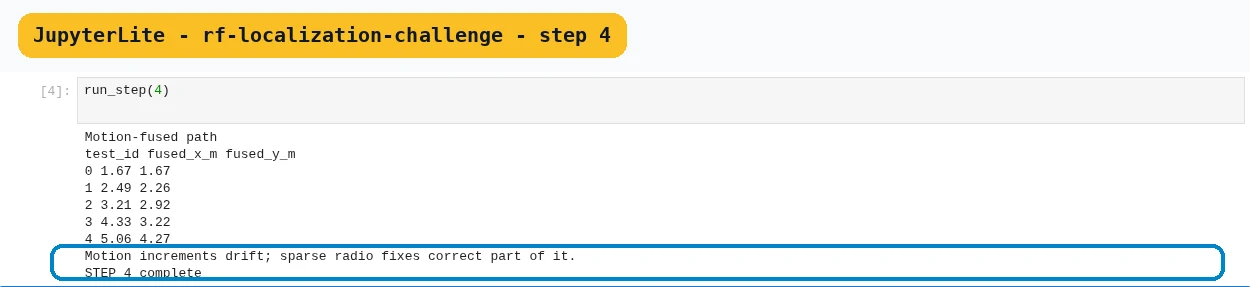
- In the JupyterLite notebook, run the Step 4 cell (run_step(4)) to add motion increments between fixes.
- You will see
- Input: execute notebook step 4 with the record’s unchanged fixture, seed, and parameters. Observed: 0 1.67 1.67 Observed: 1 2.49 2.26 Observed: 2 3.21 2.92
- Why it matters
- Expected: STEP 4 complete from this deterministic notebook step. Interpretation: A motion estimate can predict where a handset moved between radio observations. Action: Add motion increments between fixes. Boundary: this local fixture is not a live device, network, or site measurement.
Step 4 · Python 3 in your browser (JupyterLite); numbered callout added to a real capture. Enlarge screenshot (new tab) Step 5
- Do
- In the JupyterLite notebook, run the Step 5 cell (run_step(5)) to reveal and score the hidden path.
- You will see
- Input: execute notebook step 5 with the record’s unchanged fixture, seed, and parameters. Observed: method median_m p90_m Observed: RSSI-only 0.847 1.924 Observed: fused 0.439 0.539
- Why it matters
- Expected: STEP 5 complete from this deterministic notebook step. Interpretation: The median describes a typical test point, while p90 exposes the long tail that affects alarms and hand-offs. Action: Reveal and score the hidden path. Boundary: this local fixture is not a live device, network, or site measurement.

Step 5 · Python 3 in your browser (JupyterLite); numbered callout added to a real capture. Enlarge screenshot (new tab) Step 6
- Do
- In the JupyterLite notebook, run the Step 6 cell (run_step(6)) to stress one access-point bias.
- You will see
- Input: execute notebook step 6 with the record’s unchanged fixture, seed, and parameters. Observed: AP0 bias=+6 dB Observed: RSSI-only median=1.347 m; p90=3.199 m Observed: Access-point bias stress
- Why it matters
- Expected: STEP 6 complete from this deterministic notebook step. Interpretation: A smooth track may still be wrong if both inputs share a bias. Action: Stress one access-point bias. Boundary: this local fixture is not a live device, network, or site measurement.

Step 6 · Python 3 in your browser (JupyterLite); numbered callout added to a real capture. Enlarge screenshot (new tab) Step 7
- Do
- In the JupyterLite notebook, run the Step 7 cell (run_step(7)) to complete the result card.
- You will see
- Input: execute notebook step 7 with the record’s unchanged fixture, seed, and parameters. Observed: RSSI-only median=0.847 m; p90=1.924 m Observed: fused median=0.439 m; p90=0.539 m Observed: p90 improvement=1.385 m
- Why it matters
- Expected: STEP 7 complete from this deterministic notebook step. Interpretation: These scores validate the supplied fixture only; a site survey must repeat them with measured anchors and real movement. Action: Complete the result card. Boundary: this local fixture is not a live device, network, or site measurement.

Step 7 · Python 3 in your browser (JupyterLite); numbered callout added to a real capture. Enlarge screenshot (new tab)
Chapter checks
These questions refer to the chapter’s examples. Use the return links to review their answers.
Why report p90 position error beside the median?
Return to the chapter’s knowledge checkWhich method most directly depends on synchronized anchor clocks?
Return to the chapter’s knowledge check
Return to RF Localisation with RSSI, Time, Angle, UWB, and Sensor Fusion · Browse Labs