4 Deployment Models and Virtualization
More
Depth: Practitioner
Progress saves as you read. Mark sections complete as you go; your progress appears in the sidebar.
4.1 Start With What a Deployment Model Actually Decides
A service model says who manages each layer of a cloud service. A deployment model asks who may use the cloud and how separate clouds can work together. NIST names four models: public, private, community, and hybrid. We will also look at the machines and containers that run workloads inside them.
Cloud servers store and process data over a network. For an IoT system, they can manage devices, collect readings, and help people study the results. The choice of cloud affects who shares those resources and who must manage them.
The companion chapter on cloud deployment for IoT applies these ideas to a placement decision and its governance record.
4.2 The Four NIST Deployment Models
NIST defines four cloud deployment models: public, private, community, and hybrid. The first three describe who may use a cloud. Hybrid joins distinct clouds so data and apps can move between them. Other patterns describe where services run or how providers work together; they are not extra NIST models.
Public Cloud
A cloud set-up for the use of any person or industry, typically owned by the organization that offers the service.
Private Cloud
A cloud set-up for exclusive use by one organization. It can be on or off premises, and managed by that organization, a third party, or both.
Community Cloud
A shared set-up for several organizations with common concerns -- such as security, compliance, or jurisdiction -- managed by one or more members, a third party, or both.
Hybrid Cloud
Two or more distinct private, community, or public cloud infrastructures joined by technology that supports data and application portability.
AWS, Google Cloud, and Azure offer public cloud services. Shared capacity can reduce the need to buy hardware up front and can grow with demand. Customers still pay for what they use and must secure the parts they control. Storage can keep costing money even when a server is stopped.
With a private cloud, exclusive use does not ensure safety: security depends on the controls in place. The group must also plan for capacity and upkeep, even if it pays a provider to do the work.
A community cloud can help a group of hospitals share services under common rules for handling records. In a hybrid setup, a team might keep sensitive records in a private cloud and run a portable batch job in a public cloud. The link between the two must support moving data and apps, and the team must manage access across it.
4.2.1 Architecture and operating patterns beyond the NIST taxonomy
Three related patterns describe where work runs or how clouds cooperate. They help teams plan a system, but they are not extra NIST deployment models.
Distributed Cloud
Cloud services or resources are placed across multiple physical locations while governance and operation remain coordinated. In public-resource computing, people or organizations contribute spare computing power that others can use. A volunteer cloud is one example: volunteers offer their computers or other resources to support shared computing work.
Multi-Cloud
An organization deliberately uses services from more than one cloud provider or cloud environment, often to improve flexibility, resilience, or negotiating control.
Inter-Cloud
Separate clouds interoperate or federate so that services, data, or capacity can cross provider boundaries under agreed technical and governance rules.
4.3 Comparing and Choosing: On-Premise, Off-Premise, Dedicated, and Shared
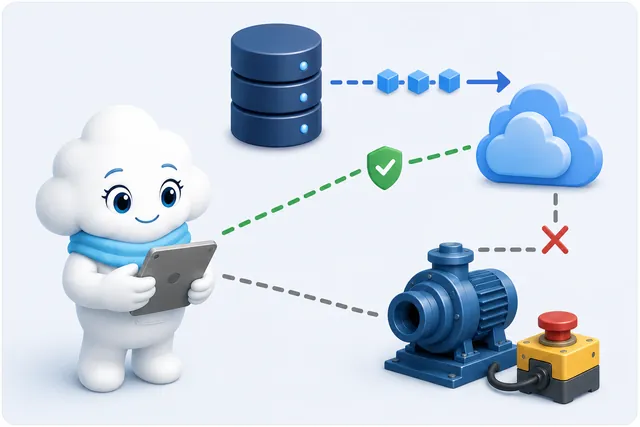
A pump fleet needs a fast local safety response and a place to study records over time. These needs may lead the team to use more than one cloud environment. The next two figures trace that choice.
-

Keep the fast shutoff close to the pump.
-
Place long records and large reviews where they fit.
-
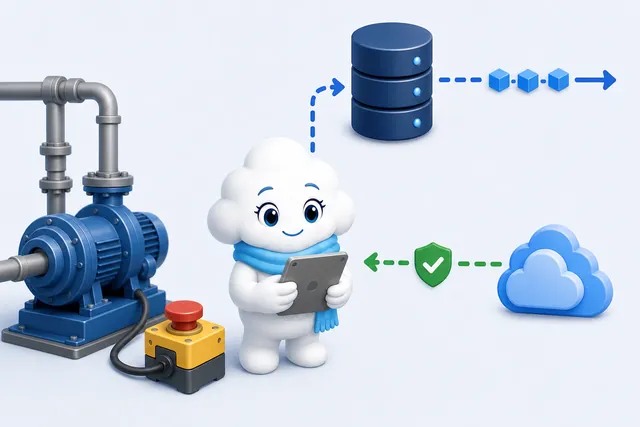
Test the signed handoff without giving remote control free rein.
In the first panel, the stop control stays near the pump so a lost wide-area link cannot block it. In the second, the team sends long-term records to private storage and large batch reviews to a public cloud. The last panel shows records moving out and a guarded return path. The caption calls for a signed handoff; the drawing does not label signing or policy versions. Those details need separate verification.

In Figure 4.1, the edge or private control handles the 20 ms shut-off even if the wide-area link fails. The private cloud keeps identity and regulated records. The public cloud supplies storage, batch analysis, and queues that can grow with demand. Across the hybrid boundary, signed events travel outward in sequence and versioned policy returns. The local interlock retains the safety decision; this path does not give the cloud an unlimited override.
Cost and scale matter, but security depends on the controls used in each setting. To compare placement, ask two separate questions: is the equipment on the group's own site or hosted elsewhere? Is access for one group or shared by several?
The matrix shows why private does not mean on-premises. A hosted private cloud sits off-site but serves one group. A community cloud serves a defined set of groups and can be on-site or off-site. A public cloud is open to the public and runs on the provider's site. Location alone does not tell us how safe or costly a system is.
First decide who needs access and what controls the workload needs. Then decide where to host the service and who will run it. Hybrid and multi-cloud designs can combine settings, so they do not fit into a single cell. Access, location, and management remain separate choices.
4.4 Under the Hood: Virtual Machines, Containers, and a Worked Docker Example
Deployment models describe who may use a cloud. They do not say how a server separates its workloads. Virtual machines and containers offer two ways to share a server. Both need security controls; neither makes a workload safe by itself. The kernel is the core of an operating system: it manages hardware and lets programs use system resources.
Virtual Machines
Multiple instances of potentially different operating systems running on the same physical machine -- the mechanism underneath Infrastructure-as-a-Service. Each instance carries its own full guest OS.
Containers
Applications isolated as containers that share a host kernel; many PaaS offerings use containers, but PaaS does not require them. Containers isolate processes using the host kernel, but unsafe container settings or kernel vulnerabilities can compromise that isolation.
A virtual machine has its own guest operating system. A hypervisor shares the physical machine among guests; it may run on the hardware or on a host system. A container instead shares the host kernel with other containers. Its app and needed files are packaged together, but the kernel is not separate. Containers can also run inside a virtual machine.
Without a guest system to boot for each instance, containers often start and stop faster and use fewer resources. They can be scaled by starting more instances. This shared kernel is also a security boundary: unsafe settings or a kernel flaw can affect isolation. Choose a VM when separate guest kernels are needed.
A worked example to read. The following Dockerfile shows how an image is built and run. It is adapted from an older Docker tutorial; this version uses a current-style Python base rather than the tutorial's obsolete Python 2.7 base. Read it as an example, not as a full production setup.
A Dockerfile is a plain-text recipe for an image -- it names a starting point and a sequence of build steps:
# Use a Python runtime as the parent image
FROM python:slim
# Set the working directory to /app
WORKDIR /app
# Copy the current directory contents into the container at /app
ADD . /app
# Install any needed packages specified in requirements.txt
RUN pip install --trusted-host pypi.python.org -r requirements.txt
# Document port 80; publish it with docker run -p
EXPOSE 80
# Define an environment variable
ENV NAME World
# Run app.py when the container launches
CMD ["python", "app.py"]
The file starts with a Python image, sets a work folder, and copies the app into it. It installs the listed packages, documents port 80, and sets a name. The final line says what to run when the container starts. In the original example, the app listens on port 80 and returns a web page.
Common misconception: EXPOSE 80 documents the container port; it does not publish it on the host. In this example, the -p 4000:80 run option supplies that missing step.
Building an image from that Dockerfile and giving it a name, then running a container from it, is two commands:
docker build -t docker-file .
docker run -p 4000:80 docker-file
The first command builds an image named docker-file. The second starts a container from that image. Its port mapping sends traffic from port 4000 on the host to port 80 in the container. Thus a browser on the host uses port 4000. The app must still listen on the container port, and host firewall rules can affect access.
4.5 Lab: Constrained IoT Ingestion Container
This lab turns the VM/container comparison into evidence. An image digest is a content-based identifier for an image; it lets the team record which image it used. Build a minimal HTTP ingestion process, bind it only to localhost, cap CPU and memory, record the image digest and build provenance, and force both a bad-input failure and a process restart. The container boundary reduces packaging variation; it does not provide a separate kernel or remove the need to secure the host.
Build provenance records how an image was built and which inputs were used. A software bill of materials (SBOM) lists software in the image or used to build it. These records help trace an image; they do not prove it is safe.
Create server.py:
import json
from http.server import BaseHTTPRequestHandler, HTTPServer

class Handler(BaseHTTPRequestHandler):
    def do_POST(self):
        try:
            length = int(self.headers.get("content-length", "0"))
            event = json.loads(self.rfile.read(length))
            assert isinstance(event.get("device"), str)
            assert isinstance(event.get("value"), (int, float))
            print(json.dumps({"accepted": event}, sort_keys=True), flush=True)
            self.send_response(202)
        except (ValueError, AssertionError, json.JSONDecodeError) as error:
            print(json.dumps({"rejected": type(error).__name__}), flush=True)
            self.send_response(400)
        self.end_headers()

HTTPServer(("0.0.0.0", 8080), Handler).serve_forever()
Create Dockerfile:
FROM python:3.13-alpine
WORKDIR /app
COPY server.py .
USER 65532:65532
EXPOSE 8080
CMD ["python", "server.py"]
Docker’s image store holds the images available to the local engine. A manifest is a structured list describing an image and its parts. An image index is a list that can point to image versions and their related records. Attestations are attached records about an image; here they include the provenance and SBOM described above. Before building, enable Docker’s containerd image store. The classic image store cannot hold an image index with these records. A Buildx driver selects where and how the builder runs. This requirement also applies when using --load with another Buildx driver. See Docker build attestation support. Build and run from a disposable lab directory:
docker buildx build --load --provenance=mode=max --sbom=true -t iot-ingest:defa .
docker image inspect iot-ingest:defa --format '{{.Id}}'
docker run --name iot-ingest-defa --detach \
  --publish 127.0.0.1:8080:8080 \
  --memory 128m --cpus 0.5 --pids-limit 64 \
  --read-only --tmpfs /tmp:rw,noexec,nosuid,size=16m \
  --restart on-failure:3 iot-ingest:defa
curl -i -X POST http://127.0.0.1:8080 -d '{"device":"lab-7","value":21.4}'
curl -i -X POST http://127.0.0.1:8080 -d '{"device":7,"value":"bad"}'
docker stats --no-stream iot-ingest-defa
docker logs --timestamps iot-ingest-defa
Record the Docker/Buildx versions, Dockerfile checksum, image digest, provenance/SBOM location, published interface and port, resource limits, accepted and rejected request status, log timestamps, restart count, and cleanup. Stop and remove only the named lab container when finished: docker rm --force iot-ingest-defa.
Repeat with malformed JSON, with port 8080 already occupied, and with the process killed inside the container. A useful record distinguishes application rejection, host-port allocation failure, resource exhaustion, process restart, and host failure. Do not treat docker ps as proof that ingestion, isolation, or recovery works.
4.6 Summary
A deployment model describes who may use a cloud and, for hybrid cloud, how distinct clouds join. NIST names public, private, community, and hybrid models. A private cloud can be hosted off-site. Other patterns, such as multi-cloud, describe how services are placed or combined.
A virtual machine runs a guest system on a hypervisor. A container shares the host kernel and packages an app with its files. Both need security controls. In the Docker example, an image supplies the app and a port mapping makes its service reachable through a host port.
4.7 Key Takeaway
Choose deployment and isolation from the workload’s needs.
Name who may use the service, who operates each layer, and whether the workload needs a guest kernel or can share the host kernel.
4.8 See Also
Continue with the service model, the cost of running a cloud service, or an IoT placement decision. Each page applies a different part of the ideas introduced here.
Service Models: IaaS, PaaS, and SaaS
The previous chapter in this module: the responsibility bracket this chapter's deployment-model taxonomy sits alongside as a separate, independent axis.
Service Management, SLAs, and Economics
The next chapter in this module: once a deployment model and a virtualization approach are chosen, this is how the resulting service gets managed, billed, and paid for.
Cloud Deployment Models for IoT
The applied companion chapter: turns this chapter's deployment-model taxonomy into an IoT placement decision with a governance record.