RFID, NFC & UWB · Study deck
Z-Wave Acceptance
Picture a door sensor that joins beside the controller but misses events from its final wall.
Radio Remi is your guide for this deck.

After studying this chapter
Learning objectives
You will be able to:
- Build a Z-Wave deployment inventory that separates controllers, classic mesh repeaters, sleeping endpoints, access-control devices, and Z-Wave Long Range endpoints.
- Place mains-powered classic mesh devices where they create useful paths instead of merely adding device count.
- Assign S2 security classes based on physical-access risk and authentication capability.
- Diagnose failed inclusion, incomplete interviews, stale routes, and sleepy-device symptoms without rebuilding the whole network first.
Major section
Start With the Story
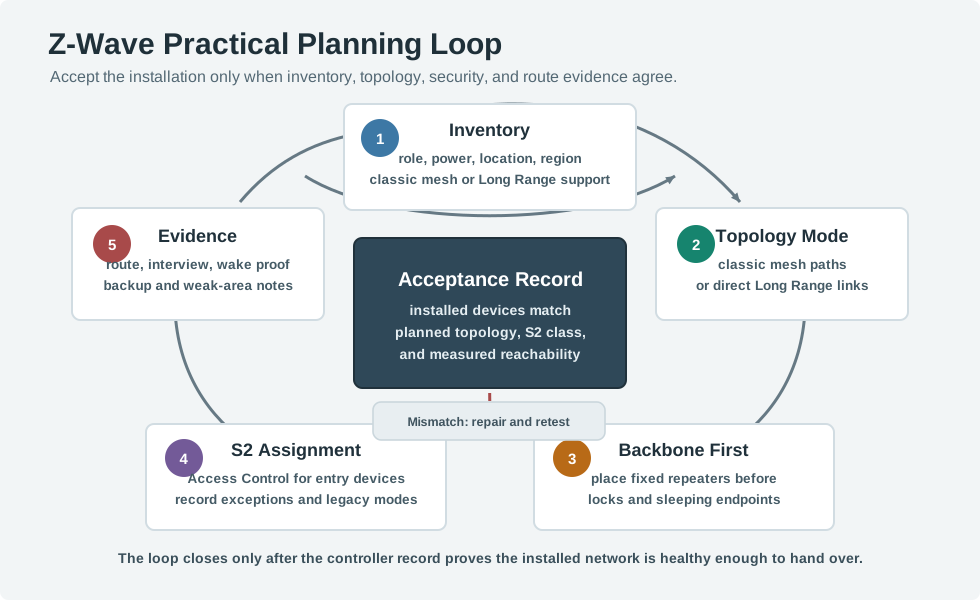
A device list cannot prove that the installed path works.
- A gateway means the boundary system that joins local devices to another network or service.
- This check covers one layout and set of devices, not every radio change.
- Pairing a device beside the hub is just the first clue.
Major section
Planning Inputs
The hand-off to: Mismatch: repair and retest needs an assigned owner.
- These five records must be read as one plan.
- Inventory establishes power state, region, and topology capability; topology intent determines whether repeaters or direct Long Range links matter; the backbone plan then exposes weak installed paths.
Major section
Placement Review
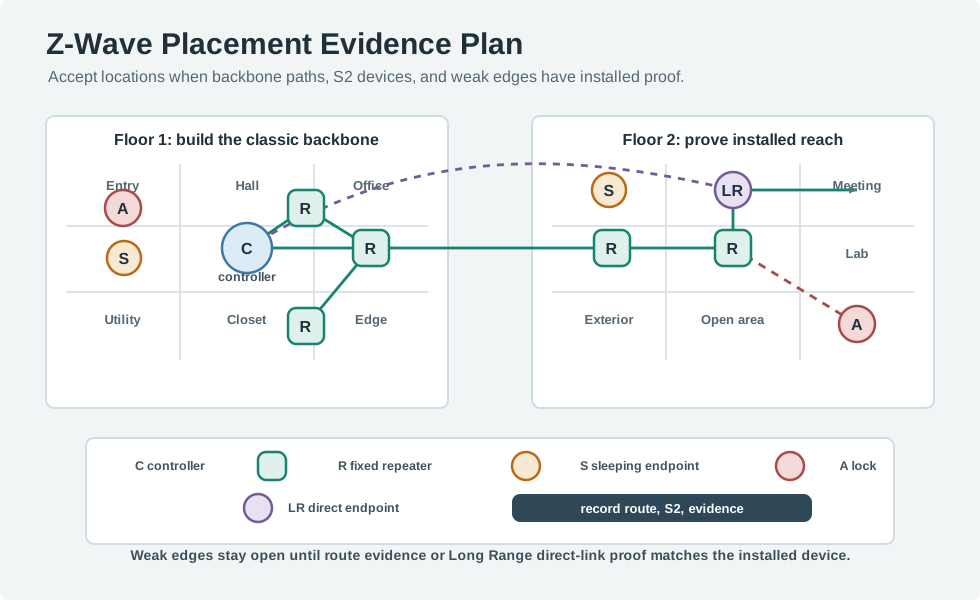
The common planning error is counting every node as if it strengthens the mesh.
- A set of battery sensors can be valuable, but it does not create a backbone.
- Reopen placement review whenever: Lab changes.
Major section
Always-On Devices Define the Backbone
Battery devices sleep to save energy and generally do not repeat for other nodes.
- The practical planning question is not "where are my sensors?" but "do my always-on devices form a connected mesh that reaches every critical location within the route budget?".
- A two-floor house might have 1 controller, 8 in-wall switches, 2 smart plugs, 1 powered thermostat, 3 locks, and 18 battery sensors.
- The installation has 33 nodes, but the classic mesh backbone is only the 11 always-listening devices: 8 + 2 + 1 = 11.
Major section
Always-On Devices Define the Backbone (continued)
The 21 battery-powered locks and sensors matter for coverage goals, but they are not the devices that carry other nodes' traffic.
- If 7 are clustered in the kitchen and living room, only 4 remain to bridge the hallway, upstairs rooms, garage wall, and exterior entry.
- Moving one smart plug from behind a TV to the stairwell may improve the architecture more than buying more battery sensors, because it changes the route backbone instead of only adding endpoints.
- If the front lock, garage controller, and upstairs hallway sensor are the three most important endpoints, each needs an explicit path story.
Major section
Security Assignment
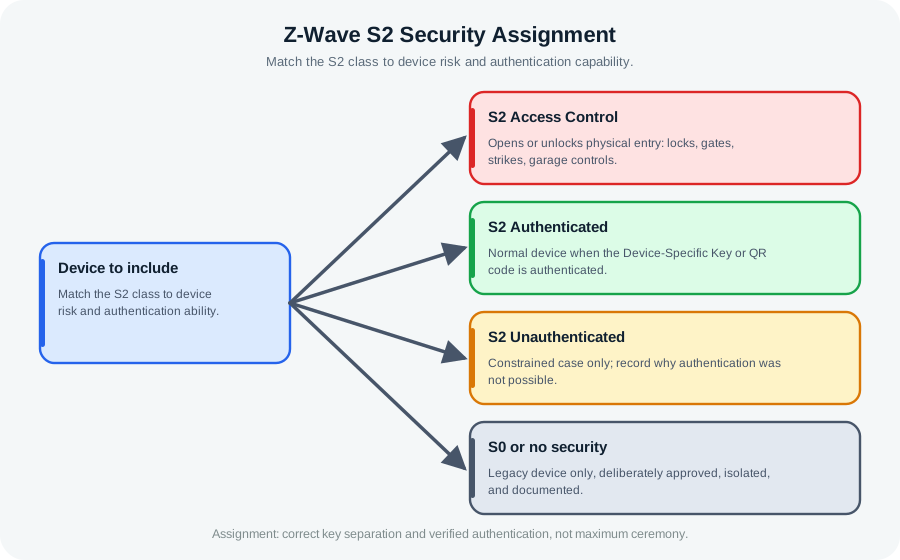
S2 security is not a single label.
- It separates network keys and inclusion rules into classes.
- The practical decision is to match the class to device risk and authentication capability.
- Both: Device to include and code is authenticated need evidence.
Major section
FLiRS, Sleeping Sensors, and Command Latency
Those rows explain what each device can do for the network and what evidence proves it is accepted.
- A mains device is available immediately.
- A light switch may use an authenticated class and serve as a repeater.
- A lock should be treated as an access-control endpoint and validated more strictly.
Major section
Troubleshooting Flow
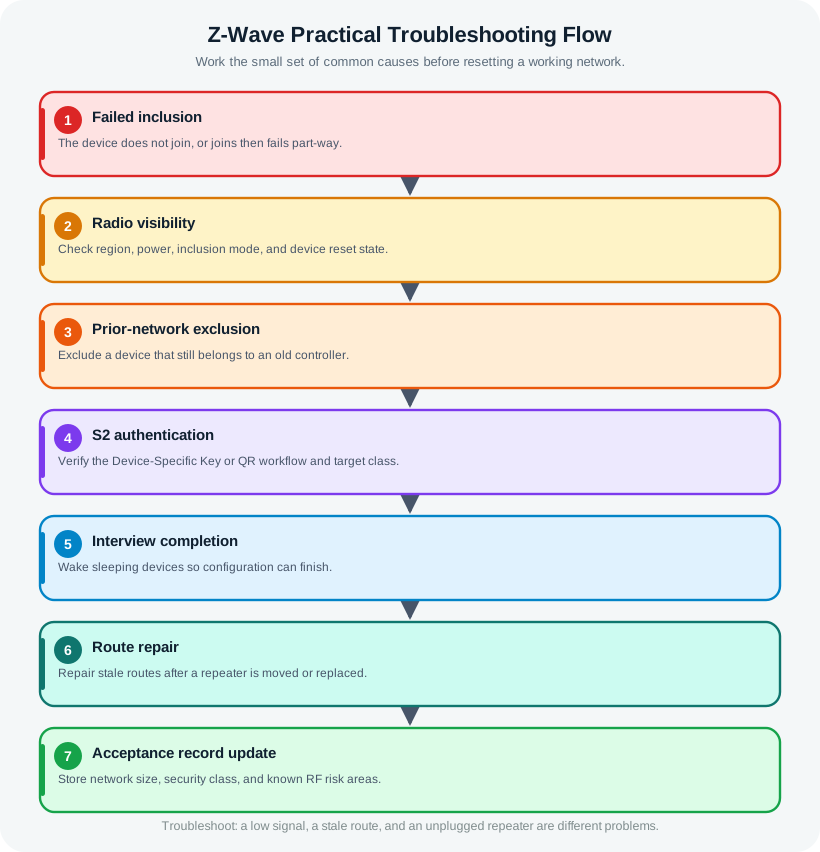
Most practical failures have a small set of causes.
- The comparison reaches and acceptance record update.
- Work through it from the: Wake sleeping devices so configuration can finish field to interview completion, then the and acceptance record update disposition.
- Combining: Wake sleeping devices so configuration can finish with interview completion hides accountability.
Major section
Troubleshooting Flow (continued)
Excluding a device from any controller can clear many stale associations, but use the device manual for final reset behavior.
- The device is not discovered.: Check regional frequency, power, inclusion mode, device reset state, and whether the controller supports the device's classic mesh or Long Range mode.
- A wrong regional device will not be fixed by route repair.
- A sleeping endpoint may need a wake action before configuration evidence is complete.
Major section
Troubleshooting Flow (continued)
The device starts inclusion but fails security.: Check the Device-Specific Key or QR workflow, the target S2 class, controller support, and whether the device still belongs to an old network.
- The device includes but the interview is incomplete.: Check whether the device is asleep, out of reach at the installed location, waiting for manual wake-up, or using command classes the controller does not fully expose.
- The device responds slowly after moving a plug or switch.: Assume route evidence may be stale.
- A lock works from nearby but fails at the door.: Treat it as a placement and route-evidence problem.
Major section
Hop Budget and Acceptance Evidence
Lay out always-powered switches, plugs, modules, and powered sensors so that every critical location sits within a short chain of them.
- A FLiRS lock also needs a mains repeater within direct radio range; it cannot lean on other battery devices to relay.
- Acceptance should be measurable.
- Long Range changes the evidence, not the need for evidence.
Major section
Hop Budget and Acceptance Evidence (continued)
Sub-GHz propagation helps through ordinary walls, but thick masonry, foil insulation, appliances, metal doors, and utility spaces still create weak paths that a well-placed fixed repeater must solve.
- If a device only succeeds at the edge of the hop budget or drops during heal, add or reposition a mains repeater instead of hoping the radio will cope.
- If the controller reaches a front lock through a hall switch and then an entry switch, record that installed path and the fact that both intermediate devices are mains powered.
- It needs direct gateway reach, regional support, controller support, security inclusion, and installed signal evidence.
Major section
Hop Budget and Acceptance Evidence (continued)
If the only observed path runs through a removable smart plug, record that dependency and decide whether to replace it with a fixed repeater.
- The problem is not the number of nodes; it is whether a critical route depends on movable or weak backbone devices.
- Unplug one non-critical smart plug or move one portable repeater back to its intended outlet, then confirm the lock, garage control, and farthest sensor still have acceptable evidence.
- If one change breaks a critical path, the network needs another fixed mains device or a revised placement plan before acceptance.
Major section
Capacity and Scaling
Classic Z-Wave has a 232-node network limit.
- That number is a boundary, not a target.
- Practical designs should leave room for replacement devices, failed-node cleanup, and future additions.
- Implementation, controller, region, and device support can still impose a lower practical limit, so record the actual supported mode instead of assuming every Z-Wave product behaves the same way.
Major section
Common Pitfalls
Treating every device as a repeater.: Sleeping endpoints may be useful sensors, but they do not create the classic mesh backbone.
- Using security class as a substitute for placement.: S2 protects communication; it does not fix weak route evidence.
- Skipping prior-network cleanup.: Used, tested, or moved devices often need exclusion before a clean inclusion.
- Moving repeaters after acceptance.: A relocated plug or switch can invalidate routes that looked healthy during handoff.
Deck summary
Key takeaways
A device list cannot prove that the installed path works.
- The hand-off to: Mismatch: repair and retest needs an assigned owner.
- The common planning error is counting every node as if it strengthens the mesh.
- Battery devices sleep to save energy and generally do not repeat for other nodes.
- The 21 battery-powered locks and sensors matter for coverage goals, but they are not the devices that carry other nodes' traffic.
Retrieval practice
Recall check 1 of 3

Radio Remi says: answer from memory, then check your reasoning.
Q1A Z-Wave design is not accepted just because every device appears in the controller app. What else must the plan show?
Show answer
Answer: D A Z-Wave plan is accepted on repeater placement, route health, and security inclusion evidence, not mere app visibility.
Retrieval practice
Recall check 2 of 3

Radio Remi says: answer from memory, then check your reasoning.
Q2A Z-Wave network has many contact sensors but only two mains-powered devices. Edge sensors report intermittently. What is the most useful first design fix?
Show answer
Answer: A Classic Z-Wave mesh coverage depends on always-listening routing devices.
Retrieval practice
Recall check 3 of 3

Radio Remi says: answer from memory, then check your reasoning.
Q3A battery-powered Z-Wave door lock at the edge of the house must lock on command within a second, but it is unreliable. What device behavior is involved, and what fixes the reliability?
Show answer
Answer: D A battery lock is a FLiRS device: it wakes on a beam for low-latency commands but does not repeat, so it needs a mains-powered repeater within direct range and a route inside the 4-hop limit.
Print reference
Answers
Answer key.
- D · A Z-Wave plan is accepted on repeater placement, route health, and security inclusion evidence, not mere app visibility.
- A · Classic Z-Wave mesh coverage depends on always-listening routing devices.
- D · A battery lock is a FLiRS device: it wakes on a beam for low-latency commands but does not repeat, so it needs a mains-powered repeater within direct range and a route inside the 4-hop limit.