Wi-Fi & 802.11 · Study deck
Wi-Fi Planning: Requirements and Installed Evidence
A desk survey plans Wi-Fi from maps and expected use.
Radio Remi is your guide for this deck.

After studying this chapter
Learning objectives
You will be able to:
- separate deployment planning into scope, site evidence, capacity, segmentation, power, operations, and validation
- identify when a Wi-Fi deployment is coverage-limited, capacity-limited, service-path-limited, or operations-limited
- plan pre-deployment evidence without relying on brittle access point or range rules
- define post-deployment validation that proves the installed behavior
Major section
Start With the Wireless Story
An access point is the network device that nearby Wi-Fi devices join: Firmware means software stored on a device.
- A lab test with one access point and one sensor does not prove that a full site will work.
- Some doors are near a network unit.
- The plan must work in all those places and times.
Major section
Start With the Wireless Story (continued)
The hall is quiet at night but busy at the start of class.
- A door alarm, room meter, camera, and staff phone do not send the same amount of data or need the same wait time.
- Coverage asks whether a device can reach the network.
- A site can pass one check and fail the other.
Major section
Start With the Wireless Story (continued)
Capacity asks whether the network can serve all active devices at once.
- Security rules can split devices into groups and block a needed service by mistake.
- Roaming can move a device between access points.
- Recheck after walls move, device counts grow, radio settings change, or new firmware lands.
Major section
Start With the Wireless Story (continued)
Real fleets can have many versions, traffic bursts, and roaming rules.
- Under the Hood sets capacity budgets and traces faults across the full path.
- One device passing at night does not prove that the group will pass in the day.
- A brand name or access point count is not a release note.
Major section
In 60 Seconds
Wi-Fi deployment planning is the step that turns a working prototype into an operating network.
- A reliable plan does not start with an access point count or a feature claim.
- It starts with device classes, service paths, site evidence, capacity evidence, security boundaries, power behavior, operating ownership, and validation records.
- This chapter gives you a deployment-planning method for IoT Wi-Fi.
Major section
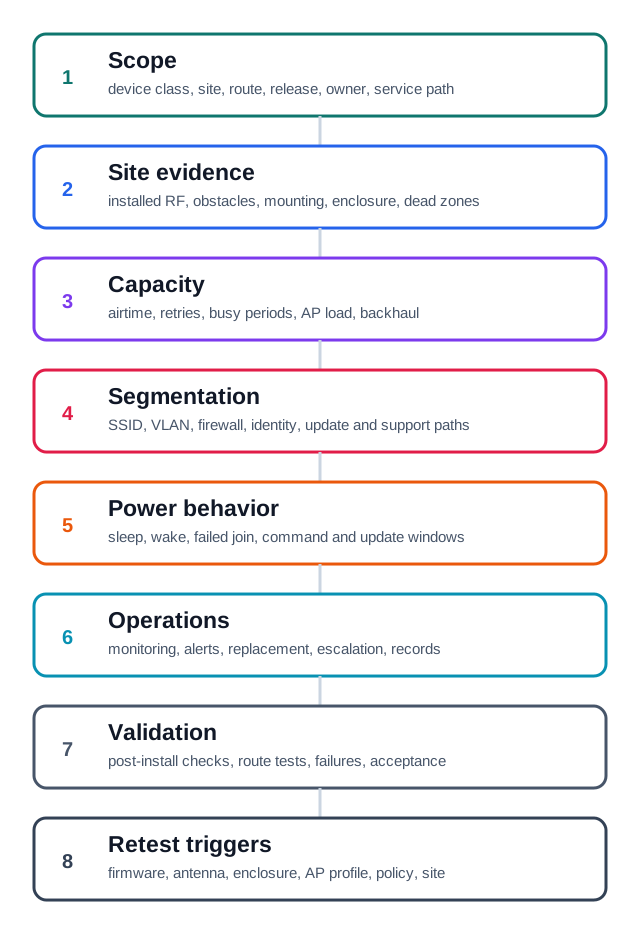
Deployment Planning Evidence Map
This keeps placement decisions tied to a service claim that can be verified.
- The walkthrough starts with device classes, locations, service paths, and ownership, then overlays site measurements and obstacle or enclosure effects.
- The design then adds segmentation, identity, update, and support paths before accounting for sleep, wake, failed joins, and maintenance power.
- Capacity is evaluated next through airtime, retries, association behaviour, traffic classes, and the expected mixed-client load; a strong signal does not prove enough shared airtime.
- Monitoring and change control complete the map by identifying who responds and which firmware, antenna, access-point, policy, or site change requires retesting.
Deck summary
Key takeaways
An access point is the network device that nearby Wi-Fi devices join: Firmware means software stored on a device.
- The hall is quiet at night but busy at the start of class.
- Capacity asks whether the network can serve all active devices at once.
- Real fleets can have many versions, traffic bursts, and roaming rules.
- Wi-Fi deployment planning is the step that turns a working prototype into an operating network.
Retrieval practice
Recall check 1 of 2

Radio Remi says: answer from memory, then check your reasoning.
Q1Wi-Fi deployment planning should start with what, rather than an access-point count?
Show answer
Answer: A Wi-Fi deployment planning starts from device classes, service paths, site evidence, and capacity, not an access-point count.
Retrieval practice
Recall check 2 of 2
Radio Remi says: answer from memory, then check your reasoning.
Q2A sensor fleet joined beside a bench router. What should post-install validation prove?
Show answer
Answer: C The installed scope needs end-to-end behavior evidence.
Print reference
Answers
Answer key.
- A · Wi-Fi deployment planning starts from device classes, service paths, site evidence, and capacity, not an access-point count.
- C · The installed scope needs end-to-end behavior evidence.