Human-Centred IoT Design · Study deck
UX Evaluation: Methods and Measures
The app looks neat in a design review, yet the tenant cannot tell whether the valve is closed or only the alert sound is off.
UX Uma is your guide for this deck.
After studying this chapter
Learning objectives
You will be able to:
- Explain: A failed smart-lock setup may involve QR scan failure, BLE provisioning timeout, Wi-Fi join error, Matter commissioning step, phone permission denial, OAuth invite conflict, reader offline state, or account-role mismatch.
- Explain: An IoT UX evaluation should test whether a person can complete the task when the physical device, app, cloud service, notification path, automation rule, and support view all have to agree.
- Explain: Without both views, teams often fix wording when the real issue is delayed state feedback, or they fix a retry handler while leaving users unsure what to do next.
Major section
Start Simple
The app looks neat in a design review, yet the tenant cannot tell whether the valve is closed or only the alert sound is off.
- That gap can damage a home.
- The review team should give a person one clear task in a realistic setting.
- Include people with different sight, movement, language, and experience needs.
Major section
Start Simple (continued)
A severe problem may block release.
- A small wording issue may have a dated owner.
- Include the support route in the experience.
- A person may finish only by calling, reading a label, or reaching a physical control.
- The product is the whole path, not just the main screen.
Major section
Evaluate Connected Experiences
An IoT UX evaluation should test whether a person can complete the task when the physical device, app, cloud service, notification path, automation rule, and support view all have to agree.
- A clean screen is not enough if the device is offline, the app cache is stale, a push notification is delayed, or support cannot explain what happened.
- The evaluation has to follow the connected experience from first setup through everyday control, alert response, recovery, maintenance, sharing, and removal.
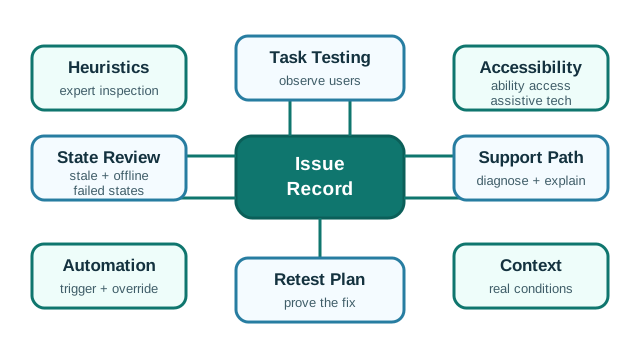
- An expert review can find unclear labels and missing feedback, while task testing shows what people do during setup, control, and recovery.
Major section
Evaluate Connected Experiences (continued)
Accessibility checks keyboard, screen reader, and physical routes; state review checks stale, offline, and failed states.
- A field-pilot decision may need setup success, recovery behavior, accessibility, and support diagnostics.
- A release decision for automation may need override success, explanation quality, false-trigger impact, and rollback behavior.
- Evaluation also has to separate three kinds of evidence.
Major section
Evaluate Connected Experiences (continued)
A maintenance-workflow decision may need evidence that technicians can distinguish stale readings, gateway outage, low battery, muted alerts, and assigned work orders without guessing.
- The test should include the states that make the decision risky, not only the path the product team hopes will happen.
- A heuristic review can show that labels, feedback, recovery, or consistency are weak.
- Task observation shows whether representative users can complete the flow under realistic conditions.
Major section
Evaluate Connected Experiences (continued)
System traces show which device, broker, cloud, notification, or account state was actually present while the user struggled.
- When those records are kept together, a finding can become a fixable product issue instead of a vague preference.
- Risk truth: include offline, stale, pending, denied, low-battery, muted, delayed, rejected, and partially applied states.
- The same structure works for a factory dashboard, medication dispenser, building automation panel, fleet tracker, or wearable health alert.
Major section
Observation with State Evidence
A failed smart-lock setup may involve QR scan failure, BLE provisioning timeout, Wi-Fi join error, Matter commissioning step, phone permission denial, OAuth invite conflict, reader offline state, or account-role mismatch.
- The participant's hesitation tells you where the interface failed; the trace tells engineers which state was actually present.
- For dashboards and alerts, evaluate the decision people must make.
- A caregiver may need acknowledgement status, alert freshness, quiet-hours state, and escalation result.
Major section
Observation with State Evidence (continued)
Without both views, teams often fix wording when the real issue is delayed state feedback, or they fix a retry handler while leaving users unsure what to do next.
- An operator may need to distinguish current, stale, estimated, muted, gateway-down, and sensor-failed readings before dispatching maintenance.
- A facilities team may need to know whether automation changed a room, a user paused it, or a sensor stopped reporting.
- The session should therefore include realistic alert volume, timestamps, network delay, role permissions, escalation rules, and support handoff rather than a clean demo account with one perfect device.
Major section
Traceable Evaluation Handles
That difference matters: the UX fix may be a clearer pending state, a better timeout, a local fallback, a cache invalidation change, or a support-console freshness label.
- Instrumentation makes UX findings actionable.
- A user may tap unlock, see pending, receive no push update, retry, and then believe the system failed.
- Accessibility findings need platform handles too.
Major section
Traceable Evaluation Handles (continued)
The handles do not need to expose private data in the research record, but they do need to let the team reconstruct which state the product presented at the moment the user made a decision.
- System record: event timestamp, device state, app state, cloud state, notification state, support-visible state, and data freshness.
- Acceptance record: measurable task outcome, accessibility result, support outcome, owner, and the condition that requires another evaluation pass.
- Tooling should support the evidence loop.
Major section
Traceable Evaluation Handles (continued)
Product analytics can show funnel drop-off, but they rarely explain the state mismatch.
- OpenTelemetry traces, structured app logs, device logs, broker logs, feature-flag cohorts, crash reports, support-ticket metadata, and session notes can be joined by a privacy-safe correlation id.
- Automated checks such as axe-core, Playwright keyboard flows, contrast tests, and unit tests for live-region updates can protect implementation basics.
- The final record should be small enough to survive release pressure: decision, task, role, context, observed behavior, state trace, severity, fix owner, acceptance check, and follow-up trigger.
Deck summary
Key takeaways
The app looks neat in a design review, yet the tenant cannot tell whether the valve is closed or only the alert sound is off.
- A severe problem may block release.
- An IoT UX evaluation should test whether a person can complete the task when the physical device, app, cloud service, notification path, automation rule, and support view all have to agree.
- Accessibility checks keyboard, screen reader, and physical routes; state review checks stale, offline, and failed states.
- A maintenance-workflow decision may need evidence that technicians can distinguish stale readings, gateway outage, low battery, muted alerts, and assigned work orders without guessing.
Retrieval practice
Recall check 1 of 4

UX Uma says: answer from memory, then check your reasoning.
Q1A test finds a rare failed access recovery that traps a resident outside and a common minor spacing flaw. Which issue should the team escalate first?
Show answer
Answer: D The failed access recovery, recording its consequence, owner, acceptance check, and retest trigger.
Retrieval practice
Recall check 2 of 4
UX Uma says: answer from memory, then check your reasoning.
Q2A team needs to decide whether a smart-home setup flow is ready after Wi-Fi pairing failures were reported. Which evaluation plan supports the release decision?
Show answer
Answer: D UX evaluation should connect the decision to observed task behavior, connected-system states, accessibility, support diagnostics, issue ownership, acceptance criteria, and follow-up conditions.
Retrieval practice
Recall check 3 of 4
UX Uma says: answer from memory, then check your reasoning.
Q3A connected lock passes a visual task test on a phone. What evaluation is still needed before claiming the whole access path works?
Show answer
Answer: D Test keyboard, screen reader, physical control, and support recovery in relevant states.
Retrieval practice
Recall check 4 of 4
UX Uma says: answer from memory, then check your reasoning.
Q4A lock app shows “offline,” but support cannot see whether the hub or lock failed. What should UX evaluation add?
Show answer
Answer: D Recovery depends on support seeing enough state to guide the person.
Print reference
Answers
Answer key.
- D · The failed access recovery, recording its consequence, owner, acceptance check, and retest trigger.
- D · UX evaluation should connect the decision to observed task behavior, connected-system states, accessibility, support diagnostics, issue ownership, acceptance criteria, and follow-up conditions.
- D · Test keyboard, screen reader, physical control, and support recovery in relevant states.
- D · Recovery depends on support seeing enough state to guide the person.