Human-Centred IoT Design · Study deck
Foundations of IoT User Experience
Before drawing an app screen, picture one person trying to make a connected product do something useful in a real place.
UX Uma is your guide for this deck.
After studying this chapter
The person’s goal connects the whole experience
Connected-product UX makes goals, state, control, and recovery understandable across touchpoints.
- A user goal describes the outcome beyond pressing a control.The meeting owner needs a comfortable room for the meeting without disrupting the normal schedule for the next group.
- Visible state tells people whether a connected result is trustworthy.A temperature reading needs freshness beside the value, while a command needs clear pending, rejected, or applied feedback.
- Meaningful control includes a route back from unwanted automation.Temporary pause, override, restore, and local fallback let the person recover when the app path or normal schedule is unsuitable.
- A useful UX review includes context, access, privacy, and support.A polished app leaves the experience incomplete when guests, physical controls, stale data, or the support handoff remain untested.
Major section
State, action, and recovery form a loop
The loop connects sensing with recovery; follow Show State to Act, then Confirm before returning from failure.
- Sensing supplies information that must become visible system state.A temperature reading needs a trustworthy status rather than a polished display that quietly presents an old value as current.
- Show State prepares the person to choose an appropriate action.Current, stale, offline, pending, denied, or overridden feedback explains what the connected product can actually support at that moment.
- Act needs confirmation that distinguishes a request from its result.A thermostat adjustment can remain queued or be rejected, so the app must not imply completion before the relevant state is known.
- Recovery keeps an unexpected result from becoming a dead end.Pause, restore, fallback, and support need consistent language across the wall device, app, dashboard, and maintenance view.
Major section
A shared goal needs a shared state story
The same connected task must remain understandable across device, app, dashboard, and support touchpoints.
- The meeting goal includes comfort and the later return to normal.A temporary adjustment should help the current group without silently replacing the schedule needed by the next meeting.
- Guest entry has a purpose beyond opening an access screen.The resident needs safe entry followed by access ending at the right time, which may not require a full guest account.
- Conflicting surface states can undermine the whole product experience.A wall device, app, and support view can each look polished while giving the person incompatible accounts of the same room.
- State, control, and recovery make the experience predictable under change.When those checks are weak, people must guess which surface is authoritative or who owns the next action.
Major section
A bounded review makes the design testable
A connected-experience record ties one user goal to context, states, controls, constraints, and evidence.
- The review records the goal, role, context, and relevant touchpoints.For the thermostat, it must identify who can change the room and what the wall device and app display.
- Failure states belong beside the normal control path.An offline device, delayed command, disagreeing occupancy sensor, or shared schedule change can alter the promise made by the override.
- Prototype fidelity depends on the question the team needs answered.Paper can test wording and sequence, while a bench device can test local indicators, buttons, haptic cues, and sensing.
- A bounded conclusion records untested roles, failures, and reopening conditions.That limit prevents a narrow usability session or clean lab demonstration from being treated as evidence for the complete field service.
Major section
Distributed state creates visible uncertainty
A person sees one answer while the product may hold several different states across its layers.
- Local success can coexist with a confusing overall experience.The app can accept a request while a cloud queue delays delivery and a sleeping device has not yet applied the change.
- Command stages need distinct language at the point of decision.Tapped, queued, sent, applied, rejected, and timed-out states describe different outcomes for the person waiting on the thermostat.
- Telemetry loses credibility when its age is hidden.A dashboard can keep showing a normal temperature after a sensor or link fails unless freshness, source, or confidence remains visible.
- Early UX review determines which truths the system must expose.Once telemetry, permissions, and support records are fixed, the interface may lack the evidence needed to explain the real state.
Major section
Authority and consent extend beyond the app
Connected-product UX must explain who can act and who is affected by sensing.
- Several controls can compete for authority over one device.A local button, mobile app, schedule, occupancy rule, and admin dashboard need visible rules explaining which action currently controls the room.
- Shared-space sensing can affect people beyond the account owner.Guests, bystanders, maintainers, and other room users need consideration even if they never opened the product’s app.
- Useful state language can translate the implementation details that affect decisions.Pending, last seen, denied, manual mode, and restore normal schedule help the person act without interpreting every device or cloud layer.
- The recovery plan identifies the next responsible person or role.When surfaces disagree, support ownership and override authority keep the user from having to guess who can restore the intended behaviour.
Major section
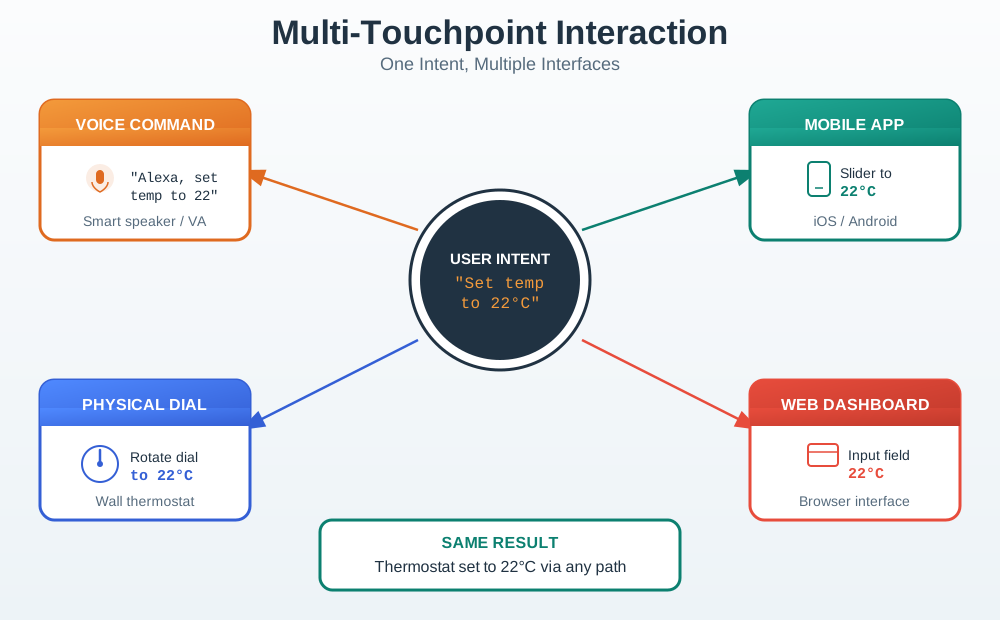
Several touchpoints can serve the same intent
The diagram follows one thermostat intent through voice, dial, app, and dashboard; compare the result across those routes.
- User intent remains the common starting point across the diagram.A thermostat adjustment begins with the person’s comfort goal, regardless of which input method is convenient in that context.
- Voice and the physical dial can offer different routes to the action.Different surroundings and access needs can make a local or spoken control more usable than opening a mobile screen.
- App and dashboard inputs must preserve the same state meaning.The chosen route should not change how the system describes the room, adjustment, pending state, or resulting temperature control.
- The shared result makes consistency visible across the touchpoints.A connected indicator beside an offline app, or an old normal dashboard value, breaks the single experience the diagram is meant to preserve.
Major section
The goal is larger than the button press
Separating the desired outcome from the interface action reveals what the product really needs to support.
- Guest entry describes an outcome, while tapping unlock describes an action.Starting with the outcome can reveal that the access flow does not need the full account journey suggested by the initial screen design.
- A user goal is what the person is trying to accomplish, not the button they press.
- Physical context changes which interface action is usable.Gloves, a low phone battery, or guest access can make a phone-only control path unsuitable despite a technically correct app.
- The user’s role limits what the design may reasonably assume.An owner, guest, operator, maintainer, or support person can face different access, reach, attention, and recovery conditions around the same device.
Major section
Freshness belongs beside the decision
A visible value needs state information that makes its freshness and relevance clear at the decision.
- A temperature reading must reveal whether its evidence is still current.When the sensor fails quietly, an old normal value can mislead the person unless freshness appears where the room decision happens.
- A pending command needs a more precise account of its progress.Sent, queued, rejected, and applied describe different situations, so the interface must not collapse all of them into apparent success.
- Operational states can change which action remains available.Offline, updating, low power, denied permission, muted, failed, and overridden states affect what the person can safely expect from the product.
- Shared state vocabulary lets the user and support discuss one problem.Putting the relevant state near the decision reduces guessing across the app, device indicator, dashboard, and support record.
Activity 1 · Label it
✎ Label the command’s visible states

I want the person waiting for a thermostat change to see an honest result.
Draw a simple command strip with four labelled places: sent, queued, rejected, and applied. Under each label, write why it must not be shown as the same completed state. Add where a stale temperature warning belongs.
3 minutes · Pen and paper · Answer: Activity 1
Major section
Automation needs a route back
The control design must let people interrupt and recover from automation that affects their task.
- A temporary pause serves a different need from permanent disable.Meeting users who only need a short interruption can forget to restore a rule when their only option switches automation off indefinitely.
- Manual override needs clear feedback about the resulting state.The person must be able to distinguish a pending request from the change that actually took effect on the device.
- Undo or restore lets people recover from unwanted automation.Explaining why the system acted and how normal behaviour resumes helps users correct mistakes without controlling every internal detail.
- Local fallback preserves meaningful control when the app is unavailable.Visible role and connectivity limits show what the person can do at the device instead of leaving the automation’s effect uninterruptible.
Major section
Recovery needs one shared explanation
A recovery path succeeds when the user and support can coordinate from symptom to stable state.
- Recovery starts by stating what is known about the visible symptom.Device, account, network, and service causes should be distinguished only where the available evidence supports that explanation.
- The next action must fit the actual failure state.Stale data, delayed commands, low battery, lost access, and conflicting automation need guidance beyond repeating the normal setup process.
- Support needs the user’s state vocabulary and enough correlation context.A technical sync-delay label against a vague user error forces both sides to translate before they can coordinate the recovery.
- A stable result includes the handoff and the preserved context.Keeping the observed state and next owner visible helps users and operators avoid guessing or repeating destructive setup steps.
Major section
A meeting override should end predictably
The thermostat review connects temporary comfort with a clear return to the normal schedule.
- The user’s goal is comfort during a specific time window.A temporary room adjustment can fit the meeting task better than forcing the user to edit the permanent schedule.
- The relevant room states must be understandable together.Current and target temperature, schedule, occupancy, and any pending command explain whether the requested change can achieve the intended comfort.
- A local temporary control supports the user’s actual context.The person may be in the room, away from the app, or sharing control with others when the adjustment is needed.
- The override needs a visible duration and return path.The app and dashboard should show the same override and confirm whether the normal schedule will resume automatically.
Activity 2 · Draw it
✎ Sketch a recoverable meeting override
I want the current meeting comfortable without leaving the next group an altered schedule.
Sketch a local thermostat override panel. Include the temporary adjustment, how long it lasts, pending or applied feedback, and the return to normal schedule. Mark which wording the app and dashboard should share.
3 minutes · Pen and paper · Answer: Activity 2
Major section
A doorbell alert needs time, choice, and privacy
The notification must help the resident understand the event and choose a response in their current context.
- The resident’s goal is to identify the visitor and choose a response.Answering remotely is one possible action, but the person may be driving, in a meeting, asleep, or away from the phone.
- The alert must distinguish a live event from an ended event.Ringing, recording, live view, missed event, and device offline describe different situations that should not collapse into a single notification state.
- Answer, ignore, mute, and later review can preserve useful choice.Clear alert levels and accessible settings let the resident respond without depending only on sound or colour.
- Privacy controls belong near video and recording behaviour.Camera, microphone, recording, and sharing must remain understandable so the notification does not hide the product’s sensing and disclosure choices.
Major section
A review covers the task and its difficult conditions
A testable UX decision links the user’s goal with consistent state, accessible control, privacy, and recovery.
- The goal and context define what the test must establish.Physical surroundings, social roles, and the desired outcome need separate attention from the button or screen used in the demonstration.
- State and control must remain consistent across the connected surfaces.Device, app, dashboard, alerts, automation, and support should agree on current, stale, pending, denied, and failed behaviour.
- Accessibility and privacy can shape the whole control path.Screen choices, physical placement, setup, alerts, support, permission explanations, and sensing behaviour all affect whether the experience is usable and understood.
- Realistic failure tasks make recovery claims reviewable.The team needs evidence for likely network, battery, command, access, and automation changes alongside a clear limit on what remains untested.
Major section
Polish can hide missing state and recovery
Connected-product defects often appear where a screen-only review stops following the person’s task.
- Screen-only improvements can leave the connected experience inconsistent.The app may look better while device indicators, dashboard state, alert wording, and support behaviour still describe different situations.
- Hidden state makes the person guess whether a result is trustworthy.A value or command without current, stale, pending, or failed feedback leaves an important decision unsupported.
- Automation without explanation or override can remove useful control.An ordinary meeting interruption becomes difficult when the rule can only be disabled permanently and no recovery path restores normal behaviour.
- Late accessibility and setup-only reviews miss real-use constraints.Physical placement, reach, alerts, battery changes, network failures, and support need attention before the design is treated as finished.
Major section
The worst moment is part of the design
The first design question concerns a real person trying to accomplish a task in real conditions.
- A connected experience begins with a person’s practical need.Drawing an app first can hide the difference between a useful outcome and the interface action chosen to request that outcome.
- The device’s knowledge can differ from what the person expects.Sensing, automation, and permission changes need feedback that makes the system’s actual state understandable at the moment of use.
- The worst moment exposes gaps that a demonstration can hide.The chapter’s tired person at 2am needs usable feedback and recovery even when the normal connected workflow fails.
- Support and recovery belong in the initial design decision.The experience includes what happens after a network, battery, access, or automation change prevents the expected result.
Deck summary
The whole experience must survive changed conditions
IoT UX joins human purpose with honest state, meaningful control, and a recoverable connected service.
- The real user goal determines what a successful experience must deliver.Comfort for one meeting includes the later schedule, just as guest entry includes access ending at the intended time.
- State information belongs where the person makes the decision.A stale temperature and a queued command need visible context rather than a success-looking screen with the explanation hidden in support.
- Control and recovery keep automation understandable when conditions change.Temporary pause, manual override, undo, restore, and local fallback give the person useful responses when the normal path fails.
- Consistency, accessibility, privacy, and support belong in early review.The same task must work across roles, physical controls, app, dashboard, alerts, and maintenance instead of stopping at a polished demonstration.
Retrieval practice
Recall check 1 of 3
UX Uma says: answer from memory, then check your reasoning.
Q1A team is reviewing a thermostat meeting-room override early in design. Which review record is strong enough to make the decision usable?
Show answer
Answer: D A reviewable IoT UX decision ties the person, task, context, touchpoints, connected states, feedback, recovery, constraints, validation evidence, and stale-decision condition together before the design is trusted.
Retrieval practice
Recall check 2 of 3
UX Uma says: answer from memory, then check your reasoning.
Q2A smart lighting app lets users disable an automation rule, but there is no temporary pause. People disable the rule during meetings and forget to restore it. Which UX fundamental is most directly missing?
Show answer
Answer: D IoT UX fundamentals include visible state, meaningful control, consistency, accessibility, and recovery.
Retrieval practice
Recall check 3 of 3
UX Uma says: answer from memory, then check your reasoning.
Q3A thermostat automation changes a room setting and users cannot see why. What should the design expose?
Show answer
Answer: B The user can understand and control the active automation.
Print reference
Answers
Answer key.
- D · A reviewable IoT UX decision ties the person, task, context, touchpoints, connected states, feedback, recovery, constraints, validation evidence, and stale-decision condition together before the design is trusted.
- D · IoT UX fundamentals include visible state, meaningful control, consistency, accessibility, and recovery.
- B · The user can understand and control the active automation.
Print reference
Activity 1 answer
Model answer.
Label it: Sent describes transmission, queued describes waiting, rejected means the request was not accepted, and applied describes the completed change. These are distinct states. Freshness or a stale warning belongs beside the temperature value where the user decides.
Print reference
Activity 2 answer
Model answer.
Draw it: The model panel shows a temporary comfort adjustment with visible duration, honest pending or applied state, and a restore-normal-schedule option or clear automatic-resume confirmation. The app and dashboard use the same override and state wording.