UX Design · Study deck

Accessible IoT Interfaces: Adaptation and Device Sync

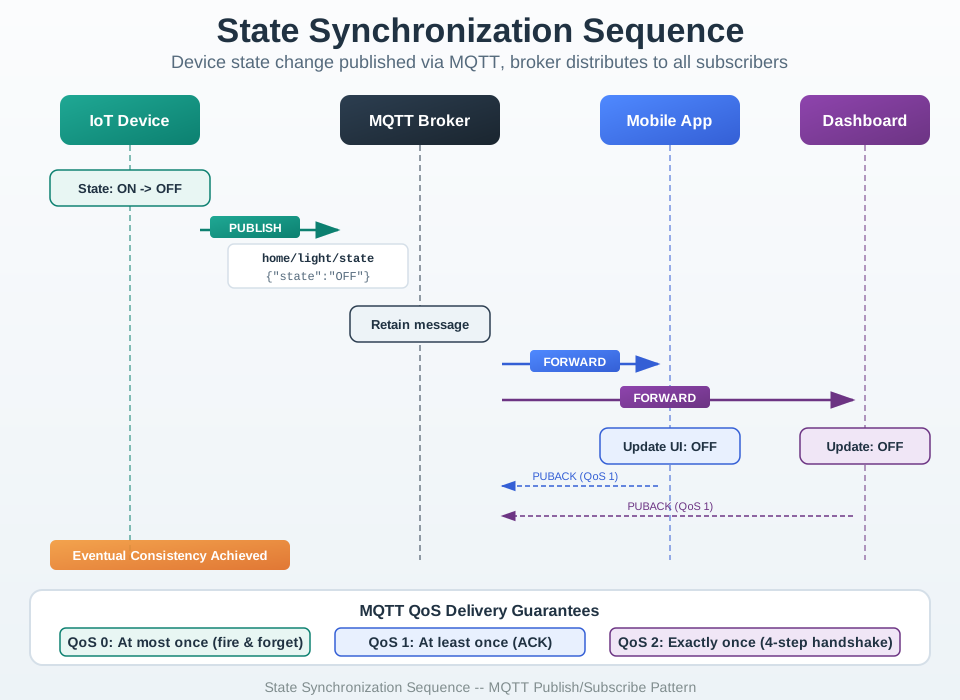
An interface can meet its WCAG and adaptation duties on one screen yet still fail when a person moves between a phone, display, voice device, and physical control.

UX Uma is your guide for this deck.

accessibilitymultidevice
UX Uma, the module guide, in a scene from this chapter.
iotclass.org

After studying this chapter

Learning objectives

You will be able to:

  • Explain: Accessible IoT design ensures devices and interfaces work for users with visual, motor, cognitive, or hearing differences, expanding market reach while meeting legal obligations in many jurisdictions.
  • Explain: Real user testing with disabled people reveals what automated tools can't: meaningful alt text, zoom behavior, cognitive load, real-world assistive tech compatibility.
  • Explain: Automated Tool Results (WAVE): ✓ All images have alt text. ✓ Color contrast meets 4.5:1 ratio. ✓ Form inputs have labels. ✓ Heading hierarchy correct.
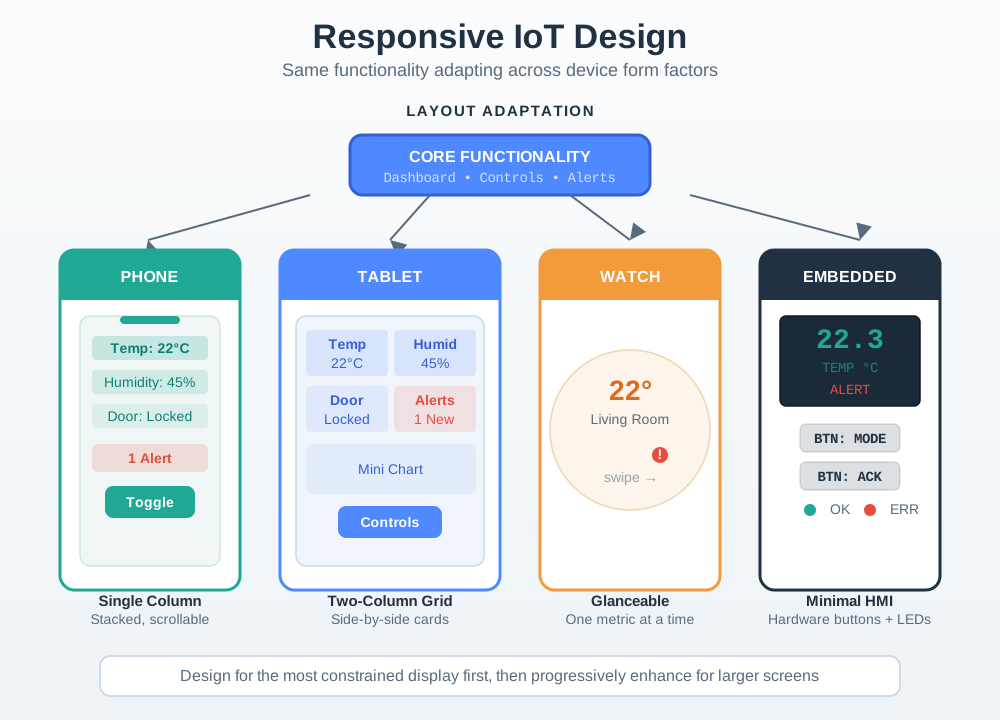
  • Explain: But interface design should leverage each platform's strengths—cramming a desktop interface onto a smartwatch creates terrible UX.
iotclass.org

Major section

Multi-Device Experiences
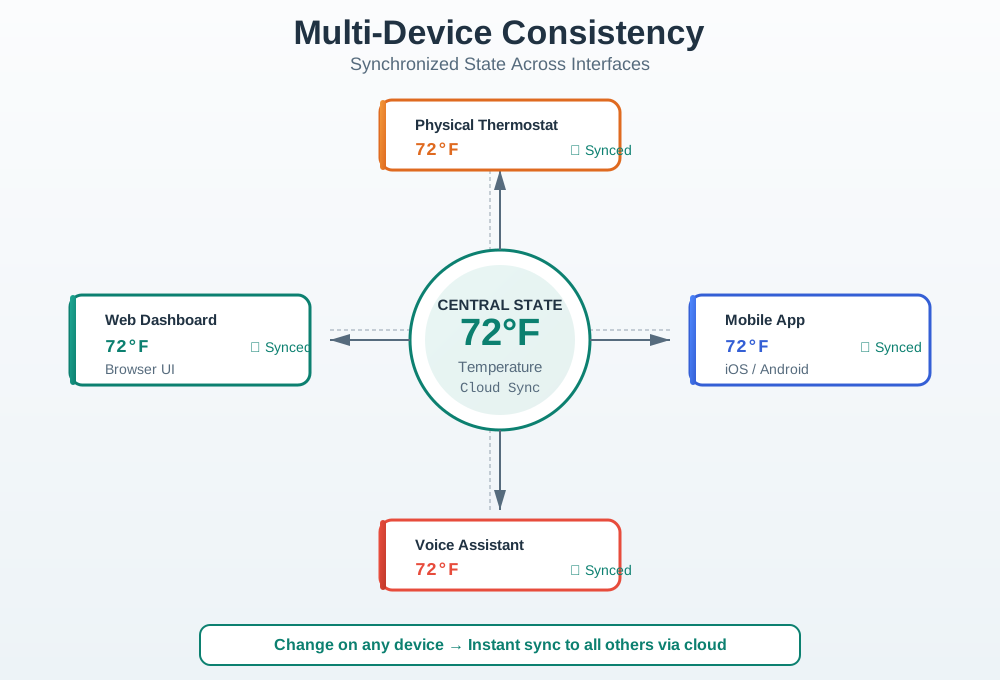
Every surface must use the same state name even when its controls differ.

  • In Figure: Responsive Design Patterns Across IoT Device Types, retain: Temp beside: ERR so responsive design patterns for iot remains explicit.
Multi-Device State Synchronization and Consistent Terminology
iotclass.org

Major section

Deep dive: Accessible Medication Dispensers

WCAG 1.4.3: Contrast (Minimum): FAIL Text: Light gray (#CCCCCC) on white background.

  • Contrast ratio: 1.6:1 (needs 4.5:1 for WCAG AA).
  • Impact: 85% of elderly users can't read text.
  • Cost: 12-minute average support calls for "can't see instructions".

Numbers to remember

85%Impact: 85% of elderly users can't read text.
8%Impact: 8% of users (color-blind) can't distinguish slots.
89%created a product 89% of users still use after 1 year (vs.
iotclass.org

Major section

Deep dive: Accessible Medication Dispensers (continued)

WCAG 2.5.5: Target Size: FAIL Button size: 32×32pt (needs 44×44pt minimum).

  • WCAG 1.4.1: Use of Color: FAIL Medication slot colors: Red/green indicators (color-blind unfriendly).
  • Impact: 8% of users (color-blind) can't distinguish slots.
  • Fails when: the alert is one 65 dB tone — 45% of users missed doses.
iotclass.org

Major section

Deep dive: Accessible Medication Dispensers (continued)

WCAG 1.4.2: Audio Control: FAIL Reminder alarm: 65 dB (hard to hear for hearing-impaired).

  • Reason: "Too hard to use," "Can't see screen," "Buttons too small".
  • Cost per unit: $50 refund + $18 support + $12 restocking = $80.
  • Accessibility isn't a niche concern—it's universal design that makes products more usable in diverse contexts (gloves, glare, noise, distraction).
iotclass.org

Major section

Deep dive: Multi-Device UX Consistency
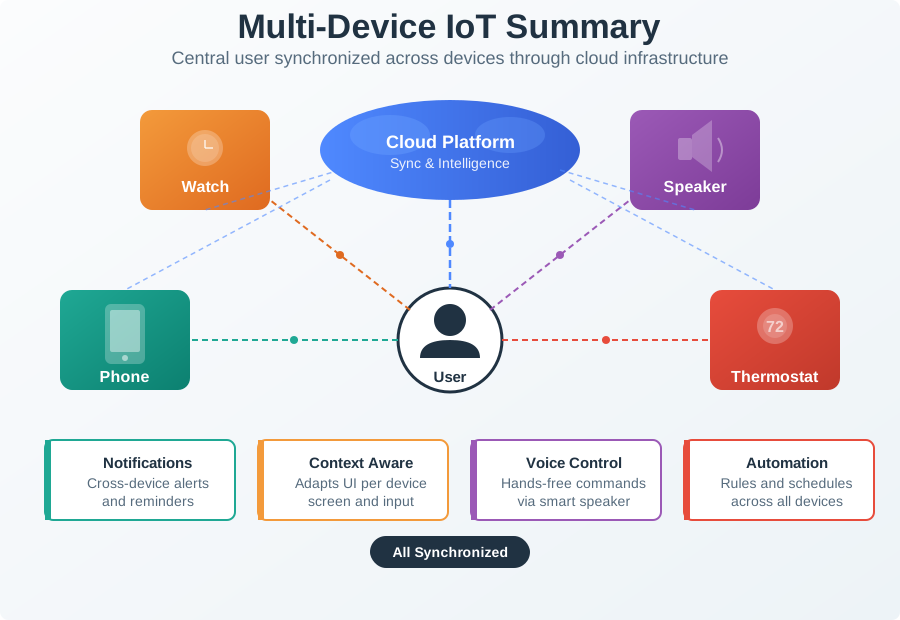
Key Insight: Consistency in terminology and data (state sync) enables users to switch devices seamlessly.

  • ✗ Mistake 2: Making Voice Assistant Do Everything.
  • But interface design should leverage each platform's strengths—cramming a desktop interface onto a smartwatch creates terrible UX.
  • Design hierarchy: Smartphone = full-featured primary, Watch = glanceable quick actions, Web = detailed analytics, Voice = hands-free simple commands, Physical = works offline.
iotclass.org

Major section

Deep dive: Beyond Automated Accessibility Tests
Who: Accessibility specialist (CPACC/WAS certified).

  • The Mistake: Running automated WCAG checkers (WAVE, axe, Lighthouse) and assuming 100% pass rate means the product is accessible to disabled users.
  • Automated Tool Results (WAVE): ✓ All images have alt text. ✓ Color contrast meets 4.5:1 ratio. ✓ Form inputs have labels. ✓ Heading hierarchy correct.
  • Assumed: Product is accessible.

Numbers to remember

100%assuming 100% pass rate means the product is accessible to disabled users.
40%Issue: Video tutorials have auto-generated captions with 40% error rate.
iotclass.org

Major section

Deep dive: Beyond Automated Accessibility Tests (continued)

Impact: User has no idea what icon represents (settings? Help? Close?).

  • Issue: Buttons are 44pt (WCAG minimum) but spaced 2pt apart.
  • Issue: Video tutorials have auto-generated captions with 40% error rate.
  • Impact: User can't distinguish error text from normal text.
  • Limitations: Expert isn't actual disabled user, may miss real-world issues.
iotclass.org

Major section

In 60 Seconds

Key Insight: Automated tools are necessary (cheap, fast, catch technical issues) but NOT sufficient (miss 70-75% of real accessibility barriers).

  • Real user testing with disabled people reveals what automated tools can't: meaningful alt text, zoom behavior, cognitive load, real-world assistive tech compatibility.
  • Spending $6K on real user testing prevents $280K+ in post-launch accessibility failures.
  • Accessible IoT design ensures devices and interfaces work for users with visual, motor, cognitive, or hearing differences, expanding market reach while meeting legal obligations in many jurisdictions.

Numbers to remember

280KSpending $6K on real user testing prevents $280K+ in post-launch accessibility failures.
iotclass.org

Deck summary

Key takeaways

Every surface must use the same state name even when its controls differ.

  • WCAG 1.4.3: Contrast (Minimum): FAIL Text: Light gray (#CCCCCC) on white background.
  • WCAG 2.5.5: Target Size: FAIL Button size: 32×32pt (needs 44×44pt minimum).
  • WCAG 1.4.2: Audio Control: FAIL Reminder alarm: 65 dB (hard to hear for hearing-impaired).
  • Key Insight: Consistency in terminology and data (state sync) enables users to switch devices seamlessly.
iotclass.org

Retrieval practice

Recall check 1 of 4

UX Uma says: answer from memory, then check your reasoning.

Q1Your industrial IoT system monitors 500 sensors across a factory. Engineers need to view real-time trends, configure complex automation rules, and analyze historical data. Should you prioritize mobile app or web dashboard development, and why?

APrioritize MOBILE APP - smartphones are ubiquitous and engineers can monitor on the go
BPrioritize WEB DASHBOARD for dense trends, precision input, and analysis
CBuild identical interfaces for both - consistency is most important
DSkip both and use only voice interface - hands-free is future of IoT
Show answer

Answer: B Correct!

iotclass.org

Retrieval practice

Recall check 2 of 4

UX Uma says: answer from memory, then check your reasoning.

Q2You're adding voice control to a smart home system. A user says 'Turn off the lights.' There are lights in 12 rooms. How should the voice interface handle this ambiguous command?

ATurn off ALL lights in the entire home - user said 'lights' (plural)
BUse CONTEXT to disambiguate - turn off lights in the room where user is located
CDo nothing and respond 'Command too ambiguous, please specify room name'
DPresent a menu: 'Say 1 for bedroom, 2 for kitchen, 3 for all lights...' listing all 12 rooms
Show answer

Answer: B Correct!

iotclass.org

Retrieval practice

Recall check 3 of 4

UX Uma says: answer from memory, then check your reasoning.

Q3You're designing a smart home app that needs to work on both smartwatches and tablets. On the tablet version, users can see and control all 15 rooms simultaneously. How should the smartwatch version handle this complexity?

AShow all 15 rooms in a scrollable list - users expect feature parity across devices
BShow only the CURRENT room (detected by location) with most-used actions, plus quick access to 'Favorites'
CRemove room controls entirely and only show notifications - watches are for reading, not interaction
DUse the same tablet interface but with smaller fonts to fit the watch screen
Show answer

Answer: B Correct!

iotclass.org

Retrieval practice

Recall check 4 of 4

UX Uma says: answer from memory, then check your reasoning.

Q4Place each multi-device accessibility responsibility where it lives so you can preserve input choice, shared state, and recoverable feedback across devices.

AAccessible Input Choices
BShared Cross-device State
CRedundant Output and Recovery
DUnqualified Shortcut
Show answer

Answer: A An accessible multi-device flow accepts more than one input, synchronizes meaningful state, and confirms outcomes through redundant, recoverable feedback.

Q5Complete the IoT dashboard widget creator with DOM manipulation:

Aconst widget = document.createElement('div');
Bconst widget = document.newElement('div');
Cconst widget = document.querySelector('div');
Dconst widget = new Element('div');
Show answer

Answer: A document.createElement() creates DOM elements. innerHTML with template literals allows dynamic HTML content.

iotclass.org

Print reference

Answers

Answer key.

  1. B · Correct!
  2. B · Correct!
  3. B · Correct!
  4. A · An accessible multi-device flow accepts more than one input, synchronizes meaningful state, and confirms outcomes through redundant, recoverable feedback.
  5. A · document.createElement() creates DOM elements. innerHTML with template literals allows dynamic HTML content.
iotclass.org