Connected Product and Service Design · Study deck
Device Pairing: Trust and Recovery
A shared door lock must find the right device and bind the right owner.
UX Uma is your guide for this deck.

After studying this chapter
Learning objectives
You will be able to:
- Trace discovery and pairing review path across its components and failure boundaries.
- Validate field gateway commissioning with a concrete scenario and pass criteria.
- Explain: Discovery only finds a candidate; the user or installer still needs evidence that it is the intended physical device.
- Explain: A candidate device must be identifiable enough for a user or installer to select the correct physical object.
Major section
Discovery And Pairing Review Path
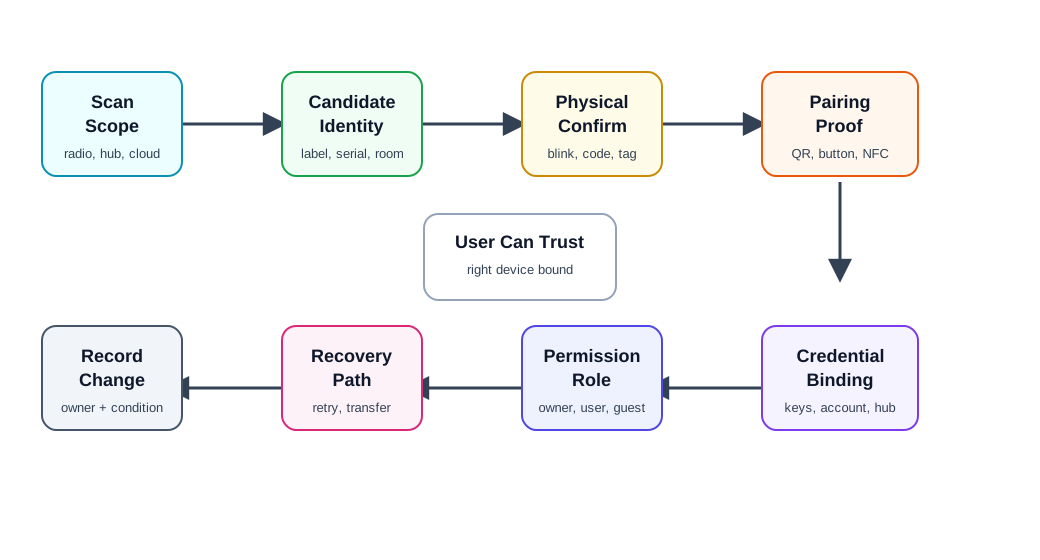
Discovery only finds a candidate; the user or installer still needs evidence that it is the intended physical device.
- Credential binding then establishes durable membership, while permission assignment defines what that identity may do.
- Proof of possession: evidence that the person pairing has physical or administrative control.
Major section
Candidate Identity
A candidate device must be identifiable enough for a user or installer to select the correct physical object.
- Identity evidence should match the deployment.
- A consumer setup flow may rely on a QR label and blinking LED.
- An industrial setup may require asset tag, work order, cabinet location, installer role, and commissioning log.
Major section
Pairing Proof
Pairing proof shows that the person pairing the device is allowed to do so.
- Button press: physical access is proved by pressing a device button during a short pairing window.
- Account transfer: previous ownership is released, delegated, or revoked before a new owner can bind the device.
- A temporary button press may be enough for a low-risk sensor in a private room.
Major section
Discovery And Pairing Record
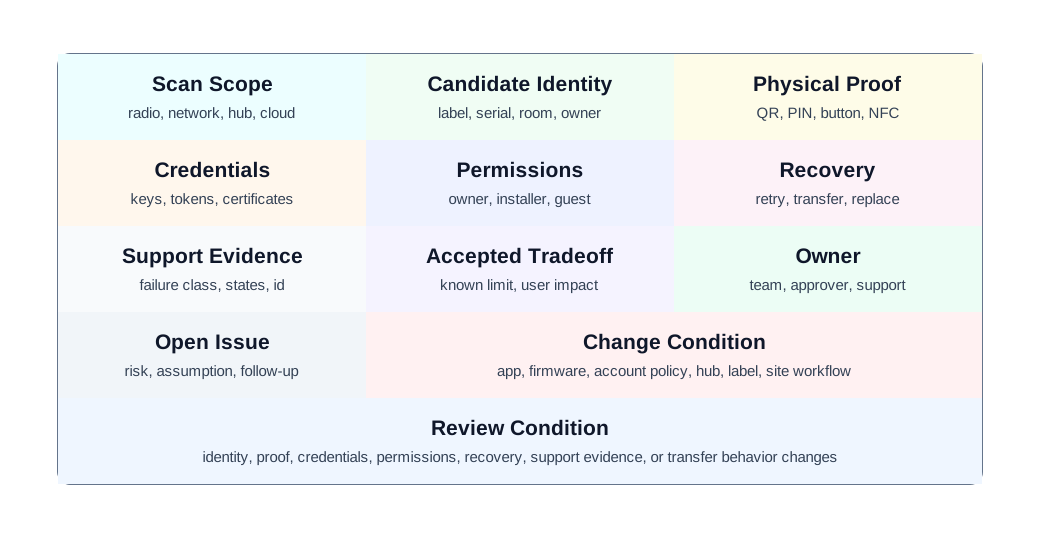
A local scan first finds a candidate by label, serial, and indicator; it does not prove that the candidate is the intended lock.
- Physical proof and credential binding then establish which unit can join.
- Role assignment decides who may use it, while the recovery field asks what happens when a prior grant or credential becomes stale.
Major section
Worked Review: Shared Door Lock Setup
A shared building uses connected locks for residents, guests, maintenance, and property managers.
- Shared locks need individual credentials, role boundaries, revocation, transfer, and support evidence.
- Moment: a lock is already paired to a previous owner or old hub, and residents, guests, maintenance, and property managers all need their own access.
Major section
Common Findings
The app says "device not found" when the real issue is permission, ownership, sleep state, or unsupported firmware.
- Factory reset is the first recovery step instead of a last resort.
- A device can be paired by someone nearby without enough ownership proof.
- Setup grants owner permission when installer or guest permission would be enough.
Major section
Common Findings (continued)
QR codes, labels, or buttons are unreachable after installation.
- Transfer between owners preserves old access or destroys needed service history.
- The record lacks an owner, known limit, open issue, or change condition.
- Moment: the app says “device not found” when the real issue is permission, ownership, sleep state, or unsupported firmware.
Deck summary
Key takeaways
Discovery only finds a candidate; the user or installer still needs evidence that it is the intended physical device.
- A candidate device must be identifiable enough for a user or installer to select the correct physical object.
- Pairing proof shows that the person pairing the device is allowed to do so.
- A local scan first finds a candidate by label, serial, and indicator; it does not prove that the candidate is the intended lock.
- A shared building uses connected locks for residents, guests, maintenance, and property managers.
Retrieval practice
Recall check

UX Uma says: answer from memory, then check your reasoning.
Q1A setup app lists six identical sensors found nearby. The user selects one at random, but the wrong room is added to the account. How should reviewers respond to wrong-device selection during setup?
Show answer
Answer: C Discovery is incomplete until the user can identify the correct physical device, prove authority, bind credentials, and recover from wrong or partial setup.
Print reference
Answers
Answer key.
- C · Discovery is incomplete until the user can identify the correct physical device, prove authority, bind credentials, and recover from wrong or partial setup.