Human-Centred IoT Design · Study deck
Prototype Testing: Neutral Tasks
The stronger task lets the user choose a path.
UX Uma is your guide for this deck.
After studying this chapter
Learning objectives
You will be able to:
- Test write neutral tasks with a concrete scenario and pass criteria.
- Validate concept check: order the user test with a concrete scenario and pass criteria.
- Explain: hands full during entry. Weak network during setup. Device shared by several people. App permission denied. Sensor reading delayed or stale. Physical indicator hard to see. Support handoff required. Automation acts at an unexpected time.
- Explain: People often try to be polite.
Major section
Write Neutral Tasks
hands full during entry. Weak network during setup. Device shared by several people. App permission denied. Sensor reading delayed or stale. Physical indicator hard to see. Support handoff required. Automation acts at an unexpected time.
- A good task gives a realistic goal without naming the solution.
- The stronger task lets the user choose a path.
- That choice is evidence.
Major section
Observe Behavior Before Opinion
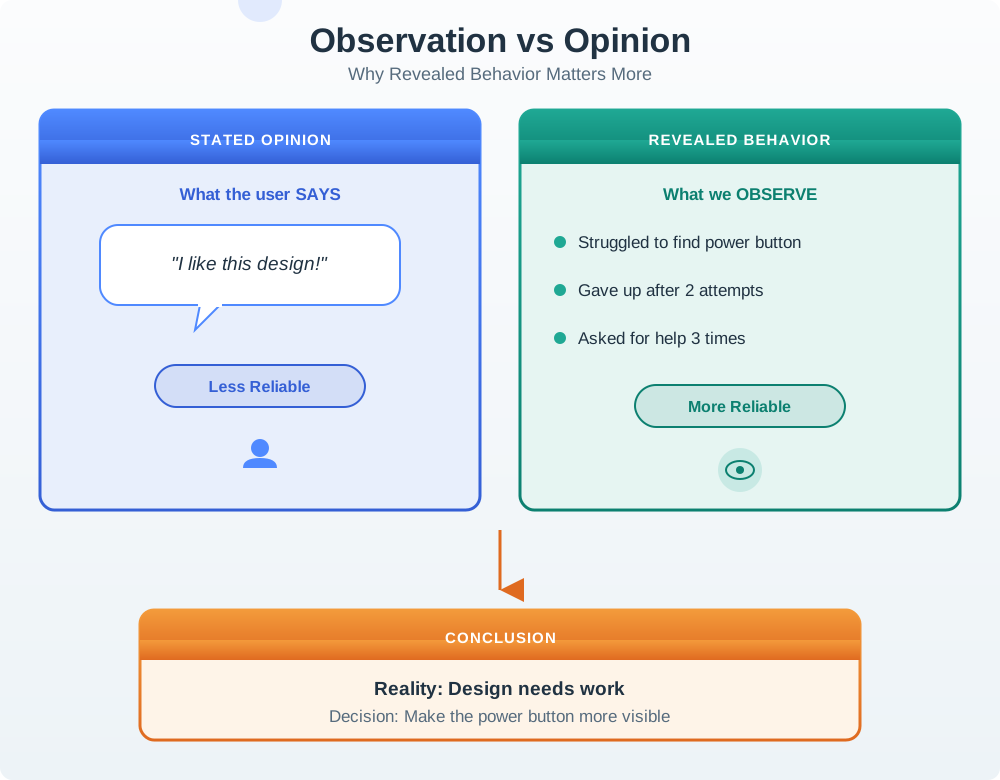
People often try to be polite.
- They may say they would use a feature every day, then ignore it in field use.
- Testing should respect participant opinions while grounding design decisions in behavior.
- The observed side shows a different task history—hesitation, repeated attempts, and asking for help three times before finding the control.
Major section
Lab, Remote, and Field Testing
Good review practice is to label the test type and its limits.
- Lab testing is useful when the team needs controlled observation of a specific flow.
- Remote testing can work for screen-heavy flows, dashboards, onboarding, consent, and support copy.
- A lab test can validate a task flow.
- A clickable or scripted interaction can test watching, acting, and escalating through the proposed flow.
Try it: Lab, Remote, and Field Testing in the chapter
Major section
Iteration Decisions
Testing should end with a decision, not only a list of observations.
- Fix wording: the concept is sound but users misread a label, state, or instruction.
- Change feedback: users cannot tell whether the device heard, acted, failed, or needs help.
- Change support model: users need a handoff, escalation, or owner that the design does not provide.
Major section
Iteration Decisions (continued)
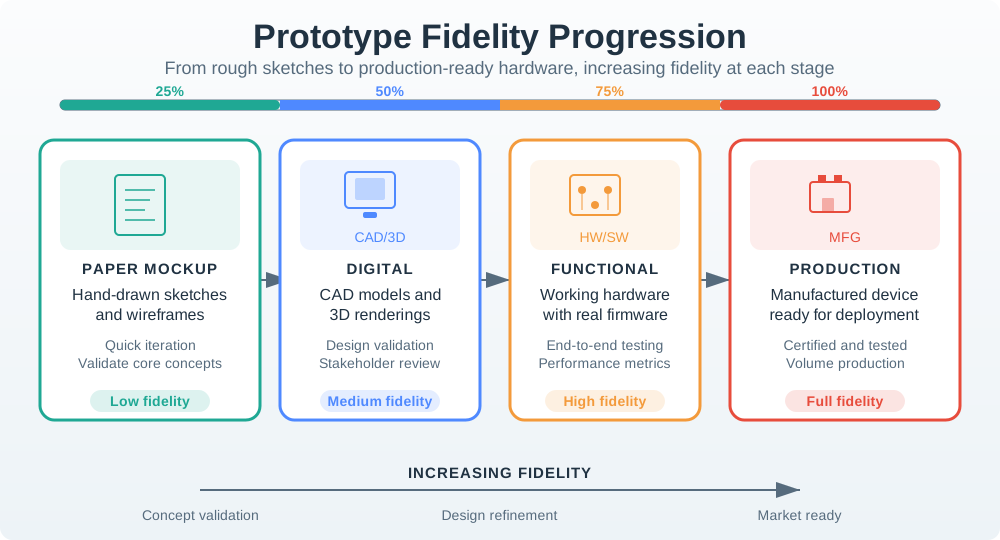
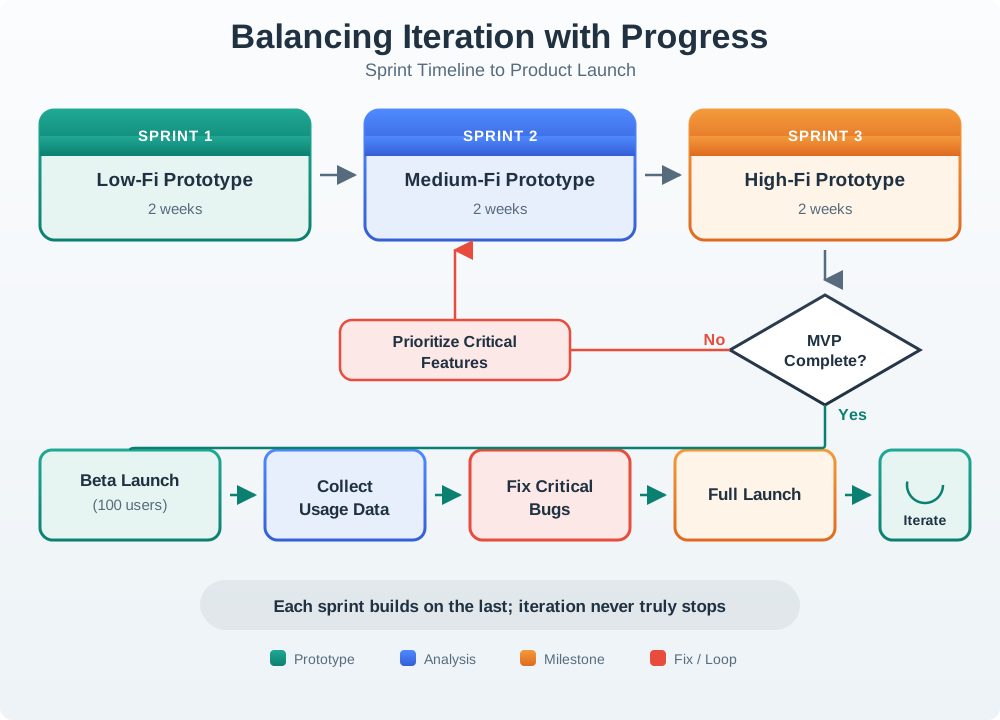
Increase fidelity: the next question requires real sensing, actuation, installation, or field context.
- A beta adds facts from real use, but keeps the group small while major faults are found.
- The fix loop sends only the claims touched by a bug back to test.
- It need not restart all work.
- A design does not need to be perfect.
Major section
User Test Evidence Record
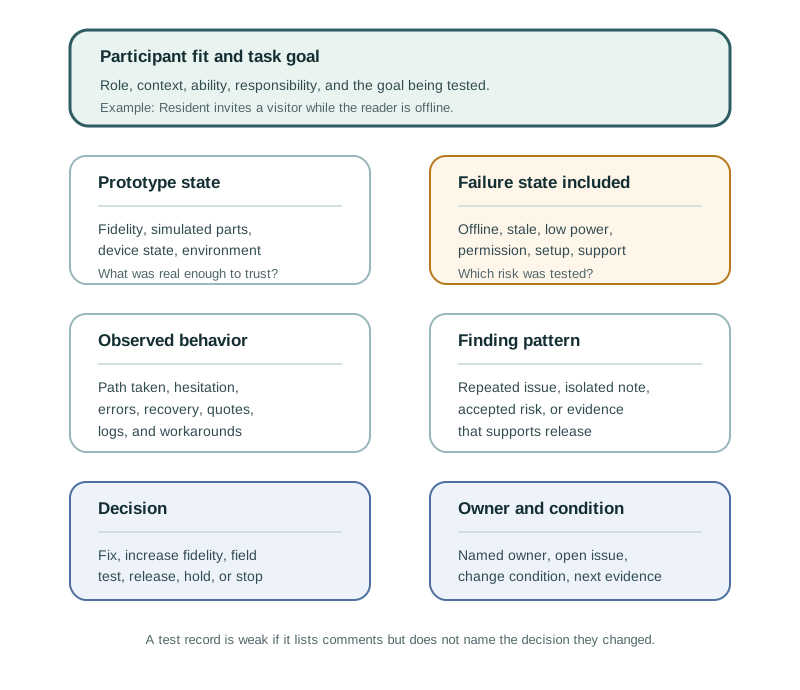
Observed behavior: what the participant did before explanation.
- Users understand how to report a problem, but when no confirmation appears they press repeatedly; staff then see duplicate tickets and waste time merging reports.
- Task goal: the user goal being tested.
- Failure state: offline, stale, low power, permission, setup, support, or other risk included in the test.
Major section
User Test Evidence Record (continued)
The record should be short enough to use but specific enough to prevent the same issue from being rediscovered later.
- The design response addresses feedback and service state with request received, already reported, and staff assigned states, followed by a focused check with network delay included.
- Decision: fix, repeat a focused check, increase fidelity, field test, release with constraint, or stop.
- Change condition: the condition that requires the finding to be checked again.
Major section
Incremental Examples
A beginner test can start with a screen prototype for a visitor invite flow.
- The useful finding is the observed route and misunderstanding, not whether the participant liked the screen.
- An intermediate test adds a real or simulated reader state.
- The facilitator sets up an expired invite, a wrong-unit selection, BLE discovery failure, or gateway offline state before the task.
Major section
Worked Review: Shared Entry Setup
A team tests a shared entry reader for a small building.
- The prototype includes a mobile setup flow and a physical reader with status lights.
- Observed behavior shows that participants can invite a visitor, but they do not understand the difference between "invite sent," "visitor accepted," and "reader ready." Some assume the visitor can enter immediately.
- The design decision is not "setup works." The decision is: revise state language, add reader-status explanation, add support handoff, and check expired invite plus offline reader recovery before release.
Major section
Common Testing Defects
Testing with convenient colleagues can hide accessibility, language, age, context, role, and trust issues.
- If the facilitator tells the user where to tap, the test has become training.
- Neutral task prompts reveal whether the design communicates the path.
- IoT review should include the failure states tied to the promise.
Major section
Common Testing Defects (continued)
Setup, offline state, stale data, permission mismatch, rejected commands, and support handoff often decide whether the product feels trustworthy.
- Positive comments are useful, but they do not override observed confusion, failed recovery, or workaround behavior.
- Screen recordings alone cannot prove visibility, reach, noise, placement, installation, shared use, or maintenance access.
- If the team does not record finding, decision, owner, and change condition, the same issue can return later under a different prototype.
Major section
How Leading Language Hides a Defect
The observer should record task completion, route taken, errors, assistance, and relevant system state separately, because a successful tap may still leave an invite pending.
- A prompt that names the target menu supplies the very navigation cue the interface must provide.
- It changes the evidence from discoverability to ability to follow instructions.
- Repeating the same neutral goal after a design change makes the comparison meaningful; a changed prompt can manufacture an apparent improvement.
Deck summary
Key takeaways
hands full during entry. Weak network during setup. Device shared by several people. App permission denied. Sensor reading delayed or stale. Physical indicator hard to see. Support handoff required. Automation acts at an unexpected time.
- People often try to be polite.
- Good review practice is to label the test type and its limits.
- Testing should end with a decision, not only a list of observations.
- Increase fidelity: the next question requires real sensing, actuation, installation, or field context.
Retrieval practice
Recall check 1 of 2

UX Uma says: answer from memory, then check your reasoning.
Q1A team tests a smart access setup flow by saying, "Tap Settings, choose Visitors, then press Send Invite." Every participant completes the task. What is the strongest critique of this test?
Show answer
Answer: B A good user test gives the participant a realistic goal without teaching the interface path.
Retrieval practice
Recall check 2 of 2
UX Uma says: answer from memory, then check your reasoning.
Q2Which prompt tests whether a resident can find visitor access controls?
Show answer
Answer: C The goal leaves navigation to the participant.
Q3A participant taps Send, but the reader remains offline. How should success be recorded?
Show answer
Answer: A The record distinguishes user action from system outcome.
Print reference
Answers
Answer key.
- B · A good user test gives the participant a realistic goal without teaching the interface path.
- C · The goal leaves navigation to the participant.
- A · The record distinguishes user action from system outcome.