Core Networking · Study deck
IPv4 Addressing Fundamentals
Picture a replacement camera that receives an address but cannot reach its recorder.
Packet Pete is your guide for this deck.

After studying this chapter
Learning objectives
Follow this chapter path with evidence at each boundary.
- Name the system boundary.
- Record the evidence needed there.
- Keep the next decision tied to the source.
Major section
Start With Where the Device Lives
The four visible numbers are not enough; its local boundary and route may be wrong.
- Internet Protocol means a system for addressing and routing packets.
- IPv4 means version 4 of that system.
- A gateway means the boundary device that forwards traffic beyond the local network.
- This runway does not prove identity, trust, or permission.
Major section
Overview: An IPv4 Address Names a Host in a Network Context
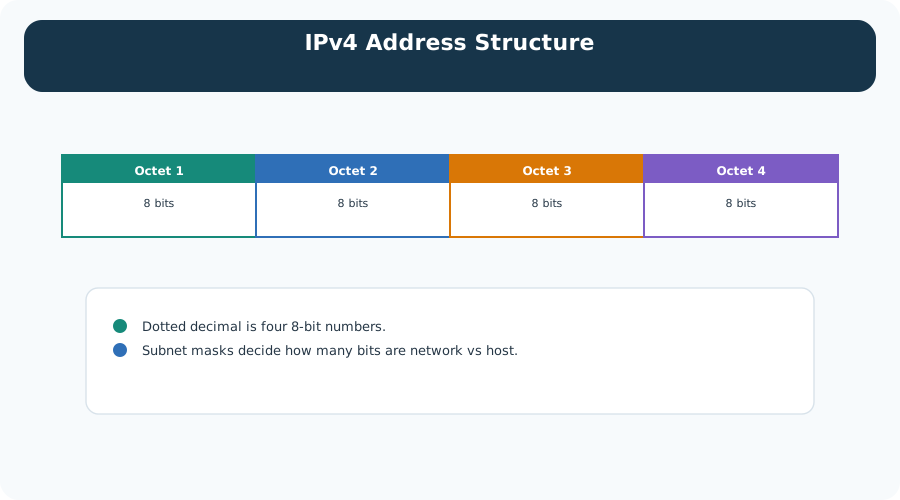
The split between network and host is decided by how many of those bits the mask claims, and it does not have to fall on a dot.
- The last two rows are not host ranges at all; they hold multicast groups and a reserved block.
Major section
Practitioner: Plan Subnets Around Device Groups and Traffic Rules
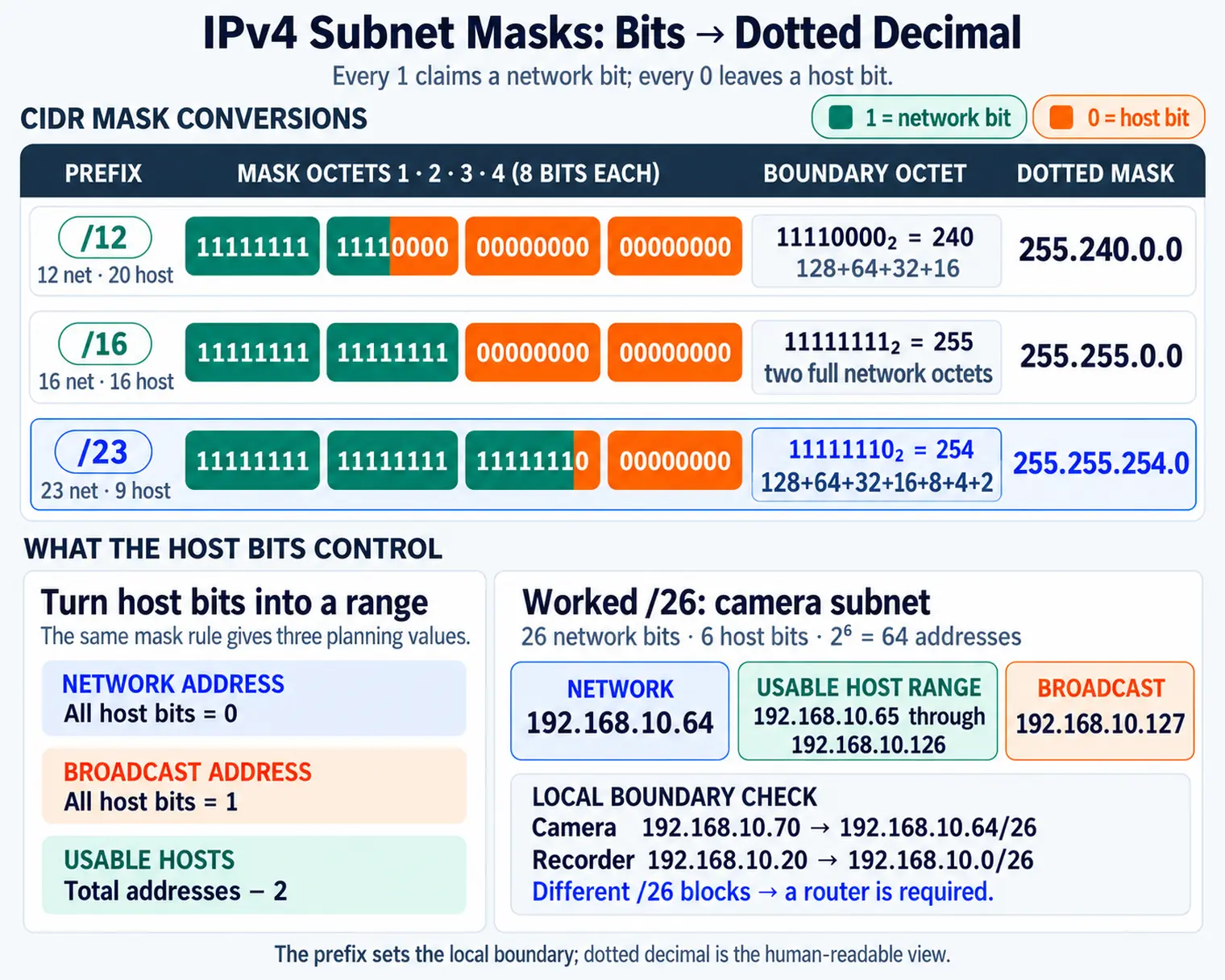
Each row shows one address with its mask written out in bits.
- Every 1 claims a bit for the network, and every 0 leaves it to the host.
- The /16 row makes this easy to see: the first sixteen bits are 1, so the mask reads 255.255.0.0.

Major section
Under the Hood: Packets Carry Addresses, Routers Use Prefixes
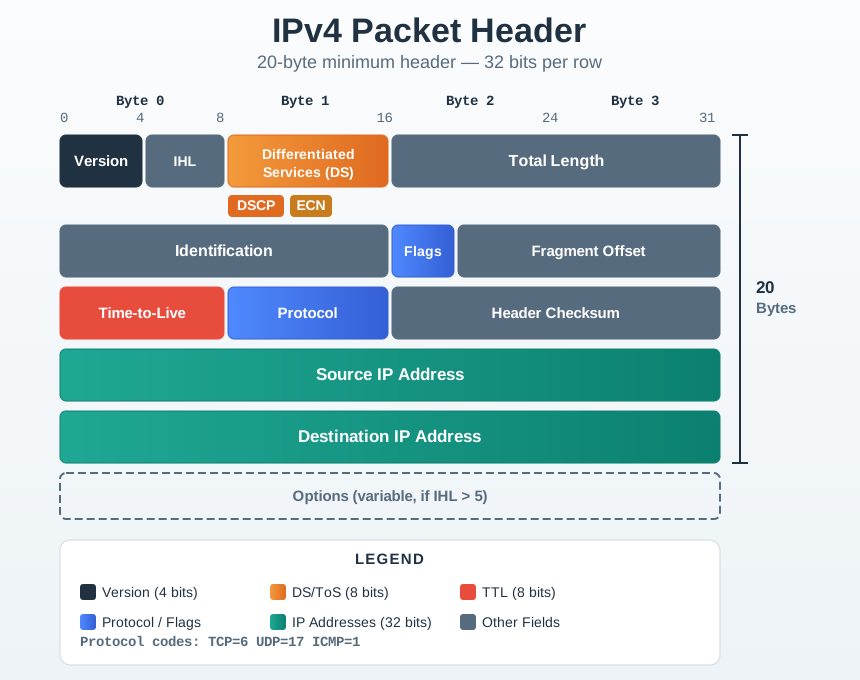
The grid is 20 bytes at minimum, drawn as rows four bytes wide.
- The middle rows carry identification, flags and fragment offset for reassembly, then time-to-live and protocol.
- Protocol tells the receiver whether TCP, UDP or ICMP is inside.
Major section
Place a Camera on the Correct IPv4 Street
The visible block labels place the camera and recorder on different subnets.
- Name the system boundary.
- Record the evidence needed there.
- Keep the next decision tied to the source.
Camera 192.168.10.70/26 → 192.168.10.64/26, ordinary hosts .65–.126; recorder 192.168.10.20/26 → 192.168.10.0/26, ordinary hosts .1–.62; different subnets, route required.
Deck summary
Key takeaways
The four visible numbers are not enough; its local boundary and route may be wrong.
- The split between network and host is decided by how many of those bits the mask claims, and it does not have to fall on a dot.
- Each row shows one address with its mask written out in bits.
- The grid is 20 bytes at minimum, drawn as rows four bytes wide.
- For a /26 prefix, 26 bits name the network and 6 bits remain for hosts.
Retrieval practice
Recall check 1 of 3

Packet Pete says: answer from memory, then check your reasoning.
Q1What makes an IPv4 address usable in an IoT network?
Show answer
Answer: A IPv4 troubleshooting starts with the full context: address, prefix, local subnet, gateway, and any reserved-address role.
Retrieval practice
Recall check 2 of 3

Packet Pete says: answer from memory, then check your reasoning.
Q2A sensor is configured as 172.20.15.45 with mask 255.255.255.0 and cannot reach a server at 172.20.30.10. Link status is up. What first routing fact follows from the given mask?
Show answer
Answer: A A subnet mask controls local reachability.
Retrieval practice
Recall check 3 of 3

Packet Pete says: answer from memory, then check your reasoning.
Q3Why does a subnet plan matter to routers and firewalls, not just to humans?
Show answer
Answer: A A usable IPv4 plan connects human inventory, device groups, prefixes, gateways, and firewall policies.
Print reference
Answers
Answer key.
- A · IPv4 troubleshooting starts with the full context: address, prefix, local subnet, gateway, and any reserved-address role.
- A · A subnet mask controls local reachability.
- A · A usable IPv4 plan connects human inventory, device groups, prefixes, gateways, and firewall policies.