IoT Interfaces, Location and Privacy · Study deck
Interface Examples: Voice UX
A room assistant may hear a command yet choose the wrong lamp.
UX Uma is your guide for this deck.

After studying this chapter
Learning objectives
You will be able to:
- Design Voice Interfaces for Diverse Users: Create accessible voice interactions for elderly users with hearing and cognitive variations
- Apply Multi-Modal Feedback Strategies: Implement redundant feedback channels for different abilities
- Build Error Recovery Systems: Design forgiving error handling that maintains user confidence
- Implement Accessibility Fallbacks: Ensure core functions remain accessible when primary modalities fail
Major section
Start Simple
The system hears only part of the request and is unsure which room was named.
- All channels should agree on whether the request is heard, waiting, done, failed, or cancelled.
- One worked example cannot represent every person.
- The deeper sections turn this case into a test plan and show where user research must replace design assumptions.
Major section
Design Commitments in Examples
A resident may speak a request, hear a confirmation, see a lamp blink, press a wall switch, use a large-button remote, or ask staff for help.
- A worked IoT interface example should make the design commitment visible: who the user is, which context matters, what the system believes, what it will do, and how the user can recover.
- A good example names the fallback before the failure reaches the resident.
- A good example does not hide uncertainty.
Major section
Example to Test Plan
The example becomes useful when its decisions can be tested.
- Wake-word detection may be local.
- ASR may run on-device or in a cloud service.
- NLU may use intent classification with slots for room, device, action, and level.
- Room context may come from motion sensors, microphone direction, recent activity, or explicit room names.
Major section
Example to Test Plan (continued)
Columns should cover spoken phrase, expected intent, room source, confidence threshold, device command, visible or audible confirmation, physical fallback, support evidence, and privacy note.
- Feedback may use spoken response, light blink, app state, large-button remote, wall switch, or staff notification.
- This matrix makes design choices reviewable instead of treating the demo script as the specification.
- Limit clarification: cap choices, use plain language, and ask before executing inferred high-impact actions.
Major section
Voice UX Needs State
Voice examples can sound simple while hiding hard system boundaries.
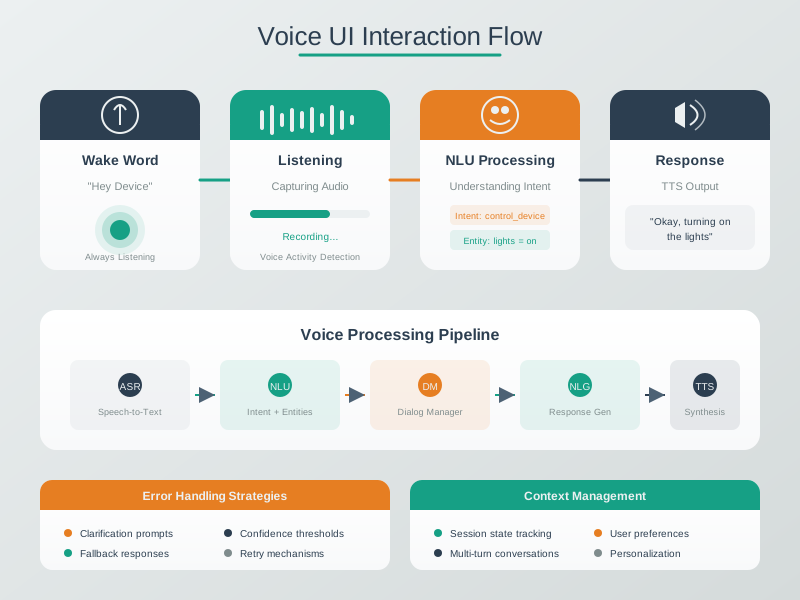
- The system must distinguish wake-word activation, speech endpointing, ASR transcript confidence, NLU intent confidence, room resolution, authorization, command acceptance, device completion, and user confirmation.
- If any stage is uncertain, the UX should expose uncertainty rather than guessing silently.
- Privacy and support are also system boundaries.
Major section
Voice UX Needs State (continued)
NLU extracts the lighting intent, but room context must still resolve which lights the user means.
- The action stage sends an idempotent command and waits for device evidence rather than assuming delivery equals success.
- The spoken response should distinguish completion, delay, ambiguity, and failure.
- Microphone mute state must be visible and respected.
Major section
Voice UX Needs State (continued)
Raw audio retention should be minimized or disabled unless there is a justified support case.
- Keeping those stages separate lets a reviewer locate a bad transcript, wrong intent, stale room, duplicate command, or unreachable device without blaming the whole voice interface.
- These details decide whether "I didn't catch that" is enough or whether the system should offer a specific safe action.
- Logs should use correlation ids and summaries rather than unnecessary personal recordings.
Major section
Voice UX Needs State (continued)
A speech transcript such as "I'm cold" may produce an intent candidate, but the system still needs authorization, room resolution, thermostat capability, current mode, safety bounds, and command acknowledgement.
- The UI should not say "done" when the thermostat service only accepted a queued request.
- It should distinguish accepted, pending, rejected, timed out, and completed states in language the resident can understand.
- Validation scope: separate lab recognition, in-home use, long-term adoption, and support burden; each proves a different claim.
- A robust worked example therefore includes both UX copy and state-machine evidence.
Major section
Voice UX for Retirement Living
We support 40+ phrasings per core action.
- Scenario: You are designing a voice-controlled lighting and climate system for a retirement community.
- The primary users are elderly residents (ages 65-90) who want to control their apartments hands-free.
- Using lower pitch responses (180-220 Hz vs. Typical 300+ Hz) improves comprehension.
- Dignity means having options.
Major section
Voice UX for Retirement Living (continued)
Volume must be loud enough to hear but not startling.
- Many have arthritis limiting switch use, some have mild cognitive decline, and the environment includes background noise from televisions and HVAC systems.
- Each failure increases frustration and decreases confidence.
- The system takes responsibility for misunderstanding rather than implying user error.
Major section
Voice UX for Retirement Living (continued)
They might say "I'm cold" instead of "Set thermostat to 74 degrees." The system must understand intent, not just keywords.
- Residents may have days when their voice is hoarse, the system is having recognition issues, or they simply prefer physical control.
- Proposed outcome in this fictional retirement-community example: 87% daily voice use versus 23% prior use and a 92% drop in recognition support calls are proposed outcomes, not deployed results.
- Resident satisfaction is also a proposed measure.
Deck summary
Key takeaways
The system hears only part of the request and is unsure which room was named.
- A resident may speak a request, hear a confirmation, see a lamp blink, press a wall switch, use a large-button remote, or ask staff for help.
- The example becomes useful when its decisions can be tested.
- Columns should cover spoken phrase, expected intent, room source, confidence threshold, device command, visible or audible confirmation, physical fallback, support evidence, and privacy note.
- Voice examples can sound simple while hiding hard system boundaries.
Retrieval practice
Recall check 1 of 3

UX Uma says: answer from memory, then check your reasoning.
Q1A room assistant hears an ambiguous request and may choose the wrong lamp. What should it do when that doubt matters?
Show answer
Answer: B The chapter exposes what was heard and keeps recovery and physical fallback available.
Retrieval practice
Recall check 2 of 3
UX Uma says: answer from memory, then check your reasoning.
Q2A retirement-community voice system supports varied phrases and feedback. What should justify those choices?
Show answer
Answer: D The worked example derives decisions from specific user needs.
Retrieval practice
Recall check 3 of 3
UX Uma says: answer from memory, then check your reasoning.
Q3A resident needs the lights during a voice-service outage. Which fallback preserves the core action?
Show answer
Answer: C Keep a usable local physical switch or remote and make its state clear.
Print reference
Answers
Answer key.
- B · The chapter exposes what was heard and keeps recovery and physical fallback available.
- D · The worked example derives decisions from specific user needs.
- C · Keep a usable local physical switch or remote and make its state clear.