IoT Interfaces, Location and Privacy · Study deck
Interface Examples: Gesture and Multimodal UX
A gesture can feel quick while light, clothing, or motion makes it fail.
UX Uma is your guide for this deck.
After studying this chapter
Learning objectives
You will be able to:
- Explain: But Grandma had some special needs: her hearing wasn't as sharp as it used to be, and sometimes she forgot the exact words for things.
- Explain: That shared state matters when several interface channels are involved, because a sound, light, and screen must not tell different stories about the same action.
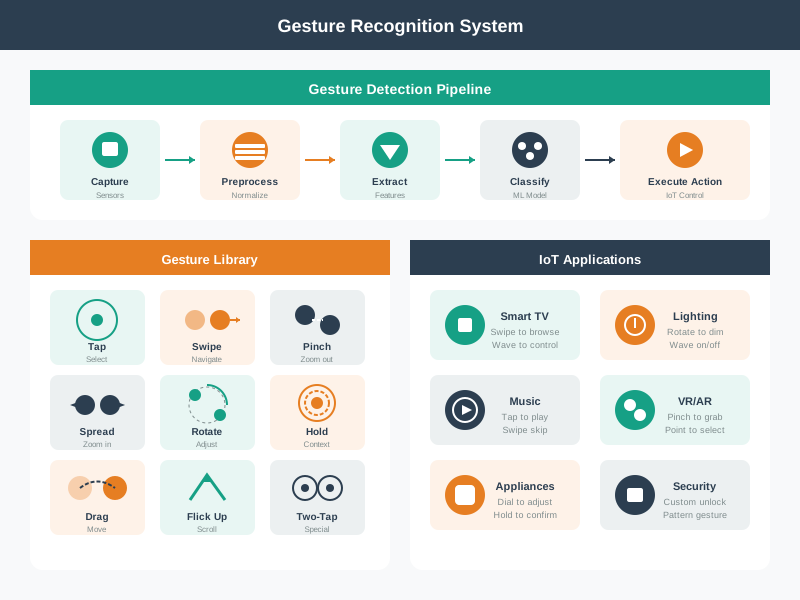
- Explain: The gesture library shows that a swipe can navigate, a rotate can adjust, and a hold can express context; the meaning depends on the application.
- Explain: The pipeline captures a movement, normalizes it, extracts features, classifies it, and only then executes an IoT control.
Major section
Gesture Control Interactions
The pipeline captures a movement, normalizes it, extracts features, classifies it, and only then executes an IoT control.
- The gesture library shows that a swipe can navigate, a rotate can adjust, and a hold can express context; the meaning depends on the application.
- Music controls and VR or AR are examples of different uses of the same recognition route.
- This visualization shows common gesture vocabularies and the feedback loop between user action and system response.
Major section
Multimodal Interaction Framework
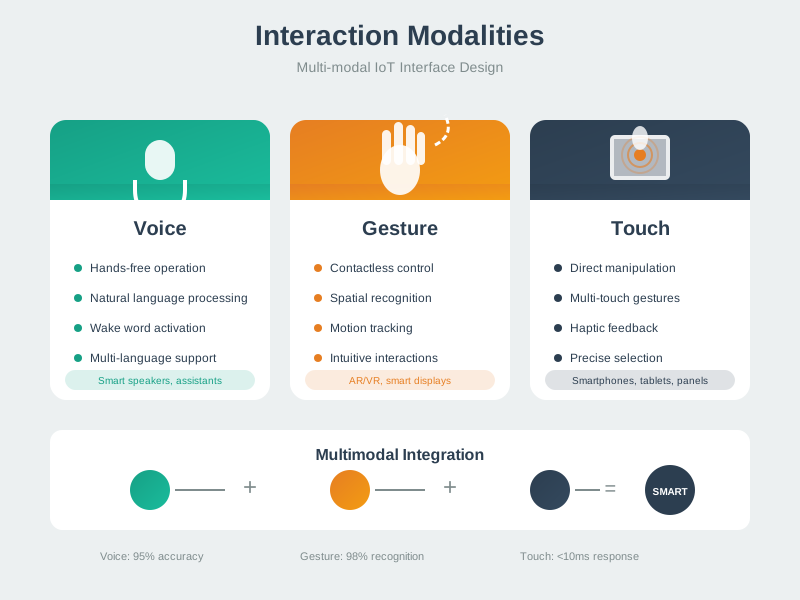
Gesture relies on spatial recognition and needs immediate feedback that the movement was seen.
- Touch offers a precise app selection, while voice must first recognize intent, acknowledge it, and then confirm the resulting light state.
- The timing notes separate acceptable response delay from how long the system waits after speech ends.
- These routes should share one truthful outcome even though their inputs differ.
- IoT systems typically support multiple interaction modalities to accommodate diverse contexts and user preferences.
Major section
Smart Home Interface Design
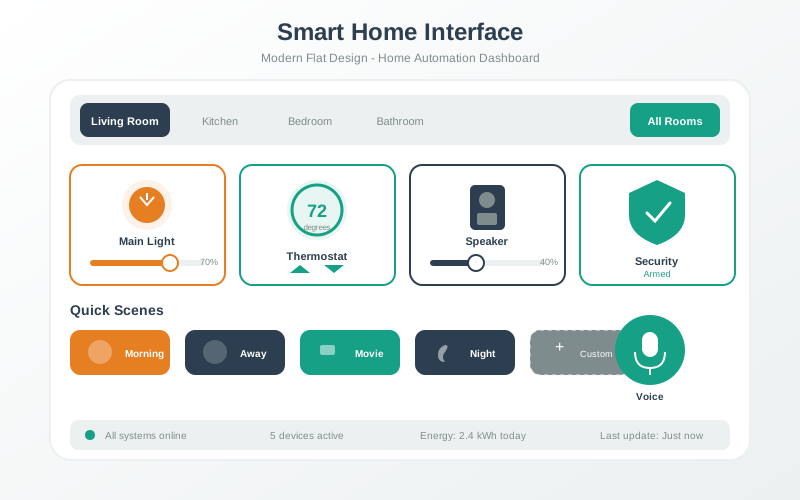
That shared state matters when several interface channels are involved, because a sound, light, and screen must not tell different stories about the same action.
- The trace starts at 2 AM, inside the 11 PM–7 AM quiet-hours interval.
- The rule therefore selects visual-only feedback for a confirmed unlock: an LED flashes while audio stays silent.
- The last warning says a failed lock or sensor response must remain visible; the scene must not look complete.
Major section
Voice Interface Design Flow
Voice interfaces require careful orchestration of multiple components.
- The user speaks a wake word to activate the system, which then captures and processes speech in real-time.
- Natural language processing extracts intent and entities from the utterance, enabling the system to execute commands and provide appropriate audio feedback.
- Effective voice UI design must handle errors gracefully and maintain conversational context across multi-turn interactions.
Major section
Accessibility in IoT Design
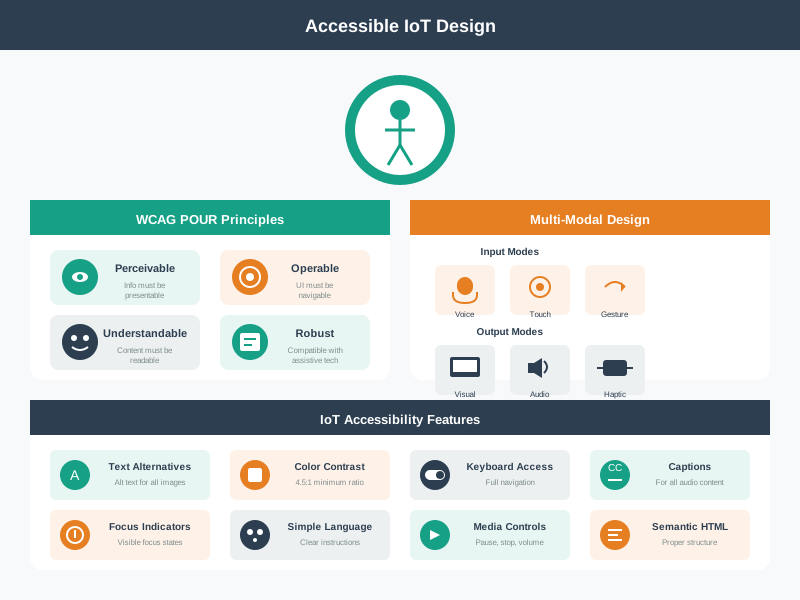
Visual accessibility includes high-contrast modes and screen reader support.
- A VoiceOver user starts pairing while the gateway is offline.
- The live region must announce that the system is still trying and then offer a local reset route, rather than leaving a silent spinner.
- Motor accessibility provides voice control and large touch targets for users with limited dexterity.
Major section
Accessibility in IoT Design (continued)
Inclusive IoT design ensures devices are usable by people with diverse abilities and in varied contexts.
- Touch, voice, gesture, keyboard, and physical controls are alternate paths, while text, speech, sound, and vibration can carry the result.
- Each channel has to name the state, explain delay or failure, and offer a safe fallback.
- Cognitive accessibility emphasizes simple language, consistent patterns, and error prevention to reduce mental load.
Major section
For Kids: Meet the Sensor Squad!
Designing for everyone means making sure your device works for young AND old, with or without perfect hearing or vision!
- The Sensor Squad was helping Grandma Rose set up her smart home.
- But Grandma had some special needs: her hearing wasn't as sharp as it used to be, and sometimes she forgot the exact words for things.
- "We need to think like GRANDMA, not like engineers!" said Temperature Terry.
Major section
Putting Numbers to It
Interactive Calculator: Voice Recognition Success Rate Analysis: A paired significance test requires each resident's before-and-after outcomes.
- The two marginal confidence intervals do not determine a p-value.
- In this synthetic worked example, assume that 78% of users encountering 2+ consecutive failures within 5 minutes abandon voice and revert to physical controls.
- Key insight: The 85% success target is a design threshold in this example, not a mathematical cutoff derived from two-failure probability.
Major section
When to Use Voice Interfaces
3-4 factors favor voice → Secondary option (provide physical fallback).
- Design principle: Voice is convenience, not a replacement.
- Guest users (don't have account/app).
- In a high-reliability scenario, set an acceptable failure rate from task risk and user testing; 10–15% is an illustrative unacceptable range.
Major section
Avoid Overbuilt Voice NLU
Result: system over-interprets and makes wrong guesses.
- Real example: A smart home voice system for elderly users tried to be "too smart": User: "It's cold in here".
- Another example: User: "Turn on the lights. Wait, no".
- Elderly users with slower speech need longer timeout before command execution.
Major section
Avoid Overbuilt Voice NLU (continued)
Cognitive mismatch: Sophisticated AI makes assumptions elderly users didn't intend.
- Loss of control: Users feel the system is "doing its own thing".
- Slower speech patterns: Elderly users speak with more pauses—system should wait longer.
- The fix: Simpler is better for elderly users.
- System: [Silently sets to 75°F based on historical data].
Deck summary
Key takeaways
The pipeline captures a movement, normalizes it, extracts features, classifies it, and only then executes an IoT control.
- Gesture relies on spatial recognition and needs immediate feedback that the movement was seen.
- That shared state matters when several interface channels are involved, because a sound, light, and screen must not tell different stories about the same action.
- Voice interfaces require careful orchestration of multiple components.
- Visual accessibility includes high-contrast modes and screen reader support.
Retrieval practice
Recall check 1 of 3

UX Uma says: answer from memory, then check your reasoning.
Q1You're designing a voice-controlled smart home for elderly users. When the system doesn't understand a command, what is the best error response?
Show answer
Answer: D The system should take blame for the misunderstanding ("I didn't catch that" not "Invalid command") and offer exactly 2 clear choices to reduce cognitive load.
Retrieval practice
Recall check 2 of 3
UX Uma says: answer from memory, then check your reasoning.
Q2An elderly user who has enabled small automatic thermostat adjustments says "I'm cold" to the smart home system while alone at home. What should the system do?
Show answer
Answer: B The authorized small-adjustment setting makes a bounded thermostat change appropriate for this comfort request.
Retrieval practice
Recall check 3 of 3
UX Uma says: answer from memory, then check your reasoning.
Q3What checks current interface state, applies a bounded change and retains retry or undo after failure?
Show answer
Answer: B Local state, action, and recovery verify the current condition, apply only the bounded change, and retain a retry, undo, or safe-state path when execution fails.
Q4Complete the responsive IoT dashboard layout handler:
Show answer
Answer: A window.innerWidth returns the viewport width. Changing gridTemplateColumns via style creates responsive layouts.
Print reference
Answers
Answer key.
- D · The system should take blame for the misunderstanding ("I didn't catch that" not "Invalid command") and offer exactly 2 clear choices to reduce cognitive load.
- B · The authorized small-adjustment setting makes a bounded thermostat change appropriate for this comfort request.
- B · Local state, action, and recovery verify the current condition, apply only the bounded change, and retain a retry, undo, or safe-state path when execution fails.
- A · window.innerWidth returns the viewport width. Changing gridTemplateColumns via style creates responsive layouts.