IoT Interfaces, Location and Privacy · Study deck
Interface Design: State Patterns and Feedback
A user needs different feedback when a device is idle, working, blocked, or unsafe.
UX Uma is your guide for this deck.
After studying this chapter
Learning objectives
You will be able to:
- Explain: A simple ESP32-C3 or nRF52 prototype can publish wet/dry events over MQTT, but the user still needs local feedback when Wi-Fi is unavailable.
- Explain: A shared entry system needs multiple surfaces: a BLE or NFC credential flow, a local reader light, a mobile invite screen, and a support path.
- Explain: Within status, the device group and WET chip make the current alert prominent, while low battery stays visible as a related state detail.
- Explain: A short local indicator may be better than a long message when someone is carrying bags at an entry door.
Major section
Choose by Context and Risk
Good modality choices reduce effort without hiding important risk.
- For example, a physical shutoff button may be better than an app-only control for a local safety task.
- A dashboard may be better than a phone notification for a technician comparing many devices.
- A short local indicator may be better than a long message when someone is carrying bags at an entry door.
Major section
State-Aware Interface Model
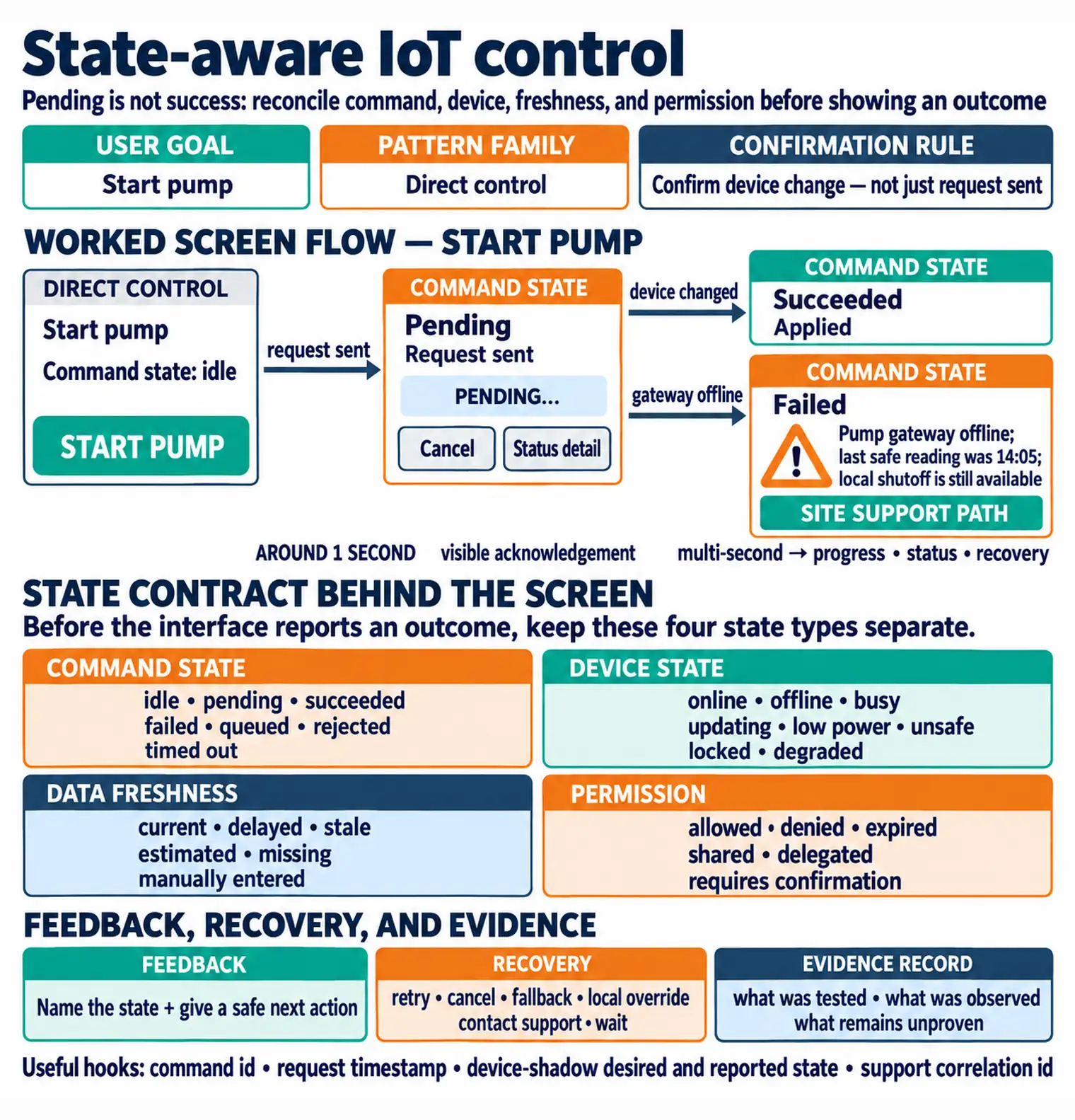
The: Interface evidence record preserves what was actually observed.
- An IoT control can look successful while the device is offline or the data is stale.
- User goal: what the person is trying to understand or do.
- Pattern family: status, control, setup, automation, alert, history, or support.
- Permission: allowed, denied, shared, delegated, expired, or requires confirmation.
Major section
State-Aware Interface Model (continued)
In the state map Figure: A trustworthy IoT interface separates command, User goal and: Pattern family establish what the person is trying to do and whether the interface is showing status, control, setup, or an alert.
- Feedback: local, remote, visual, audio, haptic, notification, or support response.
- Evidence record: what was tested, what was observed, and what remains unproven.
- Many IoT interface failures happen because the screen shows the desired action but hides command state, data freshness, or recovery.
Major section
Incremental Examples
A battery leak sensor might have no screen at all.
- The interface can be a local buzzer, a red LED, a phone notification, and a small history card in the app.
- The design should distinguish dry, wet, muted, low battery, offline, last checked, and alert acknowledged states.
- A good interface makes these states visible without exposing raw logs to residents.
Major section
Incremental Examples (continued)
A simple ESP32-C3 or nRF52 prototype can publish wet/dry events over MQTT, but the user still needs local feedback when Wi-Fi is unavailable.
- A shared entry system needs multiple surfaces: a BLE or NFC credential flow, a local reader light, a mobile invite screen, and a support path.
- The reader should show whether it is ready, offline, updating, or rejecting a credential.
- The app should separate invite sent, invite accepted, credential provisioned, reader confirmed, access denied, and access revoked.
- An industrial panel may combine a local HMI, a Grafana or SCADA dashboard, maintenance notifications, and a computerized maintenance management system handoff.
Major section
Components and Hierarchy
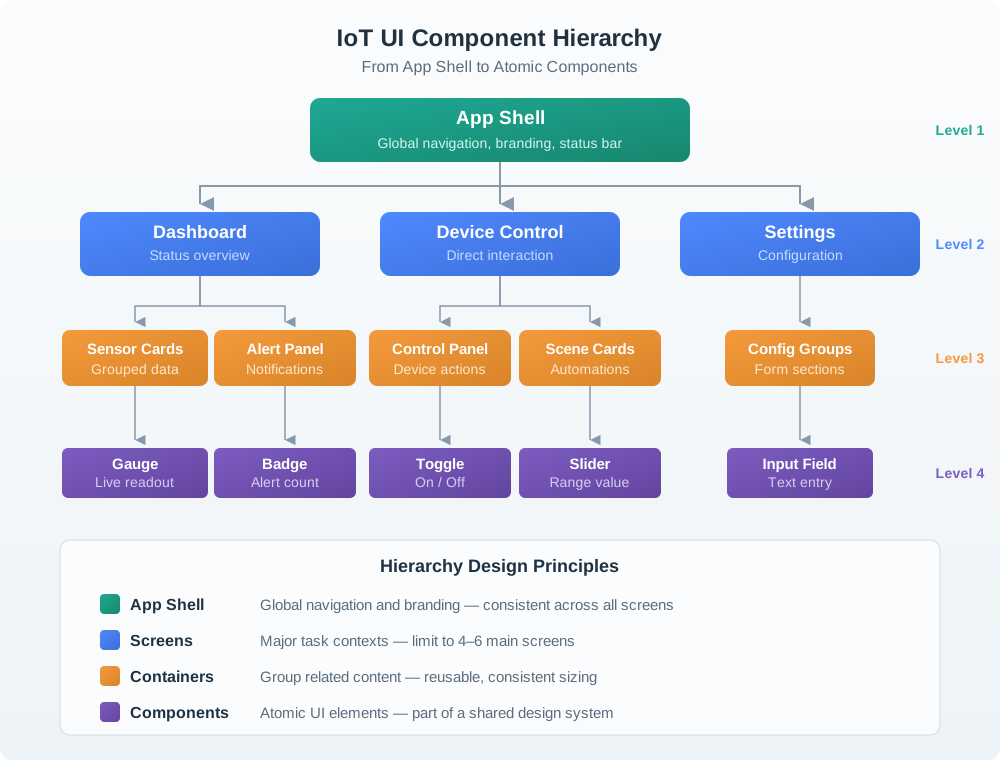
Interfaces need hierarchy so users can scan without reading everything.
- Task area: status, control, setup, automation, history, or support.
- The leak sensor screen in Figure: IoT UI component hierarchy shows how interface hierarchy supports an urgent state.
- The app surface contains a status task area and a history area.
- Rare configuration should not compete with daily status and control.
Major section
Components and Hierarchy (continued)
Within status, the device group and WET chip make the current alert prominent, while low battery stays visible as a related state detail.
- History keeps last checked and acknowledgement evidence available without taking over the main path.
- A person should see what needs action first and still be able to inspect the evidence behind that status.
- The most frequent and risky question should be easiest to see.
- Secondary details should be available without taking over the main path.
Major section
Worked Review: Shared Entry Reader
A shared entry reader has a mobile app, a local light, and a support handoff.
- The reader light is off.
- A visitor arrives and cannot enter.
- The resident does not know whether the problem is the invite, the reader, the visitor app, or permission.
- The reader shows a local status indicator when it is offline or updating.
Major section
Equipment Maintenance Review
A maintenance panel reports fault state through a dashboard and a local indicator.
- The dashboard shows a fault code.
- The local panel has a tiny indicator behind a cover.
- The technician must guess whether the device is safe to inspect.
- The local panel shows maintenance mode and unsafe state before the cover is opened.
Major section
Common Interface Defects
The app is treated as the interface, while local controls, indicators, labels, sound, installation, and support handoff are ignored.
- The interface offers controls but does not show whether the device is online, fresh, busy, locked, updating, or safe to actuate.
- Daily controls, setup, automation editing, alert triage, and settings compete on the same surface.
- The interface reports failure but does not tell the user what is known, what is unknown, and what they can safely do next.
Deck summary
Key takeaways
Good modality choices reduce effort without hiding important risk.
- The: Interface evidence record preserves what was actually observed.
- In the state map Figure: A trustworthy IoT interface separates command, User goal and: Pattern family establish what the person is trying to do and whether the interface is showing status, control, setup, or an alert.
- A battery leak sensor might have no screen at all.
- A simple ESP32-C3 or nRF52 prototype can publish wet/dry events over MQTT, but the user still needs local feedback when Wi-Fi is unavailable.
Retrieval practice
Recall check

UX Uma says: answer from memory, then check your reasoning.
Q1A connected lock app shows a large Unlock button, but it does not show whether the lock is online, whether the command is pending, or whether the user has permission for this door. What is the main interface design problem?
Show answer
Answer: C A trustworthy IoT interface shows the state behind the control: command, device, freshness, permission, feedback, and recovery.
Print reference
Answers
Answer key.
- C · A trustworthy IoT interface shows the state behind the control: command, device, freshness, permission, feedback, and recovery.