IoT Interfaces, Location and Privacy · Study deck
Multimodal Interfaces: Modalities and Trade-offs
Voice works across a room but fails beside a loud machine; touch is private but fails under gloves.
UX Uma is your guide for this deck.
After studying this chapter
Learning objectives
You will be able to:
- Explain: Option B: Local-first architecture processes commands on-device or via local hub, ensuring core functions work offline with faster response times, but limiting remote access and advanced features without connectivity.
- Explain: Option A: Cloud-first architecture routes all commands through cloud services, enabling remote access, cross-device coordination, advanced AI features, and simplified device hardware at the cost of internet dependency.
- Explain: The failure state must be announced through a live region, first as still trying and then with a local reset option, so the person is not left waiting in silence.
Major section
Start With the Decision
Voice works across a room but fails beside a loud machine; touch is private but fails under gloves.
- A modality choice must fit the user, place, delay, and fallback.
Major section
Key Concepts
Latency is the wait for a response.
- A fallback is the other way to act when the first way fails.
- Information Architecture: Structural design of digital spaces to support usability and findability, determining where content lives and how users navigate.
- Cognitive Load: Mental effort required to use an interface; IoT systems must minimise cognitive load for users managing many connected devices.
Major section
Introduction
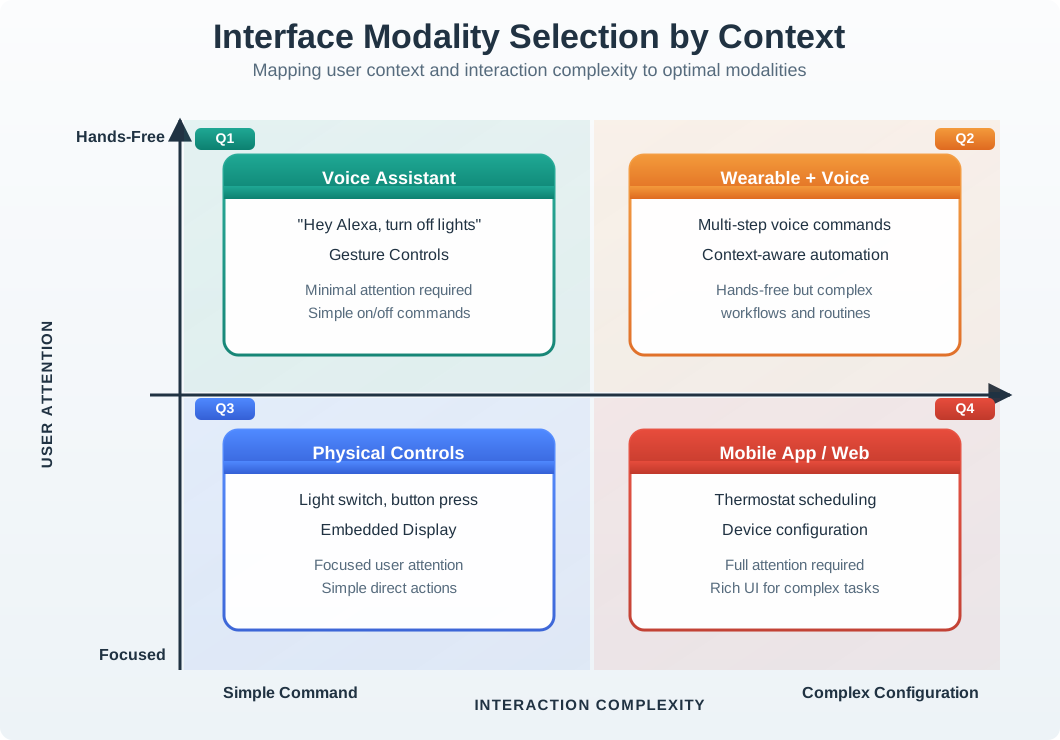
Most IoT devices are used in contexts where users cannot devote full attention to a single screen.
- A nurse checking patient vitals has gloved hands.
- A driver monitoring vehicle diagnostics is watching the road.
- A homeowner adjusting the thermostat may be carrying groceries.
Major section
Multimodal Interaction Design
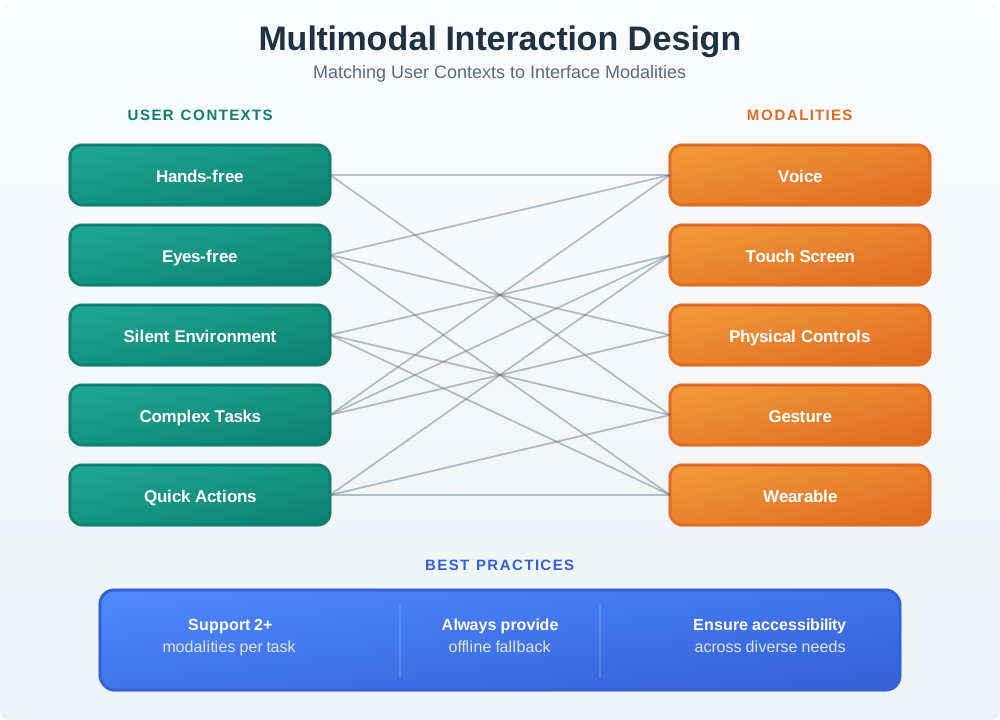
The smart light example in Figure: Worked smart-light interaction selects voice for busy hands compares voice and touch as routes to one action.
- Busy hands may favor a spoken request, while detailed choices may be easier on a touchscreen.
- Both channels need the same truthful feedback about pending, applied, or failed state.
- The smart light example in the Worked smart-light interaction selects voice for busy hands and touchscreen for detailed choices, traces each channel's operation and timing, then brings their feedback into a shared loop diagram compares voice and touch as routes to one action.
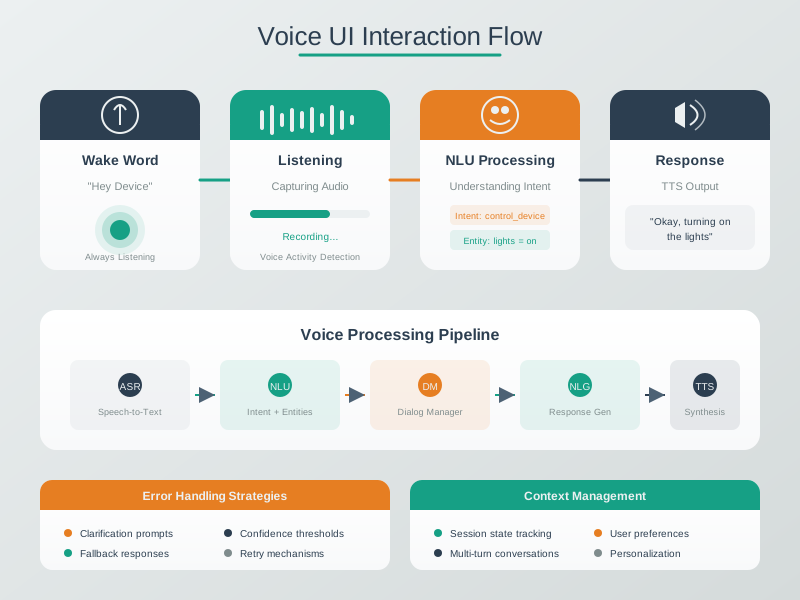
- The voice path moves through wake detection, audio capture, speech recognition, intent parsing, and command execution before the light can respond.
Major section
Multimodal Interaction Design (continued)
The worked timing values help locate delay along the voice route; they do not replace an end to end test.
- Voice fits a quick hands-free command; physical controls fit an immediate tactile action; mobile or web views fit complex work needing attention.
- The upper-right pairs a wearable cue with voice when hands and eyes are occupied.
- A casual query can tolerate recognition repair that a safety action cannot.
Major section
Touch vs Voice Interfaces
Touch supports precise choices and multi-step work.
- The response must expose what was understood and whether the action succeeded, not merely that audio was heard.
Major section
Visual vs Audio Feedback
User studies show visual indicators are checked in 0.3-0.5 second glances.
- Color-coded states (green=OK, red=error, amber=warning) are universally understood.
- Limited to line-of-sight; users must look at device.
- Critical alerts use both modalities.
- Accessibility: audio helps visually impaired users; visual helps hearing impaired users.
Major section
Input/Output Modalities for IoT
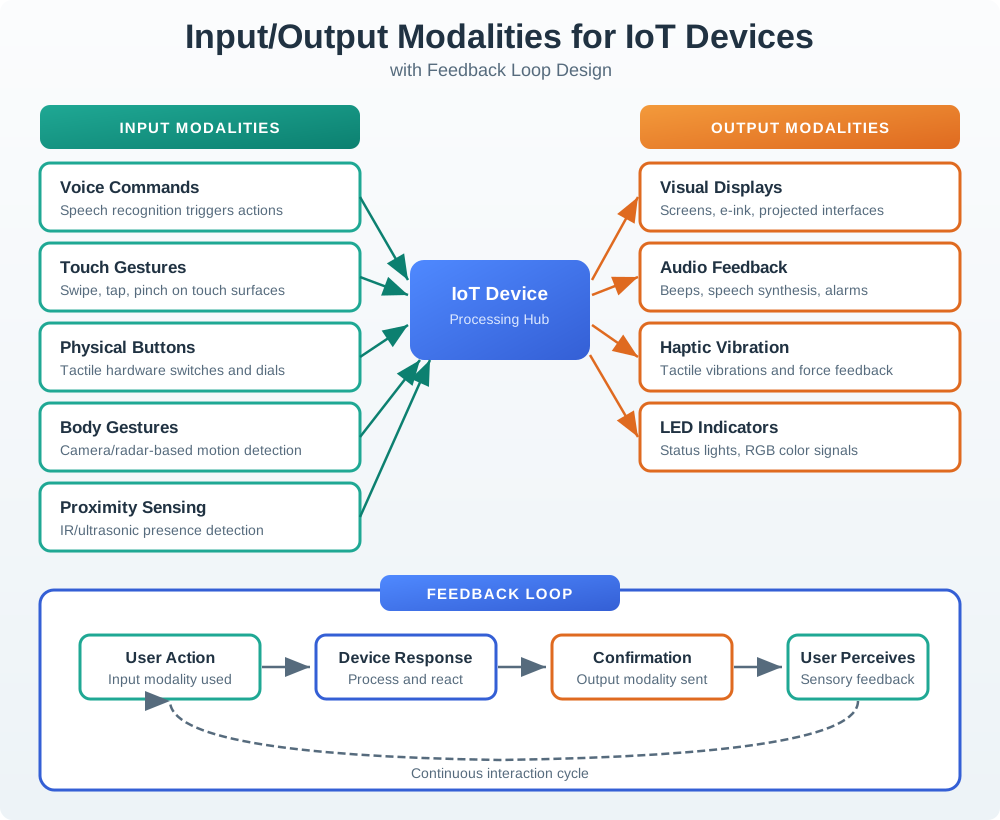
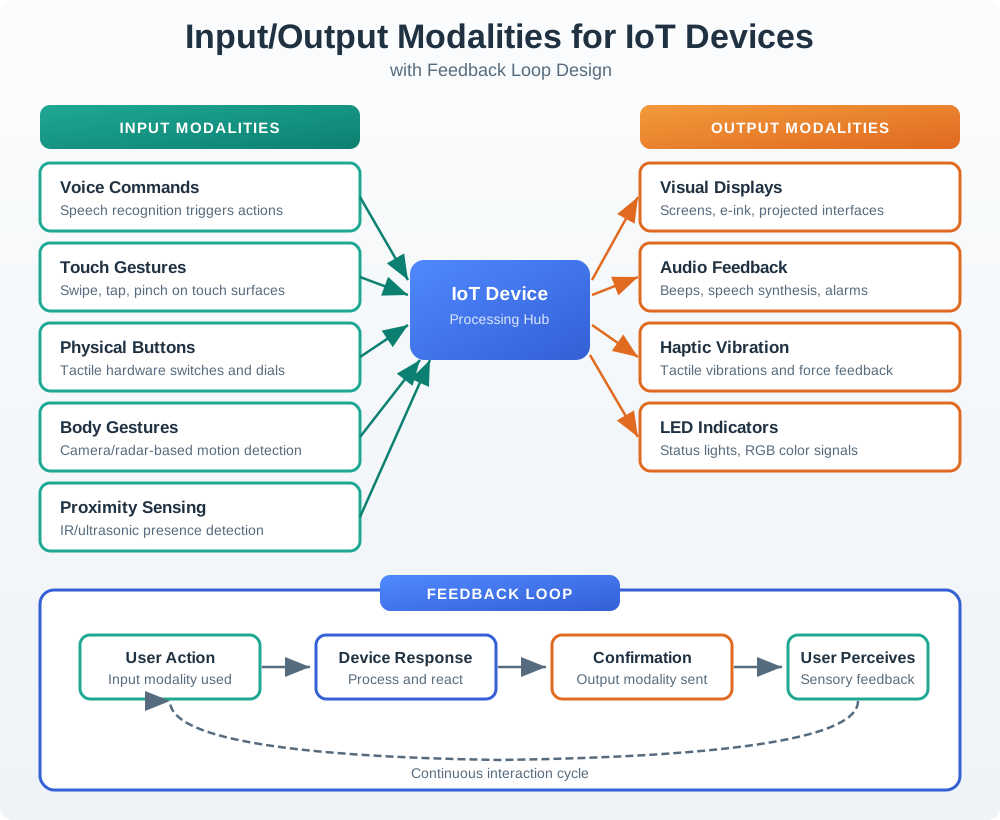
IoT devices use diverse input and output modalities.
- The input side offers touch, voice, buttons, gestures, and proximity, each with a different physical and social fit.
- The system then interprets the signal and changes or rejects state.
- On the output side, displays, lights, sound, and haptics can confirm receipt, progress, completion, or failure.
Major section
Graceful Degradation
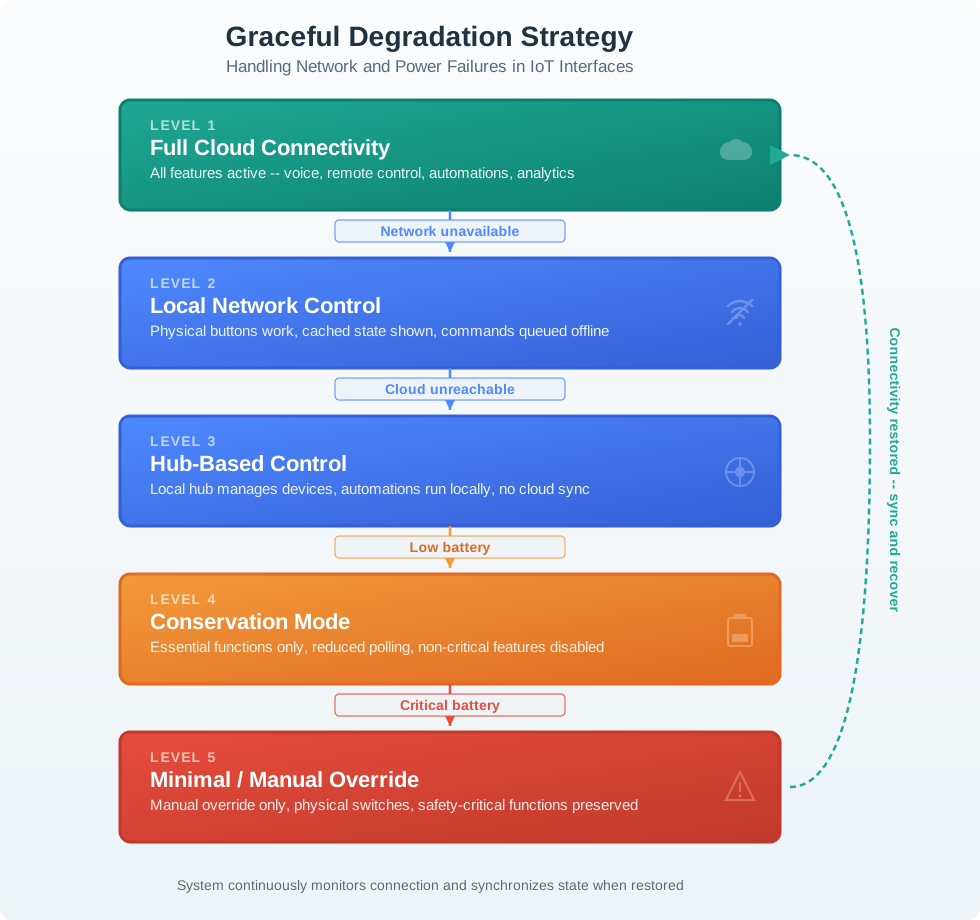
IoT interfaces must handle failures gracefully at each layer.
- When a preferred channel disappears, the design needs a planned reduction in capability rather than a single offline screen.
- A network outage moves the product to: LEVEL 2 Local Network Control, where physical buttons still work, cached state is identified, and commands may be queued.
- The recovery arrow requires state synchronization when connectivity returns, linking degradation back to truthful multimodal feedback.
Major section
Cloud-First vs Local-First
Option A: Cloud-first architecture routes all commands through cloud services, enabling remote access, cross-device coordination, advanced AI features, and simplified device hardware at the cost of internet dependency.
- Best practice: hybrid approach with local-first core functions and cloud-enhanced features, so essential operations never depend on internet availability.
- Option B: Local-first architecture processes commands on-device or via local hub, ensuring core functions work offline with faster response times, but limiting remote access and advanced features without connectivity.
Major section
Accessibility Considerations
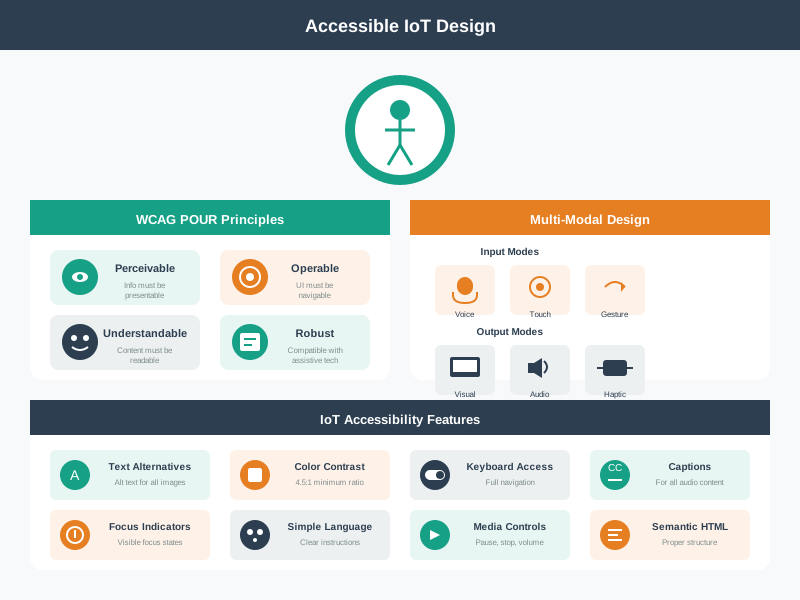
The VoiceOver task starts at Pair device while the gateway is offline.
- The failure state must be announced through a live region, first as still trying and then with a local reset option, so the person is not left waiting in silence.
- The recovery path must remain reachable with the available controls.
- A review should confirm what is spoken and whether the person can complete or leave the task safely.
Major section
Pitfalls to Avoid
Voice-Only Trap: Designing a smart device that only supports voice interaction.
- When voice recognition fails (noisy room, accent mismatch, service outage), the device becomes a paperweight.
- Ignoring Quiet Hours: Audio feedback that cannot be silenced or scheduled.
- A smart lock that announces "DOOR UNLOCKED" at 2 AM will be disabled by users, losing the security benefit.
Major section
Pitfalls to Avoid (continued)
Better to have two polished modalities (e.g., app + physical button) than five half-finished ones.
- Prioritize the modalities your users actually need.
- No Offline State Indication: When cloud connectivity is lost, the interface looks identical to the connected state.
- Users issue commands that silently fail, eroding trust.
Deck summary
Key takeaways
Voice works across a room but fails beside a loud machine; touch is private but fails under gloves.
- Latency is the wait for a response.
- Most IoT devices are used in contexts where users cannot devote full attention to a single screen.
- The smart light example in Figure: Worked smart-light interaction selects voice for busy hands compares voice and touch as routes to one action.
- The worked timing values help locate delay along the voice route; they do not replace an end to end test.
Retrieval practice
Recall check 1 of 2

UX Uma says: answer from memory, then check your reasoning.
Q1A homeowner carrying groceries needs to adjust a thermostat. What should determine the interaction mode?
Show answer
Answer: D The introduction selects modalities to fit the user’s current context.
Retrieval practice
Recall check 2 of 2
UX Uma says: answer from memory, then check your reasoning.
Q2A primary voice channel becomes unavailable for a quick device action. What should the design preserve?
Show answer
Answer: D The section connects modality selection with graceful degradation and offline fallback.
Print reference
Answers
Answer key.
- D · The introduction selects modalities to fit the user’s current context.
- D · The section connects modality selection with graceful degradation and offline fallback.