IoT Interfaces, Location and Privacy · Study deck
Interface Design: Modalities and Context
A screen is only one way to tell a user what a device is doing.
UX Uma is your guide for this deck.
After studying this chapter
Learning objectives
You will be able to:
- Explain: Designing those states early prevents dangerous ambiguity. "Door locked" is different from "lock command sent", "lock reports locked from 19 minutes ago", "lock unreachable", and "command rejected because the door is open".
- Explain: A resident, visitor, installer, caregiver, operator, technician, and support agent may all touch the same connected product, but they do not need the same surface or the same level of detail.
- Explain: If the action changes access, privacy, heating, movement, dosing, or safety, the interface should add confirmation, permission clarity, and a visible fallback.
Major section
Start With the Decision
A screen is only one way to tell a user what a device is doing.
- Light, sound, touch, and motion may fit the setting better.
Major section
Start Simple
The interface must prevent a blind repeat and show a safe next step.
- The interface should explain the connected system without forcing the user to understand its implementation.
Major section
In 60 Seconds
An IoT interface is the part of a connected system that makes device behavior understandable and controllable.
- The interface should answer the user's real question in the context where the question appears.
- A person at a door may need one clear local signal.
- A technician may need a dashboard.
- A shared household may need permission and ownership cues.
Major section
State Before Modality
Connected interfaces work best when the user can tell what the device knows, what it is doing, and whether a command is safe to trust.
- The screen, LED, sound, vibration, notification, voice response, printed label, or dashboard is only the delivery channel.
- For example, a smart lock does not need the same interface at every touchpoint.
- The interface problem starts with state: command state, device state, data freshness, permission, safety, ownership, and the path back to a known condition when the system cannot act.
- The person at the door needs immediate local status: ready, denied, door open, updating, offline, or use another entry.
Major section
State Before Modality (continued)
The owner in the app needs invite state, permission history, revoke controls, last reader confirmation, and a support path.
- A local LED can answer "is this device ready?" but cannot explain delegated access.
- A dashboard can compare many devices but may be too slow for a local safety action.
- A notification can interrupt at the right time but may lack enough context for diagnosis.
Major section
Map Interface Questions
A resident, visitor, installer, caregiver, operator, technician, and support agent may all touch the same connected product, but they do not need the same surface or the same level of detail.
- Good interface records separate those roles before layout starts.
- If the user is remote and comparing trends, an app or dashboard can carry more detail.
- If the user is local and the action is urgent, a physical control or embedded indicator may need to lead.
Major section
Map Interface Questions (continued)
A clickable app flow may prove language and hierarchy but not BLE reliability.
- If the action changes access, privacy, heating, movement, dosing, or safety, the interface should add confirmation, permission clarity, and a visible fallback.
- A bench prototype may prove local feedback but not shared household permissions.
- Those boundaries keep the next decision honest.
Major section
IoT Feedback Beyond Success
A web form usually controls one server-side action.
- Designing those states early prevents dangerous ambiguity. "Door locked" is different from "lock command sent", "lock reports locked from 19 minutes ago", "lock unreachable", and "command rejected because the door is open".
- Each state needs a modality and wording that match the user's risk.
Major section
IoT Feedback Beyond Success (continued)
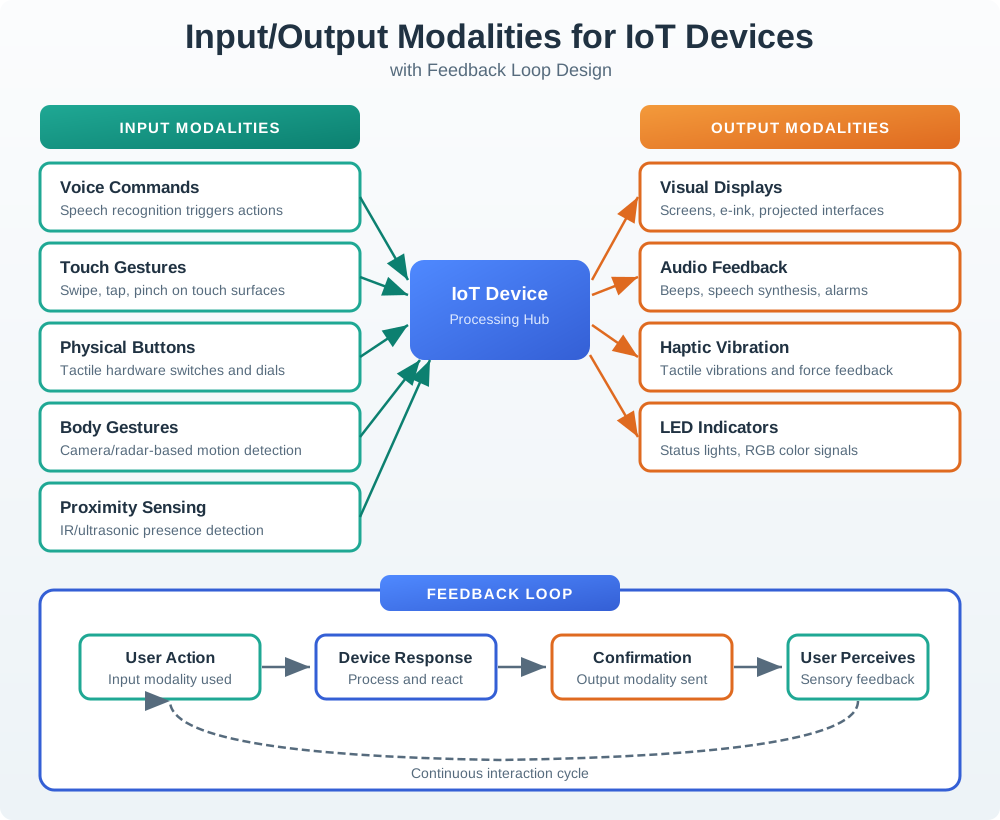
In industrial systems, OPC UA quality flags, Modbus register age, gateway buffering, SCADA alarm acknowledgement, and maintenance work-order state can all change what the user should trust.
- A low-risk preference can tolerate a quiet retry message.
- An access, motion, heating, pump, or alarm action may require local feedback, remote confirmation, timeout language, and a manual fallback.
- Interface design should expose the boundary that matters to the user without forcing them to debug the whole stack.
Major section
Design Connected State
A resident granting guest access, a technician clearing a fault, and an operator acknowledging a safety alert need different interface promises.
- For a lock, that might include BLE credential state, reader online state, door-open sensor state, app permission, battery level, and cloud acknowledgement.
- If those words are unclear, the visual hierarchy will not fix the interaction.
Major section
Interface Means More Than Screen
Many IoT devices do not have a rich display.
- Even when an app or dashboard exists, the user's first interface may be a button, indicator light, motor sound, vibration, printed label, notification, or physical placement.
- The interface is weak when it shows a feature but hides state.
Major section
Modality Fit
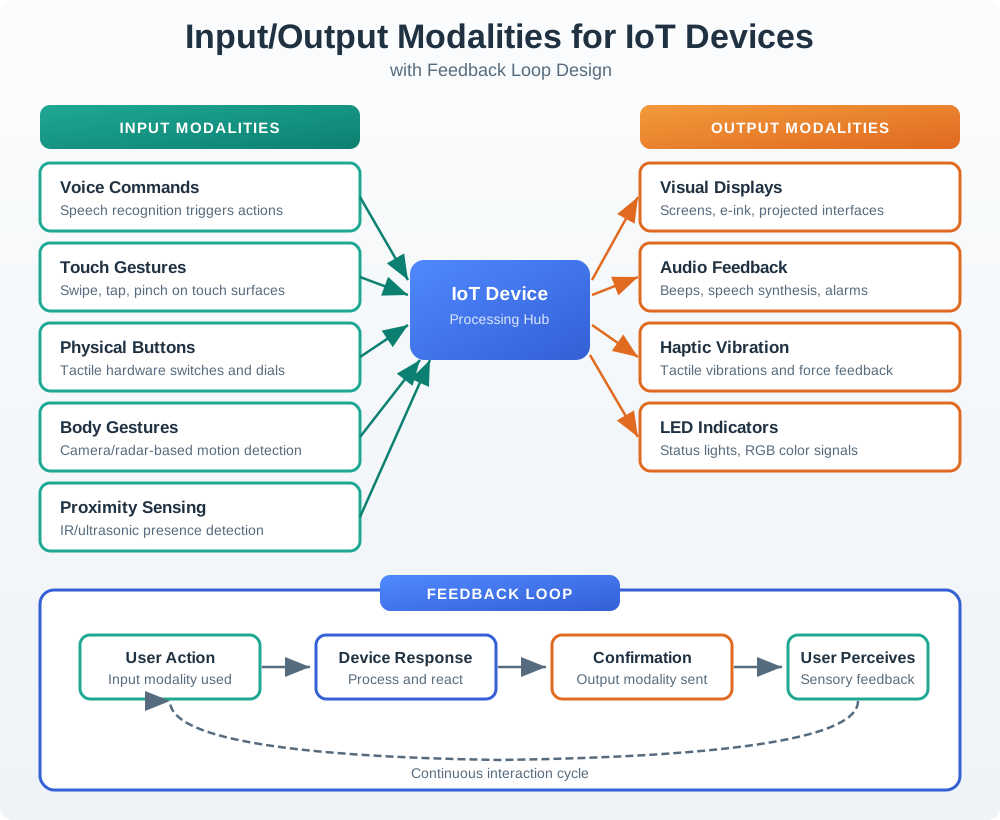
The button press is only the input.
- The system must say whether it applied, rejected, or timed out the command; the bench path tests how quickly the LED and beep signal that local step.
- The final device state still needs a separate confirmation.
- Physical controls fit frequent local action, tactile confirmation, and situations where phones are not available.
Major section
Modality Fit (continued)
Embedded indicators fit quick status, safety, pairing, charging, and maintenance cues.
- Companion apps fit setup, permission, remote control, explanations, and personal preferences.
- Dashboards fit monitoring, comparison, administration, history, and fleet-level work.
- Notifications fit exception handling, escalation, and time-sensitive awareness.
- Voice or audio cues fit hands-busy tasks and accessibility needs, but need privacy and ambiguity checks.
Deck summary
Key takeaways
A screen is only one way to tell a user what a device is doing.
- The interface must prevent a blind repeat and show a safe next step.
- An IoT interface is the part of a connected system that makes device behavior understandable and controllable.
- Connected interfaces work best when the user can tell what the device knows, what it is doing, and whether a command is safe to trust.
- The owner in the app needs invite state, permission history, revoke controls, last reader confirmation, and a support path.
Retrieval practice
Recall check 1 of 2

UX Uma says: answer from memory, then check your reasoning.
Q1In a connected lock design, which list correctly names a modality, a pattern, a component, and a state?
Show answer
Answer: B Voice is a modality, status a pattern family, LED a component, and pending a state.
Retrieval practice
Recall check 2 of 2
UX Uma says: answer from memory, then check your reasoning.
Q2A team is reviewing a shared-entry smart lock with an app, local reader light, and support handoff. Which interface record is strong enough to make the decision reviewable?
Show answer
Answer: A A reviewable IoT interface decision ties the person, task, context, touchpoints, connected states, feedback, recovery, constraints, validation evidence, evidence boundary, owner, and change condition together before the design is trusted.
Print reference
Answers
Answer key.
- B · Voice is a modality, status a pattern family, LED a component, and pending a state.
- A · A reviewable IoT interface decision ties the person, task, context, touchpoints, connected states, feedback, recovery, constraints, validation evidence, evidence boundary, owner, and change condition together before the design is trusted.