Human-Centred IoT Design · Study deck
IoT Interaction Design: Testing the Design Loop
Start with one question about real use.
UX Uma is your guide for this deck.
After studying this chapter
Learning objectives
You will be able to:
- explain the main moves in an IoT interactive design process
- distinguish evidence gathering, problem framing, ideation, prototyping, testing, iteration, and release gates
- decide when to move forward, loop back, or stop a design path
- write a short process record with owner, open issue, accepted tradeoff, and change condition
Major section
Start Simple
The first design shows a red icon, but people do not know whether to water now, check the probe, or wait.
- That small doubt is the next design job.
- A polished screen does not prove a clear interaction.
- One successful test does not prove that every person or setting will behave the same way.
- Include access needs.
Major section
Start Simple (continued)
A human action can make sense only when the device state is known.
- Under the Hood shows which signals let a team continue, loop back, or stop a release.
- The fault experience is part of the main design, not a later error page.
- Loop back when the question was wrong.
- Link a product change to the record.
Major section
Start Simple (continued)
For the garden app it might be, "A person can tell dry soil from a bad probe and choose the next safe step." Add a pass sign that can be seen.
- This lets a later team see why the design moved.
- One test does not speak for all people.
- A good process makes that limit clear while still helping the team take the next sound step.
Major section
In 60 Seconds
The interactive design process gives IoT teams a disciplined way to learn before they commit to a product direction.
- For connected products, the process must include physical context, device state, setup recovery, accessibility, privacy, support evidence, and operations handoff.
- A polished screen is not enough if the device cannot explain offline state, rejected commands, low battery, permission failure, or who owns the next action.
- The process is healthy when it loops for a reason and leaves an inspectable record.
Major section
Loop Reduces IoT Uncertainty
The uncertainty may live in the physical setting, the device state, the app flow, the cloud service, the support handoff, or the user's ability to recover.
- A process stage is weak if it produces activity but does not change what the team knows.
- The next loop should not polish the app.
Major section
Loop Reduces IoT Uncertainty (continued)
For example, a shared-entry setup flow might begin with residents, installers, and facility staff.
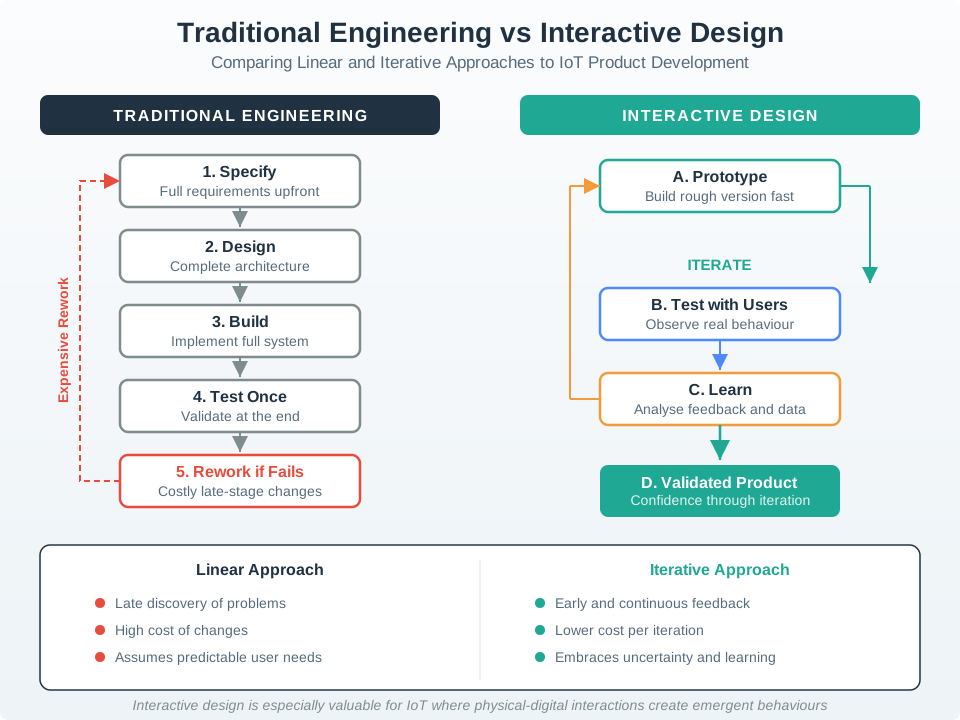
- The linear route specifies, designs, and builds before testing once, leaving costly rework if a core assumption fails.
- The interactive route prototypes, tests with users, learns from behavior, and iterates toward a validated product.
- A healthy loop also separates learning from commitment.
Major section
Loop Reduces IoT Uncertainty (continued)
A release choice then rests on observed tasks and failure states instead of a complete but untested specification.
- The team may discover that the app wording is clear but the wall reader gives no feedback during offline setup.
- It should test reader feedback, expired invite recovery, wrong-unit selection, and support visibility.
- The design team should name the uncertain behavior before selecting the artifact.
- The process record prevents those learning steps from disappearing into meeting notes.
Major section
Loop Reduces IoT Uncertainty (continued)
If the question is "can a resident recover from an expired invitation?", a paper flow or Figma click-through may be enough.
- If the question is "can the user tell whether a command is accepted, pending, rejected, or stale?", the prototype must expose real or simulated device state, network delay, and acknowledgement behavior.
- Early loops may explore several setup paths, status-light meanings, notification tones, support scripts, or consent moments.
- The interaction design loop is useful when each pass reduces a specific uncertainty about a connected product.
Major section
Map Stages to Artifacts
Each stage should leave behind an artifact that another role can inspect.
- Discovery may produce field notes, support-ticket clusters, device-placement photos, failure-mode lists, and role maps.
- Definition may produce a design question with a named user, device state, constraint, and success behavior.
- Prototype fidelity should match the question.
Major section
Map Stages to Artifacts (continued)
Ideation may compare physical controls, app flows, QR labels, NFC tags, voice prompts, local LEDs, support scripts, and automation rules.
- Figma and paper flows can test wording, role clarity, notification meaning, and consent timing; an accessible interactive prototype can test screen-reader order.
- ESP32, Raspberry Pi, nRF52, Arduino, Home Assistant, Node-RED, Mosquitto, mock REST APIs, Web Bluetooth, or a simulated device shadow can test timing, pairing, command acknowledgement, stale state, local fallback, and support logs.
- A facilities team testing a shared thermostat might first prototype role labels and invitation language with a clickable flow.
Major section
Map Stages to Artifacts (continued)
A pilot device in the field can prove more, but it must be bounded by safety, privacy, rollback, and support readiness.
- If residents still confuse room ownership, the next artifact may be a printed label plus a pairing screen.
- The practitioner check is whether the artifact can fail in the way the real product can fail.
- This makes design evidence usable by engineering, security, privacy, operations, and support instead of leaving UX as a separate presentation deck.
Major section
Process Gates Need Signals
IoT design gates fail when the process treats implementation signals as invisible.
- A prototype test cannot judge pending state if the command path has no acknowledgement.
- A support handoff cannot be reviewed if event ids, timestamps, device ids, firmware versions, account roles, and correlation ids are missing.
- Those signals should be named before the test starts.
Major section
Process Gates Need Signals (continued)
If the test covers consent, the gate should show which data class, retention period, sharing path, deletion path, and audit trail the interface explains.
- A privacy review cannot be meaningful if the flow never names what data is collected, retained, shared, or deleted.
- A firmware update may add a new error state.
- The value is not bureaucracy.
Major section
Process Gates Need Signals (continued)
Regression guard: reopen the loop when firmware, account policy, network path, integration platform, or field context changes the user-facing state.
- If the test covers a remote unlock flow, the gate might require an event trace from mobile request to authorization decision, gateway receipt, actuator acknowledgement, timeout, and user-visible final state.
- A Matter, Zigbee, BLE, or Wi-Fi stack update may change pairing behavior.
- A cloud outage may expose local fallback wording that was never tested.
Major section
Process Gates Need Signals (continued)
If the test covers setup recovery, the gate might require BLE scan error, permission denial, QR fallback, device identity check, account role check, and support-ticket evidence.
- A new privacy policy, role model, building layout, or integration partner may make old evidence too narrow.
- In practice, the under-the-hood record can be short: decision id, prototype version, device or simulator version, participant role, environment, system trace links, observed failure, accepted limitation, owner, and change condition.
- The value is that a later team can tell whether a pleasant test result was supported by real command, state, privacy, accessibility, and support evidence.
Deck summary
Key takeaways
The first design shows a red icon, but people do not know whether to water now, check the probe, or wait.
- A human action can make sense only when the device state is known.
- For the garden app it might be, "A person can tell dry soil from a bad probe and choose the next safe step." Add a pass sign that can be seen.
- The interactive design process gives IoT teams a disciplined way to learn before they commit to a product direction.
- For example, a shared-entry setup flow might begin with residents, installers, and facility staff.
Retrieval practice
Recall check 1 of 2

UX Uma says: answer from memory, then check your reasoning.
Q1A team is deciding whether a shared door-reader setup flow can leave the design loop, but the prototype has not tested expired invites, wrong-unit selection, offline reader state, installer recovery, or support handoff. Which process record makes the decision reviewable?
Show answer
Answer: A A reviewable interaction process ties context discovery, the design question, alternatives, prototype scope, observed behavior, release gate, owner, open issue, and change condition together before the design moves forward.
Retrieval practice
Recall check 2 of 2
UX Uma says: answer from memory, then check your reasoning.
Q2The team has tested a door reader only with designers on a fast office network. What blocks readiness?
Show answer
Answer: B Readiness depends on the actual use context and people.
Q3A revised setup screen passed a task test, but device pairing errors were excluded. What decision is supported?
Show answer
Answer: C The claim is bounded to what the task test represented.
Print reference
Answers
Answer key.
- A · A reviewable interaction process ties context discovery, the design question, alternatives, prototype scope, observed behavior, release gate, owner, open issue, and change condition together before the design moves forward.
- B · Readiness depends on the actual use context and people.
- C · The claim is bounded to what the task test represented.